

 From: AutoCAD Productivity Articles #96
Originally published: December 2010
Another Command Line Insight
This is so very simple, but can be so very helpful.
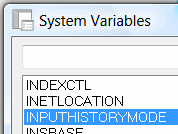 Whether you type your commands and variables, create on-the-fly Lisp lines, or select your commands from any other available method, it can be very helpful to be able to use the Up arrow to display your previous commands. Try it out; enter some text, draw a rectangle, then move or copy some objects. Now hit the Up arrow on your keyboard to see the commands you just went through.
If you are not seeing those, you may need to adjust your INPUTHISTORYMODE. That variable should be set to <15>. To see the configuration options for that variable, you will find those in the System Variable Editor [Express Tools tab Tools panel].
See all the articles published in December 2010
See this article in the December 2010 Corner
Donate to CADTutor
If you found this article useful, you might like to consider making a donation. All content on this site is provided free of charge and we hope to keep it that way. However, running a site like CADTutor does cost money and you can help to improve the service and to guarantee its future by donating a small amount. We guess that you probably wouldn't miss $5.00 but it would make all the difference to us.
Note from Michael: I want to thank all of my customers for continuing to retain my training services (some for over three decades!) and let you know your donations do not go to me personally, but to the ongoing maintenance of the CADTutor ship as a whole and to support the yeoman efforts of my friend and CADTutor captain, David Watson, to whom I am grateful for this monthly opportunity to share a few AutoCAD insights.


