

 From: AutoCAD Productivity Articles #106
Originally published: October 2011
Command Line Color
AutoCAD 2012 enables you to set the color of not only the Command line. More specifically, the color of the Active Prompt Background (and Text) can be set independent of the color for the Command History Background.
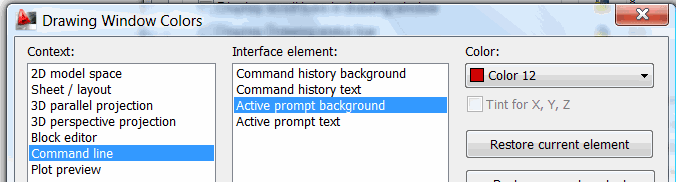
How to Set your Command Line Color
Right-click in the Command line, then click Options.
On the Display tab, click Color to open the Drawing Window Colors dialog box shown here.
Under Context, Click Command line, then under Interface Element, click the desired element of the Command line.
Now choose a Color for the selected element. If you gom it up, you can always click Restore Current Element, otherwise, click Apply & Close to see your colors.
See all the articles published in October 2011
See this article in the October 2011 Corner
Donate to CADTutor
If you found this article useful, you might like to consider making a donation. All content on this site is provided free of charge and we hope to keep it that way. However, running a site like CADTutor does cost money and you can help to improve the service and to guarantee its future by donating a small amount. We guess that you probably wouldn't miss $5.00 but it would make all the difference to us.
Note from Michael: I want to thank all of my customers for continuing to retain my training services (some for over three decades!) and let you know your donations do not go to me personally, but to the ongoing maintenance of the CADTutor ship as a whole and to support the yeoman efforts of my friend and CADTutor captain, David Watson, to whom I am grateful for this monthly opportunity to share a few AutoCAD insights.


