Jump to content

Search the Community

Showing results for tags 'command prompt default'.

  • Search By Tags

    Type tags separated by commas.
  • Search By Author

Content Type


Forums

  • CADTutor
    • News, Announcements & FAQ
    • Feedback
  • AutoCAD
    • AutoCAD Beginners' Area
    • AutoCAD 2D Drafting, Object Properties & Interface
    • AutoCAD Drawing Management & Output
    • AutoCAD 3D Modelling & Rendering
    • AutoCAD Vertical Products
    • AutoCAD LT
    • CAD Management
    • AutoCAD Bugs, Error Messages & Quirks
    • AutoCAD General
    • AutoCAD Blogs
  • AutoCAD Customization
    • The CUI, Hatches, Linetypes, Scripts & Macros
    • AutoLISP, Visual LISP & DCL
    • .NET, ObjectARX & VBA
    • Application Beta Testing
    • Application Archive
  • Other Autodesk Products
    • Autodesk 3ds Max
    • Autodesk Revit
    • Autodesk Inventor
    • Autodesk Software General
  • Other CAD Products
    • BricsCAD
    • SketchUp
    • Rhino
    • SolidWorks
    • MicroStation
    • Design Software
    • Catch All
  • Resources
    • Tutorials & Tips'n'Tricks
    • AutoCAD Museum
    • Blocks, Images, Models & Materials
    • Useful Links
  • Community
    • Introduce Yourself
    • Showcase
    • Work In Progress
    • Jobs & Training
    • Chat
    • Competitions

Categories

  • Programs and Scripts
  • 2D AutoCAD Blocks
  • 3D AutoCAD Blocks
  • Images
    • Backgrounds

Find results in...

Find results that contain...


Date Created

  • Start

    End


Last Updated

  • Start

    End


Filter by number of...

Found 1 result

  1. suresh_070379

    Set default value in command prompt

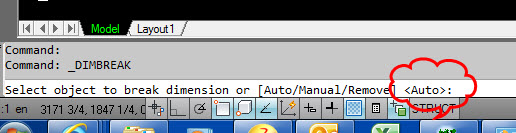
    Hi, I am using Dimension break command and when I click the required dimension, there are three options coming in command prompt ‘auto/manual/remove’ and the default value is ‘auto’. But, in my drawing, I need to repeatedly use ‘manual’ option. But, it is not available as default. If I set ‘manual’ as default instead of ‘auto’, I can access that by again pressing the spacer key. For that, I checked the net and find if any customization is possible. In CUI option, I unable to find out the command prompt customization set up. Then, I search in the .NET programming. There is lot of programming option is provided which I unable to understood. From the help manual, I found that we can upload .DLL files by NETLOAD command. But, I unable to find out the related DLL file for dimension break in my C drive. So, kindly provide any idea to customize the default value in command prompt. Is it possible through CUI method or modifying existing DLL files. If it is possible to modify the default, I can use it for other commands also. Please find the attachment. http://stackoverflow.com/questions/30848214/set-default-value-for-string-prompt Suresh
×
×
  • Create New...