All Activity
- Past hour
-
I am not good as the others but try this. It will build what you want to achieve but not exactly as what was shown in the image. Maybe other can improve the code. (defun c:LayerLegend (/ doc lays lay layname laycolor laydesc pt x y starty rowH col1 col2 col3 txtH headH colHT laycount totalH) (vl-load-com) ;; table sizes (mm) (setq rowH 8.0) (setq col1 40.0) (setq col2 70.0) (setq col3 120.0) (setq txtH 2.0) (setq headH 2.5) (setq colHT 1.0) ;; insertion point (setq pt (getpoint "\nPick insertion point: ")) (setq x (car pt)) (setq y (cadr pt)) (setq starty y) ;; get layers (setq doc (vla-get-ActiveDocument (vlax-get-acad-object))) (setq lays (vla-get-Layers doc)) ;; count layers (setq laycount (vla-get-count lays)) ;; total height (setq totalH (* rowH (+ laycount 1))) ;; ---------------- ;; TOP BORDER ;; ---------------- (entmakex (list '(0 . "LINE")(cons 8 "0") (cons 10 (list x starty 0)) (cons 11 (list (+ x col1 col2 col3) starty 0)))) ;; ---------------- ;; HEADER TEXT ;; ---------------- (entmakex (list '(0 . "TEXT")(cons 8 "0") (cons 10 (list (+ x 3) (- y 5) 0)) (cons 40 headH) (cons 1 "COLOR NUMBER"))) (entmakex (list '(0 . "TEXT")(cons 8 "0") (cons 10 (list (+ x col1 3) (- y 5) 0)) (cons 40 headH) (cons 1 "LAYER NAME"))) (entmakex (list '(0 . "TEXT")(cons 8 "0") (cons 10 (list (+ x col1 col2 3) (- y 5) 0)) (cons 40 headH) (cons 1 "DESCRIPTION"))) ;; header bottom line (entmakex (list '(0 . "LINE")(cons 8 "0") (cons 10 (list x (- y rowH) 0)) (cons 11 (list (+ x col1 col2 col3) (- y rowH) 0)))) (setq y (- y rowH)) ;; ---------------- ;; LAYER LOOP ;; ---------------- (vlax-for lay lays (setq layname (vla-get-name lay)) (setq laycolor (vla-get-color lay)) (setq laydesc (if (vlax-property-available-p lay 'Description) (vla-get-description lay) "") ) ;; COLOR NUMBER TEXT (on its own layer) (entmakex (list '(0 . "TEXT") (cons 8 layname) (cons 10 (list (+ x 3) (+ y -2.2) 0)) (cons 40 colHT) (cons 1 (itoa laycolor)) (cons 72 0) ) ) ;; SAMPLE LINE (on its own layer) (entmakex (list '(0 . "LINE") (cons 8 layname) (cons 10 (list (+ x 3) (- y 3) 0)) (cons 11 (list (+ x col1 -3) (- y 3) 0)) ) ) ;; LAYER NAME TEXT (entmakex (list '(0 . "TEXT") (cons 8 layname) (cons 10 (list (+ x col1 3) (- y 4) 0)) (cons 40 txtH) (cons 1 layname) ) ) ;; DESCRIPTION (entmakex (list '(0 . "TEXT") (cons 8 "0") (cons 10 (list (+ x col1 col2 3) (- y 4) 0)) (cons 40 txtH) (cons 1 laydesc) ) ) ;; HORIZONTAL LINE (entmakex (list '(0 . "LINE")(cons 8 "0") (cons 10 (list x (- y rowH) 0)) (cons 11 (list (+ x col1 col2 col3) (- y rowH) 0)))) (setq y (- y rowH)) ) ;; ---------------- ;; VERTICAL GRID ;; ---------------- (entmakex (list '(0 . "LINE")(cons 8 "0") (cons 10 (list x starty 0)) (cons 11 (list x (- starty totalH) 0)))) (entmakex (list '(0 . "LINE")(cons 8 "0") (cons 10 (list (+ x col1) starty 0)) (cons 11 (list (+ x col1) (- starty totalH) 0)))) (entmakex (list '(0 . "LINE")(cons 8 "0") (cons 10 (list (+ x col1 col2) starty 0)) (cons 11 (list (+ x col1 col2) (- starty totalH) 0)))) (entmakex (list '(0 . "LINE")(cons 8 "0") (cons 10 (list (+ x col1 col2 col3) starty 0)) (cons 11 (list (+ x col1 col2 col3) (- starty totalH) 0)))) (princ) )
-
I tried asking AI but unfortunately it's not working. ;;; ------------------------------------------------------------------------ ;;; Layer Table Builder ;;; Creates a table of all layers with a color swatch above a sample line, ;;; plus Layer Name and Layer Description columns. ;;; Text height is targeted at 2 mm on paper (asks for scale if in Model Space). ;;; ;;; Tested: AutoCAD 2015+ (VLIDE/Visual LISP) ;;; ------------------------------------------------------------------------ (vl-load-com) ;; ---------------------------- ;; Helpers ;; ---------------------------- (defun _acad-doc () (vla-get-ActiveDocument (vlax-get-acad-object))) (defun _cur-space (doc / ) ;; Returns current space object (Model or Paper) based on CTAB. (if (= (getvar "CTAB") "Model") (vla-get-ModelSpace doc) (vla-get-PaperSpace doc) ) ) (defun _ensure-layer (doc layname color / laycol lays colobj) ;; Ensure a layer exists. Color is ACI index or nil (no change). (setq lays (vla-get-Layers doc)) (if (not (tblsearch "LAYER" layname)) (progn (vla-Add lays layname) (if color (vla-put-Color (vla-Item lays layname) color)) ) ) (vla-Item lays layname) ) (defun _3dpt (p) (vlax-3d-point p)) (defun _add-mtext (spc ins width str h / obj) (setq obj (vla-AddMText spc (_3dpt ins) width str)) (vla-put-Height obj h) obj ) (defun _ent-solid-rect (layer pmin pmax / x1 y1 x2 y2) ;; pmin = (x1 y1), pmax = (x2 y2) (setq x1 (car pmin) y1 (cadr pmin) x2 (car pmax) y2 (cadr pmax)) (entmakex (list (cons 0 "SOLID") (cons 8 layer) (cons 10 (list x1 y2 0.0)) (cons 11 (list x2 y2 0.0)) (cons 12 (list x2 y1 0.0)) (cons 13 (list x1 y1 0.0)) ) ) ) (defun _ent-line (layer p1 p2) (entmakex (list (cons 0 "LINE") (cons 8 layer) (cons 10 (list (car p1) (cadr p1) 0.0)) (cons 11 (list (car p2) (cadr p2) 0.0)) ) ) ) (defun _ent-lwpoly (layer pts closed / n data) ;; pts: list of (x y). closed: T/NIL (setq n (length pts)) (setq data (append (list (cons 0 "LWPOLYLINE") (cons 8 layer) (cons 90 n) (cons 70 (if closed 1 0)) ) (apply 'append (mapcar '(lambda (p) (list (cons 10 p) (cons 40 0.0) (cons 41 0.0) (cons 42 0.0))) pts ) ) ) ) (entmakex data) ) (defun _safe-str (x) (cond ((null x) "") ((= x "") "") (t x) ) ) (defun _layer-desc (vlaLayerObj / desc) (vl-catch-all-apply '(lambda () (setq desc (vla-get-Description vlaLayerObj)) ) ) (_safe-str desc) ) (defun _is-xref-or-defpoints (vlaLayerObj) (or (vla-get-IsXRefDependent vlaLayerObj) (wcmatch (strcase (vla-get-Name vlaLayerObj)) "*|*") ;; xref-style name (= (strcase (vla-get-Name vlaLayerObj)) "DEFPOINTS") ) ) (defun _sort-ci (lst) (vl-sort lst (function (lambda (a b) (< (strcase a) (strcase b))) ) ) ) ;; ---------------------------- ;; Main command ;; ---------------------------- (defun c:LAYERTABLE (/ doc spc oldlay ins inc-xref sortAZ spaceChoice sden mmPerUnit th ;; computed text height in current space pad rowH wA wB wC tblLayer colLayer layers laycol i n y0 x0 xA xB xC xR hdrH titleH curtab) (setq doc (_acad-doc)) (setq spc (_cur-space doc)) (setq oldlay (getvar "CLAYER")) (setq curtab (getvar "CTAB")) ;; ---- Options & prompts ---- (princ "\n=== Layer Table ===") (setq inc-xref (getkword "\nInclude XREF/DEFPOINTS layers? [Yes/No] <No>: ")) (if (null inc-xref) (setq inc-xref "No")) (setq sortAZ (getkword "\nSort layers A->Z? [Yes/No] <Yes>: ")) (if (null sortAZ) (setq sortAZ "Yes")) (setq spaceChoice (getkword (strcat "\nPlace in which space? [Current(" curtab ")/Model/Paper] <Current>: "))) (cond ((or (null spaceChoice) (= (strcase spaceChoice) "CURRENT")) ;; use current space ) ((= (strcase spaceChoice) "MODEL") (setq spc (vla-get-ModelSpace doc)) ) ((= (strcase spaceChoice) "PAPER") (setq spc (vla-get-PaperSpace doc)) ) ) ;; Scale: 2 mm text on paper -> convert to current space height ;; Ask: viewport scale denominator (1:xxx), default 1 when in Paper space, else 100 (setq sden (cond ((= spc (vla-get-PaperSpace doc)) ;; Paper space (getint "\nViewport scale denominator (1:xxx). Paper space -> use 1. <1>: ")) (t (getint "\nViewport scale denominator (1:xxx). Model space example: 100 for 1:100 <100>: ")) ) ) (if (= spc (vla-get-PaperSpace doc)) (if (or (null sden) (< sden 1)) (setq sden 1)) (if (or (null sden) (< sden 1)) (setq sden 100)) ) ;; Ask: how many millimeters per drawing unit (unit conversion). ;; Common: mm drawing -> 1; meter drawing -> 1000; inch -> 25.4; foot -> 304.8 (setq mmPerUnit (getreal "\nMillimeters per drawing unit? (mm=1, m=1000, in=25.4, ft=304.8) <1>: ")) (if (or (null mmPerUnit) (<= mmPerUnit 0.0)) (setq mmPerUnit 1.0)) ;; Text height in current space units: ;; th = (2 mm * scale denominator) / (mm per unit) (setq th (/ (* 2.0 sden) mmPerUnit)) ;; Layout metrics (setq pad (* 0.5 th)) ;; inner padding (setq rowH (* 6.0 th)) ;; row height (setq hdrH (* 6.5 th)) ;; header row height (setq titleH (* 1.1 th)) ;; header text height ;; Column widths (scaled with text height) ;; Col A (swatch+line), Col B (Layer Name), Col C (Description) (setq wA (* 12.0 th) wB (* 40.0 th) wC (* 70.0 th) ) ;; Target layers for graphics/text (setq tblLayer "LAYER_TABLE") (setq colLayer "LAYER_TABLE") ;; grid + text layer (_ensure-layer doc tblLayer 7) ;; Pick insertion point (top-left) (setq ins (getpoint "\nPick top-left corner of the table: ")) (if (null ins) (progn (princ "\n*Cancelled*")(exit))) (setq x0 (car ins)) (setq y0 (cadr ins)) (setq xA (+ x0 wA)) (setq xB (+ xA wB)) (setq xC (+ xB wC)) (setq xR xC) ;; right edge ;; Collect layer info (setq layers '()) (vlax-for L (vla-get-Layers doc) (setq lname (vla-get-Name L)) (if (or (not (wcmatch (strcase inc-xref) "NO")) (not (_is-xref-or-defpoints L)) ) (setq layers (cons (list lname L) layers)) ) ) (if (wcmatch (strcase sortAZ) "YES") (setq layers (mapcar '(lambda (p) (list (car p) (cadr p))) (vl-sort layers (function (lambda (a b) (< (strcase (car a)) (strcase (car b)) ))) ) ) ) ) (setq n (length layers)) (if (= n 0) (progn (princ "\nNo layers found after filtering.")(exit))) ;; ---------------------------- ;; Draw header grid ;; ---------------------------- ;; Outer border (_ent-lwpoly colLayer (list (list x0 y0) (list xR y0) (list xR (- y0 hdrH)) (list x0 (- y0 hdrH))) T) ;; Header verticals (_ent-line colLayer (list xA y0) (list xA (- y0 hdrH))) (_ent-line colLayer (list xB y0) (list xB (- y0 hdrH))) ;; Header text (_add-mtext spc (list (+ x0 pad) (- y0 pad)) (- wA (* 2.0 pad)) "Color + Line" titleH) (_add-mtext spc (list (+ xA pad) (- y0 pad)) (- wB (* 2.0 pad)) "Layer Name" titleH) (_add-mtext spc (list (+ xB pad) (- y0 pad)) (- wC (* 2.0 pad)) "Description" titleH) ;; ---------------------------- ;; Draw rows ;; ---------------------------- (setq i 0) (repeat n (setq ytop (- y0 hdrH (* i rowH))) (setq ybot (- ytop rowH)) ;; Row border (_ent-lwpoly colLayer (list (list x0 ytop) (list xR ytop) (list xR ybot) (list x0 ybot)) T) ;; Row verticals (_ent-line colLayer (list xA ytop) (list xA ybot)) (_ent-line colLayer (list xB ytop) (list xB ybot)) ;; Data for this layer (setq lname (car (nth i layers))) (setq Lobj (cadr (nth i layers))) (setq ldesc (_layer-desc Lobj)) ;; --- Column A: Color Swatch (SOLID) above Sample Line --- (setq cellLeft x0) (setq cellRight xA) (setq cellTop ytop) (setq cellBot ybot) (setq swPad pad) (setq swW (- wA (* 2.0 swPad))) ;; swatch width (setq swH (* 1.6 th)) ;; swatch height (setq swX1 (+ cellLeft swPad)) (setq swX2 (+ swX1 swW)) (setq swY1 (- cellTop swPad)) ;; top-down build (setq swY2 (- swY1 swH)) ;; swatch bottom ;; SOLID swatch on the layer (_ent-solid-rect lname (list swX1 swY2) (list swX2 swY1)) ;; Sample line below swatch, centered (setq lnW (* 0.85 swW)) (setq lnX1 (+ cellLeft (/ (- wA lnW) 2.0))) (setq lnX2 (+ lnX1 lnW)) (setq lnY (- swY2 (* 0.7 th))) ;; a bit below the swatch (_ent-line lname (list lnX1 lnY) (list lnX2 lnY)) ;; --- Column B: Layer Name (MTEXT) --- (_add-mtext spc (list (+ xA pad) (- ytop pad)) (- wB (* 2.0 pad)) lname th) ;; --- Column C: Layer Description (MTEXT) --- (_add-mtext spc (list (+ xB pad) (- ytop pad)) (- wC (* 2.0 pad)) (if (= ldesc "") "<no description>" ldesc) th) (setq i (1+ i)) ) ;; Restore layer & finish (setvar "CLAYER" oldlay) (princ (strcat "\nLayer table created. Rows: " (itoa n) ".")) (princ) ) (princ "\nCommand loaded: LAYERTABLE — Create a layer table with color swatches and lines.") (princ)
- Today
-
Yes this is exactly what I need
-
Thank you I can use this as well...
-
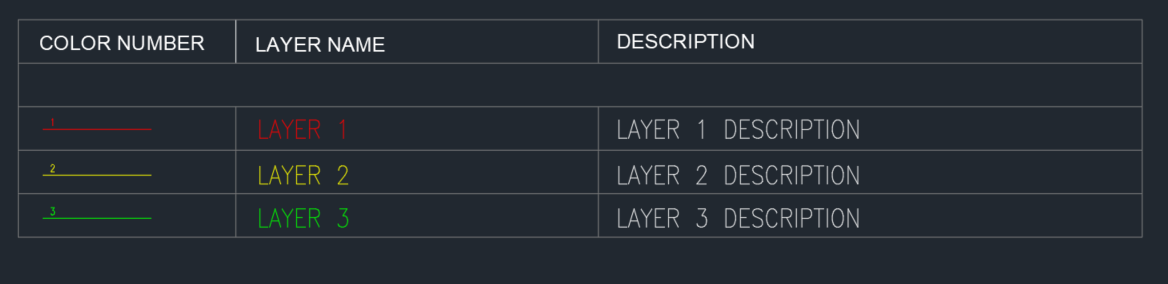
Nice program as always Tharwat. I think what the OP need is create a table as attached for visual reference.
-
I tried Bricscad V25 import pdf and it brought it in, only problem was some text was probably a shx in source dwg, so the text comes in as lines and arcs. But very readable. The File.dwg appears to have the same result. Bricscad has a Blockify that looks for patterns so a bit long winded but maybe can convert the vector text back into words. I am sure given that import a pdf and then re email the result back to you could be done by a friend as it takes like one minute.
- Yesterday
-
yah it is... I overlooked it. All good now.
-
You can take one object out of say a title block in a layout and copy it to all other layouts via lisp, I use this to fill in the basics of a title block then use the current layout to copy to other layouts, another version copies certain attributes to all other layouts. Say client changes name. Yes I had a insert signature lisp it inserted the signature into all layouts. A simple insert an external block. Sounds like your seal/signature is lots of objects as previously suggested by @SLW210 so have a hard look at it. Maybe explode all and wblock the 2 blocks to new temporary dwgs then remove old and rename to correct name.
-
First suggestion make a "Table" of the desired result not lines and text can use the example dwg for the properties of the Table text size, column width etc. Second suggestion is you can read Excel directly so post a sample Excel file. Would it not be better to use a DWT where all the layers, linetypes and blocks are already available for use. Here is an example of reading an excel. https://forums.autodesk.com/t5/visual-lisp-autolisp-and-general/required-a-lsp-to-make-automatic-topo-survey-by-creating-layer/td-p/12873977/page/2
-
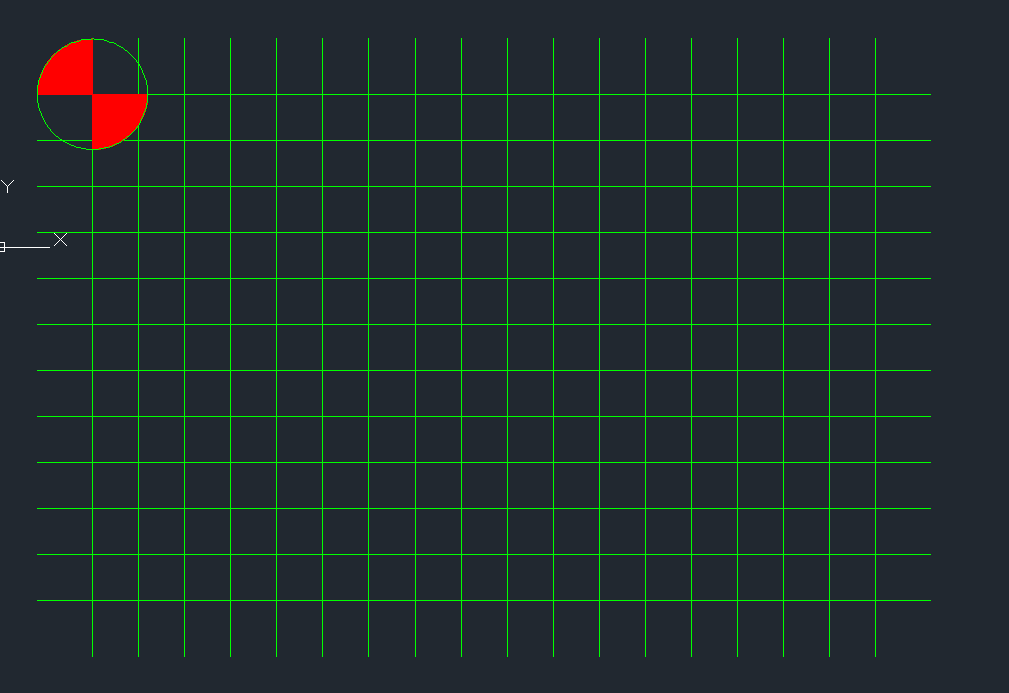
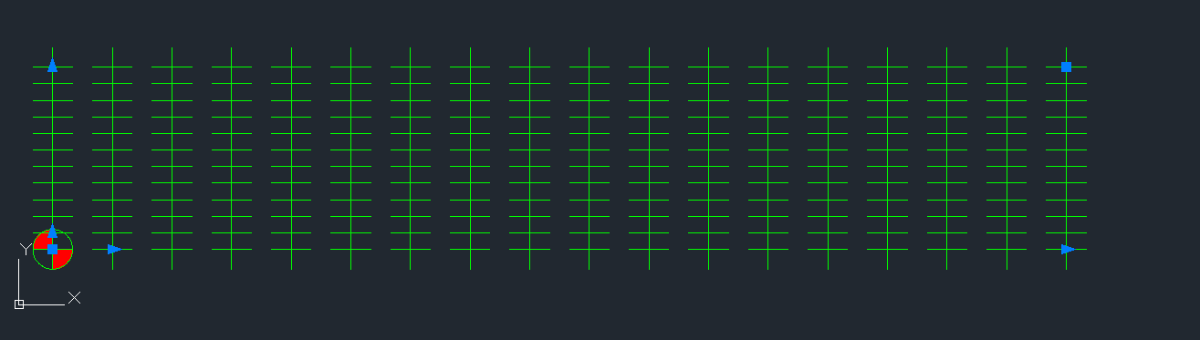
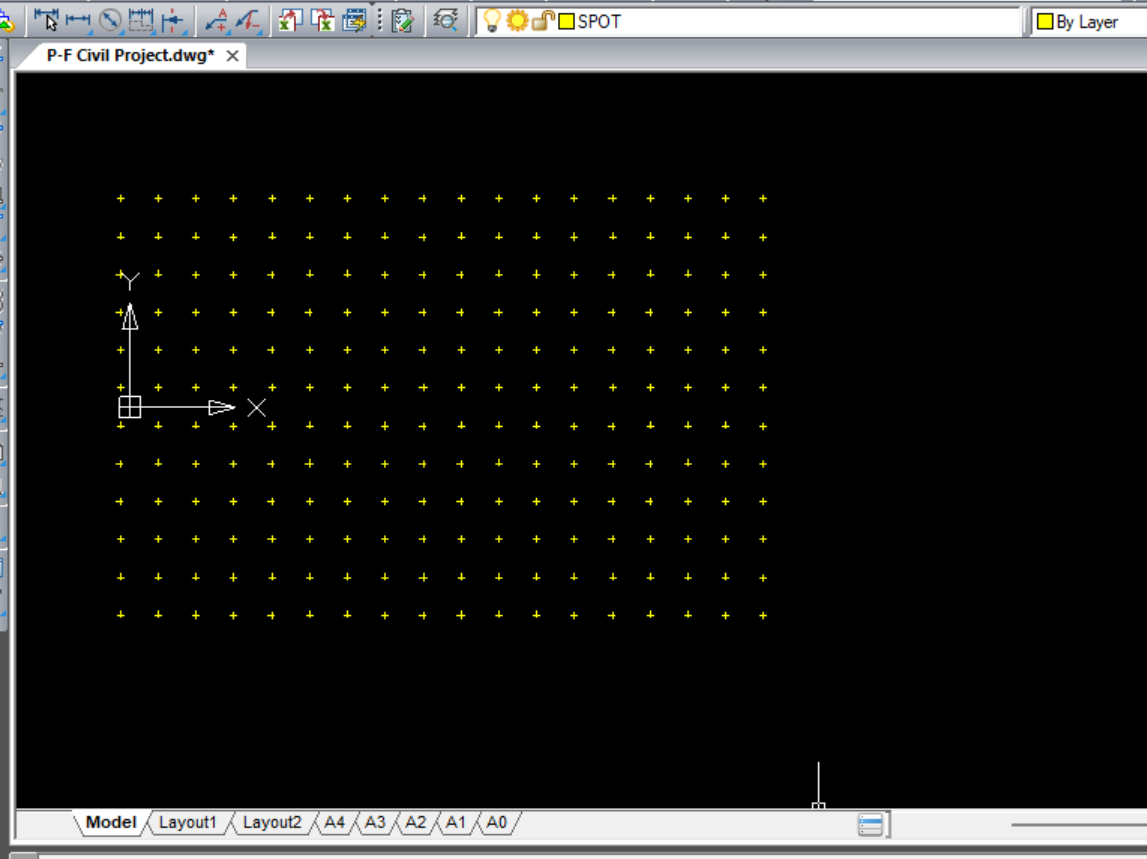
It is not -50 rows and 50 columns. It's actually 12 rows and 18 columns as stated in the instructions. -50 & 50 are distances between arrayed objects. In this case, that's the vertical and horizontal lines you created. I've tried it twice and both times I have gotten it to work. Not sure where you are going wrong at the moment. There is another way you could create the grid of spot points. Draw the vertical and horizontal lines. Move one, via midpoint, to the midpoint of the other. Turn the two lines into a block and retain it. Now, invoke the Copy command and copy your newly created block 50 units to the right. Repeat a total of 17 more times adding 50 units as you go. Ex. - 50, 100, 150, 200, 250.... and so on. Once you have 18 objects, in a straight line, copy all 18 objects down 50 units adding 50 units as you go. Do this for a total of 11 more times. Done. After doing this you will have more appreciation for the Array Command as this method is a bit tedious.
-
 andrew.burnett.CFR joined the community
 -
 GOLDBANANA joined the community
 -
 SantOsp joined the community
 -
Which Post did you get code from? It looks like the Layer Description is already accounted for in the CSV - right after the Layer Name:
-
This is what I get if I go with -50 rows and 50 Columns......

-
Nope. mine looks way different. My guess is because -50 and +50 rows cancel each other out. Guessing the second one should be Columns and not rows?
-
Honestly, I started it and go to the point where it contradicted itself and stopped because I wasn't sure if it was a typo or not. Been plenty of those in this ridiculous class so far. Then I saw where they didn't know the difference between a column and a row and I figured it was late enough that I should just be done for the day and go spend some time with my wife and kids before bed time..lol...I guess Ill follow it word for word and se what happens. I've only used the array command 1 time but I DO understand it. I think the biggest part for most of us is were all just fatigued from having to decipher instructions vs actually LEARNING the course. Obviously were still learning the course as well but not as much as if we didn't have to question every little thing. Ok, rant over. Sorry. Ill report back soon. Thank you sir
-
Gotcha, thx Remark
-
You haven't responded as of yet, so for starters you could try these steps. It would also be helpful to give all computer specifications.
-
Can you post the ZWCAD version you have? Before AutoCAD added the feature, there were other tools for this, some free, some not. I used to use VectPDF.lsp before and before that was made I used PStoEdit and Ghostery (which is made easier by the VectPDF.lsp. Converted in AutoCAD seems do be just fine as best I can tell. FILE.dwg
-
I would ask that you delete your drawings. Why? Because another student could come along and borrow them, make minor changes then submit them as their own drawings thus saving hours of labor. You do all the work and they get the credit. Not kosher at all. Follow me? Addendum: Looks like someone has already done exactly that. Again, take your drawings down. There are plenty of image files (not CAD files for students) to reference. Thank you.
-
I followed the instructions you provided above and got the following result (see attached image). How familiar are you with the ARRAY command?
-
 SLW210 changed their profile photo
 -
*A#### is an anonymous GROUP, so you seem to have these as groups, not blocks. Post a drawing that does this, no need to share the actual stamp and signature just something anonymous (no pun intended), but has the same results.
-
Here's my program : https://autolispprograms.wordpress.com/create-layers-from-excel-file/
-
I used THIS lisp by @pBe to create the layers from excel table. However, I need to create a table inside AutoCAD. Not an AutoCAD table but table consisting of lines and text. Currently I'm doing this manually and I think this can be automated since all the info are already inside. It Will be something like the image below. The Line in the first column resides on it's Layer Name and the number above the Line is the Layer Color. The Layer descriptions are already in the layer manager as well. I attached the file as reference. TEST.dwg
-
 jongbum kim joined the community
 -
“Hi everyone, I want to convert a PDF file to a ZWCAD (DWG) file. Is there any good conversion tool for converting PDF to DWG? I already tried the PDF conversion option in ZWCAD, but the result was not accurate.” FILE.pdf
-

zwcad SHX Text Not Editable in PDF
CHAKRADHAR replied to CHAKRADHAR's topic in AutoCAD Drawing Management & Output
TQ -
Sorry to resurrect this thread. This worked for me. Thanks a lot. Possible to add Layer Description?