All Activity
- Past hour
-

Pline Script File Keeps Failing
Rayan O replied to Rayan O's topic in The CUI, Hatches, Linetypes, Scripts & Macros
See the two sheets attached. First one is the dimensions, second is the one where the PLINE command is written. PLINE Example.xlsm -

2025 Draw Hatch in lisp or using command line
BIGAL replied to Strydaris's topic in AutoLISP, Visual LISP & DCL
Have a look at this it's a hatch answer, may be similar to what you want. https://forums.autodesk.com/t5/visual-lisp-autolisp-and-general/problem-with-lisp-files/td-p/14027683 Let me know if want more info. -
Pline Script File Keeps Failing
BIGAL replied to Rayan O's topic in The CUI, Hatches, Linetypes, Scripts & Macros
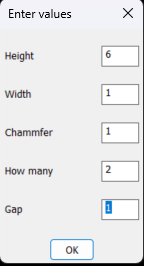
If you have a Excel spreadsheet with the info like the DCL above, you do not need the XY points calculated as they will be calculated by the lisp. Can you post the Excel or at least an image. PS can read Excel from CAD. -
Pline Script File Keeps Failing
Rayan O replied to Rayan O's topic in The CUI, Hatches, Linetypes, Scripts & Macros
I just am not that familiar with LISP commands, never used them. This is my first time where I needed many sections. Plus the geometry was defined on excel based on the contract plans. Chamfer thicknesses vary linearly. -
Pline Script File Keeps Failing
BIGAL replied to Rayan O's topic in The CUI, Hatches, Linetypes, Scripts & Macros
Any reason why you would not use a lisp ? Very simple shape to make. Just ask. The DCL front end took 1 minute to make. Could add more shapes.
- Today
-

2025 Draw Hatch in lisp or using command line
Steven P replied to Strydaris's topic in AutoLISP, Visual LISP & DCL
Am not sure if that would work, I use something along the lines of this link: But Lee Macs code - the one I use is VLA- and VLAX- so not sure it would work in LT. There is a simpler example entmake a hatch which might be what you want to do? -

2025 Draw Hatch in lisp or using command line
Strydaris replied to Strydaris's topic in AutoLISP, Visual LISP & DCL
So I am using this to try and take a list of points to use the with the hatch Draw command, but I cant get the Hatch command to accept the points in the list. I think it has something to do with the command-s needing to start and finish in the same function call, but I am not sure. Can anyone confirm this? (initcommandversion) (command-s "hatch" "_k" "_d" "_al" "_o" "_w" "4" "_m" "_p") (while (= (getvar "cmdactive") 1 ) (repeat (setq x (length bd-lst)) (command (nth (setq x (- x 1)) bd-lst)) ) (command "") ) -

Attention fellow Penn Foster structural drafting students....
TimC replied to TimC's topic in Student Project Questions
If anyone happens to have a picture of what Sheet 1 should look like that would be a great start. I'm kinda lost here -
2025 Draw Hatch in lisp or using command line
Strydaris replied to Strydaris's topic in AutoLISP, Visual LISP & DCL
Thanks Lee. I got it to work. Used this (initcommandversion) (command-s "hatch") No -hatch or it wouldnt work as intended. -

Lee-Mac NumInc modify to accept reset values
dober replied to pbelon's topic in AutoLISP, Visual LISP & DCL
Such a tool would be https://www.theswamp.org/index.php?topic=58808.0 -

2025 Draw Hatch in lisp or using command line
Lee Mac replied to Strydaris's topic in AutoLISP, Visual LISP & DCL
Try using (initcommandversion) before the command call. -
Attention fellow Penn Foster structural drafting students....
TimC posted a topic in Student Project Questions
Alright guys, so far my cad experience through Penn foster has been pretty rough to say the least...lol...starting the Structural Drafting portion now. Anything I should be aware of? Any input would be appreciated. -
Pline Script File Keeps Failing
Rayan O replied to Rayan O's topic in The CUI, Hatches, Linetypes, Scripts & Macros
Yep! That's the fix. -
2025 Draw Hatch in lisp or using command line
Strydaris posted a topic in AutoLISP, Visual LISP & DCL
Hi everyone, I am using ACAD2025LT and I was looking into the newer "Draw" hatch feature, where you can type hatch and tell the command that you want to draw a hatch along a sort of polyline that you pick. You can pick Alignment, Width whether its going to be just a rectangle or circle etc etc. The only thing I can seem to figure out is if this can be access using LISP. I have a few idea for hatching as I create something using LISP, but for the life of me I cant figure out how to use the draw hatch feature with lisp. I know lisp forces the use of "-" on a command when used in a lisp routine. Like if you use (command "hatch" ) in a LISP it will actually do (command "-hatch"). Although if you use -hatch you are given a whole different set of options to pick from and the "draw" option is not there. So my question is, Has anyone been able to use this draw option in a LISP routine? Thanks. -
Lee-Mac NumInc modify to accept reset values
Lee Mac replied to pbelon's topic in AutoLISP, Visual LISP & DCL
Unfortunately not with the current version, but I'll certainly consider implementing this functionality in a future version. -
 Guru1337 joined the community
 -

Pline Script File Keeps Failing
eldon replied to Rayan O's topic in The CUI, Hatches, Linetypes, Scripts & Macros
Have you tried to turn off Object Snaps before you run the script? It looks to me as if your line is snapping to adjacent end of line points instead of plotting the listed coordinates. -
¿It's posible to reset counter each time previous counter increments?. For example: 1-1-a, 1-1-b, 1-1-c, 1-2-a, 1-2-b, 1-2-c, 1-3-a, 1-3-b .... etc
-

Pline Script File Keeps Failing
SLW210 replied to Rayan O's topic in The CUI, Hatches, Linetypes, Scripts & Macros
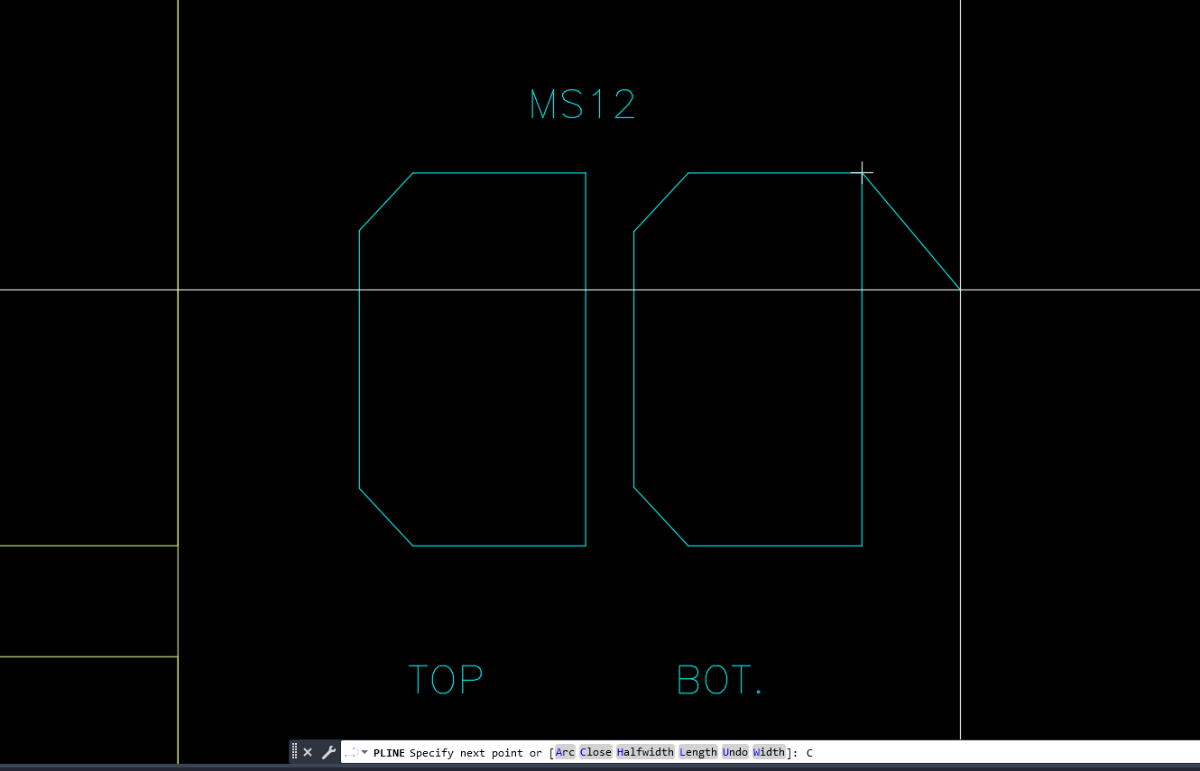
I moved your thread to the The CUI, Hatches, Linetypes, Scripts & Macros Forum. Your script is missing the blank line at the bottom, so it needed that for enter at the end. Other than that, I ran it in AutoCAD 2000i on my home computer and they all look like your bottom image. -
 Camille joined the community
 -
 abdu_mandala joined the community
 -
 JAW_NZ joined the community
 - Yesterday
-
 Phenomxy joined the community
 -
 Jhonatan joined the community
 -
Pline Script File Keeps Failing
Rayan O posted a topic in The CUI, Hatches, Linetypes, Scripts & Macros
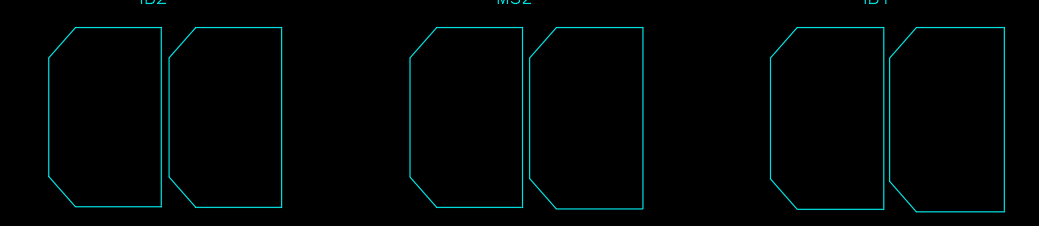
I have multiple sections which I am trying to plot using a script file. I am stuck although the format seems to match what I can find online. This is what the shapes look like when I run the script file weirdly enough. the last 5 sections work just fine. I know the coordinates are correct in all cases since I made a scatter plot in Excel before hand. Also, when I just copy the lines from the script file into the command line. I get the right shape every time. (Possible Clue: the command stays in pline after pasting, look at the command line) Lines pasted into command line _.PLINE 103150,-122340 103150,-126391.3 101272.9,-126391.3 100691.9,-125765.9 100691.9,-122965.4 101272.9,-122340 103150,-122340 C _.PLINE 106150,-122340 106150,-126391.1 104264.2,-126391.1 103674.6,-125755.4 103674.6,-122975.7 104264.2,-122340 106150,-122340 C sections.scr
-
Rayan O joined the community
-
 Igor vos joined the community
 -
 mariajarwan joined the community
 - Last week
-
Just doing something wrong with using OBDX still getting my head around using it. I think the limitation is in getting an object via a selection set. So a script approach may be the easiest way. Give this a try two parts the doatts.lsp file which does the work, the c:doatts that makes the script to be run so need to load that first. That means 2 lisp files. Change the Acadtemp to your start directory, pick any dwg for directory name. (defun c:doatts ( / fname files pre fo) (setq fname (getfiled "Select a Dwg FILE" "d:\\Acadtemp" "dwg" 16)) ; chnage start directory name (setq pre (car (fnsplitl fname))) (setq files (vl-directory-files pre "*.DWG" 0)) (setq fo (open (setq fname (vl-filename-mktemp "" "" ".scr")) "w")) (write-line "(command \"regen\")" fo) (foreach file files (write-line (strcat "Open " "\"" pre file "\"") fo) (write-line "(load \"doatts\")" fo) (write-line "(AH:doatts)" fo) (write-line "close Y" fo) ) (close fo) (command "script" fname) (vl-file-delete fname) (princ) ) Second lisp is the doatts defun AH:doatts ( / ss obj atts att tname) (setq ss (ssget "X" '((0 . "INSERT")))) (repeat (setq x (sslength ss)) (setq obj (vlax-ename->vla-object (ssname ss (setq x (1- x))))) (if (= (vlax-property-available-p obj 'hasattributes) T) (progn (setq atts (vlax-invoke obj 'Getattributes)) (foreach att atts (setq tname (vlax-get att 'Tagstring)) (if (= tname "MATERIAL") (vlax-put att 'Textstring "TEST") ) ) ) ) ) (command "close" "Y") (princ) )
-

zwcad SHX Text Not Editable in PDF
Dahzee replied to CHAKRADHAR's topic in AutoCAD Drawing Management & Output
In PDF-XChange Editor, I could only edit the Title Border Text. All the node text isn't editable. Using OCR in PDF-XChange, it converted all 5 pages in about 15 seconds. I am using the paid-for version, so not sure if OCR is available in the free version. -
I will sometime soon, I will have to redownload ACAD at home to upload anything. Not my primary CAD for personal use by any means. But I will have a mockup that should show what I would like. If needed, I'll do a video explanation as well so that it is more clear.
-
zwcad SHX Text Not Editable in PDF
SLW210 replied to CHAKRADHAR's topic in AutoCAD Drawing Management & Output
I opened your PDF in Acrobat Pro and the text was editable. This seems to be a Foxit issue, though as mentioned, you might want to use a TTF font if that's what Foxit needs. ArialNarrow.ttf is a common replacement IIRC to ISOCP.shx -
zwcad SHX Text Not Editable in PDF
BIGAL replied to CHAKRADHAR's topic in AutoCAD Drawing Management & Output
Just do a google you should be able to find a ISO.TTF font there are thousands of fonts out there. You open c:\Windows\fonts and drag the TTF onto it from memory. ISO3098B ? If your lucky some one may have one already. -
Vehicle Tracking - where to find details for vehicles
BIGAL replied to Adam - Inspire's topic in Autodesk Software General
Like a lot here just remember teaching your children how to drive, no did not crash into things, but went around a roundabout, hands everywhere trying to turn, change gears and me praying as we chugged out.