All Activity
- Past hour
-
I wouldn't rely on AutoCAD's Autosave feature, see this recently revived old thread... I have some links where you can "Autosave" without Autodesk's version. I know for AutoCAD LT the VBA solution will not work, but maybe the others are worth a shot. As I mention, get into the habit of Ctrl+S often. From the other link I posting in that thread explaining Autosave, etc....
- Today
-

dcl Share the most elegant interface design under DCL limitations
VicoWang posted a topic in AutoLISP, Visual LISP & DCL
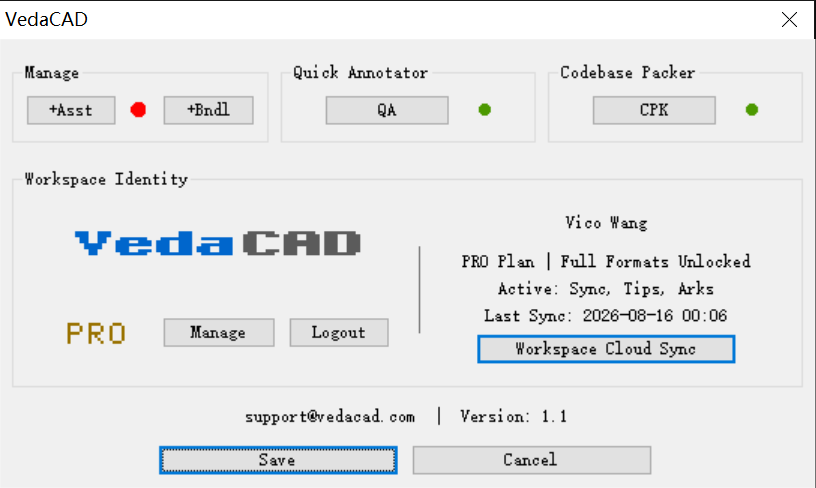
It is widely known that DCL has its native limitations, and to create beautiful and elegant UIs, it's not only about simplifying the underlying logic but also about DCL's presentation. Please share those DCL interface designs that are worth sharing! Here are the DCL interface designs for my two plugins. In the end, it was the image control that took on everything!!!
-
Actually I set the autosave every 5 minutes. At this point the only annoying element of this "bug" is that... it can happen that you don't remember what things have been changed in the last few minutes, so you run the risk of skipping some of them. It happens when I have to retouch a drawing in various areas... but as I say it's a rare case: by now I know about this "bug" and I'm careful!
-
 ross1446 joined the community
 -
 Er Nitya joined the community
 -
 t.wong joined the community
 -
This thread discusses PyRx. PyRx embeds the Python runtime inside AutoCAD/BricsCAD’s process space. It’s CAD that does the .DWG/DXF file IO. There’s other packages like ezdxf that can read write files. PyRx, is analog to CAD’s .net wrappers in that its bound to ObjectARX
- Yesterday
-
Pathon a new programming language ? Just open a dxf or a dwg can then run Python scripts. But must install the Python run time.
-

Create bounding box
BIGAL replied to Discus84's topic in AutoCAD 2D Drafting, Object Properties & Interface
A google should have pointed you to the great Website by Lee-mac, Bounding Box. -
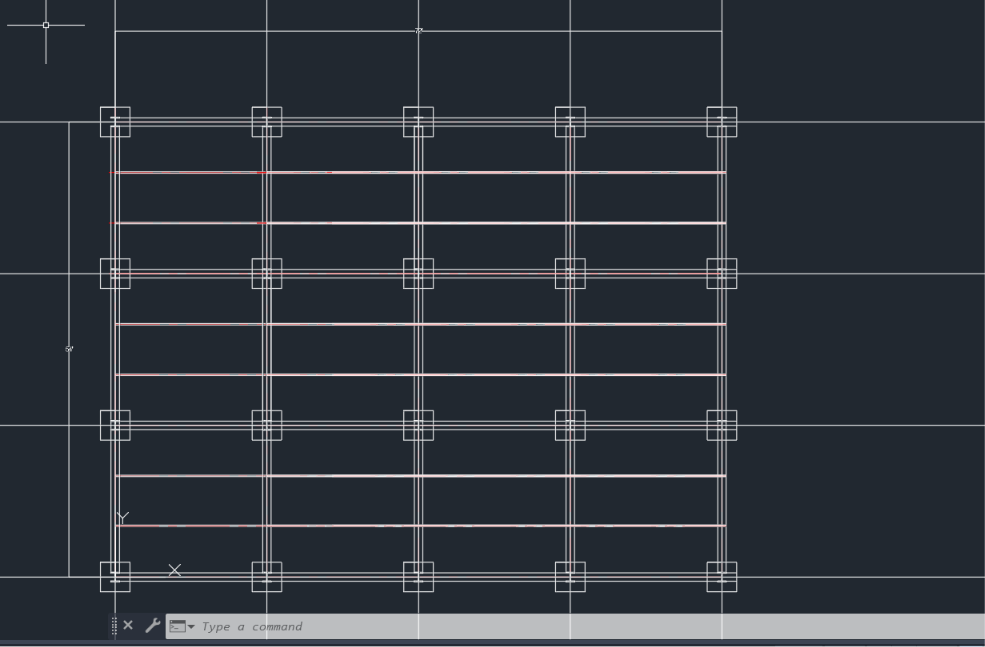
Who's drawing is pictured above? Yours or that of someone else? If it is yours then I assume you are at the point where dimensions are added. One would dimension from centerline-to-centerline both horizontally and vertically. Then one would add an overall dimension for both length and width.
-

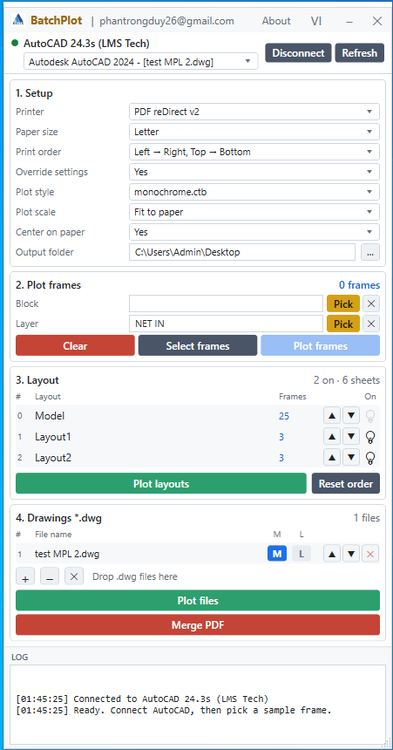
Free Multi Plot Lisp – Fast Batch Printing for AutoCAD, BricsCAD & ZWCAD | Model/Layout, Zone Plotting & PDF Merge
CamDuy replied to CamDuy's topic in AutoLISP, Visual LISP & DCL
Update for the BatchPlot.exe installation version. Free Download: https://drive.google.com/drive/folders/16RZS69S2tzZZzFnYW0H6QNQ3klwxB2C6?usp=drive_link
-
@ReMark
-
Good afternoon can someone help me I start this project, but I'm confused on what to do next right now I'm on dimlin.
-
Pathon work on dwg or dxf only?
-

Superstretch
SLW210 replied to Discus84's topic in AutoCAD 2D Drafting, Object Properties & Interface
What happens when you try to stretch them? You might try PICKSTYLE setting, I set mine to all values in 2026 and they all stretched a Group, but I am not sure which version improved the editing of Groups. -

Create bounding box
Discus84 replied to Discus84's topic in AutoCAD 2D Drafting, Object Properties & Interface
Google AI... (defun C:BBOX ( / ss index ent vlaObj minPt maxPt minExt maxExt pt1 pt2 ) (vl-load-com) (princ "\nSelect objects to enclose in a bounding box: ") ;; Prompt user to select objects (if (setq ss (ssget)) (progn (setq index 0) ;; Loop through all selected objects (repeat (sslength ss) (setq ent (ssname ss index)) (setq vlaObj (vlax-ename->vla-object ent)) ;; Safely catch objects that do not support a bounding box (if (not (vl-catch-all-error-p (vl-catch-all-apply 'vla-getboundingbox (list vlaObj 'minPt 'maxPt)))) (progn (setq pt1 (vlax-safearray->list minPt) pt2 (vlax-safearray->list maxPt)) ;; Initialize or update the overall minimum and maximum coordinates (if (not minExt) (setq minExt pt1 maxExt pt2) (setq minExt (mapcar 'min pt1 minExt) maxExt (mapcar 'max pt2 maxExt)) ) ) ) (setq index (1+ index)) ) ;; Draw the bounding box if valid coordinates were collected (if (and minExt maxExt) (progn ;; Deactivate Object Snap temporarily to ensure precision (setq oldOsmode (getvar "OSMODE")) (setvar "OSMODE" 0) ;; Draw a standard rectangle using the global coordinates (command "_.rectangle" minExt maxExt) ;; Restore original Object Snap settings (setvar "OSMODE" oldOsmode) (princ "\nBounding box successfully created!") ) (princ "\nError: Could not calculate bounding box for selected objects.") ) ) (princ "\nNo objects selected.") ) (princ) ) (princ "\nType BBOX to run the command.") (princ) -
Hi, is there a script to create a rectangular bounding box around selected objects? Regards, Lu
-
Superstretch
Discus84 replied to Discus84's topic in AutoCAD 2D Drafting, Object Properties & Interface
Yes, 2011 -
Superstretch
SLW210 replied to Discus84's topic in AutoCAD 2D Drafting, Object Properties & Interface
I can in AutoCAD 2026. Are you still using AutoCAD 2010? -
Hi, Is there a way to stretch groups without ungrouping ? Normally I ungroup and then stretch and then group again. Does it have to be a script to do a chain of commands ? Actually maybe all I want is to suspend group (pickstyle) instead of ungrouping. i.e Group remains intact , I only need to stretch parts of it . -- Thanks
-

Why do some objects disappear when you plot a DWG?
CyberAngel replied to indiancad's topic in AutoCAD 2D Drafting, Object Properties & Interface
Nonplotting layers have always made me uncomfortable. I see the value of them, but they break the WYSIWYG rule. -
Why do some objects disappear when you plot a DWG?
SLW210 replied to indiancad's topic in AutoCAD 2D Drafting, Object Properties & Interface
There was most likely a reason the layer was non plot, you should just move things you need plotted to a new layer that allows plot, presuming you were not the one making the layer non plot and if you made it non plot it was by mistake, there could be objects plotting that shouldn't. -
.thumb.jpg.615654602253be56b2fbd5d064834780.jpg)
What is your easiest way to make a through-hole in a 3D solid?
indiancad posted a topic in AutoCAD 3D Modelling & Rendering
For a simple cylindrical hole, I usually create a cylinder at the required location and then use the SUBTRACT command . The workflow is straightforward: create the solid → create the cylinder with the required diameter and depth → position it through the solid → use SUBTRACT to remove it. For example, CYLINDER can be used for the cutting solid, followed by SUBTRACT to create the actual hole. For repeated holes, ARRAY can also save a lot of time instead of creating each cutting cylinder manually. How do you normally create holes in your 3D models — SUBTRACT, PRESSPULL, or another method? -
[LISP plugin] Side DIM-a dense parallel line bundle dimensioning tool
VicoWang replied to VicoWang's topic in AutoLISP, Visual LISP & DCL
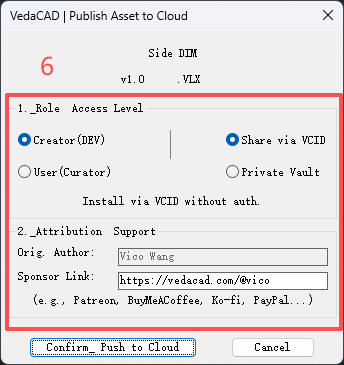
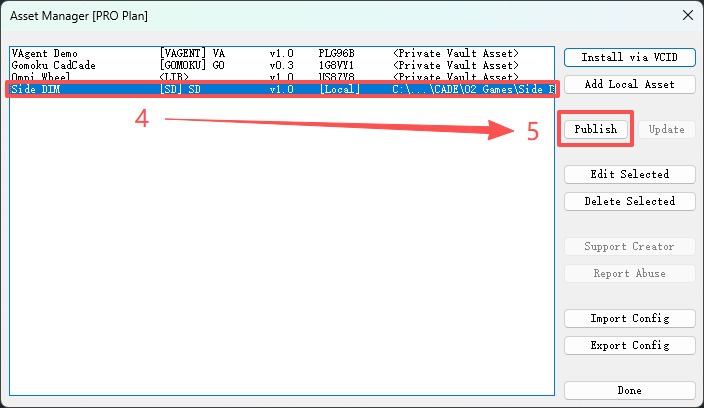
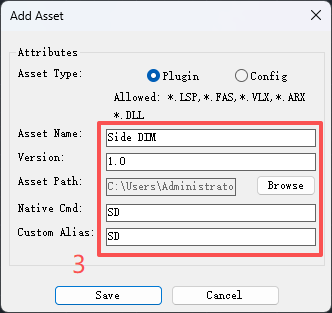
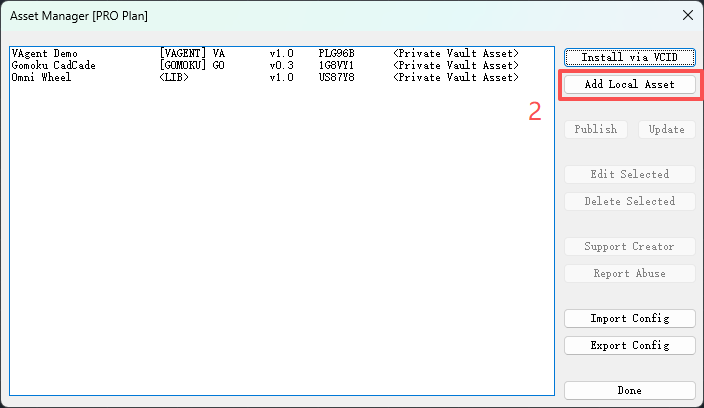
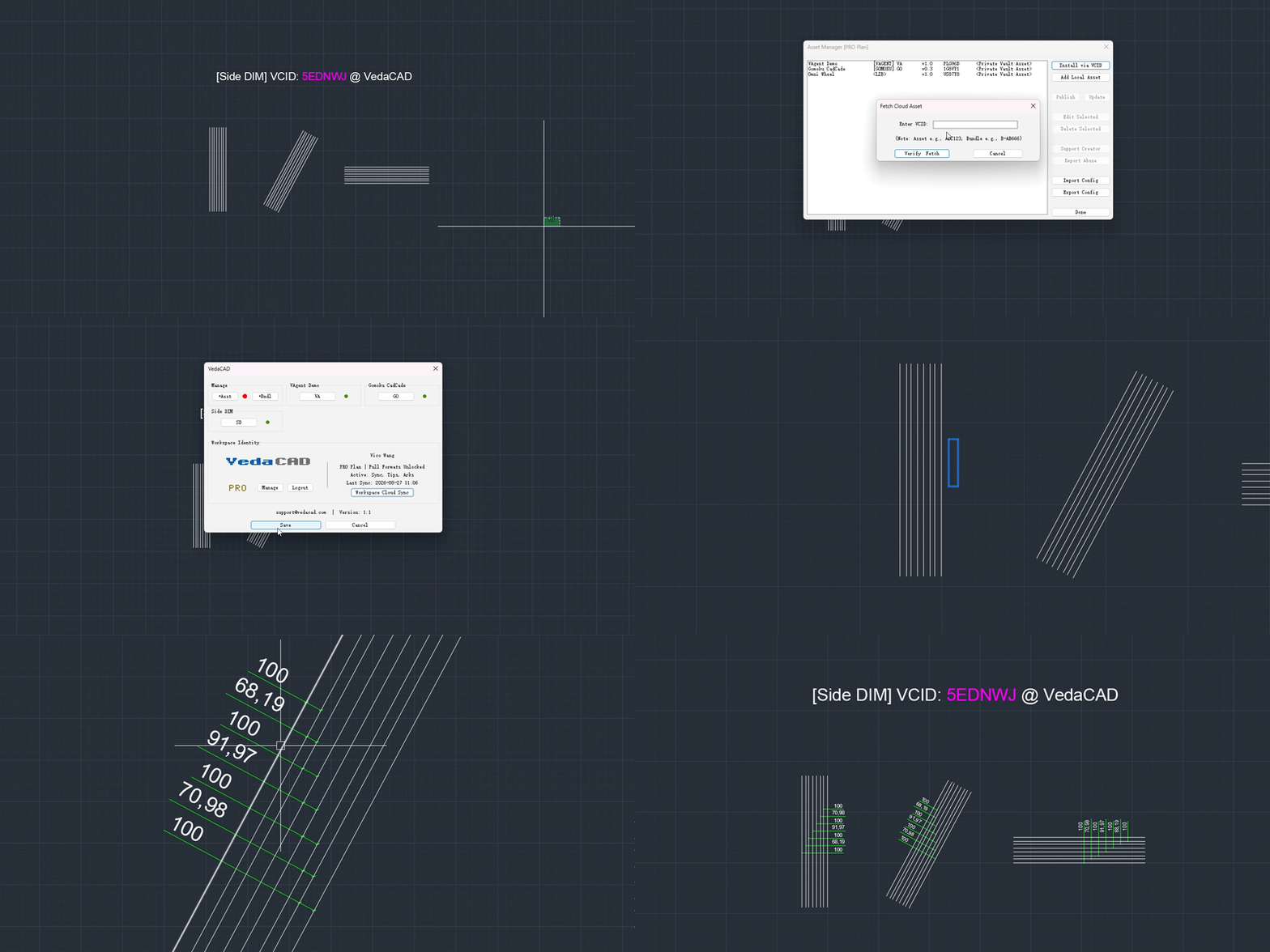
How to publish your own plugin assets in VedaCAD? Here is a brief image process guide (requires login with a free or PRO account):
-
[LISP plugin] Side DIM-a dense parallel line bundle dimensioning tool
VicoWang posted a topic in AutoLISP, Visual LISP & DCL
This is a dimension marking tool for dense parallel line bundles, which can adjust the size of the marking through the G key during the preview process, and can be executed using the SD shortcut key (or one you customize). Installation method (upgradable in the future): [Side DIM] VCID: 5EDNWJ @ VedaCAD Note: To install via VCID, you need to install VedaCAD in advance and log in to a free account (or PRO account). Tips: Welcome developers to publish their plugins on VedaCAD and obtain their plugin's VCID for plugin sharing (even free accounts can publish)
- Last week
-
Free Multi Plot Lisp – Fast Batch Printing for AutoCAD, BricsCAD & ZWCAD | Model/Layout, Zone Plotting & PDF Merge
BIGAL replied to CamDuy's topic in AutoLISP, Visual LISP & DCL
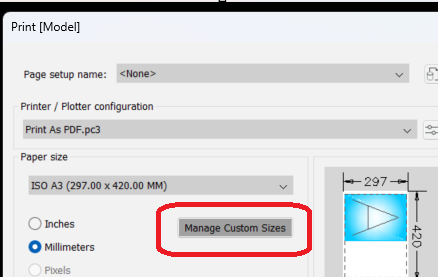
Provided you have made custom sheet sizes in the PLOT dialog. There is no reason why you can not have a title block or rectangle that is used to define the sheet size. Wether it be PDF or plot direct to roll plotter. Using layouts is best as the overall size will be at 1:1 eg 297x2010. Basically the custom size must exist, There was a post about making custom sheet sizes on the fly but very difficult to achieve. Me like a lot of others here can read the layouts and plot, there is plenty of examples of plot lisp's.
-

Why do some objects disappear when you plot a DWG?
mhupp replied to indiancad's topic in AutoCAD 2D Drafting, Object Properties & Interface
That is a feature. Usually I use that to show Design notes that I don't want to plot. Usually I would just use Defpoints or magenta color. You could make a lisp that checks all layers. This checks if a layer is not plotted, not frozen and turned on. will display a warning listing them, asking if you want to continue plotting or not. (defun c:PlotCheck ( / doc layers lay noplot msg ans) (vl-load-com) (setq doc (vla-get-ActiveDocument (vlax-get-acad-object)) layers (vla-get-Layers doc) noplot '() ) (vlax-for lay layers (if (and (= :vlax-false (vla-get-Plottable lay)) (= :vlax-false (vla-get-Freeze lay)) (= :vlax-true (vla-get-LayerOn lay)) ) (setq noplot (cons (vla-get-Name lay) noplot)) ) (if noplot (progn (setq msg (strcat "The following layers are set NOT to plot:\n\n" (apply 'strcat (mapcar '(lambda (x) (strcat x "\n")) (reverse noplot))) "\nContinue with plotting?" ) ) (setq ans (alert msg)) (initget "Yes No") (setq ans (getkword "\nContinue plotting? [Yes/No] <No>: ")) (if (= ans "Yes") (command "_.PLOT") (princ "\nPlot cancelled.") ) ) (command "_.PLOT") ) (princ) ) -
Install and set up | ArcGIS API for Python | Esri Developer Python for ArcGIS Tutorials Sample Notebooks | ArcGIS API for Python | Esri Developer ArcGIS Pro Python reference | ArcGIS Pro documentation ArcPy There is Python code out there for QGIS as well. PyQGIS Developer Cookbook — QGIS Documentation documentation