All Activity
- Past hour
-
Mine works in Full AutoCAD 2026, where did (vla-put-Annotative hobj :vlax-false) come from? Mine uses (setpropertyvalue ent "Annotative" 0) What I posted is an adaptation of a larger cleanup program I have that's still in progress, so I am not sure if it would work fully in LT, I am trying to make it work with LT as much as possible and BricsCAD etc., but being without internet for the past two weeks my working at home has been limited.
- Today
-

Need AutoLISP to Export TEXT/MTEXT to Excel (Advance Steel 2023)
Neelamegam posted a topic in AutoLISP, Visual LISP & DCL
Hi everyone, I need an AutoLISP routine for Advance Steel 2023. Requirements: - Read all TEXT and MTEXT. - All my drawings have the same format. - Preserve the table layout exactly as shown in the drawing. - Export to CSV or Excel. - Columns are: 1. Name of Assemblies 2. Drawing No. 3. Qty 4. Total Weight Sample DXF is attached. Any help would be greatly appreciated. 1111 1.dxf -
Neelamegam joined the community
-
yes, same in acad. "Fehler: ActiveX-Server gab folgenden Fehler zurück: unbekannter Name: Annotative" There is no such property wich is why i would use setpropertyvalue for acad. As for Bricscad idk how one would do that
-
Casting objects. Every database object has a static cast method, it is your responsibility to check the type from pyrx import Ap, Ax, Db, Ed, Ge, Rx import traceback @Ap.Command() def doitx3(): try: # Get ActiveX application instance axApp = Ap.Application.acadApplication() axDoc = axApp.activeDocument() axUtil = axDoc.utility() # Prompt user to pick an entity axEnt, pnt = axUtil.getEntity("\nPick a line") # Verify that the picked entity is a LINE if axEnt.objectName() != "AcDbLine": raise RuntimeError("oops!: ") # Cast to AcadLine axLine = Ax.AcadLine.cast(axEnt) # change color to green (RGB: 0, 255, 0) axLine.setTrueColor(Ax.AcadAcCmColor(0, 255, 0)) # Print information about the selected entity print(axEnt.objectName(), pnt) except Exception as err: traceback.print_exception(err)
-
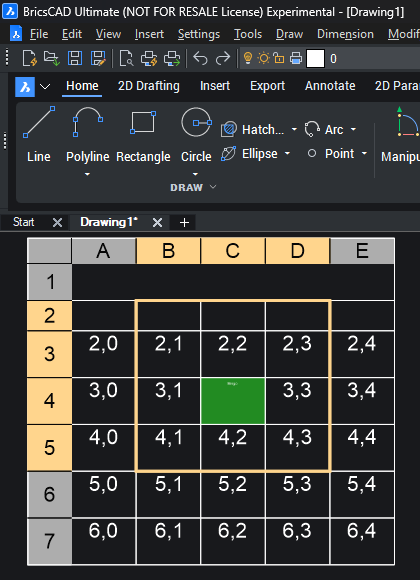
here's an example of creating a table and selecting a sub region from pyrx import Ap, Ax, Db, Ed, Ge, Rx import traceback @Ap.Command() def doitx2(): try: axApp = Ap.Application.acadApplication() axDoc = axApp.activeDocument() axModel = axDoc.modelSpace() ps , point = Ed.Editor.getPoint("\nPick table location: ") if ps != Ed.PromptStatus.eOk: raise RuntimeError("oof {}:".format(ps)) # Creates a table with 7 rows and 5 columns axTable = axModel.addTable(point, 7, 5, 1, 5) #fill up the table for col in range(axTable.columns()): for row in range(2, axTable.rows()): axTable.setText(row, col, "{},{}".format(row, col)) #get the cell extents, is a list of 3d points cex11 = axTable.cellExtents(1, 1, False) cex43 = axTable.cellExtents(4, 3, False) # Create a selection region using ActiveX selection methods sssub = axTable.selectSubRegion( cex11[0], cex43[3], Ge.Vector3d.kZAxis, Ge.Vector3d.kXAxis, Ax.AcSelectType.acTableSelectCrossing, False, ) # Apply the selection to the table using ActiveX selection methods axTable.setSubSelection(*sssub) # Perform hit testing and geometric calculations using ActiveX services # Ge space makes it easier to do math pnt = cex11[0] + (cex43[3] - cex11[0]) * 0.5 bhit, row, col = axTable.hitTest(pnt, Ge.Vector3d.kZAxis) if(bhit): # Modify cell properties using ActiveX methods axTable.setCellTextHeight(row, col, 0.8) axTable.setText(row, col, "Bingo") # since were open source we can add stuff like suppost html colors axTable.setCellBackgroundColor(row, col, Ax.AcadAcCmColor("#228B22")) except Exception: print(traceback.format_exc())

-
The Ax Space. Ax is the wrapper for ActiveX as described here https://help.autodesk.com/view/OARX/2025/ENU/?guid=GUID-A809CD71-4655-44E2-B674-1FE200B9FE30 It’s going to look familiar if you’ve done any VBA or Visual Lisp. The big difference is that all Points, Vectors, Matrices, use AcGe classes instead of variants. from pyrx import Ap, Ax, Db, Ed, Ge, Rx @Ap.Command() def doitx1(): # get the application, document, and modelspace using ActiveX automation axApp = Ap.Application.acadApplication() axDoc = axApp.activeDocument() axModel = axDoc.modelSpace() # add a lines to modelspace, then access it properties # use Ge.Point3d class instead of a variant axLine1 = axModel.addLine(Ge.Point3d(0, 0, 0), Ge.Point3d(100, 100, 0)) axLine2 = axModel.addLine(Ge.Point3d(0, 100, 0), Ge.Point3d(100, 0, 0)) interdata = axLine1.intersectWith(axLine2, Ax.AcExtendOption.acExtendNone) if len(interdata) == 0: print("\nDoes not intersect:") return axCircle = axModel.addCircle(interdata[0], 10) axCircle.setColor(Ax.AcColor.acCyan) #scale and rotate xform = Ge.Matrix3d.scaling(2,axCircle.center()) xform *= Ge.Matrix3d.rotation(0.7854, Ge.Vector3d.kZAxis, axCircle.center()) axLine1.transformBy(xform) axLine2.transformBy(xform)
-

Free Multi Plot Lisp – Fast Batch Printing for AutoCAD, BricsCAD & ZWCAD | Model/Layout, Zone Plotting & PDF Merge
CamDuy replied to CamDuy's topic in AutoLISP, Visual LISP & DCL
https://www.cadviet.com/forum/index.php?app=forums&module=forums&controller=topic&id=213313 - Yesterday
-
Start here https://github.com/CEXT-Dan/PyRx#python-for-autocad 1, watch the short YouTube video and download Python 3.14 from the link provided 2, download in install VS Code, install python extension pack 3, try out some of the samples, https://github.com/CEXT-Dan/PyRx/tree/main/PySamples
-
Following on from EnM4st3r Code. I have added a function to create the "%pr" if none exists. I had this happen when the Field is created using "Current Precision" as the string does not contain the required %pr by default. (defun c:ChangePrec (/ *error* acdoc undo-mark ss target index ename obj att field-string revised-string) (defun *error* (msg) (if undo-mark (progn (vl-catch-all-apply 'vla-EndUndoMark (list acdoc)) (setq undo-mark nil) ) ) (if (and msg (not (wcmatch (strcase msg) "*BREAK*,*CANCEL*,*EXIT*")) ) (princ (strcat "\nError: " msg)) ) (princ) ) (setq acdoc (vla-get-ActiveDocument (vlax-get-acad-object))) (prompt "\nSelect text, MText, or Attributed Blocks: ") (while (null (setq ss (ssget '((0 . "TEXT,MTEXT,INSERT"))))) (prompt "\nNo valid text, MText, or blocks selected.") ) (initget 1 "0 1 2 3 4 5 6 7 Current") (setq target (getkword "\nTarget precision [0/1/2/3/4/5/6/7/Current]: ")) (vla-StartUndoMark acdoc) (setq undo-mark T) (repeat (setq index (sslength ss)) (setq index (1- index) ename (ssname ss index) obj (vlax-ename->vla-object ename) ) (cond ;; Text or MText ((wcmatch (vla-get-ObjectName obj) "AcDbText,AcDbMText") (setq field-string (vla-FieldCode obj)) (if (and field-string (setq revised-string (replacePrecision field-string target)) ) (vla-put-TextString obj revised-string) ) ) ;; Block reference with editable attributes ((vlax-method-applicable-p obj 'GetAttributes) (foreach att (vlax-invoke obj 'GetAttributes) (setq field-string (LM:fieldcode (vlax-vla-object->ename att))) (if (and field-string (setq revised-string (replacePrecision field-string target)) ) (vla-put-TextString att revised-string) ) ) ) ) ) (vla-EndUndoMark acdoc) (setq undo-mark nil) (vla-Regen acdoc acActiveViewport) (princ) ) (defun replacePrecision (fieldStr target / nbs tmp_nbs prec return fmtStart fmtEnd fmtString newPrec) (setq newPrec (strcat "%pr" (if (= target "Current") (itoa (getvar "LUPREC")) target ) ) ) ;; Existing precision -> replace it (if (setq nbs (vl-string-search "%pr" fieldStr)) (progn (while nbs (setq tmp_nbs nbs prec (itoa (atoi (substr fieldStr (+ nbs 4) 2))) fieldStr (vl-string-subst newPrec (strcat "%pr" prec) fieldStr tmp_nbs ) nbs (vl-string-search "%pr" fieldStr (+ tmp_nbs (strlen newPrec))) ) ) (setq return fieldStr) ) ;; No %pr found (progn ;; Existing format string? (if (setq fmtStart (vl-string-search "\\f \"" fieldStr)) ;; Append %pr to existing format string (progn (setq fmtStart (+ fmtStart 4) fmtEnd (vl-string-search "\"" fieldStr fmtStart) fmtString (substr fieldStr (1+ fmtStart) (- fmtEnd fmtStart)) ) (setq return (strcat (substr fieldStr 1 fmtStart) fmtString newPrec (substr fieldStr (1+ fmtEnd)) ) ) ) ;; No format string at all -> create one (if (setq fmtEnd (vl-string-search ">%" fieldStr)) (setq return (strcat (substr fieldStr 1 (1- fmtEnd)) " \\f \"" newPrec "\">%" ) ) ) ) ) ) return ) ;; Field Code - Lee Mac ;; Returns the field expression associated with an entity (defun LM:fieldcode ( ent / replacefield replaceobject fieldstring enx ) (defun replacefield ( str enx / ent fld pos ) (if (setq pos (vl-string-search "\\_FldIdx" (setq str (replaceobject str enx)))) (progn (setq ent (assoc 360 enx) fld (entget (cdr ent)) ) (strcat (substr str 1 pos) (replacefield (fieldstring fld) fld) (replacefield (substr str (1+ (vl-string-search ">%" str pos))) (cdr (member ent enx))) ) ) str ) ) (defun replaceobject ( str enx / ent pos ) (if (setq pos (vl-string-search "ObjIdx" str)) (strcat (substr str 1 (+ pos 5)) " " (LM:ObjectID (vlax-ename->vla-object (cdr (setq ent (assoc 331 enx))))) (replaceobject (substr str (1+ (vl-string-search ">%" str pos))) (cdr (member ent enx))) ) str ) ) (defun fieldstring ( enx / itm ) (if (setq itm (assoc 3 enx)) (strcat (cdr itm) (fieldstring (cdr (member itm enx)))) (cond ((cdr (assoc 2 enx))) ("")) ) ) (if (and (wcmatch (cdr (assoc 0 (setq enx (entget ent)))) "TEXT,MTEXT,ATTRIB,MULTILEADER,*DIMENSION") (setq enx (cdr (assoc 360 enx))) (setq enx (dictsearch enx "ACAD_FIELD")) (setq enx (dictsearch (cdr (assoc -1 enx)) "TEXT")) ) (replacefield (fieldstring enx) enx) ) ) ;; ObjectID - Lee Mac ;; Returns a string containing the ObjectID of a supplied VLA-Object ;; Compatible with 32-bit & 64-bit systems (defun LM:ObjectID ( obj ) (eval (list 'defun 'LM:ObjectID '( obj ) (if (and (vl-string-search "64" (getenv "PROCESSOR_ARCHITECTURE")) (vlax-method-applicable-p (vla-get-utility (LM:acdoc)) 'getobjectidstring) ) (list 'vla-getobjectidstring (vla-get-utility (LM:acdoc)) 'obj ':vlax-false) '(itoa (vla-get-objectid obj)) ) ) ) (LM:ObjectID obj) ) ;; Active Document - Lee Mac ;; Returns the VLA Active Document Object (defun LM:acdoc nil (eval (list 'defun 'LM:acdoc 'nil (vla-get-activedocument (vlax-get-acad-object)))) (LM:acdoc) )
-
@troggarf yep took the plunge and installed Python, the install is easy With @Danielm103 help also installed a couple of extra modules that where needed for his code. Then it's simple like lisp using Pyload instead of Appload. Or you can load python scripts using a lisp call. ; lisp start python (setq python "C:/Users/xxxxxx/AppData/Local/Python/Python-3.14-64/python.exe" pyscript "D:\\alan\\lisp\\ctb table.py" ) (startapp python pyscript)
-
I dont know if its my Bricscad V25 but this is what you get using; (vla-put-Annotative hobj :vlax-false) ; error : Automation Error. Property [ANNOTATIVE] not available Would appreciate to know if same in Acad etc.
-
Just tested it this morning and working perfectly! Can't thankyou enough for that. Awesome.
-
Daniel, For total LISP hacks like me who barely get by piecing together LISP code that we find online. I don't even know where to begin with trying to utilize the awesome python code that you share. It isn't as easy as opening Notepad and copying and pasting code and then saving as a different filetype. Then dragging that file into your drawing area to load and use. So I am asking as a total beginner, Where do I start? Is there a simple breakdown with instructions for us curious newbies? Thanks ~Greg BTW - Thanks for all the stuff that you share
-

AutoCAD 2027.1 Now Available: Smarter Autodesk AI Assistance and Smoother Collaboration
The AutoCAD Blog posted a topic in AutoCAD Blogs
We’re excited to share that the AutoCAD 2027.1 update has arrived, bringing several new enhancements designed to help you work more efficiently. Building on the strong foundation of AutoCAD 2027, this update introduces a smarter Autodesk Assistant experience, improvements for collaboration and connected workflows, and a variety of usability and performance enhancements that were requested by our customers. Whether you’re creating new designs, reviewing drawings with teammates, or simply looking to save time on repetitive tasks, AutoCAD 2027.1 is here to deliver meaningful improvements across your CAD experience. A smarter Autodesk Assistant In AutoCAD 2027.1, we are continuing to evolve the Autodesk Assistant. This release makes the Assistant more visible, more contextual, and more helpful: making it easier to discover features, ask questions, and learn new workflows without interrupting your work. Discover helpful guidance with Proactive Assistance Insights, or personalized learning content tailored to your actions in AutoCAD, are now available within Assistant. Instead of searching for help, you’ll receive relevant tips and recommendations that help you discover capabilities you may not have known existed. Learn more about how the Autodesk Assistant uses your data in our AI transparency card. Our AI transparency cards provide details on functionality, data sources, and the privacy and security safeguards in place for the artificial intelligence features used in our products. To learn more, explore our card explanations. Smarter prompts to help you get started New recommended starter prompts make it easier to begin conversations with the Autodesk Assistant. By suggesting relevant questions and workflows, the Assistant helps you get answers faster while highlighting its expanding AI-powered capabilities. More contextual AI experiences AutoCAD 2027.1 also expands contextual Assistant experiences, including selection-aware interactions and enhanced Count and Query capabilities that make it easier to work with drawing data directly inside your design workflow. Better collaboration with shared drawings Collaboration continues to improve with enhancements for Checkout (introduced in AutoCAD 2027, which allows a user to edit and propose changes to specific objects in a drawing that someone else has open for editing) and Connected Support Files. These updates reduce friction when working across shared projects and help teams coordinate changes with greater confidence. Key improvements include: Improved read-only drawing workflow for Checkouts. Automatic launch of the Trace palette during Checkout workflows. Protection against checking out newly created, unsaved objects. Improved filtering of checked-out objects in Find and Replace. Subfolder support for Trusted Locations using Connected Support Files. You Asked, We Listened: New Customer-Requested Improvements AutoCAD 2027.1 also includes some of the most customer-requested features, making everyday drafting faster and more intuitive. Edit properties for multiple sheets: Update Sheet Set Manager properties across multiple sheets in fewer steps. Ctrl+A in the Attribute Editor: Quickly select all text while editing attribute values. Polyline Grip Editing: Extend polylines more intuitively using the new grip workflow. Clearer Dynamic menu: Improved menu clarity for common editing commands. New Lengthen option: More flexibility when modifying geometry. Faster ARRAY editing: Improved performance when editing arrays in place. Improved SAVEAS: A full-save workflow helps reduce DWG file size and improve file health. Performance, reliability, and quality Alongside these customer-facing enhancements, AutoCAD 2027.1 includes numerous stability improvements, maintenance updates, and security fixes. Performance optimizations across core drafting workflows help create a faster, more reliable experience while laying the groundwork for future enhancements. Update today The AutoCAD 2027.1 Update is available through the Autodesk Access application on your desktop. And if you’re not yet a subscriber, be sure to check out free trials of AutoCAD 2027.1 and AutoCAD LT 2027.1. Thank you to everyone who continues to share feedback through the AutoCAD forums. Your suggestions help shape every release, and many of the improvements in AutoCAD 2027.1 were inspired by the way you work every day. We hope you enjoy the update. Happy drafting! The post AutoCAD 2027.1 Now Available: Smarter Autodesk AI Assistance and Smoother Collaboration appeared first on AutoCAD Blog. View the full article -
What we have already just cleans up an incoming CAD file like unlocking all layers, color to ByLayer, Audit, PU, -PU(regapps), and changing the units. We use AutoCAD LT and I don't think we need to change nested hatches because the hatches I want to code are usually on the surface and include pavement, sidewalk, etc., and not in another block. I would want to include dynamic blocks to be able to be exploded as well since alot of utility symbols are dynamic blocks. I've never heard of anonymous blocks... (defun C:CLEANUP ( / allobjects hatchss i hobj hcount) (command "-layer" "unlock" "*" "") ; Unlocks all layers to make them editable (setq allobjects (ssget "_X" )) (command "_.CHPROP" allobjects "" "_color" "ByLAyer" "") ; Sets the color of all objects to ByLayer (command "_AUDIT" "Yes") (command "_PURGE" "Regapps" "*" "No") (command "_PURGE" "All" "*" "No") (setvar "lunits" 2) ; Set linear units to decimal (setvar "aunits" 0) ; Set angular units to decimal (command "_INSUNITS" "0") ; Specifies the drawing units as unitless ;; Turn off Annotative property on all hatch objects (vl-load-com) (setq hcount 0) (if (setq hatchss (ssget "_X" '((0 . "HATCH")))) (progn (setq i 0) (while (< i (sslength hatchss)) (setq hobj (vlax-ename->vla-object (ssname hatchss i))) (if (vlax-property-available-p hobj "Annotative") (progn (vla-put-Annotative hobj :vlax-false) (setq hcount (1+ hcount)) ) ) (setq i (1+ i)) ) ) ) (princ (strcat "\n" (itoa hcount) " hatch(es) set to non-annotative.")) (princ "\n\nFile has been cleaned.") ) (princ)
-
There are some items in the database, where the only option is to use entGet, I.e. ACAD_FIELDLIST is not exposed to ARX See: https://www.cadtutor.net/forum/topic/99220-python-change-precision-of-all-fields-in-a-drawing/
-
And top it off with entMake from pyrx import Ap, Db, Ed, Ge @Ap.Command() def doit5() -> None: Db.Core.entMake([(0 , "LINE"),(10, Ge.Point3d(0, 0, 0)),(11, Ge.Point3d(100, 100, 0))])
-
This might be better example, maybe similar to the COND expression? from pyrx import Ap, Db, Ed, Ge @Ap.Command() def doit4() -> None: ps, id, _ = Ed.Editor.entSel("\nPick it: ", Db.Line.desc()) if ps != Ed.PromptStatus.eOk: raise RuntimeError("oof {}:".format(ps)) #get the result buffer rb = Db.Core.entGet(id) # Process the result buffer using structural pattern matching updated_rb = [] for item in rb: match item: case (10, _): updated_rb.append((10, Ge.Point3d(0, 0, 0))) case (11, _): updated_rb.append((11, Ge.Point3d(100, 100, 0))) case _: updated_rb.append(item) # Apply changes back to the AutoCAD database Db.Core.entMod(updated_rb)
-
In Python, tuples are immutable, so if we want to modify the list, you have to replace it. In this sample we modify the start and end of a line from pyrx import Ap, Db, Ed, Ge @Ap.Command() def doit3() -> None: #entsel with a filter ps, id, _ = Ed.Editor.entSel("\nPick it: ", Db.Line.desc()) if ps != Ed.PromptStatus.eOk: raise RuntimeError("oof {}:".format(ps)) #get the result buffer rb = Db.Core.entGet(id) # Loop through the result buffer list and modify matching DXF codes for i, item in enumerate(rb): dxf_code = item[0] if dxf_code == 10: rb[i] = (10, Ge.Point3d(0, 0, 0)) elif dxf_code == 11: rb[i] = (11, Ge.Point3d(100, 100, 0)) # Apply changes back to the AutoCAD database Db.Core.entMod(rb)
-
In Python, there isn’t an assoc function, we can iterate through and search for a DXF code from pyrx import Ap, Db, Ed, Ge @Ap.Command() def doit1() -> None: # entsel with a filter ps, id, _ = Ed.Editor.entSel("\nPick it: ", Db.Line.desc()) if ps != Ed.PromptStatus.eOk: raise RuntimeError("oof {}:".format(ps)) # get the result buffer rb = Db.Core.entGet(id) # 1. Analog to Lisp: (assoc 8 rb) -> Returns the full pair (8, "LayerName") dxf_code, value = next((item for item in rb if item[0] == 8), None) # 2. Extract just the value safely if dxf_code: print(f"The layer is: {value}")
-
I thought I might write some samples to help guide lisp users that are interested in trying out Python. Long time lisp users will feel right at home using result buffers (DXF Lists). In PyRx, it’s wrappers around the old school C ADS functions, I.e. ads_entget, yay, like driving an F-150 with a toilet bowl plunger as the gear shift. In Python, most of these old functions reside in Db.Core The resbuf* linked lists are wrapped into a list of tuples.. does this output look familiar? from pyrx import Ap, Db, Ed, Ge @Ap.Command() def doit0() -> None: #entsel with a filter ps, id, _ = Ed.Editor.entSel("\nPick it: ", Db.Line.desc()) if ps != Ed.PromptStatus.eOk: raise RuntimeError("oof {}:".format(ps)) #get the result buffer rb = Db.Core.entGet(id) print(rb) # [ # (-1, PyDb.ObjectId(1de8bf954d0)), # (0, 'LINE'), # (330, PyDb.ObjectId(1de8bf9a1f0)), # (5, '265'), # (100, 'AcDbEntity'), # (67, 0), # (410, 'Model'), # (8, '0'), # (100, 'AcDbLine'), # (10, PyGe.Point3d(0.00000000000000,0.00000000000000,0.00000000000000)), # (11, PyGe.Point3d(100.00000000000000,100.00000000000000,0.00000000000000)), # (210, PyGe.Point3d(0.00000000000000,0.00000000000000,1.00000000000000)) # ]
-
those are attribute references of a block. Since vla-fieldcode only works on Text and mtext i used Lee Macs fieldcode instead https://www.lee-mac.com/fieldcode.html It should work on Blocks Attributereferences as well now. (defun c:change_prec (/ *error* acdoc undo-mark ss target index ename obj att field-string revised-string) (defun *error* (msg) (if undo-mark (progn (vl-catch-all-apply 'vla-EndUndoMark (list acdoc)) (setq undo-mark nil) ) ) (if (and msg (not (wcmatch (strcase msg) "*BREAK*,*CANCEL*,*EXIT*")) ) (princ (strcat "\nError: " msg)) ) (princ) ) (setq acdoc (vla-get-ActiveDocument (vlax-get-acad-object))) (prompt "\nSelect text, MText, or attributed blocks: ") (while (null (setq ss (ssget '((0 . "TEXT,MTEXT,INSERT"))))) (prompt "\nNo valid text, MText, or blocks selected.") ) (initget 1 "0 1 2 3 4 5 6 7 8 9 10 11 12 13 14 15 16 Current") (setq target (getkword "\nTarget precision [0/1/2/3/4/5/6/7/8/9/10/11/12/13/14/15/16/Current]: ")) (vla-StartUndoMark acdoc) (setq undo-mark T) (repeat (setq index (sslength ss)) (setq index (1- index) ename (ssname ss index) obj (vlax-ename->vla-object ename) ) (cond ;; Text or MText ((wcmatch (vla-get-ObjectName obj) "AcDbText,AcDbMText") (setq field-string (vla-FieldCode obj)) (if (and field-string (setq revised-string (replacePrecision field-string target)) ) (vla-put-TextString obj revised-string) ) ) ;; Block reference with editable attributes ((vlax-method-applicable-p obj 'GetAttributes) (foreach att (vlax-invoke obj 'GetAttributes) (setq field-string (LM:fieldcode (vlax-vla-object->ename att))) (if (and field-string (setq revised-string (replacePrecision field-string target)) ) (vla-put-TextString att revised-string) ) ) ) ) ) (vla-EndUndoMark acdoc) (setq undo-mark nil) (vla-Regen acdoc acActiveViewport) (princ) ) (defun replacePrecision (fieldStr target / nbs prec_source return) (setq nbs 0) (cond ((vl-string-search "%<\\" fieldStr nbs) (while nbs (if (setq nbs (vl-string-search "%pr" fieldStr (setq tmp_nbs nbs))) (setq prec_source (itoa (atoi (substr fieldStr (+ nbs 4) 2))) fieldStr (vl-string-subst (if (eq target "Current") (strcat "%pr" (itoa (getvar "LUPREC"))) (strcat "%pr" target) ) (strcat "%pr" prec_source) fieldStr tmp_nbs ) nbs (1+ nbs) ) ) ) (setq return fieldStr) ) ) return ) ;; Field Code - Lee Mac ;; Returns the field expression associated with an entity (defun LM:fieldcode ( ent / replacefield replaceobject fieldstring enx ) (defun replacefield ( str enx / ent fld pos ) (if (setq pos (vl-string-search "\\_FldIdx" (setq str (replaceobject str enx)))) (progn (setq ent (assoc 360 enx) fld (entget (cdr ent)) ) (strcat (substr str 1 pos) (replacefield (fieldstring fld) fld) (replacefield (substr str (1+ (vl-string-search ">%" str pos))) (cdr (member ent enx))) ) ) str ) ) (defun replaceobject ( str enx / ent pos ) (if (setq pos (vl-string-search "ObjIdx" str)) (strcat (substr str 1 (+ pos 5)) " " (LM:ObjectID (vlax-ename->vla-object (cdr (setq ent (assoc 331 enx))))) (replaceobject (substr str (1+ (vl-string-search ">%" str pos))) (cdr (member ent enx))) ) str ) ) (defun fieldstring ( enx / itm ) (if (setq itm (assoc 3 enx)) (strcat (cdr itm) (fieldstring (cdr (member itm enx)))) (cond ((cdr (assoc 2 enx))) ("")) ) ) (if (and (wcmatch (cdr (assoc 0 (setq enx (entget ent)))) "TEXT,MTEXT,ATTRIB,MULTILEADER,*DIMENSION") (setq enx (cdr (assoc 360 enx))) (setq enx (dictsearch enx "ACAD_FIELD")) (setq enx (dictsearch (cdr (assoc -1 enx)) "TEXT")) ) (replacefield (fieldstring enx) enx) ) ) ;; ObjectID - Lee Mac ;; Returns a string containing the ObjectID of a supplied VLA-Object ;; Compatible with 32-bit & 64-bit systems (defun LM:ObjectID ( obj ) (eval (list 'defun 'LM:ObjectID '( obj ) (if (and (vl-string-search "64" (getenv "PROCESSOR_ARCHITECTURE")) (vlax-method-applicable-p (vla-get-utility (LM:acdoc)) 'getobjectidstring) ) (list 'vla-getobjectidstring (vla-get-utility (LM:acdoc)) 'obj ':vlax-false) '(itoa (vla-get-objectid obj)) ) ) ) (LM:ObjectID obj) ) ;; Active Document - Lee Mac ;; Returns the VLA Active Document Object (defun LM:acdoc nil (eval (list 'defun 'LM:acdoc 'nil (vla-get-activedocument (vlax-get-acad-object)))) (LM:acdoc) )
-
I have not played in python and I will give it a whirl.
-

Adding Block Editor Commands to ribbon in CUI
SAFeSTeR replied to SAFeSTeR's topic in AutoCAD 2D Drafting, Object Properties & Interface
Ahhh, I didn't see the link, I'll check it out later. Thanks, I'm sure it will help. -

Adding Block Editor Commands to ribbon in CUI
SLW210 replied to SAFeSTeR's topic in AutoCAD 2D Drafting, Object Properties & Interface
Did you check the link I posted on customizing the Contextual tabs? You cannot add them to the Workspaces as they already activate when you open the block editor.