All Activity
- Past hour
-
I would ask that you delete your drawings. Why? Because another student could come along and borrow them, make minor changes then submit them as their own drawings thus saving hours of labor. You do all the work and they get the credit. Not kosher at all. Follow me? Addendum: Looks like someone has already done exactly that. Again, take your drawings down. There are plenty of image files (not CAD files for students) to reference. Thank you.
-
I followed the instructions you provided above and got the following result (see attached image). How familiar are you with the ARRAY command?

-
 SLW210 changed their profile photo
 -
*A#### is an anonymous GROUP, so you seem to have these as groups, not blocks. Post a drawing that does this, no need to share the actual stamp and signature just something anonymous (no pun intended), but has the same results.
-
Here's my program : https://autolispprograms.wordpress.com/create-layers-from-excel-file/
- Today
-
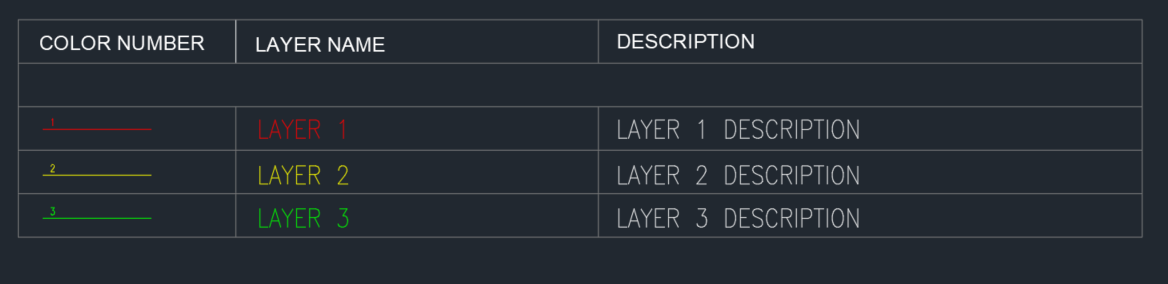
I used THIS lisp by @pBe to create the layers from excel table. However, I need to create a table inside AutoCAD. Not an AutoCAD table but table consisting of lines and text. Currently I'm doing this manually and I think this can be automated since all the info are already inside. It Will be something like the image below. The Line in the first column resides on it's Layer Name and the number above the Line is the Layer Color. The Layer descriptions are already in the layer manager as well. I attached the file as reference. TEST.dwg
-
 jongbum kim joined the community
 -
“Hi everyone, I want to convert a PDF file to a ZWCAD (DWG) file. Is there any good conversion tool for converting PDF to DWG? I already tried the PDF conversion option in ZWCAD, but the result was not accurate.” FILE.pdf
-

zwcad SHX Text Not Editable in PDF
CHAKRADHAR replied to CHAKRADHAR's topic in AutoCAD Drawing Management & Output
TQ -
Sorry to resurrect this thread. This worked for me. Thanks a lot. Possible to add Layer Description?
-
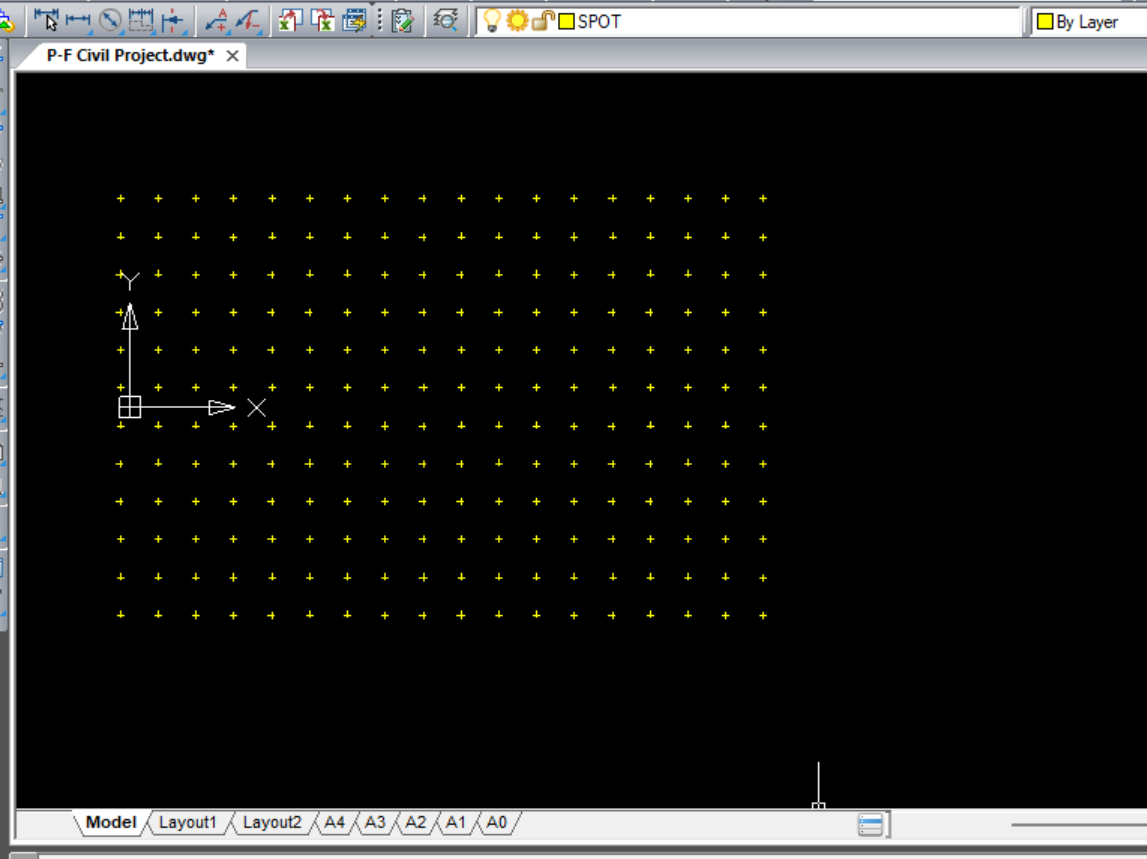
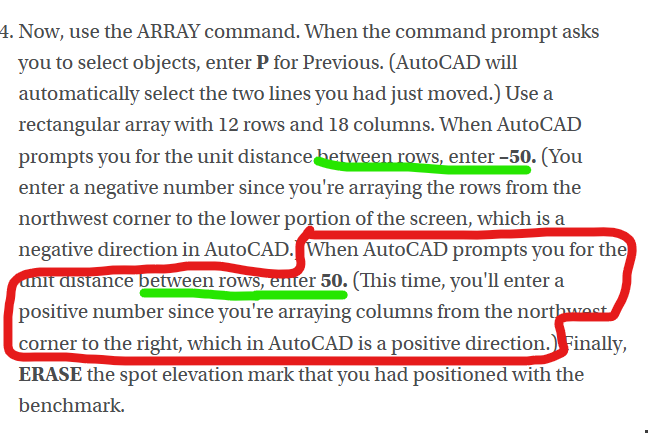
Ok, I'm just starting the civil project and I didn't make it past direction 4 without realizing this makes ZERO sense. 1. Create a layer, Spot (color yellow, linetype continuous), on which to draw the elevation values. 2. Create an X using two intersecting lines, each 10 feet long, on the layer Spot. The lines should intersect at their midpoints. 3. Move the lines from the intersection of the lines (using the Osnap) to the center of the benchmark (again using the Osnap). 4. Now, use the ARRAY command. When the command prompt asks you to select objects, enter P for Previous. (AutoCAD will automatically select the two lines you had just moved.) Use a rectangular array with 12 rows and 18 columns. When AutoCAD prompts you for the unit distance between rows, enter –50. (You enter a negative number since you're arraying the rows from the northwest corner to the lower portion of the screen, which is a negative direction in AutoCAD.) When AutoCAD prompts you for the unit distance between rows, enter 50. (This time, you'll enter a positive number since you're arraying columns from the northwest corner to the right, which in AutoCAD is a positive direction.) Finally, ERASE the spot elevation mark that you had positioned with the benchmark. 5. Create a text style named SPOT-TEXT. Select ROMANS as the font and use a height of 6″ and a width factor of 0.8. While still in layer Spot, use the DTEXT command, and type XXX alongside the spot elevation mark in the lower-left corner of the screen. Now, use the ARRAY command again to copy the XXX alongside the rest of the spot elevations. 6. The Spot Elevations table lists the spot elevations in rows, beginning with the northernmost row at BM 312 and reading from left to right. Double-click on the text to change the XXX for each spot to the appropriate elevation listed in the table. The rest of it is a pain to put on here but anyone whos ever opened excel knows that "Columns" go up and down, "Rows" go left and right. So there are many different ways this could come out with these confusing. Im not even sure how to proceed here....
- Yesterday
-

Segment Copy of a Region (cleaning request)
ScottMC replied to ScottMC's topic in AutoLISP, Visual LISP & DCL
Got to my original desire.. to enable access to region coords/osnaps though gonna tweak/twist to enable transparency. Thanks much mhupp for code enabling functionality! <any other training affordable!> (defun c:prv (/ *error* ss ss1 cec doc lastent html p) ;; AI.. https://www.google.com/search?q=copy+region+edge+segment%2C+autolisp&client=firefox-b-1-e&hs=LJSp&sca_esv=28d160b4388e87a1&biw=1143&bih=530&ei=t2enadf8OfXIp84PyJ69kA8&ved=0ahUKEwiXtPqy6oSTAxV15MkDHUhPD_I4ChDh1QMIEQ&uact=5&oq=copy+region+edge+segment%2C+autolisp&gs_lp=Egxnd3Mtd2l6LXNlcnAiImNvcHkgcmVnaW9uIGVkZ2Ugc2VnbWVudCwgYXV0b2xpc3AyCBAAGIAEGKIEMgUQABjvBTIFEAAY7wUyBRAAGO8FMgUQABjvBUjeM1C3D1iRLnABeACQAQCYAYgIoAHMC6oBBzAuNC43LTG4AQPIAQD4AQGYAgagApcNwgIIEAAYsAMY7wXCAgoQIRigARjDBBgKmAMAiAYBkAYFkgcHMS40LjYtMaAH0BCyBwcwLjQuNi0xuAffDMIHBzItMS4zLjLIB2uACAA&sclient=gws-wiz-serp (princ "\nPOints on Region Segment Vertex..(M) <oops> ") ;; https://www.cadtutor.net/forum/topic/99013-segment-copy-of-a-region-cleaning-request/#findComment-678508 ;; ESC cancels leaving lines <under region/ RT.CLK erases/cleans segments made/used (setvar 'cmdecho 0) (vl-load-com) ;; (defun *error* ( msg ) (setvar 'cmdecho 0) ;; 5.28.24 (vla-endundomark (vla-get-activedocument (vlax-get-acad-object))) (if msg (prompt (strcat "\n" msg))) (if (= fin 1) (command "_.pasteclip" "0,0,0")) ;; restores region if incomplete (setvar 'cecolor "bylayer") ;; ch copied to bylayer (setvar 'nomutt 0) (setvar 'cmdecho 1) (princ) ) ;;//------ BIGAL ----;; https://www.cadtutor.net/forum/topic/24751-timing/#findComment-199009 (defun ddelay (d / cd);;; (ddelay 1e-6) = 1 Second (setq cd (getvar "CDATE")) (while (> (+ cd d) (getvar "CDATE"))) ) (defun ftp () ;; uses 'p for coords (princ (setq pp ;; make/prints coords & paste usable (strcat (rtos (car p) 2 4) "," (rtos (cadr p) 2 4) "," (rtos (caddr p) 2 4) ) ) ) ) (setq fin 1) ;; set for *error* region restore if crash/bad.stop (setq cec (getvar 'cecolor)) ;; save color to restore to (setvar 'nomutt 1) ;; bypass ssget 'select prompt (if (setq ss (ssget ":S" '((0 . "REGION")))) ;; select 1 region for osnap/coords (progn (command "_.copybase" "0,0,0" ss "") ;; copy region to clipbrd (command "chprop" ss "" "c" 142 "") ;; change seg's color (setq LastEnt (entlast)) ;; ;;; !!!!!!!!!!!!!!!! ;; mhupp A1 to make exploded region (setq doc (vla-get-ActiveDocument (vlax-get-acad-object))) (command "_.explode" ss) ;; make segs accessable, saved in 'ss to erase (setq SS1 (ssadd)) ;; create a blank selection set or add to an existing one., saved in 'SS1 to erase (while (setq LastEnt (entnext LastEnt)) ;; (ssadd LastEnt SS1) ;; ) (princ "\nSelect Vertex(s) to add POint: <no.resist> ") (initget 1) ) ;; end of progn ) ;; end of if (while ;; pick points loop <cancel to end picking> (setq p (getpoint)) (entmakex (list (cons 0 "POINT") (cons 10 p))) ;; clean point (princ "\n") (ftp) ;; post coords ) (setvar 'nomutt 0) (sssetfirst nil ss1) ;;temp entity highlight (redraw) ;; <- usually required to show.. (ddelay 4e-7); ;; seems to allow 'short.times' <larger #'s = longer> BIGAL (sssetfirst nil nil) ;; <--- deselect above 'sssetfirst' (command "_.erase" ss "") ;; region copied/erasure (command "_.erase" ss1 "") ;; erases exploded region (command "chprop" "_L" "" "c" "bylayer" "") ;; ch copied to bylayer (command "_.pasteclip" "0,0,0") ;; re.place original region ? <- safe.r way ?? (setq fin nil) ;; reset if complete (princ "\nCleaned.Up ") (setvar 'cecolor "bylayer") ;; ch current color to bylayer (setvar 'nomutt 0) (setvar 'cmdecho 1) (*error* nil) (princ) ) -
 mnpbalda joined the community
 -
Using ACAD 2010. All drafting is done in model space. Individual drawings are set up in paperspace. When I go to the first tab in paperspace, I put my engineers seal/signature on the finished drawing. I then CTRL-C my engineers seal/signature and go to the next tab and CTRL-V my engineers seal/signature on that drawing. Every time I go to a new tab, I have to purge the drawing because there will be hundreds of blocks in the drawing called *A#####. If I do not purge the drawing at every tab, I can CTRL-V my engineers seal/signature onto maybe 2-3 tabs then my computer runs out of memory. I them have to purge the drawing, save it, close it and reopen it. This only happens when I am inserting an object into paperspace. I can work with the drawing for a week and I never get all these *A#### blocks. But as soon as I insert my seal/signature in paperspace I get all these #A#### blocks. FYI, my seal block is 54kB and my signature block is 84kB. It is irritating having to purge the drawing everytime I switch to a new tab .Any suggestions.
-
Civil_Drafting_Project_AutoCAD_Files.zip
-
 cyhn19 joined the community
 -
TitleBlock.dwg
-
Segment Copy of a Region (cleaning request)
ScottMC replied to ScottMC's topic in AutoLISP, Visual LISP & DCL
(defun c:crs (/ *error* _StartUndo _EndUndo ss ss1) ;; AI.. https://www.google.com/search?q=copy+region+edge+segment%2C+autolisp&client=firefox-b-1-e&hs=LJSp&sca_esv=28d160b4388e87a1&biw=1143&bih=530&ei=t2enadf8OfXIp84PyJ69kA8&ved=0ahUKEwiXtPqy6oSTAxV15MkDHUhPD_I4ChDh1QMIEQ&uact=5&oq=copy+region+edge+segment%2C+autolisp&gs_lp=Egxnd3Mtd2l6LXNlcnAiImNvcHkgcmVnaW9uIGVkZ2Ugc2VnbWVudCwgYXV0b2xpc3AyCBAAGIAEGKIEMgUQABjvBTIFEAAY7wUyBRAAGO8FMgUQABjvBUjeM1C3D1iRLnABeACQAQCYAYgIoAHMC6oBBzAuNC43LTG4AQPIAQD4AQGYAgagApcNwgIIEAAYsAMY7wXCAgoQIRigARjDBBgKmAMAiAYBkAYFkgcHMS40LjYtMaAH0BCyBwcwLjQuNi0xuAffDMIHBzItMS4zLjLIB2uACAA&sclient=gws-wiz-serp (princ "\nSelect Region to Copy Edge From: <oops> ") ;; micro altered.. ;; https://www.cadtutor.net/forum/topic/99013-segment-copy-of-a-region-cleaning-request/#findComment-678508 (setvar 'cmdecho 0) (defun *error* ( msg ) (setvar 'cmdecho 0) ;; 5.28.24 (vla-endundomark (vla-get-activedocument (vlax-get-acad-object))) (if msg (prompt (strcat "\n" msg))) (setvar 'nomutt 0) (setvar 'cmdecho 1) (princ) ) (defun _StartUndo ( doc ) (_EndUndo doc) (vla-StartUndoMark doc) ) (defun _EndUndo ( doc ) (if (= 8 (logand 8 (getvar 'UNDOCTL))) (vla-EndUndoMark doc) ) (princ "\r") ;; added to merge final info/cmd-line ) (setvar 'nomutt 1) ;; bypass ssget 'select prompt (if (setq ss (ssget ":S" '((0 . "REGION")))) (progn (command "_.copybase" "0,0,0" ss "") ;; copy region to clipbrd (command "chprop" ss "" "c" 252 "") ;; change color (setq LastEnt (entlast)) ;; ;;; !!!!!!!!!!!!!!!! (_StartUndo doc) (setq doc (vla-get-ActiveDocument (vlax-get-acad-object))) (command "_.explode" ss) ;; make segs accessable, saved in 'ss to erase (setq SS1 (ssadd)) ;; create a blank selection set or add to an existing one., saved in 'SS1 to erase (while (setq LastEnt (entnext LastEnt)) (ssadd LastEnt SS1) ) (princ "\nSelect Region Segment to Copy ") (initget 1) (command "_.copy" (ssget ":S")) ;; select segment (setvar 'nomutt 1) (princ "\nSpecify Basepoint: ") (command "" "\\") (princ "\nSpecify Destination: ") (command "\\") ;; +move (setvar 'nomutt 0) (command "_.erase" ss "") ;; region copied/erasure (command "_.erase" ss1 "") ;; erases exploded region (_EndUndo doc) ; (princ "\nSelect Items to Remove..") ;; <- my only known method \ ; \ ; (command "_.erase" "w" "\\" "\\" "") ;; <- manual erase :( -- solved!!! ; / ;; ... SEEING AS MY AUTOLISP EXPERIENCE SUCKS .. / ;; how can the eXploded region / lines etc, be ERASED/selected ? / ;; how to: make a selection set? / (command "chprop" "_L" "" "c" "bylayer" "") ;; ch copied to bylayer ) ;; end of progn ;;(c:crs) ) ;; end of if (command "_.pasteclip" "0,0,0") ;; re.place original region (setvar 'nomutt 0) (setvar 'cmdecho 1) (*error* nil) (princ) ) Only oops is when I rt.clk after selecting region .. tried 'initget 1 but no fixy just so glad this works. Thanks again Mr. mhupp -
 maspiers joined the community
 -

Segment Copy of a Region (cleaning request)
marko_ribar replied to ScottMC's topic in AutoLISP, Visual LISP & DCL
I tested it under AutoCAD 2022 and BricsCAD V26 and it worked well and with arced segments... Do you receive some error messages? -

Blank DWG with a large file size...
CyberAngel replied to lamensterms's topic in AutoCAD Drawing Management & Output
Then again, if people are still having the same problem, or proposing new solutions, is the issue really closed? There are bugs in AutoCAD still there since I started using it, and that's a long time. -
Segment Copy of a Region (cleaning request)
ScottMC replied to ScottMC's topic in AutoLISP, Visual LISP & DCL
Marco, when'd u write that? let me try it... seems to refuse arc segs but do like your select style -
Segment Copy of a Region (cleaning request)
ScottMC replied to ScottMC's topic in AutoLISP, Visual LISP & DCL
PURRRFECT! Thanks so much 'mhupp This gets me all.the.more excited to learn more! -
Segment Copy of a Region (cleaning request)
marko_ribar replied to ScottMC's topic in AutoLISP, Visual LISP & DCL
If I understood you correctly, you are searching to something like this... (defun c:copy_reg_edg ( / *error* car-sort osm cmd pt ptt regpt reg x el ell edg edgs ss m ) (or (not (vl-catch-all-error-p (vl-catch-all-apply (function vlax-get-acad-object) nil))) (vl-load-com)) (defun *error* ( m ) (if osm (setvar (quote osmode) osm) ) (if cmd (setvar (quote cmdecho) cmd) ) (if m (prompt (strcat "\n" m)) ) (princ) ) (defun car-sort ( lst fun / r ) (setq r (car lst)) (foreach itm (cdr lst) (if (apply fun (list itm r)) (setq r itm) ) ) r ) (setq osm (getvar (quote osmode))) (setvar (quote osmode) 3) (setq cmd (getvar (quote cmdecho))) (setvar (quote cmdecho) 0) (if (and (not (initget 1)) (setq pt (getpoint "\nPick edge of region to copy - you may use any OSNAP option; hover cursor over segment mid, or end point to see active OSNAP - <end,mid>... : ")) (setq regpt (nentselp pt)) (setq reg (car regpt)) (= (cdr (assoc 0 (setq x (entget reg)))) "REGION") (/= 4 (logand 4 (cdr (assoc 70 (tblsearch "LAYER" (cdr (assoc 8 x)))))))) (progn (setq ptt (trans pt 1 0)) (setq el (entlast)) (vla-explode (vlax-ename->vla-object reg)) (while (setq el (entnext el)) (setq ell (cons el ell)) ) (if (not (equal pt (osnap pt "_end"))) (progn (setq edg (car-sort ell (function (lambda ( a b ) (< (distance ptt (vlax-curve-getclosestpointto a ptt)) (distance ptt (vlax-curve-getclosestpointto b ptt))))))) (foreach el ell (if (not (eq el edg)) (entdel el) ) ) (vl-cmdf "_.move" edg "" "_non" (trans ptt 0 1) "\\") ) (progn (setq ell (vl-sort ell (function (lambda ( a b ) (< (distance ptt (vlax-curve-getclosestpointto a ptt)) (distance ptt (vlax-curve-getclosestpointto b ptt))))))) (setq edgs (list (car ell) (cadr ell))) (foreach el (cddr ell) (entdel el) ) (setq ss (ssadd)) (ssadd (car edgs) ss) (ssadd (cadr edgs) ss) (vl-cmdf "_.move" ss "" "_non" (trans ptt 0 1) "\\") ) ) ) (setq m "Missed, or picked wrong entity type - you must pick REGION entity on unlocked Layer... Better luck next time...") ) (*error* (if m m)) ) -

Segment Copy of a Region (cleaning request)
mhupp replied to ScottMC's topic in AutoLISP, Visual LISP & DCL
not sure what your trying to do. you can set entlast before the explode then add all the entities into the selection set. (setq LastEnt (entlast)) (command "_.explode" ss) (setq SS1 (ssadd)) ;create a blank selection set or add to an existing one. (while (setq LastEnt (entnext LastEnt)) (ssadd LastEnt SS1) ) -
Question in code.. (defun c:CopyRegionEdge (/ ss) ;; AI.. https://www.google.com/search?q=copy+region+edge+segment%2C+autolisp&client=firefox-b-1-e&hs=LJSp&sca_esv=28d160b4388e87a1&biw=1143&bih=530&ei=t2enadf8OfXIp84PyJ69kA8&ved=0ahUKEwiXtPqy6oSTAxV15MkDHUhPD_I4ChDh1QMIEQ&uact=5&oq=copy+region+edge+segment%2C+autolisp&gs_lp=Egxnd3Mtd2l6LXNlcnAiImNvcHkgcmVnaW9uIGVkZ2Ugc2VnbWVudCwgYXV0b2xpc3AyCBAAGIAEGKIEMgUQABjvBTIFEAAY7wUyBRAAGO8FMgUQABjvBUjeM1C3D1iRLnABeACQAQCYAYgIoAHMC6oBBzAuNC43LTG4AQPIAQD4AQGYAgagApcNwgIIEAAYsAMY7wXCAgoQIRigARjDBBgKmAMAiAYBkAYFkgcHMS40LjYtMaAH0BCyBwcwLjQuNi0xuAffDMIHBzItMS4zLjLIB2uACAA&sclient=gws-wiz-serp ;; micro altered.. (princ "\nSelect Region to Copy Edge From: ") (setvar 'cmdecho 0) (if (setq ss (ssget ":S" '((0 . "REGION")))) (progn (command "_.copybase" "0,0,0" ss "") ;; copy region to clipbrd (command "chprop" ss "" "c" 252 "") ;; change color ;;; ??????????? (command "_.explode" ss) ;; make segs accessable <not a selection set> (princ "\nSelect Region Seg to Copy ") (command "_.copy" (ssget ":S") "" "\\" "\\") ;; select seg +copy +move (command "_.erase" ss "") (princ "\nSelect Items to Remove..") ;; <- my only known method (command "_.erase" "w" "\\" "\\" "") ;; <- manual erase :( ;; ... SEEING AS MY AUTOLISP EXPERIENCE SUCKS .. ;; how can the eXploded region / lines etc, be ERASED/selected ? ;; how to: make a selection set? (command "chprop" "_L" "" "c" "bylayer" "") ;; ch copied to bylayer ) ) (command "_.pasteclip" "0,0,0") ;; re.place original region (setvar 'cmdecho 1) (princ) )
- Last week
-

The pound sign wobbles textreplacer
Steven P replied to bustr's topic in AutoLISP, Visual LISP & DCL
This is what I use, I think the root LISP is the same as the OPs, over time I have added to it: txtfindreplace ;https://forums.autodesk.com/t5/visual-lisp-autolisp-and-general/find-and-replace-text/td-p/5649883 (defun FindReplace (Str$ Find$ Replace$ / Cnt# FindLen# Loop Mid$ NewStr$ ReplaceLen# acount) (setq Loop t Cnt# 1 NewStr$ Str$ FindLen# (strlen Find$) ReplaceLen# (strlen Replace$) ) (setq acount 0) (while Loop (setq Mid$ (substr NewStr$ Cnt# FindLen#)) (if (= Mid$ Find$) (progn (setq acount (+ acount 1)) (setq NewStr$ (strcat (substr NewStr$ 1 (1- Cnt#)) Replace$ (substr NewStr$ (+ Cnt# FindLen#))) Cnt# (+ Cnt# ReplaceLen#) );setq );end progn (setq Cnt# (1+ Cnt#)) );if (if (= Mid$ "") (setq Loop nil)) );while (list NewStr$ acount) );defun FindReplace (defun FindReplaceNew (Find$ Replace$ / SS acounter acount ent1 entlist1 entcodes1 EntType Text$ text01 ReplaceWith$ FoundReplaced NewTxt MyBlockEntList BlockCounter ) ;;;Sub Routines ;;;; ;;;;;;;;;;;;;;;;;;;; ;;https://forums.autodesk.com/t5/visual-lisp-autolisp-and-general/get-entities-inside-a-block/td-p/2644829 (defun getblkitems ( EntName / sel items) ;;Blocks: (setq nfo (entget EntName)) (progn (vlax-for item (vla-item (vla-get-blocks (vla-get-activedocument (vlax-get-acad-object) ) ) (cdr (assoc 2 nfo)) ) (setq items (cons (vlax-vla-object->ename item) items)) ) ;end vlax ) ; end progn ) ;end defun (defun updateblock ( EntType ent1 entlist1 acount Find$ Replace$ / MyBlockEntList BlockCounter EntType2 ent2 entlist2 ) (if (= EntType "INSERT") (progn ;;Updates block texts & block blocks (setq MyBlockEntList (getblkitems ent1) ) (setq BlockCounter 0) (while (< BlockCounter (length MyBlockEntList)) (setq ent2 (nth BlockCounter MyBlockEntList)) (setq entlist2 (entget ent2)) (setq EntType2 (cdr (assoc 0 entlist2)) ) ;;Attrributes (setq acount (updateattribvalues EntType ent1 entlist1 acount Find$ Replace$)) ;;Texts (if (or (= EntType2 "TEXT")(= EntType2 "MTEXT")(= EntType2 "MULTILEADER")) ;;attributes? (setq acount (updatetext EntType2 ent2 entlist2 acount Find$ Replace$)) ); end if ;;Changes Dimensions (if (or (= EntType2 "DIMENSION") ) (if (= (cdr (assoc 1 entlist2)) "") ;;if has text over ride () (progn (setq acount (updatetext EntType2 ent2 entlist2 acount Find$ Replace$)) ;;same as text -if- ent code 4 used (command ".-refedit" (cdr (assoc 10 entlist1)) "ok" "all" "yes") ;;update block definition (command "refclose" "s") );end progn ) ;end if ); end if (if (= EntType2 "ACAD_TABLE") (setq acount (UpdateTable EntType2 ent2 entlist2 acount Find$ Replace$)) );end if (if (= EntType2 "INSERT") ;;Blocks (setq acount (updateblock EntType2 ent2 entlist2 acount Find$ Replace$)) );end if (setq BlockCounter (+ BlockCounter 1)) ) ; end while );end progn );end if acount ) ;;End Blocks ;;;;;;;;;;;;;;;;;;;; (defun updateattribvalues (EntType ent1 entlist1 acount Find$ Replace$ / ) (setq EntName^ ent1 EntList@ entlist1 EntType$ EntType Text$ (cdr (assoc 1 EntList@)) );setq (if (= EntType$ "INSERT") (if (assoc 66 EntList@) (progn (while (/= (cdr (assoc 0 EntList@)) "SEQEND") (setq EntList@ (entget EntName^)) (if (= (cdr (assoc 0 EntList@)) "ATTRIB") (progn (setq Text$ (cdr (assoc 1 EntList@))) (if (wcmatch Text$ (strcat "*" Find$ "*")) (progn (setq FoundReplaced (FindReplace Text$ Find$ Replace$)) (setq ReplaceWith$ (nth 0 FoundReplaced)) (setq acount (+ acount (nth 1 FoundReplaced))) (entmod (subst (cons 1 ReplaceWith$) (assoc 1 EntList@) EntList@)) (entupd EntName^) );progn );if );progn );end if attrib (setq EntName^ (entnext EntName^)) );while );progn );if );if acount ) ;end defun ;;;;;;;;;;;;;;;;;;;; (defun updatetext (EntType ent1 entlist1 acount Find$ Replace$ / entcodes1 FoundReplaced NewTxt) (progn (setq entcodes1 (gettextdxfcodes entlist1) ) ;list of ent codes containing text. (setq text01 (gettextasstring ent1 entcodes1) ) ;Text as string (if (= text01 nil) () (progn (setq FoundReplaced (FindReplace text01 Find$ Replace$)) (setq NewTxt (nth 0 FoundReplaced)) (setq acount (+ acount (nth 1 FoundReplaced))) (addinnewtext NewTxt entlist1 ent1) )) ;end progn, end if ) ; end progn acount ) ;;;;;;;;;;;;;;;;;;;; (defun UpdateTable ( EntType ent1 entlist1 acount Find$ Replace$ / text01 Newentlist1 counter) (setq counter 0) (setq Newentlist1 '()) (while (< counter (length entlist1)) (if (or (= (nth 0 (nth counter entlist1)) 1)(= (nth 0 (nth counter entlist1)) 302) ) (progn (setq text01 (cdr (nth counter entlist1))) (setq FoundReplaced (FindReplace text01 Find$ Replace$)) (setq NewTxt (nth 0 FoundReplaced)) (setq acount (+ acount (nth 1 FoundReplaced))) (setq text01 NewTxt) (setq Newentlist1 (append Newentlist1 (list (cons (nth 0 (nth counter entlist1)) text01)))) ) ;end progn (setq Newentlist1 (append Newentlist1 (list (nth counter entlist1)))) ;;ignore entity item ) ;end if (setq counter (+ counter 1)) ) ;end while (setq entlist1 Newentlist1) (entmod entlist1) (entupd ent1) acount ) ;;;;;;;;;;;;;;;;;;;;;;;;;;;;;;;;;;;;;;;; ;;end subroutines 'findreplace' (setq acount 0) (setq acounter 0) (command "UNDO" "BEGIN") (setq SS (ssget "x" (list '(-4 . "<AND") '(-4 . "<OR") '(0 . "*TEXT") '(0 . "INSERT") '(0 . "ATTDEF") '(0 . "ATTRIB") '(0 . "DIMENSION") '(0 . "*LEADER") '(0 . "POSITIONMARKER") '(0 . "*TABLE") '(-4 . "OR>") (cons 410 (getvar "CTAB")) '(-4 . "AND>") ))) ; end setq, end ss, end list ;;;FILTER SS to text string (while (< acounter (sslength SS)) (setq ent1 (ssname SS acounter)) (setq entlist1 (entget ent1)) (setq EntType (cdr (assoc 0 entlist1)) ) (setq Text$ (cdr (assoc 1 entlist1)) ) ;;change this line to get all texts inc. long texts etc. ;;Changes Attribute Values - In Blocks (setq acount (updateattribvalues EntType ent1 entlist1 acount Find$ Replace$)) ;;Changes Block Texts (if (= EntType "INSERT") (setq acount (updateblock EntType ent1 entlist1 acount Find$ Replace$)) );end if ;;Changes Texts (if (or (= EntType "MTEXT")(= EntType "TEXT") (= EntType "MULTILEADER") (= EntType "POSITIONMARKER") ) (setq acount (updatetext EntType ent1 entlist1 acount Find$ Replace$)) ); end if (if (or (= EntType "DIMENSION") ) (if (= (cdr (assoc 1 entlist1)) "") ;;if has text over ride () (setq acount (updatetext EntType ent1 entlist1 acount Find$ Replace$)) ;;same as text -if- ent code 4 used ) ); end if (if (or (= EntType "ATTDEF")(= EntType "ATTRIB") ) (progn (setq ent2 (entget ent1)) (setq AttText (cdr (assoc 2 ent2))) (setq FoundReplaced (FindReplace AttText Find$ Replace$)) (setq NewTxt (nth 0 FoundReplaced)) (setq acount (+ acount (nth 1 FoundReplaced))) (setq newval Replace$) (entmod (subst (cons 2 NewTxt) (assoc 2 ent2) ent2)) (entupd ent1) );end progn ); end if (if (= EntType "ACAD_TABLE") (setq acount (UpdateTable EntType ent1 entlist1 acount Find$ Replace$)) );end if (setq acounter (+ 1 acounter)) ) ; end while (command "REGEN") (command "UNDO" "END") acount );defun FindReplaceNew (defun c:txtFindReplace( / old_text new_text) (setq old_text (getstring T "OLD Text to replace (replace in this model/paper space and text case as entered): ")) (setq new_text (getstring T "NEW Text: ")) (princ "Changes: ") (princ (FindReplaceNew old_text new_text) ) (princ) ) -
I tried this as a test, so finds the #1234 text. It will find 123#456 also. But the lisp as suggested by @Steven P should cater for that. (setq ss (ssget "X" (list (cons 0 "*text")(cons 1 "*#*")))) (princ (sslength ss)) 12
-
The pound sign wobbles textreplacer
Steven P replied to bustr's topic in AutoLISP, Visual LISP & DCL
For example I use a LISP find/replace if I don't want a dialogue box for example in a batch process. -

Node of Arc Length Dimension
BIGAL replied to dickeychan's topic in AutoCAD 2D Drafting, Object Properties & Interface
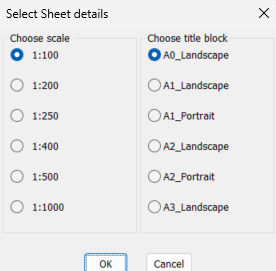
Welcome to Cadtutor. You can draw a rectang that represents your viewport for a given scale matching a known title block. It is a lisp program. Just pick a point in model space, the rectang can be moved and/or rotated, part 2 is make a matching layout. So can see the dim problem and make some choices. Just ask if sounds helpful.