All Activity
- Today
-
 yentse12 joined the community
 -

Perform an OUTSIDE offset for several rectangles
Nikon replied to Nikon's topic in AutoLISP, Visual LISP & DCL
@GLAVCVS "So that it only offsets outwards, for example, like this" I figured out what the problem was. Both codes are not working correctly with my bindings (osmode 183). With bindings disabled (osmode 0), the codes work perfectly. Thanks! (defun c:RectOffBatchOsm0-out (/ selset dist i ent pts offsetpt a70 es l le p1 p2 a midP osmode-prev) (prompt " Select rectangles (polylines): ") (setq selset (ssget '((0 . "*POLYLINE")))) (vl-cmdf "_.CONVERTPOLY" "_Light" selset "") (if selset (progn (setq osmode-prev (getvar "OSMODE")) (setvar "OSMODE" 0) (setq dist (getdist " Enter the offset distance: ") i 0) (repeat (sslength selset) (setq ent (ssname selset i)) (setq pts (mapcar 'cdr (vl-remove-if-not '(lambda (x) (= (car x) 10)) (setq le (entget ent))))) (if (= (rem (cdr (setq a70 (assoc 70 le))) 2) 0) (entmod (subst (cons 70 (+ (cdr a70) 1)) a70 le))) (setq midP (mapcar '(lambda(v) (/ v (length pts))) (apply 'mapcar (cons '+ pts)))) (setq offsetpt (polar (car pts) (angle midP (car pts)) 0.01)) (command "_.OFFSET" dist ent offsetpt "") (setq i (1+ i)) ) (setvar "OSMODE" osmode-prev) ) ) (princ) ) -
 Lom73 joined the community
 -
 kevin_777 joined the community
 - Yesterday
-

Perform an OUTSIDE offset for several rectangles
GLAVCVS replied to Nikon's topic in AutoLISP, Visual LISP & DCL
So that it only offsets outwards, for example, like this (defun c:RectOffBatch (/ selset dist i ent pts offsetpt a70 es l le p1 p2 a midP) (prompt "\nSelect rectangles (polylines): ") (setq selset (ssget '((0 . "*POLYLINE")))) (vl-cmdf "_.CONVERTPOLY" "_Light" selset "") (if selset (progn (setq dist (getdist "\nEnter the offset distance: ") i 0) (repeat (sslength selset) (setq ent (ssname selset i)) (setq pts (mapcar 'cdr (vl-remove-if-not '(lambda (x) (= (car x) 10)) (setq le (entget ent))))) (if (= (rem (cdr (setq a70 (assoc 70 le))) 2) 0) (entmod (subst (cons 70 (+ (cdr a70) 1)) a70 le))) (setq midP (mapcar '(lambda(v) (/ v (length pts))) (apply 'mapcar (cons '+ pts)))) (setq offsetpt (polar (car pts) (angle midP (car pts)) 0.01)) (command "_.OFFSET" dist ent offsetpt "") (setq i (1+ i)) ) ) ) (princ) ) -

Perform an OUTSIDE offset for several rectangles
BIGAL replied to Nikon's topic in AutoLISP, Visual LISP & DCL
As I said I did some testing about method, just get your closed plines, then check there CW or CCW direction and change if needed. Then use (getvar 'extmax) as offset point.In code below I use pedit "R" as the Reverse command is not available in Bricscad. CCW is offset out for a positive value using VLA-Offset. ; Checking if pline is CW or CCW and set to CCW ; Orignal idea by Kent Cooper, 1 August 2018 Offsetinorout.lsp ; By Alan H July 2020 (defun AH:chkcwccw (ent / objnew area1 area2 obj minpoint maxpoint) (setq obj (vlax-ename->vla-object ent)) (vla-GetBoundingBox obj 'minpoint 'maxpoint) (setq pointmin (vlax-safearray->list minpoint)) (setq pointmax (vlax-safearray->list maxpoint)) (setq dist (/ (distance pointmin pointmax) 20.0)) (vla-offset obj dist) (setq objnew (vlax-ename->vla-object (entlast))) (setq area1 (vlax-get objnew 'Area)) (vla-delete objnew) (vla-offset obj (- dist)) (setq objnew (vlax-ename->vla-object (entlast))) (setq area2 (vlax-get objnew 'Area)) (vla-delete objnew) (if (> area1 area2) (command "Pedit" ent "R" "") ) (princ) ) -
Perform an OUTSIDE offset for several rectangles
GLAVCVS replied to Nikon's topic in AutoLISP, Visual LISP & DCL
I tested the code on your drawing and it works correctly. Perhaps you didn't use it correctly. Nikon1.mp4 -
 daldrich joined the community
 -
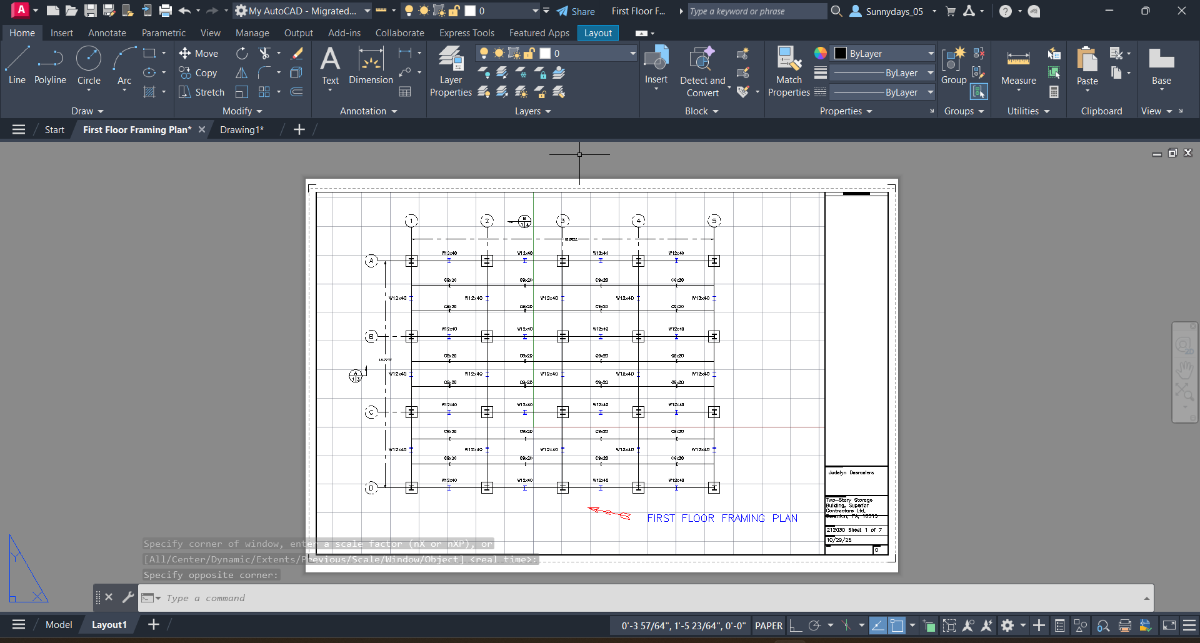
Sorry, the image is too small for me to see it clearly. Re: Grid. Looks like you enabled it again. Where was the title block and border drawn, model space or in your layout?
-
You should look at Lee Mac's Tutorials like Selection Mode Strings https://www.lee-mac.com/ssget.html for ssget options. For instance ssget "_:L" Rejects selection of objects residing on locked layers.
-
Does this look correct?

-

Perform an OUTSIDE offset for several rectangles
Steven P replied to Nikon's topic in AutoLISP, Visual LISP & DCL
(70 . 1) or (70 . 128) will filter a selection set for closed polyline - (70 . 1) is usually enough -
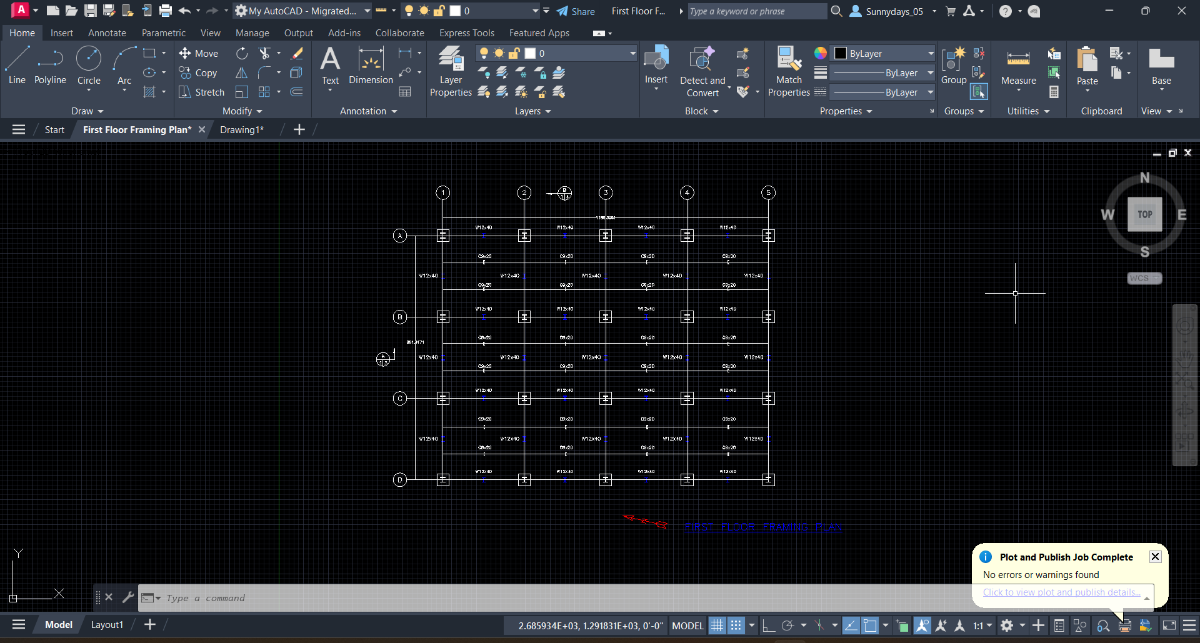
So now I'm working on plate 2, same project. I'm confused on how to start this drawing... Actually I'm gonna backtrack for a minute. The last part in the instructions for plate 1 say to go to the layout tab and plot the drawing at a scale that will result in a 24" x 36" landscape plot. I've already gotten my drawing to fit inside the boundary, I've just forgotten how to see if my title block is 24x36. And is there a way to remove the lines on the drawing? It's not the grid, I've turned that off already. This is what my finished plate one looks like in model and paper space.
-
Perform an OUTSIDE offset for several rectangles
Nikon replied to Nikon's topic in AutoLISP, Visual LISP & DCL
I don't think an example drawing is needed. If you draw a rectangle using the Rectangle command, it is always closed. If you draw a rectangle (or polygon) using the Polyline command, it can be closed or open. Manually checking each rectangle (or polygon) is not very convenient... Therefore, I just wanted to add a check of polylines to the code, and if they are not closed, then close them. Сlosed-Not closed.dwg -
Perform an OUTSIDE offset for several rectangles
GLAVCVS replied to Nikon's topic in AutoLISP, Visual LISP & DCL
As @Saxlle says, if you post an example drawing, everything will be easier. -
Perform an OUTSIDE offset for several rectangles
Nikon replied to Nikon's topic in AutoLISP, Visual LISP & DCL
@GLAVCVS Thank The displacement occurs, but incorrectly, some rectangles (polygons) are shifted inside, some outside. I would like not to specify the offset point, but to have the offset performed automatically - Outside. The polygons are not too irregular... Some rectangles (polygons) from polylines are not closed, so the offset does not work for them. Lee Mac's code performs the offset automatically, but does not work with unclosed rectangles (polygons). -
Perform an OUTSIDE offset for several rectangles
GLAVCVS replied to Nikon's topic in AutoLISP, Visual LISP & DCL
PS: 2D polylines do not support offset, so they need to be converted first. I haven't tested it extensively, but it should work for what you need. -
Perform an OUTSIDE offset for several rectangles
GLAVCVS replied to Nikon's topic in AutoLISP, Visual LISP & DCL
If the polygons aren't too irregular, using your own code, maybe this... (defun c:RectOffBatch (/ selset dist i ent pts maxpt offsetpt a70 es l le p1 p2 a) (prompt "\nSelect rectangles (polylines): ") (setq selset (ssget '((0 . "*POLYLINE")))) (vl-cmdf "_.CONVERTPOLY" "_Light" selset "") (if selset (progn (setq dist (getreal "\nEnter the offset distance or ENTER to indicate on screen: ")) (setq p1 (getpoint "\nPick on/near one of the rectangles to be offset...")) (if (and (setq es (car (nentselp p1))) (= (wcmatch (cdr (assoc 0 (entget es))) "LWP*"))) (progn (setq p2 (getpoint p1 "\nPoint to get direction (or distance) to offset: ")) (if (not dist) (setq dist (distance p1 p2))) (setq l (mapcar 'cdr (vl-remove-if-not '(lambda (x) (= (car x) 10)) (entget es)))) (setq midP (mapcar '(lambda(v) (/ v (length l))) (apply 'mapcar (cons '+ l)))) (setq a (if (> (distance p1 midP) (distance p2 midP)) 0 PI) i 0 ) (repeat (sslength selset) (setq ent (ssname selset i)) (setq pts (mapcar 'cdr (vl-remove-if-not '(lambda (x) (= (car x) 10)) (setq le (entget ent))))) (if (= (rem (cdr (setq a70 (assoc 70 le))) 2) 0) (entmod (subst (cons 70 (+ (cdr a70) 1)) a70 le))) (setq maxpt (list (apply 'max (mapcar 'car pts)) (apply 'max (mapcar 'cadr pts)))) (setq midP (mapcar '(lambda(v) (/ v (length pts))) (apply 'mapcar (cons '+ pts)))) (setq offsetpt (polar (car pts) (+ a (angle (car pts) midP)) 0.01)) (command "_.OFFSET" dist ent offsetpt "") (setq i (1+ i)) ) ) ) ) ) (princ) ) -
I've already helped, you obviously didn't read my post first. I finally posted the code. Even though I work too, I found the time to do it. Happy Epiphany Day
-
What they're talking about, I believe, is a matter of fairness. You ask for help but provide none in return. Most of us have other commitments, but we make time to teach and to help others. Not only that, learning a bit about AutoLISP will make your work easier and faster.
-
I'll this topic a "wrap" Thanks to all here! rlx: I also have worked at my last company of fifteen years within a very locked down IT environment. Here and now, I am free! One caveat here is that there are limitations in acquiring additional Microsoft tools i.e., Power Platform tools, etc. due to the complexity introduced from being a client of an widely known commercial web hosting service. Happy, happy, happy! Clint
-
Okay
-

Viewport Inset Generator
CivilTechSource replied to CivilTechSource's topic in AutoLISP, Visual LISP & DCL
@tombu Yes Lee Code is perfect, if you want to stop there. But I would like to take it a step further. @BIGAL This is a different approach that might just work perfectly! -
Perform an OUTSIDE offset for several rectangles
Nikon replied to Nikon's topic in AutoLISP, Visual LISP & DCL
Now we are talking not only about rectangles, but also polygons from LWPOLYLINE, POLYLINE. The problem is that the polygons from the LWPOLYLINE, POLYLINE must be closed. Lee Mac's OffInside.lsp code also allows offsets for CIRCLE, ARC, ELLIPSE, and SPLINE. -

Perform an OUTSIDE offset for several rectangles
Saxlle replied to Nikon's topic in AutoLISP, Visual LISP & DCL
Anything can be done, but it would be helpful if you could post an example drawing so we can see those rectangles. You can use Lee's code to perform that making a two solutions, one for inside (as it is in the example from Lee's post, and one to performe outside offset as Lee suggested). -
Perform an OUTSIDE offset for several rectangles
Nikon replied to Nikon's topic in AutoLISP, Visual LISP & DCL
@Lee Mac thank you, that's great! Is it possible to add a check for closing polylines to the code, and if they are not closed, close them? Is it possible to combine the two codes: OffInside.lsp и CloseLwPl.lsp? (defun c:CloseLwPl (/ ss i ent edata elist obj) (prompt "Select LWPOLYLINE: ") (setq ss (ssget '((0 . "LWPOLYLINE")))) (if ss (progn (setq i 0) (repeat (sslength ss) (setq ent (ssname ss i)) (setq edata (entget ent)) (setq elist (assoc 70 edata)) (if (not (and elist (= (logand (cdr elist) 1) 1))) (progn (entmod (subst (cons 70 (logior (cdr elist) 1)) elist edata)) (entupd ent) ) ) (setq i (1+ i)) ) ) ) (princ) ) -
 Cucu Setiawan joined the community
 -
 shirleydaf joined the community
 -
 o.oclilac joined the community
 -
Their IT department even has a slogan (and I'm not kidding here) : You name it , we block it
-
Yikes! Working with your arms tied.. No way I could work effectively without my tools, I would at least need autohotkey. Last company I worked for, I automated their whole system, mostly because I was lazy and I wanted to eat donuts all day. AutoCAD ships with .NET, nothing to install, I would be rolling some goodies for sure. “We At ACME corporation stifle innovation by making everyone think inside the box”
- Last week
-
Even if I wanted to use a different language I wouldn't be able because at my work I'm unable to install any software that's not supplied in our software center , also certain extensions like *.bat are a big freaking no no so my dragon claws are tied in that respect. But I can get vl-some satisfaction however whenever I can create something that at first glance seems impossible to do and then come up with something that actually works.