All Activity
- Past hour
-

Automating schedules, dates, etc. on the plot.
BIGAL replied to Discus84's topic in AutoCAD Drawing Management & Output
"Page 1 of 5" pretty sure Lee-mac has that covered. Yes uses fields. Do a Google. Where I worked had add on software so it would make layouts with blank title block so could edit one title block and copy all attribute values to the other title blocks a quick fill in. Others use the custom dwg properties again with fields. There is many update title block lisps out there to suit a particular task. -
Batch DWG to PDF plot LISP File
BIGAL replied to Chicane_Apex's topic in AutoLISP, Visual LISP & DCL
Just a comment over at Autodesk forum I posted some code to plot all dwg's in a certain directory to one pdf using publish. It has a bug though if the dwg's do not have the correct page setup saved, they don't plot. It uses OBDX to make the page setup but that is the point where I have a problem, setting the pagesetup to a known saved name. Still working on it. Using a script may be easier for the moment as can plot the pdf for each dwg then use via lisp Ghostscript to join them back into one. The only downfall is the script will open every dwg to process. I have the code for layouts into one pdf so will look at using a script in that code. The post at Autodesk wants only Model space plotted. The pdf's are located in a \PDF directory under the current dwg directory. - Today
-
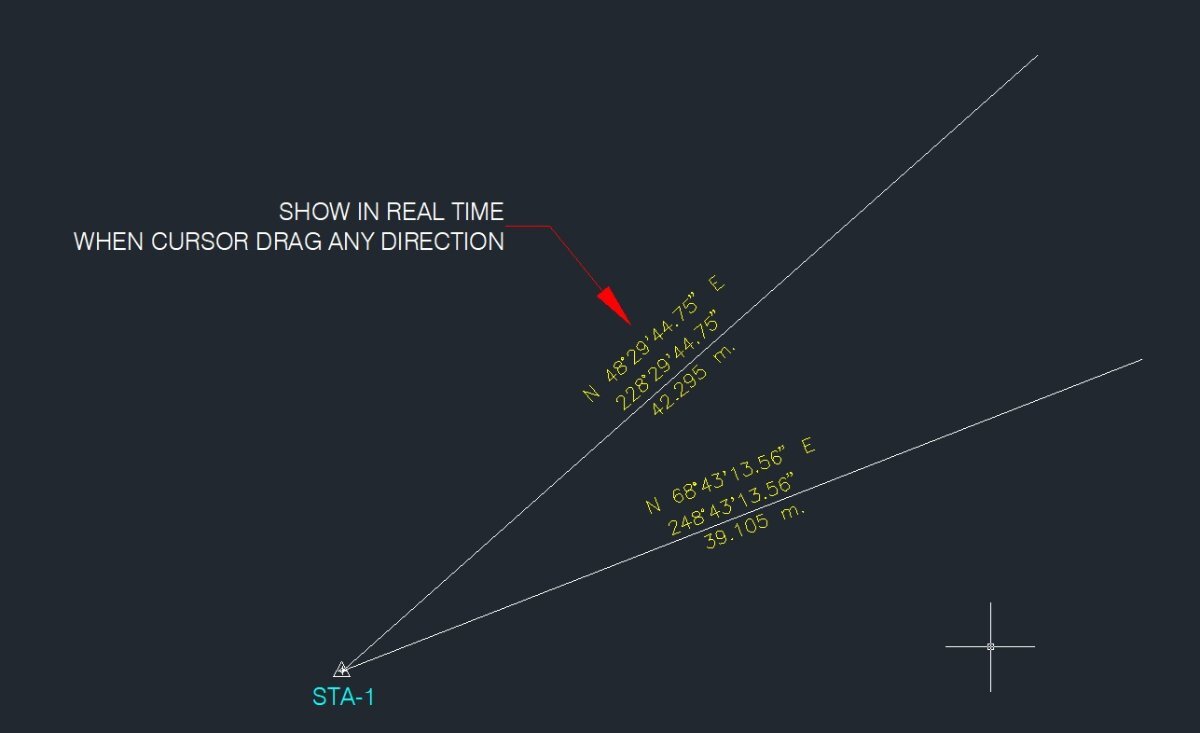
Nice idea, here in Aus the brg is 0-360 dddmmss, much easier than the S & E etc. Maybe be second version.
-

Revit 2026 - Cutting an irregular shape? (Void Form Extrusion)
ILoveMadoka replied to ILoveMadoka's topic in Autodesk Revit
Maybe the secret is trying it 10 times... I don't even know what I did differently..
-

Automating schedules, dates, etc. on the plot.
CyberAngel replied to Discus84's topic in AutoCAD Drawing Management & Output
Have you looked into fields? When you edit a text object, you can type Ctrl-F to bring up the fields dialog. Pick a category, such as Date & Time, and pick the data you want to insert. To match your example, choose Date and a format. That field will be inserted into the text, like any other characters, but highlighted and with the corresponding data. There are many more pieces of data you can use. Once you put fields into your template, you may never have to change a title block again. -
Revit 2026 - Cutting an irregular shape? (Void Form Extrusion)
ILoveMadoka posted a topic in Autodesk Revit
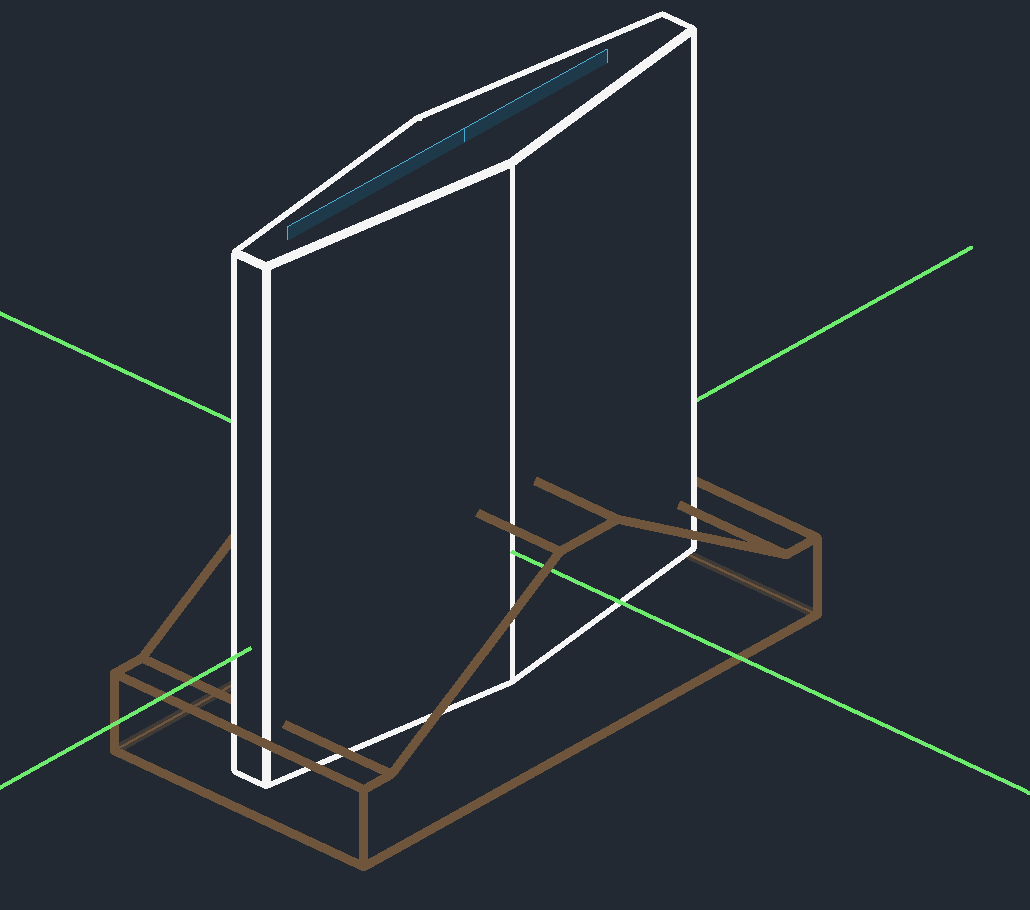
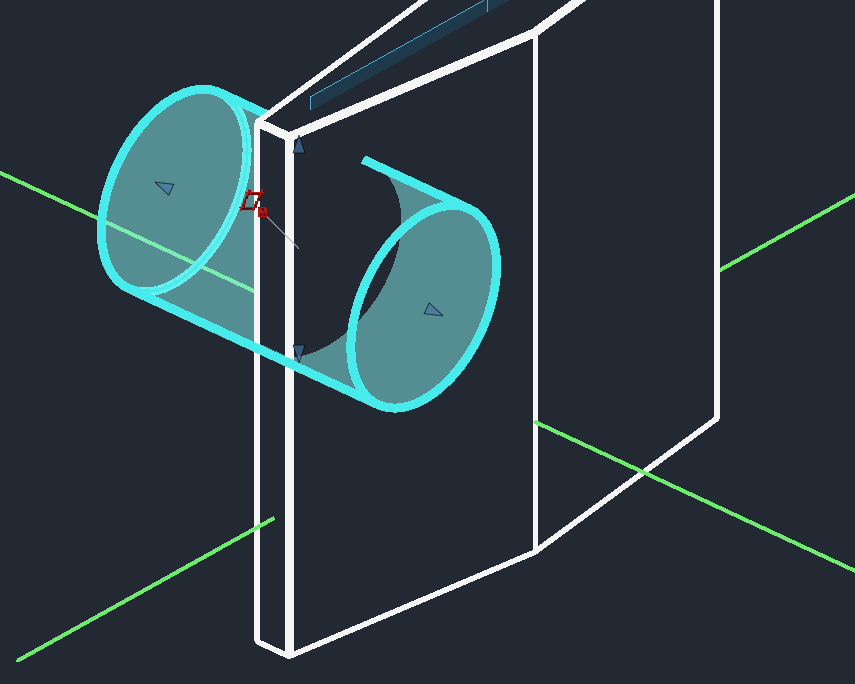
I am trying to make a cut to this diamond shape (shown) I have tried this from scratch two different times and cannot get the "cut" to work. You can see the face I used as a plane. Is there a magic trick I need to learn? fyi: Noob here... tried a different shape/sketch Simple cut on a simple shape works.. Sorry, I'm using "cut" because I'm a SW guy...
-
Illustrator couldn't get everything.... I want to try Inkscape but need to get "special permission" to have it installed....
-
 Micro Station is King joined the community
 -

Batch DWG to PDF plot LISP File
Steven P replied to Chicane_Apex's topic in AutoLISP, Visual LISP & DCL
BigAl loves his scripts and I suspect has one to copy and paste in here... though if you search this forum as well there are plenty of pdf and batch examples, just need to put them together. I have a PDF LISP (type in "plotPDF" and it creates a PDF in the drawings folder). Regardless what you are doing, typing 7 characters is a lot faster than the menu for PDF, select save folder and so on - so well worth finding one of these on the internet. As a side comment here set up a separate plotter for PDFs without the 'preview' check box - makes things better. The essence of the batch process is to create a script, saved as for example "MyScript.scr" (remember to set the file type to *.* so it saves right as a scr) Here is an example, copy, paste and change for each file you want to plot _.OPEN "YOUR_FILE_PATH_AND_FILE_NAME.dwg";;OPens the file (load "YOUR_PLOTTING_LISP_FILE_PATH_AND_FILE_NAME.lsp");;Loads the LISP (setvar "ctab" (nth 0 (layoutlist)));;Go to layout '0' (first layout in the layout list) (YOURPDFPLOTTINGLISP) (OR 'YOURPDFPLOTTINGLISP' );;do the plotting (if (= dbmod 0) (command ".close"));;if file not modified close (if (/= dbmod 0)(command ".close" "y"));;if file modified close and "OK to cancel changes" Then in a CAD file run the script We should one day find the time to make this nice, user friendly and a sticky thread the number of times this gets asked over the years... one day... -

Automating schedules, dates, etc. on the plot.
Discus84 posted a topic in AutoCAD Drawing Management & Output
Hi, Below is an example: how could this be automated, to get current date on the plot, automatically number the drawing and update the fields on this schedule instead of manually goig to each text block and typing?
-

Need a routine lisp for bearing & azimuth in realtime.
Tsuky replied to oliver's topic in AutoLISP, Visual LISP & DCL
A start with this? (vl-load-com) (defun c:label_bearing ( / l_var AcDoc Space nw_style nw_obj dxf_text pt1 pt2 dxf_line key pt alpha len_l m_pt val_txt) (setq l_var (mapcar 'getvar '("DIMZIN" "ANGDIR" "ANGBASE" "AUNITS" "AUPREC" "LUPREC" "LUNITS" "TEXTSIZE"))) (mapcar 'setvar '("DIMZIN" "ANGDIR" "ANGBASE" "AUNITS" "AUPREC" "LUPREC" "LUNITS") (list 0 1 (* pi 0.5) 4 3 2 2)) (setvar "TEXTSIZE" (* (getvar "VIEWSIZE") 0.015)) (setq AcDoc (vla-get-ActiveDocument (vlax-get-acad-object)) Space (if (= 1 (getvar "CVPORT")) (vla-get-PaperSpace AcDoc) (vla-get-ModelSpace AcDoc) ) ) (vla-startundomark AcDoc) (cond ((null (tblsearch "STYLE" "BEARING")) (setq nw_style (vla-add (vla-get-textstyles AcDoc) "BEARING")) (mapcar '(lambda (pr val) (vlax-put nw_style pr val) ) (list 'FontFile 'Height 'ObliqueAngle 'Width 'TextGenerationFlag) (list "romand.shx" 0.0 0.0 1.0 0.0) ) ) ) (setq nw_obj (vla-addMtext Space (vlax-3d-point '(0.0 0.0 0.0)) 0.0 "" ) dxf_text (entget (entlast)) ) (initget 1) (setq pt1 (getpoint "\nPick base point: ") pt2 pt1 ) (entmake (list (cons 0 "LINE") (cons 10 pt1) (cons 11 pt2))) (setq dxf_line (entget (entlast))) (while (equal pt2 pt1) (setq pt2 ((lambda ( / key pt alpha len_l m_pt) (princ "\nPick other point: ") (while (and (setq key (grread T 4 0)) (/= (car key) 3)) (cond ((eq (car key) 5) (redraw) (setq pt (cadr key) alpha (angle pt1 pt) len_l (distance pt1 pt) m_pt (mapcar '* (mapcar '+ pt1 pt) '(0.5 0.5 0.5)) val_txt (vl-string-subst "%%d" "d" (strcat (angtos alpha) "\\P " (rtos len_l) " m")) dxf_line (entmod (subst (cons 11 pt) (assoc 11 dxf_line) dxf_line ) ) ) (if (and (> alpha (* pi 0.5)) (<= alpha (* pi 1.5))) (setq alpha (+ alpha pi)) ) (mapcar '(lambda (pr val) (vlax-put nw_obj pr val) ) (list 'AttachmentPoint 'Height 'DrawingDirection 'InsertionPoint 'StyleName 'Layer 'Rotation 'TextString 'Color) (list 5 (getvar "TEXTSIZE") 5 m_pt "BEARING" (getvar "CLAYER") alpha val_txt 2) ) (entmod (subst (cons 50 alpha) (assoc 50 dxf_text) (subst (cons 10 (polar m_pt (+ alpha (* pi 0.5)) (getvar "TEXTSIZE"))) (assoc 10 dxf_text) dxf_txt) ) ) ) ) ) (cadr key) )) ) ) (vla-endundomark AcDoc) (mapcar 'setvar '("DIMZIN" "ANGDIR" "ANGBASE" "AUNITS" "AUPREC" "LUPREC" "LUNITS" "TEXTSIZE") l_var) (prin1) ) -

Need a routine lisp for bearing & azimuth in realtime.
mhupp replied to oliver's topic in AutoLISP, Visual LISP & DCL
going to use grread and mouse pointer. maybe edit Demo2? -

Text temporarily disappearing
Rooster replied to Rooster's topic in AutoCAD 2D Drafting, Object Properties & Interface
Thanks... I think I've narrowed it down to an addon downloaded from the Autodesk Exchange Apps site. As soon as I unload it, everything is back to normal. Looks like a minor bug in the addon. Thanks for all your suggestions! -

Text temporarily disappearing
SLW210 replied to Rooster's topic in AutoCAD 2D Drafting, Object Properties & Interface
It all works fine here on my computer with AutoCAD 2026. My WAG would be the Windows update, maybe try a rollback to before the issue. -
 Yiannis_deMS joined the community
 -
Routine to set transparency 'byblock'
Yiannis_deMS replied to halam's topic in AutoLISP, Visual LISP & DCL
Hi, some years have passed but still thank you for the solution! I combined this lisp to another i had so now it sets everything inside the block to "ByBlock" Layer → 0 Color → ByBlock Linetype → ByBlock Lineweight → ByBlock Transparency → ByBlock Thanks again! (defun NestedPutProp (nme prop val / blk) (if (and (not (vl-catch-all-error-p (setq blk (vl-catch-all-apply 'vla-item (list (vla-get-blocks (vla-get-activedocument (vlax-get-acad-object)) ) nme ) ) ) ) ) (= :vlax-false (vla-get-islayout blk)) (= :vlax-false (vla-get-isxref blk)) ) (vlax-for obj blk (vlax-put obj prop val) ) ) ) (defun KGA_Conv_Pickset_To_ObjectList (ss / i ret) (if ss (repeat (setq i (sslength ss)) (setq ret (cons (vlax-ename->vla-object (ssname ss (setq i (1- i)))) ret ) ) ) ) ) (defun c:setbyblock ( / adoc ss doneLst) (vl-load-com) (setq adoc (vla-get-activedocument (vlax-get-acad-object))) (vla-startundomark adoc) (if (setq ss (ssget '((0 . "INSERT")))) (foreach obj (KGA_Conv_Pickset_To_ObjectList ss) (if (not (vl-position (strcase (vla-get-name obj)) doneLst)) (progn ;; Set standard ByBlock properties (NestedPutProp (vla-get-name obj) 'Layer "0") (NestedPutProp (vla-get-name obj) 'Color 0) (NestedPutProp (vla-get-name obj) 'Linetype "BYBLOCK") (NestedPutProp (vla-get-name obj) 'Lineweight acLnWtByBlock) (NestedPutProp (vla-get-name obj) 'EntityTransparency "BYBLOCK") (setq doneLst (cons (strcase (vla-get-name obj)) doneLst)) ) ) ) ) (vla-regen adoc acallviewports) (vla-endundomark adoc) (princ) ) -
Batch DWG to PDF plot LISP File
SLW210 replied to Chicane_Apex's topic in AutoLISP, Visual LISP & DCL
Are you using AutoCAD LT 2026 as shown in your profile? Modelspace, paperspace or both? A lot of LISP for plotting around on the WWW, not sure how LT friendly they are. Have you looked or tried any? Does LT have Batch Plot - Publish? AutoCAD 2022 Help | About Publishing | Autodesk AutoCAD 2022 Help | To Publish a List of Drawings to PDF | Autodesk LISP to Batch plot (Publish) Multiple .dwg Models into One PDF - Autodesk Community Batch plot to pdf for DWG and layouts with different path and name - AutoLISP, Visual LISP & DCL - AutoCAD Forums -
Needs work, just an example from pyrx import Ap, Db, Ed, Ge, Gi import math print("command = yeehaw") class NavJig(Ed.DrawJig): def __init__(self, basepoint): Ed.DrawJig.__init__(self) self.ds = Ed.DragStatus.kNormal self.basepoint = basepoint self.curpoint = basepoint self.mt = Db.MText() self.mt.setDatabaseDefaults() self.mt.setAttachment(Db.MTextAttachmentPoint.kMiddleLeft) def get_vector_details(self, vector: Ge.Vector3d): v_length = vector.length() azimuth_rad = math.atan2(vector.x, vector.y) azimuth_deg = math.degrees(azimuth_rad) % 360 if 0 <= azimuth_deg <= 90: bearing = f"N {azimuth_deg:.2f} E" elif 90 < azimuth_deg <= 180: bearing = f"S {180 - azimuth_deg:.2f} E" elif 180 < azimuth_deg <= 270: bearing = f"S {azimuth_deg - 180:.2f} W" else: bearing = f"N {360 - azimuth_deg:.2f} W" return f"Length: {v_length:.4f}\\P" f"{azimuth_deg:.2f}%%d " f"{bearing}" def sampler(self): self.setUserInputControls(Ed.UserInputControls.kAccept3dCoordinates) self.ds, self.curpoint = self.acquirePoint() return self.ds def update(self): if self.ds == Ed.DragStatus.kNoChange: return False return True def worldDraw(self, wd: Gi.WorldDraw): if self.ds == Ed.DragStatus.kNoChange: return True try: geo = wd.geometry() v = self.curpoint - self.basepoint self.mt.setContents(self.get_vector_details(v)) self.mt.setLocation(self.basepoint + (v * 0.5)) self.mt.setDirection(v) geo.draw(self.mt) geo.polyline([self.basepoint, self.curpoint], Ge.Vector3d.kZAxis) return True except Exception as err: print(err) @Ap.Command() def yeehaw(): try: jig = NavJig(Ge.Point3d(0, 0, 0)) jig.setDispPrompt("\nPick point:\n") res = jig.drag() print("done", res) except Exception as err: print(err)
- 1 reply
-
- 1
-

-
 sixsigma2727 joined the community
 -

Need a routine lisp for bearing & azimuth in realtime.
oliver posted a topic in AutoLISP, Visual LISP & DCL
Good day once again..and Happy new year.. tired of doing manual and change the units everytime check the direction.. here is the photo. Thanks in advanced. 12.01.2026_11.15.39_REC.mp4
-
Thanks for comments, looks like it is difficult to achieve, will just use code from Lee Mac as is then
-
 lycan joined the community
 - Yesterday
-
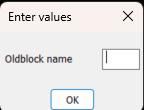
There may be a way around it for suffix, can do a dcl with the label as the old block name and the edit box is empty. Can not close gap in dcl. For prefix would need two column dcl, 1st with edit box , 2nd with label only, blockname. Can provide code if you think this is useful.
-
Another, could do a pop enter value in a dcl box etc, rather than command line. It works to specified length. (defun C:test2 ( / p1 p2 dist d) (initget 1) (setq p1 (getpoint "\npick point 1")) (initget 1) (setq p2 (getpoint p1 "\npick point 2")) (setq dist (distance p1 p2)) (setq d (getreal (strcat "\nLine length is " (rtos dist 2 2) " Enter new length "))) (if (= d nil) (princ) (setq dist d) ) (setq p2 (polar p1 (angle p1 p2) dist)) (command "_.line""_non" p1 "_non" p2 "") (princ) ) (c:test2)
-
 Chicane_Apex joined the community
 -
Hi All, I have multiple individual dwg files, would like to plot in individual pdf's. Is there any lisp file which can make this task automated?
-
Maybe with this subterfuge? (defun c:foo ( / src dxf app doc scr old new) (while (progn (setvar 'errno 0) (setq src (car (entsel (strcat "\nSelect block reference: ")))) (cond ((= 7 (getvar 'errno)) (princ "\nMissed, try again.") ) ((= 'ename (type src)) (setq dxf (entget src)) (cond ((/= "INSERT" (cdr (assoc 0 dxf))) (princ "\nPlease select a block reference.") ) ((= 4 (logand 4 (cdr (assoc 70 (tblsearch "layer" (cdr (assoc 8 dxf))))))) (princ "\nSelected block is on a locked layer.") ) ) ) ) ) ) (if (= 'ename (type src)) (progn (setq app (vlax-get-acad-object) doc (vla-get-activedocument app) src (vlax-ename->vla-object src) old (vlax-get-property src (if (vlax-property-available-p src 'effectivename) 'effectivename 'name)) new (strcat old (getstring t (strcat "\nSpecify new block name <" old ">: " (princ (strcat "\n" old))))) ) (cond ((and (= "" new) (or (not (snvalid new)) (tblsearch "block" new)) ) (princ "\nBlock name invalid or already exists.") ) (T (command "_.rename" "_block" old new)) ) ) ) (prin1) )
-
Use (list (entlast) p2) at place of p2: (list (entlast) p2) <=> at return of (entsel) (defun C:test1 ( / p1 p2 line1) (initget 1) (setq p1 (getpoint "\npick point1")) (initget 1) (setq p2 (getpoint p1 "\npick point2")) (command "_.line""_non" p1 "_non" p2 "") (setq line1 (entlast)) (command "_.lengthen" "_DYnamic" (list line1 p2) pause "") (command "_.change" line1 "" "_Properties" "_Color" "1" "") (prin1) )
-
Maybe it is possible to change the order of commands, at first "change", then "lengthen" ? (defun C:LineChLenDY ( / p1 p2 line1) (setq p1 (getpoint "Specify the first point: ")) (setq p2 (getpoint "Specify the second point: ")) (command "line" "non" p1 "non" p2 "") (setq line1 (entlast)) (command "change" line1 "" "P" "C" "1" "") (command "lengthen" "DYnamic") (princ) )
-
Not so sure you can do 'end' with the keyboard with the standard (getstring) functions - either live with it or perhaps a DCL pop up might let you do this. Should be able to amend Lees Code to insert a dialogue if it really is necessary. Change this line to call another function with the code needed, return value will be the string that (setq new is looking for: (setq new (strcat (getstring t (strcat "\nPrefix For Block <" def ">: ")) " " old)))