All Activity
- Past hour
-

Why does my hatch sometimes leave gaps or not fill the area?
SLW210 replied to indiancad's topic in AutoCAD 2D Drafting, Object Properties & Interface
There can be a lot more to it than that. "A closed boundary could not be determined" when creating a hatch in AutoCAD It actually says for one option- "Zoom out until all boundaries are visible. Then specify a new pick point", but I have actually had to zoom way in. "Valid hatch boundary not found." when adding Hatches in AutoCAD Products Also AutoCAD has an issue sometimes Select Object works, even though you should be able to use Pick points. This is about Boundary, but affects Hatches as well... Read the entire thread. Also, you can read this thread, though also boundary related. So basically the issue, besides the obvious gaps, elevations, et al, is summed up by @eldon -
Somebody else can add the Multi, it works great for my job right now. I do not want direct to Excel as I plan to use LibreOffice when away from work, in the beginning of updating I had thoughts of making it an option, that is still on the table. I may remove the code and just paste the file, so at least a sign-in is required. As for a long code to copy, just double-click the first character then shift-click the end. As for the Architectural: 1500'-0", you didn't change the values in the code to convert to mm, I put them at the top. I need to do a few changes on that output when metric, I'll see if the next version was already doing that. That's the reason I posted this version, to see what I didn't think of before the final version. I think I started the next version to include a DCL to switch instead of commandline as well as the report, as well as multiple selections and more columns in CSV. Is there a big need for meters in something like this? I know in the USA sheet metal is normally Metric in mm and Imperial is inches, sometimes on certain things they use Meters and Architectural, but I have seldom seen that. I do need to add the inches option as well, so Meters should be an option I suppose. I need to do more gap and overlap testing, most of my actual job is actually ends touching, I just needed to get them through a Viewport and in an anonymous block (I used to need to change to a regular block, then go to block editor, etc.), SOLPROF is lines and arcs, etc. so a lot of work . I'll finish up my work work and see if I have time to work on this some more. Thanks for the Metric test and BricsCAD test. If any GstarCAD, NanoCAD, CMS IntelliCAD users could test, that would be nice. I go over their sites and see if I can see what users report working and not working, but that probably doesn't cover everything or account for those that just made an error using the code. For USA that use both Metric and Imperial, would reporting both be beneficial? That might yet again be more options needed. P.S. My 3 grandkids from near me in Florida are now in Australia until the End of October, so last night my time they Facetimed me, so I got very little done at home.
- Today
-
.thumb.jpg.615654602253be56b2fbd5d064834780.jpg)
Why does my hatch sometimes leave gaps or not fill the area?
indiancad posted a topic in AutoCAD 2D Drafting, Object Properties & Interface
Have you ever tried to hatch a closed area, but CAD says the boundary is not closed? A small gap between two lines can stop the hatch from working properly. A quick way to find the problem is to use BOUNDARY or check the area with PEDIT → JOIN. If there is a small gap, close it and try HATCH again. For complicated drawings, increasing the Gap Tolerance in the Hatch settings can also help. How many of you have faced this problem? What was causing the gap in your drawing? -
Why do two 3D objects look like one but are actually separate?
indiancad replied to indiancad's topic in AutoCAD 3D Modelling & Rendering
THANKS for that! -
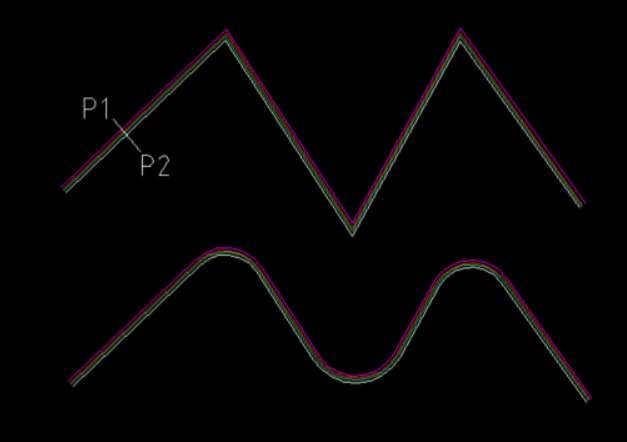
In another post there was questions about changing Mline styles for existing Mlines. So answered that and thought what about adding fillets to a mline. Wel as we know you can not do that, so did it this way. Converting the individual mlines to plines then filleting the plines produced. The fillet radius changing matching the offsets. ; Convert mline to plines and add a rdius. ; By AlanH Aug 2026 (defun LWPoly (lst cls) (entmakex (append (list (cons 0 "LWPOLYLINE") (cons 100 "AcDbEntity") (cons 100 "AcDbPolyline") (cons 90 (length lst)) (cons 70 cls)) (mapcar (function (lambda (p) (cons 10 p))) lst))) ) (defun c:ml2plrad ( / oldsnap pt1 pt2 ent obj obj2 co-ords dict col lst x) (setq oldsnap (getvar 'osmode)) (setvar 'osmode 0) (setq pt1 (getpoint "\nPick 1st point for drag ")) (setq pt2 (getpoint pt1 "\nPick 2nd point ")) (setq pts (list pt1 pt2)) (setq ent (ssname (ssget "F" pts (list (cons 0 "Mline"))) 0)) (setq obj (vlax-ename->vla-object ent)) (setq styleName (vla-get-StyleName obj)) (setq lay (vlax-get obj 'layer)) (setvar 'clayer lay) (setq co-ords (vlax-get obj 'coordinates)) (vla-delete obj) (setq pts2 '() x 0) (repeat (/ (length co-ords) 3) (setq pts2 (cons (list (nth x co-ords)(nth (1+ x) co-ords)) pts2)) (setq x (+ x 3)) ) (setq dict (dictsearch (cdr (assoc -1 (dictsearch (namedobjdict) "ACAD_MLINESTYLE"))) styleName)) (setq offsets (mapcar 'cdr (vl-remove-if-not '(lambda (x) (= (car x) 49)) dict))) (setq col (mapcar 'cdr (vl-remove-if-not '(lambda (x) (= (car x) 62)) dict))) (setq col (cdr col)) ; ignore 1st color (setq lst '() x 0) (repeat (length col) (setq lst (cons (list (nth x offsets)(nth x col)) lst)) (setq x (1+ x)) ) (LWPoly pts2 0) (setvar 'filletrad (getreal "\nEnter Fillet radius for most outside offset ")) (command "fillet" "P" (entlast)) (setq x 1) (repeat (- (length col) 1) (setq obj2 (vlax-ename->vla-object (entlast))) (vlax-put obj2 'color (nth (1- x) col)) (vla-offset (vlax-ename->vla-object (entlast)) (- (nth x offsets)(nth (1- x) offsets))) (setq x (1+ x)) ) (setq obj2 (vlax-ename->vla-object (entlast))) (vlax-put obj2 'color (nth (1- x) col)) (setvar 'osmode oldsnap) (princ) ) (c:ml2plrad)

-
 Travbeasy joined the community
 -
@SLW210 did a little bit of testing and works ok in Metric dwt. The only thing is the Architectural result. Limited Testing in Bricscad V25. made some shapes and inserted some blocks. A rectang 5000x4000 mm or decimal units. For metric don't need Architectural units. Curve length: 18000 Gaps: 0 Total: 18000 Architectural: 1500'-0" ?? For metric could do dwg is in mm but result is in metres to 3 decimals. You could use the Multi radio buttons.lsp to make choices. As its demand loaded you do not have to add it to your code. Re CSV your more than welcome to use the defuns in Alan Excel.lsp to write direct to Excel. Could demand load a lisp with just the defuns needed as don't need all that is in the lisp. Just a Ps a big file to screen copy maybe also post a file copy.
- Yesterday
-
I don't know if there was ever another LISP/Program to do this type of get length at least I never found one, my original just did what I needed, I have since made it more generally useful (I hope). As per the drawing I will attach, I just need to get the length of the center between the inner and outer of the perimeter of guards, etc. to determine the unrolled length. Normally the guards are 3D and I create the profiles with SOLPROF which creates an anonymous block (I used to change these with UNANON) or sometimes in the past I have used SOLVIEW and SOLDRAW, the same issue arises that you just can't select them and get the profile length. So originally that's what this LISP was created to do (I still have some of the older basic versions). I have upgraded it to it's current state and also still working on another version, but only small enhancements. For inside a block that is scaled, you will need to multiply the results by the scale factor, working through a viewport the viewport needs to be active, so I might tackle those issues as well as make a more detailed CSV. I also will try to make sure it works in non-AutoCAD like BricsCAD, CMS IntelliCAD, nanoCAD, etc. when I get time. I lightly tested in most situations, I have no idea how it acts on non-uniformly scaled blocks, though. It handles gaps and slight overlaps, I have some settings at the top, hopefully with enough instructions to modify on your own. Where I work (except for the machine shop which uses decimal inches) they use Architectural units, I did not double check this in Metric, so if someone would report back on that it would help. GetLenTest.dwg GetLen.lsp
-
Stack Social license
SLW210 replied to Discus84's topic in AutoCAD 2D Drafting, Object Properties & Interface
I wouldn't trust any company that's not an Autodesk official reseller. -
 usman ali joined the community
 -
Why can’t I join two lines even when they look connected?
SLW210 replied to indiancad's topic in AutoCAD 2D Drafting, Object Properties & Interface
If you have an AutoCAD license, you get the toolsets like Map 3D free, you could use MAPCLEAN, which can fill gaps and also has a weed function and more. What if they are overlapping and not a gap, you can get unexpected results from a large selection set and MPedit>Join from overlapping/collinear (P)Lines? I use MPedit as well, you just have to run a polyline weed LISP (like PLDiet.lsp) sometimes to get single polylines. You may also want to look into Overkill and Fillet with radius = 0, it can help with cleanup as well. I know everyone that has this problem is working on a drawing that was not of their own and either generated by another CAD platform or by a past or former coworker. But, the best method for these issues are to properly use and setup your CAD not to have unjoined/unconnected/ends touching (P)Lines, Arcs, Splines, etc. Good post from @irneb here on that issue... -
My drawing disappeared — what do you check first?
SLW210 replied to indiancad's topic in AutoCAD 2D Drafting, Object Properties & Interface
Do you have an example drawing that does this? That sounds more like a Graphics Card or driver issue, though as you say, could be AutoCAD 2010 (I presume that's what you mean since v10 is very old now and was released in 1988). If you still use v10 I would definitely say that's the issue. -
 tman15 joined the community
 -
Why do two 3D objects look like one but are actually separate?
SLW210 replied to indiancad's topic in AutoCAD 3D Modelling & Rendering
I moved your thread to the AutoCAD 3D Modelling & Rendering Forum. Please start threads in the most appropriate forum. -
Why do two 3D objects look like one but are actually separate?
indiancad posted a topic in AutoCAD 3D Modelling & Rendering
This can happen when working on a 3D model. Two solids may look like one object, but they can still be separate. A simple way to check is to click each part and see if you can select them separately. If they need to become one solid, UNION can combine them. You can also use INTERFERE to check if two solids are overlapping. How many of you have faced this while making a 3D model? -
Why can’t I join two lines even when they look connected?
indiancad posted a topic in AutoCAD 2D Drafting, Object Properties & Interface
Have you ever used PEDIT → JOIN, but CAD does not join the lines? Sometimes the lines look connected, but there is a small gap between them. They can also have different Z values. First, check the endpoints using OSNAP. If the lines have different Z values, FLATTEN can help bring them to the same level. How many of you have faced this problem? What fixed it for you? - Last week
-
 Anthony92 joined the community
 -

My drawing disappeared — what do you check first?
Discus84 replied to indiancad's topic in AutoCAD 2D Drafting, Object Properties & Interface
One other thing I've noticed.. Inserting a 3d block into model space. Occasionally everything in model space disappears and the 3d part appears, nothing else. Purging does not solve it, the 3d part is invisible otherwise. It's very strange and may be a bug in v10. -

VedaCAD - Technical Support, Updates & Community VCIDs
VicoWang replied to VicoWang's topic in AutoLISP, Visual LISP & DCL
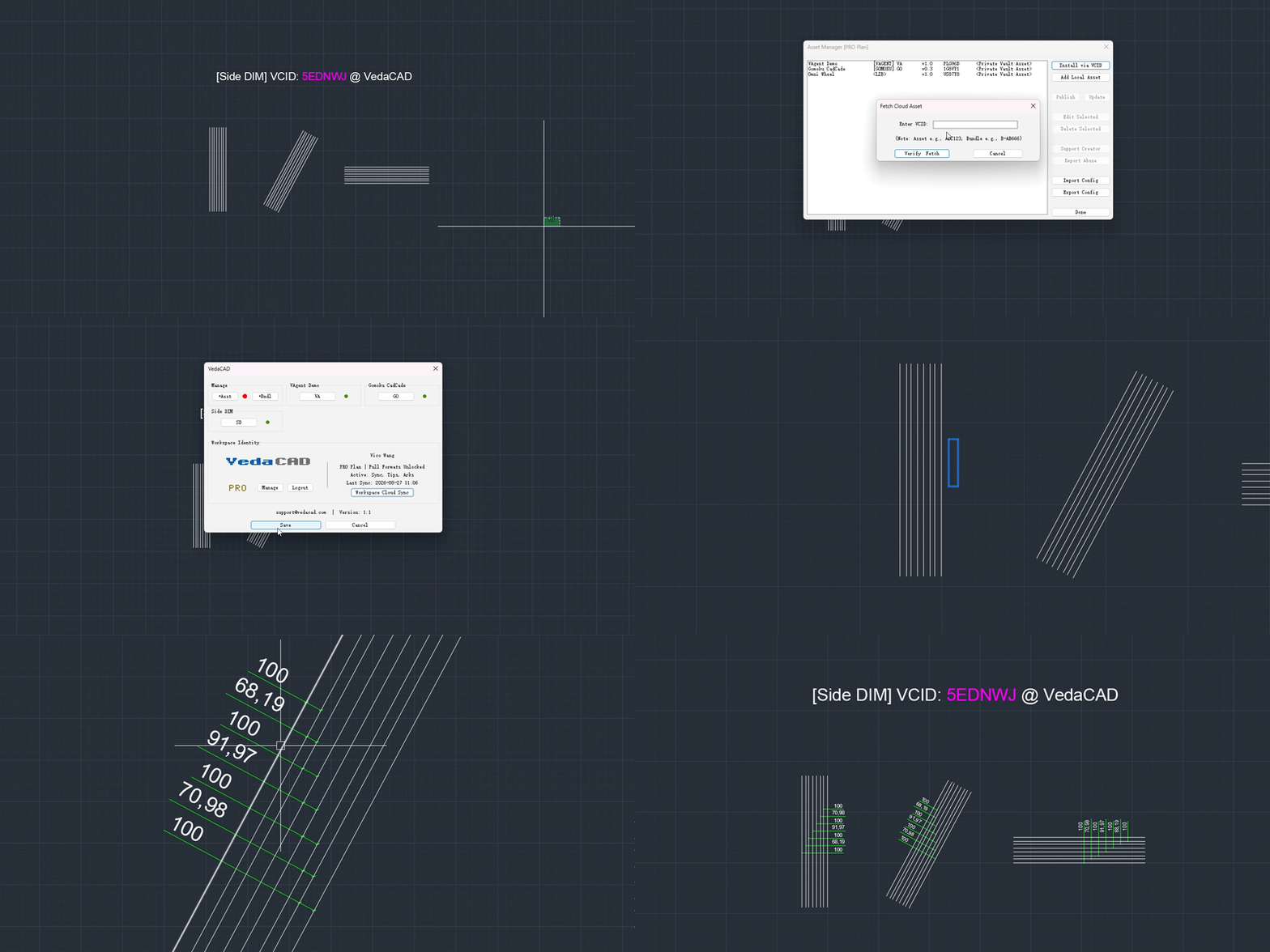
[Side DIM] VCID: 5EDNWJ @ VedaCAD
-
VedaCAD - Technical Support, Updates & Community VCIDs
VicoWang replied to VicoWang's topic in AutoLISP, Visual LISP & DCL
[Omni Wheel] VCID: US87Y8 @ VedaCAD
-
Hi, Does anyone have experience with stack social? (LT @ 199/yr) Thanks!
-
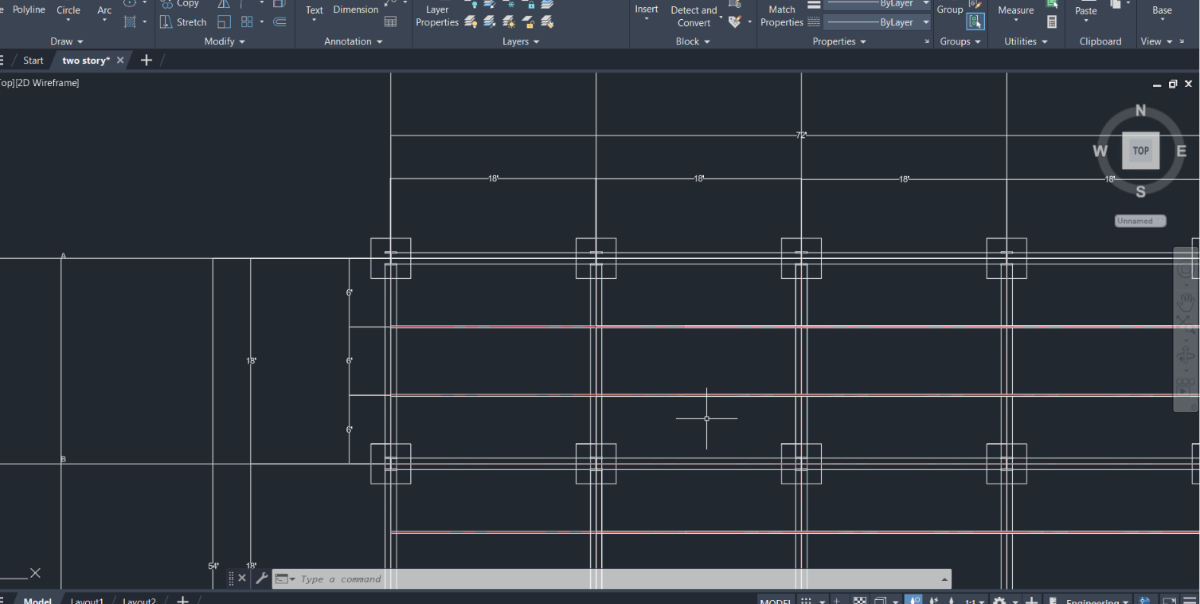
Judging by what I have seen other students use I would say 8" would be sufficient. BTW... your drawing needs further work. Footings need to be trimmed where beams appear above them. Likewise, channels are not continuous. They too need to be trimmed where they intersect with the beams.
-
 Turba 73777 joined the community
 -
 Dung Do Thanh joined the community
 -
 asab joined the community
 -

Free Multi Plot Lisp – Fast Batch Printing for AutoCAD, BricsCAD & ZWCAD | Model/Layout, Zone Plotting & PDF Merge
CamDuy replied to CamDuy's topic in AutoLISP, Visual LISP & DCL
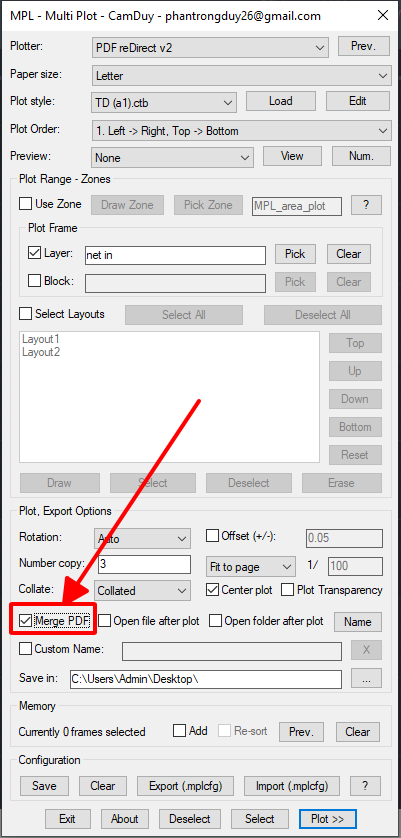
https://drive.google.com/drive/folders/1RW3VS_e2hrR0-L4AcJnErnl0MR6DnZFp?usp=sharing When using this version, check the "Merge PDF" box to print in "Publish" mode.
-
 Zayar joined the community
 -
Hi, Suppose we have three groups positioned within another but all separate. Is there a way to nest the interior groups to the exterior one whilst keeping them intact . If the whole needs to be edited, they can be pulled away as one, then edited as separate entities. Thanks!
-
Create bounding box
Discus84 replied to Discus84's topic in AutoCAD 2D Drafting, Object Properties & Interface
I wonder what he thinks about the above... -
 Graphic-don joined the community
 -

Free Multi Plot Lisp – Fast Batch Printing for AutoCAD, BricsCAD & ZWCAD | Model/Layout, Zone Plotting & PDF Merge
symoin replied to CamDuy's topic in AutoLISP, Visual LISP & DCL
Can this be modified to include the hyperlinks, like that of publish command in autocad? -
LISP: Find & Replace Without the Lag of AutoCAD's Default Command
symoin replied to CamDuy's topic in AutoLISP, Visual LISP & DCL
good -
@ReMark yes, this drawing is mine I'm on to doing the dimensions I wanted to know the size of the text.
-
I wouldn't rely on AutoCAD's Autosave feature, see this recently revived old thread... I have some links where you can "Autosave" without Autodesk's version. I know for AutoCAD LT the VBA solution will not work, but maybe the others are worth a shot. As I mention, get into the habit of Ctrl+S often. From the other link I posting in that thread explaining Autosave, etc....