All Activity
- Today
-

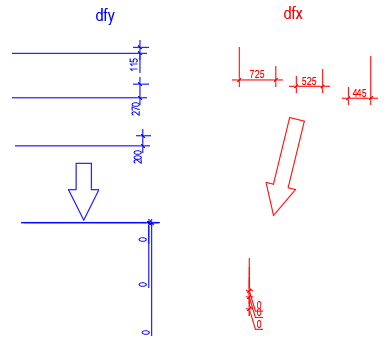
Align the extension lines to the short line of each selected size
Nikon replied to Nikon's topic in AutoLISP, Visual LISP & DCL
The dimensions are reset to 0???
-

VedaCAD - Technical Support, Updates & Community VCIDs
VicoWang replied to VicoWang's topic in AutoLISP, Visual LISP & DCL
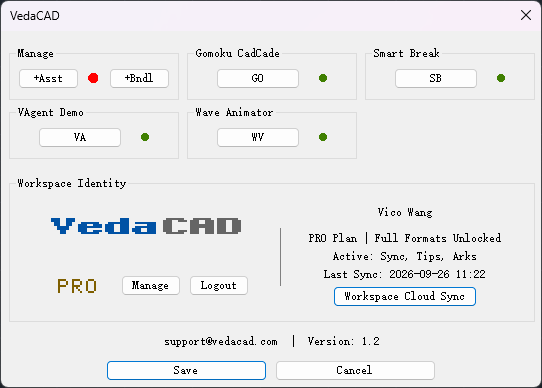
After installing the above bundle, everything works as expected. (To install these bundle, a free vedacad account is sufficient.) --- After nearly 40 emails of intense communication with @Paul Li, I saw the professionalism and rigor of the senior developer, and this real feedback after actual use has taken VedaCAD a big step forward. Thank you @Paul Li
-
Align the extension lines to the short line of each selected size
ScottMC replied to Nikon's topic in AutoLISP, Visual LISP & DCL
here's 2 for h&v alignment:..DIM.Fix.Y.Leaders.lsp ..DIM.Fix.X.Leaders.lsp -
 luisifer999 joined the community
 - Yesterday
-

AI recreating a floor-plan screenshot in AutoCAD - feedback welcome
BIGAL replied to Andrea Rocco Matta's topic in Application Beta Testing
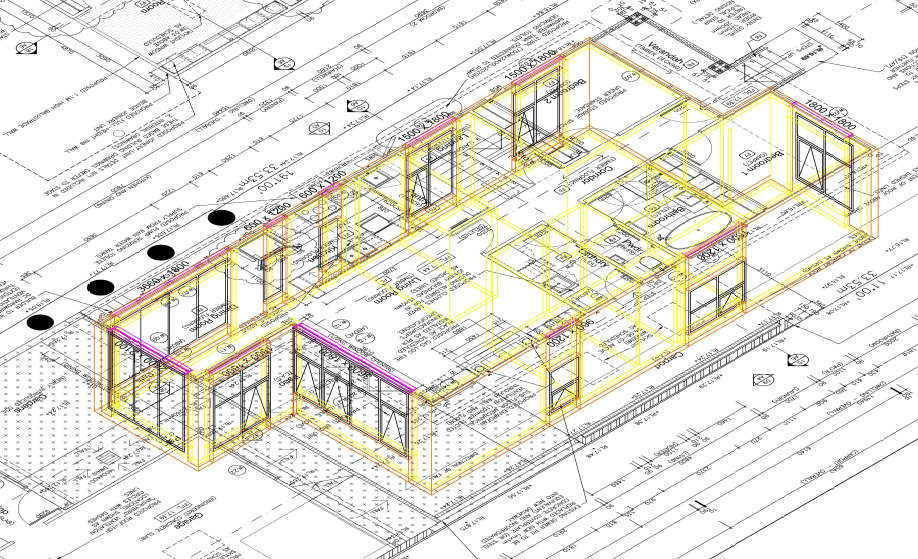
This was created using a pdf as the base and Cadarc architectural program over the top, internal doors to be added.
-

VedaCAD - Technical Support, Updates & Community VCIDs
Paul Li replied to VicoWang's topic in AutoLISP, Visual LISP & DCL
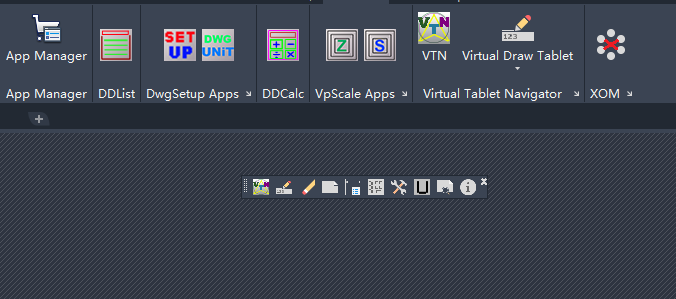
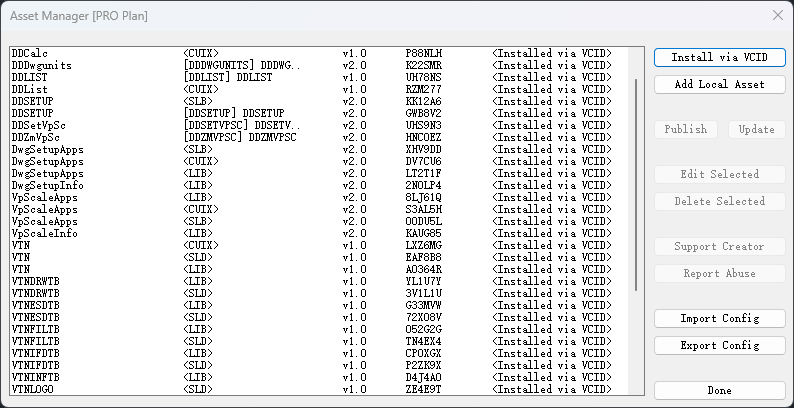
As @VicoWang mentioned I've been running some major tests implementing this new VedaCAD system of deploying 3rd party add-ons in my case specifically to AutoCAD users. @VicoWang has been really response with all my feedback. I'm fairly impressed with how this provides a software developer like myself another platform to push out my apps to end users to implement on their AutoCAD system. The following is a list of my VCIDs. Along with AutoCAD users, I'm hoping AutoCAD LT 2024 and higher version users will also try installing and running these apps. Since currently the Autodesk App Store (now known as the Design & Make Marketplace) do not support AutoCAD LT, this VCID deployment method provides an excellent solution to have AutoLISP coded apps load & run on LT. [DDCalc] VCID: B-NN9XC DDCalc is an on screen graphical calculator within Autodesk® AutoCAD® that supports feet, inch & fractional numeric entries. [DDList] VCID: B-NLR04 DDList is Autodesk® AutoCAD® basic list command but on steroids. [DwgSetup] VCID: B-4K6UL DwgSetup App offers two user friendly graphic user interface commands to make drawing setup changes: (1) DDSetup and (2) DDDwgunits [VpScale App] VCID: B-31VQK VpScale Apps offers two very useful Viewport Scaling Applications: DDZmVpSc & DDSetVpSc [VTN] VCID: B-0Z8Q6 Virtual Tablet Navigator (VTN) is an add-on AutoLISP application using DCL to bring Autodesk® AutoCAD® physical Tablet Menu commands virtually onto the graphics screen. [XOM] VCID: B-09NQD Xref Object Manager (XOM) is an AutoLISP application using a dynamic dialog box to present built-in & added operations to manage External Reference Objects displayed both in a Tree and a List view.
-

AI recreating a floor-plan screenshot in AutoCAD - feedback welcome
Andrea Rocco Matta posted a topic in Application Beta Testing
Hi everyone, I'm Andrea, an architect and co-founder of Ideatura. We've been working on letting AI create and edit geometry directly inside AutoCAD, and I'd like some honest feedback from people who use it every day. For this example, I gave it a floor-plan screenshot, told it to assume a 5 m spacing between two grids and scale the rest proportionally, and asked it to work in stages so I could review each step. It created walls and columns, then doors, windows, stairs and grids, followed by furniture, fittings and room labels. The result is editable AutoCAD geometry: polylines, arcs, blocks and text. This run was in AutoCAD 2027 on Windows. The video is sped up, especially during processing. This is an approximate reconstruction from an image and an assumed scale. It still needs checking, and one unclear perimeter edge was left open for clarification. Would checking and correcting a first pass like this save you time compared with drawing it yourself? What would you inspect first: accuracy, wall joins, blocks, layers, or something else? Feel free to pick apart the result. I'm interested in what would make this useful in an actual drafting workflow. -
Andrea Rocco Matta joined the community
-
.thumb.jpg.615654602253be56b2fbd5d064834780.jpg)
Title: Why can a LOFT create a twisted 3D shape even when the profiles look correct?
indiancad posted a topic in AutoCAD 3D Modelling & Rendering
I have seen cases where a LOFT between two profiles produces a twisted or unexpected surface, even though the cross-sections appear correct. One thing worth checking is the position and orientation of the profiles. Their starting points, alignment, and placement can affect how the loft connects corresponding sections. When the result looks wrong, I check the profiles individually, adjust their alignment, and try different loft settings before rebuilding the geometry. This is especially important when creating transition pieces, ducts, or curved components. When a LOFT twists unexpectedly, what do you check first: profile alignment, placement, or the loft settings? -
Title: Why does SHELL sometimes remove the wrong face from a 3D solid?
indiancad posted a topic in AutoCAD 3D Modelling & Rendering
Have you ever used SHELL on a 3D solid, expecting to create a hollow part, but ended up with an unexpected opening? One thing I check first is whether I selected the correct face to remove. The face selection determines where the solid opens, while the shell thickness controls the remaining wall thickness. For a more predictable result, I inspect the model from different viewing angles before applying the operation. I also check whether the chosen thickness is suitable for the size and shape of the part. A small selection mistake can change the entire result. When creating hollow 3D parts, do you prefer SHELL or do you usually model the inner geometry and use SUBTRACT? -

Help with Penn Foster structural drafting plate 1
ReMark replied to JimJames1978's topic in Student Project Questions
cauldmofbats: Have you figured it out yet? -
 MojtabaZamani joined the community
 -
 ADRIAN YUNGHOI joined the community
 -
Never thought about that - I always still use ctrl+ V / C - means I have to let go of the mouse every now and then
-

Select Between Bracket in Notepad+
Danielm103 replied to ymg3's topic in AutoLISP, Visual LISP & DCL
I use this in visual studio to toggle between header and source. also since I'm a southpaw, I use home and end for copy paste autohotkey is the GOAT! #z::Run www.autohotkey.com ;ALT + XX ; home::send ^c ; end::send ^v ; #IfWinActive ahk_exe devenv.exe ;PgUp::SendRaw `,DS.ARGS() ;misc command ;PgDn::SendRaw `,DS.ARGS({"val:type"}) ;misc command Insert::send ^k^o ;toggle header/source Delete::send ^a^k^f{Esc} ;select all and format #IfWinActive - Last week
-
If you use notepad+ as an editor for Autolisp, the CTRL+ALT+b leaves a lot to be desired when it comes to selecting between brackets. The VLIDE double-click is much more satisfying. So here is an AutoHotKey script that gives you this functionnality while preserving the normal Dbl-Click of notepad+: #Requires AutoHotkey v2.0 #SingleInstance Off ; 1. Set up a unique communication highway (MsgNumber 0x401) OnMessage(0x401, ReceiveCloseSignal) ReceiveCloseSignal(wParam, lParam, msg, hwnd) { ExitApp } ; 2. Find any running old instance (ignoring itself) and send it the "Self-Destruct" signal DetectHiddenWindows True if (oldScriptHwnd := WinExist(A_ScriptFullPath " ahk_class AutoHotkey")) { if (oldScriptHwnd != A_ScriptHwnd) { ; Ensure the script doesn't close itself! PostMessage(0x401, 0, 0, , "ahk_id " oldScriptHwnd) WinWaitClose("ahk_id " oldScriptHwnd, , 2) } } ; 3. Automatically relaunch the script using UI Access to bypass UAC entirely if !A_IsCompiled && !InStr(A_AhkPath, "_UIA.exe") { uiaPath := RegExReplace(A_AhkPath, "\.exe$", "_UIA.exe") if FileExist(uiaPath) { try { Run('"' uiaPath '" "' A_ScriptFullPath '"') ExitApp } } } ; 4. Your Application-Specific Hotkeys #HotIf WinActive("ahk_class Notepad++") ~LButton:: { static lastClick := 0 currentClick := A_TickCount if (currentClick - lastClick < DllCall("GetDoubleClickTime")) { KeyWait("LButton") Sleep(60) SendEvent("^!b") lastClick := 0 } else { lastClick := currentClick } } #HotIf Link to download AutoHotKey https://www.autohotkey.com also available on Microsoft app store (Free) NppBrackets.ahk
-
 Alexman joined the community
 -
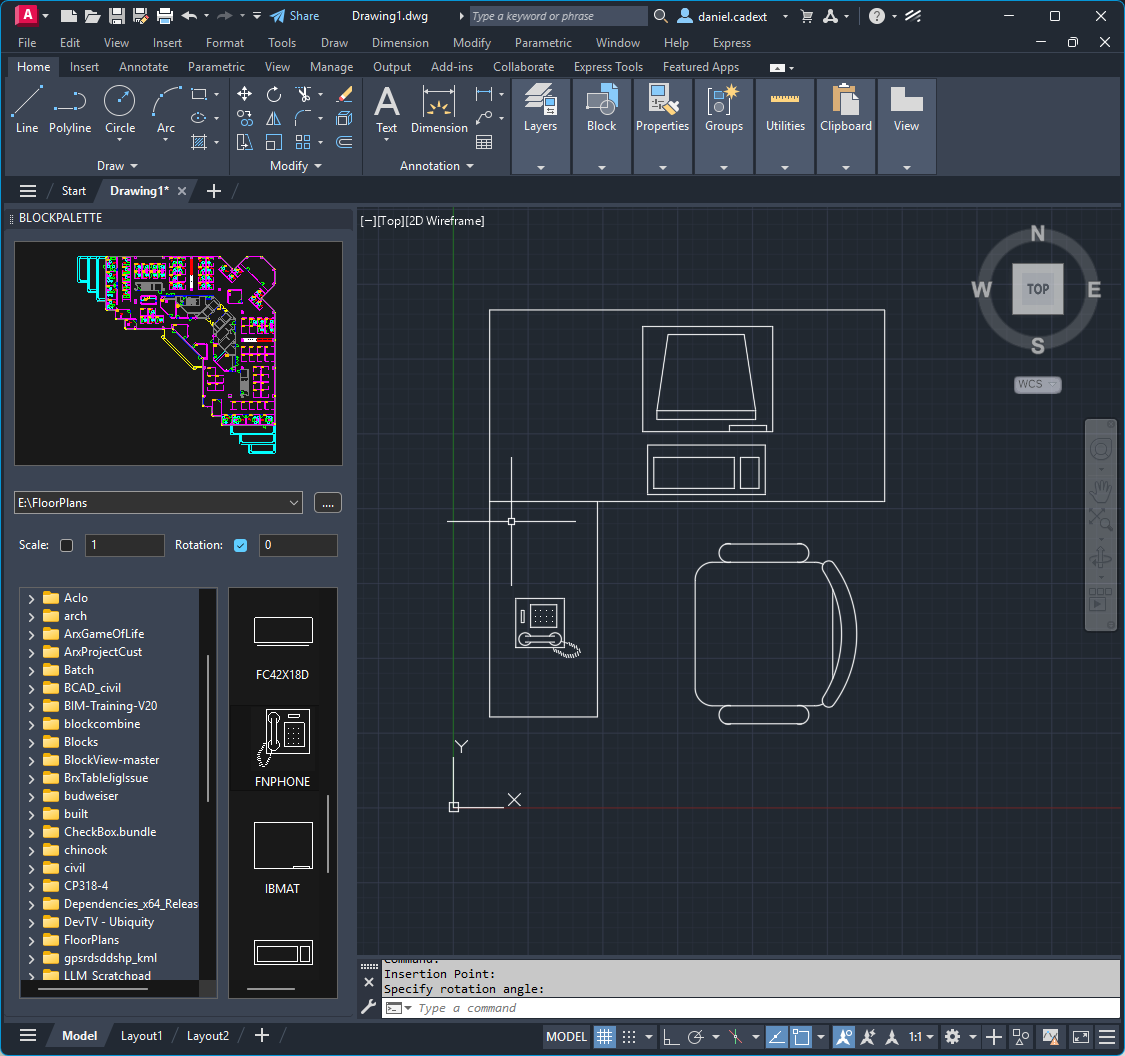
This is a port of BrxBlockMan to Python. should be a good sample of how to use a lot of the API, Palettes, Jigs, Cloning Etc. - select a drawing from the directory control - double click or drag a block from the List control to the current drawing - double click the main preview to insert the whole drawing - click the open folder button to add your favorite folder(s) - use the dropdown to navigate to a favorite folder - right click on a dwg to open it in Bricscad - right click on a folder to add it to favorites - right click on the dropdown ctrl to clear favorites https://github.com/CEXT-Dan/PyRx/tree/main/PySamples/wxPython/BlockMan Requires PyRx, BlockMan.py and BlockMan.xrc should be in the same folder
-
- 1
-

-
I’m not sure whether CADTUTOR is currently using Cloudflare’s proxy-based DNS resolution. However, if it is already using Cloudflare and still behaves this way, it seems they don’t have any better options at the moment. Accordingly, when developing my VedaCAD.com system, I fully considered and leveraged Cloudflare’s edge caching technology—complete with built-in free DDoS protection—to enhance performance under high concurrent access.
-
If it doesn't kill us, it makes us stronger...and older! Growing old beats the hell out of the only other option.
-
Just looking at the stats this month (September 2026) I can see that after the US (which always tops the charts) the next five biggest IP locations for visitors were Ireland, Armenia, Seychelles, Angola, and Unknown. You can be pretty certain that they are all spoof IP addresses used by scraping bots and those 5 account for almost half the bandwidth this month.
-
Yes, you are correct. The AI bots do not declare themselves like search engine bots do, they remain anonymous, so it's not possible to target only AI bots. Blocking all bots effectively destroys a site's SEO and search indexing. So my approach (at the moment) is to ride out the storm and see if it eases in the future.
-
The only real control we have is to block by IP address. I did that for a while, some months ago, to prevent a swamp of bots using an IP address in Singapore, but it turns out these were originating in China and using Singapore as a spoof address. All they needed to do was use an alternate spoof IP address to get around it, so I gave up on that strategy. I'm hoping that this activity is temporary rather than a new normal.
-
To be honest, the greatest value of CADTUTOR is its vast stock of knowledge and records, which are opened to search engines. I don't know if blocking AI would also block the legitimate crawling of search engines, just like the Cloudflare verification added to Theswamp, making it a ghost website (hidden from search engines, known to those who know but not searchable by those who don't, of course, this strategy should have reduced corresponding cost expenditures). Perhaps a certain threshold should be set: for example, under the condition of ensuring that normal user access is not blocked, setting a limit on the total number of daily visits by AI or search engines combined, while allowing access for those with accounts.
-
Hello friends, I have noticed the same intermittent errors. As some have suggested, this seems to be to do with AI bot activity which floods available resources, making it difficult to serve pages to real users. I am hoping this will subside over time, once all models have gorged themselves on our content. Right now we have two choices. We can either add a Capture test that means you need to complete an action before getting access to the forum (this basically filters out the bots) or we just put up with random errors for now. Let me know what you think.
-
 XYA joined the community
 -
 Wills7 joined the community
 -
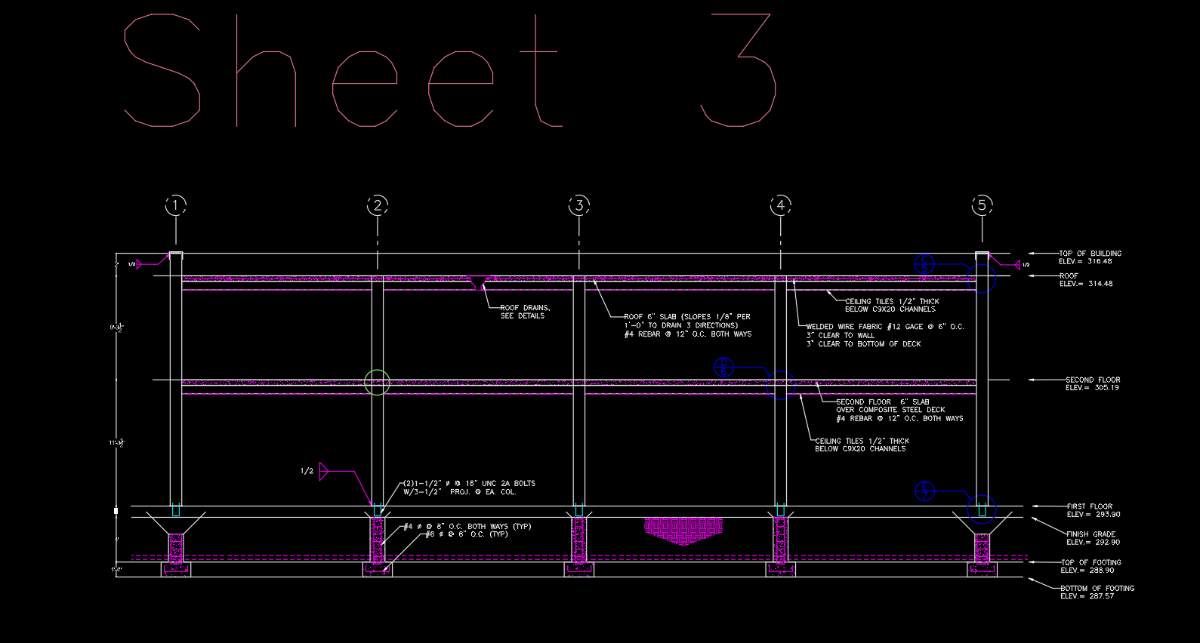
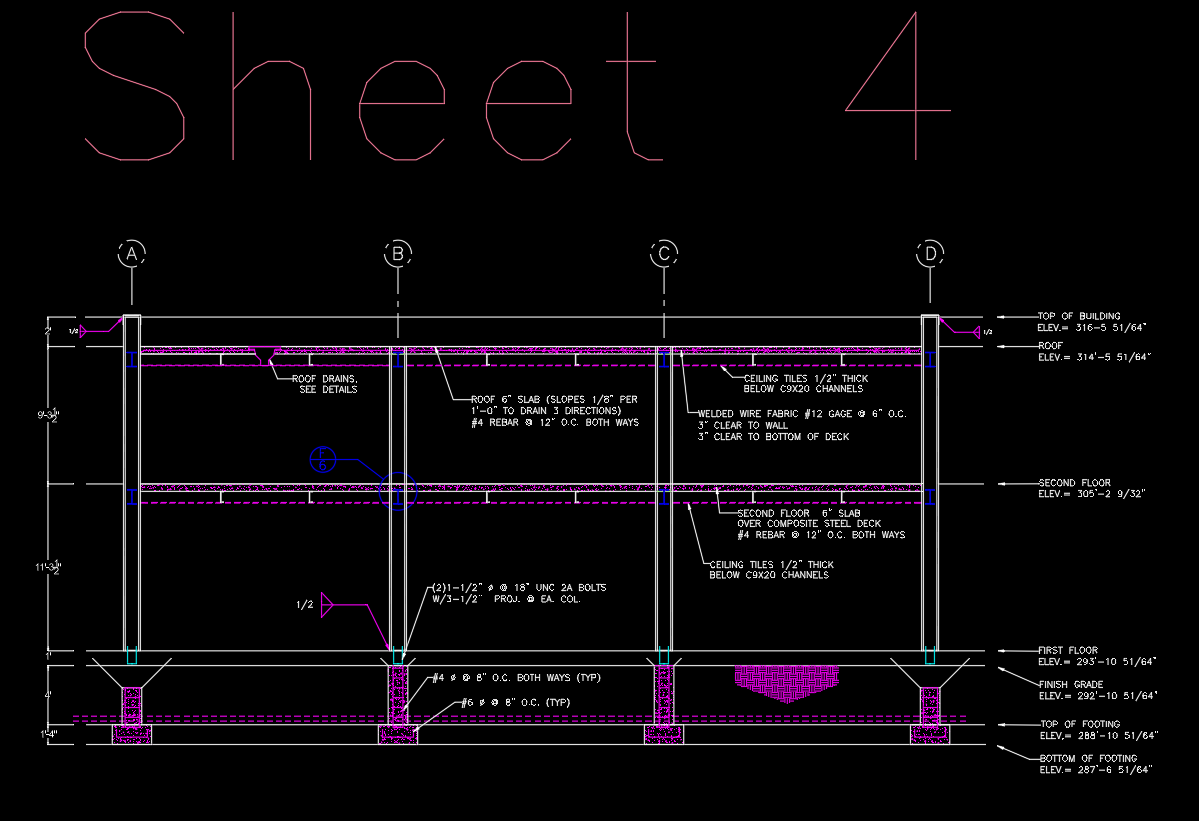
What exactly is your question regarding the channels? BTW... something doesn't look right with your columns and baseplates. Can you email me a copy of the drawing? I will message you with my contact information.
-
Thank you ReMark. I actually had to go back and do much of the work over. Bit embarrassed to say but I am learning! I think a lot of the instructions have changed. Can you give me some guidance on sheet 4? I got a bit confused with the c9X20 channel beams. The instructions are SO difficult for completely new beginners. This is what I currently have. 
-
 Anatoly123 joined the community
 -
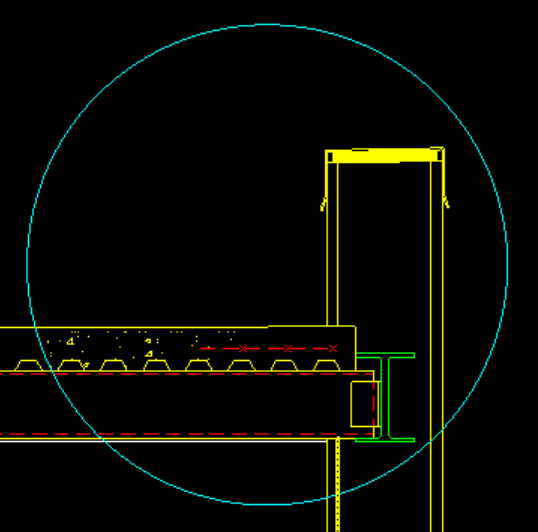
LJade: Here is an example of what I mentioned in my previous post. Note that the channel supports the steel decking, and the decking supports the concrete. The rebar is embedded in the concrete. Note the flashing and canted drip edge in the example as well.
-

5 CAD Commands That Can Save You More Time Than You Think
Steven P replied to indiancad's topic in AutoCAD 2D Drafting, Object Properties & Interface
No it is more when we go from title block version 7 to version 9.2... with the same block name... for example, title attributes go from 5 down to 4 lines and they rename drawing number attribute DwgNo to Drawing - just updating the block doesn't quite capture it all... so (lazy CAD) - burst usually works well. I think I have a LISP global updates of all the same block in a drawing - think it is one of Lee Macs - but most of our drawings are 1 sheet per file so another of Lees works for multiple sheets over may drawings. -
VedaCAD - Technical Support, Updates & Community VCIDs
VicoWang replied to VicoWang's topic in AutoLISP, Visual LISP & DCL
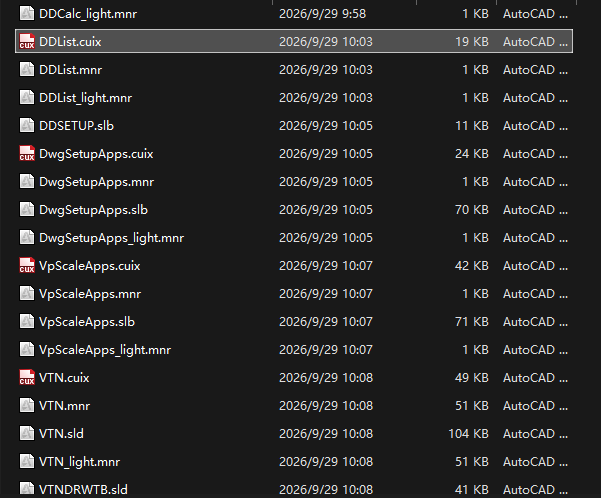
v1.2 Sep 26, 2026 Download link: https://www.vedacad.com - Special thanks to @Paul Li for the rigorous industrial-scale stress testing and invaluable feedback - Upgraded the core execution engine with a new Pre-Execution Guardian for seamless dependency hot-injection and a completely refactored CUIX loader, ensuring rock-solid stability and lightning-fast performance across massive asset libraries - Expanded Bundle capabilities to seamlessly package over 20 companion formats (e.g., .CUIX, .XML, .JSON, .PDF) alongside plugins, while reinforcing Enterprise Ark infrastructure with strict environment-only format whitelisting - Transformed the Asset Manager workflow by introducing Multi-Select Deletion for swift bulk management, combined with smart alphabetical sorting to naturally group main applications with their companion files - Redesigned UI rendering dynamics to better accommodate comprehensive app suites, featuring an expanded 12-character Custom Alias limit, enhanced viewport heights, and a robust truncation algorithm for flawless column alignment - Strengthened Web Workspace portals with advanced ecological dependency protection, ensuring the safety of distributed public assets and improving global backend synchronization --- Important notice: V1.2 is a major underlying revision that packages the plugin companion format into a collection and includes the functionality to download collections containing companion formats, which was not supported in previous versions. Currently, our core engine supports and strictly distinguishes the following three major format arrays: Plugins: .LSP, .FAS, .VLX, (.ARX, .DLL) Companion Formats: Allow packaging with plugins into collections, including: .CUIX, .CUI, .MNU, .MNS, .MNC, .SLB, .MNL, .MNR, .DCL, .CHM, .HLP, .BMP, .PNG, .DAT, .CSV, .PDF, .HTML, .XML, .JSON, .TXT, .INI, .DWG, .DWF, .SLD, (.ZIP) Env Standards: PRO and Enterprise version features, including: (.CTB, .STB, .DWT, .SHX, .PAT, .LIN, .PC3, .PMP, .ATC, .DWS, .PGP, .SCR, .FMP, .UNT)