All Activity
- Today
-
then xdrx.x64.25.arx seems correct, it should match (substr (getvar "ACADVER") 1 2)
-

-

multiple file selection dialog box using lisp & powershell
SLW210 replied to Paul Li's topic in AutoLISP, Visual LISP & DCL
I'm not going to troubleshoot it since Powershell is blocked at work, but if the load has that error, then it's something in the Code, probable in the DCL write-line part. -

VedaCAD - Technical Support, Updates & Community VCIDs
VicoWang replied to VicoWang's topic in AutoLISP, Visual LISP & DCL
Thank you for the reminder, this is long-term content for search engines. At least I know there are several WhatsApp groups in the AEC field, and I guess there should still be some users. What methods do you mainly use? -

VedaCAD - Technical Support, Updates & Community VCIDs
Steven P replied to VicoWang's topic in AutoLISP, Visual LISP & DCL
Not so sure on that one, CAD engineers don't get work phones so often, so whatsapp not so useful to keep up to date with a file repository. -
multiple file selection dialog box using lisp & powershell
Steven P replied to Paul Li's topic in AutoLISP, Visual LISP & DCL
String too long - just a guess, file path and file name string length? - going back old school when we had 256? characters for it all - but just a guess -
This thread was started 5 months ago and there was never a response to original questions. My WAG is @BIGAL's suggestion of RECOVER did the trick.
-
Good catch!
-
multiple file selection dialog box using lisp & powershell
SLW210 replied to Paul Li's topic in AutoLISP, Visual LISP & DCL
Many work computers are likely limited for using Powershell. Unrelated to Powershell being blocked, I get an error loading. error: string too long on input -
How can I make the following program support Chinese input?
SLW210 replied to xcn's topic in AutoCAD 2D Drafting, Object Properties & Interface
I was just suggesting a rewrite, though I think maybe it is just a Unicode issue so it might be altered. That's what I came back with on an internet search for change AutoCAD LISP from English input to Chinese and the articles I read stated Chinese has double-byte Unicode, the GRREAD may also be an issue. LISPSYS=2 is necessary. Is this on a Chinese Simplified version of AutoCAD, Windows , etc.? Give some more detailed information on the setups this will be used. I just started studying Chinese a few weeks ago, so I want be a ton of help on that end and haven't got into the characters yet. -
From coordinate hallucination to 7-token precision (LISP Sandbox)
VicoWang replied to VicoWang's topic in AutoLISP, Visual LISP & DCL
Just a quick update on this experiment: An AEC startup working on automated 2D quantity takeoff reached out to me today. They’ve been using AI to extract drawing data, but have been hitting a wall with geometric precision, and wanted to see if the v-code RPN approach could work for their 2D pipeline. When I started experimenting with v-code, the whole point was to slash token bloat and eliminate coordinate hallucinations through a deterministic stack machine (the 3D CSG solid in the sandbox was just a visual way to demonstrate the stack collapsing into geometry). Seeing a team take that core concept and explore applying it to real-world 2D data extraction has been an unexpected and very encouraging surprise. -
VedaCAD - Technical Support, Updates & Community VCIDs
VicoWang replied to VicoWang's topic in AutoLISP, Visual LISP & DCL
Welcome to join the VedaCAD WhatsApp group: https://chat.whatsapp.com/BsM62YEol9SHdKoWxaeW1D -
 NTH joined the community
 -

How can I make the following program support Chinese input?
xcn replied to xcn's topic in AutoCAD 2D Drafting, Object Properties & Interface
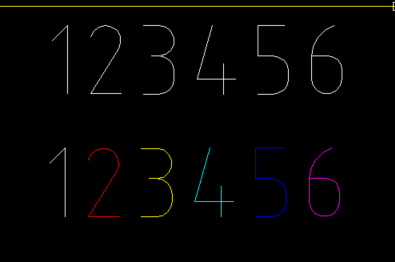
@BIGAL The goal isn’t just to change color. This AutoLISP routine is an interactive character-level editor for a single-line TEXT entity. It lets you: 1. Select an existing TEXT object. 2. Move the mouse along the text to highlight a range of characters. 3. Type replacement characters. 4. Press Enter or Space to replace the highlighted range in the original text. The temporary red text created by ht:paint is only a visual highlight of the selected character range. It is not meant to permanently change color. -

How can I make the following program support Chinese input?
BIGAL replied to xcn's topic in AutoCAD 2D Drafting, Object Properties & Interface
Not sure what your trying to achieve. Could you describe more. If it's about changing color then just use mtext.
- Yesterday
-

multiple file selection dialog box using lisp & powershell
Paul Li posted a topic in AutoLISP, Visual LISP & DCL
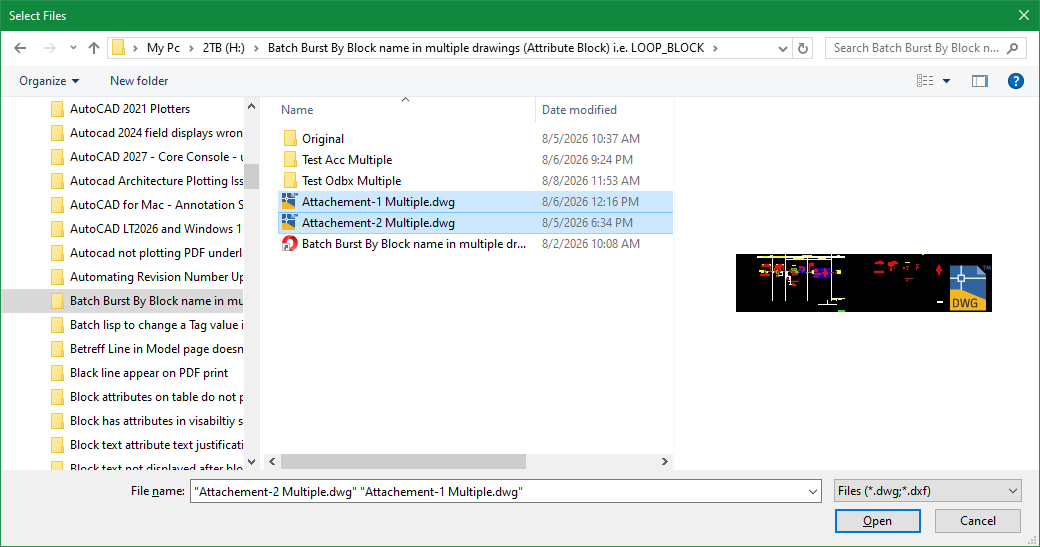
Attached is an improved version of getfiled that implements powershell with the option to select single or multiple files returning a list of the selected item(s): Examples: (pl:getfiledps "Select Files" (getvar"dwgprefix") "dwg" 0) ; for single selection of file type dwg (pl:getfiledps "Select Files" (strcat (getenv "userprofile") "\\downloads") "dwg;dxf" 1) ; for multiple selection of file types dwg & dxf Feedback & comments are welcome. pl_getfiledps.lsp
-
 ynywii joined the community
 -
if you're running Civil 3D 2019, then xdrx.x64.25.arx is not the correct version, it would be xdrx.x64.23.arx
-
How can I make the following program support Chinese input?
xcn replied to xcn's topic in AutoCAD 2D Drafting, Object Properties & Interface
I came up with it. If it could be completely rewritten, that would be great. -
I haven't seen the person that was posting here promoting that in a while, but you might try messaging them here or their website. @XDSoft
-
Do you really need a separate DWG for every revision?
SLW210 replied to indiancad's topic in AutoCAD Drawing Management & Output
I forgot to mention, for keeping up with the revisions we have Excel drawing lists with the Drawing names, dates and latest revision number on the network. P&IDs keep a dated track of each and every revision in cast things get put back to an older revision. -
How can I make the following program support Chinese input?
SLW210 replied to xcn's topic in AutoCAD 2D Drafting, Object Properties & Interface
From where did that LISP originate? Mandarin? Glancing through that LISP a little, I am almost positive the best way would be to completely write something new. -
Well done, nice use of Parallel.For! Kdtree’s are definitely a must have in the CAD programmer’s tool box.
-
@Danielm103 Well I did managed to scrape some milliseconds. However not where it counts in the pairing. Most of the gain in collection of entities. So in the end it is still gile's code. ymg Command: PAIRKD --------- TIMING ------------------------------- Collecting entities: 236 milliseconds Building kdTree: 67 milliseconds Pairing lines and texts: 34 milliseconds Coloring lines and texts: 123 milliseconds Total Elapsed Time: 460 milliseconds Total Number of Groups: 102 using System; using System.Collections.Generic; using System.Diagnostics; using System.Linq; using System.Threading.Tasks; using Gile.AutoCAD.R20.Geometry; using Autodesk.AutoCAD.EditorInput; using Autodesk.AutoCAD.ApplicationServices; using Autodesk.AutoCAD.DatabaseServices; using Autodesk.AutoCAD.Geometry; using Autodesk.AutoCAD.Runtime; using AcAp = Autodesk.AutoCAD.ApplicationServices.Core.Application; [assembly: CommandClass(typeof(PairLinesWithTextsR17.Commands))] namespace PairLinesWithTextsR17 { public class Commands { private struct EntityPosition { public Entity Entity { get; } public Point3d Position { get; } public EntityPosition(Entity entity, Point3d position) { Entity = entity; Position = position; } } [CommandMethod("PAIRKD")] public void ParallelPairTextsWithLines3() { // Force GC collection prior to timing to avoid GC halts during execution GC.Collect(); GC.WaitForPendingFinalizers(); Stopwatch stopwatch = Stopwatch.StartNew(); Document doc = AcAp.DocumentManager.MdiActiveDocument; Database db = doc.Database; Editor ed = doc.Editor; RXClass lineClass = RXObject.GetClass(typeof(Line)); RXClass textClass = RXObject.GetClass(typeof(DBText)); // Pre-allocate generous capacity to prevent memory reallocations List<EntityPosition> midLines = new List<EntityPosition>(16384); List<EntityPosition> textList = new List<EntityPosition>(16384); using (doc.LockDocument()) using (Transaction tr = db.TransactionManager.StartOpenCloseTransaction()) { LayerTable lt = (LayerTable)tr.GetObject(db.LayerTableId, OpenMode.ForRead); ObjectId lineLayerId = lt.Has("1") ? lt["1"] : ObjectId.Null; ObjectId textLayerId = lt.Has("4") ? lt["4"] : ObjectId.Null; BlockTableRecord modelSpace = (BlockTableRecord)tr.GetObject( SymbolUtilityServices.GetBlockModelSpaceId(db), OpenMode.ForRead); // 1. Fast Collection Phase foreach (ObjectId id in modelSpace) { RXClass rxClass = id.ObjectClass; if (rxClass == lineClass) { Line line = (Line)tr.GetObject(id, OpenMode.ForRead); if (line.LayerId == lineLayerId) { Point3d midPoint = new Point3d( (line.StartPoint.X + line.EndPoint.X) * 0.5, (line.StartPoint.Y + line.EndPoint.Y) * 0.5, (line.StartPoint.Z + line.EndPoint.Z) * 0.5 ); midLines.Add(new EntityPosition(line, midPoint)); } } else if (rxClass == textClass) { DBText text = (DBText)tr.GetObject(id, OpenMode.ForRead); if (text.LayerId == textLayerId) { Point3d pos = (text.Justify == AttachmentPoint.BaseLeft) ? text.Position : text.AlignmentPoint; textList.Add(new EntityPosition(text, pos)); } } } EntityPosition[][] textGroups = textList .GroupBy(t => ((DBText)t.Entity).TextString) .Select(g => g.ToArray()) .ToArray(); long t1 = stopwatch.ElapsedMilliseconds; // 2. KdTree Construction KdTree<EntityPosition> lineTree = new KdTree<EntityPosition>(midLines, ml => ml.Position, 2); long t2 = stopwatch.ElapsedMilliseconds; // 3. Parallel pairing (Math + Spatial Search) int numGroups = textGroups.Length; HashSet<Entity>[] uniqueGroupEntities = new HashSet<Entity>[numGroups]; Parallel.For(0, numGroups, i => { EntityPosition[] group = textGroups[i]; HashSet<Entity> uniqueSet = new HashSet<Entity>(group.Length * 2); for (int j = 0; j < group.Length; j++) { EntityPosition textItem = group[j]; uniqueSet.Add(textItem.Entity); Entity nearestLine = lineTree.GetNearestNeighbour(textItem.Position).Entity; uniqueSet.Add(nearestLine); } uniqueGroupEntities[i] = uniqueSet; }); long t3 = stopwatch.ElapsedMilliseconds; // 4. Sequential Database Modification Phase for (int i = 0; i < numGroups; i++) { int colorIndex = (i % 255) + 1; HashSet<Entity> uniqueSet = uniqueGroupEntities[i]; foreach (Entity entity in uniqueSet) { if (entity.ColorIndex != colorIndex) { if (!entity.IsWriteEnabled) { entity.UpgradeOpen(); } entity.ColorIndex = colorIndex; } } } long t4 = stopwatch.ElapsedMilliseconds; stopwatch.Stop(); ed.WriteMessage($"\n--------- TIMING -------------------------------"); ed.WriteMessage($"\nCollecting entities: {t1} milliseconds"); ed.WriteMessage($"\nBuilding kdTree: {t2 - t1} milliseconds"); ed.WriteMessage($"\nPairing lines and texts: {t3 - t2} milliseconds"); ed.WriteMessage($"\nColoring lines and texts: {t4 - t3} milliseconds\n"); ed.WriteMessage($"\nTotal Elapsed Time: {t4} milliseconds"); ed.WriteMessage($"\nTotal Number of Groups: {numGroups}"); tr.Commit(); } } } } pairkd.dll
-
How can I make the following program support Chinese input?
xcn replied to xcn's topic in AutoCAD 2D Drafting, Object Properties & Interface
Thanks @SLW210 for editing. I couldn't figure out how to format the code, but now I know how! - Last week
-
could you share your dwg?
-
Do you really need a separate DWG for every revision?
Steven P replied to indiancad's topic in AutoCAD Drawing Management & Output
Likewise, we save a full copy of the as issued drawings, plus the PDF mark ups and check prints each in a separate folder. Unless specified otherwise all our files are suffixed with the revision code. Mark ups and check prints are in sequentially numbered and dated folders - so we can always go back. Typical folders: 1.0 Working Drawings 2.0 Check Prints - 2.1 Check Print 01-01-26 - 2.2 Check Print 15-03-26 3.0 Markups - 3.1 Markup 01-01-26 - 3.2 Markup 10 -03-26 4.0 Previous Versions And of course if there is a significant change between issues, I'll save the before and after away somewhere safe We usually issue PDFs during the project and if required the as-builts as dwgs right at the end I believe that the construction cloud saves each save as a new version whether it is a new revision or not