All Activity
- Past hour
- Today
-

fire protection LISP routine for the distribution of sprinklers and fire detectors in fire protection installations
CamDuy replied to Javier Longa's topic in AutoLISP, Visual LISP & DCL
Very well, the community needs people like you. -
CamDuy changed their profile photo
-
 Saa C joined the community
 -

fire protection LISP routine for the distribution of sprinklers and fire detectors in fire protection installations
SLW210 replied to Javier Longa's topic in AutoLISP, Visual LISP & DCL
Welcome to CADTutor! -
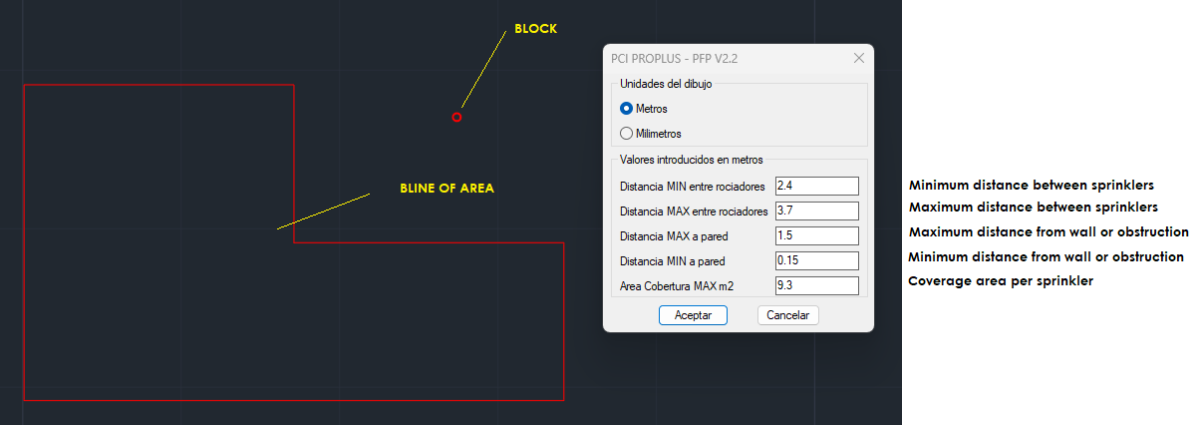
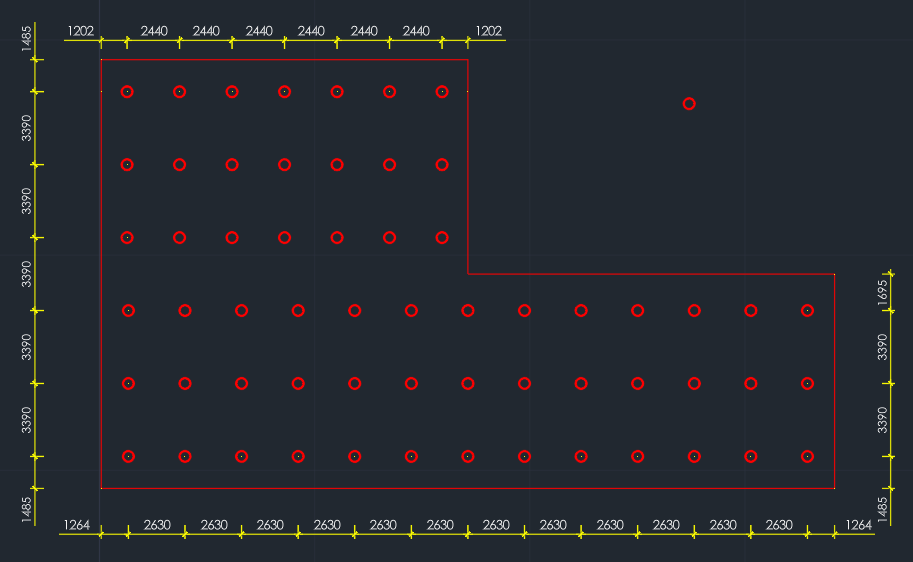
 Hello. I'm happy to share this routine I created with the help of Copilot, which I believe works acceptably for distributing elements (sprinklers, detectors, etc.) based on user input. I would be very grateful if any member of this forum could improve the code or offer any advice. I'm a big fan of @Lee Mac's programs, whom I consider a master. The routine will ask the user to define the measurements that define minimum and maximum values and then, by selecting a block, from which it acquires the layer and scale properties, by selecting an area, with or without "islands", it will generate a mesh pattern, which for a preliminary design is acceptable or approximate in many cases. I am Spanish and the routine is coded in Castilian Spanish (Spain). PCI_PRO (PFP).lsp
-
Free browser CAD viewer + AI inspection tool — feedback welcome
SLW210 replied to ProReadyEngineer's topic in AutoCAD 3D Modelling & Rendering
Welcome to CADTutor! -
Need AutoLISP to Export TEXT/MTEXT to Excel (Advance Steel 2023)
SLW210 replied to Neelamegam's topic in AutoLISP, Visual LISP & DCL
Also, will this "Table" be the only thing in the drawing and just Text and Lines/Plines as per the example .dxf? And will this only be run on a .dxf? Speaking of... Advanced Steel can export BOM/List direct to Excel IIRC. AutoCAD Mechanical can also export a BOM to Excel and comes free with the toolset. AutoCAD Mechanical 2024 Help | To Export a BOM (AutoCAD Mechanical Toolset) | Autodesk Solved: Excel lists from Advance Steel - Autodesk Community Advance Steel - Bill-Of-Material Creation -
.thumb.jpg.615654602253be56b2fbd5d064834780.jpg) indiancad changed their profile photo
indiancad changed their profile photo -

Free browser CAD viewer + AI inspection tool — feedback welcome
ProReadyEngineer posted a topic in AutoCAD 3D Modelling & Rendering
Hi CADTutor community, I’m Bassam from ProReadyEngineer. I recently released a free CAD inspection tool called Pro3DWorks, and I’d love feedback from people who work with 3D CAD models and model review workflows. Pro3DWorks is a single-file, browser-based CAD viewer and inspector. It runs locally from one HTML file, with no install, no account, and no model upload required. It supports common engineering formats including STEP, IGES, STL, Parasolid .x_t, 3MF, GLB, OBJ, and more. My goal is to make quick CAD model review easier when checking geometry, documenting assemblies, preparing screenshots, or communicating design details. Current features include: - 3D CAD viewing directly in the browser - Measurements on vertices, edges, and faces - Section views - Exploded views - Mass properties - Interference checks - Scaling tools - 4K image export/rendering - Optional AI-assisted component identification, BOM generation, and design review The AI workflow can use OpenAI-compatible endpoints, or local/private models through LM Studio. Free download: https://proreadyengineer.com/products I also published two videos showing the workflow and value: Free AI CAD Tool for Engineers: Save Time & Money with AI https://www.youtube.com/watch?v=RWoHOKjx8M8 AI Did 18 Hours of CAD Work for $1.30 — Free Tool https://www.youtube.com/watch?v=HweKy0U9Gjw I’m the creator, so I want to disclose that clearly. I’m sharing this here because I’d appreciate honest feedback from CAD users — especially around what would make this more useful for real 3D model inspection and review. Thanks, Bassam -
ProReadyEngineer joined the community
-

Need AutoLISP to Export TEXT/MTEXT to Excel (Advance Steel 2023)
BIGAL replied to Neelamegam's topic in AutoLISP, Visual LISP & DCL
A couple of comments, making a table is much easier than rows and columns of *text, one advantage is read all the string number of characters so set correct column width to max STRLEN. Part 2 is have Table to Excel program or just write direct to Excel. You provided a sample dwg but "I need an AutoLISP routine for Advance Steel 2023." so what are you trying to read from AS ? That makes more sense, export the desired answer without a intermediatory step. There is some code out there about reading AS object properties. -
LISP: Find & Replace Without the Lag of AutoCAD's Default Command
indiancad replied to CamDuy's topic in AutoLISP, Visual LISP & DCL
If you're looking for a faster alternative to AutoCAD's FIND command, an AutoLISP routine that processes TEXT, MTEXT, ATTRIB, and even block attributes directly through code can be much quicker, especially in large drawings. The slowdown in the built-in command often comes from its interface and broader search options. A LISP can be customized to search only the objects you need, making batch replacements much faster. Just remember to back up the drawing before running global replacements. -

LISP: Find & Replace Without the Lag of AutoCAD's Default Command
VicoWang replied to CamDuy's topic in AutoLISP, Visual LISP & DCL
Very professional requirements, especially when dealing with large multi-image sets, where it is necessary to quickly locate a known text or object, sometimes having to go through all the drawings. In fact, you can try VC distribution. It can mount DLL and make two bundles for different versions(like VLX+DLLV1=Budl1, VLX+DLLV2=Budl2). The user can pull the collection to achieve configuration-free. -
Can CAD be an online battle platform? I decided to try it.
VicoWang posted a topic in AutoLISP, Visual LISP & DCL
Based on my practice of networking LISP, I am going to make an online game platform that executes in the CAD model space. However, the game category is different from the products I developed before. It requires a certain timeliness, which is a challenge to the network infrastructure. In short, I have developed a local battle version of Gomoku. You can copy the following code or download the lsp file to run it locally. Gomoku V0.3.lsp After the problem of the network infrastructure part is solved, the plug-in will be iterated quickly to achieve online instant challenges. I have provided another updateable installation method to avoid duplicate copying or downloading. If I update it, you will know: [Gomoku CadCade] VCID: 1G8VY1 @ VedaCAD I hope to hear your opinions on UI and interaction. ;;; AutoCAD Gomoku v0.3 ;;; Author: Vico (CadCade) ;;; Description: Standalone 15x15 Gomoku in ModelSpace (vl-load-com) ;;; --- Globals & States --- (setq *gmk-size* 15 *gmk-cell* 10.0 *gmk-radius* (* *gmk-cell* 0.333) *gmk-layer* "CADCADE_CANVAS" *gmk-p1-color* 10 ; Soft Pastel Red *gmk-p2-color* 140 ; Bright Light Blue *gmk-win-color* 3 ; Bright Green *gmk-idle-color* 8) ; Dark Gray (setq *gmk-board* nil *gmk-hover-ent* nil *gmk-active* nil *gmk-ui-x* 0.0 *gmk-ui-y* 0.0 *gmk-p1-total* 0.0 *gmk-p2-total* 0.0 *gmk-history* nil) (setq *gmk-ui-p1-time-ent* nil *gmk-ui-p1-tot-ent* nil *gmk-ui-p2-time-ent* nil *gmk-ui-p2-tot-ent* nil *gmk-ui-p1-icon-ent* nil *gmk-ui-p1-name-ent* nil *gmk-ui-p2-icon-ent* nil *gmk-ui-p2-name-ent* nil *gmk-ui-hist-1* nil *gmk-ui-hist-2* nil *gmk-ui-hist-3* nil *gmk-ui-hist-4* nil *gmk-ui-hist-5* nil *gmk-ui-hist-6* nil) ;;; --- Data Structure --- (defun gmk:get-index (x y) (+ (* y *gmk-size*) x)) (defun gmk:get-cell (x y) (if (and (>= x 0) (< x *gmk-size*) (>= y 0) (< y *gmk-size*)) (nth (gmk:get-index x y) *gmk-board*) -1 ) ) (defun gmk:set-cell (x y val / idx i nb) (setq idx (gmk:get-index x y) i 0 nb nil) (foreach item *gmk-board* (setq nb (cons (if (= i idx) val item) nb) i (1+ i)) ) (setq *gmk-board* (reverse nb)) ) ;;; --- Graphics & Layer --- (defun gmk:ensure-layer () (if (not (tblsearch "LAYER" *gmk-layer*)) (entmakex (list '(0 . "LAYER") '(100 . "AcDbSymbolTableRecord") '(100 . "AcDbLayerTableRecord") (cons 2 *gmk-layer*) '(70 . 0))) ) ) (defun gmk:purge-board (/ ss i e) (if (setq ss (ssget "_X" (list (cons 8 *gmk-layer*)))) (progn (setq i -1) (while (setq e (ssname ss (setq i (1+ i)))) (vl-catch-all-apply 'entdel (list e)) ) ) ) ) (defun gmk:draw-line (pt1 pt2 col) (entmakex (list '(0 . "LINE") (cons 8 *gmk-layer*) (cons 10 pt1) (cons 11 pt2) (cons 62 col))) ) (defun gmk:draw-thick-line (pt1 pt2 col wid) (entmakex (list '(0 . "LWPOLYLINE") '(100 . "AcDbEntity") (cons 8 *gmk-layer*) '(100 . "AcDbPolyline") '(90 . 2) '(70 . 0) (cons 43 wid) (cons 62 col) (cons 10 (list (car pt1) (cadr pt1))) (cons 10 (list (car pt2) (cadr pt2))))) ) (defun gmk:draw-text (pt str hgt col) (entmakex (list '(0 . "TEXT") (cons 8 *gmk-layer*) (cons 10 pt) (cons 40 hgt) (cons 1 str) (cons 62 col))) ) (defun gmk:draw-centered-text (pt str hgt col) (entmakex (list '(0 . "TEXT") (cons 8 *gmk-layer*) (cons 10 pt) (cons 11 pt) (cons 40 hgt) (cons 1 str) (cons 62 col) '(72 . 1) '(73 . 2))) ) (defun gmk:update-dynamic-text (sym pt str hgt col / el) (if (and (eval sym) (setq el (entget (eval sym)))) (entmod (subst (cons 62 col) (assoc 62 el) (subst (cons 1 str) (assoc 1 el) el))) (set sym (gmk:draw-text pt str hgt col)) ) ) (defun gmk:update-color (ent col / el) (if (and ent (setq el (entget ent))) (entmod (subst (cons 62 col) (assoc 62 el) el)) ) ) (defun gmk:set-turn (p / c1 c2) (if (= p 1) (setq c1 *gmk-p1-color* c2 *gmk-idle-color*) (setq c1 *gmk-idle-color* c2 *gmk-p2-color*) ) (gmk:update-color *gmk-ui-p1-icon-ent* c1) (gmk:update-color *gmk-ui-p1-name-ent* c1) (gmk:update-color *gmk-ui-p2-icon-ent* c2) (gmk:update-color *gmk-ui-p2-name-ent* c2) (redraw) ) (defun gmk:draw-solid-circle (pt rad col / r2 p1 p2) (setq r2 (/ rad 2.0) p1 (list (- (car pt) r2) (cadr pt)) p2 (list (+ (car pt) r2) (cadr pt))) (entmakex (list '(0 . "LWPOLYLINE") '(100 . "AcDbEntity") (cons 8 *gmk-layer*) '(100 . "AcDbPolyline") '(90 . 2) '(70 . 1) (cons 62 col) (cons 43 rad) (cons 10 p1) '(42 . 1.0) (cons 10 p2) '(42 . 1.0))) ) (defun gmk:draw-rounded-rect (xmin ymin xmax ymax r col wid / b) (setq b 0.41421356) ; tan(pi/8) (entmakex (list '(0 . "LWPOLYLINE") '(100 . "AcDbEntity") (cons 8 *gmk-layer*) '(100 . "AcDbPolyline") '(90 . 8) '(70 . 1) (cons 43 wid) (cons 62 col) (cons 10 (list (+ xmin r) ymin)) (cons 42 0.0) (cons 10 (list (- xmax r) ymin)) (cons 42 b) (cons 10 (list xmax (+ ymin r))) (cons 42 0.0) (cons 10 (list xmax (- ymax r))) (cons 42 b) (cons 10 (list (- xmax r) ymax)) (cons 42 0.0) (cons 10 (list (+ xmin r) ymax)) (cons 42 b) (cons 10 (list xmin (- ymax r))) (cons 42 0.0) (cons 10 (list xmin (+ ymin r))) (cons 42 b))) ) (defun gmk:draw-board (/ i mdim cx ux-l ux-r) (setq mdim (* (1- *gmk-size*) *gmk-cell*)) (setq i 1) (while (< i (1- *gmk-size*)) (gmk:draw-line (list (* i *gmk-cell*) 0.0 0.0) (list (* i *gmk-cell*) mdim 0.0) 8) (gmk:draw-line (list 0.0 (* i *gmk-cell*) 0.0) (list mdim (* i *gmk-cell*) 0.0) 8) (setq i (1+ i)) ) (setq i 0) (while (< i *gmk-size*) (gmk:draw-text (list (- (* i *gmk-cell*) (* *gmk-cell* 0.2)) (* -0.8 *gmk-cell*) 0.0) (chr (+ 65 i)) (* *gmk-cell* 0.4) 8) (gmk:draw-text (list (* -1.4 *gmk-cell*) (- (* i *gmk-cell*) (* *gmk-cell* 0.2)) 0.0) (itoa (1+ i)) (* *gmk-cell* 0.4) 8) (setq i (1+ i)) ) (entmakex (list '(0 . "LWPOLYLINE") '(100 . "AcDbEntity") '(100 . "AcDbPolyline") (cons 8 *gmk-layer*) '(90 . 4) '(70 . 1) (cons 43 (* *gmk-cell* 0.08)) '(62 . 8) (cons 10 '(0.0 0.0)) (cons 10 (list mdim 0.0)) (cons 10 (list mdim mdim)) (cons 10 (list 0.0 mdim)))) (gmk:draw-solid-circle (list (* 7 *gmk-cell*) (* 7 *gmk-cell*) 0.0) (* *gmk-cell* 0.15) 8) (setq ux-l (+ mdim (* *gmk-cell* 2.5)) ux-r (+ ux-l (* *gmk-cell* 7.5)) cx (+ ux-l (* *gmk-cell* 3.75))) (gmk:draw-rounded-rect ux-l 0.0 ux-r mdim (* *gmk-cell* 0.5) 8 (* *gmk-cell* 0.05)) (gmk:draw-centered-text (list cx (- mdim (* *gmk-cell* 0.7)) 0.0) "GOMOKU" (* *gmk-cell* 0.55) 8) (gmk:draw-centered-text (list cx (- mdim (* *gmk-cell* 1.4)) 0.0) "CadCade.com" (* *gmk-cell* 0.25) 8) (gmk:draw-line (list (+ ux-l (* *gmk-cell* 0.4)) (- mdim (* *gmk-cell* 1.9)) 0.0) (list (- ux-r (* *gmk-cell* 0.4)) (- mdim (* *gmk-cell* 1.9)) 0.0) 8) (setq *gmk-ui-p1-icon-ent* (gmk:draw-solid-circle (list (+ ux-l (* *gmk-cell* 1.0)) (- mdim (* *gmk-cell* 2.7)) 0.0) *gmk-radius* *gmk-p1-color*)) (setq *gmk-ui-p1-name-ent* (gmk:draw-text (list (+ ux-l (* *gmk-cell* 1.8)) (- mdim (* *gmk-cell* 2.85)) 0.0) "Player 1" (* *gmk-cell* 0.4) *gmk-p1-color*)) (gmk:draw-text (list (+ ux-l (* *gmk-cell* 1.0)) (- mdim (* *gmk-cell* 3.6)) 0.0) "Think Time:" (* *gmk-cell* 0.3) 8) (gmk:update-dynamic-text '*gmk-ui-p1-time-ent* (list (+ ux-l (* *gmk-cell* 4.1)) (- mdim (* *gmk-cell* 3.6)) 0.0) "0.00s" (* *gmk-cell* 0.3) 8) (gmk:draw-text (list (+ ux-l (* *gmk-cell* 1.0)) (- mdim (* *gmk-cell* 4.1)) 0.0) "Total Time:" (* *gmk-cell* 0.3) 8) (gmk:update-dynamic-text '*gmk-ui-p1-tot-ent* (list (+ ux-l (* *gmk-cell* 4.1)) (- mdim (* *gmk-cell* 4.1)) 0.0) "0.00s" (* *gmk-cell* 0.3) 8) (gmk:draw-line (list (+ ux-l (* *gmk-cell* 0.4)) (- mdim (* *gmk-cell* 4.7)) 0.0) (list (- ux-r (* *gmk-cell* 0.4)) (- mdim (* *gmk-cell* 4.7)) 0.0) 8) (setq *gmk-ui-p2-icon-ent* (gmk:draw-solid-circle (list (+ ux-l (* *gmk-cell* 1.0)) (- mdim (* *gmk-cell* 5.5)) 0.0) *gmk-radius* *gmk-p2-color*)) (setq *gmk-ui-p2-name-ent* (gmk:draw-text (list (+ ux-l (* *gmk-cell* 1.8)) (- mdim (* *gmk-cell* 5.65)) 0.0) "Local AI" (* *gmk-cell* 0.4) *gmk-p2-color*)) (gmk:draw-text (list (+ ux-l (* *gmk-cell* 1.0)) (- mdim (* *gmk-cell* 6.4)) 0.0) "Think Time:" (* *gmk-cell* 0.3) 8) (gmk:update-dynamic-text '*gmk-ui-p2-time-ent* (list (+ ux-l (* *gmk-cell* 4.1)) (- mdim (* *gmk-cell* 6.4)) 0.0) "0.00s" (* *gmk-cell* 0.3) 8) (gmk:draw-text (list (+ ux-l (* *gmk-cell* 1.0)) (- mdim (* *gmk-cell* 6.9)) 0.0) "Total Time:" (* *gmk-cell* 0.3) 8) (gmk:update-dynamic-text '*gmk-ui-p2-tot-ent* (list (+ ux-l (* *gmk-cell* 4.1)) (- mdim (* *gmk-cell* 6.9)) 0.0) "0.00s" (* *gmk-cell* 0.3) 8) (gmk:draw-line (list (+ ux-l (* *gmk-cell* 0.4)) (- mdim (* *gmk-cell* 7.5)) 0.0) (list (- ux-r (* *gmk-cell* 0.4)) (- mdim (* *gmk-cell* 7.5)) 0.0) 8) (gmk:draw-text (list (+ ux-l (* *gmk-cell* 0.8)) (- mdim (* *gmk-cell* 8.2)) 0.0) "RECENT MOVES:" (* *gmk-cell* 0.35) 8) (setq *gmk-history* nil) (gmk:draw-line (list (+ ux-l (* *gmk-cell* 0.4)) (* *gmk-cell* 1.4) 0.0) (list (- ux-r (* *gmk-cell* 0.4)) (* *gmk-cell* 1.4) 0.0) 8) (gmk:draw-centered-text (list cx (* *gmk-cell* 0.8) 0.0) "Powered by CadCade.com" (* *gmk-cell* 0.2) 8) (gmk:draw-centered-text (list cx (* *gmk-cell* 0.3) 0.0) "Code by Vico" (* *gmk-cell* 0.2) 8) ) (defun gmk:format-move (x y) (strcat (chr (+ 65 x)) (itoa (1+ y)))) (defun gmk:add-history (p mstr / c pt i mdim ux-l) (setq *gmk-history* (cons (list p mstr) *gmk-history*)) (if (> (length *gmk-history*) 6) (setq *gmk-history* (reverse (cdr (reverse *gmk-history*)))) ) (setq mdim (* (1- *gmk-size*) *gmk-cell*) ux-l (+ mdim (* *gmk-cell* 2.5)) i 0) (foreach item *gmk-history* (setq c (if (= (car item) 1) *gmk-p1-color* *gmk-p2-color*) pt (list (+ ux-l (* *gmk-cell* 1.2)) (- mdim (* *gmk-cell* (+ 8.8 (* i 0.55)))) 0.0)) (gmk:update-dynamic-text (read (strcat "*gmk-ui-hist-" (itoa (1+ i)) "*")) pt (cadr item) (* *gmk-cell* 0.3) c) (setq i (1+ i)) ) ) (defun gmk:update-hover (x y / pt el) (if (and (>= x 0) (< x *gmk-size*) (>= y 0) (< y *gmk-size*) (zerop (gmk:get-cell x y))) (progn (setq pt (list (* x *gmk-cell*) (* y *gmk-cell*) 0.0)) (if (or (not *gmk-hover-ent*) (not (entget *gmk-hover-ent*))) (setq *gmk-hover-ent* (entmakex (list '(0 . "CIRCLE") (cons 8 *gmk-layer*) (cons 10 pt) (cons 40 *gmk-radius*) (cons 62 *gmk-p1-color*)))) (progn (setq el (entget *gmk-hover-ent*)) (entmod (subst (cons 10 pt) (assoc 10 el) el)) ) ) ) (gmk:clear-hover) ) ) (defun gmk:clear-hover () (if *gmk-hover-ent* (progn (vl-catch-all-apply 'entdel (list *gmk-hover-ent*)) (setq *gmk-hover-ent* nil) ) ) ) (defun gmk:cleanup () (gmk:clear-hover) (setq *gmk-entities* nil *gmk-hover-ent* nil *gmk-board* nil *gmk-ui-p1-time-ent* nil *gmk-ui-p1-tot-ent* nil *gmk-ui-p2-time-ent* nil *gmk-ui-p2-tot-ent* nil *gmk-ui-p1-icon-ent* nil *gmk-ui-p1-name-ent* nil *gmk-ui-p2-icon-ent* nil *gmk-ui-p2-name-ent* nil *gmk-ui-hist-1* nil *gmk-ui-hist-2* nil *gmk-ui-hist-3* nil *gmk-ui-hist-4* nil *gmk-ui-hist-5* nil *gmk-ui-hist-6* nil) ) ;;; --- DCL UI --- (defun gmk:show-lobby-dialog (/ fn f id res) (setq fn (vl-filename-mktemp "gmk_lobby.dcl") f (open fn "w")) (foreach str '( "gmk_lobby : dialog { label=\"CadCade.com Lobby\"; width=40;" " : spacer { height=0.5; }" " : text { label=\"Select Game Mode:\"; alignment=centered; font=\"bold\"; }" " : spacer { height=1; }" " : column { alignment=centered; fixed_width=true;" " : button { key=\"btn_match\"; label=\"Online Matchmaking\"; width=28; fixed_width=true; is_enabled=false; }" " : spacer { height=0.2; }" " : button { key=\"btn_watch\"; label=\"Spectate Mode\"; width=28; fixed_width=true; is_enabled=false; }" " : spacer { height=0.2; }" " : button { key=\"btn_local\"; label=\"Local PvE (vs AI)\"; width=28; fixed_width=true; is_default=true; }" " }" " : spacer { height=1; }" " : button { key=\"btn_quit\"; label=\"Exit Game\"; is_cancel=true; width=12; alignment=centered; }" "}") (write-line str f) ) (close f) (setq id (load_dialog fn)) (if (new_dialog "gmk_lobby" id) (progn (action_tile "btn_local" "(done_dialog 1)") (action_tile "btn_match" "(done_dialog 2)") (action_tile "btn_watch" "(done_dialog 3)") (action_tile "btn_quit" "(done_dialog 0)") (setq res (start_dialog)) ) (setq res 0) ) (unload_dialog id) (vl-file-delete fn) res ) (defun gmk:show-gameover-dialog (msg / fn f id res) (gmk:clear-hover) (setq fn (vl-filename-mktemp "gmk_go.dcl") f (open fn "w")) (foreach str (list "gmk_go : dialog { label=\"Match Complete\";" " : spacer { height=0.5; }" (strcat " : text { label=\"" msg "\"; alignment=centered; font=\"bold\"; }") " : spacer { height=1; }" " : row { alignment=centered; fixed_width=true;" " : button { key=\"btn_next\"; label=\"Play Again\"; is_default=true; width=16; fixed_width=true; }" " : button { key=\"btn_quit\"; label=\"End Match\"; is_cancel=true; width=16; fixed_width=true; }" " }" "}") (write-line str f) ) (close f) (setq id (load_dialog fn)) (if (new_dialog "gmk_go" id) (progn (action_tile "btn_next" "(done_dialog 1)") (action_tile "btn_quit" "(done_dialog 0)") (setq res (start_dialog)) ) ) (unload_dialog id) (vl-file-delete fn) res ) (defun gmk:show-cleanup-dialog (/ fn f id res) (gmk:clear-hover) (setq fn (vl-filename-mktemp "gmk_cl.dcl") f (open fn "w")) (foreach str '( "gmk_cl : dialog { label=\"Exit Game\";" " : spacer { height=0.5; }" " : text { label=\"Do you want to keep the board on the screen?\"; alignment=centered; }" " : text { label=\"(Kept entities will become standard CAD objects)\"; alignment=centered; color=8; }" " : spacer { height=1; }" " : row { alignment=centered; fixed_width=true;" " : button { key=\"btn_keep\"; label=\"Keep Board\"; is_default=true; width=14; fixed_width=true; }" " : button { key=\"btn_clean\"; label=\"Clean Up\"; is_cancel=true; width=14; fixed_width=true; }" " }" "}") (write-line str f) ) (close f) (setq id (load_dialog fn)) (if (new_dialog "gmk_cl" id) (progn (action_tile "btn_keep" "(done_dialog 1)") (action_tile "btn_clean" "(done_dialog 0)") (setq res (start_dialog)) ) ) (unload_dialog id) (vl-file-delete fn) res ) ;;; --- Core Math & AI --- (defun gmk:get-time-seconds () (* 86400.0 (getvar "DATE"))) (defun gmk:count-continuous (x y dx dy p / cnt blk cx cy px py) (setq cnt 0 blk 0 cx (+ x dx) cy (+ y dy) px x py y) (while (and (>= cx 0) (< cx *gmk-size*) (>= cy 0) (< cy *gmk-size*) (= (gmk:get-cell cx cy) p)) (setq px cx py cy cnt (1+ cnt) cx (+ cx dx) cy (+ cy dy)) ) (if (or (< cx 0) (>= cx *gmk-size*) (< cy 0) (>= cy *gmk-size*) (/= (gmk:get-cell cx cy) 0)) (setq blk 1) ) (list cnt blk px py) ) (defun gmk:check-win (x y p / dirs d r1 r2 tot win) (setq dirs '((1 0) (0 1) (1 1) (1 -1)) win nil) (foreach d dirs (setq r1 (gmk:count-continuous x y (car d) (cadr d) p) r2 (gmk:count-continuous x y (- (car d)) (- (cadr d)) p) tot (+ 1 (car r1) (car r2))) (if (>= tot 5) (setq win (list (nth 2 r2) (nth 3 r2) (nth 2 r1) (nth 3 r1))) ) ) win ) (defun gmk:eval-dir (x y dx dy p / r1 r2 cnt blk) (setq r1 (gmk:count-continuous x y dx dy p) r2 (gmk:count-continuous x y (- dx) (- dy) p) cnt (+ 1 (car r1) (car r2)) blk (+ (cadr r1) (cadr r2))) (cond ((>= cnt 5) 1000000) ; Win ((and (= cnt 4) (= blk 0)) 100000) ; Open 4 ((and (= cnt 4) (= blk 1)) 10000) ; Closed 4 ((and (= cnt 3) (= blk 0)) 5000) ; Open 3 ((and (= cnt 3) (= blk 1)) 50) ; Closed 3 ((and (= cnt 2) (= blk 0)) 100) ; Open 2 ((and (= cnt 2) (= blk 1)) 5) ; Closed 2 (t 1) ) ) (defun gmk:eval-point (x y p / dirs tot d) (setq dirs '((1 0) (0 1) (1 1) (1 -1)) tot 0) (foreach d dirs (setq tot (+ tot (gmk:eval-dir x y (car d) (cadr d) p))) ) tot ) (defun gmk:ai-move (/ bx by max-s x y s1 s2 cbias tot) (setq max-s -1 bx 7 by 7 x 0) (while (< x *gmk-size*) (setq y 0) (while (< y *gmk-size*) (if (zerop (gmk:get-cell x y)) (progn (setq s1 (gmk:eval-point x y 1) s2 (gmk:eval-point x y 2) ;; Center bias using inverse Manhattan distance to (7,7). Max value ~14, Min 0. cbias (- 14.0 (+ (abs (- x 7)) (abs (- y 7)))) tot (+ s2 (* s1 1.2) (* cbias 0.5))) (if (> tot max-s) (setq max-s tot bx x by y)) ) ) (setq y (1+ y)) ) (setq x (1+ x)) ) (list bx by) ) ;;; --- Main App Loop --- (defun c:GOMOKU (/ *error* o-cmd o-osm run md pa gr pt spt cx cy am win r st dt uxl mdim ccode) (defun *error* (msg) (gmk:purge-board) (gmk:cleanup) (if o-cmd (setvar "CMDECHO" o-cmd)) (if o-osm (setvar "OSMODE" o-osm)) (if (not (wcmatch (strcase msg) "*QUIT*,*CANCEL*,*BREAK*")) (princ (strcat "\n[Gomoku] Error: " msg)) (princ "\n[Gomoku] Match aborted by user.") ) (princ) ) (setq o-cmd (getvar "CMDECHO") o-osm (getvar "OSMODE")) (setvar "CMDECHO" 0) (setvar "OSMODE" 32) (setq mdim (* (1- *gmk-size*) *gmk-cell*) uxl (+ mdim (* *gmk-cell* 2.5)) run T) (while run (setq md (gmk:show-lobby-dialog)) (cond ((= md 0) (setq run nil)) ((= md 1) (setq pa T) (while pa (princ "\n[Gomoku] Initializing Sandbox Board...") (gmk:ensure-layer) (gmk:purge-board) (gmk:cleanup) (setq *gmk-board* '()) (repeat (* *gmk-size* *gmk-size*) (setq *gmk-board* (cons 0 *gmk-board*))) (setq *gmk-p1-total* 0.0 *gmk-p2-total* 0.0) (gmk:draw-board) (command "_.ZOOM" "_W" (list (* -2 *gmk-cell*) (* -2 *gmk-cell*)) (list (+ uxl (* *gmk-cell* 9.5)) (+ mdim (* *gmk-cell* 2.0)))) (princ "\n[Gomoku] Game Start! You are Red. Click to place your piece. Press ESC or Right-Click to exit.") (setq *gmk-active* T st (gmk:get-time-seconds)) (gmk:set-turn 1) (while *gmk-active* (setq gr (grread T 15 0) ccode (car gr) pt (cadr gr)) (cond ;; Hover ((= ccode 5) (if (setq spt (osnap pt "_int")) (setq pt spt)) (setq cx (fix (+ (/ (car pt) *gmk-cell*) 0.5)) cy (fix (+ (/ (cadr pt) *gmk-cell*) 0.5))) (gmk:update-hover cx cy) (setq dt (- (gmk:get-time-seconds) st)) (gmk:update-dynamic-text '*gmk-ui-p1-time-ent* (list (+ uxl (* *gmk-cell* 4.1)) (- mdim (* *gmk-cell* 3.6)) 0.0) (strcat (rtos dt 2 2) "s") (* *gmk-cell* 0.3) 8) ) ;; Click ((= ccode 3) (if (setq spt (osnap pt "_int")) (setq pt spt)) (setq cx (fix (+ (/ (car pt) *gmk-cell*) 0.5)) cy (fix (+ (/ (cadr pt) *gmk-cell*) 0.5))) (if (and (>= cx 0) (< cx *gmk-size*) (>= cy 0) (< cy *gmk-size*) (zerop (gmk:get-cell cx cy))) (progn (setq dt (- (gmk:get-time-seconds) st) *gmk-p1-total* (+ *gmk-p1-total* dt)) (gmk:update-dynamic-text '*gmk-ui-p1-time-ent* (list (+ uxl (* *gmk-cell* 4.1)) (- mdim (* *gmk-cell* 3.6)) 0.0) (strcat (rtos dt 2 2) "s") (* *gmk-cell* 0.3) 8) (gmk:update-dynamic-text '*gmk-ui-p1-tot-ent* (list (+ uxl (* *gmk-cell* 4.1)) (- mdim (* *gmk-cell* 4.1)) 0.0) (strcat (rtos *gmk-p1-total* 2 2) "s") (* *gmk-cell* 0.3) 8) (gmk:set-cell cx cy 1) (gmk:draw-solid-circle (list (* cx *gmk-cell*) (* cy *gmk-cell*)) *gmk-radius* *gmk-p1-color*) (gmk:clear-hover) (gmk:add-history 1 (strcat "Red: " (gmk:format-move cx cy))) (if (setq win (gmk:check-win cx cy 1)) (progn (gmk:add-history 1 "Red: MATCH WIN!") (gmk:draw-thick-line (list (* (car win) *gmk-cell*) (* (cadr win) *gmk-cell*)) (list (* (nth 2 win) *gmk-cell*) (* (nth 3 win) *gmk-cell*)) *gmk-win-color* (* *gmk-cell* 0.4)) (redraw) (setq r (gmk:show-gameover-dialog "Victory! You defeated the Local AI.") *gmk-active* nil pa (= r 1)) ) (if (not (member 0 *gmk-board*)) (progn (gmk:add-history 1 "SYS: DRAW MATCH") (redraw) (setq r (gmk:show-gameover-dialog "Stalemate! The board is full.") *gmk-active* nil pa (= r 1)) ) (progn (gmk:set-turn 2) (princ "\n[Gomoku] AI is thinking...") (setq st (gmk:get-time-seconds) am (gmk:ai-move) dt (- (gmk:get-time-seconds) st) *gmk-p2-total* (+ *gmk-p2-total* dt)) (gmk:update-dynamic-text '*gmk-ui-p2-time-ent* (list (+ uxl (* *gmk-cell* 4.1)) (- mdim (* *gmk-cell* 6.4)) 0.0) (strcat (rtos dt 2 3) "s") (* *gmk-cell* 0.3) 8) (gmk:update-dynamic-text '*gmk-ui-p2-tot-ent* (list (+ uxl (* *gmk-cell* 4.1)) (- mdim (* *gmk-cell* 6.9)) 0.0) (strcat (rtos *gmk-p2-total* 2 2) "s") (* *gmk-cell* 0.3) 8) (gmk:set-cell (car am) (cadr am) 2) (gmk:draw-solid-circle (list (* (car am) *gmk-cell*) (* (cadr am) *gmk-cell*)) *gmk-radius* *gmk-p2-color*) (gmk:add-history 2 (strcat "Blue: " (gmk:format-move (car am) (cadr am)))) (if (setq win (gmk:check-win (car am) (cadr am) 2)) (progn (gmk:add-history 2 "Blue: MATCH WIN!") (gmk:draw-thick-line (list (* (car win) *gmk-cell*) (* (cadr win) *gmk-cell*)) (list (* (nth 2 win) *gmk-cell*) (* (nth 3 win) *gmk-cell*)) *gmk-win-color* (* *gmk-cell* 0.4)) (redraw) (setq r (gmk:show-gameover-dialog "Defeat! The Local AI claims victory.") *gmk-active* nil pa (= r 1)) ) (if (not (member 0 *gmk-board*)) (progn (gmk:add-history 2 "SYS: DRAW MATCH") (redraw) (setq r (gmk:show-gameover-dialog "Stalemate! The board is full.") *gmk-active* nil pa (= r 1)) ) (progn (gmk:set-turn 1) (setq st (gmk:get-time-seconds)) (princ "\n[Gomoku] Your turn.") ) ) ) ) ) ) ) ) ) ;; Exit (Right Click or Enter/Space) ((member ccode '(11 2 25)) (gmk:clear-hover) (setq *gmk-active* nil pa nil) ) ;; Catch-all for robust input handling (e.g. middle mouse pan) (t nil) ) ) ) ) ) ) (princ "\n[Gomoku] Game session ended.") (setq r (gmk:show-cleanup-dialog)) (if (= r 1) (progn (princ " Board entities kept as standard CAD objects.") (gmk:cleanup)) (progn (princ " Cleaning up board...") (gmk:purge-board) (gmk:cleanup)) ) (setvar "CMDECHO" o-cmd) (setvar "OSMODE" o-osm) (princ "\n[Gomoku] Type GOMOKU to enter Lobby.") (princ) ) (princ "\n[CadCade] Gomoku Engine (Local PvE Edition) v0.3 loaded. Type GOMOKU to play.") (princ) -
LISP: Find & Replace Without the Lag of AutoCAD's Default Command
CamDuy posted a topic in AutoLISP, Visual LISP & DCL
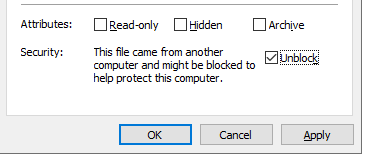
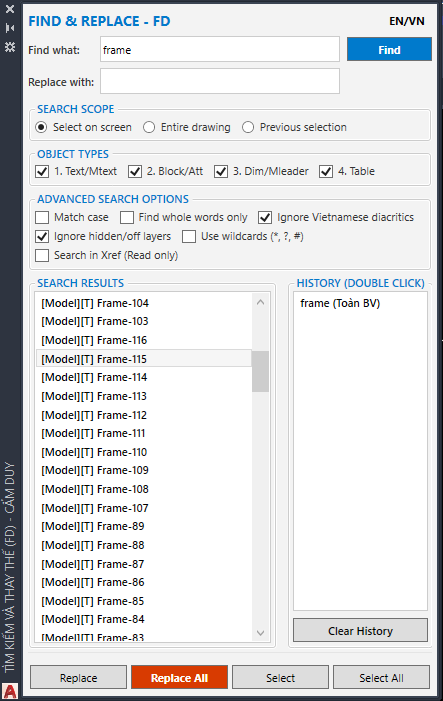
Using AutoCAD's default Find & Replace command often causes the program to freeze or lag for a while when opening or closing the search dialog—especially with large drawings. I'm sharing a lightweight and fast Find & Replace LISP that helps reduce lag and waiting time compared to AutoCAD's built-in Find & Replace command. 2026/07/18 – Version V2 Added a new feature: run the FD command again to toggle the Find panel on/off. Command Name: FDP (FD) +Automatic Installation (Load Once Only) Step 1: Extract FD.zip. Step 2: Run setup.bat to install the files to drive C:. Step 3: Open APPLOAD (AP) and browse to: C:\FD Step 4: Load the file Load_FD.lsp. (Optional) Add it to the Startup Suite so it loads automatically whenever AutoCAD starts. +Manual Installation (Must Be Loaded Every Session) Load FD.vlx using APPLOAD (AP). Load the DLL using the NETLOAD command. Be sure to read the notes below to avoid loading the wrong DLL. !!_!! Important AutoCAD 2018 – Early 2024: Use FD_Palette_v15.dll. Late AutoCAD 2024 – 2025 / 2026 / 2027: Use FD_Palette_v16.dll. If Windows Blocks the DLL Windows may block downloaded DLL files, which can cause loading errors. To fix this: Right-click the .dll file. Open Properties. Check Unblock (if available). Click OK, then load the DLL again. Link: https://www.cadviet.com/forum/index.php?app=forums&module=forums&controller=topic&id=213381&app=forums&module=forums&id=213381
-
Need AutoLISP to Export TEXT/MTEXT to Excel (Advance Steel 2023)
CamDuy replied to Neelamegam's topic in AutoLISP, Visual LISP & DCL
(TTE-TBE) Text to Excel-unformat_byCamDuy.lsp @Neelamegam try it! - Yesterday
-
 pudieraser joined the community
 -
Need AutoLISP to Export TEXT/MTEXT to Excel (Advance Steel 2023)
SLW210 replied to Neelamegam's topic in AutoLISP, Visual LISP & DCL
Why not use a Table Object in AutoCAD? -
 Sarvesh Juvekar joined the community
 -
 Hieu Hoang joined the community
 -
I have a zero installer here, https://github.com/CEXT-Dan/PyRx-Redistributable I still need to update it to Python 3.14. so it not currently functional. It’s based off the embedded package; the idea is if you have some cool libraries you want to share within an organization. It can be unzipped as an AutoCAD. Bundle. You can also roll your own with the embedded package https://www.python.org/downloads/windows/ If you want to run scripts outside of CAD, you’ll probably need the full install. There are other people that use virtual environments and python managers like Anaconda. They know more than me with regards to setup lol For new people, I recommend to follow the instructions, watch the video
-

Need AutoLISP to Export TEXT/MTEXT to Excel (Advance Steel 2023)
Neelamegam replied to Neelamegam's topic in AutoLISP, Visual LISP & DCL
The table format is standard and never changes. -
indiancad joined the community
-

Need AutoLISP to Export TEXT/MTEXT to Excel (Advance Steel 2023)
rbshsnkar replied to Neelamegam's topic in AutoLISP, Visual LISP & DCL
If your table layout is always the same, you don't need a very complicated AutoLISP. A simple approach is: * Read all TEXT and MTEXT entities. * Sort them by Y coordinate (rows) and then X coordinate (columns). * Group nearby text into the same row using a small Y tolerance. * Map the four columns to Assembly Name, Drawing No., Qty, and Total Weight. * Write the data to a CSV file (Excel opens CSV directly). The biggest challenge isn't exporting—it's correctly identifying which text belongs to each row. Once the row grouping is reliable, CSV export is straightforward. If you can share the sample DXF, someone can write a routine tailored to that table format, making it much more reliable than a generic text export. -
There is also PyInstaller to create an executable. PyInstaller Manual — PyInstaller 6.21.0 documentation pip install -U pyinstaller pyinstaller your_program.py
-
Did my Code work on LT for you? You need to respond to queries if you desire the best results. Can you post an example drawing that needs the modifications you describe? You never answered what program was creating these drawings? If I catch up at work I'll see where I am on my cleanup routine and see if I can make it more LT friendly. Dynamic blocks among other things create anonymous blocks, so I'll double check the posted code and adjust if needed. From Autodesk: Basically if anything is changed from the original version, like stretch, rotate, flip, visibility, etc. an anonymous block is created. There is RESETBLOCK in full AutoCAD, not sure on LT. It returns the block to the original default values of the dynamic block.
-
Mine works in Full AutoCAD 2026. Where did (vla-put-Annotative hobj :vlax-false) come from? Mine uses (setpropertyvalue ent "Annotative" 0) What I posted is an adaptation of a larger cleanup program I have that's still in progress, so I am not sure if it would work fully in LT, I am trying to make it work with LT as much as possible and BricsCAD etc., but being without internet for the past two weeks my working at home has been limited.
-
Need AutoLISP to Export TEXT/MTEXT to Excel (Advance Steel 2023)
Neelamegam posted a topic in AutoLISP, Visual LISP & DCL
Hi everyone, I need an AutoLISP routine for Advance Steel 2023. Requirements: - Read all TEXT and MTEXT. - All my drawings have the same format. - Preserve the table layout exactly as shown in the drawing. - Export to CSV or Excel. - Columns are: 1. Name of Assemblies 2. Drawing No. 3. Qty 4. Total Weight Sample DXF is attached. Any help would be greatly appreciated. 1111 1.dxf -
Neelamegam joined the community
-
yes, same in acad. "Fehler: ActiveX-Server gab folgenden Fehler zurück: unbekannter Name: Annotative" There is no such property wich is why i would use setpropertyvalue for acad. As for Bricscad idk how one would do that
-
Casting objects. Every database object has a static cast method, it is your responsibility to check the type from pyrx import Ap, Ax, Db, Ed, Ge, Rx import traceback @Ap.Command() def doitx3(): try: # Get ActiveX application instance axApp = Ap.Application.acadApplication() axDoc = axApp.activeDocument() axUtil = axDoc.utility() # Prompt user to pick an entity axEnt, pnt = axUtil.getEntity("\nPick a line") # Verify that the picked entity is a LINE if axEnt.objectName() != "AcDbLine": raise RuntimeError("oops!: ") # Cast to AcadLine axLine = Ax.AcadLine.cast(axEnt) # change color to green (RGB: 0, 255, 0) axLine.setTrueColor(Ax.AcadAcCmColor(0, 255, 0)) # Print information about the selected entity print(axEnt.objectName(), pnt) except Exception as err: traceback.print_exception(err)
-
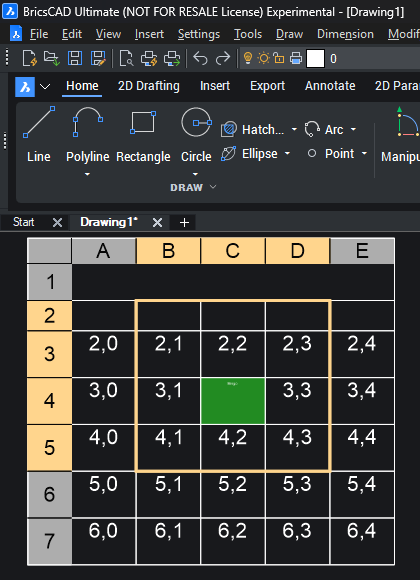
here's an example of creating a table and selecting a sub region from pyrx import Ap, Ax, Db, Ed, Ge, Rx import traceback @Ap.Command() def doitx2(): try: axApp = Ap.Application.acadApplication() axDoc = axApp.activeDocument() axModel = axDoc.modelSpace() ps , point = Ed.Editor.getPoint("\nPick table location: ") if ps != Ed.PromptStatus.eOk: raise RuntimeError("oof {}:".format(ps)) # Creates a table with 7 rows and 5 columns axTable = axModel.addTable(point, 7, 5, 1, 5) #fill up the table for col in range(axTable.columns()): for row in range(2, axTable.rows()): axTable.setText(row, col, "{},{}".format(row, col)) #get the cell extents, is a list of 3d points cex11 = axTable.cellExtents(1, 1, False) cex43 = axTable.cellExtents(4, 3, False) # Create a selection region using ActiveX selection methods sssub = axTable.selectSubRegion( cex11[0], cex43[3], Ge.Vector3d.kZAxis, Ge.Vector3d.kXAxis, Ax.AcSelectType.acTableSelectCrossing, False, ) # Apply the selection to the table using ActiveX selection methods axTable.setSubSelection(*sssub) # Perform hit testing and geometric calculations using ActiveX services # Ge space makes it easier to do math pnt = cex11[0] + (cex43[3] - cex11[0]) * 0.5 bhit, row, col = axTable.hitTest(pnt, Ge.Vector3d.kZAxis) if(bhit): # Modify cell properties using ActiveX methods axTable.setCellTextHeight(row, col, 0.8) axTable.setText(row, col, "Bingo") # since were open source we can add stuff like suppost html colors axTable.setCellBackgroundColor(row, col, Ax.AcadAcCmColor("#228B22")) except Exception: print(traceback.format_exc())
-
The Ax Space. Ax is the wrapper for ActiveX as described here https://help.autodesk.com/view/OARX/2025/ENU/?guid=GUID-A809CD71-4655-44E2-B674-1FE200B9FE30 It’s going to look familiar if you’ve done any VBA or Visual Lisp. The big difference is that all Points, Vectors, Matrices, use AcGe classes instead of variants. from pyrx import Ap, Ax, Db, Ed, Ge, Rx @Ap.Command() def doitx1(): # get the application, document, and modelspace using ActiveX automation axApp = Ap.Application.acadApplication() axDoc = axApp.activeDocument() axModel = axDoc.modelSpace() # add a lines to modelspace, then access it properties # use Ge.Point3d class instead of a variant axLine1 = axModel.addLine(Ge.Point3d(0, 0, 0), Ge.Point3d(100, 100, 0)) axLine2 = axModel.addLine(Ge.Point3d(0, 100, 0), Ge.Point3d(100, 0, 0)) interdata = axLine1.intersectWith(axLine2, Ax.AcExtendOption.acExtendNone) if len(interdata) == 0: print("\nDoes not intersect:") return axCircle = axModel.addCircle(interdata[0], 10) axCircle.setColor(Ax.AcColor.acCyan) #scale and rotate xform = Ge.Matrix3d.scaling(2,axCircle.center()) xform *= Ge.Matrix3d.rotation(0.7854, Ge.Vector3d.kZAxis, axCircle.center()) axLine1.transformBy(xform) axLine2.transformBy(xform)
-
Free Multi Plot Lisp – Fast Batch Printing for AutoCAD, BricsCAD & ZWCAD | Model/Layout, Zone Plotting & PDF Merge
CamDuy replied to CamDuy's topic in AutoLISP, Visual LISP & DCL
https://www.cadviet.com/forum/index.php?app=forums&module=forums&controller=topic&id=213313