All Activity
- Past hour
-

Publish as PDF,Purge all and save as dxf binary 2007
pyou replied to pyou's topic in AutoLISP, Visual LISP & DCL
How do incorporate publish pdf with present default settings? Basically just (_publish " ") and ENTER, but it keeps asking me for more information , need just pdf export with present default settings as it is. -
its great, thanks
- Today
-

Detect Circular Xref in AutoLISP
Ahankhah replied to Ahankhah's topic in AutoLISP, Visual LISP & DCL
Steven, thank you very much. I will review it and get back to you. I truly appreciate your help. -
Detect Circular Xref in AutoLISP
Ahankhah replied to Ahankhah's topic in AutoLISP, Visual LISP & DCL
mhupp, I want AutoLISP code to do that. -
I know that this is old, but did you find a solution? I am wondering if you are sure that you are pathed to the metric pipe catalog?...
-

Import multipage PDF as AutoCAD Objects
rlx replied to SLW210's topic in AutoLISP, Visual LISP & DCL
Great! Thanx! It did gave me an error after the first page so I changed one of your subs a little. added this line : (and blkRef (vlax-method-applicable-p blkRef 'Name)) (defun set-block-contents-color (blkRef layer color / blkDef) (if (and blkRef (vlax-method-applicable-p blkRef 'Name)) (progn (setq blkDef (vla-item (vla-get-Blocks doc) (vla-get-Name blkRef))) (vlax-for ent blkDef (vl-catch-all-apply 'vla-put-layer (list ent layer)) (vl-catch-all-apply 'vla-put-color (list ent color)) ) ) ) )- 1 reply
-
- 1
-

-

Help Appreciated: Force Existing Layer Names to UPPER CASE Not Working
mhupp replied to Clint's topic in AutoLISP, Visual LISP & DCL
I use Screentogif But SaveAS MP4 not gif. these forums don't like the gif it saves. -Edit @BIGAL
-
 nnn13 joined the community
 -

Help Appreciated: Force Existing Layer Names to UPPER CASE Not Working
Clint replied to Clint's topic in AutoLISP, Visual LISP & DCL
This is very superior feedback from both of you! Thanks a million! About this layer name conversion task: Expect all things to change including CAD standard layer name text cases! LAYER NAME TEXT CONVERSION BATCH PROCESSING - calling LISPS in SCRIPT FILES A BricsCAD-based, custom batch file program (Batcher.lsp) as developed for my company very recently. Currently it processes .SCR file types. QUESTION 1: Can .LSP programs be included from within script code lines? If so, ... BATH PROCESSING - SCRIPT FILE PURSUIT A: Convert both existing Title Case & lower case to UPPER CASE BATH PROCESSING - SCRIPT FILE PURSUIT B: Batch convert via the following LISP program. Prerequisite: Researching how to create the following LISP program Create a AutoLISP/Visual LISP program called LAYSUB.lsp This program reads from a old layer name list and a current layer list.* When old names are found from the old layer list, the program replaces the old layer string with current layer string. Proposed LISP Step 1: (*) Create a program resource text file for each layer list, old and current layer names as a program resource file. Proposed LISP Step 2: If old layers name case-sensitive string exist, substitute them with the new layer name case sensitive (UPPER) that is based on the two text file lists. SUMMARY Do the above pursuits sound reasonably practical for batch processing? Best regards, Clint Hill -
I don't believe I posted my Import multiple PDF pages as AutoCAD objects LISP. It does most of what I need, so I doubt if I'll spend any more time on it. ;;; Imports indicated page(s), converts to DWG entities, then arranges them spaced along +X. | ;;;-----------------------------------------------------------------------------------------------| ;;; ImPDF.lsp | ;;; | ;;; By SLW210 (a.k.a. Steve Wilson) | ;;; | ;;; Requires: AutoCAD 2017 + (for PDFIMPORT) | ;;;-----------------------------------------------------------------------------------------------| (defun c:ImPDF (/ pdfPath pgStart pgEnd pg insPt gap doc ms layerColor bgColor layerName blk ) (vl-load-com) ;; Detect background color (setq bgColor (getvar "BACKGROUNDCOLOR")) ; 0=black, 7=white (setq layerColor (if (= bgColor 0) 7 0 ) ) ; white on black, black on white ;; Select PDF file (setq pdfPath (getfiled "Select PDF file to import" "" "pdf" 8)) (if (not pdfPath) (exit) ) ;; Page range (setq pgStart (getint "\nStart page <1>: ")) (if (not pgStart) (setq pgStart 1) ) (setq pgEnd (getint "\nEnd page <same>: ")) (if (not pgEnd) (setq pgEnd pgStart) ) ;; Starting insertion point (setq insPt (getpoint "\nInsertion point: ")) (if (not insPt) (setq insPt '(0 0 0)) ) ;; Gap between pages (setq gap (getreal "\nGap between pages <5.0>: ")) (if (not gap) (setq gap 5.0) ) ;; Get AutoCAD document (setq doc (vla-get-ActiveDocument (vlax-get-acad-object))) ;; Set all entities inside block definition to layer + color (defun set-block-contents-color (blkRef layer color / blkDef) (setq blkDef (vla-item (vla-get-Blocks doc) (vla-get-Name blkRef))) (vlax-for ent blkDef (vl-catch-all-apply 'vla-put-layer (list ent layer)) (vl-catch-all-apply 'vla-put-color (list ent color)) ) ) ;; Loop through pages (setq pg pgStart) (while (<= pg pgEnd) (princ (strcat "\nImporting page " (itoa pg) "...")) ;; Attach PDF underlay (command "_-PDFATTACH" pdfPath (itoa pg) insPt 1.0 0.0) (setq u (entlast)) ;; underlay reference ;; Import to geometry (All, then detach) (command "_PDFIMPORT" u "All" "D") ;; The imported block reference is the last entity (setq blk (entlast)) (if blk (progn ;; Create layer for this page (setq layerName (strcat "PDF_Page_" (itoa pg))) (if (not (tblsearch "layer" layerName)) (vl-catch-all-apply 'vla-Add (list (vla-get-Layers doc) layerName) ) ) ;; Move block reference to layer (vl-catch-all-apply 'vla-put-layer (list (vlax-ename->vla-object blk) layerName) ) ;; Set nested geometry inside block (set-block-contents-color (vlax-ename->vla-object blk) layerName layerColor ) ;; Compute block width for next insertion point (setq minX 1e20 maxX -1e20 ) (vl-catch-all-apply 'vla-getboundingbox (list (vlax-ename->vla-object blk) 'pmin 'pmax) ) (setq pmin (vlax-safearray->list pmin)) (setq pmax (vlax-safearray->list pmax)) (setq width (- (car pmax) (car pmin))) (if (<= width 0.0) (setq width 100.0) ) ;; Update insertion point for next page (setq insPt (list (+ (car insPt) width gap) (cadr insPt) 0)) ) ) ;; Next page (setq pg (1+ pg)) ) (command "_ZOOM" "_E") (princ "\nAll pages imported successfully." ) (princ) )
- 1 reply
-
- 3
-
-

-

Detect Circular Xref in AutoLISP
Steven P replied to Ahankhah's topic in AutoLISP, Visual LISP & DCL
AutoCAD is very bad at running a LISP in one file to read another file, it is not something I have looked at with xrefs, however this might give you a starter, listing any xrefs in the current file - I was looking at this to do something different and is in the folder "finish this one day"... so the code might not be 100%. ;;https://forums.autodesk.com/t5/visual-lisp-autolisp-and-general/grab-all-xref-names-and-paths/td-p/1661552 ;;(defun filepfil ( / Doc LayoutCol EndList) ;; Returns a list of list of all the Xrefs and Images with their paths within a drawing. (defun c:xreffilepaths ( / ) (defun xreftype ( str / ) ;; (setq lst (list "abcd.dwg" "1234.dwg" "sample drawing with space in file name.dwg" "5566.dwg") ) ;; (mapcar '(lambda (x) ;; (substr x 1 (- (strlen x) 4)) ;; ) ;; lst ;; ) (setq MyLen (strlen str)) (setq MyType (substr str (- MyLen 3) )) ) (setq Doc (vla-get-ActiveDocument (vlax-get-Acad-Object))) (setq LayoutCol (vla-get-Layouts Doc)) (vlax-for i LayoutCol (vlax-for Obj (vla-get-Block i) (cond ((= (vla-get-ObjectName Obj) "AcDbRasterImage") (if (not (assoc (vla-get-Name Obj) EndList)) (setq EndList (cons (cons (vla-get-Name Obj) (vla-get-ImageFile Obj)) EndList)) ) ) ((and (= (vla-get-ObjectName Obj) "AcDbBlockReference") (vlax-property-available-p Obj 'Path)) (if (not (assoc (vla-get-Name Obj) EndList)) (setq EndList (cons (cons (vla-get-Name Obj) (vla-get-Path Obj)) EndList)) ) ) ) ) ) EndList (princ "\nContains Xrefs: ") (princ EndList) (foreach n EndList (if (findfile (cdr n)) () (progn (princ "\nMissing XREF: ") (princ (car n)) ;; (princ n) ) ; end progn ) ; end if ) ; end foreach (setq MyPath (cdr (nth 0 EndList)) ) (setq MyFileType (xreftype (cdr (nth 0 EndList)) )) (setq MyFile (strcat (car (nth 0 EndList)) MyFileType) ) (setq NewPath (strcat (getvar "dwgprefix") (vl-string-trim ".\\\\" MyPath ) )) (if (findfile NewPath) ; find file : if file exists (progn (setq MyPath (vl-string-right-trim MyFile MyPath )) ; take off file from file path (setq NewPath (vl-string-right-trim MyFile NewPath )) ; take off file from file path ) ; end progn (progn ) ; end progn ) ; end if ) Not sure if this is something you can use? https://www.autodesk.com/support/technical/article/caas/sfdcarticles/sfdcarticles/Determining-whether-a-drawing-is-referenced-as-an-xref-in-other-drawings.html- 4 replies
-
- 1
-

-
- xref
- circular reference
- (and 2 more)
-
Use CLASSICXREF will display a window for you to look thought. for the ones that you suspect to be circular switch to overlay.
- 4 replies
-
- 1
-
-
- xref
- circular reference
- (and 2 more)
-
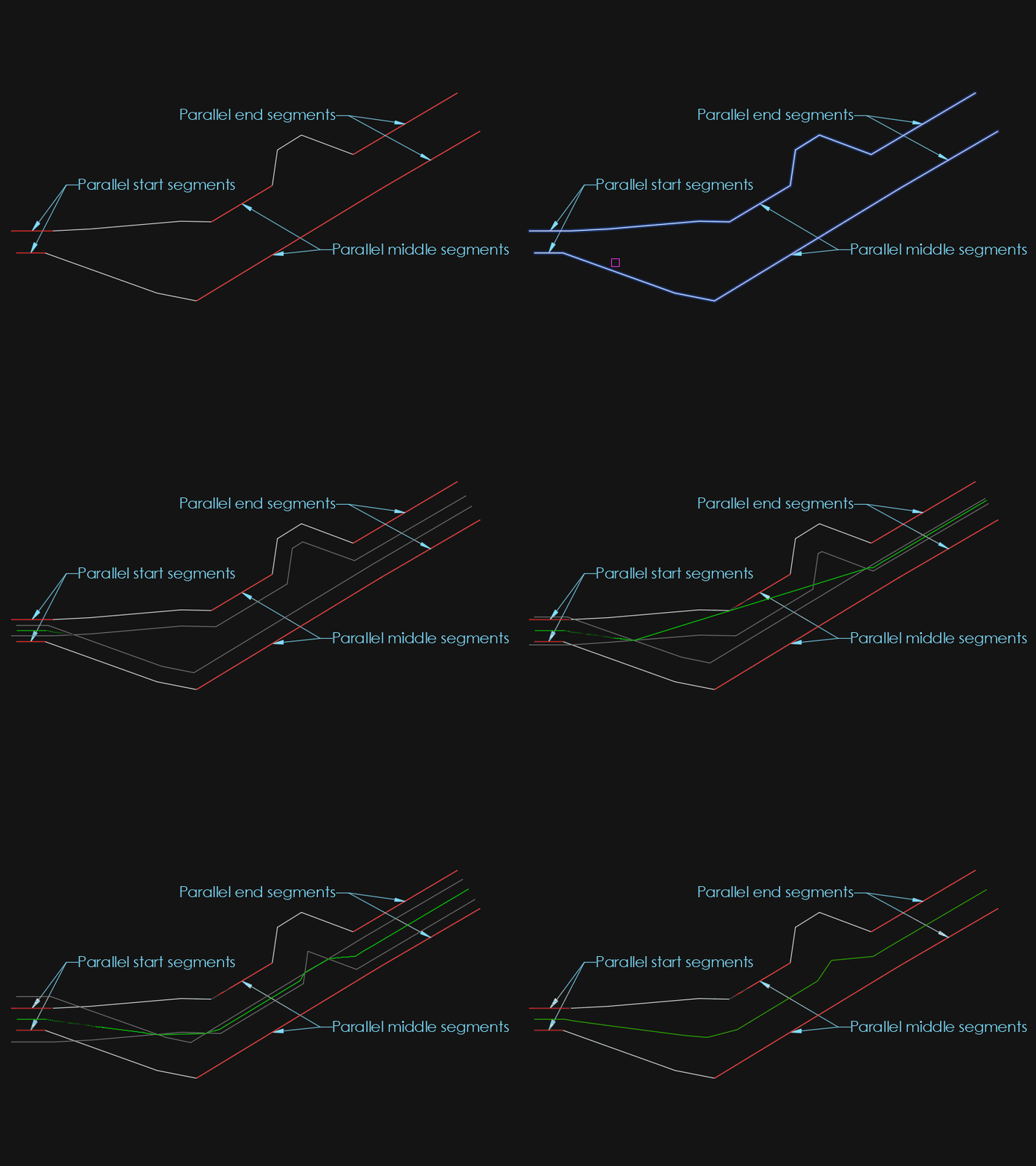
I did some more tests today and found that when the end segments were parallel, they didn't get added to the line. So I added support for that. This one was easy because the _cornerOffset function already checks for parallel segments and I just had to add a flag to inform the offset loop. And I found another example which it has a hard time on with concentric arcs, attached below. But that will be for another day since I have no more time for that this week. AxisExple3.dxf
-
 Meldin joined the community
 -
Replace/Redefine Block Removing Attributes
Meldin replied to Foxxy1's topic in AutoCAD Drawing Management & Output
google translate Hello, I had the same problem. Unfortunately, Lee Mac's code isn't 100% correct either, as the group code 66 remains in the block even though no attribute is present. This is the only way I managed to fix it. Hallo, ich hatte das gleiche Problem, leider ist der Code von Lee Mac auch nicht 100% da der Gruppencode 66 im Block erhalten bleibt, obwohl kein Attribut vorhanden ist. Ich habe es nur so hin bekommen. (setq blockRecord (ssget "_+.:E:S" (list (cons 0 "INSERT") ;(cons 66 1) (cons 410 (getvar "ctab")) ) ) ) (setq blockRecord (ssname blockRecord 0)) (command "PSELECT" blockRecord "") (command "-BEDIT" ) (command "-Attdef" "" "**DUMMY**" "**DUMMY**""**DUMMY**" "0,0" "0.1" "0.0") (command "BCLOSE" "Speichern" ) (command "PSELECT" blockRecord "") (command "Attsync" "Auswählen" blockRecord "J" ) (command "PSELECT" blockRecord "") (command "-BEDIT" ) (command "_erase" (ssget "_x" (list (cons 0 "ATTDEF") (cons 1 "**DUMMY**")(cons 2 "**DUMMY**")(cons 3 "**DUMMY**") )) "") (command "BCLOSE" "Speichern" ) (command "PSELECT" blockRecord "") (command "Attsync" "Auswählen" blockRecord "J" ) -
Hi, I need to check in AutoLISP whether an attached Xref in the current drawing creates a circular reference (refers to itself or a parent Xref). Is there a way, using AutoLISP or ActiveX, to detect this before attaching or reloading the Xref? Ideally, a function that takes the Xref name and returns True/False for circular reference. Any sample code or approach would be greatly appreciated.
-
 uksafa joined the community
 -

Help Appreciated: Force Existing Layer Names to UPPER CASE Not Working
Saxlle replied to Clint's topic in AutoLISP, Visual LISP & DCL
I found this tool online (screenrec), but I'm not satisfied well. The reason is that I'm the using gifcap, so didn't work properly yesterday when tried to make video, so I find this as alternative. I've forgotten to mention this Multi toggles as alternative, so I agree with that it can be useful. -
Thanks, the code works with the Texts. I changed the selection line a bit. (setq choice (getkword "\nChoose Percision From:To : [1:2/1:3/2:1/2:3/3:1/3:2]: ")) But nothing works with the MText.
-
Thanks, the code works perfectly with the Texts, I didn't even think it was possible. But nothing works with the MText. I choose the MText, I choose "Precision of target number", but the precision does not change. If the code is applied to the MText, then after that the MText cannot be copied and pasted into another drawing. change_prec_fields.dwg
-
 Eric in CAD HK joined the community
 -

[VLX] SectionSync LITE – Viewport sync along a polyline path (Civil 3D/AutoCAD)
AutoLISP Wizard posted a topic in AutoLISP, Visual LISP & DCL
Hi everyone, I’ve been working on a small production tool in AutoLISP/VLISP for AutoCAD / Civil 3D and thought it might be useful to share here for anyone doing a lot of section or profile sheets. ## What problem it solves On corridor / section jobs we often end up with several paper-space viewports that all need to: - Use the same scale and twist - Stay aligned to a centerline / path (alignment, guide polyline, etc.) - Be re-centered after design changes The usual manual workflow for us was: 1. Set up one “master” viewport with the correct scale, twist, layers, etc. 2. Copy that viewport across the layout for each station/section. 3. Manually PAN/ZOOM/DVIEW in each viewport to center the correct station along the path. 4. Repeat that pan/zoom step any time the design or alignment changed. It works, but it’s tedious and easy to make mistakes when you have a lot of sheets. ## What SectionSync LITE does SectionSync LITE is a compiled VLX that: - Lets you pick a polyline path (e.g. alignment, section chain, etc.) - Associates multiple paper-space viewports with positions along that path - Updates the view center of each viewport so it “follows” the path - Preserves the existing viewport scale and twist - Can be re-run after design changes so you don’t have to manually re-pan everything It was written mainly with Civil 3D section/profile sheets in mind, but it’s just working with standard AutoCAD viewports and a polyline. ## Technical notes - Written in AutoLISP/Visual LISP and compiled to VLX for distribution. - Uses vla/vlax functions to read and set viewport center, width/height, and twist. - Path positions are based on cumulative distance along the selected polyline. - No reactors or custom objects – it just runs on demand and updates existing VPs. ## Demo + download Short demo video: https://youtu.be/l1JRbz4_owQ Download / more details (there’s a built-in 5-run / 7-day trial so you can test it on a real project): https://autolispwizard.gumroad.com/l/civabs If anyone is interested in the implementation details (polyline parameterization, handling UCS and VP twist, etc.) I’m happy to discuss approaches or share pseudo-code for the core parts. -
AutoLISP Wizard joined the community
- Yesterday
-
Using Bricscad dwg has a solid, finds trace. Or do you mean (setq ss (ssget "_X" (list (cons -4 "<NOT") (cons 0 "3DSOLID,TRACE") (cons -4 "NOT>")(cons 410 (getvar 'ctab)))))
-

Help Appreciated: Force Existing Layer Names to UPPER CASE Not Working
BIGAL replied to Clint's topic in AutoLISP, Visual LISP & DCL
Yes should have dbl clicked still hard to see what is in dcl. -
@mhupp this may be useful, it captures command errors so after loading your lisp. You type say p2-3 on command line. Can do say p1-2, Pr3-2, prec1-0 and so on. ; test trap a command used as variable input ; BY Alan H 2019 ; now 2025 ( (lambda nil (vl-load-com) (foreach obj (cdar (vlr-reactors :vlr-command-reactor)) (if (= "fillet-reactor" (vlr-data obj)) (vlr-remove obj) ) ) (vlr-command-reactor "fillet-reactor" '((:vlr-unknowncommand . fillet-reactor-callback))) ) ) (defun fillet-reactor-callback ( obj com ) (setq com (car com)) (alert com) ; do the split com into ; (Change_Prec X X)) ) ; defun (or fillet-reactor-acdoc (setq fillet-reactor-acdoc (vla-get-activedocument (vlax-get-acad-object))) ) Thinking more maybe only check p12, prec10
-
Whether with (ssget "_X" '((0 . "*") (-4 . "<NOT") (0 . "3DSOLID") (-4 . "NOT>"))) or (ssget "_X" (list (cons 0 "~3DSOLID"))), it also dismisses the entities TRACE et SOLID???? I was cheated because my selection being numerous, the grips were not actif.et I could not see the highlighting with filled shapes.
-
Thank you @marko_ribar much simpler. Added look in current Layout or Model. In Civ3D may find surfaces also that are not displayed. (ssget "_X" (list (cons 0 "~3DSOLID")(cons 410 (getvar 'ctab))))
-
Help Appreciated: Force Existing Layer Names to UPPER CASE Not Working
mhupp replied to Clint's topic in AutoLISP, Visual LISP & DCL
Hit the X button bottom Right. -
K updated my code as well. tho this seems to not work well with BricsCAD. moved the vlax-put to only update when the if statment is true. change_prec_fields_update.lsp