All Activity
- Past hour
-
Why does SWEEP twist a profile while following a curved path?
lrm replied to indiancad's topic in AutoCAD 2D Drafting, Object Properties & Interface
@indiancad here's a thread that you might find interesting regarding twist relative to a spline. Note that the first derivative of a curve is a vector tangent to the spline at a specifed point on the spline. The second derivative is a vector thet is the direction and magnitude of the change in the tangent vector at a point. The cross product of these two vetors, also know as the transverse vector, point to the instantaneous center of curvature for the curve at a specfied point along a curve. I wrote the following program to display graphically the radius of curvature (the ends of the generated lines are the center of curvature) or the curvature of a spline (short lines indicate almost flat segments of a spline). Try the program on a spline and answer Yes when prompted. (defun C:DOCL (/ path inc n osm par der1 der2 curva p perp normv p2 sf curveType ans) ; = Degree Of Curvature - Lines ; Creates curvature lines or radius-of-curvature lines ; normal to a spline. ; LRM 8/18/2022 edited to place curvature vectors outside (setq path (car (entsel)) inc (/ (vlax-curve-getEndParam path) 100) n 0 osm (getvar 'osmode) ) (setvar 'osmode 0) (setvar "cmdecho" 0) (initget "y n") (setq ans (getkword "Do you want radius-of-curvature instead of curvature? [y/n] <n>: ")) (if (= ans "y") (setq curveType 1) (setq curveType 2 sf (getdist "Enter scale factor.") ) ) (repeat 100 (setq par (* inc n)) (setq der1 (vlax-curve-getfirstDeriv path par) der2 (vlax-curve-getSecondDeriv path par) ) ; calculate curvature at point par (setq d (distance '(0 0 0) (cross der1 der2))) (if (> (abs d) 1.0e-15) (progn (setq curva (/ (expt (distance '(0 0 0) der1) 3) d)) (if (= curveType 2) (setq curva (* -1. (* sf (/ 1. curva)))) ) (princ "\n") (princ n) (princ " curvature = ") (princ curva) (setq p (vlax-curve-getPointAtParam path par) perp (unitv (cross der1 (cross der2 der1))) normv (mapcar '* perp (list curva curva curva)) p2 (mapcar '+ p normv) ) (command "_.line" p p2 "") ) ; end progn ) (setq n (1+ n)) ) (setvar 'osmode osm) (setvar "cmdecho" 1) (princ) ) ;;; Compute the cross product of 2 vectors a and b (defun cross (a b / crs) (setq crs (list (- (* (nth 1 a) (nth 2 b)) (* (nth 1 b) (nth 2 a)) ) (- (* (nth 0 b) (nth 2 a)) (* (nth 0 a) (nth 2 b)) ) (- (* (nth 0 a) (nth 1 b)) (* (nth 0 b) (nth 1 a)) ) ) ;end list ) ;end setq c ) ;end cross (defun unitV ( v / d) (setq d (distance '(0 0 0) v) d (mapcar '/ v (list d d d)))) blocks_on_spline.lsp spline curvature.lsp -

Selecting Folders (AutoCAD LT 2024)
Paul Li replied to SLW210's topic in AutoLISP, Visual LISP & DCL
FYI: LT 2024+ does support vlax functions but not vlax-create-object - Today
-
Selecting Folders (AutoCAD LT 2024)
Paul Li replied to SLW210's topic in AutoLISP, Visual LISP & DCL
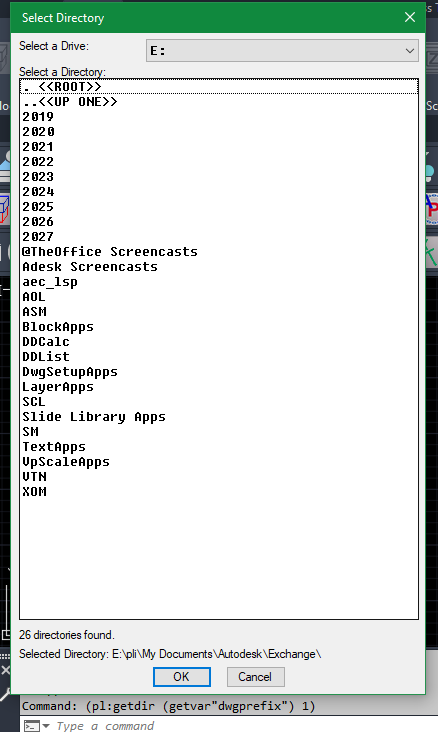
and yet here's another version that should run in LT pl_GetDir.lsp
-
I think I have a ready for testing version ready. If I have time I'll try it on AutoCAD 2000i on my home computer as well. Let me know if you have issues, I tested it in a few cases on AutoCAD 2026. I still have a few things I want to add to it for myself, maybe some reactors for the CrossHairs, I might add a DCL for the Layer information, et. al. ;;; Add AutoCAD's Native CENTERMARK (option for a CrossHair of lines) to Diameter/Radius dimension and turns off the Center Mark/Line if on. ;;; ;;; https://www.cadtutor.net/forum/topic/99350-center-mark-replacement/#findComment-680408 ;;; ;;; By SLW210 (a.k.a. Steve Wilson) ;;; ;;; Since AutoCAD in there infinite wisdom makes the default dimdia and dimrad center marks useless ;;; by not allowing them to be associated by other dimensions and not allowing an individual color and linetype. ;;; I came up with this little routine. Much faster, it was using some commands, I went to removing commands. Though ;;; for CENTERMARK, a command is needed so there remains those that are necessary. ;;; I used to get rid of the default then drew a centermark and copied from center to center, a bit tedious at best. ;;; ;;; I started with this from Alan J Thompson, so thanks to him. ;;; ================================================================ ;;; Turn off the centermark for diameter and radius dimensions ;;; ;;; https://www.cadtutor.net/forum/topic/18792-request-routint-to-turn-off-center-mark-for-single-entity/#findComment-153451 ;;; ;;; By alanjt|; ;;; ;;; ================================================================ ;;; ================================================================ ;;; AddCtrMrk.lsp ;;; ;;; ;;; AutoCAD 2018-2026 should work as well as BricsCAD and others. ;;; Even if there is not a CENTERMARK command, it should use the CrossHair fallback. ;;; ;;; ================================================================ ;;; ================================================================ ;;; Original dimensions are retained. ;;; ;;; Replacement geometry: ;;; Layer : CenterMark ;;; Color : ByLayer ;;; Linetype : ByLayer ;;; Layer Color : ACI 5 (Blue) ;;; Layer Linetype : ByLayer ;;; ;;; Options: ;;; Native -uses AutoCAD's (or other) native CENTERMARK command (if available) ;;; Crosshair -uses the inbuilt CrossHair made of lines and automatically sized to the curve object ;;; Auto -Automatically selects native CENTERMARK if available or uses CrossHair if not available ;;; ;;; Modes: ;;; Select - manually selected DIMDIAMETER/DIMRADIUS (This LISP works on the dimension not the Arc, Circle, etc., so select the dimension) ;;; Current - all such dimensions in current Model/Layout space ;;; All - all such dimensions in all paperspace layouts + Model ;;; ;;; Associated dimension center marks: ;;; Disabled using acCenterNone. ;;; ;;; Duplicate centers: ;;; Only one Centermark or CrossHair is created for each unique center ;;; within each Model/Layout space using a center tolerance. ;;; ================================================================ Hopefully some my find this usefull. AddCtrMrk_1.5.lsp
-
 Ryan Z joined the community
-

Generated ISO title block DXF: units, attributes and fonts when used in a template
Margo App replied to Margo App's topic in AutoCAD Drawing Management & Output
Thanks BIGAL, and sorry for the late reply. One layout per sheet size, each holding only the title sheet at true size, is exactly the setup I was missing. I've added it to the notes that come with the DXF files: insert the sheet at 0,0 and scale 1 in a layout named after the size, make one layout per size, save as .dwt, then bring in the one you need with LAYOUT > Template. Thanks also for the Lisp document and the welcome. -

Finding overlapping geometry without manually checking every line
SLW210 replied to indiancad's topic in AutoCAD 2D Drafting, Object Properties & Interface
It's not always beginners, some user have just developed bad habits over the years. A lot of times for me, it's imported geometry that was exported from 3D software packages and the mentioned profiles from SOLPROF and also SOLVIEW/SOLDRAW, that's why I have LISP to make sure anything that goes to the waterjet and/or plasma cutter are correct. -
Why does SWEEP twist a profile while following a curved path?
SLW210 replied to indiancad's topic in AutoCAD 2D Drafting, Object Properties & Interface
Besides checking the related settings, I have had to rotate and position the shape as well, though most of my SWEEP experience is with piping, so no worries if a circle twists. -
Why does a 3D model look different after exporting it for 3D printing?
SLW210 replied to indiancad's topic in AutoCAD 3D Modelling & Rendering
Most slicing software will alert you to issues, I usually end up reducing the faces in the slicer to speed up printing and often you get a message that the slicer will clean them up for you. In CAD software, viewers, et.al. they may appear faceted or have a lack of detail, but may look just fine when printed. My Bambu Studio slicer lets you inspect layer by layer, no need for a viewer. STEP works better in some cases, but I am still testing different formats coming into the slicer and the quality and speed of the print. I plan to start trying to work on getting them to .obj (it maintains color and texture) and other formats that are excepted by my slicer and see what works best. Bambu Studio supports importing STL, STEP, 3MF, OBJ, AMF, and SVG files. Of those file formats, STL is the simplest and if done correctly, they usually print out just fine, particularly if it is something simple to begin with. Actually, models I make seem to be printing well and fairly fast, not so much the models you download from the marketplace, I almost always have to inspect and tweak those, if not outright redo from scratch. -
I still try to think about LT usage when redoing an old LISP and creating new LISP, but it's not a real priority. If those that use LT around here need something done with a LISP and we can't find one that runs on LT, I can see if it's adjustable to be made to work or I can just do it for them. I originally asked this because an engineer with AutoCAD LT needed to convert a bunch of DGNs, I did end up converting a lot of folders with my LISP, but in the end the company that sent us the DGNs sent the exported from Autoplant .dwgs, etc., the DGNs we had converted okay, but IIRC some information was missing here and there for some of the files.
-

Selecting Folders (AutoCAD LT 2024)
Steven P replied to SLW210's topic in AutoLISP, Visual LISP & DCL
I was looking for something quick and simple yesterday - thanks. Now the not so quick part, I decided to make the DCL file as 'create on demand' style, and then tweak it a touch.... and then sent it through Al... a bit updated does what I want now. (Al was reasonably competent in it saved me about an hour copy-paste from my reference LISPs) Edit: Oh, for LT... forgetting the reason I was looking - shortcut links use VLAX code and I think the desktop part needs amending too - shortcuts are bypassed - won't work in LT - desktop I'll come back to (defun c:gf ( / DriveList CurDrive SubfolderList CurSubfolder GetFolderOldErr GetFolderDcl CurPath PathHistoryList MyResult) (defun GetFolder_init ( / MyDrawingDrive ) (setq GetFolderDcl (load_dialog "GetFolder")) (setq GetFolderOldErr *error*) (setq *error* GetFolderErr) (MakeDriveList) (setq CurPath (getvar "DWGPREFIX")) ;; Current drawing folder (setq DrawingDrive (substr CurPath 1 2)) ;; Drive (setq CurDrive (vl-position DrawingDrive DriveList)) (if (null CurDrive) (setq CurDrive 0)) ; End If (setq PathHistoryList (list CurPath)) (MakeSubfolderList CurPath) ) ; End GetFolder_init (defun GetFolder_exit ( / ) (setq CurPath CurPath) ) ; End GetFolder_exit (defun GetFolderErr ( s / ) (GetFolder_exit) (if GetFolderOldErr (setq *error* GetFolderOldErr) (setq *error* '()) ) ; End If ) ; End GetFolderErr (defun MakeDriveList ( / ascii-code drive ) (setq DriveList '()) (setq ascii-code 67) ;; ASCII code C = 67, Z = 90 (while (<= ascii-code 90) (setq drive (strcat (chr ascii-code) ":") ) (if (vl-file-directory-p drive) (setq DriveList (append DriveList (list drive))) ) ; End If (setq ascii-code (1+ ascii-code)) ) ; End While ) ; End MakeDriveList (defun MakeSubfolderList ( dir / MyFolderList MyShortcutList ) (if (and dir (= (type dir) 'STR) (vl-file-directory-p dir) ) ; End And (progn (setq MyFolderList (vl-directory-files dir nil -1) ) ;; Folders (if (= (getvar 'program) "LT") (setq SubfolderList (append (list "<-") MyFolderList )) ;;LT vl-dirctoryfiles might not work (progn (setq MyShortcutList (vl-directory-files dir "*.lnk" 1) ) ;; Shortcuts (setq SubfolderList (append (list "<-") MyFolderList MyShortcutList )) ) ; end progn ) ; end if ) ; End Progn (setq SubfolderList (list "<-")) ) ; End If (setq SubfolderList (vl-remove "." SubfolderList) ) (setq SubfolderList (vl-remove ".." SubfolderList)) (if (wcmatch CurPath "@`:") (setq SubfolderList (vl-remove "<-" SubfolderList)) ) ; End If ) ; End MakeSubfolderList (defun UpdateSubfolder ( $value / MyShortcut MyTarget MyShell ) (setq CurSubfolder (nth (atoi $value) SubfolderList )) (cond ((equal CurSubfolder "<-") ;; Back to previous folder (if (= (length PathHistoryList) 1) ;; top level (progn (setq CurPath (car PathHistoryList)) ) (progn (setq CurPath (cadr PathHistoryList)) (setq PathHistoryList (cdr PathHistoryList)) ) ; end progn ) ; end if ) ; end cond ((wcmatch (strcase CurSubfolder) "*.LNK") ;; shortcut (if (= (getvar 'program) "LT") ;; LT doesn't do VLAX (progn ) (progn (setq MyShell (vlax-create-object "WScript.Shell")) (setq MyShortcut (vlax-invoke-method MyShell 'CreateShortcut (strcat CurPath "\\" CurSubfolder))) (setq MyTarget (vlax-get-property MyShortcut 'TargetPath)) (vlax-release-object MyShortcut) (vlax-release-object MyShell) (if (and ;; if lnk is a folder MyTarget (vl-file-directory-p MyTarget) ) ; End And (progn (setq PathHistoryList (append (list CurPath) PathHistoryList )) (setq CurPath MyTarget) ;; Jump to shortcut target ) ; End Progn ;; (alert "Shortcut does not point to a folder.") ) ; End If ) ; end progn lnk ) ; end if ) ; end cond (T ;; Normal folder (setq PathHistoryList (append (list CurPath) PathHistoryList )) (setq CurPath (strcat CurPath "\\" CurSubfolder) ) ;; Enter selected folder ) ; end cond T ) ; End Conds (MakeSubfolderList CurPath) ;; Rebuild folders and shortcuts for the new location ;; Replace existing DCL list contents (start_list "subfolder" 3) (mapcar 'add_list SubfolderList) (end_list) (set_tile "subfolder" "0") ;; Select first item in refreshed list (set_tile "path" CurPath) ;; Display new path ) ; End UpdateSubfolder (defun InitDialog ( / ) (start_list "drive") (mapcar 'add_list DriveList) (end_list) (set_tile "drive" (itoa CurDrive)) ;; Select the drive containing the current drawing (start_list "subfolder") (mapcar 'add_list SubfolderList) (end_list) (set_tile "path" CurPath) ;; Display the current drawing folder ) ; End InitDialog (defun GetFolder_dialog ( / fname GF drv MyDclFile dcl_id MyFile) ;; Create DCL file ;;Start DCL (setq GF (open (setq fname (vl-filename-mktemp "GetFolder" (getvar "TEMPPREFIX") ".dcl")) "w")) ;;Header (write-line "SelLays : dialog {" GF) (write-line " key = \"Folder\";" GF) (write-line " label = \"GetFolder (RLX-10/04)\";" GF) (write-line " spacer;" GF) ;;Stuff (write-line " :row {alignment = top;" GF) (write-line " :column { width = 5; fixed_width = true; " GF) (write-line " : popup_list {key = \"drive\"; label = \"Drive\"; edit_width = 7; }" GF) (write-line " }" GF) ; end column (write-line " :column { width = 38; fixed_width = true; " GF) (write-line " }" GF) ; end column (write-line " }" GF) ; end row (write-line " :row {alignment = top;" GF) (write-line " :column { width = 6; fixed_width = true; " GF) (write-line " }" GF) ; end column (write-line " :column { width = 12; fixed_width = true; " GF) (write-line " :row {alignment = top;" GF) (write-line " : button { key = \"uplevel\"; label = \"↑ Last level\"; width = 5; }" GF) (write-line " : button { key = \"desktop\"; label = \"Desktop\"; width = 5; }" GF) (write-line " }" GF) ; end row (write-line " }" GF) ; end column (write-line " :column { width = 32; fixed_width = true; " GF) (write-line " }" GF) ; end column (write-line " }" GF) ; end row (write-line " :row {alignment = top;" GF) (write-line " : list_box { key = \"subfolder\"; label = \"Subfolders\"; height = 12; width = 25; }" GF) (write-line " }" GF) ; end row (write-line " :row {alignment = top;" GF) (write-line " : edit_box { key = \"path\"; label = \"Path\"; width = 25; }" GF) (write-line " }" GF) ; end row (write-line " ok_cancel;" GF) (write-line "}" GF) ; end dialog (close GF) (setq dcl_id (load_dialog fname)) (if (and dcl_id (new_dialog "SelLays" dcl_id) ) ; End And (progn (InitDialog) (action_tile "drive" " (UpdateDrive $value)" ) (action_tile "desktop" "(UpdateDesktop)" ) (action_tile "uplevel" "(UpdateUpLevel)" ) (action_tile "subfolder" "(UpdateSubfolder $value)" ) (action_tile "path" "(UpdatePath $value)" ) (action_tile "accept" "(done_dialog 1)" ) (action_tile "cancel" "(done_dialog 0)" ) (setq drv (start_dialog)) (cond ((= drv 0) (setq CurPath nil) ) ((= drv 1) (setq CurPath CurPath) ) ) ; End Cond ) ; End Progn ) ; End If (if dcl_id (unload_dialog dcl_id) ) ) ; End GetFolder_dialog (defun UpdateDrive ( $value / ) (setq CurDrive (atoi $value) ) (setq CurPath (nth CurDrive DriveList) ) (MakeSubfolderList CurPath) (start_list "subfolder") (mapcar 'add_list SubfolderList) (end_list) (setq PathHistoryList (list CurPath) ) (set_tile "path" CurPath) ) ; End UpdateDrive (defun UpdatePath ( dir / ) (if (and dir (= (type dir) 'STR) (vl-file-directory-p dir) ) ; End And (setq CurPath dir) (alert "Invalid Path") ) ; End If ) ; End UpdatePath (defun UpdateUpLevel ( / MyParentPath ) ;; Remove trailing slash if present (if (or (= (substr CurPath (strlen CurPath) 1) "\\") (= (substr CurPath (strlen CurPath) 1) "/") ) ; Endor (setq CurPath (substr CurPath 1 (1- (strlen CurPath))) ) ) ; End If (setq MyParentPath (vl-filename-directory CurPath)) ;; parent folder (if MyParentPath (progn (setq CurPath MyParentPath) (MakeSubfolderList CurPath) ;; Refresh subfolder list (start_list "subfolder") (mapcar 'add_list SubfolderList) (end_list) (set_tile "path" CurPath) ;; Update displayed path (setq PathHistoryList (list CurPath)) ;; Reset history from new location ) ; End Progn ) ; End If ) ; End UpdateUpLevel (defun UpdateDesktop ( / MyShell MyDesktop ) ;;Double check for none VLAX for LT (if (= (getvar 'program) "LT") (progn ) (progn (setq MyShell (vlax-create-object "WScript.Shell") ) (setq MyDesktop (vlax-invoke-method (vlax-get-property MyShell 'SpecialFolders) 'Item "Desktop")) (vlax-release-object MyShell) ) ) (if (and MyDesktop (vl-file-directory-p MyDesktop) ) ; End And (progn (setq CurPath MyDesktop) (MakeSubfolderList CurPath) (start_list "subfolder") (mapcar 'add_list SubfolderList) (end_list) (set_tile "path" CurPath) (setq PathHistoryList (list CurPath)) ) ; End Progn (alert "Desktop folder not found.") ) ; End If ) (GetFolder_init) (GetFolder_dialog) (setq MyResult (GetFolder_exit)) MyResult ) -

Why does SWEEP twist a profile while following a curved path?
indiancad posted a topic in AutoCAD 2D Drafting, Object Properties & Interface
Have you ever used SWEEP to create a 3D shape along a curved path, but the profile gradually twists instead of maintaining the orientation you expected? This can happen when the profile orientation changes along the path. One thing worth checking is the SWEEP alignment and twist settings. I also check the profile's starting position and orientation before running the command. For more predictable results, I test the sweep with a simple profile first and adjust the settings before using the actual geometry. Have you faced unexpected twisting with SWEEP? Which settings do you normally adjust to control it? -
Why does a 3D model look different after exporting it for 3D printing?
indiancad posted a topic in AutoCAD 3D Modelling & Rendering
Have you ever created a detailed 3D solid that looks smooth in CAD, but appears faceted or loses some detail after exporting it for 3D printing? One important thing to check is the mesh quality used during export. A surface that looks smooth on screen may be approximated by a limited number of triangular faces in the exported mesh. I always recommend checking the exported STL in a mesh viewer before sending it for printing. Pay particular attention to curved surfaces, small holes, and fine details. What settings or tools do you use to maintain curved surface quality when exporting CAD models for 3D printing? -
Finding overlapping geometry without manually checking every line
indiancad replied to indiancad's topic in AutoCAD 2D Drafting, Object Properties & Interface
Absolutely. Checking geometry before CNC export can prevent a lot of downstream problems. It's especially important when working with closed profiles for cutting. Thanks for sharing your experience. -
 exoland joined the community
- Yesterday
-
If your old like me then you would know in the days when software came in a big box with a CD and paper manuals. There was at one stage a learn Autocad CD that got you to do lessons. It would check what you had drawn, I had one but not sure where it is now would have to put on a USB as no DVD/cd player in my laptop. Of course the paper manuals were so much easier to look how to do things in CAD, still have that manual.
-

Aluminum composite panels parametric templates
BIGAL replied to emosms's topic in AutoCAD 2D Drafting, Object Properties & Interface
Bricscad a Acad clone. Google it. What I am saying is that using lisp can draw what you want for basically any combination. It is the same as what was used in the draw windows, it ask for how many rows and columns and the size of the panels and then it's all drawn. The movie is in real time so shows how fast you can draw say what you want. It's a case of take the same style of method and functions inside a lisp. Each function does something eg Dimensions. I have over years of coding made shortcuts to make new code faster. May start by editing the window code to suit. DCL Dialouge Control Language it's about displaying on screen say a series of questions, in the image above enter the relevant values. Rather than say in lisp entering values one after the each other and can get one wrong and not realise it. Will see if can do an example for you. -
I have it working on blocks that are dimensioned in the same space and curve objects in modelspace that are dimensioned in paperspace through a Viewport, but not blocks in modelspace dimensioned in paperspace through a Viewport, so a little more thinking. I also plan to keep the Fallback Crosshair option for older AutoCAD and any other CAD that doesn't have CENTERMARK command.
-
I've been developing CADstart, a browser-based 2D CAD learning platform, so I appreciate what you're trying to accomplish. I like the idea of helping beginners practice through challenges. One thing I'd be interested in is how you're introducing precision, object snaps, and dimensions before students move into more complicated exercises. Wishing you success with the project.
-

Finding overlapping geometry without manually checking every line
CADhomie replied to indiancad's topic in AutoCAD 2D Drafting, Object Properties & Interface
I work with 2D CAD drawings for protective foam packaging and CNC, so overlapping geometry is something I pay attention to. Duplicate lines can create problems downstream, especially when preparing closed profiles for cutting. I think it's worth teaching beginners to check their geometry early instead of waiting until export. -
CADhomie joined the community
-
Fillet or blend between two non-parallel cylinders
lrm replied to Dale Grice's topic in AutoCAD 3D Modelling & Rendering
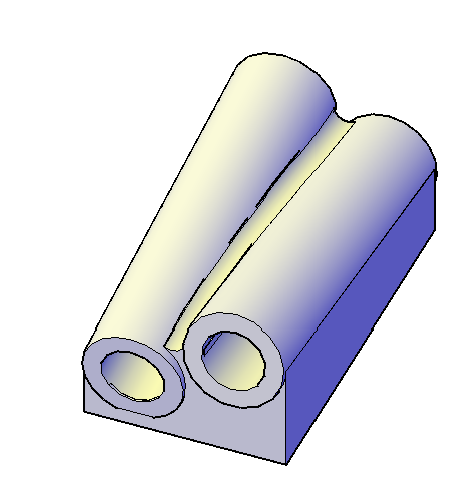
@indiancad The cylinders do not intersect. In addition, depending on the magnitude of the fillet radius, the fillet may need to be tangent to a cylindrical surface and a flat plane for a portion of its extent. I don't think filletedge or blend has much potential in this case. Try it out yourself. -
Finding overlapping geometry without manually checking every line
SLW210 replied to indiancad's topic in AutoCAD 2D Drafting, Object Properties & Interface
That depends on the LISP. Check my GETLEN.lsp. as an example. A new get length LISP - AutoLISP, Visual LISP & DCL - AutoCAD Forums It gets perimeters and accounts for gaps and overlaps even in anonymous blocks. I made that due to SOLPROF profiles being a pain with the overlaps, etc.. So, sometimes a cleanup isn't required to get correct information, just a LISP or other code. I have one somewhere, but there are a few online "OVERKILL" type LISPs that work on blocks and sometimes better cleanup, something OVERKILL doesn't do all of the time. But, OVERKILL does under normal circumstances do fairly well, so a first run with that, or a second run if the drawing needs a real flattening, best to do that first. The waterjet/plasma cutter person at work does a lot of the work for those machines now, but I used to do all of it when those were first purchased. So I have done lots of cleanups for cutting. Luckily, most things I start are pretty clean except the SOLPROF and SOLVIEW/SOLDRAW objects. The software that came with the waterjet also can do some cleaning. So I have that as well. -

Aluminum composite panels parametric templates
emosms replied to emosms's topic in AutoCAD 2D Drafting, Object Properties & Interface
dont quite get what u do (also the video above). Is that Bricks Cad and DCL (data control language) used in bricks cad? -
Fillet or blend between two non-parallel cylinders
indiancad replied to Dale Grice's topic in AutoCAD 3D Modelling & Rendering
If both cylinders are 3D solids and intersect, try FILLETEDGE on the intersection edge. If you need a smooth transition between separate cylindrical surfaces, BLEND may be more suitable. -
 Nam Le joined the community
-
Finding overlapping geometry without manually checking every line
indiancad replied to indiancad's topic in AutoCAD 2D Drafting, Object Properties & Interface
That's a useful approach. Do your LISP routines also detect partially overlapping lines, or mainly exact duplicates? - Last week
-
 OSM2CDR joined the community
-
Fillet or blend between two non-parallel cylinders
lrm replied to Dale Grice's topic in AutoCAD 3D Modelling & Rendering
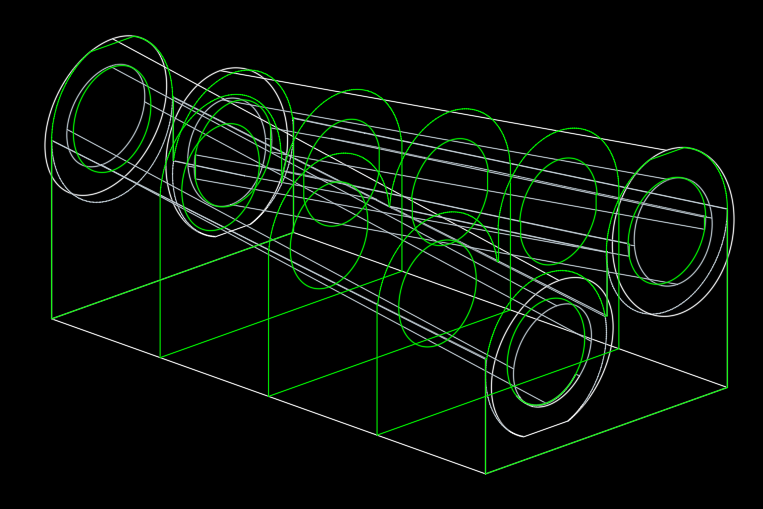
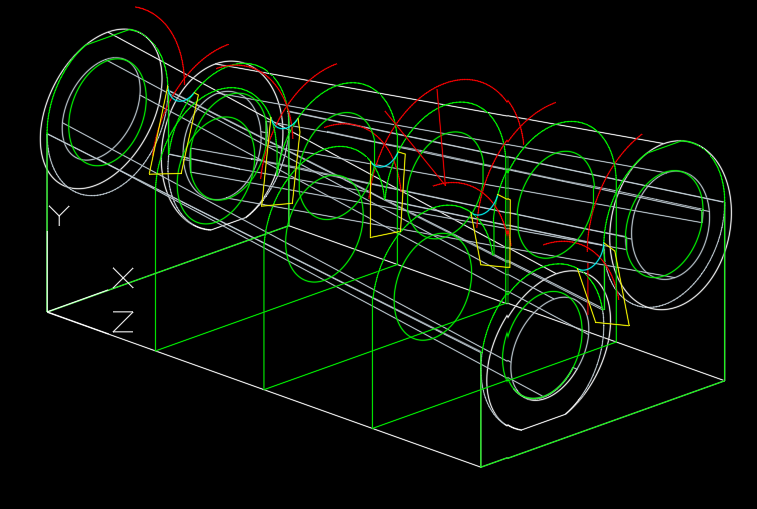
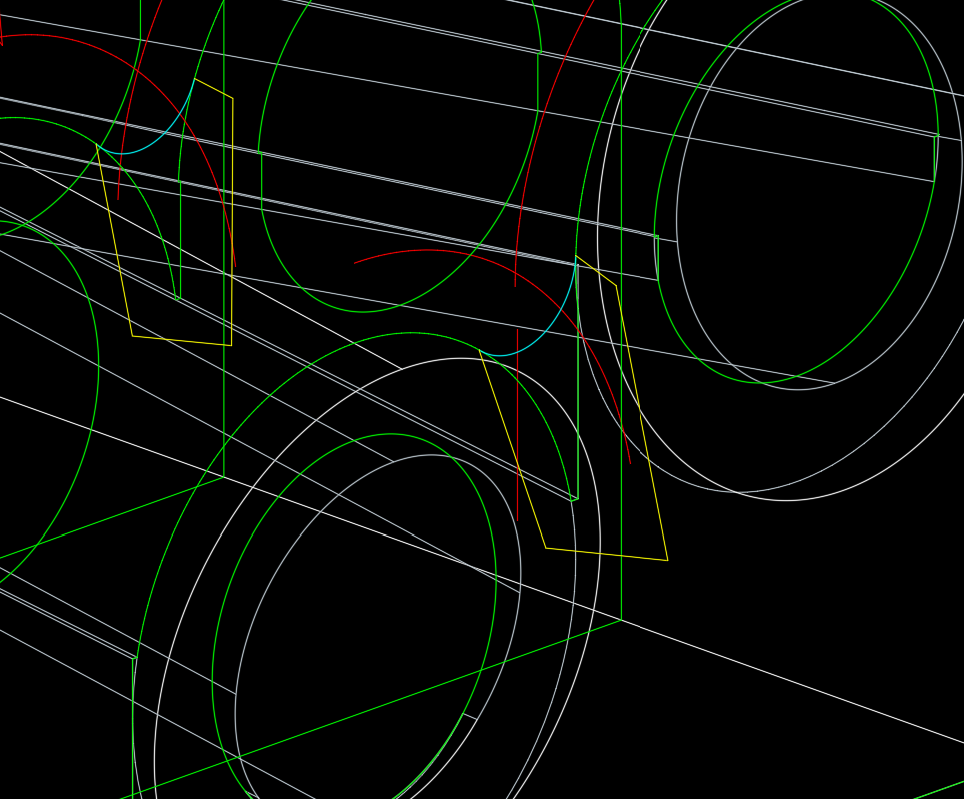
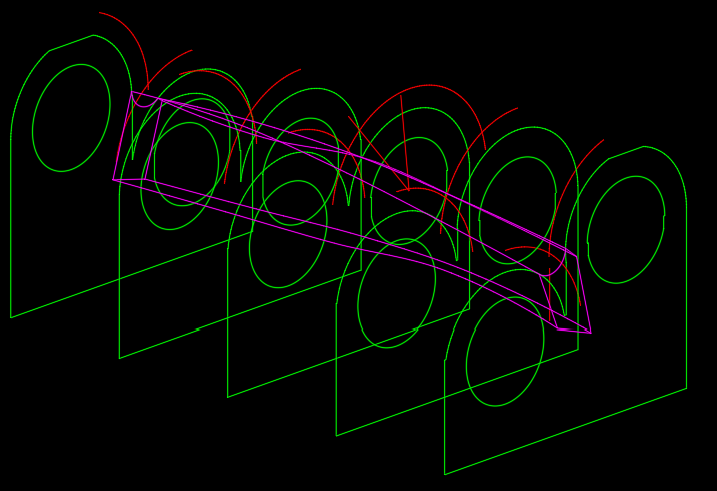
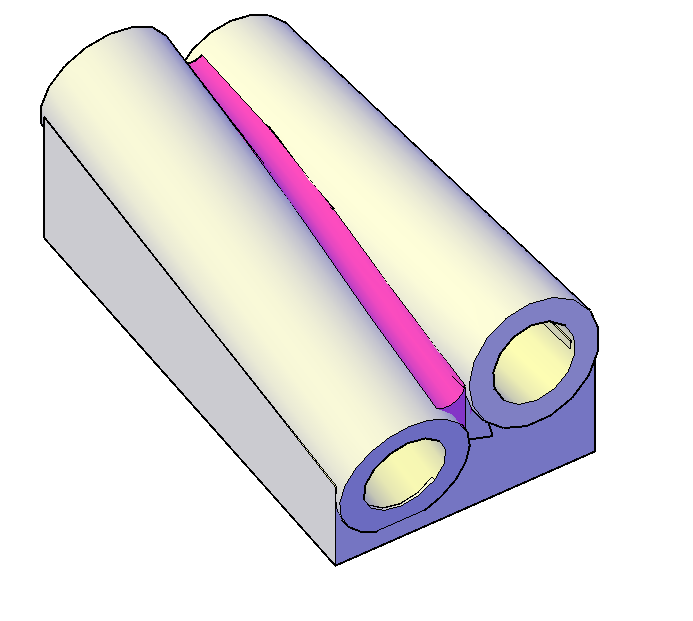
Create sections (green) at several points along the object. Explode the sections then set a UCS to the plane of a section and create offset curves (red) with a distance equal to the desired fillet radius. I used 0.2. Add a circle of the fillet radus at the intersection of the offset curves and then trim the circle. Create a polyline (yelllow) to form a closed shape that includes the "fillet" arc (cyan). With pedit create closed polylines for the fillet sections then use loft to create the fillet solid. Union the two solids together.
-
[Free LISP] Auto-mark revision clouds for design changes — compare two regions in same DWG
SLW210 replied to Beastt1992's topic in AutoLISP, Visual LISP & DCL
I got to thinking about this and with some other LISPs it would be handy for my use to check if anyone has been altering a drawing on the network without permission. I normally look at the last saved time and date, but something like this might be useful to see what if anything was physically altered.