All Activity
- Past hour
-

leader and mtext are not attaching
pkenewell replied to pmadhwal7's topic in AutoLISP, Visual LISP & DCL
@pmadhwal7 You cannot attach the text to standard LEADER objects so they move together. They would at least have to be converted to QLEADERS. MLEADERS are better. I convert all my old leaders to MLEADERS using a similar program, so that the text stays with the leader. PS: The express tools annotation attachment works with the older leaders like @mhupp said, using reactors (Makes it a QLEADER effectively). However, to move the leader, you always have to move the TEXT first. If you move the leader end point near the text first, the text will stay where it is. -

leader and mtext are not attaching
pmadhwal7 replied to pmadhwal7's topic in AutoLISP, Visual LISP & DCL
no through global attached leader commond those types of leader text not join i tried that too - Today
-
 mhy3sx changed their profile photo
 -
hi i use this code to insert block in zwcad. this is part of bigger code ;; Calculate scale factor based on distance from mid1 to mid2 (setq scaleFactor (distance mid1 mid2)) ;; Block options (defun _eArt67 () (setq blkn "C:\\blocks\\eArt67.dwg") (if (and mid1 mid2) (progn (setq scl (distance mid1 mid2) ang (angle mid1 mid2)) (if (setq ins mid1) (command "._-insert" blkn "_non" ins scaleFactor "" (angtos (+ (/ pi 2) ang))) ) ) ) ) i find this code and i like the part mirror the block using [TAB]. (defun C:test ;| credits to: Lee Mac |; ( / *error* cm SelBname bn p Blk ll ur msg SS cen Grrr mc ) (defun *error* (m) (redraw)(and cm (setvar 'cmdecho cm)) (and m (print m)) (princ)) (defun SelBname ( / e bn ) (setvar 'errno 0) (while (/= 52 (getvar 'errno)) (setq e (car (entsel "\nSelect block to reinsert <exit>: "))) (cond ( (= 7 (getvar 'errno)) (princ "\nMissed, try again.") (setvar 'errno 0) ) ( (and (= 'ENAME (type e)) (/= (cdr (assoc 0 (entget e))) "INSERT")) (princ "\nThis is not a block.") (setq e nil) ) ( (and e (not (alert "Visit lee-mac.com")) (setq bn (vla-get-EffectiveName (vlax-ename->vla-object e))) (setvar 'errno 52)) ) ); cond ); while bn ); defun SelBname (redraw) (setq bn (SelBname)) (while (and (setq cm (getvar 'cmdecho)) (setvar 'cmdecho 0) bn (last (setq p (list (getpoint "\nSpecify insertion point <exit>: ")))) (last (setq p (append p (list (getpoint (last p) "\nSpecify second point <exit>: "))))) (not (apply 'grdraw (append p (list 1 7)))) (setq Blk (vla-InsertBlock (vlax-get-property (vla-get-ActiveDocument (vlax-get-acad-object)) (if (= 1 (getvar 'CVPORT)) 'Paperspace 'Modelspace) ) ; AcSpc (vlax-3D-point (car p)) bn 1. 1. 1. 0. ) ) ) (progn (vla-GetBoundingBox Blk 'll 'ur) (vla-ScaleEntity Blk (vlax-3D-point (car p)) (/ (apply 'distance p) (abs (apply '- (mapcar 'car (mapcar 'vlax-safearray->list (list ll ur))))) ) ) (vla-put-Rotation Blk (apply 'angle p)) (setq msg "\nPress [TAB] to change orientation, [ENTER] to exit: ") (and msg (princ msg)) (setvar 'errno 0) (setq SS (ssadd)) (ssadd (handent (vla-get-Handle Blk)) SS) (setq cen (apply 'mapcar (cons '(lambda (a b) (/ (+ a b) 2.)) p))) (while (/= 52 (getvar 'errno)) (setq Grrr (grread T)) (cond ((= (car Grrr) 2) (cond ((= (cadr Grrr) (ascii "\t")) (and msg (princ msg)) (and (not mc) (setq mc 0)) (setq mc (rem (+ mc 1) 4)) (cond ( (or (= mc 1) (= mc 3) ) (command "_.MIRROR" SS "" "_non" cen "_non" (polar cen (+ (apply 'angle p) (/ PI 2.)) (apply 'distance p)) "_Y") ) ( (or (= mc 2) (= mc 0) ) (command "_.MIRROR" SS "" "_non" cen "_non" (polar cen (apply 'angle p) (apply 'distance p)) "_Y") ) ) ) ((= (cadr Grrr) (ascii "\r")) (princ "\nExiting.") (redraw) (setvar 'errno 52) ) ); cond ) ((= (car Grrr) 25) (princ "\nExiting.") (redraw) (setvar 'errno 52) ) ); cond ); while ); progn ); while/if (and cm (setvar 'cmdecho cm)) (princ) );| defun |; (vl-load-com) (princ) Is it possible to add this part to the first code? Thanks
-
Understanding 'Getenv Variable call denied'?
pkenewell replied to ScottMC's topic in AutoLISP, Visual LISP & DCL
@ScottMC I don't see the purpose of why you are cutting the circle, printing the coordinates to the command line, then pasting the circle in the same loop? - You don't need to initialize the pp variable as "" - There is not apparent reason to cut and paste the circle. - You do not need to put a Global variable into the registry to recall it again in the same session, even if the program stops. Try out the following code: (defun c:C2 (/ cr el *error* fp oe os p p2) (defun *error* (msg) (if oe (setvar "cmdecho" oe)) (if os (setvar "osmode" os)) (vla-endundomark (vla-get-activedocument (vlax-get-acad-object))) (princ (strcat "\n" msg)) ) (vla-startundomark (vla-get-activedocument (vlax-get-acad-object))) (setq oe (getvar "cmdecho") os (getvar "osmode") ) (setvar "cmdecho" 0) (while (setq fp (getpoint "\nSpecify 1st Point of 2P.Circle: ")) (setvar 'osmode (boole 7 os 512)) (command "._Circle" "_2P" "_non" fp) (setvar "osmode" OS) (princ "\nSecont Point: ") (while (= (logand (getvar "cmdactive") 1) 1) (command pause) ) (setq el (entget (entlast)) p (trans (cdr (assoc 10 el)) (cdr (assoc 210 el)) 1) p2 (getvar "lastpoint") cr (getvar "circlerad") ) (princ (strcat "\n Coordinates: " (setq C2:pp (strcat (rtos (car p) 2 4) "," (rtos (cadr p) 2 4) "," (rtos (caddr p) 2 4) ) ) "\n Diameter: " (rtos (* cr 2) 2 4) "| Radius: " (rtos cr 2 4) "\n" ) ) (entmakex (list (cons 0 "POINT") (cons 10 p))) (entmakex (list (cons 0 "POINT") (cons 10 p2))) ) (setvar "cmdecho" oe) (vla-endundomark (vla-get-activedocument (vlax-get-acad-object))) (princ) ) -

leader and mtext are not attaching
mhupp replied to pmadhwal7's topic in AutoLISP, Visual LISP & DCL
I'll give you a hint its in the 2nd Reply. no lisp code needed just express tool. -

Understanding 'Getenv Variable call denied'?
ryanatkins49056 replied to ScottMC's topic in AutoLISP, Visual LISP & DCL
So these were the results that I got from the command line Command: C CIRCLE Specify center point for circle or [3P/2P/Ttr (tan tan radius)]: 2P Specify first end point of circle's diameter: !pp "50,60,0" <--------------- CALLING THE VARIABLE WORKS LIKE YOURS Specify second end point of circle's diameter: Command: C2 2.Point Circle (M) <'CT for.tan !pp> Specify 1st Point of 2P.Circle: !pp Can't reenter LISP. Invalid point. <--------------- CALLING THE VARIABLE DOESN'T WORKS LIKE YOURS *Cancel* Above the line that says invalid point you'll see it mentioned how you can't re-enter lisp. This means that if you wish to feed an autolisp variable into a custom autolisp coded command you can't feed it in like a regular command. I would hazard a guess the other issue is (if i'm reading it correctly) is that the variable is actually a string but the autolisp interpreter is expecting a list. I'm working on a few solutions in between work breaks (I am also in the Asia Pacific as well so its nearly bed time). But to proceed further if I may ask why are you writing the variable to the windows registry with the SETENV function? -
 Engenext joined the community
 -
 jdawg joined the community
 -
leader and mtext are not attaching
pmadhwal7 replied to pmadhwal7's topic in AutoLISP, Visual LISP & DCL
THIS CODE CONVERTING LEADER TO MLEADER AND I DIN'T REQUIRED MLEADER -
 kimmolsn25 joined the community
 -
 Floor tiling joined the community
 -
 Max Yung joined the community
 -
Just found out that 'my program' refuses transparent use of a variable saved. This happens only when trying to use a saved variable when it's 'my program'. The variable is unrecognized: Example.. Command: c2 2.Point Circle (M) <'CT for.tan !pp> Specify 1st Point of 2P.Circle: !pp Invalid 2D point. /\ <- keyed variable call --------------------------------------- Here's the original reply.. Command: c CIRCLE Specify center point for circle or [3P/2P/Ttr (tan tan radius)]: 2p Specify first end point of circle's diameter: !pp "39.5838,25.6142,0" <--------------- call /\ works the /\ contents are actually without parenthesis but appear as shown. Command: (princ (getenv "pp")) 39.5838,25.6142,0"39.5838,25.6142,0" How can the code be changed to allow [ !pp ]? Also tested this by making a base command (no extras) and the results are the same. (defun c:c2 ( / *error* p oldsnap 1st) ;just 2 point.. //wasCIRCLE TANGENT RE: 19SEPT17 (princ "\n 2.Point Circle (M) <'CT for.tan !pp> ") (setq pp "") (setq oldsnap (getvar 'osmode)) (setvar 'osmode (boole 7 (getvar 'osmode) 512)) ;; added 'nea for 1st point (defun *error* ( msg ) (setvar 'cmdecho 0) ;; 5.28.24 (vla-endundomark (vla-get-activedocument (vlax-get-acad-object))) (setvar 'osmode oldsnap) (if msg (prompt (strcat "\n" msg))) (if (eq pp "") (setq pp (getenv "pp"))) ;; restores stored <!pp> from "pp" if crash (setvar 'cmdecho 1) (princ) ) (initget 103) (princ "\n Specify 1st Point of 2P.Circle: ") ;; (rtos (getvar 'circlerad))">" ;; <- not needed (setvar 'cmdecho 0) (while T ;; 'M' loop.. (setq 1st (getpoint)) ;; get 1st edge of '2p.cir (command ".circle" "2p" 1st) (setvar 'cmdecho 1) (while (= 1 (logand 1 (getvar 'cmdactive))) (setvar 'osmode (boole 7 (getvar 'osmode) 128)) ;(setvar 'osmode 128) ;; added 'perp (command "\\") ) (setq p2 (getvar 'lastpoint)) (setq p (trans (cdr (assoc 10 (entget (entlast)))) (cdr (assoc 210 (entget (entlast)))) 1)) ;; 210 for 'z' direction (vl-cmdf "_copybase" '(0 0 0) "_L" "" "_erase" "_L" "") ;; same as in: cut-... [ `` ] (setvar 'osmode oldsnap) (setvar 'cmdecho 0) ; (princ ; (setq pp ;; make/prints coords & paste usable ; (strcat ; (rtos (car p2) 2 4) "," ;; 'p' -- vertex from pgm /\ getpoint,... ; (rtos (cadr p2) 2 4) "," ; (rtos (caddr p2) 2 4) ; ) ; ) ; ) (princ "\n") (princ (setq pp ;; make/prints coords & paste usable (strcat (rtos (car p) 2 4) "," ;; 'p' -- vertex from pgm /\ getpoint,... (rtos (cadr p) 2 4) "," (rtos (caddr p) 2 4) ) ) ) (princ (strcat " | Ø: " (rtos (* (getvar 'circlerad) 2) 2 4)" | R: " (rtos (getvar 'circlerad) 2 4))) (entmakex (list (cons 0 "POINT") (cons 10 p))) ;; clean point (entmakex (list (cons 0 "POINT") (cons 10 p2))) ;; clean point (command "_pasteclip" '(0 0 0)) ;; restore circle [now 'last.obj] (princ "\n Specify 1st Point of 2P.Circle: ") ;; (rtos (getvar 'circlerad))">" (setenv "pp" pp) (setvar 'osmode oldsnap) ) ;; end of while (setvar 'cmdecho 1) (*error* nil) (princ) ) Same function but not from a home.made cmd.
- Yesterday
-

Drawing a house with just 10-key input.
BIGAL replied to Ataim's topic in AutoLISP, Visual LISP & DCL
Inside lisp programs the "\" backslash has a special meaning so I would suggest you consider using a different character, it makes the programming much easier, maybe use any other character like @ # $ ^ or the | "pipe" above "\". An example is "\n" is a new line. a "\\" returns a single "\". You can use A-Z, or a-z note z is a easy key to press. Yes 52 characters not 26 from a programming aspect but either can be used as you can force upper or lower case. You may also want some more options 30 & 60 degrees, a 2pt X&Y option and so on. -
leader and mtext are not attaching
mhupp replied to pmadhwal7's topic in AutoLISP, Visual LISP & DCL
first thing on google. -
 Hello, I’m a beginner in creating dynamic blocks. I need to create dynamic blocks for electrical schematics. They should contain a symbol and three attributes. The symbol should be able to rotate as needed, while the text attributes should remain horizontal and change position to stay visible. Also, perhaps the most important requirement is that the attributes change alignment (left/right) depending on the rotation angle. Here is an image of what I have managed to create and what I actually need. I am also attaching a DWG file. If anyone can download and take a look, maybe I’m already heading in the right direction. Thank you very much in advance. DynamicBlockSymbol.dwg
 -
Gavrilo92 joined the community
-
i was facing issue when i was associating leader with m-text some of are associting but too many are not i was try it too many time but not got the result, my screeshot and dwg are attached pls if anyone help me this is very crucial and important task for me leader.dwg

-
 JackH joined the community
 -
At least old information is still available for now, Cadalyst is pretty much gone, might find something with Wayback, several others over the years have gone the way of the Dodo.
-
Drawing a house with just 10-key input.
mhupp replied to Ataim's topic in AutoLISP, Visual LISP & DCL
fixed an error with substr to only remove the first char of the string. and added your + option. -

Drawing a house with just 10-key input.
Ataim replied to Ataim's topic in AutoLISP, Visual LISP & DCL
I've been using already THANKS. I promise this might be my last change. Can you add +distsance just extend the last line that additional amount? -
Drawing a house with just 10-key input.
mhupp replied to Ataim's topic in AutoLISP, Visual LISP & DCL
I was using /# and /-# but using / and \ works to. if the 45 still going the wrong way you just need to flip the first two wcmatch calls. right now line 17 ((wcmatch inp "\\*") line 26 ((wcmatch inp "/*") fix line 17 ((wcmatch inp "/*") line 26 ((wcmatch inp "\\*") PolyHouse.lsp -
Drawing a house with just 10-key input.
Ataim replied to Ataim's topic in AutoLISP, Visual LISP & DCL
One more thing. If osnap is on it will snap to that object if the line lands on it. Can you automatically turn off osnap at the beginning? -
Drawing a house with just 10-key input.
Ataim replied to Ataim's topic in AutoLISP, Visual LISP & DCL
Not sure how much longer I need admin's approval for my new posts (I totally understand).... Couple of requests....... Can you change - sign to be for a 90° left turn and nothing would be 90° right? And reverse the / and \ so that / is a 45° to the right and \ is a 45° to the left? Currently \ does not seem to working properly. Other than that you ROCK. As far as coding in notepad I personally would not use it. My goal is to just 10-key for inputs. - Last week
-
Drawing a house with just 10-key input.
mhupp replied to Ataim's topic in AutoLISP, Visual LISP & DCL
Was thinking that as well. would have to tinker with it for a bit. ended up adding an [U]ndo and [C]lose option. *can only use undo on last leg. -
Drawing a house with just 10-key input.
BIGAL replied to Ataim's topic in AutoLISP, Visual LISP & DCL
@mhupp great code no reason why input could not be 7.7;-12;22.8;12;-5.9;21.6;-0.5;\3.5;8;2.5;\1.5;13.8 in this case each leg is separated by a semi colon, or more often a comma is used. Could type in say notepad and copy and paste to a getstring. The reason for the paste rather than type direct would be if made a mistake you UNDO fix in notepad and do again. Use "parse to list" defun. @Ataim what do you think about that idea ? -
Drawing a house with just 10-key input.
mhupp replied to Ataim's topic in AutoLISP, Visual LISP & DCL
Should get you what your looking for. code below -
Nothing in the March issue I could find or anywhere on their website. Guess the decision wasn't meant to be up for discussion.
-
Drawing a house with just 10-key input.
Ataim replied to Ataim's topic in AutoLISP, Visual LISP & DCL
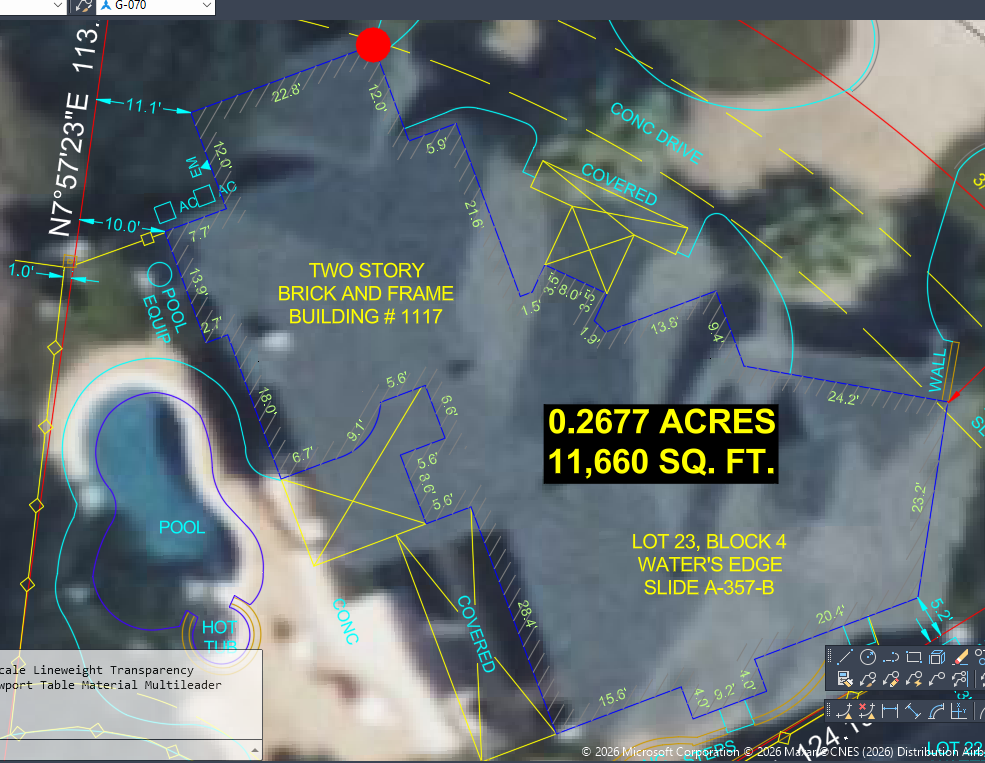
Thanks to all that have pitched in. As per suggested here is a couple of screen shots to help. First is the sketch the guys measure in the field. Second is our dwg. What I'm needing is just the 10-key in the distances. Currently we turn ortho on and just move the cursor the direct we want and the type the distance (same as Stefan). Which works, but you have to take your hand off of the keyboard. What I'd like to do is to keep my hand on the 10-key and just type distances. For the following picture (starting at the arrow/donut) I would start the lisp, pick a point, and then the direction with the cursor and then distance 7.7. my next key strokes would simply be: -12 (left 90° turn); 22.8 (right 90° turn); 12 (right 90° turn); -5.9 (left 90° turn); 21.6 (right 90° turn); -0.5 (left 90° turn); \3.5(left 45° turn); 8 (right 90° turn); 2.5 (right 90° turn); \1.5 (left 45° turn); 13.8 (left 90° turn); etc.
-
That was sudden, but I must admit I didn't read the last newsletter I received from them since I have been so busy with other things lately. Was there any heads-up in the newsletter?
-

Drawing a house with just 10-key input.
Stefan BMR replied to Ataim's topic in AutoLISP, Visual LISP & DCL
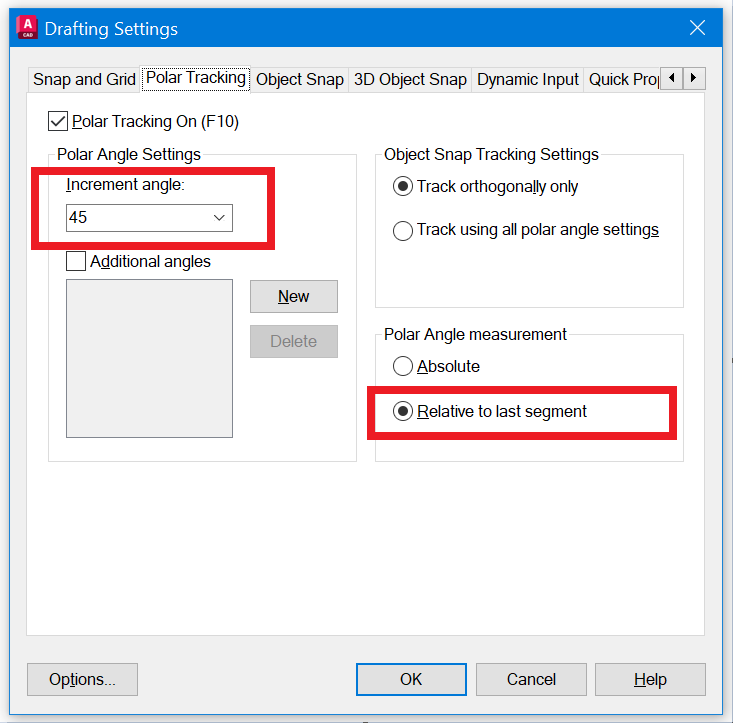
If I understand correctly your request, I think you can get the same with the right settings. Just aim the desired direction and specify the distance.