All Activity
- Past hour
-

[LISP] BPDF - Batch export Model Space title block frames to individual PDFs
Beastt1992 replied to Beastt1992's topic in AutoLISP, Visual LISP & DCL
That's a great tip, thank you! Much cleaner than spamming the command line. I'll add this to the next version and clear the status bar when done. - Today
-
 Nugget joined the community
 -
Hello. Just wondering if the other plates have to be drawn in separate files or on continuous layouts on one singular file: For example, layout one is plate 1, layout two is plate 2, layout 3 is plate 3 etc... Thank you
-

[LISP] BPDF - Batch export Model Space title block frames to individual PDFs
mhupp replied to Beastt1992's topic in AutoLISP, Visual LISP & DCL
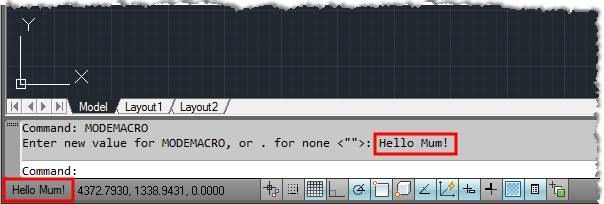
My 0.02¢ Instead of outputting the status to command line (princ (strcat " [" (itoa (1+ i)) "/" (itoa counter) "] Done\n")) Output to the Status Bar (setvar "MODEMACRO" (strcat "Processing: [" (itoa (1+ i)) "/" (itoa counter) "] Layouts")) Then you don't have clutter/spam in the command prompt but still have the current stats. Just have to clear it after complete.
-

[LISP] BPDF - Batch export Model Space title block frames to individual PDFs
pkenewell replied to Beastt1992's topic in AutoLISP, Visual LISP & DCL
@Steven P Not easy to notice, but he did give a link to the routine: https://github.com/beastt1992/autocad-batch-plot I agree that layouts should be used. -
Understanding 'Getenv Variable call denied'?
pkenewell replied to ScottMC's topic in AutoLISP, Visual LISP & DCL
@ScottMC Ok - I think I understand. You want to the Circle to be the last entity created, even though you added the points. That is relatively simple, just delete the circle and recreate it. See the update to my code below. (defun c:C2 (/ cr el *error* fp oe os p p2) (defun *error* (msg) (if oe (setvar "cmdecho" oe)) (if os (setvar "osmode" os)) (vla-endundomark (vla-get-activedocument (vlax-get-acad-object))) (princ (strcat "\n" msg)) ) (vla-startundomark (vla-get-activedocument (vlax-get-acad-object))) (setq oe (getvar "cmdecho") os (getvar "osmode") ) (setvar "cmdecho" 0) (while (and (setvar 'osmode (boole 7 os 512)) (setq fp (getpoint "\nSpecify 1st Point of 2P.Circle: ")) ) (command "._Circle" "_2P" "_non" fp) (setvar "osmode" os) (princ "\nSecond Point: ") (while (= (logand (getvar "cmdactive") 1) 1) (command pause) ) (setq el (entget (entlast)) p (trans (cdr (assoc 10 el)) (cdr (assoc 210 el)) 1) p2 (getvar "lastpoint") cr (getvar "circlerad") ) (entdel (entlast)); Delete the Circle (princ (strcat "\n Coordinates: " (setq C2:pp ;; Global Variable "C2:pp" (strcat (rtos (car p) 2 4) "," (rtos (cadr p) 2 4) "," (rtos (caddr p) 2 4) ) ) "\n Diameter: " (rtos (* cr 2) 2 4) " | Radius: " (rtos cr 2 4) "\n" ) ) (entmakex (list (cons 0 "POINT") (cons 10 p))) (entmakex (list (cons 0 "POINT") (cons 10 p2))) (entmakex (list (cons 0 "CIRCLE") (assoc 10 el) (assoc 8 el) (assoc 40 el))) ; Recreate the Circle ) (setvar "cmdecho" oe) (vla-endundomark (vla-get-activedocument (vlax-get-acad-object))) (princ) ) -

How to copy an object to a specified distance
CyberAngel replied to sinergy2020's topic in AutoCAD Beginners' Area
The COPY command has several different schemes, but they all do the same thing. The difference is in how you input your information. One option is to type the command (COPY) before you select the objects. The prompt will say: Select objects: You pick the objects you want to copy and then continue with the command. If you've already selected them, you get this prompt: Specify base point or [Displacement mOde] <Displacement>: What happens next depends on your input. It's asking for a base point, that is, a place that marks the beginning of the operation. You can type a coordinate, like (2,5), or you can pick a point with your mouse. If you select a corner of your rectangle, for instance, that will help you place the copy in line with it, rather than doing some math. Another option is Displacement, which is probably better for your purposes. AutoCAD forgets about a base point. Instead hit Enter to go into Displacement mode. You type the distance, such as (5,0). The copy appears five units to the right, and you're done. If you do use a base point, you get this prompt: Specify second point or [Array] <use first point as displacement>: You can still use Displacement. AutoCAD assumes again that the base point is the beginning mark. When you put in the second coordinate, you've defined the distance between the original rectangle and the copy. If you work through all these versions of COPY, you see that they all give you similar results. The only difference is where the copy begins and ends, and that depends on how you enter those points. With a base point, you can start anywhere in your drawing. You can snap to a corner of your rectangle, for instance, or to any other object in the drawing. You can type in an X,Y coordinate based on anything, or type in numbers at random, or pick a random point with your mouse. Once you have that base point, you can pick a second point in the same way: a point on another object, a pair of numbers, or a point in space. Without a base point, AutoCAD assumes the base point is (0,0). Any X/Y distance you enter will be calculated from (0,0). The result is the same. The best way to learn any CAD system is to experiment. You can't break it by giving it bad input. Try the different options to see what they do. -
[LISP] BPDF - Batch export Model Space title block frames to individual PDFs
Beastt1992 replied to Beastt1992's topic in AutoLISP, Visual LISP & DCL
Thanks Steven! Code is posted above. Regarding Paper Space - completely agree it's the better long-term approach, but changing an entire office workflow is harder than writing a tool to work around it! -
[LISP] BPDF - Batch export Model Space title block frames to individual PDFs
Beastt1992 replied to Beastt1992's topic in AutoLISP, Visual LISP & DCL
;;; BATCH-PDF ;;; Function: Batch export all title block frames to PDF ;;; Command: BPDF ;;; Compatible: AutoCAD 2014+ ;;; v2.0 - Single-frame mode + cross-version compatibility ;;; AC_WINDOW auto-detected (3 or 4) ;;; RefreshPlotDeviceInfo order fixed for fresh sessions (setq AC_0DEG 0) (setq AC_FIT 0) (defun BPDF-cfgpath () (strcat (getenv "APPDATA") "\\bpdf_settings.cfg") ) (defun BPDF-load-cfg ( / f line kv cfg) (setq cfg (list (cons "blockname" "") (cons "prefix" "frame") (cons "outpath" (strcat (getenv "USERPROFILE") "\\Desktop")) (cons "styleNum" "1") (cons "paperNum" "1") (cons "scaleStr" "") )) (setq f (open (BPDF-cfgpath) "r")) (if f (progn (while (setq line (read-line f)) (setq kv (vl-string-search "=" line)) (if kv (setq cfg (subst (cons (substr line 1 kv) (substr line (+ kv 2))) (assoc (substr line 1 kv) cfg) cfg )) ) ) (close f) ) ) cfg ) (defun BPDF-save-cfg (blockname prefix outpath styleNum paperNum scaleStr / f) (setq f (open (BPDF-cfgpath) "w")) (if f (progn (write-line (strcat "blockname=" blockname) f) (write-line (strcat "prefix=" prefix) f) (write-line (strcat "outpath=" outpath) f) (write-line (strcat "styleNum=" (itoa styleNum)) f) (write-line (strcat "paperNum=" (itoa paperNum)) f) (write-line (strcat "scaleStr=" scaleStr) f) (close f) ) ) ) (defun c:BPDF ( / blockname outpath ss i ent obj sel entdata plotMode minpoint maxpoint pt1 pt2 counter fname adoc alayout aplot scaleStr scaleVal useFit styleSheet prefix frameList frame fx fy fx2 fy2 rowHeight plotterName styleList styleNum allMedia mediaShort mediaIdx m j item paperNum paperSize cfg lastVal inp confirm AC_WINDOW err) (vl-load-com) (setq cfg (BPDF-load-cfg)) ;; 1. Click to select title block, or type name (princ "\nClick on a title block frame (or press Enter to type block name): ") (setq sel (entsel "")) (if sel (progn (setq ent (car sel)) (setq entdata (entget ent)) (if (= (cdr (assoc 0 entdata)) "INSERT") (progn (setq blockname (cdr (assoc 2 entdata))) (princ (strcat "\nBlock detected: " blockname "\n")) (initget "1 A") (setq plotMode (getkword "\nPlot [1=This frame only / A=All frames with this name] <A>: ") ) (if (null plotMode) (setq plotMode "A")) ) (progn (alert "Please click on a Block (INSERT) entity.") (exit) ) ) ) (progn (setq lastVal (cdr (assoc "blockname" cfg))) (if (/= lastVal "") (setq inp (getstring (strcat "\nBlock Name <" lastVal ">: "))) (setq inp (getstring "\nBlock Name: ")) ) (setq blockname (if (= inp "") lastVal inp)) (if (= blockname "") (progn (princ "\nCancelled.") (exit))) (setq plotMode "A") ) ) ;; 2. PDF Prefix (setq lastVal (cdr (assoc "prefix" cfg))) (setq inp (getstring (strcat "\nPDF Prefix <" lastVal ">: "))) (setq prefix (if (= inp "") lastVal inp)) ;; 3. Output Folder (setq lastVal (cdr (assoc "outpath" cfg))) (setq inp (getstring (strcat "\nOutput Folder <" lastVal ">: "))) (setq outpath (if (= inp "") lastVal inp)) (if (/= (substr outpath (strlen outpath)) "\\") (setq outpath (strcat outpath "\\")) ) (vl-mkdir outpath) (princ (strcat "Output: " outpath "\n")) ;; 4. Build frame list (if (= plotMode "1") (progn ;; Single mode: get bbox of the clicked entity directly (setq obj (vlax-ename->vla-object ent)) (vla-getboundingbox obj 'minpoint 'maxpoint) (setq frameList (list (list (vlax-safearray-get-element minpoint 0) (vlax-safearray-get-element minpoint 1) (vlax-safearray-get-element maxpoint 0) (vlax-safearray-get-element maxpoint 1) ))) (setq counter 1) (princ "Mode: Single frame\n") ) (progn ;; All mode: find all matching blocks (setq ss (ssget "X" (list (cons 0 "INSERT") (cons 2 blockname) (cons 410 "Model")) )) (if (null ss) (progn (alert (strcat "Block not found: " blockname)) (exit)) ) (setq counter (sslength ss)) (setq frameList nil i 0) (repeat counter (setq ent (ssname ss i)) (setq obj (vlax-ename->vla-object ent)) (vla-getboundingbox obj 'minpoint 'maxpoint) (setq fx (vlax-safearray-get-element minpoint 0)) (setq fy (vlax-safearray-get-element minpoint 1)) (setq fx2 (vlax-safearray-get-element maxpoint 0)) (setq fy2 (vlax-safearray-get-element maxpoint 1)) (setq frameList (append frameList (list (list fx fy fx2 fy2)))) (setq i (1+ i)) ) ;; Sort: top-to-bottom rows, left-to-right within row (setq rowHeight (* (- (cadddr (car frameList)) (cadr (car frameList))) 0.5)) (setq frameList (vl-sort frameList (function (lambda (a b) (if (> (abs (- (cadr a) (cadr b))) rowHeight) (> (cadr a) (cadr b)) (< (car a) (car b)) ) )) ) ) (princ (strcat "Mode: All frames (" (itoa counter) " found)\n")) ) ) ;; 5. VLA setup ;; Fix from forum: RefreshPlotDeviceInfo BEFORE ConfigName, ;; then ConfigName, then RefreshPlotDeviceInfo again. ;; This prevents "Invalid input" on fresh CAD sessions. (setq adoc (vla-get-activedocument (vlax-get-acad-object))) (setq alayout (vla-get-activelayout adoc)) (setq aplot (vla-get-plot adoc)) (setq plotterName "DWG To PDF.pc3") (vla-RefreshPlotDeviceInfo alayout) (vla-put-configname alayout plotterName) (vla-RefreshPlotDeviceInfo alayout) ;; Detect AC_WINDOW value: try 4 first (works on more setups), ;; fall back to 3 only if 4 is rejected. ;; Note: plottype=3 can silently "accept" but not actually work. (setq AC_WINDOW 4) (setq err (vl-catch-all-apply (function (lambda () (vla-put-plottype alayout 4))) )) (if (vl-catch-all-error-p err) (progn (vla-put-plottype alayout 3) (setq AC_WINDOW 3) ) ) ;; 6. Plot Style (setq styleList (vlax-safearray->list (vlax-variant-value (vla-GetPlotStyleTableNames alayout)) ) ) (setq styleList (append (list "None (Color)") styleList)) (setq lastVal (atoi (cdr (assoc "styleNum" cfg)))) (if (or (< lastVal 1) (> lastVal (length styleList))) (setq lastVal 1)) (princ "\nPlot Style:\n") (setq i 1) (foreach s styleList (princ (strcat " " (itoa i) ". " s (if (= i lastVal) " <- last" "") "\n")) (setq i (1+ i)) ) (setq inp (getint (strcat "Select <" (itoa lastVal) ">: "))) (setq styleNum (if (or (null inp) (< inp 1) (> inp (length styleList))) lastVal inp)) (setq styleSheet (if (= styleNum 1) "" (nth (1- styleNum) styleList))) (princ (strcat "Style: " (if (= styleSheet "") "None" styleSheet) "\n")) ;; 7. Paper Size (setq allMedia (vlax-safearray->list (vlax-variant-value (vla-GetCanonicalMediaNames alayout)) ) ) (setq mediaShort nil mediaIdx 0) (foreach m allMedia (if (or (vl-string-search "A0" m) (vl-string-search "A1" m) (vl-string-search "A2" m) (vl-string-search "A3" m) (vl-string-search "A4" m)) (setq mediaShort (append mediaShort (list (list mediaIdx m)))) ) (setq mediaIdx (1+ mediaIdx)) ) (setq lastVal (atoi (cdr (assoc "paperNum" cfg)))) (if (or (< lastVal 1) (> lastVal (length mediaShort))) (setq lastVal 1)) (princ "\nPaper Size:\n") (setq j 1) (foreach item mediaShort (princ (strcat " " (itoa j) ". " (cadr item) (if (= j lastVal) " <- last" "") "\n")) (setq j (1+ j)) ) (setq inp (getint (strcat "Select <" (itoa lastVal) ">: "))) (setq paperNum (if (or (null inp) (< inp 1) (> inp (length mediaShort))) lastVal inp)) (setq paperSize (cadr (nth (1- paperNum) mediaShort))) (princ (strcat "Paper: " paperSize "\n")) ;; 8. Scale (setq lastVal (cdr (assoc "scaleStr" cfg))) (setq inp (getstring (strcat "\nScale denominator (100=1:100, 0 or F=Fit, Enter=last setting)" (if (/= lastVal "") (strcat " <" lastVal ">") " <Fit>") ": ") )) (setq scaleStr (if (= inp "") lastVal inp)) ;; 0 or F or empty = Fit to paper (if (or (= scaleStr "") (= scaleStr "0") (= (strcase scaleStr) "F") (= (strcase scaleStr) "FIT")) (progn (setq useFit T scaleVal 0) (setq scaleStr "")) (setq useFit nil scaleVal (atof scaleStr)) ) (BPDF-save-cfg blockname prefix outpath styleNum paperNum scaleStr) ;; 9. Apply plot settings ONCE before loop (not inside loop!) (setvar "BACKGROUNDPLOT" 0) (vla-put-canonicalmedianame alayout paperSize) (vla-put-plotrotation alayout AC_0DEG) (vla-put-centerplot alayout :vlax-true) (vla-put-plotwithlineweights alayout :vlax-true) (if (/= styleSheet "") (progn (vla-put-plotwithplotstyles alayout :vlax-true) (vla-put-stylesheet alayout styleSheet) ) (vla-put-plotwithplotstyles alayout :vlax-false) ) (if useFit (progn (vla-put-useStandardScale alayout :vlax-true) (vla-put-standardscale alayout AC_FIT) ) (progn (vla-put-useStandardScale alayout :vlax-false) (vla-SetCustomScale alayout 1.0 scaleVal) ) ) ;; 10. Confirm (alert (strcat "===== Confirm Plot =====\n\n" "Frames: " (itoa counter) "\n" "Prefix: " prefix "\n" "Output: " outpath "\n" "Paper: " paperSize "\n" "Style: " (if (= styleSheet "") "None" styleSheet) "\n" "Scale: " (if useFit "Fit" (strcat "1:" (rtos scaleVal 2 0))) "\n\n" "Click OK to continue" )) (initget "Y N") (setq confirm (getkword "\nConfirm [Y=Yes / N=Cancel] <Y>: ")) (if (= confirm "N") (progn (princ "\nCancelled.") (exit)) ) ;; 11. Plot loop ;; SetWindowToPlot THEN put-plottype (per Autodesk docs) ;; No RefreshPlotDeviceInfo inside the loop (that was breaking it) (princ "Plotting...\n") (setq i 0) (foreach frame frameList (setq pt1 (vlax-make-safearray vlax-vbdouble '(0 . 1))) (vlax-safearray-put-element pt1 0 (car frame)) (vlax-safearray-put-element pt1 1 (cadr frame)) (setq pt2 (vlax-make-safearray vlax-vbdouble '(0 . 1))) (vlax-safearray-put-element pt2 0 (caddr frame)) (vlax-safearray-put-element pt2 1 (cadddr frame)) (vla-SetWindowToPlot alayout pt1 pt2) (vla-put-plottype alayout AC_WINDOW) (setq fname (strcat outpath prefix "_" (itoa (1+ i)) ".pdf")) (vla-PlotToFile aplot fname) (princ (strcat " [" (itoa (1+ i)) "/" (itoa counter) "] Done\n")) (setq i (1+ i)) ) (setvar "BACKGROUNDPLOT" 2) (alert (strcat "Done! " (itoa counter) " PDFs exported\nLocation: " outpath)) (princ) ) GitHub link with README and installation instructions: https://github.com/beastt1992/autocad-batch-plot Happy to answer any questions! -

[LISP] BPDF - Batch export Model Space title block frames to individual PDFs
Steven P replied to Beastt1992's topic in AutoLISP, Visual LISP & DCL
So post the LISP so we can give feedback - it is easier to reference if the LISP is in the same thread as the comments and questions Though I might be tempted to say change the system and get the draughters to use paperspace for what it is meant for. (haven't had the paperspace / modespace discussion on here for a while now....) -
 Tule changed their profile photo
 -
 huuhoai2012 joined the community
 -
 dusara joined the community
 -
 afaref joined the community
 -
Beastt1992 joined the community
-
[LISP] BPDF - Batch export Model Space title block frames to individual PDFs
Beastt1992 posted a topic in AutoLISP, Visual LISP & DCL
Hi CADTutor, I'm an architect in Taiwan and wrote a free AutoLISP tool to solve a problem we face daily - batch exporting all title block frames in Model Space to individual PDFs. For those of us who work with all drawings arranged in one Model Space (common workflow in Taiwan/Asia), AutoCAD's built-in Batch Plot doesn't help much since it works at the Layout level. Features: - Click on a title block frame to detect the Block name automatically - Option to plot just that 1 frame, or all frames with the same name - Sorts output top-to-bottom, left-to-right - Dynamically loads plot styles and paper sizes from your machine - Remembers last settings - Compatible with AutoCAD 2014 and above GitHub: https://github.com/beastt1992/autocad-batch-plot Already tested by users on Reddit r/AutoCAD with good feedback. A couple of bugs were found and fixed based on community input (AC_WINDOW constant varies by version, RefreshPlotDeviceInfo order). Would love feedback from the AutoLISP community here - especially if anyone tests it on different AutoCAD versions or workflows! - Yesterday
-
 Delfin joined the community
 -

Civil Drafting with AutoCAD Project-Civil Drafting with AutoCAD Project
nelsonm replied to nelsonm's topic in Student Project Questions
Thank you for the answers! Now I understand it better -
 Rodrigo ponce joined the community
 -

Understanding 'Getenv Variable call denied'?
ScottMC replied to ScottMC's topic in AutoLISP, Visual LISP & DCL
As mentioned, my intention is to correct the 'post.create' entity selection to be the circle as last.object. The other reason is for me to have visibility of the 2p.circle as I draw it. Attchd is the latest working.. Circle-2P.lsp - Last week
-

Understanding 'Getenv Variable call denied'?
BIGAL replied to ScottMC's topic in AutoLISP, Visual LISP & DCL
You could save (entlast) properties like centre and radius so (setq cprop (list pt rad)) a line (setq Lprop (list start end)) you can redefine commands like circle as a lisp Defun so it would ask for pt and rad if it does not exist or use pt again for something else. Is that what your thinking ? -
Civil Drafting with AutoCAD Project-Civil Drafting with AutoCAD Project
BIGAL replied to nelsonm's topic in Student Project Questions
Where I am in Australia the co-ordinates of a real world point would be like X=473272.2831 Y=5977274.5924 Z=0 these values can be uploaded or read from survey data instruments. We just get used to working in big numbers. -
Did you try Recover, it checks a dwg, you choose the dwg to check.
-
Understanding 'Getenv Variable call denied'?
Steven P replied to ScottMC's topic in AutoLISP, Visual LISP & DCL
Not sure if this is something to look at and lamda / mapcar (car (mapcar '(lambda (a) (command "point" c) c) (setq c (getpoint "Get point")))) will return the point of the point... and somehow wrap that into a circle command.. though just a quick look it didn't work for me. Thinking something like: (command "circle" -lambda expression- -lambda expression-) So the points are created first and then the circle created last. Someone might know the workings to make that work. Have to use something like this to return a point as a part of another function -
 BrandonJay joined the community
 -
 Kathleenor Donez joined the community
 -

Civil Drafting with AutoCAD Project-Civil Drafting with AutoCAD Project
tombu replied to nelsonm's topic in Student Project Questions
The X-coordinate is Easting the Y-coordinate is Northing and the Benchmark elevation is it's Z-coordinate used in Surveying as a reference for determining the elevation of other points. Topo surveys generally have Benchmarks labeled with their description and elevation. Generally at least 2 are required so they can be checked between and in case one of them is destroyed during construction activities. -
 chris88 joined the community
 -
Understanding 'Getenv Variable call denied'?
ScottMC replied to ScottMC's topic in AutoLISP, Visual LISP & DCL
re: I like it, while drawing, to 'pick what I've drawn with "L.ast" as I consider the circle the main entity created. In trying other order changes, really haven't found much better. The cmd-line coords are not in question are they? I prefer the coords that way for 'ease.of.use' on following commands. Suggestions, requests please. -
Civil Drafting with AutoCAD Project-Civil Drafting with AutoCAD Project
nelsonm replied to nelsonm's topic in Student Project Questions
I have another question, Drafting the Existing Site Plan (Sheet 1): It says this: "The area is in a state that bases all surveys on the intersection of a meridian and a baseline for that state. Therefore, the origin (or point 0, 0) for allsurveys is at that intersection, and any x- and y-coordinates tell the distance in feet from the intersection. If, for example, a benchmark is at point11675,39532, the benchmark is 2.21 miles east of the intersection and 7.49 miles north of the intersection. A benchmark (BM 312) exists at the northwest corner of the survey area. BM 312 has an elevation of 88.9 feet, and its coordinates are 521662,44895." Can someone explain this to me? -
What is the error message you are seeing?
-
How to copy an object to a specified distance
BIGAL replied to sinergy2020's topic in AutoCAD Beginners' Area
A couple of ways type copy, pick objects, pick start point, drag mouse, have say ortho on for in X & Y direction, type distance all done. These were written like 40 years ago. If you have this task a lot then Appload add to startup a lisp with code. (defun C:CHX () (SETVAR "CMDECHO" 0) (setq sn (getvar "osmode")) (command "osnap" "near") (princ "\nalters object in X direction") (setq ht (getstring "\n What is amount of change: ")) (setq newht (strcat ht ",0")) (while (setq newobj (entsel "\nPoint to object: ")) (command "move" newobj "" "0,0" newht) ) ) ; (defun C:CHY () (SETVAR "CMDECHO" 0) (setq sn (getvar "osmode")) (command "osnap" "near") (princ "alters object in Y direction") (setq ht (getstring "\n What is amount of change: ")) (setq newht (strcat "0," ht)) (while (SETQ NEWobj (entsel "\nPoint to object: ")) (command "move" newobj "" "0,0" newht) ) ) ;simple routine to change objects in the z direction (defun C:CHZ () (SETVAR "CMDECHO" 0) (setq sn (getvar "osmode")) (command "osnap" "near") (setq x 0) (princ "alters object in Z direction") (setq ht (getstring "\n What is amount of change: ")) (setq newht (strcat "0,0," ht)) (while (SETQ NEWobj (entsel "\nPoint to object: ")) (command "move" newobj "" "0,0,0" newht) ) ) -
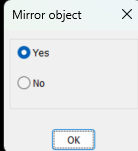
For me I pop this, you can set Yes or No as default so press Ok or press enter (if (not AH:Butts)(load "Multi radio buttons.lsp")) ; loads the program if not loaded already (if (= but nil)(setq but 1)) ; this is needed to set default button (setq ans (ah:butts but "V" '("Mirror object" "Yes" "No" ))) ; ans holds the button picked value as a string Another is using ACET YesNo. Just google. Multi radio buttons.lsp
-
Hi, I am a beginner, and I am actually using nanocad, which seems to have very similar basic commands as Autocad. It basically looks so ... I'd like create a copy of an existing object, such as a rectangle, just beside the original one but at a specific distance. I am using the copy command which has a parameter for inputting a distance but I never manage to actually copy the new object exactly beside the exiting one at the specified distance. How is this done in Autocad?
-
hi can anyone help me to fix the error in .dwg file.
-
Solution?