All Activity
- Past hour
-

Reduce file size.
Bandido replied to Bandido's topic in AutoCAD 2D Drafting, Object Properties & Interface
Many thanks. - Today
-
Being as it is an older non-supported version, your options are limited. There was a lot in those 2 links, what did not work?
-

Reduce file size.
SLW210 replied to Bandido's topic in AutoCAD 2D Drafting, Object Properties & Interface
I WBlocked them. new Lines and arcs.dwg new font.dwg -
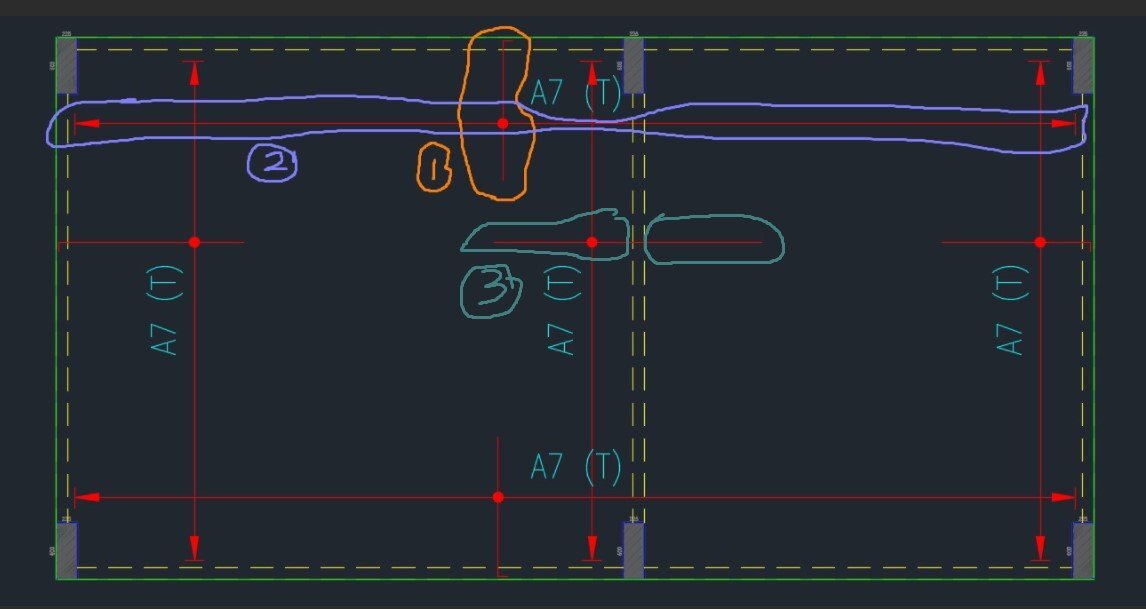
Hi Team, I wish to create a Lisp code for slab rebar detail that has the following conditions, Legend = The perimeter green line represents the edge line of the slab, the yellow dashed line represents the internal beam where the slab is continuous. Clouded with orange colour is the slab rebar. Clouded with purple colour is the arrangement of slab rebar in that direction. Condition 1 = User to point 6 locations to create the slab rebar length. The starting point of the rebar will be the location at last 33.33% or one-thirds length of the 1st and 2nd location. It applied the similar for 3rd and 4th location which to determine the end point for the rebar length, as shown in item 3 in the picture. Subsequently, to point 5th and 6th location to create the length of the rebar arrangement (arrow), as shown in item 2 in the picture. This will allow for creation in both vertical and horizontal directions. To allow the user to point the location without straight alignment. Condition 2 = User to point 6 locations to create the slab rebar length. If the slab rebar is started at the slab edge (green colour line), user to type "x" and point 1st location, this represents the started point of the rebar, as shown in item 2 in the picture. Automatically, 2nd location to be skipped and continues with the 3rd, 4th, 5th, and 6th location. If slab rebar ended at slab edge (green colour line), user to type "x" and point the 3rd location and 4th location to be skipped. - The start and end of the slab reber shall finish with the 90 deg bent with 100mm length. - Create the default text A7 (T) at the centre. - Create solid circle with 100 diameter at the intersection of the line as shown in the picture. - The line layer to follow the layer as per the drawing attached. Kindly advise the lisp code above. Thanks. Drawing1.dwg

-

LISP for breaking multiple polyline at 'insertion point' of multiple Blocks (AUTOCAD 2026)
Saxlle replied to xenru's topic in AutoLISP, Visual LISP & DCL
Something like this!? ; ***************************************************************************************************** ; Functions : PLBRJ ; Description : Breaking POLYLINE at blocks insertation points and joined into the one POLYLINE ; Author : Saxlle ; Date : January 19, 2026 ; ***************************************************************************************************** (prompt "\nTo run a LISP type: PLBRJ") (princ) (defun c:PLBRJ ( / ent joinList ptlist ss len spt ept i breakPoint) (setq ent (car (entsel "\nSelect the POLYLINE:")) joinList (list) ptlist (mapcar 'cdr (vl-remove-if-not '(lambda (x) (= (car x) 10)) (entget ent))) ss (ssget "_F" ptlist (list (cons 0 "INSERT"))) len (sslength ss) spt (vlax-curve-getStartPoint (vlax-ename->vla-object ent)) ept (vlax-curve-getEndPoint (vlax-ename->vla-object ent)) joinList (append (list spt) joinList) i 0 ) (while (< i len) (setq breakPoint (cdr (assoc 10 (entget (ssname ss i))))) (command "_.BREAK" breakPoint "_f" breakPoint breakPoint) (setq joinList (append (list breakPoint) joinList)) (setq i (1+ i)) ) (setq joinList (reverse (append (list ept) joinList)) ss (ssget "_F" joinList (list (cons 0 "LWPOLYLINE"))) ) (command-s "_PEDIT" "m" ss "" "j" "" "") (prompt "\nThe POLYLINE was broken at blocks insert points and joined into the one POLYLINE!") (princ) )
-

How I draw this type of long break line
Joeg posted a topic in AutoCAD 2D Drafting, Object Properties & Interface
How can I draw this kind of break line on autocad. See file attached. Thanks. 20260119_090353.heic -
thks for the reply, that did not work, the 2026 trial version installed without issue. I posted this issue in the autodesk forum, I looked today the moderator removed it
-
Bandido changed their profile photo
-
Reduce file size.
Bandido replied to Bandido's topic in AutoCAD 2D Drafting, Object Properties & Interface
Yes. I tried purge, -purge, audit, overkill, and nothing. I am attaching a link with two versions, one made with lines, arcs, and solids, and another with fonts. Thank you. https://we.tl/t-ydngathEMu -

LISP for breaking multiple polyline at 'insertion point' of multiple Blocks (AUTOCAD 2026)
Tsuky replied to xenru's topic in AutoLISP, Visual LISP & DCL
Try this !? You can use POINT or Insert Point of block... Break_Poly@point.lsp -
I guess you wanted to be orthogonal in relation to current UCS... It is working as desired according to picture you posted... If you always want to make it work in relation to WCS, then you add this line as first : (command "_,ucs" "_w") , and last one should be : (command "_.ucs" "_p")... As for @Tsuky code, you just push that first (defun round_number ... ) into body of main command function (c:regular_draw) and localize it after main defun : (defun c:regular_draw ( / round_number js n_count ent dxf_ent dxf_lst), then you save *.lsp as : "regular_draw.lsp" file, then use APPLOAD command and point to saved "regular_draw.lsp"; CAD should return message : successfuly loaded lisp... Then all you should do is type at Command: regular_draw... You'll be asked to select objects and upon selecting and pressing ENTER, all vertices should jump onto coordinates that are whole numbers (no decimal expansions) [if your SNAPUNIT sys variable is default - 1.0,1.0]... Still with @Tsuky routine, original polylines (or/and other entity types that were selected) will only slightly change vertices positions and therefore it may turn out that orthogonalism won't be processed... So IMHO, you should use both (c:regular_draw) and (c:lw_orth) to make your drawing without problematic portions where inaccuracies of drawn objects may occur...
-
The command is "regular_draw", but before to execute it set the variable "RESOL" (value near to your delta X and Y)
-
You might see if any of this helps. https://forums.autodesk.com/t5/3ds-max-forum/windows-11-is-stopping-3ds-max-opening-and-installing-any-new/td-p/13805917 https://www.autodesk.com/support/technical/article/caas/sfdcarticles/sfdcarticles/Unable-to-install-An-error-occurred-while-preparing-the-installation-Please-try-again-or-contact-Autodesk-Support-when-installing-from-Autodesk-Desktop-App.html I had this issue getting Map 3D 2026 installed, Map 3D 2025 installed fine and all the other AutoCAD 2026 and Toolsets installed. Ended up getting Autodesk to install it, since IT didn't want to go through everything. Basically did a bunch of registry resets. You might try installing the latest version's free trial just to see if it installs okay.
-
Reduce file size.
SLW210 replied to Bandido's topic in AutoCAD 2D Drafting, Object Properties & Interface
Did you try a -Purge? Make the lines and arcs polylines (Pedit M). Do the solid hatches have a border and also outlined with lines and arcs? If so you only need one or the other or even no border/outline at all since it's solid. You might use a file sharing service (like Dropbox, etc.) to share the file, though for just a check on methods to reduce the file size, you could just post a smaller portion of the logo. -
Good morning. How can I reduce the file size of this logo? I can't attach it because it's 11MB. How can I post it here? The letters are made with lines and arcs and filled with solid hatching. Thank you very much
-
Bandido joined the community
-
 knezknezevicstefan joined the community
 -
Thanks, could you help me to use that code. I put that in lisp editor, saved, used appload to load lisp. But i can find these comands to use, either "round_number" or "regular_draw" Where am i wrong?
-
Hi, does it possible to take into account UCS also? I tried to use it in real routine job. Result is above.
-
Option2 is the correct answer. For option 1 to be correct the orthographic views would need to include dashed lines to show the wall thickness of the vertical cylinder. What you show is a hollow vertical cylinder with a zero wall thickness.
-
Maybe another function that could help you... It is essential to set the "RESOL" variable to your resolution wishes before starting the routine, note that this modifies the geometry data of all selected objects. (defun round_number (xr n / ) (* (fix (atof (rtos (* xr n) 2 0))) (/ 1.0 n)) ) (defun c:regular_draw ( / js n_count ent dxf_ent dxf_lst) (setq js (ssget '((0 . "FACE3D,ARC,ATTDEF,ATTRIB,CIRCLE,ELLIPSE,INSERT,LINE,POLYLINE,LWPOLYLINE,*TEXT,POINT,SHAPE,SOLID,TRACE"))) n_count -1) (cond (js (setvar "cmdecho" 0) (command "_.undo" "_group") (while (setq ent (ssname js (setq n_count (1+ n_count)))) (setq dxf_ent (entget ent)) (cond ((eq (cdr (assoc 0 dxf_ent)) "LWPOLYLINE") (setq dxf_lst (cdr dxf_ent) dxf_ent (list (car dxf_ent))) (while (cdr dxf_lst) (if (eq 10 (caar dxf_lst)) (setq dxf_ent (cons (cons 10 (mapcar '(lambda (x p) (round_number x (/ 1 p))) (cdar dxf_lst) (getvar "SNAPUNIT"))) dxf_ent)) (setq dxf_ent (cons (car dxf_lst) dxf_ent)) ) (setq dxf_lst (cdr dxf_lst)) ) (setq dxf_ent (reverse dxf_ent)) ) ((eq (cdr (assoc 0 dxf_ent)) "POLYLINE") (while (eq (cdr (assoc 0 (setq dxf_ent (entget (entnext (cdar dxf_ent)))))) "VERTEX") (setq dxf_ent (subst (cons 10 (mapcar '(lambda (x p) (round_number x (/ 1 p))) (cdr (assoc 10 dxf_ent)) (append (getvar "SNAPUNIT") (list (car (getvar "SNAPUNIT")))))) (assoc 10 dxf_ent) dxf_ent)) (entmod dxf_ent) ) ) (T (foreach n dxf_ent (if (member (car n) '(10 11 12 13 40)) (if (listp (cdr n)) (setq dxf_ent (subst (cons (car n) (mapcar '(lambda (x p) (round_number x (/ 1 p))) (cdr n) (append (getvar "SNAPUNIT") (list (car (getvar "SNAPUNIT")))))) (assoc (car n) dxf_ent) dxf_ent)) (setq dxf_ent (subst (cons (car n) (round_number (cdr n) (/ 1 (car (getvar "SNAPUNIT"))))) (assoc (car n) dxf_ent) dxf_ent)) ) ) ) ) ) (entmod dxf_ent) (entupd ent) ) (command "_.undo" "_end") (setvar "cmdecho" 1) (princ (strcat "\n" (itoa n_count) " transformed object(s).")) ) (T (princ "\nNo find valid object.")) ) (prin1) )
-
Create lisp code for text above polyline
Tsuky replied to karfung's topic in AutoLISP, Visual LISP & DCL
The same, but more condensed... (vl-load-com) (defun c:label ( / l_var js htx AcDoc Space nw_style def_text n obj ename pr dist_start dist_end pt_start pt_end seg_len alpha val_txt nw_obj) (setq l_var (mapcar 'getvar '("AUNITS" "AUPREC" "LUPREC" "LUNITS"))) (mapcar 'setvar '("AUNITS" "AUPREC" "LUPREC" "LUNITS") '(4 3 0 2)) (princ "\nSelect polylines.") (while (null (setq js (ssget '((0 . "LWPOLYLINE"))))) (princ "\nSelection is empty or not are LWPOLYLINE!") ) (initget 6) (setq htx (getdist (getvar "VIEWCTR") (strcat "\nSpecify text height <" (rtos (getvar "TEXTSIZE")) ">: "))) (if htx (setvar "TEXTSIZE" htx)) (setq AcDoc (vla-get-ActiveDocument (vlax-get-acad-object)) Space (if (= 1 (getvar "CVPORT")) (vla-get-PaperSpace AcDoc) (vla-get-ModelSpace AcDoc) ) ) (vla-startundomark AcDoc) (cond ((null (tblsearch "LAYER" "SNA-TXT")) (vlax-put (vla-add (vla-get-layers AcDoc) "SNA-TXT") 'color 7) ) ) (cond ((null (tblsearch "STYLE" "STANDARD")) (setq nw_style (vla-add (vla-get-textstyles AcDoc) "STANDARD")) (mapcar '(lambda (pr val) (vlax-put nw_style pr val) ) (list 'FontFile 'Height 'ObliqueAngle 'Width 'TextGenerationFlag) (list (strcat (getenv "windir") "\\fonts\\arial.ttf") 0.0 0.0 1.0 0.0) ) ) ) (setq def_text "BD/1:200/") (repeat (setq n (sslength js)) (setq obj (ssname js (setq n (1- n))) ename (vlax-ename->vla-object obj) pr -1 ) (repeat (fix (vlax-curve-getEndParam ename)) (setq dist_start (vlax-curve-GetDistAtParam ename (setq pr (1+ pr))) dist_end (vlax-curve-GetDistAtParam ename (1+ pr)) pt_start (vlax-curve-GetPointAtParam ename pr) pt_end (vlax-curve-GetPointAtParam ename (1+ pr)) seg_len (fix (* (- dist_end dist_start) 0.001)) alpha (angle (trans pt_start 0 1) (trans pt_end 0 1)) val_txt (strcat def_text (rtos seg_len 2 0) " m") ) (if (and (> alpha (* pi 0.5)) (< alpha (* pi 1.5))) (setq alpha (+ alpha pi))) (setq nw_obj (vla-addMtext Space (vlax-3d-point (setq pt (polar (vlax-curve-GetPointAtParam ename (+ 0.5 pr)) (+ alpha (* pi 0.5)) (getvar "TEXTSIZE")))) 0.0 val_txt ) ) (mapcar '(lambda (pr val) (vlax-put nw_obj pr val) ) (list 'AttachmentPoint 'Height 'DrawingDirection 'InsertionPoint 'StyleName 'Layer 'Rotation) (list 8 (getvar "TEXTSIZE") 5 pt "STANDARD" "SNA-TXT" alpha) ) ) ) (vla-endundomark AcDoc) (mapcar 'setvar '("AUNITS" "AUPREC" "LUPREC" "LUNITS") l_var) (prin1) ) -

Find the correct direction of picked two points.
ryanatkins49056 replied to Dayananda's topic in AutoLISP, Visual LISP & DCL
@Dayananda Is something like this what you're actually after? It has the advantage of only picking the line instead of picking two points. (defun c:redlines ( / *error* make:line linesset line linelist linelisteach lineinfo linest lineen linean linedt) (defun *error* ( rramsg ) (if (not (member rramsg '("Function cancelled" "quit / exit abort"))) (princ (strcat "\nError: " rramsg)) ) (command-s "_.UNDO" "_END") );(defun)*error* (defun make:line ( lpt1 lpt2 ) (entupd (entmakex (list (cons 0 "LINE") (cons 10 lpt1);starting point (cons 11 lpt2);ending point );(list) );(entmakex) );(entupd) );(defun), make:line (setq linesset (ssget (list '(0 . "LINE"))));creates the selection set using standard autocad selection procedures (command "_.UNDO" "_BEGIN") (if linesset (repeat (setq line (sslength linesset));get the number of items in the selection set and use as counter for repeat (setq linelist (cons (ssname linesset (setq line (1- line))) linelist));set variable to new list ;move throught the sset (ssname), index no. is from sslength, (cons) construct the list and then set it );(repeat), from Lee Mac );(if) Lee Mac create a list for processing from the selection set (foreach linelisteach linelist ;for each line (linelisteach) of each entity in the selection set list (linelist) (setq lineinfo (entget linelisteach));get the entity data as a list (setq linest (cdr (assoc 10 lineinfo))) (setq lineen (cdr (assoc 11 lineinfo))) (setq linean (angle linest lineen)) (setq linedt (distance linest lineen)) (cond ( ;0 degrees subfunction (equal linean (* pi 0.0) 0.001);0 degrees (make:line (list (nth 0 linest) (+ (nth 1 linest) 5) (nth 2 linest)) (list (+ (nth 0 linest) (* 0.3 linedt)) (+ (nth 1 linest) 5) (nth 2 linest)) ) ) ;0 degrees subfunction ( ;90 degrees subfunction (equal linean (* pi 0.5) 0.001);90 degrees (make:line (list (- (nth 0 linest) 5) (nth 1 linest) (nth 2 linest)) (list (- (nth 0 linest) 5) (+ (nth 1 linest) (* 0.3 linedt)) (nth 2 linest)) ) ) ;90 degrees subfunction ( ;180 degrees subfunction (equal linean (* pi 1.0) 0.001);180 degrees (make:line (list (nth 0 linest) (+ (nth 1 linest) 5) (nth 2 linest)) (list (- (nth 0 linest) (* 0.3 linedt)) (+ (nth 1 linest) 5) (nth 2 linest)) ) ) ;180 degrees subfunction ( ;270 degrees subfunction (equal linean (* pi 1.5) 0.001);270 degrees (make:line (list (- (nth 0 linest) 5) (nth 1 linest) (nth 2 linest)) (list (- (nth 0 linest) 5) (- (nth 1 linest) (* 0.3 linedt)) (nth 2 linest)) ) ) ;270 degrees subfunction );(cond) );(foreach) );(defun) - Yesterday
-
Nice!
-
Create lisp code for text above polyline
Saxlle replied to karfung's topic in AutoLISP, Visual LISP & DCL
Sure @karfung, but I will leave you to do that (I'm writing from the phone). This is the hint, find it everywhere in the code: (entmake (list (cons 0 "MTEXT") (cons 100 "AcDbEntity") (cons 100 "AcDbMText") (cons 10 pt) (cons 11 pt) (cons 40 height) (cons 50 ang) (cons 71 5) (cons 1 (strcat def_text (rtos lenSegment 2 2) " m")))) Find this part inside: Replace this part: (cons 1 (strcat def_text (rtos lenSegment 2 2) " m")) With this: (cons 1 (strcat def_text (itoa lenSegment) " m")) and you will get the whole integer without the decimal part. I've heard the Durian, but never taste it. If I ever come to Malaysia, I will taste it . Best regards. -
@Danielm103 How can AI be better than human revision? Here is AI - I've added "red" color... (defun c:ortho_pline ( / orthogonalize-points edata ent newpts p pl pts x) (defun orthogonalize-points (pts / dx-in dx-out dy-in dy-out i in-is-h new-x new-y out-is-h p0 p1 p2 result) ;; If fewer than 3 points, nothing to do (if (< (length pts) 3) pts (progn (setq result pts) ;; Iterate interior vertices (setq i 1) (while (< i (- (length pts) 1)) (setq p0 (nth (- i 1) result)) (setq p1 (nth i result)) (setq p2 (nth (+ i 1) result)) ;; Incoming vector p0 -> p1 (setq dx-in (- (car p1) (car p0))) (setq dy-in (- (cadr p1) (cadr p0))) ;; Outgoing vector p1 -> p2 (setq dx-out (- (car p2) (car p1))) (setq dy-out (- (cadr p2) (cadr p1))) ;; Dominant direction tests (setq in-is-h (>= (abs dx-in) (abs dy-in))) (setq out-is-h (>= (abs dx-out) (abs dy-out))) ;; Case 1: Proper corner (one horizontal, one vertical) (cond ((/= in-is-h out-is-h) (if in-is-h (progn ;; incoming horizontal, outgoing vertical (setq new-x (car p2)) (setq new-y (cadr p0)) ) (progn ;; incoming vertical, outgoing horizontal (setq new-x (car p0)) (setq new-y (cadr p2)) ) ) ) ;; Case 2: both horizontal (in-is-h (setq new-x (car p1)) (setq new-y (cadr p0)) ) ;; Case 3: both vertical (t (setq new-x (car p0)) (setq new-y (cadr p1)) ) ) ;; Replace interior point (setq result (subst (list new-x new-y) p1 result)) (setq i (1+ i)) ) result ) ) ) (setq ent (car (entsel "\nSelect a polyline: "))) (if (not ent) (progn (princ "\nNothing selected.") (exit) ) ) (setq edata (entget ent)) ;; Ensure LWPOLYLINE (if (/= (cdr (assoc 0 edata)) "LWPOLYLINE") (progn (princ "\nEntity is not a lightweight polyline.") (exit) ) ) ;; Extract vertices (group code 10) (setq pts (mapcar 'cdr (vl-remove-if-not '(lambda (x) (= (car x) 10)) edata))) ;; Orthogonalize (setq newpts (orthogonalize-points pts)) ;; Create new polyline (setq pl (entmakex (append (list '(0 . "LWPOLYLINE") '(100 . "AcDbEntity") '(100 . "AcDbPolyline") (cons 90 (length newpts)) '(70 . 0) ) (mapcar '(lambda (p) (cons 10 p)) newpts) (list '(62 . 1)) ) ) ) (if pl (princ "\nOrthogonal polyline created.") (princ "\nFailed to create polyline.") ) (princ) ) And here is my version - I used "green" color... (defun c:lw_orth ( / un f lw lwx pl cl ) (defun un ( l / a ll ) (while (setq a (car l)) (if (vl-some (function (lambda ( x ) (equal x a 1e-10))) l) (setq ll (cons a ll) l (vl-remove-if (function (lambda ( x ) (equal x a 1e-10))) (cdr l))) (setq ll (cons a ll) l (cdr l)) ) ) (reverse ll) ) (defun f ( l / i p1 p2 r ) (if (> (length l) 2) (progn (setq i -1) (while (< (setq i (1+ i)) (1- (length l))) (if (not p1) (setq p1 (nth i l) p2 (nth (1+ i) l)) (setq p1 p2 p2 (nth (1+ i) l)) ) (if (= i 0) (setq r (cons (car l) r)) ) (if (< (abs (- (car p2) (car p1))) (abs (- (cadr p2) (cadr p1)))) (setq r (cons (setq p2 (list (car p1) (cadr p2))) r)) (setq r (cons (setq p2 (list (car p2) (cadr p1))) r)) ) (if (= i (- (length l) 2)) (setq r (cons (last l) r)) ) ) (setq r (reverse r)) (un (apply (function append) (mapcar (function (lambda ( p1 p2 / pp ) (if (setq pp (vl-some (function (lambda ( x ) (if (and (equal (distance p1 p2) (+ (distance p1 x) (distance x p2)) 1e-10) (not (equal x p1 1e-10)) (not (equal x p2 1e-10))) x))) l)) (list p1 pp) (list p1)))) r (append (cdr r) (list (car r)))))) ) ) ) (if (and (setq lw (car (entsel "\nPick polygonal lwpolyline to make its clone orthogonalized..."))) (= (cdr (assoc 0 (setq lwx (entget lw)))) "LWPOLYLINE") (vl-every (function (lambda ( x ) (= (cdr x) 0.0))) (vl-remove-if (function (lambda ( x ) (/= (car x) 42))) lwx)) ) (progn (if (or (= (cdr (assoc 70 lwx)) 1) (= (cdr (assoc 70 lwx)) 129)) (setq cl t) ) (setq pl (mapcar (function (lambda ( p ) (trans p lw 1))) (mapcar (function cdr) (vl-remove-if (function (lambda ( x ) (/= (car x) 10))) lwx)))) (if cl (setq pl (append pl (list (car pl)))) ) (if (> (length pl) 2) (entmake (append (list (cons 0 "LWPOLYLINE") (cons 100 "AcDbEntity") (cons 100 "AcDbPolyline") (cons 90 (length (setq pl (f pl)))) (cons 70 (if cl (1+ (* 128 (getvar (quote plinegen)))) (* 128 (getvar (quote plinegen))))) (cons 38 0.0) ) (mapcar (function (lambda ( x ) (cons 10 x))) (mapcar (function (lambda ( p ) (trans p 1 lw))) pl)) (list (cons 62 3) (list 210 0.0 0.0 1.0) ) ) ) (prompt "\nPicked lwpolyline with insufficient number of vertices...") ) ) (prompt "\nMissed, or picked entity not polygonal lwpolyline... Better luck next time...") ) (princ) ) In attached *.DWG you can see that AI version makes mistake with finalizing segment - it isn't always orthogonal... Anyway interesting and fun for coding... Regards, M.R. orthogonalize_lwpolyline.dwg
-
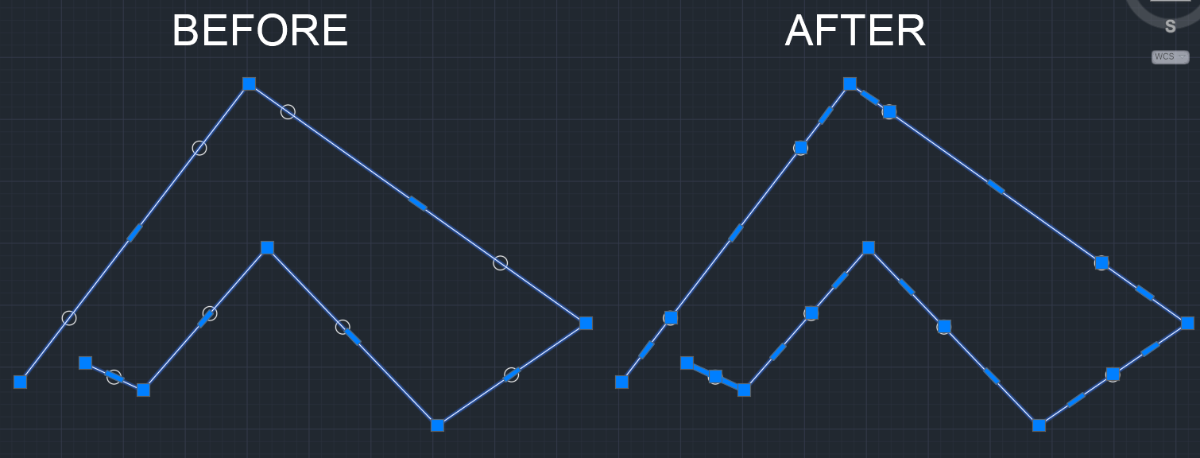
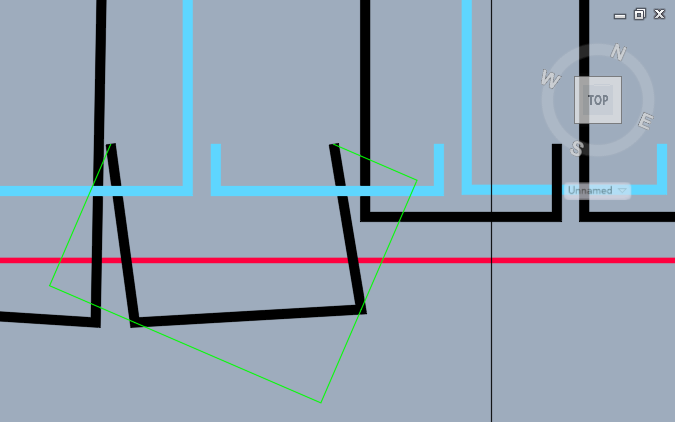
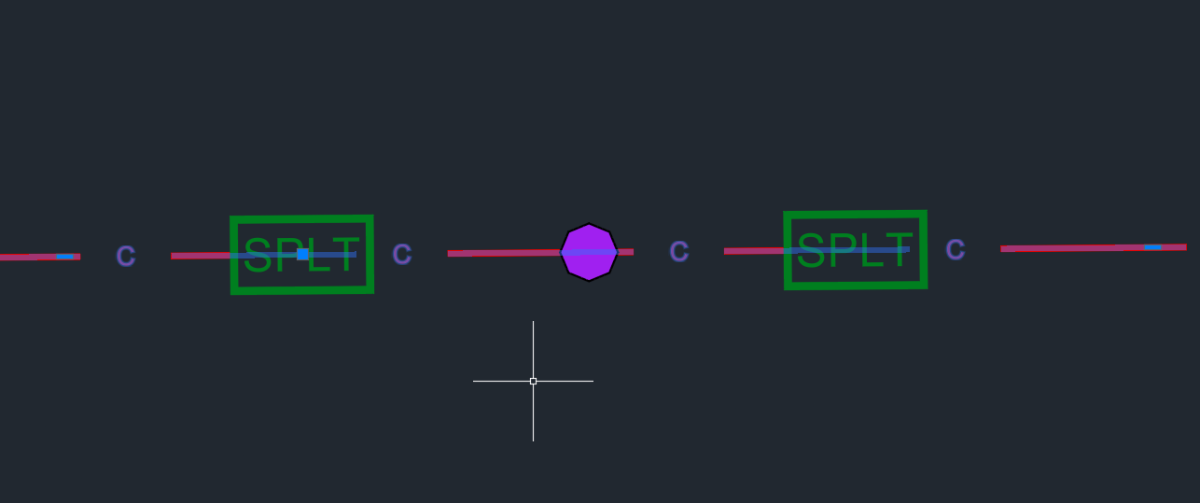
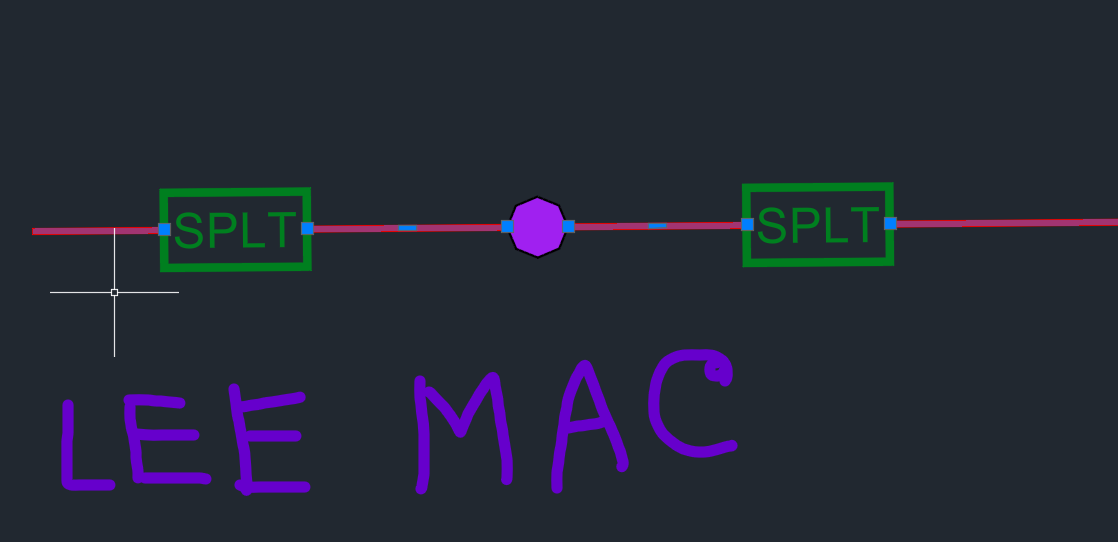
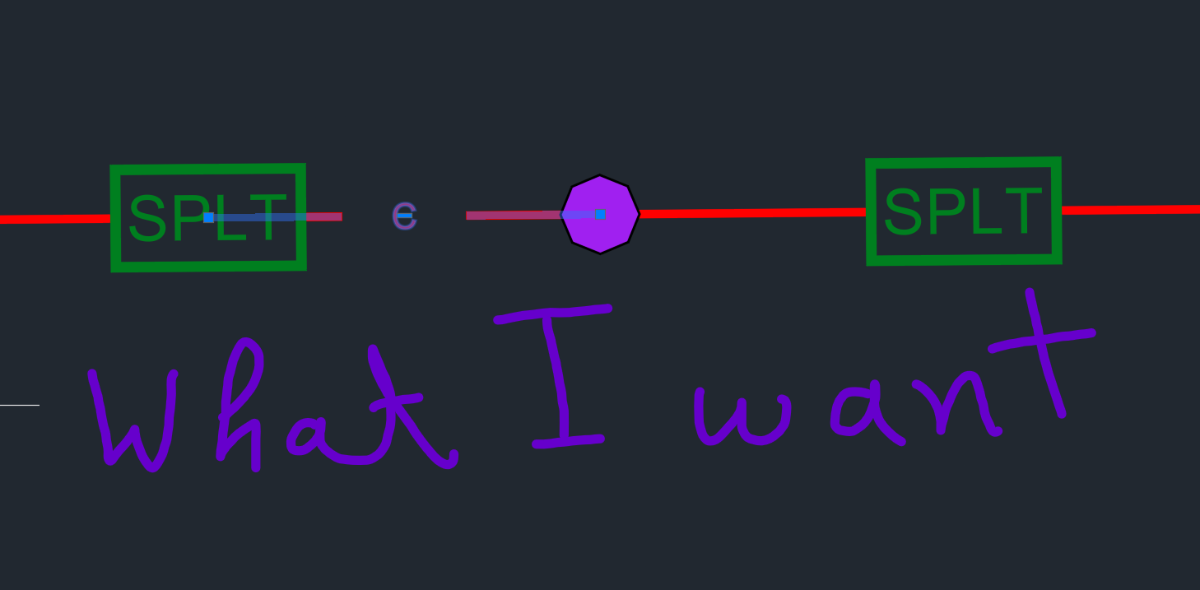
 I have multiple blocks(10 to 20) placed on multiple polylines in my map. I need to break the polylines of a huge map at the insertion point and join the vertices at the insertion point of the block. Is there any LISP available to break the polylines exactly at the insertion point ? I saw LEE MAC's LISP does something similar, but it trims the polylines at the border of the blocks. Shown in the picture (LEE MAC written)
-

Repair Lisp to create superimpose acad
rlx replied to karfung's topic in AutoLISP, Visual LISP & DCL
Well I was born on Mars (and my wife on Venus) and because of my job I currently live in NL