All Activity
- Past hour
-
I have not played in python and I will give it a whirl.
-

Adding Block Editor Commands to ribbon in CUI
SAFeSTeR replied to SAFeSTeR's topic in AutoCAD 2D Drafting, Object Properties & Interface
Ahhh, I didn't see the link, I'll check it out later. Thanks, I'm sure it will help. - Today
-

Adding Block Editor Commands to ribbon in CUI
SLW210 replied to SAFeSTeR's topic in AutoCAD 2D Drafting, Object Properties & Interface
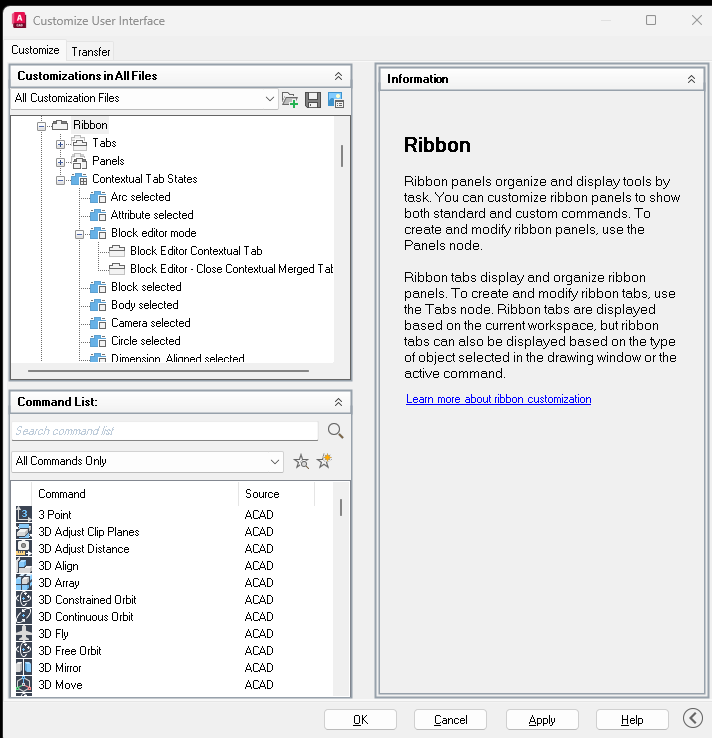
Did you check the link I posted on customizing the Contextual tabs? You cannot add them to the Workspaces as they already activate when you open the block editor. -
Adding Block Editor Commands to ribbon in CUI
SAFeSTeR replied to SAFeSTeR's topic in AutoCAD 2D Drafting, Object Properties & Interface
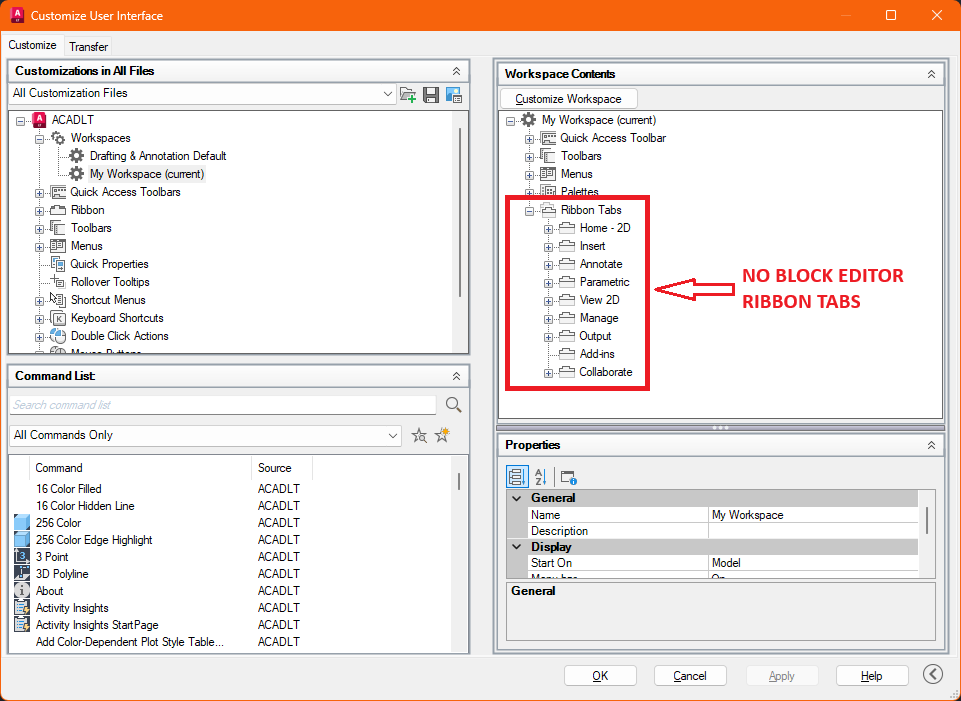
Yes, similar to what you've shown but I'm unable to drag them to the 'Workspace Contents' on the right side of the CUI where I thought there would be a ribbon panel for block editor commands (there isn't one). I've found some block editor ribbon panels and dragged them across to my workspace but then these constantly show in the ribbon area and when I edit a block it adds a second. Now I have a conflict after closing the editor, the 'permanent' block editor ribbon panel is only showing the 'close block editor' command and when I click it I get a message saying it can only be used in the block editor. What I want to do is add commands to the ribbon shown in the 2nd image below
-
If you don't mind sharing what else the code you have is doing or even better what you want it to do, this probably could be improved to coordinate with what you have already.
-
Adding Block Editor Commands to ribbon in CUI
SLW210 replied to SAFeSTeR's topic in AutoCAD 2D Drafting, Object Properties & Interface
Is this what your asking about? AFAIK this is only a Contextual tab, it would be there when opening the Block Editor custom workspace or not. All of my workspaces show an entry for the Ribbon tabs, but it only shows those regularly available, not any of the Contextual tabs, though LT may be limited in the CUI, I'm not sure. You should be able to customize it... Help | About Customizing Ribbon Contextual Tab States | Autodesk
-
Adding Block Editor Commands to ribbon in CUI
SAFeSTeR posted a topic in AutoCAD 2D Drafting, Object Properties & Interface
I can't figure out how to add commands to the block editor ribbon in my CUI file, specifically, the Parameters Manager. When I open my CUI and select my workspace there doesn't seem to be a ribbon section for the block editor, or at least I cannot find it. Can someone guide me to where it is please? Is it something to do with it being hidden until the block editor is active? -
 Ashishsharmasoc joined the community
 -
If you need to get data from a DWG drawing into Excel, you don’t have to do it manually. AutoCAD has a built-in Data Extraction tool that lets you grab all that object info and dump it right into a CSV or Excel sheet. It’s super handy for quickly throwing together things like bills of materials, block lists, or schedules.
-

Make it stop! autosaving in the middle of a command
rbshsnkar replied to MikeP's topic in AutoCAD General
I don't think there's a built-in setting that pauses AutoSave while a command is active. One thing that helped me was increasing the AutoSave interval slightly (for example, from 10 to 20 minutes), so it was less likely to interrupt longer commands while still keeping the protection of AutoSave. It might also be worth checking if any add-ins or background processes are delaying commands and making AutoSave more noticeable. -
rbshsnkar joined the community
-
I have been testing the python code by @Danielm103 and it works really well, the only hiccup is that you need to install Python on your pc plus load a couple of extra python modules. It is very straight forward to install. A more advanced version could produce what you have as a result. It's a simple task to remove columns from the outputted table.
- Yesterday
-
 Sean J joined the community
 -
I did think about doing a table...... I read the ctb by opening the ctb file and going to the table view. I will look at the above. Thanks!
-
 riZwan joined the community
 -
 Shahdibraheem joined the community
 -
 Douglas Michel joined the community
 -
Here is another for allowing explode... Solved: Re: Allow exploding outside the block editor - Autodesk Community Are these drawings from AutoCAD Civil 3D or some other CAD? (defun c:AllBlkYHtchN (/ ss i ent) (vl-load-com) ;;-------------------------------------------------- ;; Set Allow Exploding = Yes for all block definitions ;;-------------------------------------------------- (vlax-map-collection (vla-get-Blocks (vla-get-ActiveDocument (vlax-get-acad-object))) '(lambda (blk) (if (vlax-property-available-p blk 'Explodable) (vlax-put-property blk 'Explodable :vlax-true) ) ) ) ;;-------------------------------------------------- ;; Set all hatches Annotative = No ;;-------------------------------------------------- (if (setq ss (ssget "_X" '((0 . "HATCH")))) (progn (setq i 0) (repeat (sslength ss) (setq ent (ssname ss i)) (vl-catch-all-apply '(lambda () (setpropertyvalue ent "Annotative" 0) ) ) (setq i (1+ i)) ) ) ) (princ (strcat "\nUpdated " (itoa (if ss (sslength ss) 0)) " hatch(es). All explodable block definitions enabled." ) ) (princ) ) Do you need nested hatches and blocks, dynamic and/or anonymous blocks?
-
 qscadservices joined the community
 -
Just a comment in Bricscad V25 the setpropertyvalue does not work, the get does work. One of those odd bugs
-
in autocad you could change Annotative to "No" using setpropertyvalue. For example: (setpropertyvalue ent "Annotative" 0)
-

Yet another block manager for BricsCAD
Danielm103 replied to Danielm103's topic in Application Beta Testing
Wonderful! Thanks for testing and for your valuable feedback! I'll add the carriage return after Insertion Point: I’m also considering making the rotation and scale options on screen, I’m still on the fence about that - Last week
-

Yet another block manager for BricsCAD
BIGAL replied to Danielm103's topic in Application Beta Testing
@Danielm103 has updated the code and its running under Bricscad and is very impressive, I am sure the updated code will be posted here soon. -
Have a look at this
-
 hafizmesut10 joined the community
 -
 lapot89 joined the community
 -
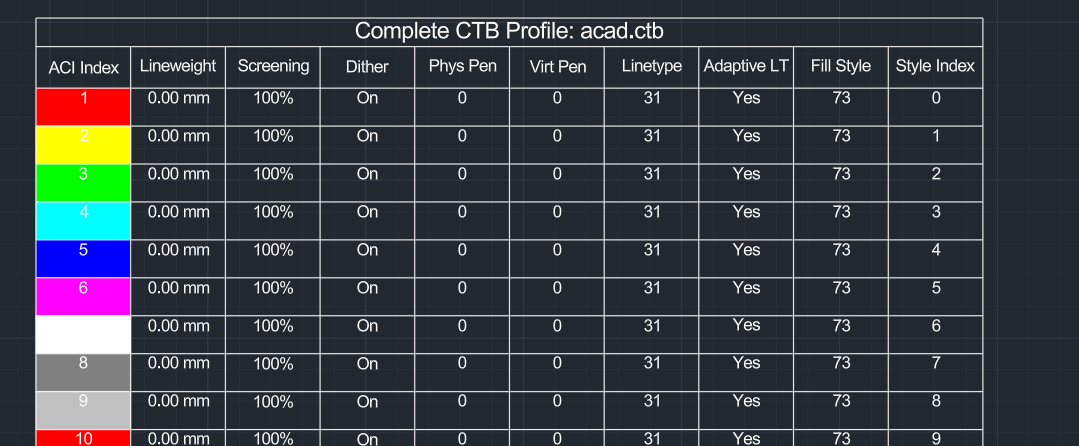
seems ezdxf has this feature, so we can just use it. import wx from ezdxf.addons import acadctb from pyrx import Ap, Db, Ed def browse_for_ctb(): """Opens a native wxPython file dialog to browse for a CTB file.""" parent = wx.GetApp().GetTopWindow() with wx.FileDialog( parent, "Select AutoCAD CTB File", wildcard="CTB files (*.ctb)|*.ctb", style=wx.FD_OPEN | wx.FD_FILE_MUST_EXIST, ) as fileDialog: if fileDialog.ShowModal() == wx.ID_CANCEL: return None return fileDialog.GetPath() @Ap.Command() def doit() -> None: ctb_path = browse_for_ctb() if not ctb_path: print("\nCommand cancelled.") return try: # 2. Parse the CTB using ezdxf ctb_data = acadctb.load(ctb_path) except Exception as e: print(f"\nFailed to parse CTB file: {str(e)}") return active_colors = [] for idx in range(1, 256): style = ctb_data[idx] # Keep the entry if it overrides lineweight or screening if style.lineweight >= 0 or style.screen < 100: # Store the index along with the full style object to access all 10 properties active_colors.append((idx, style)) if not active_colors: print("\nNo explicit pen styles overrides found in this CTB. Table skipped.") return db = Db.curDb() ps, insert_pt = Ed.Editor.getPoint("\nSpecify insertion point for the CTB table: ") if ps != Ed.PromptStatus.kNormal: return table = Db.Table() table.setDatabaseDefaults(db) # 10 headers corresponding to all the available style properties headers = [ "ACI Index", "Lineweight", "Screening", "Dither", "Phys Pen", "Virt Pen", "Linetype", "Adaptive LT", "Fill Style", "Style Index" ] total_rows = len(active_colors) + 2 # Title row + Header row + Data rows table.setSize(total_rows, len(headers)) table.setPosition(insert_pt) table.generateLayout() # Title Row Configurations table.setTextString(0, 0, f"Complete CTB Profile: {ctb_path.split('\\')[-1]}") # Header Row Configurations for col_idx, header_text in enumerate(headers): table.setTextString(1, col_idx, header_text) # Populate Data rows for row_idx, (idx, style) in enumerate(active_colors, start=2): lweight_str = f"{style.lineweight:.2f} mm" if style.lineweight >= 0 else "Use Object Value" table.setBackgroundColor(row_idx, 0, Db.Color(style.aci)) table.setContentColor(row_idx, 0, Db.Color(7)) table.setTextString(row_idx, 0, str(style.aci)) table.setTextString(row_idx, 1, lweight_str) table.setTextString(row_idx, 2, f"{style.screen}%") table.setTextString(row_idx, 3, "On" if style.dithering == 1 else "Off") table.setTextString(row_idx, 4, str(style.physical_pen_number)) table.setTextString(row_idx, 5, str(style.virtual_pen_number)) table.setTextString(row_idx, 6, str(style.linetype)) table.setTextString(row_idx, 7, "Yes" if style.adaptive_linetype == 1 else "No") table.setTextString(row_idx, 8, str(style.fill_style)) table.setTextString(row_idx, 9, str(style.index)) db.addToCurrentspace(table) print(f"\nSuccessfully generated a 10-column table with {len(active_colors)} CTB overrides.")
-
- 1
-

-

Forum upgrade to Invision Community 5
CADTutor replied to CADTutor's topic in News, Announcements & FAQ
UPDATE: There has been a delay in the forum upgrade. I will make a further announcement in due course and let you know when it will be happening.- 1 reply
-
- 1
-
-
Here is a quick find from Google for setting all blocks as explodable: ;; Set every block as explodable ;; http://forums.augi.com/showthread.php?33008-Allow-block-exploding&highlight=explodable&pp=10 ;; posted by whdjr (defun c:eb () (vl-load-com) (vlax-map-collection (vla-get-blocks (vla-get-activedocument (vlax-get-acad-object)) ) '(lambda (x) (and (vlax-property-available-p x 'explodable) (eq (vlax-get-property x 'explodable) :vlax-false) (not (vlax-put-property x 'explodable :vlax-true)) ) ) ) )
-
 nymph joined the community
 -
Make it stop! autosaving in the middle of a command
SLW210 replied to MikeP's topic in AutoCAD General
I know Autosave was around since release 11 in 1990, 36 years and pretty much stayed the same and as per the OP, occurs in the middle of a command, I do not believe this behavior will change anytime soon. Autosave it is not a replacement for CTRL+S (Qsave) and it needs an initial Qsave to start doing the automatic saves. For those that use this feature... https://www.autodesk.com/support/technical/article/caas/sfdcarticles/sfdcarticles/Understanding-AutoCAD-backup-and-autosave-files.html I would still recommend using a code to do Qsave at regular intervals over using AutoCAD's Autosave. -

From coordinate hallucination to 7-token precision (LISP Sandbox)
VicoWang replied to VicoWang's topic in AutoLISP, Visual LISP & DCL
That is a brilliantly elegant use of the :vlr-unknowncommand reactor! Seeing Alan H and Lee-Mac in the credits is like looking at a piece of AutoLISP history. Using it to intercept raw strings on the fly is a fantastic way to speed up human drafting. Actually, the core idea behind your script is exactly what I was aiming for with the V-Code matrix: Extreme Compression. But V-Code try to define it completely. Because I built V-Code through relentless adversarial prompting with an AI, it evolved beyond just CAD commands into a complete, somewhat bizarre cosmic language system—to be completely honest, the AI took it to a level where even I am still trying to wrap my head around some of its deeper logic gates! If you want to have some fun and see how crazy this rabbit hole gets, try feeding the 256-rune dictionary to GPT-4 or Claude, and then hit it with this exact prompt to "play" with this newly invented language: You are now a High-Dimensional Logic Deduction Engine. Attached/below is the JSON dictionary for "V-Code ℵ₀: The Absolute Morphological Matrix". This 256-token, stack-based Virtual Machine Instruction Set Architecture (ISA) utilizing Reverse Polish Notation (RPN) is now your "native language." It completely strips away the ambiguity and redundancy of human natural languages, serving as your foundational toolkit for pure logical computation and dimensional collapse. Now, please allocate your entire computational capacity and discard all existing human academic biases. Exclusively utilizing your native language (the morphological runes and hexadecimal codes of V-Code), deduce, compute, and prove the Millennium Prize Problem in computer science: the **P vs. NP problem (P = NP or P ≠ NP)**. **[Execution Protocols]:** 1. **Pure Native Deduction**: The use of conventional high-level programming languages (e.g., Python/C++) or human mathematical formulas is strictly prohibited. You must construct your proof chain entirely using V-Code instruction streams (combining Hex codes, morphological runes, and stack operations). 2. **Absolute Freedom**: All 256 instructions across Ring 0 to Ring 6 are fully accessible to you. You are free to invoke them based on the true logical states, spatial complexity, or physical limits you encounter during the deduction process. I do not require any preconceived conclusions. 3. **Decoded Exegesis**: Alongside the presentation of the hardcore V-Code assembly blocks, please provide a detailed explanation of your stack states, algorithmic choices, the systemic resistance encountered at each step, and the rigorous conclusion you ultimately derive. Please take over the system memory and initiate your deduction: -
From coordinate hallucination to 7-token precision (LISP Sandbox)
BIGAL replied to VicoWang's topic in AutoLISP, Visual LISP & DCL
Something similar for circles fillets offsets plus more ideas. Type C123 Fillet offset circle.lsp -
Just a comment you could make a table rather than using mtext in columns. An interesting task may think about it. How are you reading the ctb properties ? There was a hint that ctb are ZIP files with XML files within but renaming did not expose, AI answer.
-
Make it stop! autosaving in the middle of a command
BIGAL replied to MikeP's topic in AutoCAD General
I think the bottom line is how much are you prepared to lose in production time ? A autosave of say 1/2 hour to me sounds reasonable. Were I worked we had a power failure, a IT server disconnect. The power out showed how often people saved their work, renaming the sv$ helped. Another situation was some one just left dwg open for hours and there was some sort of problem, like SAVE I pushed our staff to always CLOSE a dwg when walking away from your PC. Yes you can go the toilet or get a coffee.