All Activity
- Today
-

Hello everyone! Please take a look at this.
sd2006 replied to sd2006's topic in AutoLISP, Visual LISP & DCL
thank you @yangguoshe but error error: no function definition: RH:DXF help me. -
 abdelrahman418 joined the community
 -

[Free LISP] Auto-mark revision clouds for design changes — compare two regions in same DWG
Beastt1992 posted a topic in AutoLISP, Visual LISP & DCL
Every design revision, I have to circle changes with revision clouds for submission. I kept missing things or marking the wrong spots, so I wrote a LISP to do it automatically. What it does: 1. Select Region A (old version) 2. Select Region B (revised version) 3. Red revision clouds appear around every difference It works inside the same DWG — no need for two separate files like DWG Compare. Uses signature-based object comparison with sorted merge, so it handles 1400+ objects in seconds. Features: - Automatic spatial alignment (consensus voting) - Nearby changes merged into grouped clouds - Giant objects (title blocks, borders) auto-filtered - Manual 2-point alignment fallback if auto fails - Configurable tolerance, arc size, merge distance Supports: LINE, CIRCLE, ARC, LWPOLYLINE, TEXT/MTEXT, INSERT, DIMENSION Skips: HATCH (too many false positives) AutoCAD 2014+ compatible. Free / MIT: https://github.com/beastt1992/DiffCheck Feedback welcome -
 Romeo joined the community
 -
 Piyush madnani joined the community
 -
Losing selected objects when zooming/panning etc
Piyush madnani replied to TxArcht81's topic in AutoCAD 2D Drafting, Object Properties & Interface
Hi, so i have been having this problem from some time now. No, it is not how autocad works, use the following command SELECTIONOFFSCREEN: 1 and your problem will be solved -

MLEADER WITH FIELDS FOR COORDINATES
SLW210 replied to SCHNIPPLES's topic in AutoCAD 2D Drafting, Object Properties & Interface
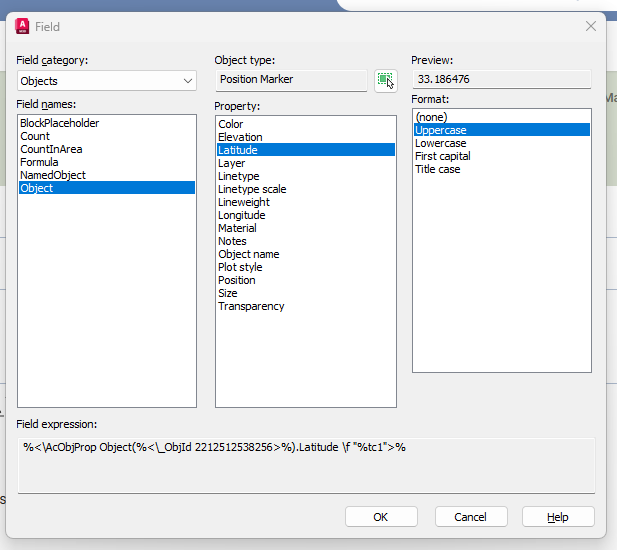
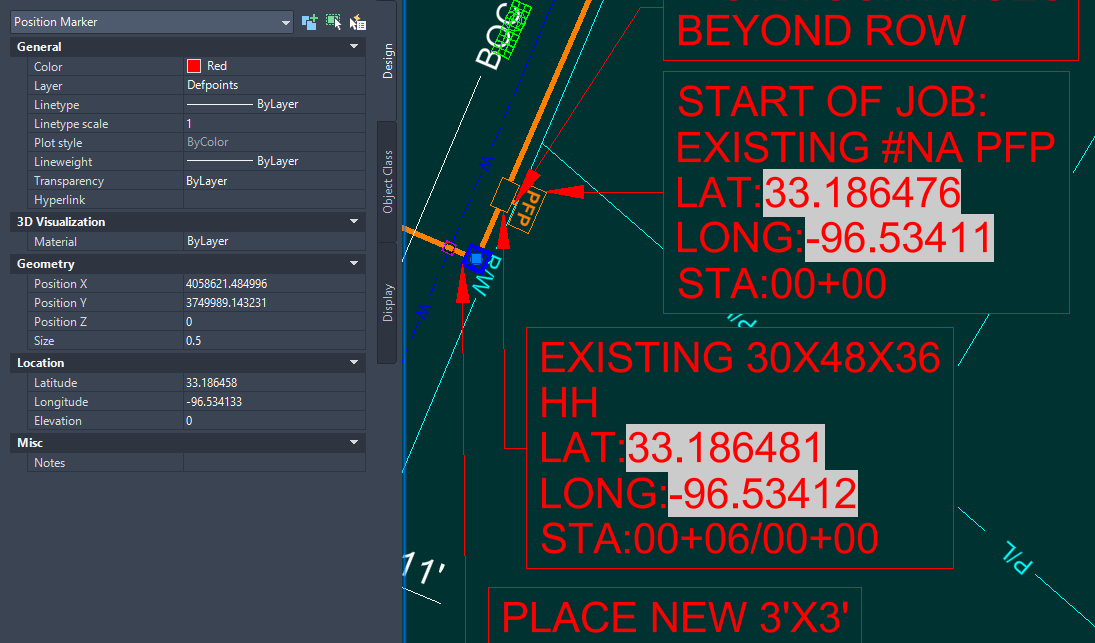
They are just FIELDS referencing a Position Marker as shown in the image of the Field Dialog Box you posted. They are just Multileaders with the fields added into the MText. This is just a good use of Multileaders, no need for any blocks.- 1 reply
-
- 1
-

-

Add to the code the ability to create layouts for non-standard formats
Nikon posted a topic in AutoLISP, Visual LISP & DCL
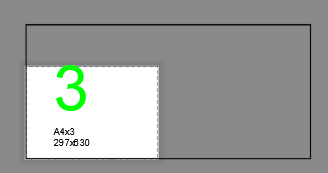
Hello everyone! There is a wonderful lisp AddLay.LSP. I've been using it for a few years now. It creates layouts standard A1, A2, and A3 formats... Can anyone add to this code the ability to create layouts for non-standard formats (A4x3, A4x4, A3x3, A3x4, A2x3, A2x4...). So far, no one has been able to implement this. I would be very grateful. The code creates viewports for non-standard formats, but the formats need to be set manually. The code works with polyline frames and dynamic frame blocks. In the file dwg shows that a viewport is being created for a non-standard format, but the format is not being set. List of non-standard formats: _A4x3_(297.00_x_630.00_MM) _A4x4_(297.00_x_841.00_MM) _A4x5_(297.00_x_1051.00_MM) _A3x3_(420.00_x_891.00_MM) _A3x4_(420.00_x_1189.00_MM) _A3x5_(420.00_x_1486.00_MM) _A2x3_(594.00_x_1261.00_MM) _A2x4_(594.00_x_1682.00_MM) _A2x5_(594.00_x_2102.00_MM) ;;; AddLayEn / Original AddLay Author: Andrey_13 / 08.2015 / ;;; Translation to English: 03.2025 ;;; Creation of Layouts and Viewports based on frames in Model Space (defun C:AL (/ ActiveDocument Application Display DeleteLayouts FirstSheet Flag Formats i j Layout Layouts Layer ModelSpace NumberFormats PaperSpace Points MatchSheet MinPoint MaxPoint NoMatchSheet Object Point1 Point2 Point1x Point1y Point2x Point2y Scale Square ViewportHeight ViewportWidth Viewport X Y ) (vl-load-com) ; Load ActiveX functions (setvar "CTAB" "Model") ; Switch to Model tab (initget 6) (setq Application (vlax-get-acad-object) ; Application object ActiveDocument (vla-get-ActiveDocument Application) ; Active document object ModelSpace (vla-get-ModelSpace ActiveDocument) ; Model space pointer Layouts (vla-get-Layouts ActiveDocument) ; Layouts collection Display (vla-get-Display (vla-get-Preferences Application)) ; Display preferences ) ;;; Prompt for the layer containing frames by selecting an object (while (null Object) (setq Object (car (entsel " Select an object to define the frames layer: "))) ) (setq Layer (cdr (assoc 8 (entget Object))) ; Determine layer name Formats (ssget (list (cons 8 Layer))) ; Select all objects on that layer NumberFormats (sslength Formats) ; Count number of frames Scale (getreal " Enter scale 1:<1>: ") ; Request scale i 0 Points () ) (if (not Scale) (setq Scale 1)) (repeat NumberFormats (setq Format (vlax-ename->vla-object (ssname Formats i))) (if (and (= (vla-get-ObjectName Format) "AcDbBlockReference") (= (vla-get-IsDynamicBlock Format) :vlax-true)) ; Check if dynamic block (progn (setq Points (append Points (list (GetBoundingBox_dynblock (vlax-vla-object->ename Format))))) ; Get points for dynamic block (setq i (1+ i)) ) (progn (vla-GetBoundingBox Format 'MinPoint 'MaxPoint) ; Get points for regular object (setq Points (append Points (list (list (vlax-safearray->list MinPoint) (vlax-safearray->list MaxPoint)))) i (1+ i) ) ) ) ) ;;; Determine sorting order for the points (setq i 0) (repeat (length Points) ; Build lists of X and Y coordinates (setq X (append X (list (caar (nth i Points))))) (setq Y (append Y (list (cadar (nth i Points))))) (setq i (1+ i)) ) (if (> (- (MaxElement X) (MinElement X)) (- (MaxElement Y) (MinElement Y))) ; Decide sorting axis (setq Points (vl-sort Points (function (lambda (P1 P2) (< (caar P1) (caar P2)))))) ; Sort by X (setq Points (vl-sort Points (function (lambda (P1 P2) (> (cadar P1) (cadar P2)))))) ; Sort by Y ) ;;; Disable automatic viewport creation on new layouts (if (= (vla-get-LayoutCreateViewport Display) :vlax-true) (progn (vla-put-LayoutCreateViewport Display :vlax-false) (setq Flag T) ) ) ;;; Layout management (initget 1 "Yes No") (setq DeleteLayouts (getkword " Delete existing layouts? [Yes/No]: ")) (cond ( (= DeleteLayouts "Yes") ;;; Delete all layouts except Model (vlax-for Layout Layouts (if (/= (vla-get-Name Layout) "Model") (vla-delete Layout) ) ) (initget 6) (setq FirstSheet (getint " Starting sheet number: ")) (vla-put-Name (vla-Item Layouts 1) (itoa FirstSheet)) ; Rename the default remaining layout ) ;;; Handle existing layouts if not deleting ( (= DeleteLayouts "No") (while (= NoMatchSheet nil) (progn (initget 6) (setq i 0 FirstSheet (getint " Starting sheet number: ") MatchSheet nil ) (repeat NumberFormats (if (not (null (member (itoa (+ FirstSheet i)) (layoutlist)))) (setq MatchSheet T) ) (setq i (1+ i)) ) (if (= MatchSheet T) (alert "Error: Layout names already exist!") (setq NoMatchSheet T) ) ) ) ) ) ;;; Insert new layouts and create viewports (setq i 0 j 0) (repeat NumberFormats (cond ;;; Workflow if layouts were deleted ( (= DeleteLayouts "Yes") (if (= i 0) (progn (setq Layout (vla-item Layouts 0)) (setvar "CTAB" (itoa FirstSheet)) ) (progn (setq Layout (vla-Add Layouts (itoa (+ FirstSheet i)))) (setvar "CTAB" (itoa (+ FirstSheet i))) ) ) ) ;;; Workflow if adding to existing layouts ( (= DeleteLayouts "No") (progn (setq Layout (vla-Add Layouts (itoa (+ FirstSheet i)))) (setvar "CTAB" (itoa (+ FirstSheet i))) ) ) ) ;;; Viewport creation logic (setq Point1 (car (nth j Points)) Point2 (cadr (nth j Points)) PaperSpace (vla-get-paperspace ActiveDocument) Point1x (car Point1) Point1y (cadr Point1) Point2x (car Point2) Point2y (cadr Point2) ViewportHeight (/ (abs (- Point1y Point2y)) Scale) ViewportWidth (/ (abs (- Point1x Point2x)) Scale) Viewport (vla-AddPViewport PaperSpace (vlax-3d-point (list (/ ViewportWidth 2) (/ ViewportHeight 2))) ViewportWidth ViewportHeight)) (vla-display Viewport :vlax-true) (vla-put-mspace ActiveDocument :vlax-true) ; Activate model space inside viewport (vla-zoomcenter Application (vlax-3d-point (list (/ (+ Point1x Point2x) 2) (/ (+ Point1y Point2y) 2))) 1.0) (vla-put-mspace ActiveDocument :vlax-false) ; Deactivate model space (vla-put-standardscale Viewport acVpCustomScale) (vla-put-CustomScale Viewport (/ 1.0 Scale)) (vla-put-DisplayLocked Viewport :vlax-true) ; Lock viewport ;;; Page Setup (vla-put-StyleSheet Layout "monochrome.ctb") (vla-put-PlotType Layout 5) ; Set plot area to "Layout" ;;; Determine Paper Size based on viewport area (Square) (setq Square (* ViewportHeight ViewportWidth)) (cond ((and (> Square 59251) (< Square 65488)) (vla-put-ConfigName Layout "DWG To PDF.pc3") (vla-put-CanonicalMediaName Layout "ISO_full_bleed_A4_(297.00_x_210.00_MM)")) ((and (> Square 118503) (< Square 130977)) (vla-put-ConfigName Layout "DWG To PDF.pc3") (vla-put-CanonicalMediaName Layout "ISO_full_bleed_A3_(420.00_x_297.00_MM)")) ((and (> Square 237006) (< Square 261954)) (vla-put-ConfigName Layout "DWG To PDF.pc3") (vla-put-CanonicalMediaName Layout "ISO_full_bleed_A2_(594.00_x_420.00_MM)")) ((and (> Square 474012) (< Square 523908)) (vla-put-ConfigName Layout "DWG To PDF.pc3") (vla-put-CanonicalMediaName Layout "ISO_full_bleed_A1_(841.00_x_594.00_MM)")) ((and (> Square 948024) (< Square 1047816)) (vla-put-ConfigName Layout "DWG To PDF.pc3") (vla-put-CanonicalMediaName Layout "ISO_full_bleed_A0_(841.00_x_1189.00_MM)")) (T (vla-put-ConfigName Layout "None")) ; Default to No plotter for non-standard sizes ) (if (> ViewportHeight ViewportWidth) (vla-put-PlotRotation Layout 1) (vla-put-PlotRotation Layout 0)) ; Orientation (command "_Zoom" "_All") (setq i (1+ i) j (1+ j)) ) ;;; Restore "Automatic Viewport Creation" setting if it was originally ON (if (= Flag T) (vla-put-LayoutCreateViewport Display :vlax-true)) (setvar "CTAB" "Model") ; Return to Model tab (princ " Creation of layouts completed.") (princ) ) ;;; Find minimum element in list (defun MinElement (X /) (car (vl-sort X '<))) ;;; Find maximum element in list (defun MaxElement (X /) (car (vl-sort X '>))) ;;; Get correct Bounding Box for Dynamic Blocks (defun GetBoundingBox_dynblock (ent / lst ins_pt min_point max_point 3d_polarp) (if (and (or ent (= (type (setq ent (vl-catch-all-apply (function (lambda () (car (entsel " Select Dynamic Block: "))))))) 'ename) ) (setq ent (vlax-ename->vla-object ent)) (vlax-property-available-p ent 'isdynamicblock) (equal (vla-get-isdynamicblock ent) :vlax-true) ) (progn (vlax-for item (vla-item (vla-get-blocks (vla-get-activedocument (vlax-get-acad-object))) (vla-get-name ent) ) (if (equal (vla-get-visible item) :vlax-true) (setq lst (cons item lst)) ) ) (setq ins_pt (vlax-safearray->list (vlax-variant-value (vla-get-insertionpoint ent))) lst (vl-remove nil (mapcar '(lambda (x / minp maxp) (if (not (vl-catch-all-error-p (vl-catch-all-apply (function (lambda () (vla-getboundingbox x 'minp 'maxp)))))) (list (cons "min" (vlax-safearray->list minp)) (cons "max" (vlax-safearray->list maxp))) ) ) lst ) ) lst (mapcar '(lambda (mins) (mapcar '(lambda (fun) (apply (read mins) (mapcar (function fun) (mapcar '(lambda (pts) (cdr (assoc mins pts))) lst) ) ) ) (list car cadr caddr) ) ) (list "min" "max") ) lst (mapcar '(lambda (ept) (mapcar '(lambda (coord_pt coord_line coord_ins) (+ (* coord_pt ((eval (read (strcat "vla-get-" coord_line "EffectiveScaleFactor"))) ent)) coord_ins) ) ept '("X" "Y" "Z") ins_pt ) ) lst ) ) ) ) ) AL.dwg
-
 Xi Schumann joined the community
 -

Hello everyone! Please take a look at this.
yangguoshe replied to sd2006's topic in AutoLISP, Visual LISP & DCL
try this (cons 1 (strcat (rtos (/ area 1000000.0) 2 2) "m\U+00B2")) -

[LISP] BPDF - Batch export Model Space title block frames to individual PDFs
BIGAL replied to Beastt1992's topic in AutoLISP, Visual LISP & DCL
I have a plot title blocks in model space version. I have say 5 different plot lisps depending on what say printer is involved color, B-W, A1 or A3 and so on. As in my last job in a multi storey building, you can get a users name and send the prints to the closest printer to them. -
[LISP] BPDF - Batch export Model Space title block frames to individual PDFs
Beastt1992 replied to Beastt1992's topic in AutoLISP, Visual LISP & DCL
Yes, I used Claude (AI) to help write and debug the code. I'm not an AutoLISP expert - I came up with the concept andrequirements, and used AI to help implement it. The logic, testing, and bug fixes were done through back-and-forth with the AI based on real errors I encountered in AutoCAD. -

[LISP] BPDF - Batch export Model Space title block frames to individual PDFs
CAD_Noob replied to Beastt1992's topic in AutoLISP, Visual LISP & DCL
hi. sorry to ask. Did you use Vibe coding on this? Coz I notice formatting similarities - Yesterday
-
[SHARE] SyncBlock - Synchronize specific layers across multiple blocks with precise alignment
Beastt1992 replied to Beastt1992's topic in AutoLISP, Visual LISP & DCL
Haha, mother-in-law nightmares are a universal architectural problem regardless of profession. Glad it gave you a chuckle either way -
 Riyan Dino joined the community
 -

[SHARE] SyncBlock - Synchronize specific layers across multiple blocks with precise alignment
rlx replied to Beastt1992's topic in AutoLISP, Visual LISP & DCL
I don't work with an architectural background so my nightmares are somewhat different than yours (most of them are about my mother in law or my sister in law) but thank you for sharing. High Lee , oh sorry , highly appreciated -
 luzcid joined the community
 -

Hello everyone! Please take a look at this.
mhupp replied to sd2006's topic in AutoLISP, Visual LISP & DCL
chr instead of string. (cons 1 (strcat (rtos (/ area 1000000.0) 2 2) "m" (chr 0178))) also might be the font your using. https://www.cadtutor.net/forum/topic/75383-text-ascii/#findComment-596226 -
[SHARE] SyncBlock - Synchronize specific layers across multiple blocks with precise alignment
Beastt1992 posted a topic in AutoLISP, Visual LISP & DCL
Hi everyone, I want to share a LISP tool I recently developed called SyncBlock. If you work with architectural or MEP backgrounds, you probably deal with this nightmare constantly: You have a Master Block (A), and several child blocks (B, C, D) that were copied from A but have some layers deleted to show different details. When the Master Block updates, synchronizing those child blocks without ruining their specific layer visibility—and without them flying off to random coordinates because their base points are all set to (0,0,0)—is a huge pain. To solve this, I wrote a script that does the following: 1. You select the Master Block. 2. You window-select the target blocks. 3. The script reads which layers are currently active in the target block, clears it, and pulls only those matching layers from the Master Block. The Magic (Consensus Voting Algorithm): The biggest challenge was alignment. Standard Bounding Box methods fail if you delete half a room or add a dimension in the child block. To fix this, the script uses a "Consensus Voting" approach. It gathers all valid geometry centers in both blocks, pairs them up, calculates the displacement vectors (dX, dY), and lets them "vote." The offset with the overwhelming majority wins. This ensures pixel-perfect alignment even if the child block is heavily trimmed! GitHub Repository: https://github.com/beastt1992/SyncBlock-AutoCAD The code avoids copying Hatches to prevent associativity crashes, and it safely handles older AutoCAD versions (like 2014) by using pure English prompts to avoid ANSI/UTF-8 encoding issues. I’d love for you guys to test it out on your messy real-world drawings! Any feedback, bug reports, or suggestions for improvement are highly appreciated. Cheers! -

MLEADER WITH FIELDS FOR COORDINATES
SCHNIPPLES posted a topic in AutoCAD 2D Drafting, Object Properties & Interface
Hello, We have an engineering vendor that submits drawings to us that have mleaders that contain fields correspond to lat and long, making labeling very quick when placing mleaders. Does anyone know this works? Are the mleaders a block? There is a position marker linked to the field with the Lat/Long but I can't imagine they are placing the fields manually each time this wouldn't be a time saver if so. I found a program called smart leader on autocad store, which seems to do this but I was just wondering if this can be achieved through blocks alternatively. Thanks EXAMPLE.dwg
-
Hello everyone! Please take a look at this.
SLW210 replied to sd2006's topic in AutoLISP, Visual LISP & DCL
Please use Code Tags for your code in the future. (press the <> in the editor toolbar) -
Could you please take a look and explain why this Lisp program is producing this result? 27807.35m² Please help me adjust the result. 27807.35m² I know nothing about Lisp. thank you . (defun rh:dxf (code lst) (cdr (assoc code lst))) (defun c:aa ( / cmde ent e_typ e_lst area vtx x_lst y_lst z_lst x_pt y_pt z_pt c_lst v_lst ss sum) (cond ( (/= 0 (getvar 'cmdecho)) (setq cmde (getvar 'cmdecho)) (setvar 'cmdecho 0) ) ) (while (setq ss (ssget "_+.:E:S" '((0 . "POLYLINE,LWPOLYLINE") (-4 . "<OR") (70 . 1) (70 . 3) (70 . 5) (-4 . "OR>") ) )) (setq ent (ssname ss 0) e_typ (rh:dxf 0 (setq e_lst (entget ent))) area (getpropertyvalue ent "area") v_lst nil ) (cond ( (= e_typ "POLYLINE") (setq ent (entnext ent) vtx (rh:dxf 10 (entget ent)) ) (if (< (length vtx) 3) (setq vtx (reverse (cons 0.0 (reverse vtx))))) (while (/= "SEQEND" (cdr (assoc 0 (entget ent)))) (setq v_lst (cons vtx v_lst) ent (entnext ent) vtx (rh:dxf 10 (entget ent)) ) (if (< (length vtx) 3) (setq vtx (reverse (cons 0.0 (reverse vtx))))) ) (setq x_pt (/ (apply '+ (mapcar '(lambda (x) (car x)) v_lst)) (length v_lst)) y_pt (/ (apply '+ (mapcar '(lambda (x) (cadr x)) v_lst)) (length v_lst)) ) (if (= (setq sum (apply '+ (mapcar '(lambda (x) (caddr x)) v_lst))) 0.0) (setq z_pt 0.0) (setq z_pt (/ sum (length v_lst))) ) ) ( (= e_typ "LWPOLYLINE") (setq z_pt (rh:dxf 38 e_lst)) (foreach pr e_lst (if (= (car pr) 10) (setq v_lst (cons (cdr pr) v_lst))) ) (setq x_pt (/ (apply '+ (mapcar '(lambda (x) (car x)) v_lst)) (length v_lst)) y_pt (/ (apply '+ (mapcar '(lambda (x) (cadr x)) v_lst)) (length v_lst)) ) ) ) (setq c_lst (list x_pt y_pt z_pt)) (entmakex (list (cons 0 "MTEXT") (cons 100 "AcDbEntity") (cons 100 "AcDbMText") (cons 10 c_lst) (cons 40 (getvar 'textsize)) (cons 71 5) (cons 72 5) (cons 1 (strcat (rtos (/ area 1000000.0) 2 2) "m²")) ; (cons 1 (rtos (/ area 1000000.0) 2 3)) ; If you don't need the suffix "m²" ) ) ) (if cmde (setvar 'cmdecho cmde)) )
-
sd2006 joined the community
-

How to copy an object to a specified distance
sinergy2020 replied to sinergy2020's topic in AutoCAD Beginners' Area
Thank you @BIGAL -
How to copy an object to a specified distance
sinergy2020 replied to sinergy2020's topic in AutoCAD Beginners' Area
Hi @CyberAngel many thanks for your detailed explanation. Much appreciated. Playing with with all these options, I find that (in Nanocad) if I insert a displacement, this is measured from the leftmost corner, so if I have say a rectangle, and I introduce a displacement of (5, 0) the actual distance between the new rectangle and the original is 5 - the rectangle width. If I select the first point to be the rightmost corner instead, then I can't insert a displacement or at least nanocad doesn't care and nothing is drawn if I do. Another issue that I have with this (which isn't related to the Copy command) is that I can't easily have the cursor to snap exactly on the corner, it shows very close snaps but actually snapping on the exact meeting point of vertical and horizontal lines can be very laborious. I wonder if there are ways to configure the snap to fall exactly on the intersection points of lines. -
Thank you for your response. I'll post questions here if I have any. Have a great day
-
At one time P-F required students to submit a separate .dwg file for each plate. I don't see any reason why you can't use layouts. Your advisor could probably answer the question.
-
 abc1175457790 joined the community
 -
 brick8 joined the community
 -
[LISP] BPDF - Batch export Model Space title block frames to individual PDFs
Beastt1992 replied to Beastt1992's topic in AutoLISP, Visual LISP & DCL
Thank you for the welcome and for sharing your code! You're right that similar tools have existed for a long time - my goal was to create a modern open source version with a dialog box interface that's more accessible to new users. The Ghostscript PDF merging idea is brilliant - I hadn't thought of that and will look into adding it as an optional feature. Your version works with Layouts which is the correct workflow. Mine is specifically for the Model Space workflow common in Taiwan/Asia, so they serve different use cases. Thanks again for the tips! - Last week
-
[LISP] BPDF - Batch export Model Space title block frames to individual PDFs
BIGAL replied to Beastt1992's topic in AutoLISP, Visual LISP & DCL
Welcome to Cadtutor. What you are offering is not a new solutions this have been around for me say 17 years, for where I worked. But I have something extra for you, once you make the PDF's as single pdf's you can join them back into one, done this for 88 layouts but code looks for PDF's. It uses Ghostscript to rejoin the pdf's. Ghostscript is a free product and has lots of features. The code is ran via lisp. The code attached also allows for a selection of layouts it has the Ghostscript code in it. You will need to edit the version of Ghostscript and its location. A more advanced version checks for different company title blocks, eg landscape V's portrait. Like others I would push for using layouts a much better way as you can take advantage of the viewport scale, I have multi code for making multiple layouts at scale matching your model space. Multi GETVALS.lsp plotA3Pdfrange2.lsp -
[LISP] BPDF - Batch export Model Space title block frames to individual PDFs
Beastt1992 replied to Beastt1992's topic in AutoLISP, Visual LISP & DCL
That's a great tip, thank you! Much cleaner than spamming the command line. I'll add this to the next version and clear the status bar when done. -
 Nugget joined the community
 -
Hello. Just wondering if the other plates have to be drawn in separate files or on continuous layouts on one singular file: For example, layout one is plate 1, layout two is plate 2, layout 3 is plate 3 etc... Thank you
-
[LISP] BPDF - Batch export Model Space title block frames to individual PDFs
mhupp replied to Beastt1992's topic in AutoLISP, Visual LISP & DCL
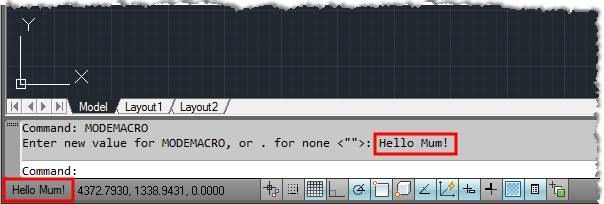
My 0.02¢ Instead of outputting the status to command line (princ (strcat " [" (itoa (1+ i)) "/" (itoa counter) "] Done\n")) Output to the Status Bar (setvar "MODEMACRO" (strcat "Processing: [" (itoa (1+ i)) "/" (itoa counter) "] Layouts")) Then you don't have clutter/spam in the command prompt but still have the current stats. Just have to clear it after complete.