All Activity
- Past hour
-
 Betato joined the community
 -
I've added (c:lw_orth-2) and (c:lw_orth-grread-2), but IMHO, version 1 is better... Here is link... Regards, M.R.
- Today
-
If I'm looking at the same subsystem, when you edit a part drawing, the Toolspace includes Model Parameters (under Modeling) and Size Parameters (under the part). When you right click on a part in the Size Parameters, you get an "Edit..." option. That opens an "Edit Part Sizes" window, which is a table. Pull down the box on the toolbar (the default is Values) and pick Parameter Configuration instead. That gives you a different table with more rows. One of those rows is Units. Check the units for your part and see if they match your drawing. If that doesn't take care of your issue, please give us more information.
-

help with extracting text from one dimension....
Nikon replied to leonucadomi's topic in AutoLISP, Visual LISP & DCL
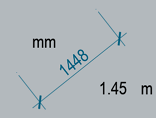
I use the dimensions in the drawing in mm. I need a copy of the dimensional text in m for further calculations. Therefore, the @ronjonp code is quite suitable for me.
-

copy & paste to original location multiple times
Tharwat replied to ctrlaltdel's topic in AutoLISP, Visual LISP & DCL
You are most welcome. -
 AHMED RAFEEQ joined the community
 -
 AmilaSG joined the community
 -

help with extracting text from one dimension....
Steven P replied to leonucadomi's topic in AutoLISP, Visual LISP & DCL
Converting mm dimension to m? My preference would be to leave the dimension to measure properly and adjust the scale in the properties to 0.001, then you can just copy the text and everything is consistent.
-
 mertcanosaka joined the community
 -

copy & paste to original location multiple times
mohdomar replied to ctrlaltdel's topic in AutoLISP, Visual LISP & DCL
thank you tharwat - Yesterday
-
Yep same for if you do or dont like the Ribbon. Ribbonclose and Ribbon.
-
MENUBAR = 1
-

Pathfinding in AutoCAD with the A-Star Algorithm (A*)
ymg3 replied to heschr's topic in AutoLISP, Visual LISP & DCL
The path found has to travel on edges not on points. If your graph does not have edges on the diagonal of the nodes it cannot find that path. ymg -

Pathfinding in AutoCAD with the A-Star Algorithm (A*)
GLAVCVS replied to heschr's topic in AutoLISP, Visual LISP & DCL
I must apologize for forgetting to reply to your comment. Please forgive me for this. Welcome to the forum. Yes, that's right. In the case of that drawing, the code doesn't return the shortest path. Perhaps it's a limitation of A* for drawings like this. I think @ymg3 is the most qualified to answer this. -
 Douaa joined the community
 -
when i design a custom manhole in part builder , i have a problem that when i do swap part to place the new manhole that i created instead of an old one in my network (my model), the new manhole seems quite big its even bigger than my model so what do you think i should do ? my manhole is in mm and all the part in my system is in mm but when i measure it in the system its in m .
-
Would you mind sharing the solution?
-
It will probably be next week before I can check out QGIS solutions. From the user's perspective, even if off in a few spots, several of these LISP solutions here are faster (maybe more accurate), even including time to adjust manually than most of the other solutions for GIS, though I am no speed demon in GIS. Just look at all of the prep work on the Whitebox Tools, though if I had all of those branches and islands as well as a few oxbows, thin connections, etc. like the example, that would be the way to go as far as I can tell, I do believe it also works on vector, IIRC. It looks like part of that is free as a Python toolset, I'll try to read up some more on that. As I mentioned long ago in this thread, my daughter's co-workers are using AutoCAD to create the centerlines and manually adjusting if needed even though they have ArcGIS, though they may not have the extra tools that have the easy centerline tools. From what I looked up, ArcGIS made some tools a higher priced tier. Maybe asking a few questions on some GIS forums might yield more information.
-
Thanks for your responce. I found a solution and it´salle working....
-
That's interesting. Although the starting points seem to be different: pixels vs. vectors. In any case, it would be interesting to test the geometric robustness of that central line. That is, what it can return in some of the more challenging vector examples we've tested here.
-
 Kelly ZX joined the community
 -

forcing AutoCAD to look for “AcFields.fdc” in a network location?
SLW210 replied to halfcracked's topic in The CUI, Hatches, Linetypes, Scripts & Macros
It could be done, but seems a hassle and inefficient. AutoCAD decides where to look based on a mix of profiles, support paths, and environment variables from what I can determine. It is "intentionally" made to not be used on a network to be shared. You will have to use any number of "tricks" to get it to work that way, even then you may have file locks, slow performance, etc.. Your best bet is to just update on each computer when needed. -
Dynamic block - align to viewport
SLW210 replied to D_P's topic in AutoCAD Drawing Management & Output
That drawing only opened in the block editor and only had one visibility in it. You might try to use an annotative text style and ensure the "Match text orientation to layout" option is checked. Should be a similar character. -
You haven't mentioned what you have tried so far. If you haven't already, MENUBAR to 1, then go to Tools>Hover over Toolbars, should be a dropdown to select the toolbar group you need. If you already have a toolbar docked, just Right-Click an empty area.
-
I´m using cuix-files and i hav tried to unload and after that to reload the menufile. The file do load as it suppose to, but i can´t get the toolbars, pulldown etc. up on the screen....?
-
 king joined the community
 -

Colors of the top menu bars
mhupp replied to FELIXJMELO's topic in AutoCAD 2D Drafting, Object Properties & Interface
looks like your in dark mode. type COLORTHEME and set it to 0 this will put you in light mode. - Last week
-

forcing AutoCAD to look for “AcFields.fdc” in a network location?
BIGAL replied to halfcracked's topic in The CUI, Hatches, Linetypes, Scripts & Macros
Just a maybe (setq who (getenv "username")) hopefully that matches the XXXX, can use a vl copy file or a shell to copy the modified file. For the correct user. For me I use a Install lisp when I do a new CAD install/update so that file copy could be part of it. -
Colors of the top menu bars
BIGAL replied to FELIXJMELO's topic in AutoCAD 2D Drafting, Object Properties & Interface
I think you meant "Is it possible" probably a English thing. Some settings to do with the screen colors are buried away in the Registry. But you have to understand what the values mean, its not just a simple "light grey". I think there is a Dark or Light setting, that is about as much help as I can offer, a google should reveal more. -
Where your menu's, MNU or CUI/CUIX files ? Either way you use menuload or menuunload to remove sometimes have to do that before reloading. If your custom menu is inside a "ACAD.mnu" then you may have a problem. Can you please confirm.
-
Thank you for your reply, I think I am very restricted to some form of 'align to viewport' function. Reason being the block is placed into Model space so If I rotate it in anyway it would help the viewport where the UCS has been changed by 45 degrees but than any other viewport in the drawing at 90 Degrees would show it incorrect. Imagine a through road with a side street coming off at 45 degrees. I hope that made sense. Without some form of function to recognise the orientation of independent viewports I think I am at a loss.
-
See if that helps. PP.dwg