All Activity
- Today
-
 RITIK MALLIK joined the community
 -
AI has been around a long time, LLM since the 1990's, LISP was created for AI programming IIRC. It's a tool just like VLIDE, VS Code, etc. for programming. Problem, just like before, people came on to forums often demanding a code, etc. be written to make their life easier instead of learning something on their own to do it themselves. Most forums used to provide help and occasionally a custom code, etc. just like... That's a long list of requests. So now they demand AI to do their demands, those with some abilities have success, those that have great abilities have great success, etc. I know recently a man in Lee County, FL was arrested for a crime committed in or near Jacksonville, FL due to AI facial recognition, done by a third county's AI program, no second looks, no reasonable investigation, the man had never been to Jacksonville and a valid alibi for the time showing such. That's the bigger problem with AI right now, accepting the results without question. From the comments I see everywhere a great many seem tired of the AI everything.
-
The full scope of what you are asking seems quite a lot to me. Thought, REFEDIT instead of BEDIT might be faster? I'm not sure about using BlockTableRecord, I'll have to look into that as well. How would those items be separated from what does need OVERKILL? As for the last part, nothing is really being modified except to be cleaned up, so what exactly doesn't need cleaned and improved? I think LISP might be slow using commands compared to .NET or other methods, I might look into it if that's an option. Do you have an example drawing? How far have you got on writing this code?
-

LISP FOR BATCH OVERKILL FOR BLOCKS
Steven P replied to MARINA's topic in AutoLISP, Visual LISP & DCL
This does blocks, but I can't remember why I stopped using it, think it was a speed thing. It BEdit each block to overkill, but since automated does it a lot quicker than manually open-close each block. Overkill settings are whatever you did last - no option to adjust settings in this script Might be a start for you to work from (defun c:OK-Ill ( / MySS) ;;Overkill by LISP (Batch processing...) (if (setq MySS (ssget "_x")) (command "-overkill" MySS "" "") ) ) (defun c:OK-BLOCKS ( / MySS acount MyEnt BlockName BlockList MyOption) (defun Blocklist (/ LL_Return) (vl-sort (vlax-for LL_Item (vla-get-blocks (vla-get-ActiveDocument (vlax-get-acad-object))) ;; can also do get-layers etc (if (equal (substr (vla-get-Name LL_item) 1 1) "\*") (progn ) (progn (setq LL_Return (cons (vla-get-Name LL_Item) LL_Return)) ) ; end progn ) ; end if ) ; end vlax-for '< ) LL_Return ) ; end defun (defun OKBlocks (BlockList / acount) (setq acount 0) (while (< acount (length BlockList)) (command "bedit" (nth acount Blocklist) ) (c:OK-ILL) (command "bsave") (command "bclose") (setq acount (+ acount 1)) ) ; end while ) ; end defun (initget "All Space") (setq MyOption (getkword "Select All Blocks or in this space (All or Space)")) (if (equal MyOption "Space") (progn (setq MySS (ssget "_X" '((0 . "INSERT")))) (setq acount 0) (setq BlockList (list)) (while (< acount (sslength MySS)) (setq MyEnt (entget (ssname MySS acount))) (setq Blockname (cdr (assoc 2 MyEnt))) (if (member Blockname BlockList) () (setq BlockList (cons Blockname BlockList)) ) (setq acount (+ acount 1)) ) ; end while ;;DO STUFF TO BLOCK LIST (OKBlocks BlockList) ) ; end progn (progn (OKBlocks (setq BlockList (BlockList))) ) ; end progn ) ; end if space (princ "\n")(princ (length BlockList))(princ " blocks assessed") (princ) ) -
I’m loving AI, it’s allowed me to do stuff that would take months to write in days. Example, this dark mode project to BricsCAD (https://github.com/CEXT-Dan/BrxDarkMenu) would have taken months to research.I had already done some win32 programming in the past, but very little. In short, you kind of have to know what you’re doing to use AI. I read about the Brown university thing where the professor made the students do their exams in class and most of the class failed. Scary! People need to at least learn foundational level stuff before using AI. What if the cloud is down, or you reach your token max, would you be able to go old school and continue? Or just sit there and twiddle your thumbs. With regards to anti-scraping, I see lots of open-source projects moving off GitHub to other places like Codeberg so their projects aren’t scraped, I guess so big companies that use AI don’t end up getting their code. I’m the opposite, I want AI to train on my code (if its open source)
- Yesterday
-
Couple of comments to add: MHUPP mentioned anti-scraping, years ago I had a website and would layer the important images, put together they showed correctly but a left click, copy, paste, gave something like just the yellow and a transparent colour block - had to dig a little deeper to get the original image... so it is something that has happened kind of for years. If it is out there though I don't know if you can have a true anti-scraping system and have it visible to the humans CADTutor, for the future of AutoCAD, I am not concerned - though I am also including the others such as BricsCAD and so on - many of the issues on one system are common to the others and this forum will be relevant for a while yet (15 years please, till I retire...).
-
 caatwan joined the community
 -
Due to my workload and a busy weekend, it will be sometime next week before I fix the one I have posted. I have so far a working DXF-DWG, DWG-DXF, and DWG-DWG (change the version) on the Multi-file Batch Convertor using ODBX, I plan to add DGN, SAT, PDF, and maybe more, but those aren't exposed to ODBX AFAIK, but I am not going to use Express Tools. Thanks for the inspiration and help to get back on this. Besides the original DGN batch convertor I found and adapted, I was surprised nobody ever tried to make an improved version before.
-

Dynamic / Pointer input changes units
SLW210 replied to JDowls's topic in AutoCAD 2D Drafting, Object Properties & Interface
It's actually acting correctly, according to Autodesk. Move in a straighter line and/or adjust precision. Better explained at Displacement Dimensions changing. -
 thinhperman joined the community
 - Last week
-
 JDowls joined the community
 -
Dynamic / Pointer input changes units
JDowls posted a topic in AutoCAD 2D Drafting, Object Properties & Interface
Looking for a little help with something that has been frustrating me over the last few months. Started a new job, AutoCAD already configured on the laptop. For the life of me, I cant figure out why the dynamic/pointer input switches between Architectural units and Scientific units while the mouse moves. For example drawing a line, sometimes it shows the arch units (8'-9 23/64") and sometimes it shows scientific (1.074880E+02). This is the same polyline command, just moving the mouse a bit further right. Does anyone know how to fix this? -
 Clint changed their profile photo
 -
ODBX: The excellent and elegant solution provided here is heartening. As originator and, due to several demands being disconnected, of this important posted topic, your work is appreciated. Best regards, Clint
-
Fair bet if BricsCAD and AutoCAD are OK then the others are not too far off either, nice work so far!
-
 dadetianzi joined the community
 -
AutoCAD Command: TESTDBX Success! Total objects in Model Space: 41769 BricsCAD : TESTDBX Success! Total objects in Model Space: 41769 I didn't try ZwCAD or GstarCAD
-
I suppose if time allows I could work out to get it working for other CAD that use ODBX. After all, that is my reasoning on eliminating the use of Express Tools, make it more universal. Without having anything else to test I would need testing volunteers with appropriate CAD platform. Maybe at some point I could download the trial version if they have them.
-
Hello everyone, Advanced notice Every few years, the software used for this forum goes through a major point upgrade and that time has come round again. At some point in the next few days, I will close the forum for a short while, maybe 24 hours, so that the new software can be installed and the forum can be configured and themed. I'll be in touch with more details shortly.
-
- 2
-

-

-
What were the results?
-
There is a plug-in to connect AutoCAD, AutoCAD Civil 3D, etc. directly to ArcGIS. ArcGIS® for Autodesk® AutoCAD® There is also Reading a Civil 3D Corridor Project Using CSX Format : Softree Technical Systems Support. I believe it is $, but has a free trial. There are several YouTube videos around on exporting with the "Export to FGDB" in Civil 3D.
-
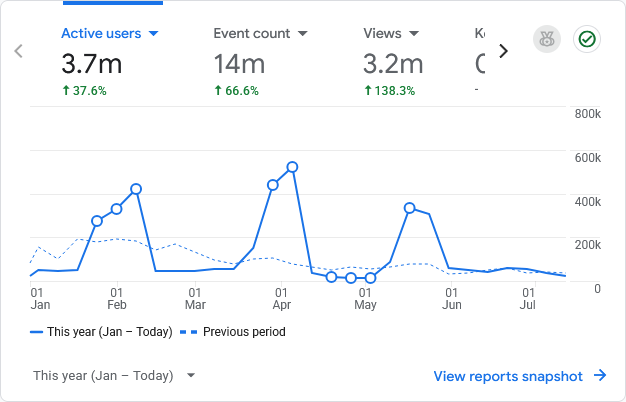
Hi All, apologies for arriving late to this discussion. @SLW210 is right about the decline in forums before AI. There was a big shift away from forums like this one towards social media platforms and it does seem that most of us left here are Boomers. However, despite the decline, I have noticed that in recent years, it has plateaued and although number of visitors are significantly lower than they were (say) 15 years ago, they are no longer declining but seem stable. Traffic here is probably around 10% of what it was back in the day. Currently, new sign-ups to the forum average around 100 per month and that has been pretty stable for the past few years. So that's the background picture. AI has made a difference only in that all the data on this forum and others has now been well and truly scraped and is still being scraped by more and more bots. The graph below shows traffic to this site since January. You can see three massive spikes - those are all bots, scraping content. The result is that most people don't need to visit the site because the scraped content is being provided to them via AI agents. You might think that would result in even lower traffic to the site but that's not what I'm seeing. My guess is that the sort of visitors who prefer to use AI results rather than going to source are the same ones that stopped visiting forums and shifted to social media. So what remains is a solid core of Boomers who genuinely care about community and respect the skill and experience of others. Fortunately, there's enough of us around to keep things going. The future? It's very difficult to predict but my view is that most people are becoming tired of the toxic nature of social media and will likely learn to value the genuine human interactions and sense of community that forums can provide once they realise that AI is just another tool and not a friend that can't always be relied upon. So I'm predicting a return of popularity in forums for special interest groups. As for AutoCAD, I don't really have a good understanding of its popularity any more. It's a long time since I used it professionally (almost 10 years) but I'm not aware that it's being replaced by anything else. Gemini tells me that AutoCAD retains a 38% global market share, so I guess it's still relevant and that this forum is therefore still relevant.

-

Help to Modify Existing Line Annotation LISP
Tsuky replied to KraZeyMike's topic in AutoLISP, Visual LISP & DCL
An another code, for lines or polylines. (vl-load-com) (defun make_label (pt alpha val_txt / nw_obj) (setq nw_obj (vla-addMtext Space (vlax-3d-point pt) alpha val_txt ) ) (mapcar '(lambda (pr val) (vlax-put nw_obj pr val) ) (list 'AttachmentPoint 'Height 'DrawingDirection 'InsertionPoint 'StyleName 'Layer 'Rotation 'Width) (list 5 (getvar "TEXTSIZE") 5 pt "BEARING" "LABEL-BEARING" alpha 0.0) ) ) (defun c:label-bearing ( / l_var js htx AcDoc Space nw_style n obj ename pr dist_start dist_end pt_start pt_end seg_len alpha val_txt pt) (setq l_var (mapcar 'getvar '("AUNITS" "AUPREC" "LUPREC" "LUNITS"))) (mapcar 'setvar '("AUNITS" "AUPREC" "LUPREC" "LUNITS") '(4 3 2 2)) (princ "\nSelect Polylines/Lines.") (while (null (setq js (ssget '((0 . "LWPOLYLINE,LINE"))))) (princ "\nSelection is empty or not are LWPOLYLINE, LINE!") ) (initget 6) (setq htx (getdist (getvar "VIEWCTR") (strcat "\nSpecify text height <" (rtos (getvar "TEXTSIZE")) ">: "))) (if htx (setvar "TEXTSIZE" htx)) (setq AcDoc (vla-get-ActiveDocument (vlax-get-acad-object)) Space (if (= 1 (getvar "CVPORT")) (vla-get-PaperSpace AcDoc) (vla-get-ModelSpace AcDoc) ) ) (vla-startundomark AcDoc) (cond ((null (tblsearch "LAYER" "LABEL-BEARING")) (vlax-put (vla-add (vla-get-layers AcDoc) "LABEL-BEARING") 'color 7) ) ) (cond ((null (tblsearch "STYLE" "BEARING")) (setq nw_style (vla-add (vla-get-textstyles AcDoc) "BEARING")) (mapcar '(lambda (pr val) (vlax-put nw_style pr val) ) (list 'FontFile 'Height 'ObliqueAngle 'Width 'TextGenerationFlag) (list (strcat (getenv "windir") "\\fonts\\arial.ttf") 0.0 0.0 1.0 0.0) ) ) ) (repeat (setq n (sslength js)) (setq obj (ssname js (setq n (1- n))) ename (vlax-ename->vla-object obj) pr -1 ) (cond ((eq (vlax-get ename "ObjectName") "AcDbLine") (setq seg_len (vlax-get ename "Length") alpha (vlax-get ename "Angle") val_txt (vl-string-subst "%%d" "d" (strcat (angtos alpha) "\\P" (rtos seg_len) " m")) ) (setq pt (vlax-curve-GetPointAtParam ename (* 0.5 seg_len))) (if (and (> alpha (* pi 0.5)) (< alpha (* pi 1.5))) (setq alpha (+ alpha pi))) (make_label pt alpha val_txt) ) (T (repeat (fix (vlax-curve-getEndParam ename)) (setq dist_start (vlax-curve-GetDistAtParam ename (setq pr (1+ pr))) dist_end (vlax-curve-GetDistAtParam ename (1+ pr)) pt_start (vlax-curve-GetPointAtParam ename pr) pt_end (vlax-curve-GetPointAtParam ename (1+ pr)) seg_len (- dist_end dist_start) alpha (angle (trans pt_start 0 1) (trans pt_end 0 1)) val_txt (vl-string-subst "%%d" "d" (strcat (angtos alpha) "\\P" (rtos seg_len) " m")) ) (setq pt (vlax-curve-GetPointAtParam ename (+ 0.5 pr))) (if (and (> alpha (* pi 0.5)) (< alpha (* pi 1.5))) (setq alpha (+ alpha pi))) (make_label pt alpha val_txt) ) ) ) ) (vla-endundomark AcDoc) (mapcar 'setvar '("AUNITS" "AUPREC" "LUPREC" "LUNITS") l_var) (prin1) ) -
I'm not very familiar with ArcGIS, although I have prepared drawings to import into it. Which entities exactly do you need to transfer? Surfaces, polylines, points, or something more complicated? This page tells you how to export feature lines, COGO points, and surfaces. The feature line option includes polyline, grading feature, alignment, and profile options. There's a tool called Connector for ArcGIS, but it's probably not worth buying if you only use it occasionally. According to this page, you can import many civil objects directly into ArcGIS. Can you provide more information about what you need to bring into ArcGIS?
-
I just had AI write a test to see if ODBX worked. (defun c:TestDbx ( / dbxProgId dbxDoc extFile) (vl-load-com) (if (vl-string-search "BricsCAD" (getvar "PROGRAM")) (setq dbxProgId "ObjectDBX.AxDbDocument") (setq dbxProgId (strcat "ObjectDBX.AxDbDocument." (substr (getvar "ACADVER") 1 2))) ) (setq dbxDoc (vl-catch-all-apply 'vla-GetInterfaceObject (list (vlax-get-acad-object) dbxProgId))) (if (vl-catch-all-error-p dbxDoc) (progn (princ (strcat "\nError: Could not load interface using ProgID: " dbxProgId)) (princ (strcat "\nDetails: " (vl-catch-all-error-message dbxDoc))) ) (progn (setq extFile (getfiled "Select Drawing to Read" "" "dwg" 0)) (if extFile (progn (vla-open dbxDoc extFile) (princ (strcat "\nSuccess! Total objects in Model Space: " (itoa (vla-get-count (vla-get-modelspace dbxDoc))))) ) (princ "\nNo file selected.") ) (vlax-release-object dbxDoc) ) ) (princ) )
-
Does this work in BricsCAD? I did a quick search before starting on this method and it showed ODBX in BricsCAD for a few versions back, but wasn't 100% sure. The OP used AutoCAD 2021 when this thread was started and I only have AutoCAD to test with, so it is what it is. This program might could be made a little faster and cleaner, though plenty fast enough for me. I made some headway yesterday on doing the multi-file batch convertor, I may have to do some work they pay me to do today, though. I am still waiting on the answers from my latest Request for Information, I might be able to do some more testing until then. I'm positive they will respond and ask for finished drawings 5 minutes later. I will probably continue this on my original thread I created for the older convertors. Drawing Batch Converters - AutoLISP, Visual LISP & DCL - AutoCAD Forums
-
 Bjy joined the community
 -
 notbad2502 joined the community
 -
Indeed it does! I had tried to get implement this in Python, but there was no public interface, same with the other clones. I wonder if it’s hidden in lisp?
-
@Danielm103 Yes Bricscad has OBDX, have used it at times, I think tested on like V19. Now using V25.
-
Have not done this task but CIV3D has this command. Not running CIV3D at moment. I also used GOOGLE "export corridor objects CIV3D to autocad objects" and got a lot of answers, similar to above that point to inbuilt civ3d commands.
-
Welcome aboard, is there a reason why you do not want to use Bedit ? Would make life a lot easier, a lisp would call bedit and select all objects in the block and could run Overkill then or something like this that I found using Google. Then save the block definition and update the dwg. ; keep longest overlapping lines ; By Saxelle Aug 2025 (defun c:DOL ( / ss len i ename_length_list ename ename_length) (setq ss (ssget (list (cons 0 "*LINE"))) len (sslength ss) i 0 ename_length_list (list) ) (while (< i len) (setq ename (ssname ss i) ename_length (getpropertyvalue ename "Length") ename_length_list (append ename_length_list (list (list ename ename_length))) i (1+ i) ) ) (setq ename_length_list (vl-sort ename_length_list (function (lambda (x1 x2) (< (cadr x1) (cadr x2))))) ename_length_list (vl-remove (last ename_length_list) ename_length_list) total_len (itoa (length ename_length_list)) ) (foreach x ename_length_list (entdel (car x)) ) (prompt (strcat "\nThe total number of deleted lines is " total_len "!")) (princ) ) A good idea with a request like this would be to post a sample dwg with the block you want to check. use wblock to pull block out of an existing dwg.
-
In the case of Clint’s post, I don’t know that BricsCAD has ODBX