All Activity
- Past hour
-
I do not see anything specific stating the Lite version can do LISP. But, just in case, here is the manual for regular CADS RC. https://rebarcad.com/wp-content/uploads/2025/09/Lisp_Programming_Interface_Guide.pdf I also moved your thread to a new topic Use LISP with CADS RC Lite in AutoLISP, Visual LISP & DCL Forum
-
You should use the System Variable Monitor (SYSVARMONITOR), I also set my SYSVAR in my ACADDOC.lsp. You can export then import your settings and profiles before a Reset to Defaults, some things should be in your templates anyway, that would stay the same. So no, it is not a 'nuclear' option, that would be a complete removal and reinstall, and even then, you can restore a profile, settings, etc. and have proper templates.
- Today
-
 ECE joined the community
 -
Resetting to default definitely works as a 'nuclear' option, but for anyone else finding this thread who doesn't want to lose their UI setup, definitely check PICKFIRST and PICKADD first. If those variables get flipped to 0 by a glitch or a rogue LISP routine, it causes exactly this behavior where the Properties palette won't 'see' your selection.
-
Thanks Bigal for the info , I have CADS-RC lite program i have seen that the product has the access of using lisps and parameter files but i couldn't have any idea to add those packages in this product.

-

Pathfinding in AutoCAD with the A-Star Algorithm (A*)
ymg3 replied to heschr's topic in AutoLISP, Visual LISP & DCL
I implemented astar using a heap instead of the dictionnary proposed by @GLAVCVS. Safearray is used to simulate the heap. Was done with prompt in Google AI. Results the heap is faster specially if the graph is bigger. ;; ; ;; c:A* by ymg ; ;; Astar implemented with a Heap instead of a dictionnary ; ;; Edges of the Graph are drawn on layer identified by Golbal #Edgeslay ; ;; ; ;; Edges can be lines, lpolylines or 3dpolylines ; ;; You select Start and End points. Shortest is then found and drawn as a ; ;; 3D Polylines on layer, color and lineweight chosen via Global vars ; ;; found at beginning of this routine ; ;; ; ;; Heap has a faster running time than the dictionnary and list approach ; ;; as the size of the graph grows. ; ;; ; (defun c:A* (/ ss graph openH gScore cameFrom found cur curPt curK sNode sKey neighbor nKey t_g val oldG oldCF Startp Endp d minD en param endpar p1 p2 path k link pt i ti) (vl-load-com) (or #acdoc (setq #acdoc (vla-get-activedocument (vlax-get-acad-object)))) (set_errhandler '("CLAYER" "OSMODE" "CMDECHO" "DIMZIN")) (setvar 'CMDECHO 0) (setvar 'OSMODE 1) (setq #Edgelay "Edges" #Pathlay "Path" #Pathcol 1 #Pathlwt 70 #Hptr 0 ) ;; Selecting set of entities defining edges of graph. (if (not (setq ss (ssget "X" (list '(0 . "LINE,LWPOLYLINE,POLYLINE") (cons 8 #Edgelay))))) (progn (alert (strcat "\nError: No entities found on layer " #Edgelay)) (exit) ) ) ;; Geting Start and End points. (Use snap to endpoint) (setq Startp (getpoint "\nPick Start Point: ")) (setq Endp (getpoint "\nPick End Point: ")) (vla-startundomark #acdoc) (setq ti (getvar 'MILLISECS)) ;Timer for execution time ; Building Graph... (setq graph nil i 0) (repeat (sslength ss) (setq en (ssname ss i) param 0 endpar (vlax-curve-getEndParam en) i (1+ i) ) (while (< param endpar) (setq p1 (vlax-curve-getPointAtParam en param) p2 (vlax-curve-getPointAtParam en (setq param (1+ param))) k1 (pt->key p1) k2 (pt->key p2) graph (update-g graph k1 p1 p2) graph (update-g graph k2 p2 p1) ) ) ) (setq minD 1.7e308) ; Initialize to infinity (foreach entry graph (if (< (setq d (distance (cadr entry) Startp)) minD) (setq minD d sNode entry) ) ) (setq sKey (car sNode) openH (heap:new (length graph)) gScore (list (cons sKey 0.0)) cameFrom nil found nil ) (heap:push openH (distance (cadr sNode) Endp) (cadr sNode)) (princ (strcat "\n Graph Size: " (itoa (length graph)) " nodes")) (princ (strcat "\n Graph Building Time: " (itoa (setq gbti (- (getvar 'MILLISECS) ti))) " ms.")) ;Start of Pathfinding... (while (and (> #Hptr 0) (not found)) (setq cur (heap:pop openH) curPt (cdr cur) curK (pt->key curPt) ) (if (< (distance curPt Endp) 0.1) (setq found T) (foreach neighbor (cddr (assoc curK graph)) (setq nKey (pt->key neighbor) val (assoc curK gScore) t_g (+ (cdr val) (distance curPt neighbor)) ) (if (or (null (setq oldG (assoc nKey gScore))) (< t_g (cdr oldG))) (progn (if oldG (setq gScore (vl-remove oldG gScore))) (setq gScore (cons (cons nKey t_g) gScore)) (if (setq oldCF (assoc nKey cameFrom)) (setq cameFrom (subst (cons nKey curPt) oldCF cameFrom)) (setq cameFrom (cons (cons nKey curPt) cameFrom)) ) (heap:push openH (+ t_g (distance neighbor Endp)) neighbor) ) ) ) ) ) ;; Result Handling (if found (progn (setq path (list curPt) k curK ) (while (setq link (assoc k cameFrom)) (setq pt (cdr link) k (pt->key pt) path (cons pt path) ) ) (mk_3dp path) ) (princ "\nNo path found.") ) (vla-endundomark #acdoc) (setq totaltime (- (getvar 'MILLISECS) ti)) (princ (strcat "\n Pathfinding Time: " (itoa (- totaltime gbti)) " ms.")) (princ (strcat "\nTotal Execution time: " (itoa totaltime) " ms.")) (*error* nil) ) ;; ; ;; ERROR HANDLING & SYSTEM UTILITIES ; ;; ; ;; ; ;; set_errhandler by Elpanov Evgenyi ; ;; Captures system variable states into global #varl. ; ;; Argument 'l': List of strings naming system variables. ; ;; ; (defun set_errhandler (l) (setq #varl (mapcar (function (lambda (a) (list 'setvar a (getvar a)))) l)) ) ;; ; ;; *error* by Elpanov Evgenyi ; ;; Redefines the *error* function and display an error message. ; ;; Restores system variables and handles exit messages. ; ;; ; (defun *error* (msg) (mapcar 'eval #varl) (if (and msg (not (wcmatch (strcase msg) "*BREAK*,*CANCEL*,*EXIT*"))) (princ (strcat "\nError: " msg)) ) (princ) ) ;; ; ;; Heap Abstraction Utilities Using Safearray ; ;; ; ;; ; ;; heap:new ; ;; ; ;; Initializes a Variant Safearray as a Minimum-Heap and set the Heap pointer ; ;; Global Var #Hptr to 0 ; ;; ; ;; Argument: size, Total capacity for the Heap. ; ;; ; ;; Return : Safearray Object ; ;; ; (defun heap:new (size) (setq #Hptr 0) (vlax-make-safearray vlax-vbVariant (cons 0 (max 1 (1- size))) '(0 . 1)) ) ;; ; ;; heap:get ; ;; ; ;; Fetch node data at given index in the heap ; ;; ; ;; Arguments: h, Heap name as a safearray object ; ;; idx, Index of the node ; ;; ; ;; Returns: A dotted pair, (Priority . Point) ; ;; ; (defun heap:get (h idx) (cons (vlax-variant-value (vlax-safearray-get-element h idx 0)) (vlax-safearray->list (vlax-variant-value (vlax-safearray-get-element h idx 1))) ) ) ;; ; ;; heap:set ; ;; ; ;; Writes priority and point into heap at index. ; ;; Arguments: h, heap name ; ;; i, index ; ;; prio, double ; ;; p, point. ; ;; ; (defun heap:set (h i prio p / arr) (setq arr (vlax-make-safearray vlax-vbDouble '(0 . 2))) (vlax-safearray-fill arr (mapcar 'float p)) (vlax-safearray-put-element h i 0 (vlax-make-variant prio vlax-vbDouble)) (vlax-safearray-put-element h i 1 arr) ) ;; ; ;; heap:swap ; ;; ; ;; Swaps two elements the heap ; ;; ; ;; Arguments: h, heap name ; ;; i, index of first element ; ;; j, index of second element ; ;; ; (defun heap:swap (h i j / tp tv) (setq tp (vlax-safearray-get-element h i 0) tv (vlax-safearray-get-element h i 1) ) (vlax-safearray-put-element h i 0 (vlax-safearray-get-element h j 0)) (vlax-safearray-put-element h i 1 (vlax-safearray-get-element h j 1)) (vlax-safearray-put-element h j 0 tp) (vlax-safearray-put-element h j 1 tv) ) ;; ; ;; heap:push ; ;; Adds a node, re-sorts heap via sift-up and adjust the heap pointer ; ;; ; ;; Arguments: h, heap name ; ;; prio, priority ; ;; pt, point ; ;; ; ;; Returns: Value of heap pointer ; ;; ; (defun heap:push (h prio pt / i p) (heap:set h #Hptr prio pt) (setq i #Hptr) (while (and (> i 0) (< prio (car (heap:get h (setq p (/ (1- i) 2)))))) (heap:swap h i p) (setq i p) ) (setq #Hptr (1+ #Hptr)) ) ;; ; ;; heap:pop ; ;; ; ;; Removes root node, re-sorts the heap by sift-down updates #Hptr ; ;; ; ;; Argument: h, heap name ; ;; ; ;; Return: root node as dotted pair (Priority . Point) ; ;; ; (defun heap:pop (h / root size i l r s i-prio l-prio r-prio) (if (> #Hptr 0) (progn (setq root (heap:get h 0) #Hptr (1- #Hptr)) (if (> #Hptr 0) (progn (heap:swap h 0 #Hptr) (setq i 0 size #Hptr) (while (< (setq l (1+ (* i 2))) size) (setq r (1+ l) ;; Get priorities once to avoid redundant safearray lookups i-prio (vlax-variant-value (vlax-safearray-get-element h i 0)) l-prio (vlax-variant-value (vlax-safearray-get-element h l 0)) s l ) ;; Check if right child exists and is smaller than left (if (and (< r size) (< (setq r-prio (vlax-variant-value (vlax-safearray-get-element h r 0))) l-prio)) (setq s r l-prio r-prio)) ;; Update smallest index and priority ;; If smallest child is smaller than current, swap (if (< l-prio i-prio) (progn (heap:swap h i s) (setq i s)) (setq i size)) ;; Else, heap property restored ) ) ) root ) ) ) ;; ; ;; GRAPH & DRAWING UTILITIES ; ;; ; ;; ; ;; pt->key ; ;; Converts 3D point to a string key "X,Y,Z". ; ;; Argument 'p': 3D point list. ; ;; ; (defun pt->key (p) (strcat (rtos (car p) 2 2) "," (rtos (cadr p) 2 2) "," (rtos (caddr p) 2 2))) ;; ; ;; update-g ; ;; Links nodes in graph association list. ; ;; ; ;; Arguments: g, graph list ; ;; k, key ; ;; p, point ; ;; n, neighbor. ; ; ;; ; (defun update-g (g k p n / ex) (if (setq ex (assoc k g)) (subst (append ex (list n)) ex g) (cons (list k p n) g) ) ) ;; ; ;; mk_3dp by Alan J Thompson ; ;; ; ;; Entmakes a 3D Polyline. Global Vars #Pathlay, #Pathcol and #Pathlwt have ; ;; to be set in calling program. ; ;; ; ;; Argument: lst, List of 3D points. ; ;; ; ;; Returns: Entity Name of Polyline ; ;; ; (defun mk_3dp (lst / vtx) (if (and lst (> (length lst) 1)) (progn (entmakex (list '(0 . "POLYLINE") '(10 0. 0. 0.) (cons 8 #Pathlay) (cons 62 #Pathcol) (cons 370 #Pathlwt) '(70 . 8) ) ) (foreach vtx lst (entmakex (list '(0 . "VERTEX") (cons 10 vtx) '(70 . 32) ) ) ) (entmakex '((0 . "SEQEND"))) ) ) ) (princ "\nCommand A* loaded.") (princ) ;|«Visual LISP© Format Options» (150 3 1 2 nil "end of " 100 9 0 0 1 nil T nil T) ;*** DO NOT add text below the comment! ***|; Astar3dHeap.LSP - Yesterday
-

Penn Foster AutoCAD Applications-Construction assistance (Residential House Project)
ReMark replied to TimC's topic in Student Project Questions
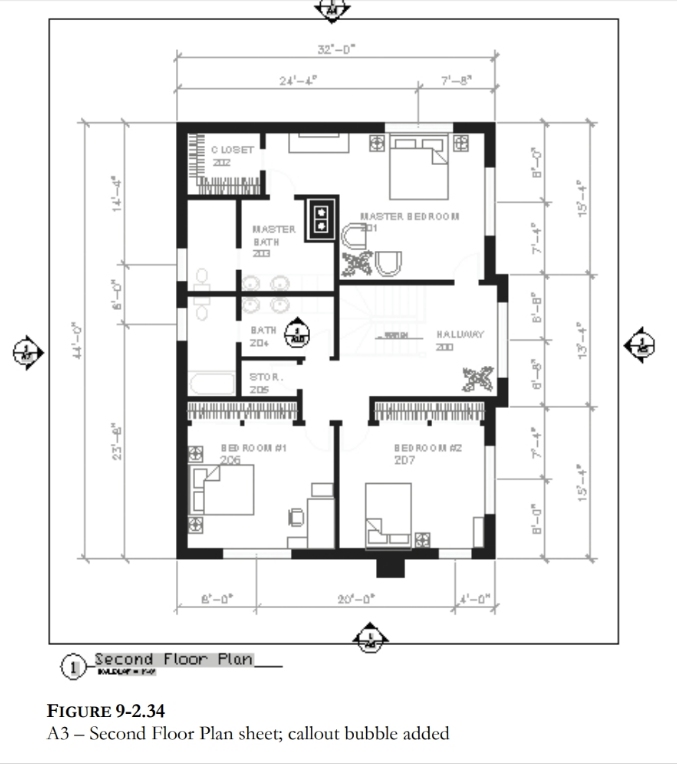
Are the project instructions in PDF file format? Looking back at the second-floor plan shown above wouldn't the "bubbles" be the circles with the arrowheads pointing in different directions. The top number, I believe, is the elevation number/letter while the bottom number would be the sheet number the elevation is shown on. -

Penn Foster AutoCAD Applications-Construction assistance (Residential House Project)
TimC replied to TimC's topic in Student Project Questions
Well, per the usual, lack of info. I have no idea what to put in the callouts or where because we weren't given the info. I wish I had a way to upload the project instructions so you guys could see how rediculous this is with the lack of information and in some cases, blatant wrong information -
 Omaer joined the community
 -
 loshie joined the community
 -
Please use Code Tags for your code in the future. (<> in the editor toolbar)
-
Re.. the point is to get AutoCAD to perform the Properties vertex highlight but I'm probably correct to say 'they wouldn't prefer. Just is a single click on the Properties/Vertex and up.it.pops. Such a minor benefit but would choose yes if asked. Here's one from the many [matrix..] that does help me. It's from MR Marko Ribar - with other updates.. https://forums.augi.com/showthread.php?125388-End-of-foreach-function But here's my mod of it. CHIV-StartPoint.lsp
- Last week
-
Penn Foster AutoCAD Applications-Construction assistance (Residential House Project)
ReMark replied to TimC's topic in Student Project Questions
Callout blocks on floor plans are specialized, often circular or bubble-shaped, graphical symbols used to highlight a specific area, detail, section, or elevation, indicating that more detailed information about that area can be found elsewhere in the drawing set. -
You can get all vertices step 1, Step 2 is enter vertice number place a "X" say as text on vertice. If wrong do again erasing existing "X". An example of get co-ords. (setq plent (entsel "\nPick lwpolyline 2D ")) (if plent (setq co-ord (mapcar 'cdr (vl-remove-if-not '(lambda (x) (= (car x) 10)) (entget (car plent)))))) (princ co-ord) If you have 3D poly's then use (setq obj (vlax-ename->vla-object (car (entsel "\nPick pline ")))) (setq co-ord (vlax-safearray->list (vlax-variant-value (vla-get-coordinates obj))))
-
no show/difference with a 'CONVERTPOLY Enter polyline conversion option [Heavy/Light] <Light>: h' 2d polyline..
-
'CurrentVertex' is not a property of "LWPOLYLINE" objects
-
Penn Foster AutoCAD Applications-Construction assistance (Residential House Project)
TimC replied to TimC's topic in Student Project Questions
I also don't know what they mean about callout blocks for elevation. I cant even read what the callout blocks say in their example with my readers on...lol
-
Penn Foster AutoCAD Applications-Construction assistance (Residential House Project)
TimC replied to TimC's topic in Student Project Questions
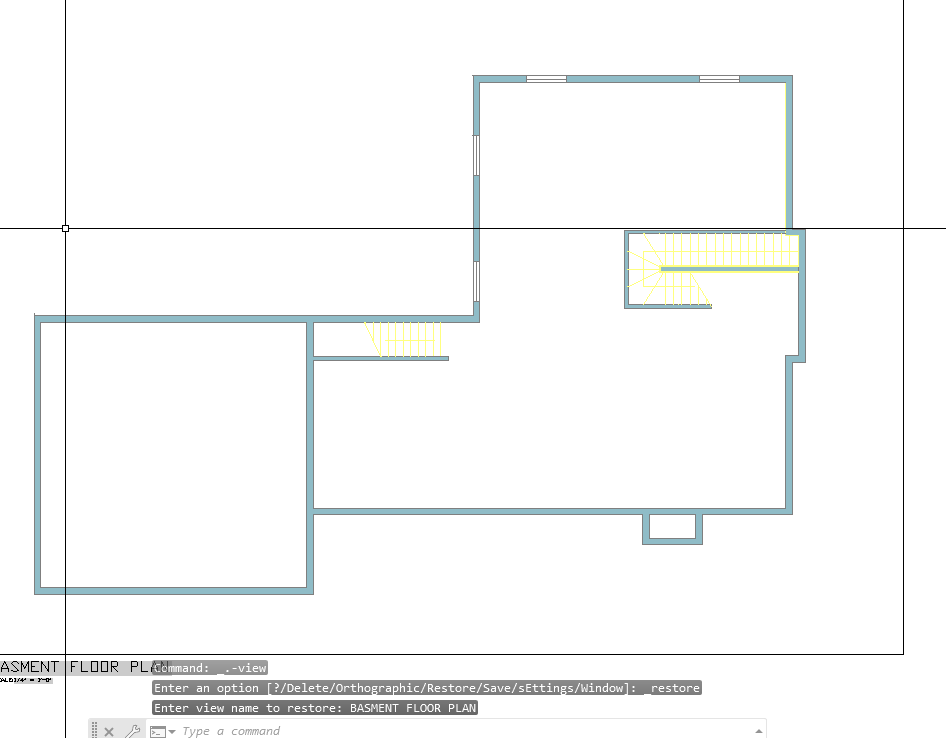
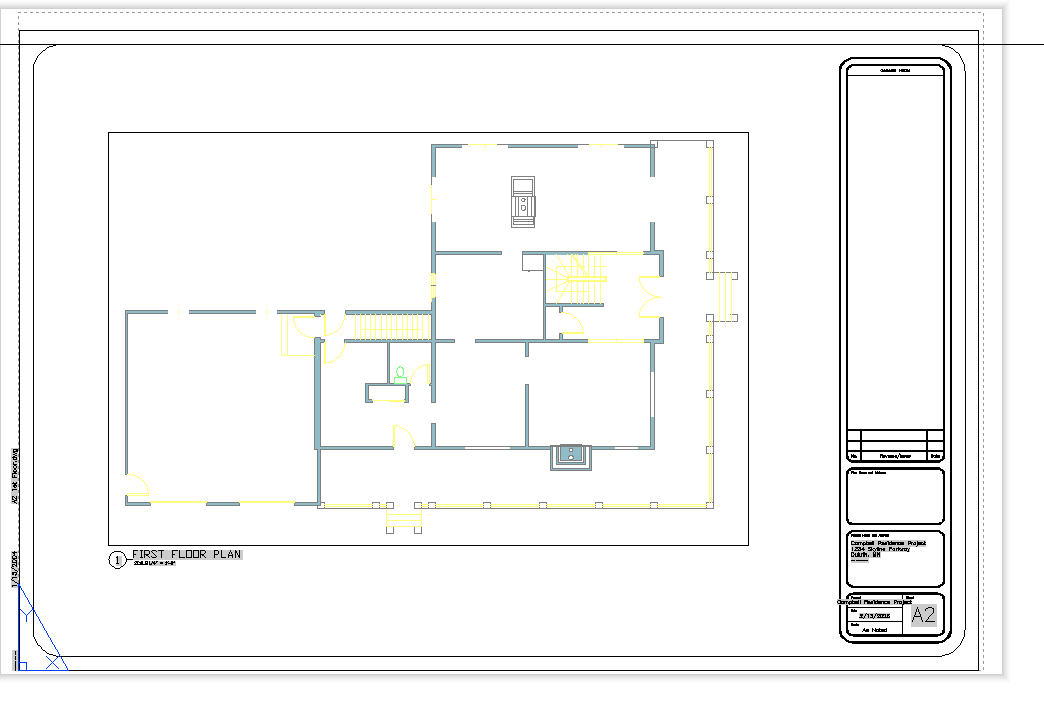
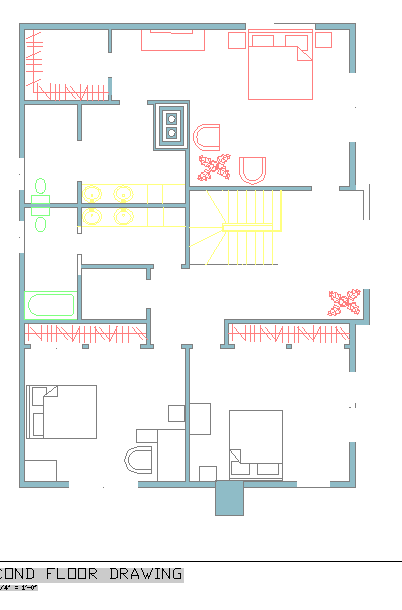
correct. Here's a few of the files. Right now I'm having an issue with missing dimensions and furniture blocks when I upload the drawings into sheets from model space. I made sure no layers were frozen, nothing is on def points, ran an audit....etc Flr-B.dwg Flr-1.dwg FLR-2.dwg Exterior Elevations corrected.dwg Site plan Alternate.dwg Wall Section.dwg Building section.dwg Stair Detail.dwg -
Alright, another Penn Foster student here. Big shocker there, I know. I put all my drawings from model space in to sheets but I lost all my dimensions and some of my furniture blocks. I double checked to be sure I didn't have any frozen layers, nothing is in def points, they're in correct layers, I ran an audit and it found and fixed 0 errors. I'm really new to all this auto cad stuff but apparently my work thinks I need it even though ill never use it. I'm not even ALOUD to have it on my computer at work...lol Any help would be greatly appreciated Flr-B.dwg Flr-1.dwg FLR-2.dwg
-
here's the AI reply to my question: "Activate Current Vertex 'X' marker: as if Clicking on the Current Vertex field on gis Properties, autolisp" here's the code and tried but my a2k might not be able.. can someone try this <short>Vertex.X.lsp? (defun c:Sv ( / ent obj vla-obj vertexNum) (vl-load-com) ;; 1. Select the polyline (setq ent (car (entsel "\nSelect Polyline: "))) (if (and ent (member (cdr (assoc 0 (entget ent))) '("LWPOLYLINE" "POLYLINE"))) (progn (setq vla-obj (vlax-ename->vla-object ent)) ;; 2. Ask for the vertex index (0-indexed) (setq vertexNum (getint "\nEnter vertex index (0 is first): ")) ;; 0) ;; <- my choice (if (and vertexNum (>= vertexNum 0)) (progn ;; 3. Set the CurrentVertex property (Activates the X marker) (vl-catch-all-apply 'vlax-put-property (list vla-obj 'CurrentVertex vertexNum)) ;; 4. Refresh to show the marker (vla-update vla-obj) (redraw) (princ (strcat "\nVertex " (itoa vertexNum) " activated.")) ) ) ) (princ "\nNot a valid polyline.") ) (princ) )
-
Penn Foster AutoCAD Applications-Construction assistance (Residential House Project)
ReMark replied to TimC's topic in Student Project Questions
What are you being asked to create? Since it is an architectural drawing I would say a floor plan, at least two elevations, a section and related details. Is that correct? -
Penn Foster AutoCAD Applications-Construction assistance (Residential House Project)
TimC replied to TimC's topic in Student Project Questions
2D -

Penn Foster AutoCAD Applications-Construction assistance (Residential House Project)
007 replied to TimC's topic in Student Project Questions
What specifically is the project? Is it a 2D or 3D drawing that is required? -
Penn Foster AutoCAD Applications-Construction assistance (Residential House Project)
TimC replied to TimC's topic in Student Project Questions
correct. yea that's the book -
Penn Foster AutoCAD Applications-Construction assistance (Residential House Project)
ReMark replied to TimC's topic in Student Project Questions
I tried the link but the furthest I got was to a screen where I was told I don't have access to the book. The title of the book referenced was "Residential Design Using AutoCAD 2023." Sound familiar? -
 burxrecord joined the community
 -
I think a custom DCL front end would be good. Will have a think about it. The extend option is easy just set the default length to 0.0 so any other value means yes. Nikon the dynamic block is a nice idea.
-

Copying a Value into the Clipboard without using Active-X so it can work on LT
BIGAL replied to CivilTechSource's topic in AutoLISP, Visual LISP & DCL
Like @Steven P "Generally I save to the same folder as the CAD file" In the attached file is a plot a range of pdf's a DCL pops up for the range then the plots are done. In the code you will see a command Mk-dir that is used to make a PDF directory. I think we have discussed previously about making menu's as the simplest way of click on a choice and it happens. See image above, keep adding options for users, they don't need to worry about appload or (load."????") I had 8 users, our menu was on a server so would auto update for end users. You will need to change the code to suit your title block and pdf settings have a go. It is set up for title block at 0,0. It is possible to have one lisp but it uses different variables for different output devices and title blocks. A version I have for a client looks at title block name and sets the correct plot size settings. Come back if have a problem, you have my Email ? plotA3Pdfrange.lsp Multi GETVALS.lsp -
The dimension style holds the settings for dimensions not the units, the Units would be used for setting imperial or metric.