All Activity
- Past hour
-
Answer from another forum which is a bit more than my answer above - the errors are a kind of firewall to stop the Al bots scraping the websites, taking all the bandwidth, slowing things for the humans - something we'll have to live with for a while I think
- Today
-
usually after I click Try Again then it'll work..not sure why..
-
Perhaps you should contact the 3rd party vendor where you install this program from to get the file?
-
@Danielm103, I did convert gile's code to autocad 2017 and ran it on test.dwg & testmore.dwg Results for PLWT_KDTREE test.dwg Pairs = 102 Elapsed Milliseconds = 73 testmore.dwg Pairs = 102 Elapsed Milliseconds = 520 With that kind of results I don't see what I could improve on here. I am attaching the cs file converted for acad 2017 and Gile.AutoCAD.R20.Geometry ymg pairs.cs
-
c:\program files (x86)\xdsoft\sys\xdrx.x64.25.arx cannot find a procedure that it needs.
-
c:\program files (x86)\xdsoft\sys\xdrx.x64.25.arx cannot find a procedure that it needs.
-
 zs123 joined the community
 - Yesterday
-
this was a fun challenge using KDTrees https://www.theswamp.org/index.php?topic=59487.0
-

Do you really need a separate DWG for every revision?
BIGAL replied to indiancad's topic in AutoCAD Drawing Management & Output
Like others if a revision then a dwg was saved. We also saved a "AS Built" dwg, all our dwg's were recorded and could be looked up, we went back to 1999. They were saved as Tiffs later on as Pdf's. As we controlled the dwg's in regards to access by others, server locked, we made sure only the latest version was in the current working directory, we had a superseded directory. As part of document control a new project had specific directories premade. -
@gile, Here I build a bridge to your GeometryExtensions.NET library, exposing essentially the same command that I had in mine . The only addition being GC:KD-MINNODE. I have also built a concavehull in C# using your kd-tree if anybody is interested. ymg using System; using System.IO; using System.Linq; using System.Globalization; using System.Collections.Generic; using Autodesk.AutoCAD.Runtime; using Autodesk.AutoCAD.ApplicationServices; using Autodesk.AutoCAD.DatabaseServices; using Autodesk.AutoCAD.Geometry; using Gile.AutoCAD.R20.Geometry; namespace LispGileBridge { public class ExtensionLoader : IExtensionApplication { public void Initialize() { try { var ed = Autodesk.AutoCAD.ApplicationServices.Application.DocumentManager.MdiActiveDocument.Editor; // Extracts the absolute running file path dynamically via Reflection string assemblyPath = System.Reflection.Assembly.GetExecutingAssembly().Location; string assemblyName = System.IO.Path.GetFileName(assemblyPath); ed.WriteMessage($"\n--> Assembly File Loaded: \"{assemblyName}\""); ed.WriteMessage($"\n--> Full Path: {assemblyPath}"); ed.WriteMessage("\n--> Available commands:"); ed.WriteMessage("\n (GC:KD-BUILD pointList [dimensions] [customHandle])"); ed.WriteMessage("\n (GC:KD-NEAREST handle Point [count] [maxRadius] [sortFlag])"); ed.WriteMessage("\n (GC:KD-NEAREST-INFO handle Point [count] [maxRadius])"); ed.WriteMessage("\n (GC:KD-RANGE handle Point radius)"); ed.WriteMessage("\n (GC:KD-MINNODE handle dimension)"); ed.WriteMessage("\n (GC:KD-FREE [handle])"); } catch { // Fallback safety silent escape check } } public void Terminate() { } } public class KdTreeBridge { // Thread-safe dictionary tracking string handles to their specific tree instances and properties private static readonly Dictionary<string, (Point3dTree Tree, bool Is2D)> _registry = new Dictionary<string, (Point3dTree, bool)>(StringComparer.OrdinalIgnoreCase); private static int _autoId = 1; // -------------------------------------------------------------------------------- // 1. (gc:kd-build pointList [dimensions] [customHandle]) // -------------------------------------------------------------------------------- [LispFunction("GC:KD-BUILD")] public static object GileKdBuild(ResultBuffer args) { if (args == null) return null; TypedValue[] arr = args.AsArray(); if (arr.Length == 0) return null; try { List<Point3d> pts = ParseLispPoints(arr, 0, out int pointsReadCount); if (pts.Count == 0) return null; // Default dimension to 2D unless explicitly specified as 3 int dimensions = 2; string customHandle = null; if (arr.Length > pointsReadCount) { int nextIdx = pointsReadCount; if (arr[nextIdx].TypeCode == (int)LispDataType.Int32 || arr[nextIdx].TypeCode == (int)LispDataType.Int16) { dimensions = Convert.ToInt32(arr[nextIdx].Value); nextIdx++; } if (arr.Length > nextIdx && arr[nextIdx].TypeCode == (int)LispDataType.Text) { customHandle = Convert.ToString(arr[nextIdx].Value); } } bool is2D = (dimensions == 2); // Gilles' constructor: ignoreZ parameter directly matches our is2D rule Point3dTree tree = new Point3dTree(pts, is2D); string handle = string.IsNullOrEmpty(customHandle) ? $"<KD-TREE-{_autoId++}>" : customHandle; _registry[handle] = (tree, is2D); return handle; } catch (System.Exception ex) { Application.DocumentManager.MdiActiveDocument.Editor.WriteMessage($"\nError in KD-BUILD: {ex.Message}\n"); return null; } } // -------------------------------------------------------------------------------- // 2. (gc:kd-nearest handle targetPoint [count] [maxRadius] [sortFlag]) // -------------------------------------------------------------------------------- [LispFunction("GC:KD-NEAREST")] public static object GileKdNearest(ResultBuffer args) { if (args == null) return null; TypedValue[] arr = args.AsArray(); if (arr.Length < 2) return null; try { string handle = Convert.ToString(arr[0].Value); if (!_registry.TryGetValue(handle, out var entry)) return null; if (arr[1].TypeCode != (int)LispDataType.Point3d) return null; Point3d targetPt = (Point3d)arr[1].Value; int count = 1; double maxRadius = double.MaxValue; int sortFlag = 1; // Default: Sort by Angle if (arr.Length >= 3) count = Convert.ToInt32(arr[2].Value); if (arr.Length >= 4) maxRadius = Convert.ToDouble(arr[3].Value); if (arr.Length >= 5) sortFlag = Convert.ToInt32(arr[4].Value); var searchCollection = entry.Tree.GetNearestNeighbours(targetPt, count); if (searchCollection == null) return null; // Filter by radius limit and compile working list List<Point3d> filtered = new List<Point3d>(); foreach (Point3d pt in searchCollection) { double dist = entry.Is2D ? targetPt.DistanceTo(new Point3d(pt.X, pt.Y, targetPt.Z)) : targetPt.DistanceTo(pt); if (dist <= maxRadius) filtered.Add(pt); } if (filtered.Count == 0) return null; // Execute selected Sort mode if (sortFlag == 0) { filtered = filtered.OrderBy(p => entry.Is2D ? targetPt.DistanceTo(new Point3d(p.X, p.Y, targetPt.Z)) : targetPt.DistanceTo(p)).ToList(); } else { filtered = filtered.OrderBy(p => { double angle = Math.Atan2(p.Y - targetPt.Y, p.X - targetPt.X); return angle < 0 ? angle + (2 * Math.PI) : angle; }).ToList(); } // API Standard Rule Check: If count is 1, return single item. Else, return list. if (count == 1) { return filtered[0]; } ResultBuffer rb = new ResultBuffer(); rb.Add(new TypedValue((int)LispDataType.ListBegin)); foreach (Point3d pt in filtered) rb.Add(new TypedValue((int)LispDataType.Point3d, pt)); rb.Add(new TypedValue((int)LispDataType.ListEnd)); return rb; } catch { return null; } } // -------------------------------------------------------------------------------- // 3. (gc:kd-nearest-info handle targetPoint [count] [maxRadius]) // -------------------------------------------------------------------------------- [LispFunction("GC:KD-NEAREST-INFO")] public static object GileKdNearestInfo(ResultBuffer args) { if (args == null) return null; TypedValue[] arr = args.AsArray(); if (arr.Length < 2) return null; try { string handle = Convert.ToString(arr[0].Value); if (!_registry.TryGetValue(handle, out var entry)) return null; Point3d targetPt = (Point3d)arr[1].Value; int count = 1; double maxRadius = double.MaxValue; if (arr.Length >= 3) count = Convert.ToInt32(arr[2].Value); if (arr.Length >= 4) maxRadius = Convert.ToDouble(arr[3].Value); var searchCollection = entry.Tree.GetNearestNeighbours(targetPt, count); if (searchCollection == null) return null; ResultBuffer rb = new ResultBuffer(); rb.Add(new TypedValue((int)LispDataType.ListBegin)); // Re-locate matches to extract array index mappings cleanly int idx = 0; foreach (Point3d pt in searchCollection) { double dist = entry.Is2D ? targetPt.DistanceTo(new Point3d(pt.X, pt.Y, targetPt.Z)) : targetPt.DistanceTo(pt); if (dist <= maxRadius) { rb.Add(new TypedValue((int)LispDataType.ListBegin)); rb.Add(new TypedValue((int)LispDataType.Point3d, pt)); rb.Add(new TypedValue((int)LispDataType.Int32, idx)); // Metadata index placement rb.Add(new TypedValue((int)LispDataType.Double, dist)); rb.Add(new TypedValue((int)LispDataType.ListEnd)); } idx++; } rb.Add(new TypedValue((int)LispDataType.ListEnd)); return rb; } catch { return null; } } // -------------------------------------------------------------------------------- // 4. (gc:kd-range handle centerPoint radius) // -------------------------------------------------------------------------------- [LispFunction("GC:KD_RANGE")] public static object GileKdRange(ResultBuffer args) { if (args == null) return null; TypedValue[] arr = args.AsArray(); if (arr.Length < 3) return null; try { string handle = Convert.ToString(arr[0].Value); if (!_registry.TryGetValue(handle, out var entry)) return null; Point3d centerPt = (Point3d)arr[1].Value; double radius = Convert.ToDouble(arr[2].Value); // Passing a double directly to GetNearestNeighbours switches Gilles' engine to range search var searchCollection = entry.Tree.GetNearestNeighbours(centerPt, radius); if (searchCollection == null) return null; // Enforce distance sort ordering var sorted = searchCollection.OrderBy(p => entry.Is2D ? centerPt.DistanceTo(new Point3d(p.X, p.Y, centerPt.Z)) : centerPt.DistanceTo(p)).ToList(); ResultBuffer rb = new ResultBuffer(); rb.Add(new TypedValue((int)LispDataType.ListBegin)); foreach (Point3d pt in sorted) rb.Add(new TypedValue((int)LispDataType.Point3d, pt)); rb.Add(new TypedValue((int)LispDataType.ListEnd)); return rb; } catch { return null; } } // -------------------------------------------------------------------------------- // 5. NEW! (gc:kd-minnode handle dimension) -> Useful for Concave Hull base logic // -------------------------------------------------------------------------------- [LispFunction("GC:KD-MINNODE")] public static object GileKdMinNode(ResultBuffer args) { if (args == null) return null; TypedValue[] arr = args.AsArray(); if (arr.Length < 2) return null; try { string handle = Convert.ToString(arr[0].Value); if (!_registry.TryGetValue(handle, out var entry)) return null; int dimension = Convert.ToInt32(arr[1].Value); // 0=X, 1=Y, 2=Z // Target standard range query over all nodes to run aggregate matching var allPoints = entry.Tree.GetNearestNeighbours(Point3d.Origin, double.MaxValue); if (allPoints == null || !allPoints.Any()) return null; Point3d minPoint; switch (dimension) { case 0: // Minimum X coordinate minPoint = allPoints.OrderBy(p => p.X).First(); break; case 1: // Minimum Y coordinate minPoint = allPoints.OrderBy(p => p.Y).First(); break; case 2: // Minimum Z coordinate minPoint = allPoints.OrderBy(p => p.Z).First(); break; default: return null; } return minPoint; } catch { return null; } } // -------------------------------------------------------------------------------- // 6. (gc:kd-free [handle]) // -------------------------------------------------------------------------------- [LispFunction("GC:KD-FREE")] public static object GileKdFree(ResultBuffer args) { int removedCount = 0; if (args == null) { removedCount = _registry.Count; _registry.Clear(); _autoId = 1; } else { TypedValue[] arr = args.AsArray(); if (arr.Length > 0 && arr[0].TypeCode == (int)LispDataType.Text) { string handle = Convert.ToString(arr[0].Value); if (_registry.Remove(handle)) removedCount = 1; } else { removedCount = _registry.Count; _registry.Clear(); _autoId = 1; } } GC.Collect(); GC.WaitForPendingFinalizers(); return removedCount; } // -------------------------------------------------------------------------------- // INTERNAL ROUTINE: Streamlined input coordinate list extractor // -------------------------------------------------------------------------------- private static List<Point3d> ParseLispPoints(TypedValue[] arr, int startIndex, out int readCount) { var collected = new List<Point3d>(); readCount = 0; for (int i = startIndex; i < arr.Length; i++) { if (arr[i].Value is Point3d pt) { collected.Add(pt); readCount++; } else if (arr[i].TypeCode == (int)LispDataType.ListEnd || arr[i].TypeCode == (int)LispDataType.Int32 || arr[i].TypeCode == (int)LispDataType.Text) { break; // Stopped at non-point parameter boundaries } } return collected; } } } essentially the same command that I had in my post.
-
 lazarev joined the community
 -

dcl Share the most elegant interface design under DCL limitations
SLW210 replied to VicoWang's topic in AutoLISP, Visual LISP & DCL
If you want to learn to do that method... Making a POP with images for inserting blocks or running a program - Autodesk Community -
Do you really need a separate DWG for every revision?
SLW210 replied to indiancad's topic in AutoCAD Drawing Management & Output
Like @CyberAngel, different places do it different. My current work place, for the work I do, I keep all copies (even those I never released) on a personal (company) cloud drive, the latest revision is the one posted on the network, the drawing name includes the revision number at the end. In most cases, the relevant personnel are emailed that a new revision is out, since one or more of them would have requested a change. P&IDs we keep the old revisions in a separate folder on the network and sometimes the same for certain projects. For contractor drawings I also put old drawings in a folder and only leave the latest revisions on the network. For ongoing projects my boss usually keeps everything in a project folder and then at the end the "As Built" goes on the network, "As Built" as in I usually (or my boss/both of us and/or a relevant engineer) have to go double check everything. Other places I have done them pretty much every method CyberAngel mentioned and probably more, as each company and even sometimes different divisions in a company wanted them done "their way". -

Do you really need a separate DWG for every revision?
CyberAngel replied to indiancad's topic in AutoCAD Drawing Management & Output
This is one of the knottiest issues in engineering work. What constitutes a full revision? When do you issue a partial revision, if you do at all? How do you track the changes? How do you roll them back if necessary? Worst of all, different shops use different criteria, and sometimes the same shop uses different criteria for different projects. It seems like common sense, since storage is so cheap these days, to save a new copy of the drawing for each revision, and append the revision number to the file name. That way the old revisions are still available if you need to refer to them or send them to someone. Even better, keep the revisions in a subfolder so they don't clutter up the main project folder. And this should go without saying--keep current backups! The current working file should have the project name (or whatever) with no revision number. Again, though, some shops will use different standards. For smaller projects, there's no need to keep old revisions, especially if you've sent them out all along. You can go back to those emails for attached copies of old drawings. As always, simpler is better. Make a plan and stick to it. Otherwise you're asking for trouble. -
Why can’t I join two lines even when they look connected?
SLW210 replied to indiancad's topic in AutoCAD 2D Drafting, Object Properties & Interface
P.S. I meant to mention this in my first response. Your title states... And then you state... You can use an AutoCAD command JOIN... JOIN (Command) | Autodesk In many situations a much better tool. You can experiment with what happens with different combinations or look through the link above. -
Why can’t I join two lines even when they look connected?
SLW210 replied to indiancad's topic in AutoCAD 2D Drafting, Object Properties & Interface
What if you need different elevations, but still need continuous linework? Flattening the entire drawing would be an issue. This would be a good time to use Qselect (or filters, LISP, et al) to select by Elevation, etc. and Join the polylines, lines, etc. Once again Overkill to remove overlaps, though a custom LISP for it all would be better most likely. As mentioned, having all of that in a drawing should be from untrained cad users and/or poor third party software importing, etc. -
.thumb.jpg.615654602253be56b2fbd5d064834780.jpg)
Do you really need a separate DWG for every revision?
indiancad posted a topic in AutoCAD Drawing Management & Output
I recently worked on a project where every revision was saved as a completely separate DWG file. After a few revisions, it became difficult to know which file was the latest one. A simpler approach is to keep the working DWG as the main file and use DWGPROPS to record revision information such as the revision number, date, and description. For issued drawings, I also keep a clear revision naming convention rather than relying only on the filename. This makes it much easier to identify the current drawing and understand its history. How do you normally manage DWG revisions on larger projects? -
Would anybody be interested in having the results in AutoCAD MText/Text and/or a Table? Though for a Table, you can just use the Excel option and then create a table, then Datalink the Excel file. I just use the Notebook option mostly and everything is working in all of my tests, so unless there is a need I will not be adding very much to this. I may, if workload allows, make the DCL a little fancier.
-
PDF Plot Shaded Visual Style = Sawtooth Edge
SLW210 replied to lamensterms's topic in AutoCAD Drawing Management & Output
If you want to share the file (or at least enough to see if the issue is a setting) it would be helpful. Woukld a different PDF plotter help? One more thought, try printing to an image file. -
 johnsmith6423423 joined the community
 -

Why does a viewport show the wrong part of my drawing?
Paul Li replied to indiancad's topic in AutoCAD Drawing Management & Output
Have you tried to use AutoCAD's View command which does have a Save and Restore options? I would typically go inside the Pspace Vport and then run the View command Save option just in case I forget to lock it and I start Zooming around like you mentioned which does quite often happen to me too. Then I'll just use the View command Restore option to get back to the location where it was. - Last week
-

PDF Plot Shaded Visual Style = Sawtooth Edge
lamensterms replied to lamensterms's topic in AutoCAD Drawing Management & Output
Hey @SLW210 - took a look at and experimented with some of the different setting in the VSM, particularly Lighting Quality.. and I do see clear differences in the print quality, the saw toothing still remains I'll play around with more of the VSM settings and see if I can improve it Thanks very much for your help and suggestions -
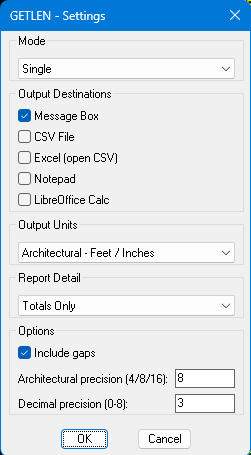
The latest version is now in the first post. I used the @BIGAL codes for MS Excel and LibreOffice Calc, all credit given. Hopefully works in non-AutoCAD programs as well, it worked in AutoCAD 2000i on my home computer, batch wasn't an available option, so I may or may not see why. I forgot how much better Calc looks than Excel, it really looked better with my dark theme, I might need to work on my Excel at work. I just used a quickly made Metric drawing, so hopefully everything is correct, I know getting metric measurements in my Imperial drawings is correct. It now has option for the complete report or just the totals. It also gives the actual measurement of a scaled block and the 1:1 total. It also should first ask to save the CSV in the same folder as the drawing now.

-
Why does a viewport show the wrong part of my drawing?
CyberAngel replied to indiancad's topic in AutoCAD Drawing Management & Output
What often happens to me is that I unlock the viewport to move something, and then I forget to lock it again when I'm done. Later I use the viewport but forget it's unlocked. I zoom in and out to focus on something but affect the model view instead of the viewport. Wherever possible, I use a border in model space (on a nonplot layer of course) to show the edges of the viewport. Then, if something changes the view, it's easy to get it back to the proper scale/location. It would be nice if AutoCAD had a way to save views for you. Revit has that feature, but for some reason AutoCAD doesn't. -

dcl Share the most elegant interface design under DCL limitations
Steven P replied to VicoWang's topic in AutoLISP, Visual LISP & DCL
(that was an awesome thread....) Yes, that was the start of me making the above, and using BigAl for inspiration -
 cauldrnofbats joined the community
 -
Help with Penn Foster structural drafting plate 1
cauldrnofbats replied to JimJames1978's topic in Student Project Questions
I have been looking at the discussion boards for the past month while working on my structural project for Penn Foster. It has been a great help but I was wondering if anyone could point me to a visual example of plate 3 (Section A)? I'm sure there is one somewhere in the boards but I have not been able to find it. I also don't need details, I am just a visual learner and I know for a fact the drawing I have made for this is completely wrong since the instructions are not clear to me. Any visual for this plate would be of great help! Thank you! -
Do you use QSELECT when a drawing gets crowded?
CyberAngel replied to indiancad's topic in AutoCAD 2D Drafting, Object Properties & Interface
The best thing about QuickSelect is that you can append or remove your selections to/from the previous set. If you need all the manhole blocks on one layer and all the sewer lines on a different layer, for instance, you can pick one of each and use Similar. On the other hand, if you need the pipes in a particular range of lengths, you build one set without the shorter pipes, then remove the pipes that are too long, QED. It may be more complex than other methods, but if there are hundreds or thousands of items to process, it will be quicker. -
dcl Share the most elegant interface design under DCL limitations
SLW210 replied to VicoWang's topic in AutoLISP, Visual LISP & DCL
From @Steven P's thread. AutoLISP Code Scroll down to Blk_Lib.lsp Blk_Lib.dcl Blk_Lib.doc Also some information on making these types of DCL. Getting Started with Dcl Dialogs just scroll down for DCLs with slide images and Image buttons. This is pretty good as well. https://www.theswamp.org/index.php?topic=20878.msg253445#msg253445