All Activity
- Past hour
-

Inactive Edit boxes in some places in the Dialog box.
Steven P replied to Dayananda's topic in AutoLISP, Visual LISP & DCL
I'd forgotten mode_tile there, yes, that is the one to go for. - Today
-

Inactive Edit boxes in some places in the Dialog box.
rlx replied to Dayananda's topic in AutoLISP, Visual LISP & DCL
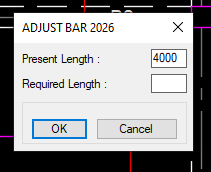
you have a command called mode_tile , set it to 0 means enable tile and set it to 1 means disable it. (confusing so think my wife was somehow involved) https://help.autodesk.com/view/OARX/2025/ENU/?guid=GUID-23ACCF72-9C6F-45C0-A889-9307CC1210C2 lets say your top edit box is called "present_length" , to disable / gray out this edit box you would use (mode_tile "present_length" 1) in example below I've named the edit boxes "eb1" & "eb2" but I have to admit , using a text tile would have been just as easy. (defun tst1 ( $m / f p d r s) (if (and (setq f (vl-filename-mktemp ".dcl"))(setq p (open f "w"))) (progn (write-line (strcat "adjust :dialog {label =\"" $m "\";" ":edit_box {key=\"eb1\";label=\"Present Length\";}" ":edit_box {key=\"eb2\";label=\"Required Length\";}" "spacer;ok_cancel;}") p ) (close p)(gc) (setq d (load_dialog f))(new_dialog "adjust" d) (action_tile "eb1" "(setq s $value)") (action_tile "eb2" "(setq s $value)") (action_tile "accept" "(done_dialog 1)") (action_tile "cancel" "(done_dialog 0)") (set_tile "eb1" "1000") (mode_tile "eb1" 1) (setq r (start_dialog))(unload_dialog d)(vl-file-delete f) ) ) (if (and (= r 1) (= 'STR (type s)) (/= s "")) s nil) ) (alert (strcat "Required length : " (vl-princ-to-string (tst1 "Adjust bar 2026")))) -
Repair Lisp to create superimpose acad
rlx replied to karfung's topic in AutoLISP, Visual LISP & DCL
;;; https://www.cadtutor.net/forum/topic/98937-repair-lisp-to-create-superimpose-acad/ (defun c:new_desktop_file_copy ( / acad_dbx object_list zero_point db odbx_objects_list ss fn db actDocs doc) (vl-load-com) (setq acad_dbx (vla-getinterfaceobject (vlax-get-acad-object) (dbx_ver))) (defun make_color_21 ( / lays lay) (setq lays (vla-get-layers acad_dbx)) (vlax-map-collection (vla-get-blocks acad_dbx) '(lambda (b) (vlax-map-collection b '(lambda (o) (vla-put-color o 256) (if (/= 21 (vla-get-color (setq l (vla-item lays (vla-get-layer o))))) (vla-put-color l 21))))))) (prompt "\nPick objects to copy to a new file on the desktop...") (if (not (setq ss (ssget))) (princ "\nNothing was selected") (progn (setq object_list (ss->ol ss)) (setq zero_point (getpoint "\nPick zero point for the copied entities: ")) (setq db (vla-get-database (vla-get-activedocument (vlax-get-acad-object)))) (setq odbx_objects_list (vlax-invoke db 'copyobjects object_list (vla-get-modelspace acad_dbx))) (foreach copied_object odbx_objects_list (if (vlax-method-applicable-p copied_object 'move) (vla-move copied_object (vlax-3d-point zero_point) (vlax-3d-point 0 0 0)) (princ (strcat "\nUnable to move object name : " (vla-get-name copied_object))) ) ) (make_color_21) (if (eq (setq fn (getstring "\nEnter file name: ")) "") (princ (strcat "\nInvalid filename for new drawing : " (vl-princ-to-string fn))) (progn (setq fn (strcat (getenv "userprofile") "\\Desktop\\" fn ".dwg")) (vla-saveas acad_dbx fn) (vlax-release-object acad_dbx) (gc) (gc) (foreach obj object_list (vla-delete obj)) (command ".qsave") ;|lets go vanilla|;(ScriptDwg fn (list "LUNITS" "2" "LUPREC" "6" ".zoom" "extents")) ) ) ) ) (princ) ) (defun SS->OL (ss / i l) (setq i 0)(repeat (sslength ss)(setq l (cons (vlax-ename->vla-object (ssname ss i)) l) i (1+ i))) l) (defun dbx_ver ( / v) (strcat "objectdbx.axdbdocument" (if (< (setq v (atoi (getvar 'acadver))) 16) "" (strcat "." (itoa v))))) (defun ScriptDwg ( dwg-fn dwg-com / scr-fn scr-fp ) (if (= (getvar "SDI") 1) (setvar "SDI" 0)) (setq scr-fn (strcat (getvar 'MYDOCUMENTSPREFIX) "\\ScriptDwg.scr")) (cond ((or (not (= (type dwg-fn) 'STR)) (not (findfile dwg-fn))) (princ (strcat "\n*error* : unable to find drawing : " (vl-princ-to-string dwg-fn)))) ((not (setq scr-fp (open scr-fn "w"))) (princ "\n*error* : unable to create script for commands.")) ((not (vl-consp dwg-com)) (princ "\n*error* : no commands in script")) (t (write-line (_open_cmd dwg-fn) scr-fp) (mapcar '(lambda (s)(write-line s scr-fp)) dwg-com) (write-line (_close_cmd) scr-fp) ) ) (if scr-fp (progn (close scr-fp)(gc)(command "._script" scr-fn))) ) (defun _open_cmd ($fn) (strcat ".open\n\"" $fn "\"\n(while (= 1 (logand (getvar \"cmdactive\") 1))(command \"Yes\"))")) (defun _close_cmd () (eval "(if (= (getvar \"writestat\") 1)(command \".qsave\" \".close\"))")) (defun c:t1 nil (c:new_desktop_file_copy)) -
Inactive Edit boxes in some places in the Dialog box.
Steven P replied to Dayananda's topic in AutoLISP, Visual LISP & DCL
Here are the options for edit boxes: https://help.autodesk.com/view/ACD/2026/ENU/?guid=GUID-38A11AED-DDF5-4ACA-A8BB-1F7901D0AF50 I think if you change is_enabled from true to false it should do what you want, I can't remember jus now how to switch it from one to the other - might be a google thing -

Inactive Edit boxes in some places in the Dialog box.
mhupp replied to Dayananda's topic in AutoLISP, Visual LISP & DCL
Make it a text not edit_box -
 anish.bhavsar joined the community
 -
 toton joined the community
 -

Perform hatch without superfluous requests
Nikon replied to Nikon's topic in AutoLISP, Visual LISP & DCL
* * * * * * * * * * * * * * * * * * * * * * * * * * * * * * * * * I recently noticed that Notepad (Windows 11) now has the ability to drag and drop selected text to Autocad or Word or another notepad file. There is no such option in Notepad (Windows 10). * * * * * * * * * * * * * * * * * * * * * * * * * * * * * * * * *
-
Perform hatch without superfluous requests
Nikon replied to Nikon's topic in AutoLISP, Visual LISP & DCL
It is possible to use standard hatch ANSI37. ;|= = = = = = = = = = = = = = = = = = = = = = = = = = = = = = = = = = = = = = = = = = = = = = Changes in the code of the author Tsuky "hatch_align_vtx". https://www.cadtutor.net/forum/topic/98938-perform-hatch-without-superfluous-requests/ Replacing BAT_PUBL with the standard ANSI37. Select a closed polyline and hatch it by aligning itself to the side of the selection point. Hatch a closed polyline with ANSI37 hatch, angle 45, scale 63 (for 200x200 cells). = = = = = = = = = = = = = = = = = = = = = = = = = = = = = = = = = = = = = = = = = = = = = = =|; (vl-load-com) (defun c:hatch_align_vtx_ANSI ( / AcDoc flag *error* ent Space hatch obj_curv ) (setq AcDoc (vla-get-ActiveDocument (vlax-get-acad-object)) flag T) (vla-StartUndoMark AcDoc) (defun *error* (msg) (and msg (not (wcmatch (strcase msg) "*CANCEL*,*QUIT*,*BREAK*,*EXIT*")) (princ (strcat "\nError: " msg)) ) (if (= 8 (logand (getvar "UNDOCTL") 8)) (vla-endundomark AcDoc) ) (princ) ) (while (setq ent (entsel "\nSelect the long side polyline to hatch it: ")) (setq obj_curv (vlax-ename->vla-object (car ent))) (cond ((and (eq (vlax-get-property obj_curv 'ObjectName) "AcDbPolyline") (eq (vla-get-closed obj_curv) :vlax-true) ) (setq Space (if (eq (getvar "CVPORT") 1) (vla-get-PaperSpace AcDoc) (vla-get-ModelSpace AcDoc) ) ) ;; standard ANSI37 (setq hatch (vla-AddHatch Space acHatchPatternTypePreDefined "ANSI37" :vlax-True)) (vlax-invoke hatch 'AppendOuterLoop (list obj_curv)) (vla-put-patternscale hatch 63.0) ; scale 63 (vla-put-patternangle hatch (/ pi 4)) ; angle 45° (in radians) (vla-evaluate hatch) ) ) ) (*error* nil) (vla-EndUndoMark AcDoc) (prin1) ) -

Inactive Edit boxes in some places in the Dialog box.
Dayananda posted a topic in AutoLISP, Visual LISP & DCL
In my dialog box I am displaying present length of a line in first edit box. Second edit box I am requesting the required length. and while that I want to inactive the first edit box. Please Help
-

Repair Lisp to create superimpose acad
karfung replied to karfung's topic in AutoLISP, Visual LISP & DCL
@rlx The latest lisp code still cannot comply to the additional condition that I mentioned before. Kindly review again. The additional condition as follows, 1). Please set the unit to be "mm" in the created file. 2). Please zoom extend for the created file. 3). (New add) At the original file, after picking the specific point for the object, please delete the selected object from the original file. This is to info user that if some of the objects weren't selected in the previous selection, it will not be deleted in this process. Kindly advise. Your assistance is appreciated. Thanks. - Yesterday
-
Perform hatch without superfluous requests
Nikon replied to Nikon's topic in AutoLISP, Visual LISP & DCL
I was a bit hasty. With a scale of 200, the cell pitch is 150x150, so to get 200x200, you need to set the scale to 266.67.
-
Perform hatch without superfluous requests
Nikon replied to Nikon's topic in AutoLISP, Visual LISP & DCL
I'm changing the scale of the hatch in this line: ; (vla-put-patternscale hatch 1.0) (vla-put-patternscale hatch 200) Super! A completely different approach. Thanks @Tsuky -

Perform hatch without superfluous requests
Tsuky replied to Nikon's topic in AutoLISP, Visual LISP & DCL
Another example. This allows you to select a closed polyline and hatch it by aligning itself to the side of the selection point. (vl-load-com) (defun c:hatch_align_vtx ( / AcDoc flag *error* f_pat ent Space pr-1 pr-1 alpha hatch) (setq AcDoc (vla-get-ActiveDocument (vlax-get-acad-object)) flag T) (vla-StartUndoMark AcDoc) (defun *error* (msg) (and msg (not (wcmatch (strcase msg) "*CANCEL*,*QUIT*,*BREAK*,*EXIT*")) (princ (strcat "\nError: " msg)) ) (if (= 8 (logand (getvar "UNDOCTL") 8)) (vla-endundomark AcDoc) ) (princ) ) (if (not (findfile "BAT_PUBL.pat")) (progn (setq f_pat (open (strcat (getvar "ROAMABLEROOTPREFIX") "support\\BAT_PUBL.pat") "w")) (write-line "*BAT_PUBL" f_pat) (write-line "45,0,0,0,.75" f_pat) (write-line "315,0,0,0,.75" f_pat) (close f_pat) ) ) (while (setq ent (entsel "\nSelect the long side polyline to hatch it: ")) (setq obj_curv (vlax-ename->vla-object (car ent))) (cond ((and (eq (vlax-get-property obj_curv 'ObjectName) "AcDbPolyline") (eq (vla-get-closed obj_curv) :vlax-true) ) (setq Space (if (eq (getvar "CVPORT") 1) (vla-get-PaperSpace AcDoc) (vla-get-ModelSpace AcDoc) ) pr-1 (fix (vlax-curve-getParamAtPoint obj_curv (vlax-curve-getClosestPointTo obj_curv (cadr ent) nil))) pr+1 (if (>= (1+ pr-1) (fix (vlax-curve-getEndParam obj_curv))) 0 (1+ pr-1)) alpha (+ (angle (vlax-curve-getPointAtParam obj_curv pr-1) (vlax-curve-getPointAtParam obj_curv pr+1)) (* 0.25 pi)) ) (setq hatch (vla-AddHatch Space acHatchPatternTypeCustomDefined "BAT_PUBL" :vlax-True)) (vlax-invoke hatch 'AppendOuterLoop (list obj_curv)) (vla-put-patternscale hatch 1.0) (vla-put-patternangle hatch alpha) (vla-evaluate hatch) ) ) ) (*error* nil) (vla-EndUndoMark AcDoc) (prin1) ) -
Repair Lisp to create superimpose acad
rlx replied to karfung's topic in AutoLISP, Visual LISP & DCL
;;; https://www.cadtutor.net/forum/topic/98937-repair-lisp-to-create-superimpose-acad/ (defun c:new_desktop_file_copy ( / acad_dbx object_list zero_point db odbx_objects_list ss fn db actDocs doc) (vl-load-com) (setq acad_dbx (vla-getinterfaceobject (vlax-get-acad-object) (dbx_ver))) (defun make_color_21 ( / lays lay) (setq lays (vla-get-layers acad_dbx)) (vlax-map-collection (vla-get-blocks acad_dbx) '(lambda (b) (vlax-map-collection b '(lambda (o) (vla-put-color o 256) (if (/= 21 (vla-get-color (setq l (vla-item lays (vla-get-layer o))))) (vla-put-color l 21))))))) (prompt "\nPick objects to copy to a new file on the desktop...") (if (not (setq ss (ssget))) (princ "\nNothing was selected") (progn (setq object_list (ss->ol ss)) (setq zero_point (getpoint "\nPick zero point for the copied entities: ")) (setq db (vla-get-database (vla-get-activedocument (vlax-get-acad-object)))) (setq odbx_objects_list (vlax-invoke db 'copyobjects object_list (vla-get-modelspace acad_dbx))) (foreach copied_object odbx_objects_list (if (vlax-method-applicable-p copied_object 'move) (vla-move copied_object (vlax-3d-point zero_point) (vlax-3d-point 0 0 0)) (princ (strcat "\nUnable to move object name : " (vla-get-name copied_object))) ) ) (make_color_21) (if (eq (setq fn (getstring "\nEnter file name: ")) "") (princ (strcat "\nInvalid filename for new drawing : " (vl-princ-to-string fn))) (progn (setq fn (strcat (getenv "userprofile") "\\Desktop\\" fn ".dwg")) (vla-saveas acad_dbx fn) (vlax-release-object acad_dbx) (gc) ;;; re-open & reset drawing (setq actDocs (vla-get-documents (vlax-get-acad-object))) (if (setq doc (vla-open actDocs fn)) (progn (vla-SetVariable doc "LUNITS" 2) (vla-SetVariable doc "LUPREC" 4) (vla-zoomextents (vlax-get-acad-object)) (vla-close doc :vlax-true) (vl-catch-all-apply 'vlax-release-object (list doc)) (vl-catch-all-apply 'vlax-release-object (list actDocs)) ) (princ (strcat "\nUnable to open " (vl-princ-to-string fn))) ) ) ) ) ) (princ) ) (defun SS->OL (ss / i l) (setq i 0)(repeat (sslength ss)(setq l (cons (vlax-ename->vla-object (ssname ss i)) l) i (1+ i))) l) (defun dbx_ver ( / v) (strcat "objectdbx.axdbdocument" (if (< (setq v (atoi (getvar 'acadver))) 16) "" (strcat "." (itoa v))))) (defun c:t1 nil (c:new_desktop_file_copy)) -
Perform hatch without superfluous requests
Nikon replied to Nikon's topic in AutoLISP, Visual LISP & DCL
Thank @pkenewell, I will study it. -

Perform hatch without superfluous requests
pkenewell replied to Nikon's topic in AutoLISP, Visual LISP & DCL
@Nikon FWIW, Here is an opportunity to show you how to store and retrieve system variables without all the extra variables in Lisp. Also - I've added undo marks to the command so everything stays together, and some stuff into the error handler. Nothing you did wrong; just showing another way to do the same thing with different techniques. ; MHATCH VVA /2006 + additions /2026 (defun c:UShatch_Doub_200 ( / d lst nab vars *error*) (defun *error* (msg) (if (not (wcmatch (strcase msg T) "*break*,*cancel*,*quit*,*exit*")) (princ (strcat "\nError: " msg "\n")) (princ "\nProgram Aborted.\n") ) ;; Cancel any open commands. (while (not (equal (getvar "cmdnames") ""))(command-s)) ;; If uh:varlist is found, reset all the system variables to original values stored. (if uh:varlist (mapcar '(lambda (var)(setvar (car var) (cdr var))) uh:varlist) ) (while (equal 8 (logand 8 (getvar "undoctl"))) (vla-EndUndoMark (vla-get-activedocument (vlax-get-acad-object))) ) (princ) ) (vl-load-com) ;; Set an undo mark (vla-StartUndoMark (setq d (vla-get-activedocument (vlax-get-acad-object)))) ;;Create an association list for the system variables and values to be set. (setq vars '(("cmdecho" . 0) ("osmode" . 0) ("hpname" . "_USER") ("hpang" . 0) ("hpdouble" . 1) ("hpspace" . 200) ("hpassoc" . 1))) ;; Gather the existing values for the system variables and add to association list "uh:varlist" (setq uh:varlist (mapcar '(lambda (var)(cons (car var) (getvar (car var)))) vars) ) ;; Set all the system variable to the values stored in "vars". (mapcar '(lambda (var)(setvar (car var) (cdr var))) vars) (if (and (setq nab (ssget "_:L")) (setq lst (vl-remove-if 'listp (mapcar 'cadr (ssnamex nab)))) ) (foreach item lst (vl-catch-all-apply '(lambda ()(command "_.-bhatch" "_s" item "" "")) ) ) ) (mapcar (function (lambda (var)(setvar (car var) (cdr var)))) uh:varlist ) (vla-EndUndoMark d) (princ) ) (princ "Type in the command prompt UShatch_Doub_200") -
Perform hatch without superfluous requests
Nikon replied to Nikon's topic in AutoLISP, Visual LISP & DCL
Couldn't open the link... I used the MHATCH.lsp code author VVA (2006). ; Thanks to the author VVA /2006/ (defun c:MHATCH ( / nab cmd osm *error*) (defun *error* (msg)(princ msg) (if cmd (setvar "cmdecho" cmd)) (if osm (setvar "osmode" osm)) (princ)) (vl-load-com) (setq cmd (getvar "cmdecho")) (setq osm (getvar "osmode")) (setvar "cmdecho" 0) (setvar "osmode" 0) (setvar "hpassoc" 1) (setq nab (ssget "_:L")) (if (and nab (setq lst (vl-remove-if 'listp (mapcar 'cadr (ssnamex nab))))) (foreach item lst (vl-catch-all-apply '(lambda () (command "_.-bhatch" "_s" item "" ""))))) ;_foreach (setvar "cmdecho" cmd) (setvar "osmode" osm) (princ)) I added two main lines (setvar "hpdouble" 1) - criss-cross (setvar "hpspace" 200) - spacing The code is working. Perhaps there is a simpler solution. I accept comments from the pros... ; MHATCH VVA /2006 + additions /2026 (defun c:UShatch_Doub_200 ( / nab cmd osm old_hpname old_hpang old_hpdouble old_hpspace old_hpassoc lst *error*) (defun *error* (msg) (princ msg) (if cmd (setvar "cmdecho" cmd)) (if osm (setvar "osmode" osm)) (if old_hpname (setvar "hpname" old_hpname)) (if old_hpang (setvar "hpang" old_hpang)) (if old_hpdouble (setvar "hpdouble" old_hpdouble)) (if old_hpspace (setvar "hpspace" old_hpspace)) (if old_hpassoc (setvar "hpassoc" old_hpassoc)) (princ) ) (vl-load-com) (setq cmd (getvar "cmdecho")) (setq osm (getvar "osmode")) (setvar "cmdecho" 0) (setvar "osmode" 0) (setq old_hpname (getvar "hpname")) (setq old_hpang (getvar "hpang")) (setq old_hpdouble (getvar "hpdouble")) (setq old_hpspace (getvar "hpspace")) (setq old_hpassoc (getvar "hpassoc")) (setvar "hpname" "_USER") (setvar "hpang" 0) (setvar "hpdouble" 1) (setvar "hpspace" 200) (setvar "hpassoc" 1) (setq nab (ssget "_:L")) (if (and nab (setq lst (vl-remove-if 'listp (mapcar 'cadr (ssnamex nab)))) ) (foreach item lst (vl-catch-all-apply '(lambda () (command "_.-bhatch" "_s" item "" "") ) ) ) ) (setvar "hpname" old_hpname) (setvar "hpang" old_hpang) (setvar "hpdouble" old_hpdouble) (setvar "hpspace" old_hpspace) (setvar "hpassoc" old_hpassoc) (setvar "cmdecho" cmd) (setvar "osmode" osm) (princ) ) (princ "Type in the command prompt UShatch_Doub_200") -
Perform hatch without superfluous requests
Steven P replied to Nikon's topic in AutoLISP, Visual LISP & DCL
If it all goes wrong then entmake it.... This link might help, with the code from code ding https://forums.autodesk.com/t5/visual-lisp-autolisp-and-general/entmake-hatch-with-base-point-or-object-polyline-entity-name/td-p/8696712 -

Repair Lisp to create superimpose acad
devitg replied to karfung's topic in AutoLISP, Visual LISP & DCL
some like it copy to desktop.dwg copy to desktop.dwg -
Repair Lisp to create superimpose acad
karfung replied to karfung's topic in AutoLISP, Visual LISP & DCL
@devitg The file was created automatically by using the Lisp code. The format within the file did not follow to the template. We shall need the Lisp code to set the created file by automatically. Thanks. -
Repair Lisp to create superimpose acad
devitg replied to karfung's topic in AutoLISP, Visual LISP & DCL
@karfung, why not to do a Writeblock command, it allow to set units as need, and show zoom extend new block.dwg -
 Artem joined the community
 -
 Tsatso joined the community
 -
Batch DWG to PDF plot LISP File
karfung replied to Chicane_Apex's topic in AutoLISP, Visual LISP & DCL
You can use etransmit by type "etransmit". It can plot all the individual acad files. Thanks. -
 Done joined the community
 -
Repair Lisp to create superimpose acad
karfung replied to karfung's topic in AutoLISP, Visual LISP & DCL
@rlx Wow, your code is awesome and works very well. Thank bro. Additionally, could you assist in setting the new file with the condition as follows, 1). Please set the unit to be "mm" in the created file. 2). Please zoom extend for the created file. Kindly advise. Thanks. -

Repair Lisp to create superimpose acad
SLW210 replied to karfung's topic in AutoLISP, Visual LISP & DCL
Select at start of what you need, then shift select the end is fastest I know (you can actually go from end to the beginning as well). -
 Wilmath joined the community
 -
 unbesiegbar joined the community
 -
Perform hatch without superfluous requests
Nikon replied to Nikon's topic in AutoLISP, Visual LISP & DCL
Thank @BIGAL you gave me the right direction. -

The printing LISP does not work with some drawing files.
SINGFENG posted a topic in AutoLISP, Visual LISP & DCL
Hello everyone. I have been following this website for a long time and would like to kindly ask for support regarding an AutoLISP printing routine. I used AI assistance to develop a printing code, however some drawings produce no output when printed. Could anyone help me find the cause? I can provide the code and sample drawings that work and those that do not. Thank you. Desktop.rar