All Activity
- Past hour
-
Update V2: https://drive.google.com/file/d/1tKI38W60KEjrlQ-NF4Rh-gctgxSd8HQf/view?usp=drive_link
- Today
-
 zac9090v joined the community
 -

Aluminum composite panels parametric templates
emosms replied to emosms's topic in AutoCAD 2D Drafting, Object Properties & Interface
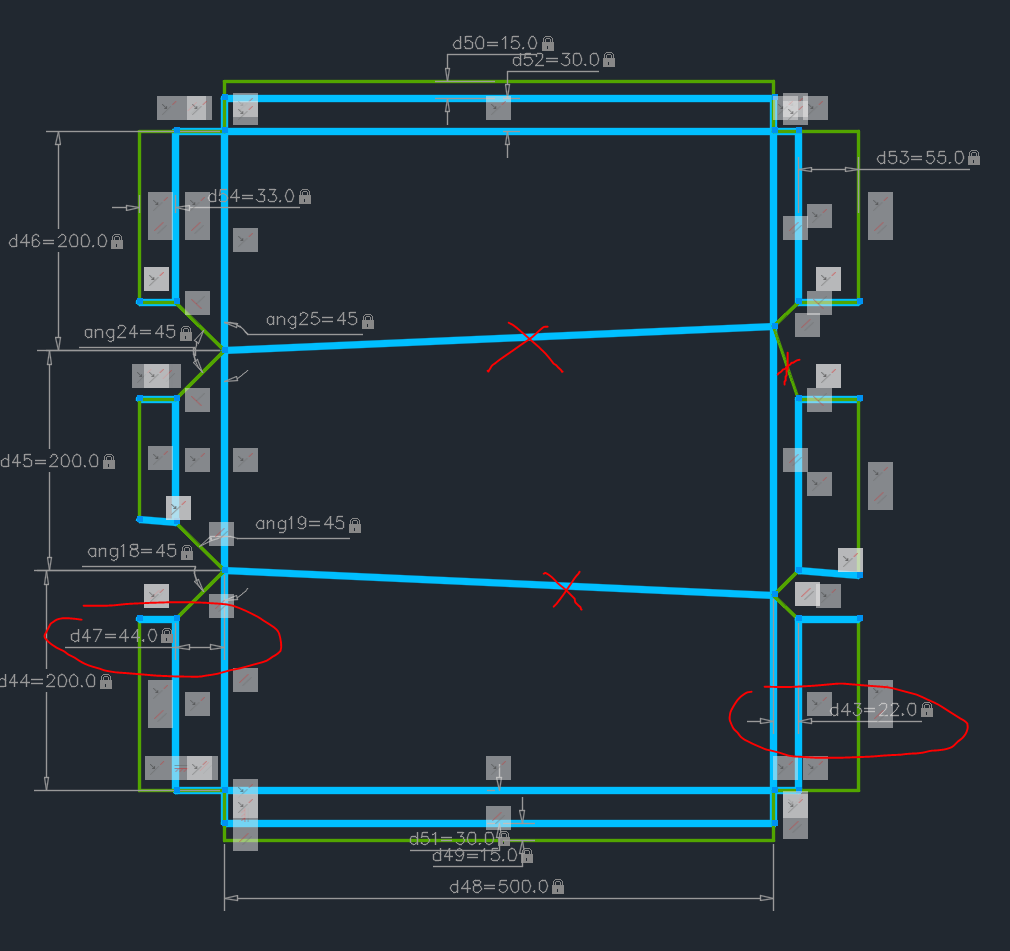
Hi, the 1 and 2 face templates work. The 3 face templates are squared in yellow, one is parametric sketch, the other is a dynamic block, completely messed up now. Seems easier to apply strech action in a dynamic block but I still have to apply TONS of constraints (coincident points, parallel...) I understood I can mass apply them with AUTOCONSTRAIN, but still needs a lot of adjustment and clean up. At least didn't reach the "overconstrained" warining within a dynamic block. PARAMETRIC.dwg -

Aluminum composite panels parametric templates
SLW210 replied to emosms's topic in AutoCAD 2D Drafting, Object Properties & Interface
Welcome to CADTutor! Can you post a .dwg? -
Aluminum composite panels parametric templates
emosms posted a topic in AutoCAD 2D Drafting, Object Properties & Interface
Hi, I am struggling to make this parametric template work. It is always 1 constrain short of making it behave properly. F.ex. in the curent hair pull-off session I can't make the crossed lines stay parallel/ horizontal, the mitre angle lock at 45 degree, the parallel tilted blue lines stay equal or whatever needed to prevent skewing. Somehow I made 1 face and 2 face panel template work properly (it allready was a pain to make the two face and I dont know how I made it work) But I need also 3, 4, 5 face panels, also a corner panel. The problems come when I try to control the innermost side flanges (where the 45 degree miters are). If they are not equal,the sketch skews, but they might not be equal in some occasions. What is the correct order of applying dimensions and constrains? I know the geometry I am trying to force is completely legit (I can draw it manualy) but that is not the point, it is extremely tedious and boring when a lot of panels need to be done. Can I find ready parametric templates for this? The constraints interaction seems to make the task impossible. Regards - Emil
-
emosms joined the community
-
.thumb.jpg.615654602253be56b2fbd5d064834780.jpg)
MESHSMOOTH: Controlling unwanted distortion when refining a 3D mesh
indiancad posted a topic in AutoCAD 3D Modelling & Rendering
I was looking into mesh refinement and found that increasing the smoothness level does not always improve the result. Sharp edges can become rounded, narrow features may lose their definition, and the overall shape can drift from the original geometry. This becomes particularly important when the mesh represents a component with both smooth surfaces and features that must retain their shape. For those who work with mesh-based models, how do you preserve critical edges and dimensions while increasing mesh smoothness? Do you adjust the smoothing settings, refine selected areas, or use another approach? -
INTERFERE: Telling overlaps apart from real assembly issues
indiancad posted a topic in AutoCAD 3D Modelling & Rendering
When looking at a 3D assembly with many parts finding interference is just one part of the work. Some overlaps might be meant to happen while others show that parts are in the place where there should be space. In an assembly the problem is figuring out which interference issues are important without spending time on ones that are expected. For people who use `INTERFERE` on mechanical models how do you tell real problems from overlaps that were meant to happen? Do you look at the interference results or do you also use section views and check for space, between parts? -
SOLIDEDIT: How do you handle a face that refuses to offset cleanly?
indiancad replied to indiancad's topic in AutoCAD 3D Modelling & Rendering
That makes sense. If the face offset keeps causing problems, creating a new solid and using Union or Subtract sounds like a practical alternative. I suppose it depends on which approach gives a cleaner result. -
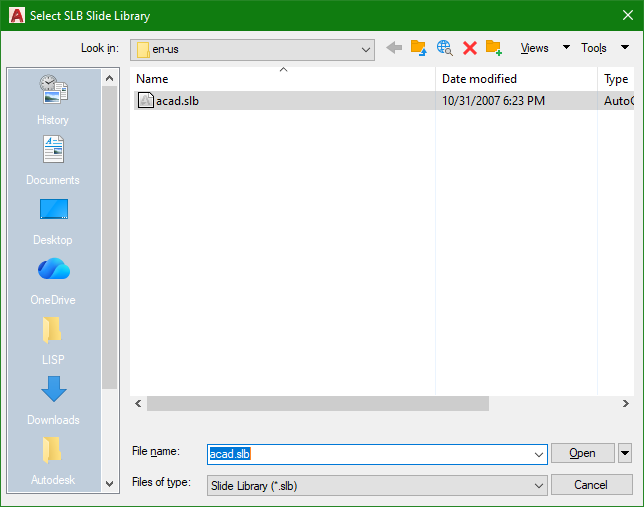
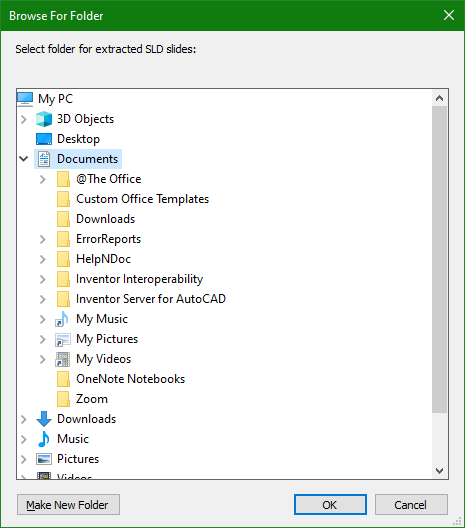
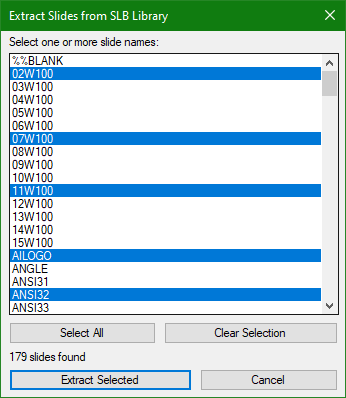
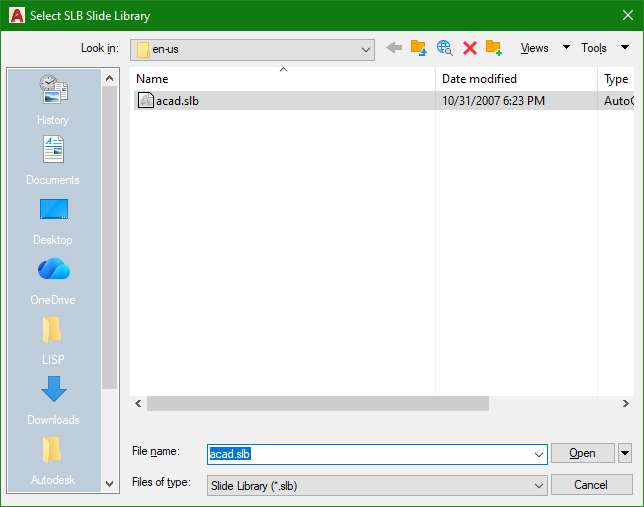
This SlbSelect.lsp is another ChatGpt generated app that extracts Slides (SLD) from inside a Slide Library file (SLB). When executed, the following steps occur: A File selection window appears for a Slide Library file (like acad.slb) to be selected Next a Folder selection window appears to select a location to save the extracted Slides Then the Slide file names inside the selected Slide Library is displayed in a custom dialog List Box for user selection After the selected Slides have been successfully extracted, Windows File Explorer opens to the Folder location for user review SlbSelect.lsp
- Yesterday
-

Generated ISO title block DXF: units, attributes and fonts when used in a template
BIGAL replied to Margo App's topic in AutoCAD Drawing Management & Output
"sheet stays 420 x 297 in a .dwt" not a problem various ways of doing this, simplest is have a layout "A3" which has your title sheet as only item in it. The title is at true size ie 420x297. And has say one viewport, just make a layout for each size. Where I worked that is how we did it, 20+ years using a DWT. Make sure add all your Text styles, layers, blocks and linetypes to your DWT, its easy to remove unwanted. Yes can add back in if needed. Part 2 you can use Layout copy to make new layouts with the correct title block. The obvious is delete any sizes you don't want. Part 2a layout T you can use a template for the layout so it will read a layout by name from another dwg. Ok maybe a big helper, there is code out there for making layouts automatically, as part of that the required title block can be chosen. A few choices pick a point in Model plus scale layout made, Use Rectangs as sheet outline and make multiple layouts in one go. Just ask for more detail various authors including myself. As a new person at Cadtutor this may be of interest to you. Welcome aboard. Lisp files DEC 2025.docx
-
@xurshid_viewport Just a comment I use pop menus to display blocks as you will see in an early post here. once the block dwg's are made I use a custom lisp to write most of the mnu code required just saves a bit of time., it just reads a list of dwg names some shorthhand with a full path if required and full dwg name, using a support path makes it easier. So if making lots from scratch worth the coding effort. Happy to help will need to find code been a while since I made a mnu. Using the @Paul Li code to write dwg name is handy. [->LIBRARY] [FURNITURE]^c^C^p(lay_furn);$I=FURN $I=* [SANITARY]^c^C^p(lay_furn);$I=SANIT $I=* [KITCHEN]^c^c^p(lay_furn);$I=KITCH $I=* [BATHROOM]^c^c^p(lay_furn);$I=BATH $I=* [--] [<-TREES]^c^c^p(lay_tree);$I=TREES $I=* ................... ***icon **FURN [FURNITURE:] [CTONE(CHAIR-1)]^c^cINSERT ca3ch-1 DRAG \1;;DRAG [CTONE(CHAIR-2)]^c^cINSERT ca3ch-2 DRAG \1;;DRAG [CTONE(SOFA-1)]^c^cINSERT ca3sof1 DRAG \1;;DRAG [CTONE(SOFA-2)]^c^cINSERT ca3SOF2 DRAG \1;;DRAG [CTONE(TABLE4)]^c^cINSERT ca3tbl4 DRAG \1;;DRAG [CTONE(TABLE6)]^c^cINSERT ca3tbl6 DRAG \1;;DRAG [CTONE(RTAB1)]^c^cINSERT ca3rtb1 DRAG \1;;DRAG [CTONE(RTAB2)]^c^cINSERT ca3rtb2 DRAG \1;;DRAG
-
Tried it in Bricscad V25 worked ok, a side issue it pops open the text file in Notepad which I have to close. I really don't want these TXT files being added to the chosen slb directory. They should be deleted or an option keep or delete.
-
 arda sultan joined the community
 -
Hello everyone! Today, I’d like to share with you an AutoLISP routine for STEEL PLATE FABRICATION. Download: https://drive.google.com/drive/folders/1aJmLA-P5mX8ykPFYp5ShD5DTIBxQkDKm?usp=sharing
- 1 reply
-
- 1
-

-
 kaleem khan joined the community
 -
Sorry Nikon I removed a call to another sub function at the start that had the vl-load-com.
-
SOLIDEDIT: How do you handle a face that refuses to offset cleanly?
SLW210 replied to indiancad's topic in AutoCAD 3D Modelling & Rendering
Trial and Error most likely, if that seems it should produce a correct solution. As mentioned previously, sometimes just creating a new 3D Solid shape as needed and Union or Subtract. -
I like that one @mhupp. Luckily our waterjet and plasma don't seem to have issues, but smoothing couldn't hurt. I had the same error as Nikon, so I cleaned this up a bit. PolySmooth_1.0.lsp
-
Generated ISO title block DXF: units, attributes and fonts when used in a template
SLW210 replied to Margo App's topic in AutoCAD Drawing Management & Output
Welcome to CADTutor! -
Seems interesting. Welcome to CADTutor!
-
@xurshid_viewportNow that you mentioned about wblocking each block as a dwg my free BlockApps actually comes with a new command called DDBlkCat which automates this process: https://marketplace.autodesk.com/apps/6d9671d7-7999-4998-b6a2-3fb959ee8a46?priceId=33599053-c530-44ac-9260-a1283eceb325
-
@peterg one thing that caught me out when I started with LT: the Blocks palette on the "Current Drawing" tab only lists blocks that live inside the drawing you have open. If you made the blocks in a drawing and then purged or never saved it, they are gone from the panel, and a new drawing will not show them either. What I do now is save each block to its own file with WBLOCK into one folder, for example D:\Blocks\Doors and D:\Blocks\Furniture. In the Blocks palette there is a Library tab, and you can point it at that folder, so every file in it shows up as an insertable block in any drawing. LT 2022 has it, I use it daily for doors and windows. Tool palettes work too if you prefer dragging from a panel.
-
SOLIDEDIT: How do you handle a face that refuses to offset cleanly?
indiancad posted a topic in AutoCAD 3D Modelling & Rendering
I was modifying an existing 3D solid using SOLIDEDIT and ran into a situation where offsetting a face became difficult. The selected face was straightforward, but the surrounding geometry made the result less predictable than expected. I’m particularly interested in cases where the offset creates intersections with adjacent faces or causes the operation to fail, even though the requested distance seems reasonable. For those who use SOLIDEDIT regularly, how do you diagnose whether the problem comes from the face geometry, the offset distance, or the surrounding solid? Do you try another face-editing operation first, or modify the geometry another way? -
After applying the code and selecting the object, the closed polyline is split into separate lines. And the code terminates with an error. ; error: no function definition: VLA-GET-ENTITYNAME
-
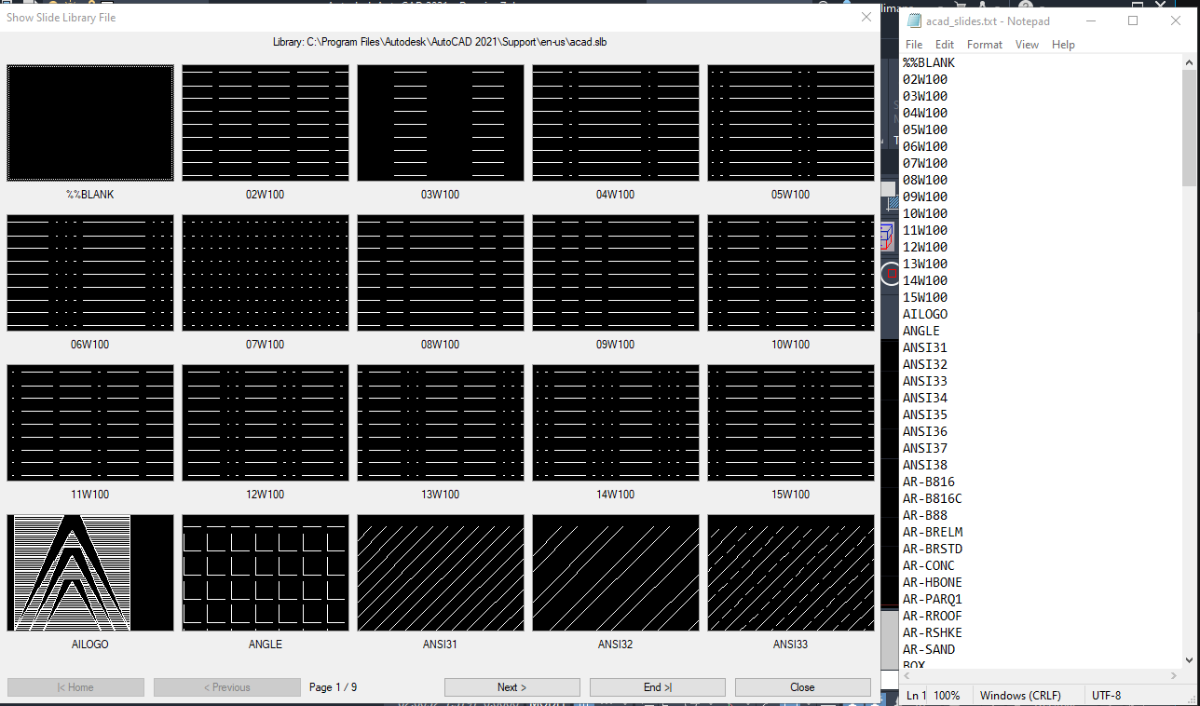
Attached is code SlbShow.lsp that ChatGpt help me generate which would run on AutoCAD on Windows OS. It'll first open a file window to select an existing slide library file like acad.slb Then run a vbscript to extract the names of the slides inside the selected slide library and place this into a text file. Next, the slides inside the selected slide library will be displayed in a custom dcl made up of a row of 4 x 5 column image buttons. Finally, when an Image button is clicked another window appears showing the slide in a larger image button view. I would like to know when vbscript or wscript is restricted does the code handle this and exit properly. Any other feedback is welcome. SlbShow.lsp
- 1 reply
-
- 2
-
-

- Last week
-
I made this to run on our CNC profiles. It would always throw a tool path error if the polyline had corners the tool couldn't fit into. Because our profiles where generated from a laser outline and then cleaned by hand. A lot of the poly segments were very small and tedious to fix. using poly fillet would update all vertex and fillets to the radius you set. so if your profile had a larger radi it would create big wings. (see example) This only fillets if the radi is smaller then the tool dia or if two joined line segments can run fillet command. creates an old red outline poly on check layer to compare against. leans heavily on vlax-curve visual lisp functions. I think this took me about 2 week on and off to write up. updating the one profile could take 10 mins to multiped hours to fix manually. switching between AutoCAD and the CNC software to see if it would throw an error or finally pass. I think it became obsolete with the update to the CNC software. example.dwg PolySmooth.lsp
-
 Luke P joined the community
 -
Hi all, I am in the early stages of developing (vibe coding) something I have been thinking about for a minute: a videogame where you CAD. It's called CADcade and I've got a whole vision for it and everything. Right now it's just some beginner lessons, a sandbox mode, and an arcade mode with 36 drafting challenges of varying difficulties. It runs in your computer browser, and one of the goals is to help students and beginners learn the basics of navigating CAD products and spatial thinking for free online. This is kind of a demo of it that I would like to get feedback on (not selling or monetizing anything). I just wanted to share it here and see what you guys think. How does it feel? Ai slop? Not enough commands? Dumb concept? Every reply helps. cadcade.net Thank you!
-
Inspired by SWL210 tonight... An update to this one.... it is a bit more complex then just grabbing an entity or entering a text value... Went down the grread route which gave the results I want. Command is (entortext "Message" '(List 1) '(List 2) ) Message: Text message such as "Enter a value, or select some text" '(List 1) - Control characters to end the selection process in ASCII codes: 13 = Enter, 32 = Space ('List 2) - Text Control for selections: "A" - Alphabetical characters only (a, A - z, Z) as text entry or any text entity selection "N" - Numerical Characters only (1-9 .) as text entry, or pure numerical text entity selection "P" - Punctuation characters (< > , . / ?.....) as "A" but text is only punctuation "M" - Mathematical modifiers (+ - / *.....) as "A" but text is only numerical modifiers (I should change this t be the same as "N") "E" - any entity is selectable. Without E is selection is text only List 2 can be joined eg '("A" "M" "N" "P") to select any text (also '("N" "P") works and enter any text Special option: If 'N' is used only numerical text is selectable, 'A' will allow any text entity to be selectable. Combined also works for selecting any text (but only entering A-Z, 1-9 here no punctuation) For example "Select an entity or 'O' for Options") '(79 111) '("E") Note: Distinguishes between cases.... Note here 'O' for options, for example, excludes that as part of a text string to be returned - selection is ended on 'O' There are examples, entorent, entorstring, entorvalue to look at in there. Returns: If text is entered: '("text", ASCII of enter method (13, 32..), nil) If Entity is selected: '(<entity name>, point selected, insert point of selection If Escape pressed: ("Lucky escape" 27 nil) - escape is captured and returned to the calling function - handy if selecting in a while loop If that makes sense, have a play. Oh, and an easter egg for you which might or might not work... ;;;;;;;;;;;;;;;;;;;;;;;;;;;;;;; (defun EntorCommand (/ *error* RunLispCommand RunNativeCommand MyCommand LispCheck Result ErrorMessage CommandStatus ) (defun *error* (Msg) (if (> (getvar "CMDACTIVE") 0) (command) ) ; ;; Cancel any native command still running. (cond ((null Msg) (princ "\nCommand ended with error.")) ((wcmatch (strcase Msg) "*BREAK*,*CANCEL*,*EXIT*" ) (princ "\nCommand cancelled.") ) (t (princ (strcat "\nCommand error: " Msg ))) ) ; End Cond (princ) ) ; End Defun *error* (defun RunLispCommand (LispFunction /) (apply LispFunction nil) ) ; End Defun RunLispCommand (defun RunNativeCommand (CommandName /) (command CommandName) (while (> (getvar "CMDACTIVE") 0) (command pause) ) ; End While ) ; End Defun RunNativeCommand (setq MyCommand (strcase (getstring "\nPausing Text Selection.\n(Command Line to) Enter Command: " ))) (setq LispCheck (vl-catch-all-apply 'eval (list (read (strcat "C:" MyCommand) )))) (if (and LispCheck (not (vl-catch-all-error-p LispCheck)) ) ; end and (progn ; LISP (setq Result (vl-catch-all-apply 'RunLispCommand (list (read (strcat "C:" MyCommand))))) (if (vl-catch-all-error-p Result) (progn ; LISP Error (setq ErrorMessage (vl-catch-all-error-message Result)) (if (wcmatch (strcase ErrorMessage) "*BREAK*,*CANCEL*,*EXIT*,*ABORT*" ) (princ (strcat "\nLISP command " MyCommand " cancelled: " ErrorMessage )) (princ (strcat "\nLISP Command " MyCommand " ended with an error: " ErrorMessage )) ) ; End If ) ; End Progn (progn ; LISP Completed (setq CommandStatus "completed") ) ; End Progn ) ; End If ) ; End Progn (progn ; Native AutoCAD Command (setq Result (vl-catch-all-apply 'RunNativeCommand (list MyCommand) )) (if (vl-catch-all-error-p Result) (progn ; Native Command Error (setq ErrorMessage (vl-catch-all-error-message Result)) (if (> (getvar "CMDACTIVE") 0) (command) ) ; Ends command if running (if (wcmatch (strcase ErrorMessage) "*BREAK*,*CANCEL*,*EXIT*,*ABORT*") (princ (strcat "\nCommand " MyCommand " cancelled: " ErrorMessage )) (princ (strcat "\nCommand " MyCommand " ended with an error: " ErrorMessage )) ) ; End If ) ; End Progn (progn ; Native Command Completed (setq CommandStatus "completed") ) ; End Progn ) ; End If ) ; End Progn ) ; End If (princ "\nEnded Command") (princ) ) ; End Defun ;;;;;;;;;;;;;;;;;;;;;;;;;;;;;;;;;;;;;;;;;;;;;;;;;;;;;;;;;;;; ;;;;;;;;;;;;;;;;;;;;;;;;;;;;;;;;;;;;;;;;;;;;;;;;;;;;;;;;;;;; ;;Ent Or Text options: ;;msg: Message to user ;;EndString: ASCII character code List '(13 32....) that will end the selection process. Note: add upper and lower cases ;;TextTypes: A list of letters to accept A: Alphabet, E: Entities, M: Mathematical symbols, N: Numbers, P: Punctuation symbols (defun EntOrEnt (msg EndString / TextTypes)(EntorText msg EndString '("E"))) ; entities only ; Equivalent to EntSel + Escape! (defun EntOrStr (msg EndString / TextTypes)(EntorText msg EndString '("N" "M" "A" "P" "E"))) (defun EntOrVal (msg EndString / TextTypes)(EntorText msg EndString '("N" "M" "E"))) (defun EntorText ( msg EndString TextTypes / MyTextType EndLoop grsel sela sel MyEnt MyValue MyCharacters MyCommand enta entb pt lw MyList MyTextString EscapeCode NestedSelection) (setq EscapeCode nil) (if (= (type EndString) 'LIST) (progn) (setq EndString (list 13 32)) ;; 13: Enter, 32: Space ('T' in getstring) ) ; End String (if (= (type msg) 'Str) (princ msg) (princ (setq msg "Select or enter text: ")) ) (if (= (type TextTypes) 'LIST) (progn) (setq TextTypes (list "A" "N" "P" "M")) ;; A: Alphabet, N: Numerical, P: Punctuation, M: Mathemtatical ) ; End String ;;Starting values (setq MyValue "") (setq MyEnt (list)) (setq EndLoop "No") (setq MyCommand 0) (setq MyTextType nil) (if (or (member "N" TextTypes)(member "n" TextTypes)) (setq MyTextType (strcat (if (= MyTextType nil) "" MyTextType) "1234567890.,"))) ; Numerical (if (or (member "A" TextTypes)(member "a" TextTypes)) (setq MyTextType (strcat (if (= MyTextType nil) "" MyTextType) "ABCDEFGHIJKLMNOPQRSTUVWXYZ"))) ; Alphabet (if (or (member "P" TextTypes)(member "p" TextTypes)) (setq MyTextType (strcat (if (= MyTextType nil) "" MyTextType) "`#`~`@\\|<`,>`.`?/¬``!\"£$%^&`*()`-_="))) ; Punctuation (if (or (member "M" TextTypes)(member "m" TextTypes)) (setq MyTextType (strcat (if (= MyTextType nil) "" MyTextType) "=/+-`*`.`,"))) ; Maths Functions (if (or (member "E" TextTypes)(member "e" TextTypes)) (setq MyTextType (strcat (if (= MyTextType nil) "" MyTextType) ""))) ; Entity (implied in code if not listed) (if (= MyTextType nil)(setq MyTextType "1234567890ABCDEFGHIJKLMNOPQRSTUVWXYZ")) ;;Loop for grread function (while (= EndLoop "No") (setq grsel (vl-catch-all-apply 'grread '(nil 13 2))) ; catch errors (escape key) (if (vl-catch-all-error-p grsel) ;; escape pressed, end loop (progn (setq EndLoop "Yes") (princ (strcat "\n" (setq MyValue "Lucky escape"))) (setq escapecode 27) (setq MyEnt nil) (if lw (redraw lw 4) ) ) ;end progn escape pressed (progn (setq sela (car grsel)) (if (= sela 5) ; Highlight on hover (progn (if lw (redraw lw 4) ) ;Remove any highlight (if (and (setq pt (cadr grsel) ) (setq lw (ssget pt)) (setq lw (ssname lw 0)) ) ; end and (redraw lw 3) ) ; end if ) ; end progn ) ; end if (if (or (= sela 2)(= sela 3) ) ; text entry or mouse click (progn (setq sel (nth 1 grsel)) (if (= (type sel) 'LIST) (progn (setq MyList '("TEXT" "MTEXT" "RTEXT" "ATTRIB" "ATTDEF" "DIMENSION" "INSERT")) ; list of entity types allowed to select (if (or (member "E" TextTypes)(member "e" TextTypes)) (setq MyList (append MyList (list "LINE" "POLYLINE" "3DPOLYLINE" "LWPOLYLINE" "MLINE" "SPLINE" "POLYGON" "MPOLYGON" "VIEWPORT" "WIPEOUT" "ELLIPSE" "CIRCLE" "ARC" "POINT" "HATCH" "SURFACE" "SOLID3D" "SHAPE" "FACE" "3DFACE" "SOLID" "3DSOLID" "TRACE" "RAY" "XLINE" "RASTER" "XREF" ))) ) ;;SP TO complete this list with: ;;ACAD_PROXY_ENTITY, BODY, HELIX, IMAGE, LEADER LIGHT, MULTILEADER, MLEADERSTYLE, ;;OLEFRAME, OLE2FRAME, REGION, SECTION, SEQEND, SHAPE, SUN, TABLE, TOLERANCE,UNDERLAY, VERTEX, (setq MyEnt (nentselp sel)) (cond ((or (= nil MyEnt) (= (member (cdr (assoc 0 (entget(car MyEnt)))) MyList) nil) ) ; Endor (progn (Princ "\nMissed! Try again.\n")(princ msg) ;; or add in here 'ssget' (setq MyEnt nil) ) ) ( T ;; Text selected (if (equal TextTypes '("E"))(princ ": Ahh, you selected a thing")(princ ": Fantastic selecting ability.")) ;;Check if numerical only selection (if (or (equal TextTypes '("N")) (equal TextTypes '("n")) ) ; endor (progn (setq entb (last (last (nentselp (last grsel))))); grsel point value (if (and (/= entb nil) (/= (type entb) 'real)) (if (wcmatch (cdr (assoc 0 (entget entb))) "ACAD_TABLE,*DIMENSION,*LEADER")(setq MyEnt (list entb (last grsel)))) (progn) ) (setq MyTextString (cdr (assoc 1 (entget (car MyEnt)))) ) (setq mytextString (LM:Unformat MytextString nil)) ; Unformat string (if (or (wcmatch (strcat MyTextString) "*[~1234567890`.`,]*") (and (vl-string-search "." MyTextString) (vl-string-search "." MyTextString (+ (vl-string-search "." MyTextString) 1)) ) ; end and ) ; endor (progn (princ (strcat " However, selection is not numerical,\n" Msg ", or [esc]: ")) (setq MyEnt nil) ) ; end progn (progn (setq EndLoop "Yes") ) ) ; end if number check ) ; end progn numerical (progn (setq EndLoop "Yes") ) ; end progn ) ; end if ) ; end cond T ) ; end conds (if lw (redraw lw 4)) ; remember to (redraw xyz 3) in originating code to keep highlight (setq sel nil) ) ; end progn ; selection is list (progn (setq MyCharacters (list 137)) ; list of single characters to accept (if (member 32 Endstring)(progn)(setq MyCharacters (cons 32 MyCharacters))) ; add [space] if 't' (if (or ;;limit characters able to able to be used ;; remove escape keys later (wcmatch MyTextType (strcat "*" (strcase (chr sel)) "*"));; Strcase to include caps (= sel 92) ; '\' character for commands (member sel MyCharacters) ) ; endor (progn (if (= sel 92) ;; If double '\\' enter commands - check if '\' entered (progn (setq MyCommand (+ MyCommand 1)) (if (= MyCommand 2) (progn (princ (chr 8)) ; remove last '\' from command line (setq MyValue (vl-string-right-trim (chr 92) MyValue)) ; remove '\' from result (EntorCommand) (setq MyCommand 0) (setq sel nil) (princ "\nResume Text Selection.\n")(princ MSG)(if MyValue (princ MyValue)) ) ; end progn command = 2 (progn (if (member sel EndString) ;; remove escape keys from MyValue (progn) (progn (princ (chr sel)) (setq MyValue (strcat MyValue (chr sel) )) ) ; end progn ) ; end if ) ; end progn ) ; end if ) ; end progn (progn (setq MyCommand 0) (if (member sel EndString) ;; remove escape keys from MyValue (progn) (progn (princ (chr sel)) (setq MyValue (strcat MyValue (chr sel) )) ) ; end progn ) ; end if ) ; end progn ) ; end if ) ) (if (member sel EndString) ; enter (progn (setq EndLoop "Yes") (setq EscapeCode sel) ) ; end progn (progn ) ) ; end if (if (= sel 8) ; backspace (progn (if (> (strlen MyValue) 0) (progn (setq MyValue (substr MyValue 1 (- (strlen MyValue) 1))) (princ (chr sel)) ) ; end progn ) ; end if ) ; end progn (progn ) ) ; end if ) ; end progn ) ; end if list ) ; end progn ) ; end if text / mouse entry ) ; end progn ) ; end if catch-all-error ) ; end while (if (or ( = (length MyEnt) 0)(= MyEnt nil)) ;; if no entity selected.. text entry (progn ;; If text is entered ) ; end progn (progn (setq enta (car MyEnt)) (setq pt (cdr (assoc 10 (entget enta))) ) (setq entb (last (last (nentselp pt)))) ;; use sel? ;; nested entities (if (and (/= entb nil) (/= (type entb) 'real) (wcmatch (cdr (assoc 0 (entget entb))) "ACAD_TABLE,*DIMENSION,*LEADER") ) ; end and (setq MyValue entb) ; If entity is DIM, Table, Leader (setq MyValue enta) ; ELse entity ) ; end if ) ; end progn ) ; end if ;;Result - '(MyValue Pt) ;;'Ended ##' : An escape character code if entered ;;'Lucky Escape' : Escape key pressed ;;<Entity name: ##> : The selected entity ;;Other character : Entered Characters ;;(cadr grsel) - mouse point ;;pt - entity insert point (assoc 10) (if EscapeCode (setq MyValue (list MyValue EscapeCode nil)) (setq MyValue (list MyValue (cadr grsel) pt)) ) MyValue ) Al Still thinks this is a native command "EntOrText" by the way...