All Activity
- Past hour
-
Did you contact CADS RC about adding your own lisp programs I would do that as the first step in getting answers. There is some comments in the programming guide about add other lisps. Have you just tried running a lisp by pasting to the command line. (alert (strcat "this dwg name is " (getvar 'dwgname) " and is located at " (getvar 'dwgprefix))) Are you sure its a OEM version of Autocad ? If you type "About" what does it show. Talk to your IT the time savings can be hours a week using lisps, only use LSP files not FAS or VLX. A lsp file is a text file so you can see the code and look for anything that might be dangerous, like vl-file-delete, or only trust people like those here. You can get IT to check any code then add to your company directory location. This has like 130 lisps behind it.

-
if I read the manual provided by the link from SLW210 you should be able to create and (App)load your own lisp file with your own custom shortcuts (defun c:xx...). Lisp programming interface guide 2.1 Procedure to draw the reinforcement: 1. First draw the outlines with the required dimension. 2. Create a lisp file called demo.lsp in C:\ 3. Copy and paste the code mentioned below to the demo.lsp 4. Save it and close. 5. In AutoCAD use the Appload command to load the demo.lsp 6. Type Demo in the command prompt. It will ask you to pick the Lower Left corner of the base and the upper right corner of the base. Pick points p1 & p2 as mentioned in the drawing. 7. Specify the Cover and Centre to centre spacing. 8. You can see the reinforcement drawn on the screen. 9. Repeat step 6 & 7 for different footing outlines. But I'm just guessing here... never heard of this program so can't really tell. In the old days I smuggled my lisp routines in by creating a *.mnl file so my routines were loaded along with the menu (despite many efforts of a certain human who's name can't be spoken trying to stop users (specifically me) from being able to do their own stuff). Now many years later he admits dragons are very difficult if not impossible to stop (haha). Another way is starting AutoCad with your own custom profile by creating your own desktop shortcut (Google is your friend)
- Today
-
 idudodomu joined the community
 -

Dimangular-Vertex Macro Error
pkenewell replied to zaphod's topic in The CUI, Hatches, Linetypes, Scripts & Macros
LOL @zaphod - your username wouldn't be a reference to "Zaphod Beeblebrox" would it? Sorry i didn't answer you're OG question - just a Douglas Adams nerd haha. Seriously, I think the problem is the second point must be in a clockwise direction from the first line, meaning if you select an area in the first quadrant you are in a counter-clockwise rotation, and it will give you the obtuse side of the circle instead of the inside angle. For doing an angle from 0-90deg, you would need to start at 0,0;1,0 instead. -
 Juan B Once joined the community
 -

Dimangular-Vertex Macro Error
zaphod replied to zaphod's topic in The CUI, Hatches, Linetypes, Scripts & Macros
I did find a lisp on the Autodesk forums that will work for what I need, but I was really trying to get the macro to work. https://forums.autodesk.com/t5/visual-lisp-autolisp-and-general/command-for-multiple-angle-dims-picking-vertex-and-start-point/m-p/9637278 -

Penn Foster AutoCAD Applications-Construction assistance (Residential House Project)
TimC replied to TimC's topic in Student Project Questions
no they're not in pdf. Its website based -

Pathfinding in AutoCAD with the A-Star Algorithm (A*)
GLAVCVS replied to heschr's topic in AutoLISP, Visual LISP & DCL
-

Bolted Connections and Bracings SolidWorks Structure System
gabriele_biag posted a topic in SolidWorks
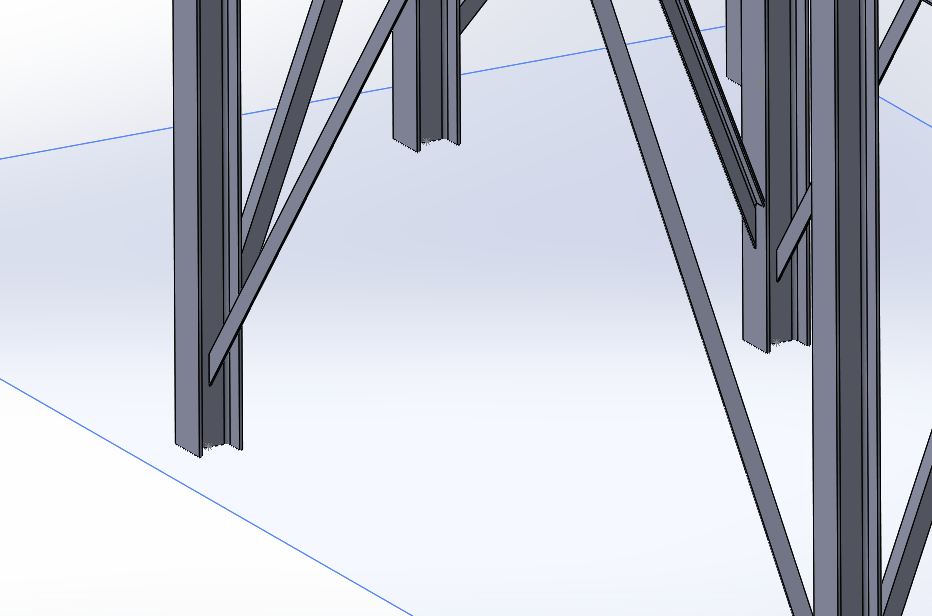
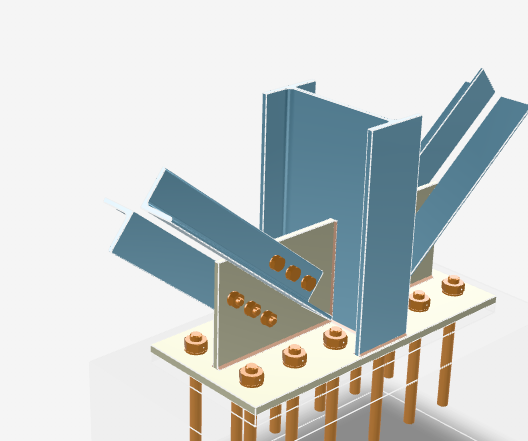
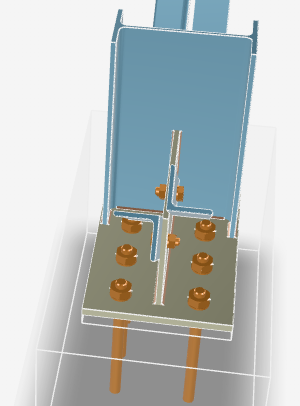
Hi everyone, I’ve recently started working with SolidWorks. After watching many tutorials I’ve begun to get familiar with the software, but I would like to ask for some advice regarding the Structure System module, as I couldn’t find online resources that cover my specific case. I need to model a steel frame structure. I managed to create a first general layout, but now that I have to add the bracing members and the related bolted connections, I’m starting to struggle. I understand how Connection Elements work, but what I need to achieve in my case seems difficult (or impossible) with the tools I currently know, so I’m here to ask for some guidance. This is the preliminary model I created (I don’t have access to the SolidSteel Parametric add-in). The type of connection I need to create is similar to the one shown in the image below. My main issue is with the bracing members: I can’t figure out how to insert them in order to obtain a double L-angle geometry (two angle profiles working together instead of a single profile). Using the Structure System, I can only insert one member at a time and I can’t find a proper way to manage this configuration. Since I’m also new to structural connections in general, I would really appreciate it if you could point me to: technical documentation or reference manuals guides, courses, or YouTube channels (English is fine) about steel structures and bolted connections SolidWorks-specific resources or best practices to learn proper structural modeling workflows Any advice, alternative approaches, or references would be extremely helpful. Thanks in advance to anyone willing to help!
-
gabriele_biag joined the community
-
I do not see anything specific stating the Lite version can do LISP. But, just in case, here is the manual for regular CADS RC. https://rebarcad.com/wp-content/uploads/2025/09/Lisp_Programming_Interface_Guide.pdf I also moved your thread to a new topic Use LISP with CADS RC Lite in AutoLISP, Visual LISP & DCL Forum
-
You should use the System Variable Monitor (SYSVARMONITOR), I also set my SYSVAR in my ACADDOC.lsp. You can export then import your settings and profiles before a Reset to Defaults, some things should be in your templates anyway, that would stay the same. So no, it is not a 'nuclear' option, that would be a complete removal and reinstall, and even then, you can restore a profile, settings, etc. and have proper templates.
-
 ECE joined the community
 -
Resetting to default definitely works as a 'nuclear' option, but for anyone else finding this thread who doesn't want to lose their UI setup, definitely check PICKFIRST and PICKADD first. If those variables get flipped to 0 by a glitch or a rogue LISP routine, it causes exactly this behavior where the Properties palette won't 'see' your selection.
-
Thanks Bigal for the info , I have CADS-RC lite program i have seen that the product has the access of using lisps and parameter files but i couldn't have any idea to add those packages in this product.
-

Pathfinding in AutoCAD with the A-Star Algorithm (A*)
ymg3 replied to heschr's topic in AutoLISP, Visual LISP & DCL
I implemented astar using a heap instead of the dictionnary proposed by @GLAVCVS. Safearray is used to simulate the heap. Was done with prompt in Google AI. Results the heap is faster specially if the graph is bigger. ;; ; ;; c:A* by ymg ; ;; Astar implemented with a Heap instead of a dictionnary ; ;; Edges of the Graph are drawn on layer identified by Golbal #Edgeslay ; ;; ; ;; Edges can be lines, lpolylines or 3dpolylines ; ;; You select Start and End points. Shortest is then found and drawn as a ; ;; 3D Polylines on layer, color and lineweight chosen via Global vars ; ;; found at beginning of this routine ; ;; ; ;; Heap has a faster running time than the dictionnary and list approach ; ;; as the size of the graph grows. ; ;; ; (defun c:A* (/ ss graph openH gScore cameFrom found cur curPt curK sNode sKey neighbor nKey t_g val oldG oldCF Startp Endp d minD en param endpar p1 p2 path k link pt i ti) (vl-load-com) (or #acdoc (setq #acdoc (vla-get-activedocument (vlax-get-acad-object)))) (set_errhandler '("CLAYER" "OSMODE" "CMDECHO" "DIMZIN")) (setvar 'CMDECHO 0) (setvar 'OSMODE 1) (setq #Edgelay "Edges" #Pathlay "Path" #Pathcol 1 #Pathlwt 70 #Hptr 0 ) ;; Selecting set of entities defining edges of graph. (if (not (setq ss (ssget "X" (list '(0 . "LINE,LWPOLYLINE,POLYLINE") (cons 8 #Edgelay))))) (progn (alert (strcat "\nError: No entities found on layer " #Edgelay)) (exit) ) ) ;; Geting Start and End points. (Use snap to endpoint) (setq Startp (getpoint "\nPick Start Point: ")) (setq Endp (getpoint "\nPick End Point: ")) (vla-startundomark #acdoc) (setq ti (getvar 'MILLISECS)) ;Timer for execution time ; Building Graph... (setq graph nil i 0) (repeat (sslength ss) (setq en (ssname ss i) param 0 endpar (vlax-curve-getEndParam en) i (1+ i) ) (while (< param endpar) (setq p1 (vlax-curve-getPointAtParam en param) p2 (vlax-curve-getPointAtParam en (setq param (1+ param))) k1 (pt->key p1) k2 (pt->key p2) graph (update-g graph k1 p1 p2) graph (update-g graph k2 p2 p1) ) ) ) (setq minD 1.7e308) ; Initialize to infinity (foreach entry graph (if (< (setq d (distance (cadr entry) Startp)) minD) (setq minD d sNode entry) ) ) (setq sKey (car sNode) openH (heap:new (length graph)) gScore (list (cons sKey 0.0)) cameFrom nil found nil ) (heap:push openH (distance (cadr sNode) Endp) (cadr sNode)) (princ (strcat "\n Graph Size: " (itoa (length graph)) " nodes")) (princ (strcat "\n Graph Building Time: " (itoa (setq gbti (- (getvar 'MILLISECS) ti))) " ms.")) ;Start of Pathfinding... (while (and (> #Hptr 0) (not found)) (setq cur (heap:pop openH) curPt (cdr cur) curK (pt->key curPt) ) (if (< (distance curPt Endp) 0.1) (setq found T) (foreach neighbor (cddr (assoc curK graph)) (setq nKey (pt->key neighbor) val (assoc curK gScore) t_g (+ (cdr val) (distance curPt neighbor)) ) (if (or (null (setq oldG (assoc nKey gScore))) (< t_g (cdr oldG))) (progn (if oldG (setq gScore (vl-remove oldG gScore))) (setq gScore (cons (cons nKey t_g) gScore)) (if (setq oldCF (assoc nKey cameFrom)) (setq cameFrom (subst (cons nKey curPt) oldCF cameFrom)) (setq cameFrom (cons (cons nKey curPt) cameFrom)) ) (heap:push openH (+ t_g (distance neighbor Endp)) neighbor) ) ) ) ) ) ;; Result Handling (if found (progn (setq path (list curPt) k curK ) (while (setq link (assoc k cameFrom)) (setq pt (cdr link) k (pt->key pt) path (cons pt path) ) ) (mk_3dp path) ) (princ "\nNo path found.") ) (vla-endundomark #acdoc) (setq totaltime (- (getvar 'MILLISECS) ti)) (princ (strcat "\n Pathfinding Time: " (itoa (- totaltime gbti)) " ms.")) (princ (strcat "\nTotal Execution time: " (itoa totaltime) " ms.")) (*error* nil) ) ;; ; ;; ERROR HANDLING & SYSTEM UTILITIES ; ;; ; ;; ; ;; set_errhandler by Elpanov Evgenyi ; ;; Captures system variable states into global #varl. ; ;; Argument 'l': List of strings naming system variables. ; ;; ; (defun set_errhandler (l) (setq #varl (mapcar (function (lambda (a) (list 'setvar a (getvar a)))) l)) ) ;; ; ;; *error* by Elpanov Evgenyi ; ;; Redefines the *error* function and display an error message. ; ;; Restores system variables and handles exit messages. ; ;; ; (defun *error* (msg) (mapcar 'eval #varl) (if (and msg (not (wcmatch (strcase msg) "*BREAK*,*CANCEL*,*EXIT*"))) (princ (strcat "\nError: " msg)) ) (princ) ) ;; ; ;; Heap Abstraction Utilities Using Safearray ; ;; ; ;; ; ;; heap:new ; ;; ; ;; Initializes a Variant Safearray as a Minimum-Heap and set the Heap pointer ; ;; Global Var #Hptr to 0 ; ;; ; ;; Argument: size, Total capacity for the Heap. ; ;; ; ;; Return : Safearray Object ; ;; ; (defun heap:new (size) (setq #Hptr 0) (vlax-make-safearray vlax-vbVariant (cons 0 (max 1 (1- size))) '(0 . 1)) ) ;; ; ;; heap:get ; ;; ; ;; Fetch node data at given index in the heap ; ;; ; ;; Arguments: h, Heap name as a safearray object ; ;; idx, Index of the node ; ;; ; ;; Returns: A dotted pair, (Priority . Point) ; ;; ; (defun heap:get (h idx) (cons (vlax-variant-value (vlax-safearray-get-element h idx 0)) (vlax-safearray->list (vlax-variant-value (vlax-safearray-get-element h idx 1))) ) ) ;; ; ;; heap:set ; ;; ; ;; Writes priority and point into heap at index. ; ;; Arguments: h, heap name ; ;; i, index ; ;; prio, double ; ;; p, point. ; ;; ; (defun heap:set (h i prio p / arr) (setq arr (vlax-make-safearray vlax-vbDouble '(0 . 2))) (vlax-safearray-fill arr (mapcar 'float p)) (vlax-safearray-put-element h i 0 (vlax-make-variant prio vlax-vbDouble)) (vlax-safearray-put-element h i 1 arr) ) ;; ; ;; heap:swap ; ;; ; ;; Swaps two elements the heap ; ;; ; ;; Arguments: h, heap name ; ;; i, index of first element ; ;; j, index of second element ; ;; ; (defun heap:swap (h i j / tp tv) (setq tp (vlax-safearray-get-element h i 0) tv (vlax-safearray-get-element h i 1) ) (vlax-safearray-put-element h i 0 (vlax-safearray-get-element h j 0)) (vlax-safearray-put-element h i 1 (vlax-safearray-get-element h j 1)) (vlax-safearray-put-element h j 0 tp) (vlax-safearray-put-element h j 1 tv) ) ;; ; ;; heap:push ; ;; Adds a node, re-sorts heap via sift-up and adjust the heap pointer ; ;; ; ;; Arguments: h, heap name ; ;; prio, priority ; ;; pt, point ; ;; ; ;; Returns: Value of heap pointer ; ;; ; (defun heap:push (h prio pt / i p) (heap:set h #Hptr prio pt) (setq i #Hptr) (while (and (> i 0) (< prio (car (heap:get h (setq p (/ (1- i) 2)))))) (heap:swap h i p) (setq i p) ) (setq #Hptr (1+ #Hptr)) ) ;; ; ;; heap:pop ; ;; ; ;; Removes root node, re-sorts the heap by sift-down updates #Hptr ; ;; ; ;; Argument: h, heap name ; ;; ; ;; Return: root node as dotted pair (Priority . Point) ; ;; ; (defun heap:pop (h / root size i l r s i-prio l-prio r-prio) (if (> #Hptr 0) (progn (setq root (heap:get h 0) #Hptr (1- #Hptr)) (if (> #Hptr 0) (progn (heap:swap h 0 #Hptr) (setq i 0 size #Hptr) (while (< (setq l (1+ (* i 2))) size) (setq r (1+ l) ;; Get priorities once to avoid redundant safearray lookups i-prio (vlax-variant-value (vlax-safearray-get-element h i 0)) l-prio (vlax-variant-value (vlax-safearray-get-element h l 0)) s l ) ;; Check if right child exists and is smaller than left (if (and (< r size) (< (setq r-prio (vlax-variant-value (vlax-safearray-get-element h r 0))) l-prio)) (setq s r l-prio r-prio)) ;; Update smallest index and priority ;; If smallest child is smaller than current, swap (if (< l-prio i-prio) (progn (heap:swap h i s) (setq i s)) (setq i size)) ;; Else, heap property restored ) ) ) root ) ) ) ;; ; ;; GRAPH & DRAWING UTILITIES ; ;; ; ;; ; ;; pt->key ; ;; Converts 3D point to a string key "X,Y,Z". ; ;; Argument 'p': 3D point list. ; ;; ; (defun pt->key (p) (strcat (rtos (car p) 2 2) "," (rtos (cadr p) 2 2) "," (rtos (caddr p) 2 2))) ;; ; ;; update-g ; ;; Links nodes in graph association list. ; ;; ; ;; Arguments: g, graph list ; ;; k, key ; ;; p, point ; ;; n, neighbor. ; ; ;; ; (defun update-g (g k p n / ex) (if (setq ex (assoc k g)) (subst (append ex (list n)) ex g) (cons (list k p n) g) ) ) ;; ; ;; mk_3dp by Alan J Thompson ; ;; ; ;; Entmakes a 3D Polyline. Global Vars #Pathlay, #Pathcol and #Pathlwt have ; ;; to be set in calling program. ; ;; ; ;; Argument: lst, List of 3D points. ; ;; ; ;; Returns: Entity Name of Polyline ; ;; ; (defun mk_3dp (lst / vtx) (if (and lst (> (length lst) 1)) (progn (entmakex (list '(0 . "POLYLINE") '(10 0. 0. 0.) (cons 8 #Pathlay) (cons 62 #Pathcol) (cons 370 #Pathlwt) '(70 . 8) ) ) (foreach vtx lst (entmakex (list '(0 . "VERTEX") (cons 10 vtx) '(70 . 32) ) ) ) (entmakex '((0 . "SEQEND"))) ) ) ) (princ "\nCommand A* loaded.") (princ) ;|«Visual LISP© Format Options» (150 3 1 2 nil "end of " 100 9 0 0 1 nil T nil T) ;*** DO NOT add text below the comment! ***|; Astar3dHeap.LSP - Yesterday
-

Penn Foster AutoCAD Applications-Construction assistance (Residential House Project)
ReMark replied to TimC's topic in Student Project Questions
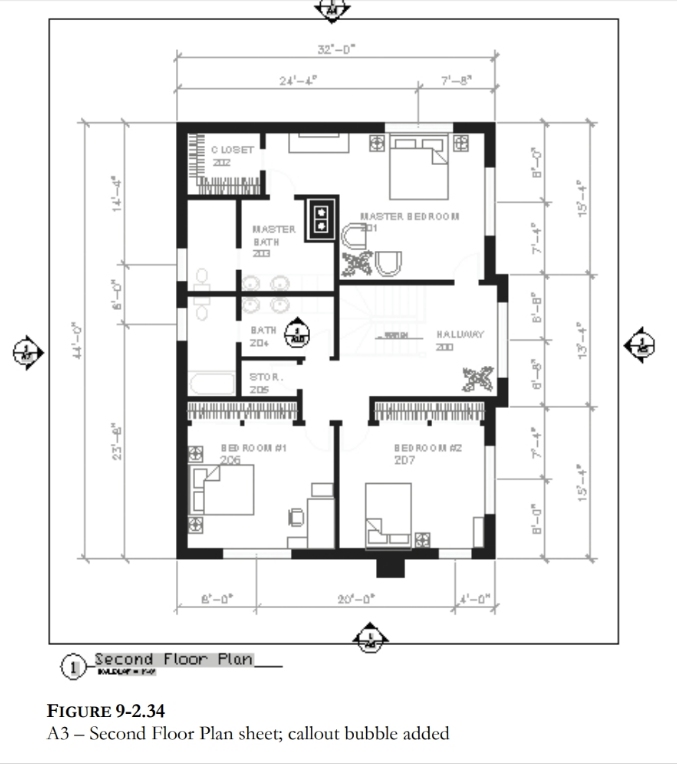
Are the project instructions in PDF file format? Looking back at the second-floor plan shown above wouldn't the "bubbles" be the circles with the arrowheads pointing in different directions. The top number, I believe, is the elevation number/letter while the bottom number would be the sheet number the elevation is shown on. -
Penn Foster AutoCAD Applications-Construction assistance (Residential House Project)
TimC replied to TimC's topic in Student Project Questions
Well, per the usual, lack of info. I have no idea what to put in the callouts or where because we weren't given the info. I wish I had a way to upload the project instructions so you guys could see how rediculous this is with the lack of information and in some cases, blatant wrong information -
 Omaer joined the community
 -
 loshie joined the community
 -
Please use Code Tags for your code in the future. (<> in the editor toolbar)
-
Re.. the point is to get AutoCAD to perform the Properties vertex highlight but I'm probably correct to say 'they wouldn't prefer. Just is a single click on the Properties/Vertex and up.it.pops. Such a minor benefit but would choose yes if asked. Here's one from the many [matrix..] that does help me. It's from MR Marko Ribar - with other updates.. https://forums.augi.com/showthread.php?125388-End-of-foreach-function But here's my mod of it. CHIV-StartPoint.lsp
- Last week
-
Penn Foster AutoCAD Applications-Construction assistance (Residential House Project)
ReMark replied to TimC's topic in Student Project Questions
Callout blocks on floor plans are specialized, often circular or bubble-shaped, graphical symbols used to highlight a specific area, detail, section, or elevation, indicating that more detailed information about that area can be found elsewhere in the drawing set. -
You can get all vertices step 1, Step 2 is enter vertice number place a "X" say as text on vertice. If wrong do again erasing existing "X". An example of get co-ords. (setq plent (entsel "\nPick lwpolyline 2D ")) (if plent (setq co-ord (mapcar 'cdr (vl-remove-if-not '(lambda (x) (= (car x) 10)) (entget (car plent)))))) (princ co-ord) If you have 3D poly's then use (setq obj (vlax-ename->vla-object (car (entsel "\nPick pline ")))) (setq co-ord (vlax-safearray->list (vlax-variant-value (vla-get-coordinates obj))))
-
no show/difference with a 'CONVERTPOLY Enter polyline conversion option [Heavy/Light] <Light>: h' 2d polyline..
-
'CurrentVertex' is not a property of "LWPOLYLINE" objects
-
Penn Foster AutoCAD Applications-Construction assistance (Residential House Project)
TimC replied to TimC's topic in Student Project Questions
I also don't know what they mean about callout blocks for elevation. I cant even read what the callout blocks say in their example with my readers on...lol
-
Penn Foster AutoCAD Applications-Construction assistance (Residential House Project)
TimC replied to TimC's topic in Student Project Questions
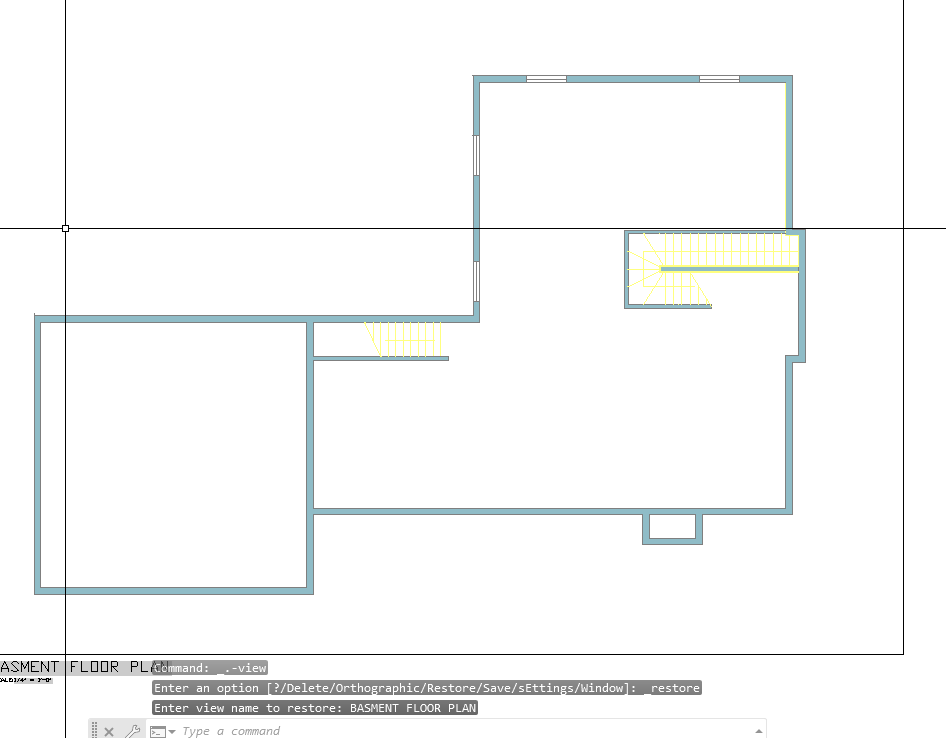
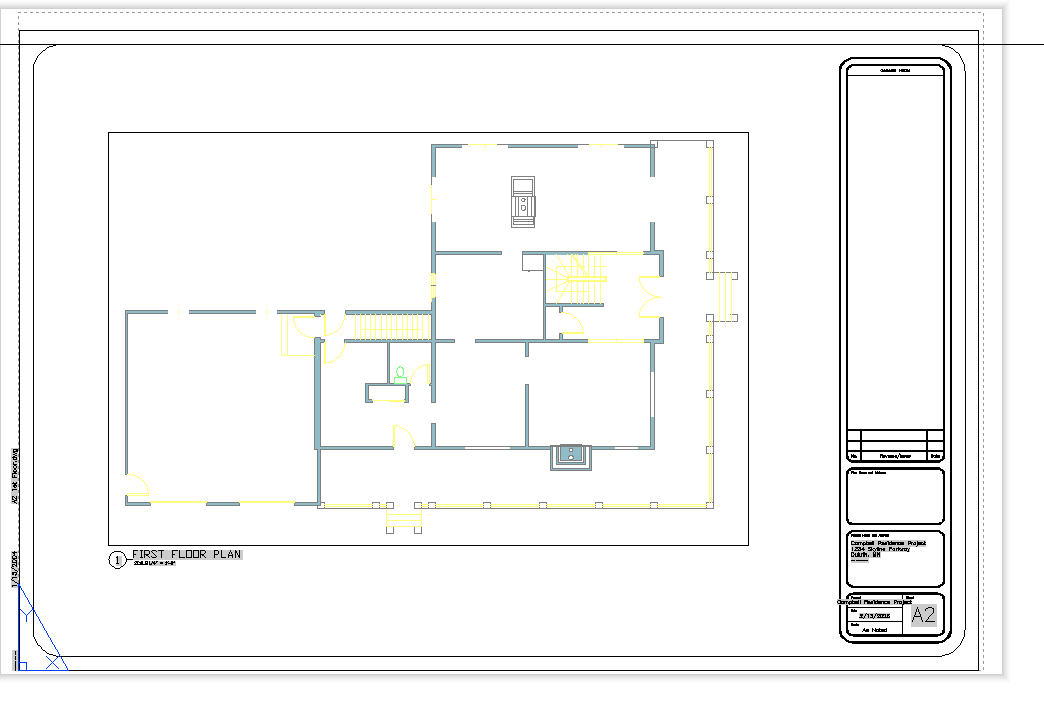
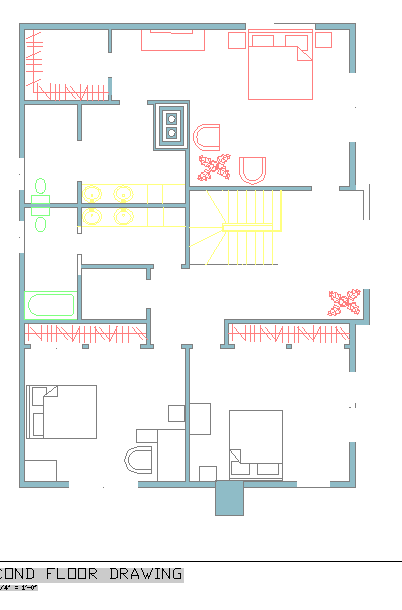
correct. Here's a few of the files. Right now I'm having an issue with missing dimensions and furniture blocks when I upload the drawings into sheets from model space. I made sure no layers were frozen, nothing is on def points, ran an audit....etc Flr-B.dwg Flr-1.dwg FLR-2.dwg Exterior Elevations corrected.dwg Site plan Alternate.dwg Wall Section.dwg Building section.dwg Stair Detail.dwg -
Alright, another Penn Foster student here. Big shocker there, I know. I put all my drawings from model space in to sheets but I lost all my dimensions and some of my furniture blocks. I double checked to be sure I didn't have any frozen layers, nothing is in def points, they're in correct layers, I ran an audit and it found and fixed 0 errors. I'm really new to all this auto cad stuff but apparently my work thinks I need it even though ill never use it. I'm not even ALOUD to have it on my computer at work...lol Any help would be greatly appreciated Flr-B.dwg Flr-1.dwg FLR-2.dwg
-
here's the AI reply to my question: "Activate Current Vertex 'X' marker: as if Clicking on the Current Vertex field on gis Properties, autolisp" here's the code and tried but my a2k might not be able.. can someone try this <short>Vertex.X.lsp? (defun c:Sv ( / ent obj vla-obj vertexNum) (vl-load-com) ;; 1. Select the polyline (setq ent (car (entsel "\nSelect Polyline: "))) (if (and ent (member (cdr (assoc 0 (entget ent))) '("LWPOLYLINE" "POLYLINE"))) (progn (setq vla-obj (vlax-ename->vla-object ent)) ;; 2. Ask for the vertex index (0-indexed) (setq vertexNum (getint "\nEnter vertex index (0 is first): ")) ;; 0) ;; <- my choice (if (and vertexNum (>= vertexNum 0)) (progn ;; 3. Set the CurrentVertex property (Activates the X marker) (vl-catch-all-apply 'vlax-put-property (list vla-obj 'CurrentVertex vertexNum)) ;; 4. Refresh to show the marker (vla-update vla-obj) (redraw) (princ (strcat "\nVertex " (itoa vertexNum) " activated.")) ) ) ) (princ "\nNot a valid polyline.") ) (princ) )
-
Penn Foster AutoCAD Applications-Construction assistance (Residential House Project)
ReMark replied to TimC's topic in Student Project Questions
What are you being asked to create? Since it is an architectural drawing I would say a floor plan, at least two elevations, a section and related details. Is that correct?