All Activity
- Past hour
-
First of all....I'm barely a noob with Revit. Learning via youtube. We use Autocad title blocks with zone Letters & Numbers. (A,B,C,D on sides, 1-8 [numbers] on the bottom and top) We are about to start our first Revit project. What is the recommendation if we want to use zones on all Revit sheets? Make it text and have to manually update each sheet? I didn't know if Labels can be made is such a way as to update per the sheet they are located on? please be gentle.... It's my first time..
-
 TarakMehata joined the community
 - Today
-
Since that is the case when plotted you will use a scale of 1:1 and it should plot just fine.
-
Add this code below '(command " rectangle"... ', load it, and try running the code again (if (not (tblsearch "block" roomName)) (command "_block" roomName (setq pt (list (min (car fc) (car fc)) (min (cadr fc) (cadr fc)))) (setq cj (ssadd (entlast))) "") (princ (strcat "\n" roomName " already exist...")) ) (command "_.insert" roomName pt "" "" "")
- 1 reply
-
- 1
-

-
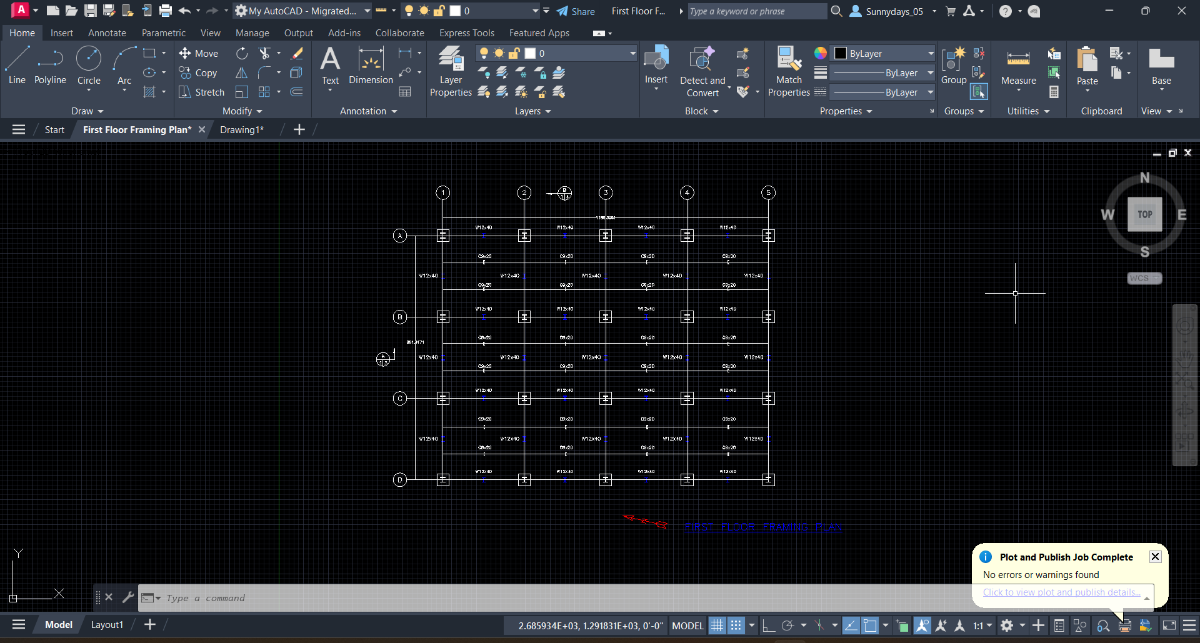
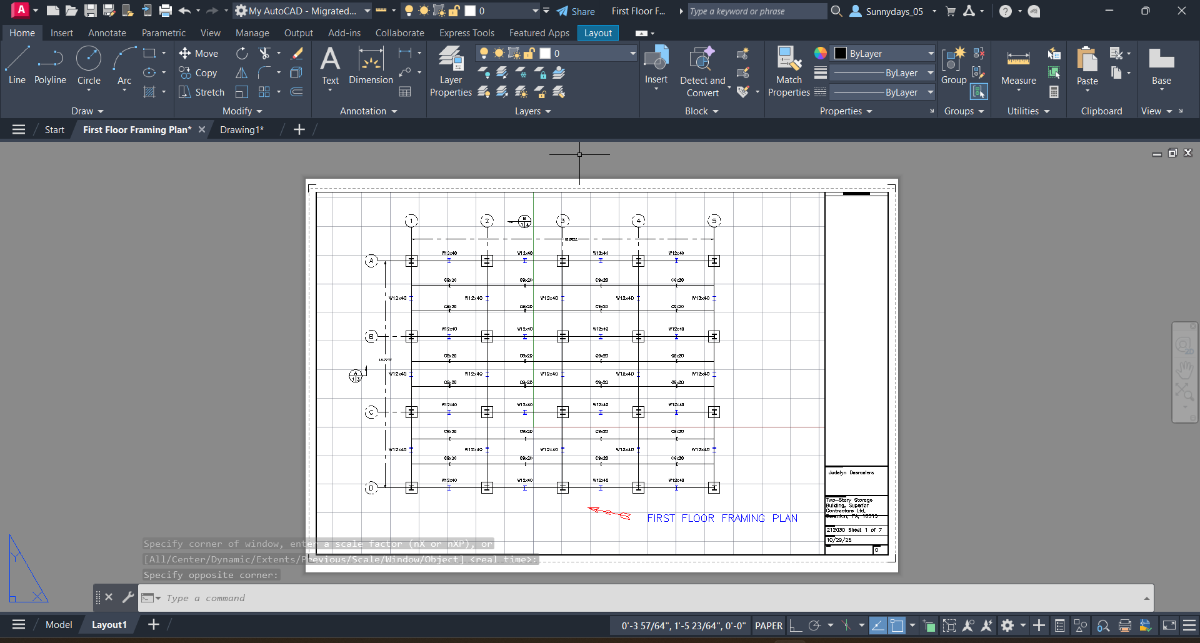
The title block and border are drawn in the layout tab
-

Perform an OUTSIDE offset for several rectangles
GLAVCVS replied to Nikon's topic in AutoLISP, Visual LISP & DCL
That's definitely the best option. Thank you, @Lee Mac -
(defun c:rm () (setq roomName (getstring t "\nEnter room type:" ) ) (null (initget 32)) (setq fc (getpoint "\nPick first corner")) (null (initget 32)) (setq nc (getcorner fc "\nPick Next corner")) (setq h (abs (- (car fc) (car nc))) v (abs (- (cadr fc) (cadr nc))) ) (setq ar (* h v)) (setq txt (strcat roomName "\\P" (rtos h 2 2) " M " " X " (rtos v 2 2) " M " "\\P" "[" (rtos ar 2 2) " SQ.M.]" ) ) (command "rectangle" fc nc) (setq p (mapcar (function (lambda (a b) (/ (+ a b) 2.00))) fc nc)) (entmakex (list (cons 0 "MTEXT") (cons 8 "ROOM") ; your layer name (cons 62 5) ; text color blue (cons 7 "Standard") ; text style name (cons 100 "AcDbEntity") (cons 100 "AcDbMText") (cons 10 p) (cons 1 txt) (cons 41 0) ; Text width (cons 71 5) (cons 72 5) (cons 73 1) (cons 40 0.23) ) ) (princ) ) Convert the rectangle (only) into a block, placing the point at the bottom left corner. Drawing2.dwg
-

Perform an OUTSIDE offset for several rectangles
Lee Mac replied to Nikon's topic in AutoLISP, Visual LISP & DCL
Just use: (command "_.OFFSET" dist ent "_non" offsetpt "") And you no longer need to worry about OSMODE. -
Perform an OUTSIDE offset for several rectangles
GLAVCVS replied to Nikon's topic in AutoLISP, Visual LISP & DCL
I forgot to mention that: I haven't done anything with 'osmode' because I think it's convenient to manage it from the F3 key at runtime: you can activate or deactivate it during command execution by pressing F3. -

Perform an OUTSIDE offset for several rectangles
Nikon replied to Nikon's topic in AutoLISP, Visual LISP & DCL
@GLAVCVS Thanks so much, I really appreciate your help! You offer many options, one is better than the other! I do not know about your drawing, but my bindings interfere with the correct execution of the code. Need to set OSMODE to 0. I use offset OUTSIDE more often, but we don't know what the future holds! -
You would still need Visual Studio or similar and packages installed. Even for Visual Studio Code and LISP, I get PowerShell errors due to IT blocking it as well as the need to download the extension. Main issue is just lazy IT departments not wanting to due proper security, every issue I have had a work shows "improper server configuration" and/or "improper firewall configuration" when searching the issue. Anyone using Autodesk products (maybe other programs as well) has to manually override the proxy server on each restart of their computer or we have licensing issues. I had to to do all of the leg work on getting that issue resolved. Unfortunately that's just how many IT "professionals" are trained, "when in doubt, block it out". I normally don't have issues getting programs installed, just usually they are in no hurry to get it done. Autodesk is partly to blame, should be a better way to get apps, add-ons, etc. than needing an IT install. Even Microsoft, why do I need to update Windows and MS Office tools separately and need IT to allow use of PowerShell? To be honest though, I am just the AutoCAD guy, so they don't understand how programming with other tools is relevant.
-
Perform an OUTSIDE offset for several rectangles
GLAVCVS replied to Nikon's topic in AutoLISP, Visual LISP & DCL
If you want to change the offset direction, you just need to change the 'i?' parameter used to call 'sDir' from 'nil' to 'T' (as indicated in the code comment). Nikon2.mp4 PS: The video shows the execution of the code with 'i?' set to 'T'. -
Perform an OUTSIDE offset for several rectangles
GLAVCVS replied to Nikon's topic in AutoLISP, Visual LISP & DCL
This version should work in all cases, regardless of the complexity of the polygons ;******************* p o r d e s i a r g o ******************** ;************************ G L A V C V S ************************* ;************************** F E C I T *************************** (defun c:RectOffBatch (/ selset dist i ent pts offsetpt a70 es l le p1 p2 o sDir) (defun sDir (le i? / p1 p2 p ar ang ab dir tl) (foreach l le (if (and (= (car l) 10) (setq p (cdr l))) (progn (if p2 (if p1 (setq dir (cond ((< (abs (setq ang (- (setq ar (angle p1 p2)) (setq ab (angle p2 p))))) PI) ang) (T (if (<= ar PI) (+ ar (- (* 2 PI) ab)) (- (- ar (* 2 PI)) ab))) ) ) ) ) (if dir (setq tl (+ (if tl tl 0) dir))) (setq p1 p2 p2 p dir nil) ) ) ) (if (minusp tl) (if i? + -) (if i? - +)) ) (prompt "\nSelect rectangles (polylines): ") (setq selset (ssget '((0 . "*POLYLINE")))) (vl-cmdf "_.CONVERTPOLY" "_Light" selset "") (if selset (if (setq i -1 dist (getdist "\nEnter the offset distance: ")) (repeat (sslength selset) (setq ent (ssname selset (setq i (1+ i)))) (setq o (sDir (setq le (entget ent)) nil)); <-- CHANGE 'nil' TO 'T' FOR OFFSET INWARD TOWARD INTERIOR OF THE POLYGONS (if (= (rem (cdr (setq a70 (assoc 70 le))) 2) 0) (entmod (subst (cons 70 (+ (cdr a70) 1)) a70 le))) (setq pr (vlax-curve-getPointAtParam ent 0.5)) (setq offsetpt (polar pr (o (angle (vlax-curve-getPointAtParam ent 0) pr) (/ PI 2.)) 0.1)) (command "_.OFFSET" dist ent offsetpt "") ) ) ) (princ) ) -
 yentse12 joined the community
 -
Perform an OUTSIDE offset for several rectangles
Nikon replied to Nikon's topic in AutoLISP, Visual LISP & DCL
@GLAVCVS "So that it only offsets outwards, for example, like this" I figured out what the problem was. Both codes are not working correctly with my bindings (osmode 183). With bindings disabled (osmode 0), the codes work perfectly. Thanks! (defun c:RectOffBatchOsm0-out (/ selset dist i ent pts offsetpt a70 es l le p1 p2 a midP osmode-prev) (prompt " Select rectangles (polylines): ") (setq selset (ssget '((0 . "*POLYLINE")))) (vl-cmdf "_.CONVERTPOLY" "_Light" selset "") (if selset (progn (setq osmode-prev (getvar "OSMODE")) (setvar "OSMODE" 0) (setq dist (getdist " Enter the offset distance: ") i 0) (repeat (sslength selset) (setq ent (ssname selset i)) (setq pts (mapcar 'cdr (vl-remove-if-not '(lambda (x) (= (car x) 10)) (setq le (entget ent))))) (if (= (rem (cdr (setq a70 (assoc 70 le))) 2) 0) (entmod (subst (cons 70 (+ (cdr a70) 1)) a70 le))) (setq midP (mapcar '(lambda(v) (/ v (length pts))) (apply 'mapcar (cons '+ pts)))) (setq offsetpt (polar (car pts) (angle midP (car pts)) 0.01)) (command "_.OFFSET" dist ent offsetpt "") (setq i (1+ i)) ) (setvar "OSMODE" osmode-prev) ) ) (princ) ) -
 Lom73 joined the community
 -
 kevin_777 joined the community
 - Yesterday
-
Perform an OUTSIDE offset for several rectangles
GLAVCVS replied to Nikon's topic in AutoLISP, Visual LISP & DCL
So that it only offsets outwards, for example, like this (defun c:RectOffBatch (/ selset dist i ent pts offsetpt a70 es l le p1 p2 a midP) (prompt "\nSelect rectangles (polylines): ") (setq selset (ssget '((0 . "*POLYLINE")))) (vl-cmdf "_.CONVERTPOLY" "_Light" selset "") (if selset (progn (setq dist (getdist "\nEnter the offset distance: ") i 0) (repeat (sslength selset) (setq ent (ssname selset i)) (setq pts (mapcar 'cdr (vl-remove-if-not '(lambda (x) (= (car x) 10)) (setq le (entget ent))))) (if (= (rem (cdr (setq a70 (assoc 70 le))) 2) 0) (entmod (subst (cons 70 (+ (cdr a70) 1)) a70 le))) (setq midP (mapcar '(lambda(v) (/ v (length pts))) (apply 'mapcar (cons '+ pts)))) (setq offsetpt (polar (car pts) (angle midP (car pts)) 0.01)) (command "_.OFFSET" dist ent offsetpt "") (setq i (1+ i)) ) ) ) (princ) ) -

Perform an OUTSIDE offset for several rectangles
BIGAL replied to Nikon's topic in AutoLISP, Visual LISP & DCL
As I said I did some testing about method, just get your closed plines, then check there CW or CCW direction and change if needed. Then use (getvar 'extmax) as offset point.In code below I use pedit "R" as the Reverse command is not available in Bricscad. CCW is offset out for a positive value using VLA-Offset. ; Checking if pline is CW or CCW and set to CCW ; Orignal idea by Kent Cooper, 1 August 2018 Offsetinorout.lsp ; By Alan H July 2020 (defun AH:chkcwccw (ent / objnew area1 area2 obj minpoint maxpoint) (setq obj (vlax-ename->vla-object ent)) (vla-GetBoundingBox obj 'minpoint 'maxpoint) (setq pointmin (vlax-safearray->list minpoint)) (setq pointmax (vlax-safearray->list maxpoint)) (setq dist (/ (distance pointmin pointmax) 20.0)) (vla-offset obj dist) (setq objnew (vlax-ename->vla-object (entlast))) (setq area1 (vlax-get objnew 'Area)) (vla-delete objnew) (vla-offset obj (- dist)) (setq objnew (vlax-ename->vla-object (entlast))) (setq area2 (vlax-get objnew 'Area)) (vla-delete objnew) (if (> area1 area2) (command "Pedit" ent "R" "") ) (princ) ) -
Perform an OUTSIDE offset for several rectangles
GLAVCVS replied to Nikon's topic in AutoLISP, Visual LISP & DCL
I tested the code on your drawing and it works correctly. Perhaps you didn't use it correctly. Nikon1.mp4 -
 daldrich joined the community
 -
Sorry, the image is too small for me to see it clearly. Re: Grid. Looks like you enabled it again. Where was the title block and border drawn, model space or in your layout?
-
You should look at Lee Mac's Tutorials like Selection Mode Strings https://www.lee-mac.com/ssget.html for ssget options. For instance ssget "_:L" Rejects selection of objects residing on locked layers.
-
Does this look correct?

-

Perform an OUTSIDE offset for several rectangles
Steven P replied to Nikon's topic in AutoLISP, Visual LISP & DCL
(70 . 1) or (70 . 128) will filter a selection set for closed polyline - (70 . 1) is usually enough -
So now I'm working on plate 2, same project. I'm confused on how to start this drawing... Actually I'm gonna backtrack for a minute. The last part in the instructions for plate 1 say to go to the layout tab and plot the drawing at a scale that will result in a 24" x 36" landscape plot. I've already gotten my drawing to fit inside the boundary, I've just forgotten how to see if my title block is 24x36. And is there a way to remove the lines on the drawing? It's not the grid, I've turned that off already. This is what my finished plate one looks like in model and paper space.
-
Perform an OUTSIDE offset for several rectangles
Nikon replied to Nikon's topic in AutoLISP, Visual LISP & DCL
I don't think an example drawing is needed. If you draw a rectangle using the Rectangle command, it is always closed. If you draw a rectangle (or polygon) using the Polyline command, it can be closed or open. Manually checking each rectangle (or polygon) is not very convenient... Therefore, I just wanted to add a check of polylines to the code, and if they are not closed, then close them. Сlosed-Not closed.dwg -
Perform an OUTSIDE offset for several rectangles
GLAVCVS replied to Nikon's topic in AutoLISP, Visual LISP & DCL
As @Saxlle says, if you post an example drawing, everything will be easier. -
Perform an OUTSIDE offset for several rectangles
Nikon replied to Nikon's topic in AutoLISP, Visual LISP & DCL
@GLAVCVS Thank The displacement occurs, but incorrectly, some rectangles (polygons) are shifted inside, some outside. I would like not to specify the offset point, but to have the offset performed automatically - Outside. The polygons are not too irregular... Some rectangles (polygons) from polylines are not closed, so the offset does not work for them. Lee Mac's code performs the offset automatically, but does not work with unclosed rectangles (polygons). -
Perform an OUTSIDE offset for several rectangles
GLAVCVS replied to Nikon's topic in AutoLISP, Visual LISP & DCL
PS: 2D polylines do not support offset, so they need to be converted first. I haven't tested it extensively, but it should work for what you need.