All Activity
- Past hour
-

Small dot appears near MTEXT and cannot be deleted
CHAKRADHAR replied to CHAKRADHAR's topic in AutoCAD 2D Drafting, Object Properties & Interface
Thanks for letting me know. I’ve noted it. -

Small dot appears near MTEXT and cannot be deleted
SLW210 replied to CHAKRADHAR's topic in AutoCAD 2D Drafting, Object Properties & Interface
No, I'm not giving out my email, nor should anybody else. Just simply provide a new draw with a MText with the problem, you can change the wording as well. It may be something a STRIP FORMATING LISP would fix or maybe go into the MText properties and remove the formatting manually. Anything else and I would need the .dwg. -

Small dot appears near MTEXT and cannot be deleted
fuccaro replied to CHAKRADHAR's topic in AutoCAD 2D Drafting, Object Properties & Interface
Just a word of warning: I would not post my e-mail address in a public post... -

Viewport Inset Generator
CivilTechSource replied to CivilTechSource's topic in AutoLISP, Visual LISP & DCL
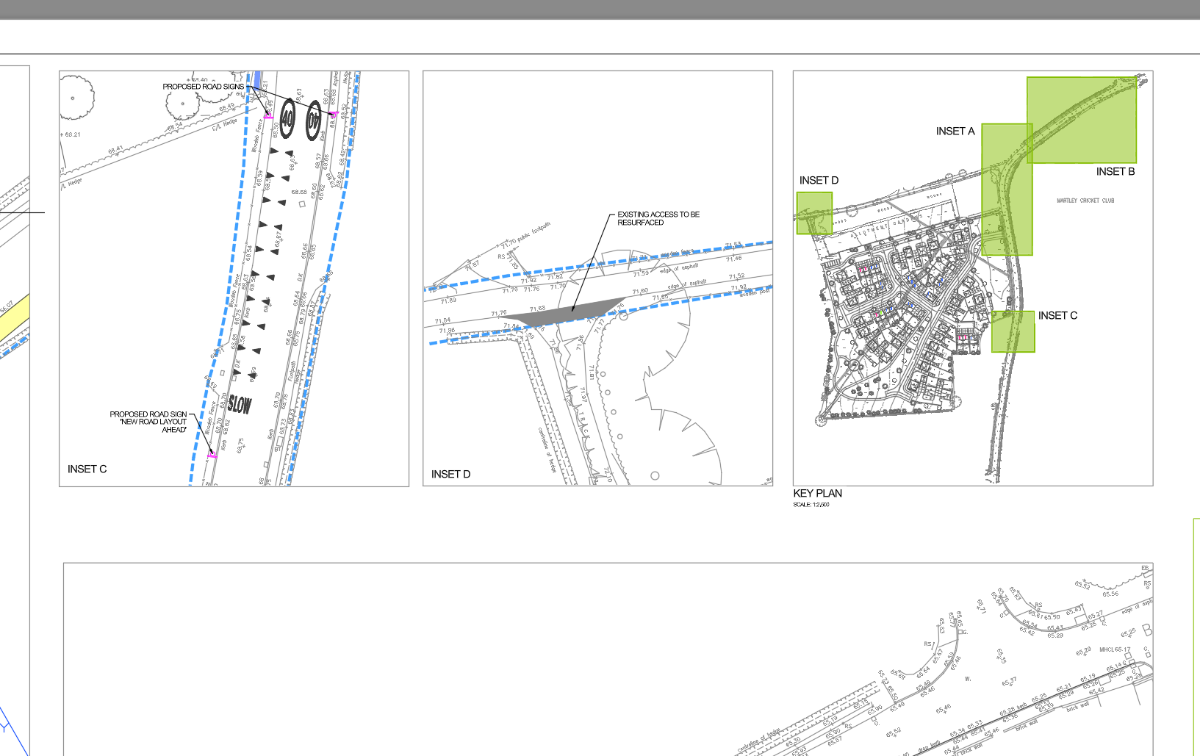
@BIGAL So in principal I agree with your approach draw rectangles along the selected viewports, send to model space and then select the key plan to bring them back to paperspace. The problem I faced I stumbled across is that you can not define which viewport to CHspace without the user selecting the viewports. So my idea of the optimal workflow/lisp would look something like this: 1. Select Key Plan Viewport 2. Select Insert Viewports 3. Draw Rectangle on all Inset viewports 4. Send Rectangles to ModelSpace of each Inset viewport (So they are at the right scale). 5. Bring all rectangles to PaperSpace through the Key Plan Viewport. - Today
-

quick xyz coordinates text placed from selected points
EnM4st3r replied to pavanetc's topic in AutoLISP, Visual LISP & DCL
like this? (defun c:XYText (/ pt str box) (while (setq pt (getpoint "\nPick point for coordinate text: ")) (setq str (strcat "X=" (rtos (car pt) 2 4) "\nY=" (rtos (cadr pt) 2 4) "\nZ=" (rtos (caddr pt) 2 4))) (vla-addmtext (vla-get-modelspace (vla-get-activedocument (vlax-get-acad-object))) (vlax-3d-point pt) 0 str) ) (princ) ) -

quick xyz coordinates text placed from selected points
pavanetc replied to pavanetc's topic in AutoLISP, Visual LISP & DCL
(defun C:CPP (/ PNT1 P1X P1Y STDY DY COORD PTXT) (setq PNT1 (getpoint "\nPick coordinate point: ")) (setq P1X (car pnt1)) ;x coord (setq P1Y (cadr pnt1)) ;y coord (setq P1Z (caddr pnt1)) ;z coord (setq STDX (rtos P1X 2 3)) (setq STDY (rtos P1Y 2 3)) (setq STDZ (rtos P1Z 2 3)) (setq COORD (strcat "E" STDX) COORD1(strcat "N" STDY) COORD2(strcat "EL" STDZ)) (setq PTXT (getpoint PNT1 "\nPick text location: ")) (command "LEADER" PNT1 PTXT "" COORD COORD1 COORD2 "" "" "") (princ)) ; end -
quick xyz coordinates text placed from selected points
pavanetc replied to pavanetc's topic in AutoLISP, Visual LISP & DCL
this is someone did which is existing code, could you please modify as I need in CAD X Y Z SAMPLE.dwg -
Small dot appears near MTEXT and cannot be deleted
CHAKRADHAR replied to CHAKRADHAR's topic in AutoCAD 2D Drafting, Object Properties & Interface
CAN U GIVE YOUR EMAIL ADDRESS -
Small dot appears near MTEXT and cannot be deleted
SLW210 replied to CHAKRADHAR's topic in AutoCAD 2D Drafting, Object Properties & Interface
Can you post a .dwg with this MText? -
quick xyz coordinates text placed from selected points
SLW210 replied to pavanetc's topic in AutoLISP, Visual LISP & DCL
All points in the drawing, select points, etc.? Can you post a sample .dwg with before and after? -
quick xyz coordinates text placed from selected points
pavanetc posted a topic in AutoLISP, Visual LISP & DCL
looking a lisp quick xyz coordinates text placed from selected points I need x= y= z= not like x, y, z
-
pavanetc joined the community
-
 jordan7688 joined the community
 -
I looked for this on various websit es including youtube and solved it using to clear explanation here! Knowing that the Bing map data streams from the Autodesk 360 cloud (and isn't saved in the DWG) is the key piece of info that solves the mystery of why it disappears for others.
-
Small dot appears near MTEXT and cannot be deleted
CHAKRADHAR posted a topic in AutoCAD 2D Drafting, Object Properties & Interface
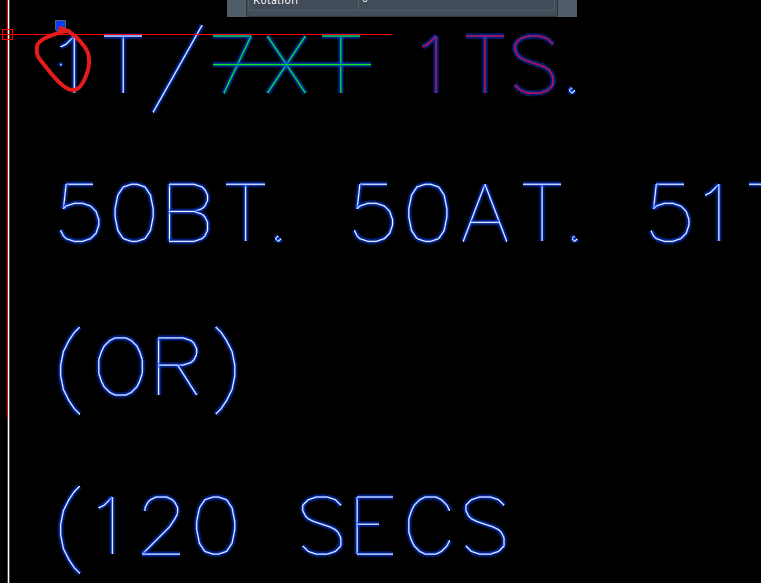
I am using ZWCAD 2026. A small dot appears near an MTEXT, but I did not create it. When I select the dot, the MTEXT is selected. The dot cannot be deleted, and it is not visible inside the MTEXT editor. Text style used: SIMPLEX (SHX font). This drawing was copied/imported from another file. What is this dot and how can I remove it permanently? Thanks in advance.
-
CHAKRADHAR joined the community
-

Lisp exportar todas las presentaciones
ivaj replied to mikarts's topic in AutoLISP, Visual LISP & DCL
Buenos días, el autocad que tengo es el 2026, pertenece a mi empresa. Los planos que realizo son isométricas de tubería y cuando tengo que hacer una línea, pueden que salgan entre 4 hasta 35 planos de isométricas. Todos los planos los tengo en el modelo y me creo una presentación de cada isométrica, "Selecciono todas las presentaciones", ejecuto "publicar las presentaciones seleccionadas" y me crean PDF independientes, ejemplo: - Fichero de autocad "Tomo.dwg" y presentaciones 001, 002, 003, etc. La rutina me lee "TOMO" y las presentaciones, una a una. Y me crea TOMO-(con un guion y seguidamente el nombre de las presentaciones) TOMO-001, TOMO-002, TOMO-003, etc. Pero a la rutina del principio que funciona muy bien, no separa el nombre de fichero dwg y la presentación. Muchas gracia por ayudarme "bidal", pero no se donde colocar lo que has mandado, siento ser tan torpe. -
Yes. I know. I already mentioned that this problem could arise on some long segments during turns. I didn't want to delay posting again to fix this. But I already have an idea of how to solve it. I'll post the solution as soon as I can.
-
 L8in joined the community
 - Yesterday
-
Like @dan20047 I make rectangs and then make a layout matching that rectang. Where I worked our title block was fixed, so the viewport in a layout was based on the matching rectang at a scale. The rectangs can be rotated and the viewport will be Twisted to match. You can pick a Viewport and get its info then draw a rectang that matches in paperspace then do a simple CHSPACE, all done. Look at these 3 values. Just take 1/2 the 40 and 41 can work out the corners. (defun c:vp2model ( / vp cp d1 d2 p1 p2 lay) (command "pspace") (setq vp (entget (car (entsel "\nPick the viewport ")))) (setq cp (assoc 10 vp)) (setq cp (list (cadr cp)(caddr cp))) (setq lay (cdr (assoc 8 vp))) (setq d1 (/ (cdr (assoc 40 vp)) 2.0)) (setq d2 (/ (cdr (assoc 41 vp)) 2.0)) (setq p1 (mapcar '+ cp (list (- d1) (- d2) 0.0))) (setq p2 (mapcar '+ cp (list d1 d2 0.0))) (setvar 'clayer lay) (command "Rectang" p1 p2) (command "chspace" (entlast) "" ) (command "pspace") (princ) ) A question will the layouts have more than one viewport as you need to identify which viewport has been selected.
-
If you don't want to go down the OBDX method you can use a simple script to edit multiple dwgs. There are various ways to get a dwg name list, I use Word to make a script like this. Start with a list of dwgs, you can Replace ^p with a new line, ^p(load "chgvis") same for close the ^p is end of line. Another can get lisp to write the script file. Use (vl-directory-files "D:\\acadtemp" "*.dwg" 1) to get a list of dwg names. Open dwg1 (load "chgvis") Close Y Open dwg2 (load "chgvis") Close Y Open dwg3 (load "chgvis") Close Y Open dwg4 (load "chgvis") Close Y Yes 1st step is get lisp code to work. Use Lee-mac dynamic block lisp to change visibility, Don't forget must use SSGET '((0 . "INSERT")) but must then look for "Effectivename" of the block objects as Dynamic blocks usually have a name like "*U12". Lastly I use an old fashioned DOS command as it can get a list of dwg names including sub directories. Have a go if get stuck post again.
-

Lisp exportar todas las presentaciones
BIGAL replied to mikarts's topic in AutoLISP, Visual LISP & DCL
You are correct. change the value of presentacion. (strcat (getvar "dwgprefix") (vl-filename-base (getvar "dwgname")) "-" presentacion ) (setq num (getint "\nEnter start number ")) (cond ((< num 10)(setq presentacion (Strcat "00" (rtos num 2 0)))) ((< num 100)(setq presentacion (Strcat "0" (rtos num 2 0)))) ((>= num 100)(setq presentacion (rtos num 2 0))) ) (setq num (1+ num)) -
Moving objects within polyline to different layer
BIGAL replied to Hsanon's topic in AutoLISP, Visual LISP & DCL
My $0.05 I use this method in some code, I get all objects inside a poly object, and change layer then do a Layer off, can then do a "Select All" and use the simple chprop command to change layer to Site" then turn layer exist back on. In another program I go a step further and not only change layer name but add "EXIST-" to the layer name and change its color to light grey. As we had in house surveyors made a list of layer names to look for may be useful as it does not rely on a inside outside approach. -
Here is my code which draws mspace rectangles for viewport extents. It's missing subroutines prefixed with XYZ, but the main code for the coordinates can be used. ;;; Draw rectangle inside viewport limits (defun c:RTV (/ pt1 pt2 dy dx vcx vcy pt3x pt3y pt4x pt4y) (XYZ-ERROR-INIT (list (list "clayer" (getvar "clayer") "cmdecho" 0) T)) ;do list of variables to be set/reset (if (not XYZ_LAY_VPORT) (setq XYZ_LAY_VPORT (getvar "clayer"))) (if (not (tblsearch "LAYER" XYZ_LAY_VPORT)) (command "-layer" "make" XYZ_LAY_VPORT "color" "7" "" "plot" "no" "") ;make layer if it doesn't exist ) (command "-layer" "thaw" XYZ_LAY_VPORT "on" XYZ_LAY_VPORT "set" XYZ_LAY_VPORT "") ;thaw layer whether it exists or not (if (or (= 1 (caar (Vports))) ;determine if in mspace vport (= 1 (getvar "tilemode"))) (progn (XYZ_rectangle nil (getvar "vsmin") (getvar "vsmax")) (command "scale" (entlast) "" (getvar "viewctr") (/ (getvar "viewsize") (- (cadr (getvar "vsmax")) (cadr (getvar "vsmin")))) ) ) (progn ;if in mspace vport (setq pt1 (cadr (car (vports))) ;vport corners pt2 (caddr (car (vports))) dy (distance pt1 (list (car pt1) (cadr pt2))) ;height of vport dx (distance pt2 (list (car pt1) (cadr pt2))) ;width of vport vcx (car (getvar "viewctr")) ;x pt of vport center vcy (cadr (getvar "viewctr")) ;y pt sclf (/ (getvar "viewsize") dy) ;vport scale factor pt3x (- vcx (* 0.5 dx sclf)) ;points of vport extent pt3y (- vcy (* 0.5 dy sclf)) pt4x (+ vcx (* 0.5 dx sclf)) pt4y (+ vcy (* 0.5 dy sclf)) ) (XYZ_rectangle nil (list pt3x pt3y) (list pt4x pt4y)) ;if not in mspace use virtual viewport limits ) ) (princ "\nPline rectangle drawn to viewport limits") (XYZ-ERROR-RESTORE) )
-

Viewport Inset Generator
CyberAngel replied to CivilTechSource's topic in AutoLISP, Visual LISP & DCL
The Architecture system has a mechanism for creating Views, which you can then assign to viewports. I assume (but don't know) that you can show those Views in other viewports, such as the key plan you describe, and label them. All of that would be really handy in my job, but Civil doesn't include that mechanism for some reason. I guess you'd have to create a new object type, View. It would include the name, the bounds, and the UCS for one sheet. You'd have the ability to create a viewport, capture the bounds, and annotate it with the name and the scale. You could also apply one view to another, as with the insets on the key map. To be even more helpful, there'd be a new category in the Prospector so you could manage all those views. And maybe a layer state for the viewports. -
I have a Key Plan Viewport showing the wider site plan and I have multiple viewports showing specific areas of the wider site plan (Insets). Has it been done or attempted to create a lisp that will prompt the user to select the Key Plan Viewport, and then select the other Insets and show the Inset extents on the Key Plan Viewport as Rectangles?+
-
Hi everyone, My topic may have been addressed already, but I couldn’t find it. Here’s my situation: I have a large number of drawings (around 900), and I need to batch-change the visibility state of a specific dynamic block, similar to this thread: https://forums.autodesk.com/t5/visual-lisp-autolisp-and-general/batch-edit-visibility-state-of-dynamic-block/td-p/5629689 I know Lee-Mac has several .lsp routines that use ObjectDBX (OBDX). I’m not much of a coder, but I’m hoping someone here could help me put something together (or point me to the right approach). Thanks!
-

Lisp exportar todas las presentaciones
devitg replied to mikarts's topic in AutoLISP, Visual LISP & DCL
@ivaj Hola , ¿que cad tienes ? y si puedes subir el DWG , se puede analizar. -
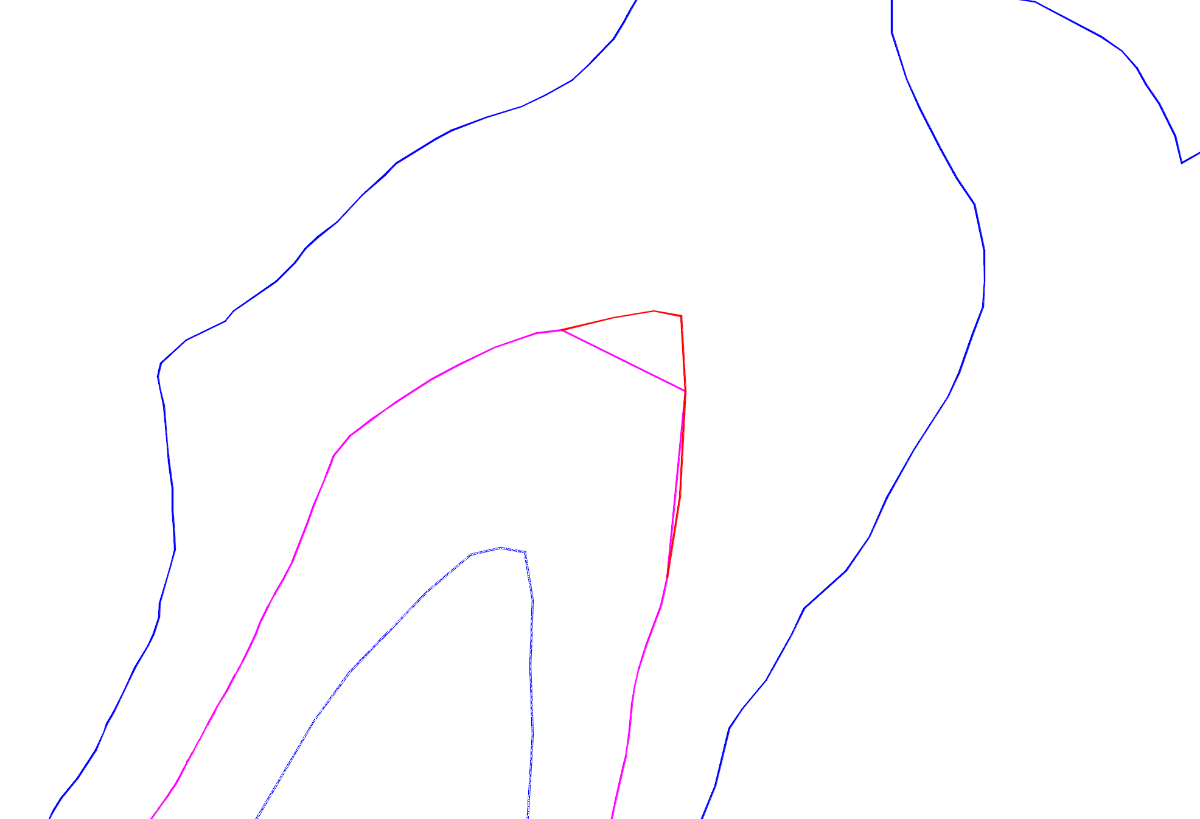
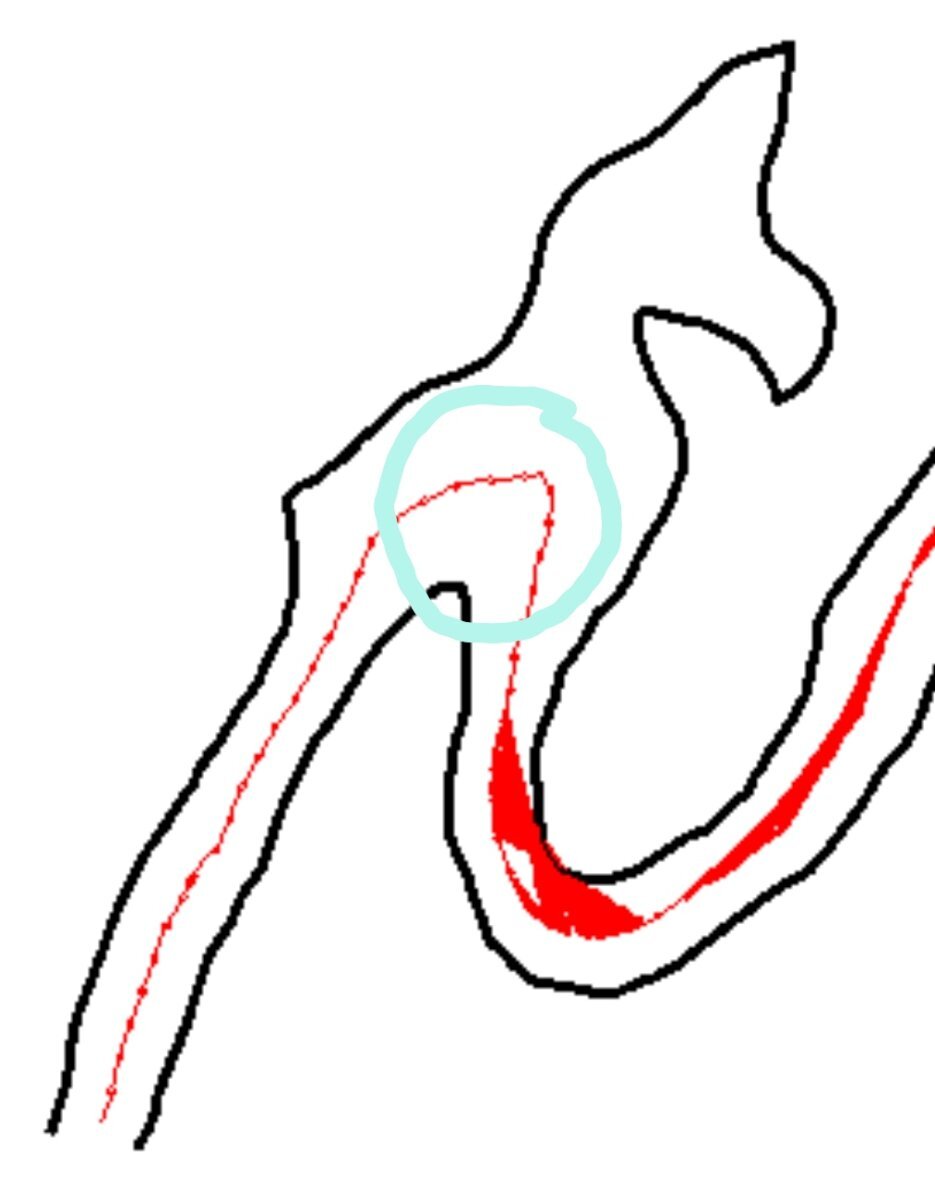
I tested the code. All the points are equidistant, but there are two long segments where the equidistance is drastically broken. In the last screenshot Dexus attached, you can see approximately where the center line should be in that area. The center line returned by the GLAVCVS code is shown in magenta. And the approximate location where it should be is shown in red. I've attached an image of this