All Activity
- Past hour
-

Do you use QSELECT when a drawing gets crowded?
Paul Li replied to indiancad's topic in AutoCAD 2D Drafting, Object Properties & Interface
Actually I prefer to use SelectSimilar. I've also used Filter. I'm not as well versed with QSelect. - Today
-
.thumb.jpg.615654602253be56b2fbd5d064834780.jpg)
Do you use QSELECT when a drawing gets crowded?
indiancad posted a topic in AutoCAD 2D Drafting, Object Properties & Interface
When a drawing has hundreds of objects, selecting them one by one can take a lot of time. QSELECT lets you select objects based on their type or properties. For example, you can quickly select all circles, hatches, dimensions, or objects on a particular layer. I find it especially useful when I need to make the same change to many objects at once. How many of you use QSELECT regularly? What do you use it for most? -

Free Multi Plot Lisp – Fast Batch Printing for AutoCAD, BricsCAD & ZWCAD | Model/Layout, Zone Plotting & PDF Merge
CamDuy replied to CamDuy's topic in AutoLISP, Visual LISP & DCL
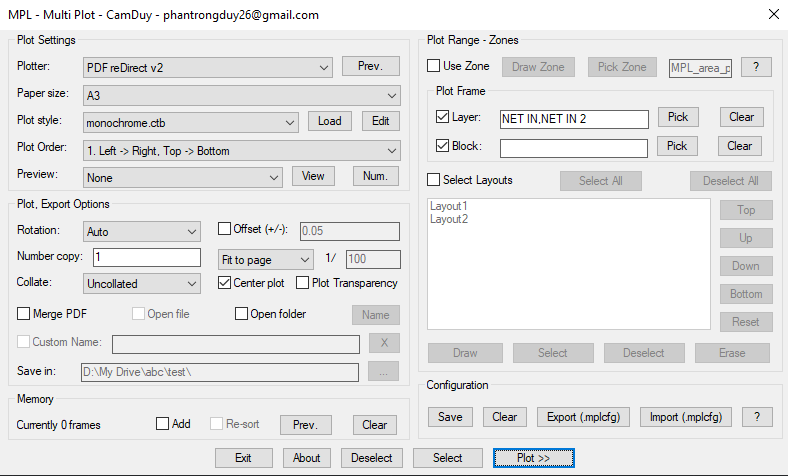
Try again :https://drive.google.com/file/d/1PEI9H3FrJosMIUunhefGpuIUOMdsqf8Z/view?usp=sharing -

Free Multi Plot Lisp – Fast Batch Printing for AutoCAD, BricsCAD & ZWCAD | Model/Layout, Zone Plotting & PDF Merge
zaphod replied to CamDuy's topic in AutoLISP, Visual LISP & DCL
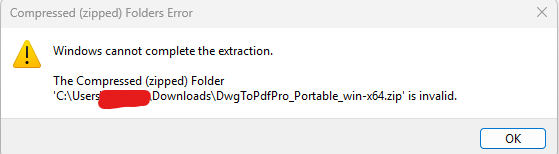
when I looked in the zip folder it was empty, extracting it brought up this message.
-
 Raguilar joined the community
 -
Free Multi Plot Lisp – Fast Batch Printing for AutoCAD, BricsCAD & ZWCAD | Model/Layout, Zone Plotting & PDF Merge
CamDuy replied to CamDuy's topic in AutoLISP, Visual LISP & DCL
Portable Version Download: https://drive.google.com/file/d/1PEI9H3FrJosMIUunhefGpuIUOMdsqf8Z/view?usp=sharing Run DwgToPdfPro.exe - Yesterday
-

dcl Share the most elegant interface design under DCL limitations
BIGAL replied to VicoWang's topic in AutoLISP, Visual LISP & DCL
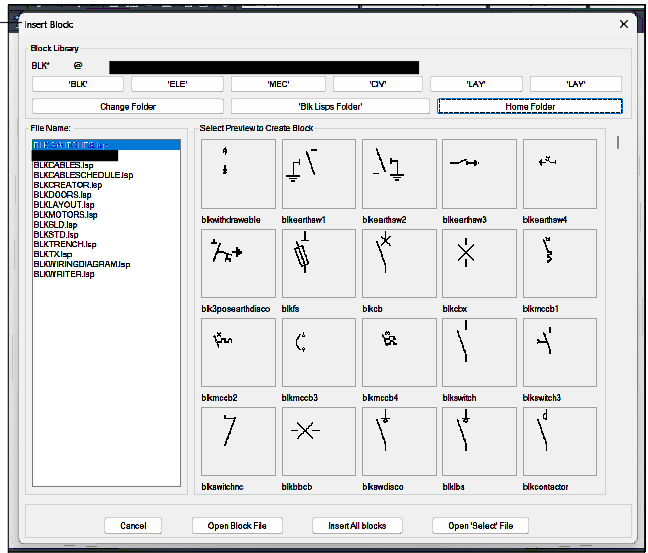
@CivilTechSource the Block/dwg select is part of the POP menu interface, in particular the Icon section. It's just made with Notepad and you save a MNU file., Autocad handles the actual dcl. Re images yes they are slides, SLD files. Ok the how to. 1st step is you must shrink your screen area down to about 1/4 size. When slides were introduced screens were 640x480 so current screens are way more pixels. I use a lisp to make the slides insert say a block, zoom E, Zoom 0.9XP then MSLIDE, Erase last and insert next. Obviously the name of the saved slide is in the lisp. Without going into now you can make like 200 slides very quickly including inserting other block dwg's. You can use a program called Slide library it compresses all your slides into one SLB file a bit easier to manage, I have numerous slb files that contain common items eg landscaping, cars. ***MENUGROUP=CADARC ***POP1 **CADARC2018 [CADARC] LOAD CADARC]^C^C(LOAD "CA3ENTR2013")(LOAD "CA4USRLA-2") [->Set Up] [DRAWING SETUP]^c^C^p(load "ca11set") [--] ............. ............. ............. ............. ***icon **FURN [FURNITURE:] [CTONE(CHAIR-1)]^c^cINSERT ca3ch-1 DRAG \1;;DRAG [CTONE(CHAIR-2)]^c^cINSERT ca3ch-2 DRAG \1;;DRAG [CTONE(SOFA-1)]^c^cINSERT ca3sof1 DRAG \1;;DRAG -
A CAD command that is easy to miss: NCOPY
Paul Li replied to indiancad's topic in AutoCAD 2D Drafting, Object Properties & Interface
I see said the blind man...For example, Layer names come over with $0$ as if bound...thanks. -

A CAD command that is easy to miss: NCOPY
CyberAngel replied to indiancad's topic in AutoCAD 2D Drafting, Object Properties & Interface
If I'm reading the official documentation correctly, the Insert setting only copies the object itself. The Bind setting brings along "named objects" associated with the object, that is, entities you would find in the Design Center, such as linetypes, layers, text styles, etc. You wouldn't notice them immediately, but they could interfere with the existing named objects in your drawing. -
Free Multi Plot Lisp – Fast Batch Printing for AutoCAD, BricsCAD & ZWCAD | Model/Layout, Zone Plotting & PDF Merge
zaphod replied to CamDuy's topic in AutoLISP, Visual LISP & DCL
Looks neat, but is there any way to run/test it without the custom install? The IT department has us locked away from that type of thing. -
A CAD command that is easy to miss: NCOPY
Paul Li replied to indiancad's topic in AutoCAD 2D Drafting, Object Properties & Interface
Actually prior to NCOPY I used a lisp command called XCOPY that basically did similar operations. Also could someone explain to me what the difference is with NCOPY Settings set to Insert vs Bind. Irregardless of which setting the NCOPY object result is always a non-block object. -
Free Multi Plot Lisp – Fast Batch Printing for AutoCAD, BricsCAD & ZWCAD | Model/Layout, Zone Plotting & PDF Merge
CamDuy replied to CamDuy's topic in AutoLISP, Visual LISP & DCL
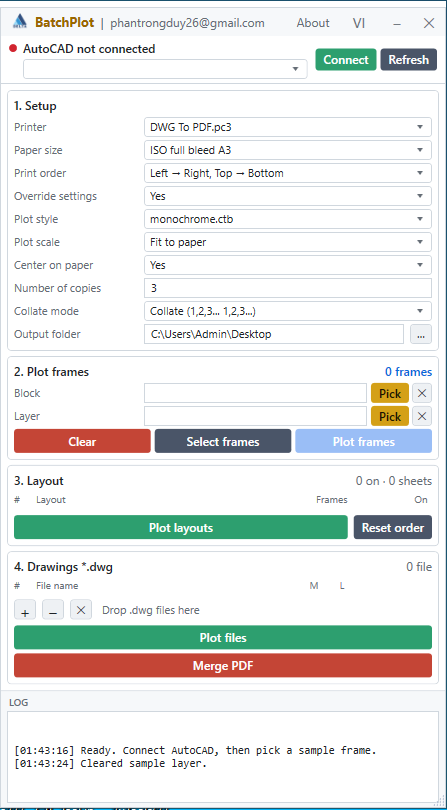
- Update to the latest .exe (Add number of copies, add collate) https://drive.google.com/file/d/1FmN_TQNTGGzTXQojuRLd9H4SdH-Hqbov/view?usp=sharing - Update the LISP file. (Update the DCL interface) https://drive.google.com/file/d/1RDGjsKS0RruitLW83pHWcwq74ygik3wu/view?usp=sharing
-
Free Multi Plot Lisp – Fast Batch Printing for AutoCAD, BricsCAD & ZWCAD | Model/Layout, Zone Plotting & PDF Merge
CamDuy replied to CamDuy's topic in AutoLISP, Visual LISP & DCL
Merging PDFs is equivalent to publishing. -
@BIGAL The code does not work with a number of segments but with an angle increment. Here I chose 36.0 (which is 10 degrees: 360 / 10) which seems to me a reasonable resolution to obtain a limited number of vertices... If you want a finer definition with 5°, simply replace 36.0 with 72.0. for 20° it would be 18.0. The number of segments does not seem appropriate to me because depending on the length of the arc the definition would not be identical.
-

dcl Share the most elegant interface design under DCL limitations
Steven P replied to VicoWang's topic in AutoLISP, Visual LISP & DCL
Block Library pallet - I had that 20 years ago with FastCAD - which inspired me to make something very similar to BigALs - though I think the workings behind are a bit different - might be wrong, BigAl, do you use slide files for the thumbnails? (I remember you giving me a good instruction of them a few years ago now... which I then ignored.... and went with vector images). Can apply any command / LISP to the thumbnails (for example I have a tab 'Get': "Google", "CAD Standards", "Current Folder" which runs just the LISP to open chrome / explorer) - I think BigAl can do the same too. (B&W because I got too lazy to colour them all in)
-
5 CAD Commands That Can Save You More Time Than You Think
CyberAngel replied to indiancad's topic in AutoCAD 2D Drafting, Object Properties & Interface
I use similar and quick select all the time, especially to find objects on the wrong layer or in cluttered locations. Burst is not something I use much at all, but when I do need it, it's a life saver. It's the same as explode, the only difference being it preserves the data in attributes. As far as I know, the only alternative is to retype that information, which is hard to do after you've already lost it. -
A CAD command that is easy to miss: NCOPY
indiancad replied to indiancad's topic in AutoCAD 2D Drafting, Object Properties & Interface
yes !exactly -
Why can’t I join two lines even when they look connected?
CyberAngel replied to indiancad's topic in AutoCAD 2D Drafting, Object Properties & Interface
For some reason, a polyline that is not parallel to the XY plane is hard to flatten. It may have a large value for elevation. If you take the easy route and change the elevation to 0, it moves to somewhere you didn't expect. The only solution I know of is to explode it, flatten all the segments, and join them again. You may want to isolate the polyline before you do that, in case the segments land in a cluttered area, where they'll be hard to select. Not sure why this happens, maybe it wasn't created in the UCS. -
A CAD command that is easy to miss: NCOPY
CyberAngel replied to indiancad's topic in AutoCAD 2D Drafting, Object Properties & Interface
When that is what you need done, NCOPY is a wonderful tool. You don't have to worry about orientation or layers, you don't have to cut and paste from somewhere else, you just select the object(s) you want. I don't use it often, but when I do, it's a real time saver. It's been in AutoCAD since 2013, so there's no excuse not to know about it. -
A CAD command that is easy to miss: NCOPY
indiancad posted a topic in AutoCAD 2D Drafting, Object Properties & Interface
Have you ever needed just one object from inside a block or XREF? Instead of opening or editing the source drawing, NCOPY lets you copy the required object directly into your current drawing. For example, if you only need a wall, line, or detail from an XREF, run NCOPY, select the object, and place the copy where you need it. It can save time when working with large drawings and XREFs. How many of you use NCOPY regularly? What other lesser-known command saves you time?
-

dcl Share the most elegant interface design under DCL limitations
CivilTechSource replied to VicoWang's topic in AutoLISP, Visual LISP & DCL
@BIGAL this is beautiful, probably this is where AutoDesk got inspiration for the Block Library Pallette. Do you mind sharing the DCL code? -

Why can’t I join two lines even when they look connected?
SLW210 replied to indiancad's topic in AutoCAD 2D Drafting, Object Properties & Interface
That's too much work on a large drawing, if it needs to be on the same elevation, you can Z = 0 (or what ever elevation you want) them individually or the entire drawing. -
Stack Social license
SLW210 replied to Discus84's topic in AutoCAD 2D Drafting, Object Properties & Interface
There are legitimate alternatives to AutoCAD, some Free and some very low priced, I would go that route before getting AutoCAD LT from an iffy at best source. I went and looked them up, they seem to "sell" different software, lot's of bad reviews. -
I'll try to get to this and finish the Excel today if I can free up some time. I can only test Calc on my home computer, but I'll give it a blind shot at work if I get time, then test and trouble shoot at home. Is the GetLen 2.0.lsp working better in Metric now?
-
PDF Plot Shaded Visual Style = Sawtooth Edge
SLW210 replied to lamensterms's topic in AutoCAD Drawing Management & Output
Normally that would be a DPI issue I would believe, but it appears you are using the same on both computers. If they look the same on all PDF readers and the plot preview the issue is computer related, maybe AutoCAD and the individual Visual Styles Settings. Did you compare the Visual Style Settings in the Visual Styles Manager? -
 dongpt1907 joined the community
 -
 JEContext joined the community
 -
 kof70 joined the community
 -

PDF Plot Shaded Visual Style = Sawtooth Edge
VicoWang replied to lamensterms's topic in AutoCAD Drawing Management & Output
You're welcome. I hope it can be helpful. I want to know how to synchronize the environment configuration of your work computer and home computer at present? ( For example, 20 lisp plug-ins and 10 environment configuration files such as DWT, SHX, etc. are installed) This is a good test site for the synchronization and consistency of VedaCAD plugins and environment profiles, which can support cross-CAD version synchronization. If you are willing to try, I would like to invite you to conduct a double-end Vedacad synchronous test of your working environment: 1. Log in to the account at any end, configure your plug-in and environment configuration file, publish into VCID, and then form a bunch of VCID into a working environment configuration file, and click push to push it to the cloud. 2. Log in to the account at the other end, and through pull, the whole working environment will be synchronized in tens of seconds and can be used directly.