All Activity
- Past hour
-
Which Post did you get code from? It looks like the Layer Description is already accounted for in the CSV - right after the Layer Name:
-
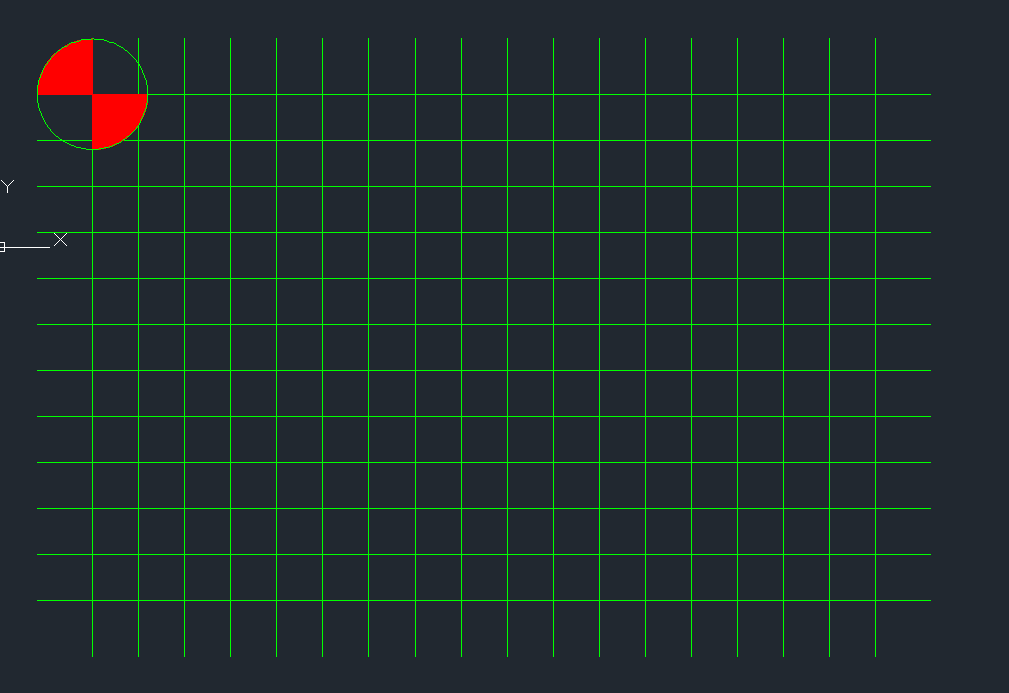
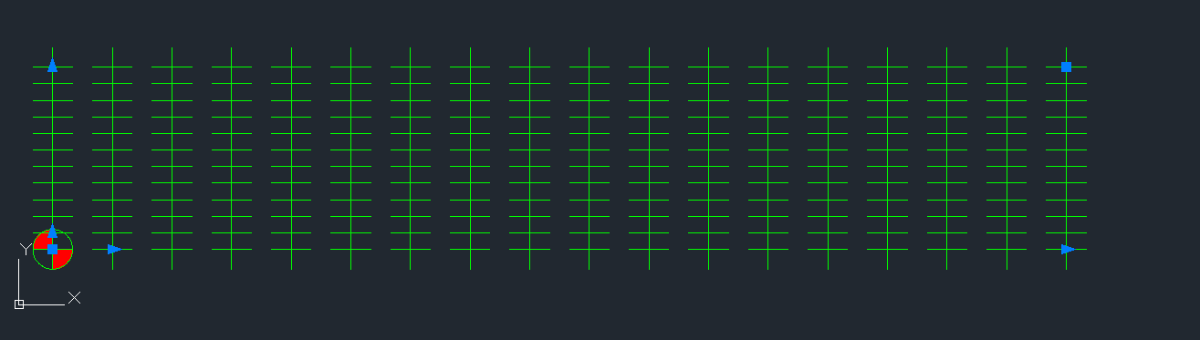
This is what I get if I go with -50 rows and 50 Columns......

-
Nope. mine looks way different. My guess is because -50 and +50 rows cancel each other out. Guessing the second one should be Columns and not rows?
- Today
-
Honestly, I started it and go to the point where it contradicted itself and stopped because I wasn't sure if it was a typo or not. Been plenty of those in this ridiculous class so far. Then I saw where they didn't know the difference between a column and a row and I figured it was late enough that I should just be done for the day and go spend some time with my wife and kids before bed time..lol...I guess Ill follow it word for word and se what happens. I've only used the array command 1 time but I DO understand it. I think the biggest part for most of us is were all just fatigued from having to decipher instructions vs actually LEARNING the course. Obviously were still learning the course as well but not as much as if we didn't have to question every little thing. Ok, rant over. Sorry. Ill report back soon. Thank you sir
-
Gotcha, thx Remark
-
You haven't responded as of yet, so for starters you could try these steps. It would also be helpful to give all computer specifications.
-
Can you post the ZWCAD version you have? Before AutoCAD added the feature, there were other tools for this, some free, some not. I used to use VectPDF.lsp before and before that was made I used PStoEdit and Ghostery (which is made easier by the VectPDF.lsp. Converted in AutoCAD seems do be just fine as best I can tell. FILE.dwg
-
I would ask that you delete your drawings. Why? Because another student could come along and borrow them, make minor changes then submit them as their own drawings thus saving hours of labor. You do all the work and they get the credit. Not kosher at all. Follow me? Addendum: Looks like someone has already done exactly that. Again, take your drawings down. There are plenty of image files (not CAD files for students) to reference. Thank you.
-
I followed the instructions you provided above and got the following result (see attached image). How familiar are you with the ARRAY command?
-
 SLW210 changed their profile photo
 -
*A#### is an anonymous GROUP, so you seem to have these as groups, not blocks. Post a drawing that does this, no need to share the actual stamp and signature just something anonymous (no pun intended), but has the same results.
-
Here's my program : https://autolispprograms.wordpress.com/create-layers-from-excel-file/
-
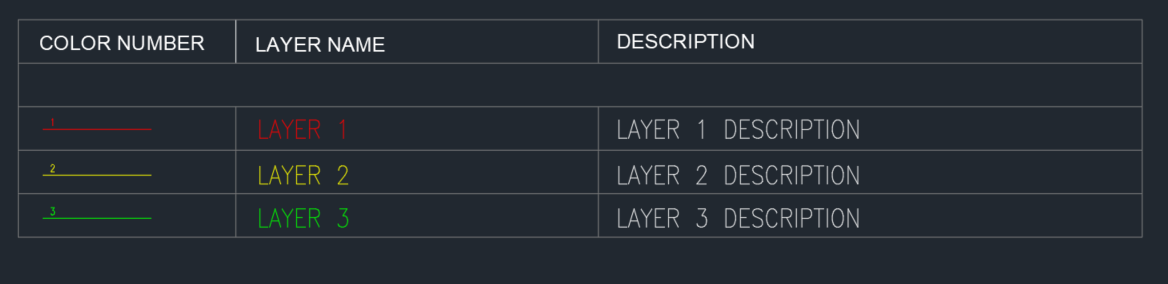
I used THIS lisp by @pBe to create the layers from excel table. However, I need to create a table inside AutoCAD. Not an AutoCAD table but table consisting of lines and text. Currently I'm doing this manually and I think this can be automated since all the info are already inside. It Will be something like the image below. The Line in the first column resides on it's Layer Name and the number above the Line is the Layer Color. The Layer descriptions are already in the layer manager as well. I attached the file as reference. TEST.dwg
-
 jongbum kim joined the community
 -
“Hi everyone, I want to convert a PDF file to a ZWCAD (DWG) file. Is there any good conversion tool for converting PDF to DWG? I already tried the PDF conversion option in ZWCAD, but the result was not accurate.” FILE.pdf
-

zwcad SHX Text Not Editable in PDF
CHAKRADHAR replied to CHAKRADHAR's topic in AutoCAD Drawing Management & Output
TQ -
Sorry to resurrect this thread. This worked for me. Thanks a lot. Possible to add Layer Description?
-
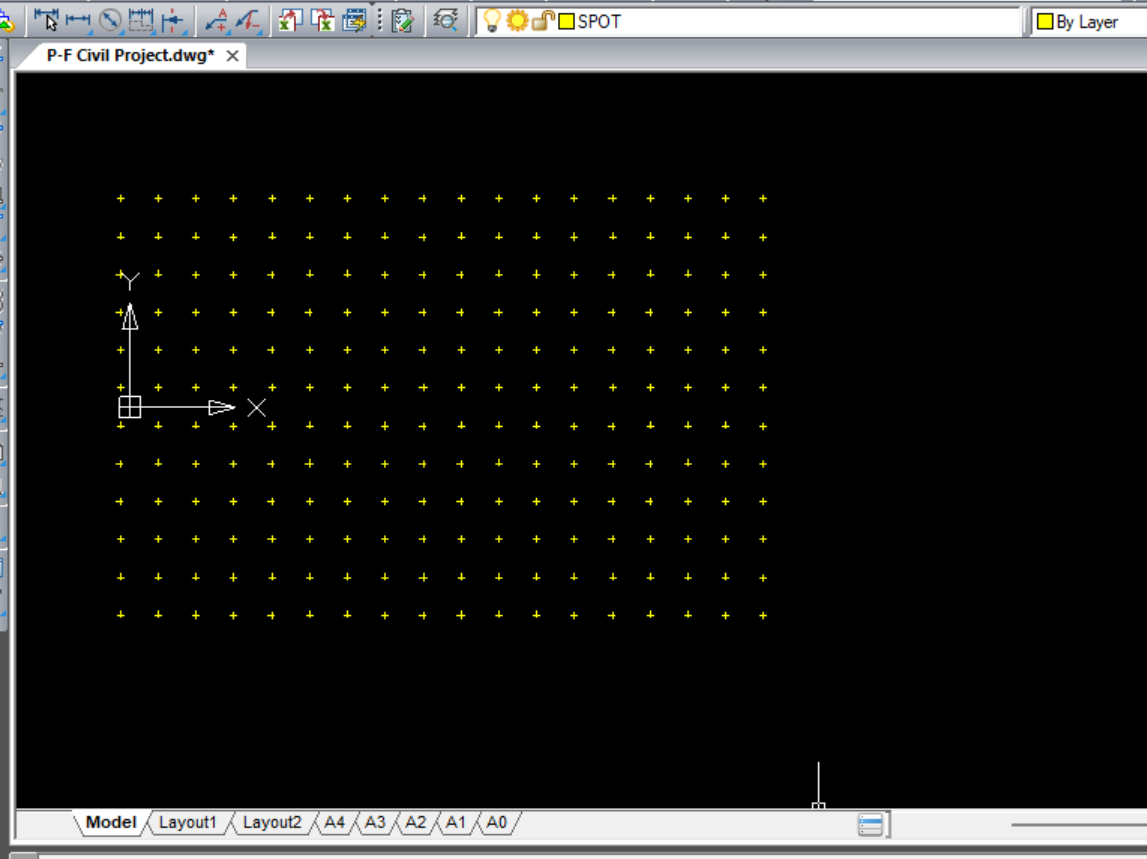
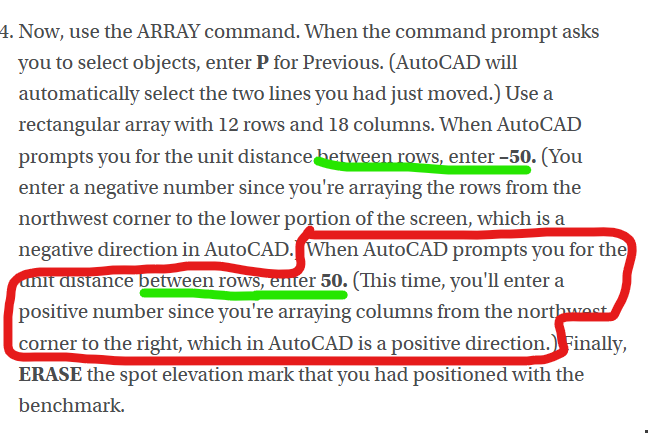
Ok, I'm just starting the civil project and I didn't make it past direction 4 without realizing this makes ZERO sense. 1. Create a layer, Spot (color yellow, linetype continuous), on which to draw the elevation values. 2. Create an X using two intersecting lines, each 10 feet long, on the layer Spot. The lines should intersect at their midpoints. 3. Move the lines from the intersection of the lines (using the Osnap) to the center of the benchmark (again using the Osnap). 4. Now, use the ARRAY command. When the command prompt asks you to select objects, enter P for Previous. (AutoCAD will automatically select the two lines you had just moved.) Use a rectangular array with 12 rows and 18 columns. When AutoCAD prompts you for the unit distance between rows, enter –50. (You enter a negative number since you're arraying the rows from the northwest corner to the lower portion of the screen, which is a negative direction in AutoCAD.) When AutoCAD prompts you for the unit distance between rows, enter 50. (This time, you'll enter a positive number since you're arraying columns from the northwest corner to the right, which in AutoCAD is a positive direction.) Finally, ERASE the spot elevation mark that you had positioned with the benchmark. 5. Create a text style named SPOT-TEXT. Select ROMANS as the font and use a height of 6″ and a width factor of 0.8. While still in layer Spot, use the DTEXT command, and type XXX alongside the spot elevation mark in the lower-left corner of the screen. Now, use the ARRAY command again to copy the XXX alongside the rest of the spot elevations. 6. The Spot Elevations table lists the spot elevations in rows, beginning with the northernmost row at BM 312 and reading from left to right. Double-click on the text to change the XXX for each spot to the appropriate elevation listed in the table. The rest of it is a pain to put on here but anyone whos ever opened excel knows that "Columns" go up and down, "Rows" go left and right. So there are many different ways this could come out with these confusing. Im not even sure how to proceed here....
- Yesterday
-

Segment Copy of a Region (cleaning request)
ScottMC replied to ScottMC's topic in AutoLISP, Visual LISP & DCL
Got to my original desire.. to enable access to region coords/osnaps though gonna tweak/twist to enable transparency. Thanks much mhupp for code enabling functionality! <any other training affordable!> (defun c:prv (/ *error* ss ss1 cec doc lastent html p) ;; AI.. https://www.google.com/search?q=copy+region+edge+segment%2C+autolisp&client=firefox-b-1-e&hs=LJSp&sca_esv=28d160b4388e87a1&biw=1143&bih=530&ei=t2enadf8OfXIp84PyJ69kA8&ved=0ahUKEwiXtPqy6oSTAxV15MkDHUhPD_I4ChDh1QMIEQ&uact=5&oq=copy+region+edge+segment%2C+autolisp&gs_lp=Egxnd3Mtd2l6LXNlcnAiImNvcHkgcmVnaW9uIGVkZ2Ugc2VnbWVudCwgYXV0b2xpc3AyCBAAGIAEGKIEMgUQABjvBTIFEAAY7wUyBRAAGO8FMgUQABjvBUjeM1C3D1iRLnABeACQAQCYAYgIoAHMC6oBBzAuNC43LTG4AQPIAQD4AQGYAgagApcNwgIIEAAYsAMY7wXCAgoQIRigARjDBBgKmAMAiAYBkAYFkgcHMS40LjYtMaAH0BCyBwcwLjQuNi0xuAffDMIHBzItMS4zLjLIB2uACAA&sclient=gws-wiz-serp (princ "\nPOints on Region Segment Vertex..(M) <oops> ") ;; https://www.cadtutor.net/forum/topic/99013-segment-copy-of-a-region-cleaning-request/#findComment-678508 ;; ESC cancels leaving lines <under region/ RT.CLK erases/cleans segments made/used (setvar 'cmdecho 0) (vl-load-com) ;; (defun *error* ( msg ) (setvar 'cmdecho 0) ;; 5.28.24 (vla-endundomark (vla-get-activedocument (vlax-get-acad-object))) (if msg (prompt (strcat "\n" msg))) (if (= fin 1) (command "_.pasteclip" "0,0,0")) ;; restores region if incomplete (setvar 'cecolor "bylayer") ;; ch copied to bylayer (setvar 'nomutt 0) (setvar 'cmdecho 1) (princ) ) ;;//------ BIGAL ----;; https://www.cadtutor.net/forum/topic/24751-timing/#findComment-199009 (defun ddelay (d / cd);;; (ddelay 1e-6) = 1 Second (setq cd (getvar "CDATE")) (while (> (+ cd d) (getvar "CDATE"))) ) (defun ftp () ;; uses 'p for coords (princ (setq pp ;; make/prints coords & paste usable (strcat (rtos (car p) 2 4) "," (rtos (cadr p) 2 4) "," (rtos (caddr p) 2 4) ) ) ) ) (setq fin 1) ;; set for *error* region restore if crash/bad.stop (setq cec (getvar 'cecolor)) ;; save color to restore to (setvar 'nomutt 1) ;; bypass ssget 'select prompt (if (setq ss (ssget ":S" '((0 . "REGION")))) ;; select 1 region for osnap/coords (progn (command "_.copybase" "0,0,0" ss "") ;; copy region to clipbrd (command "chprop" ss "" "c" 142 "") ;; change seg's color (setq LastEnt (entlast)) ;; ;;; !!!!!!!!!!!!!!!! ;; mhupp A1 to make exploded region (setq doc (vla-get-ActiveDocument (vlax-get-acad-object))) (command "_.explode" ss) ;; make segs accessable, saved in 'ss to erase (setq SS1 (ssadd)) ;; create a blank selection set or add to an existing one., saved in 'SS1 to erase (while (setq LastEnt (entnext LastEnt)) ;; (ssadd LastEnt SS1) ;; ) (princ "\nSelect Vertex(s) to add POint: <no.resist> ") (initget 1) ) ;; end of progn ) ;; end of if (while ;; pick points loop <cancel to end picking> (setq p (getpoint)) (entmakex (list (cons 0 "POINT") (cons 10 p))) ;; clean point (princ "\n") (ftp) ;; post coords ) (setvar 'nomutt 0) (sssetfirst nil ss1) ;;temp entity highlight (redraw) ;; <- usually required to show.. (ddelay 4e-7); ;; seems to allow 'short.times' <larger #'s = longer> BIGAL (sssetfirst nil nil) ;; <--- deselect above 'sssetfirst' (command "_.erase" ss "") ;; region copied/erasure (command "_.erase" ss1 "") ;; erases exploded region (command "chprop" "_L" "" "c" "bylayer" "") ;; ch copied to bylayer (command "_.pasteclip" "0,0,0") ;; re.place original region ? <- safe.r way ?? (setq fin nil) ;; reset if complete (princ "\nCleaned.Up ") (setvar 'cecolor "bylayer") ;; ch current color to bylayer (setvar 'nomutt 0) (setvar 'cmdecho 1) (*error* nil) (princ) ) -
 mnpbalda joined the community
 -
Using ACAD 2010. All drafting is done in model space. Individual drawings are set up in paperspace. When I go to the first tab in paperspace, I put my engineers seal/signature on the finished drawing. I then CTRL-C my engineers seal/signature and go to the next tab and CTRL-V my engineers seal/signature on that drawing. Every time I go to a new tab, I have to purge the drawing because there will be hundreds of blocks in the drawing called *A#####. If I do not purge the drawing at every tab, I can CTRL-V my engineers seal/signature onto maybe 2-3 tabs then my computer runs out of memory. I them have to purge the drawing, save it, close it and reopen it. This only happens when I am inserting an object into paperspace. I can work with the drawing for a week and I never get all these *A#### blocks. But as soon as I insert my seal/signature in paperspace I get all these #A#### blocks. FYI, my seal block is 54kB and my signature block is 84kB. It is irritating having to purge the drawing everytime I switch to a new tab .Any suggestions.
-
.dwg removed Please post images only.
-
 cyhn19 joined the community
 -
.dwg removed Please post images only.
-
Segment Copy of a Region (cleaning request)
ScottMC replied to ScottMC's topic in AutoLISP, Visual LISP & DCL
(defun c:crs (/ *error* _StartUndo _EndUndo ss ss1) ;; AI.. https://www.google.com/search?q=copy+region+edge+segment%2C+autolisp&client=firefox-b-1-e&hs=LJSp&sca_esv=28d160b4388e87a1&biw=1143&bih=530&ei=t2enadf8OfXIp84PyJ69kA8&ved=0ahUKEwiXtPqy6oSTAxV15MkDHUhPD_I4ChDh1QMIEQ&uact=5&oq=copy+region+edge+segment%2C+autolisp&gs_lp=Egxnd3Mtd2l6LXNlcnAiImNvcHkgcmVnaW9uIGVkZ2Ugc2VnbWVudCwgYXV0b2xpc3AyCBAAGIAEGKIEMgUQABjvBTIFEAAY7wUyBRAAGO8FMgUQABjvBUjeM1C3D1iRLnABeACQAQCYAYgIoAHMC6oBBzAuNC43LTG4AQPIAQD4AQGYAgagApcNwgIIEAAYsAMY7wXCAgoQIRigARjDBBgKmAMAiAYBkAYFkgcHMS40LjYtMaAH0BCyBwcwLjQuNi0xuAffDMIHBzItMS4zLjLIB2uACAA&sclient=gws-wiz-serp (princ "\nSelect Region to Copy Edge From: <oops> ") ;; micro altered.. ;; https://www.cadtutor.net/forum/topic/99013-segment-copy-of-a-region-cleaning-request/#findComment-678508 (setvar 'cmdecho 0) (defun *error* ( msg ) (setvar 'cmdecho 0) ;; 5.28.24 (vla-endundomark (vla-get-activedocument (vlax-get-acad-object))) (if msg (prompt (strcat "\n" msg))) (setvar 'nomutt 0) (setvar 'cmdecho 1) (princ) ) (defun _StartUndo ( doc ) (_EndUndo doc) (vla-StartUndoMark doc) ) (defun _EndUndo ( doc ) (if (= 8 (logand 8 (getvar 'UNDOCTL))) (vla-EndUndoMark doc) ) (princ "\r") ;; added to merge final info/cmd-line ) (setvar 'nomutt 1) ;; bypass ssget 'select prompt (if (setq ss (ssget ":S" '((0 . "REGION")))) (progn (command "_.copybase" "0,0,0" ss "") ;; copy region to clipbrd (command "chprop" ss "" "c" 252 "") ;; change color (setq LastEnt (entlast)) ;; ;;; !!!!!!!!!!!!!!!! (_StartUndo doc) (setq doc (vla-get-ActiveDocument (vlax-get-acad-object))) (command "_.explode" ss) ;; make segs accessable, saved in 'ss to erase (setq SS1 (ssadd)) ;; create a blank selection set or add to an existing one., saved in 'SS1 to erase (while (setq LastEnt (entnext LastEnt)) (ssadd LastEnt SS1) ) (princ "\nSelect Region Segment to Copy ") (initget 1) (command "_.copy" (ssget ":S")) ;; select segment (setvar 'nomutt 1) (princ "\nSpecify Basepoint: ") (command "" "\\") (princ "\nSpecify Destination: ") (command "\\") ;; +move (setvar 'nomutt 0) (command "_.erase" ss "") ;; region copied/erasure (command "_.erase" ss1 "") ;; erases exploded region (_EndUndo doc) ; (princ "\nSelect Items to Remove..") ;; <- my only known method \ ; \ ; (command "_.erase" "w" "\\" "\\" "") ;; <- manual erase :( -- solved!!! ; / ;; ... SEEING AS MY AUTOLISP EXPERIENCE SUCKS .. / ;; how can the eXploded region / lines etc, be ERASED/selected ? / ;; how to: make a selection set? / (command "chprop" "_L" "" "c" "bylayer" "") ;; ch copied to bylayer ) ;; end of progn ;;(c:crs) ) ;; end of if (command "_.pasteclip" "0,0,0") ;; re.place original region (setvar 'nomutt 0) (setvar 'cmdecho 1) (*error* nil) (princ) ) Only oops is when I rt.clk after selecting region .. tried 'initget 1 but no fixy just so glad this works. Thanks again Mr. mhupp -
 maspiers joined the community
 -

Segment Copy of a Region (cleaning request)
marko_ribar replied to ScottMC's topic in AutoLISP, Visual LISP & DCL
I tested it under AutoCAD 2022 and BricsCAD V26 and it worked well and with arced segments... Do you receive some error messages? -

Blank DWG with a large file size...
CyberAngel replied to lamensterms's topic in AutoCAD Drawing Management & Output
Then again, if people are still having the same problem, or proposing new solutions, is the issue really closed? There are bugs in AutoCAD still there since I started using it, and that's a long time. -
Segment Copy of a Region (cleaning request)
ScottMC replied to ScottMC's topic in AutoLISP, Visual LISP & DCL
Marco, when'd u write that? let me try it... seems to refuse arc segs but do like your select style -
Segment Copy of a Region (cleaning request)
ScottMC replied to ScottMC's topic in AutoLISP, Visual LISP & DCL
PURRRFECT! Thanks so much 'mhupp This gets me all.the.more excited to learn more!