All Activity
- Past hour
-

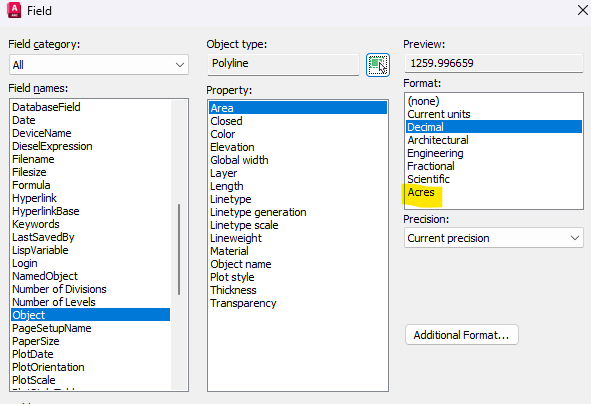
forcing AutoCAD to look for “AcFields.fdc” in a network location?
tombu replied to halfcracked's topic in The CUI, Hatches, Linetypes, Scripts & Macros
Good luck! I did it the same as you many years ago. If you find a solution post it here. -

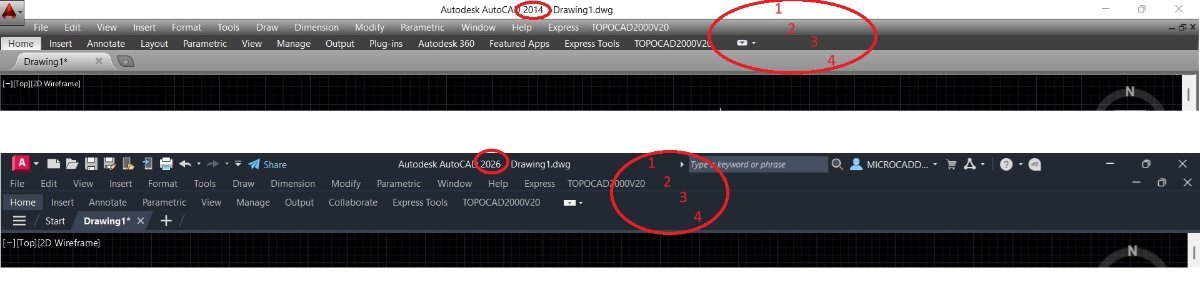
Colors of the top menu bars
FELIXJMELO posted a topic in AutoCAD 2D Drafting, Object Properties & Interface
It is possible to configure the menu bar colors in AutoCAD 2026 to match those of 2014. See the attached image.
-
I also found a new plug-in for QGIS. I will try to put in some home time on this when I can. BecaGIS — QGIS Python Plugins Repository Early on in this thread I posted some links as well. Looking at the work to create these in other CAD/GIS software, it looks like AutoCAD and LISP is the closest to automatic so far, not sure yet how accurate some of the other software and methods can get.
-
FELIXJMELO joined the community
- Today
-
Creating river center-lines with WhiteboxTools
-

How can I write the code for a batch fillet plugin for images like this?
SLW210 replied to amook147's topic in AutoLISP, Visual LISP & DCL
Here is the one from Kent Cooper, though it seems suspicious you would be blocked from the Autodesk Forums. This is the one that asks for the radius and will accept 0 radius. ;| FilletMultiplePolylines.lsp [command name: FMP] Asks for desired Fillet radius, offering default of prior value if present, otherwise regular Fillet's value, as default. Asks for selection of Polylines, and Fillets all possible corners at specified radius. Restores regular Fillet's radius setting, but stores setting from this command separately, for default on subsequent use. Works on LightWeight and "heavy" 2D Polylines except those that are Fit- or Spline-curved. Accepts selection of those, and of 3D Polylines, but does not process them. |; ;;; ;;; By Kent Cooper ;;; ;;; Found here https://forums.autodesk.com/t5/visual-lisp-autolisp-and-general/fillet-multiple-polyline-all-at-once-by-lisp/m-p/10151411#M130041 (defun C:FMP ; = Fillet Multiple Polylines (/ *error* doc filr plss n pl) (defun *error* (errmsg) (if (not (wcmatch errmsg "Function cancelled,quit / exit abort,console break")) (princ (strcat "\nError: " errmsg)) ); if (setvar 'filletrad filr); reset (vla-endundomark doc) (princ) ); defun - *error* (vla-startundomark (setq doc (vla-get-activedocument (vlax-get-acad-object)))) (setq filr (getvar 'filletrad)); save current setting (initget 4); no negative (setq *fmpr* ; global variable (cond ( (getdist (strcat "\nRadius for Filleting all Polyline corners <" (rtos (cond (*fmpr*) ((getvar 'filletrad)))) ; prior value as default if present; if not, regular Fillet radius ">: " ); strcat ); getdist ); User-input condition (*fmpr*); prior value if present on Enter ((getvar 'filletrad)); regular Fillet radius if no prior value on Enter ); cond ); setvar (setvar 'filletrad *fmpr*) (if (setq plss (ssget "_:L" '((0 . "*POLYLINE")))) (repeat (setq n (sslength plss)) (setq pl (ssname plss (setq n (1- n)))) (if (= (logand (cdr (assoc 70 (entget pl))) 30) 0); not 3D, fit- or spline-curved (command "_.fillet" "_polyline" pl); then ); if ); repeat ); if (setvar 'filletrad filr) (vla-endundomark doc) (princ) ); defun (vl-load-com) (prompt "\nType FMP to Fillet Multiple Polylines.") -

forcing AutoCAD to look for “AcFields.fdc” in a network location?
halfcracked replied to halfcracked's topic in The CUI, Hatches, Linetypes, Scripts & Macros
it is a pain. that's why I'm trying to find a way to make ACAD use the file in a different location. much like I do for printer configuration files. -

How can I write the code for a batch fillet plugin for images like this?
GLAVCVS replied to amook147's topic in AutoLISP, Visual LISP & DCL
Phew! I just copied and pasted from the link you requested. For some reason, the final parenthesis got lost. But I see that the code suggested here is already more complete. Deprecated! -
forcing AutoCAD to look for “AcFields.fdc” in a network location?
tombu replied to halfcracked's topic in The CUI, Hatches, Linetypes, Scripts & Macros
Sound like the hard way having to update it for every user every time a new version is installed that could be overwritten by an AutoCAD update. I use a Slightly modified version of older version of Lee's code https://www.lee-mac.com/areastofield.html you can find at https://www.cadtutor.net/forum/topic/71208-area-lisp-help/#elControls_571948_menu that labels with selected area or lengths units included. I added the scaled versions of "sqft" for labeling X-Section areas which usually have exaggerated vertical scale for an engineer who wanted it. Tremendous amount of functions in a custom CUI with all code in a network Trusted Support folder. -

How can I write the code for a batch fillet plugin for images like this?
Nikon replied to amook147's topic in AutoLISP, Visual LISP & DCL
The code can connect several polylines with a radius of 0. I understood that FILLETRAD must be set beforehand. Or do this: (defun C:FMP0 ; = Fillet Multiple Polylines (/ plss n) (setvar "FILLETRAD" 0) (if (setq plss (ssget '((0 . "LWPOLYLINE")))) (repeat (setq n (sslength plss)) (command "_.fillet" "_polyline" (ssname plss (setq n (1- n)))) ); repeat ); if (princ) ); defun Or a different code for different radii, and you can also use 0. (defun C:FMP01 (/ rad plss n) (setq rad (getreal " Enter the fillet radius (you can use 0): ")) (setvar "FILLETRAD" rad) (if (setq plss (ssget '((0 . "LWPOLYLINE")))) (repeat (setq n (sslength plss)) (command "_.fillet" "_polyline" (ssname plss (setq n (1- n)))) ) ) (princ) ) -
How can I write the code for a batch fillet plugin for images like this?
Nikon replied to amook147's topic in AutoLISP, Visual LISP & DCL
This code should perform the pairing (without specifying the radius?). The code doesn't work: unknown command. The parenthesis after (princ) is lost. +) -
How can I write the code for a batch fillet plugin for images like this?
GLAVCVS replied to amook147's topic in AutoLISP, Visual LISP & DCL
(defun C:FMP (/ plss n) (if (setq plss (ssget '((0 . "LWPOLYLINE")))) (repeat (setq n (sslength plss)) (command "_.fillet" "_polyline" (ssname plss (setq n (1- n)))) ); repeat ); if (princ) I guess this is it -
How can I write the code for a batch fillet plugin for images like this?
Nikon replied to amook147's topic in AutoLISP, Visual LISP & DCL
Can anyone attach a lisp from this link? -
forcing AutoCAD to look for “AcFields.fdc” in a network location?
halfcracked replied to halfcracked's topic in The CUI, Hatches, Linetypes, Scripts & Macros
I use the fields to calculate acreage not a strait forward option in standard fields that come with out of the box. I was able to add "Acres" to the pulldown list through the AcFields file and quickly force the conversion from SI to acres.
-
Hi I´m a little bit rusti in AC. I resently worked in AC12 but have just bougt AC22. I have loaded my old homemade menufiles from AC12 to AC22, but i can´t get my pulldown-bars etc. up on the screen. How do i do that...? John
-

Dynamic block - align to viewport
CyberAngel replied to D_P's topic in AutoCAD Drawing Management & Output
Let me get this straight. To show some type of pole, you have three types of markers in four sizes. You have a label that applies to all poles, but it needs to appear horizontal in every viewport. One of the markers should also appear with the same alignment (I assume that doesn't matter for the other two since they're circles). You'd rather use a dynamic block because you can easily change the marker size--but then the marker and text don't align. You could use a point style, but you still can't align the marker and text, and you'd have to change the style to change the pole size. My first thought is to add a polar parameter to the block and apply it to the marker and text. Then you can rotate them as desired. Not sure how that interacts with the visibility parameter, that is, you may have to add a new polar parameter for each visibility state. You could use a separate point style and label style for each pole, and you'd have the option to rotate them, but that sounds more clunky. On the other hand, you'd have the option to select the sizes independently (based on point style), which might help with takeoffs. -
How can I write the code for a batch fillet plugin for images like this?
Nikon replied to amook147's topic in AutoLISP, Visual LISP & DCL
Unfortunately, I couldn't check, the link doesn't open for me... -
I'd also like to know what other, more specialized programs can do about this. I'll be following any news on this closely.
-
Hopefully I will have free time after this week to play with this topic again.
-
Dynamic block - align to viewport
SLW210 replied to D_P's topic in AutoCAD Drawing Management & Output
I moved your thread to the AutoCAD Drawing Management & Output Forum. Can you post a drawing? -
How can I write the code for a batch fillet plugin for images like this?
SLW210 replied to amook147's topic in AutoLISP, Visual LISP & DCL
Did you bother to check the link I posted? The first one in my link from Kent Cooper will do fillet>R>0 if that is the value of FILLETRAD. https://forums.autodesk.com/t5/visual-lisp-autolisp-and-general/fillet-multiple-polyline-all-at-once-by-lisp/m-p/6473166#M130031 The FilletMultiplePolylines will work with 0 radius. https://forums.autodesk.com/t5/visual-lisp-autolisp-and-general/fillet-multiple-polyline-all-at-once-by-lisp/m-p/10151411#M130041 -
 willliam joined the community
 -
all sorted. my 2022 version was set up with regen when changing layouts but my 2026 wasn't set the same meaning i couldn't see the changes when i switched to modelspace without a manual regen
-
strange.. im running same routines on 2022 as i do on 2026. i shall do a bit more investigating. cheers for the info
-
 QQQ joined the community
 -
Hi there, I've created a dynamic block (multiple visibility states) but require it to 'align to viewport'. I have this option when turning MTEXT annotative, and when I first created the block before adding the visibility states, however once the visibility states are added the option to 'align to viewport will not work. The block is to display a power pole. Regardless of the orientation of the window, I require the 'X' on the last option to always be an 'X', not a '+' when the UCS is changed to a 45 degree angle. I have read this is not possible due to the block being dynamic, I have also looked at creating cogo point label styles however, I require all 3 of the above scaled for 0.3, 0.35, 0.4, 0.45m power poles which I'd rather have one block/multiple visibility states. Apologies if what I have said does not make sense I am still very early into my civil3d career. Appreciate any assistance. Cheers,
-

showing zones as a default in the properties of spaces
nod684 replied to ahmedabdallah's topic in Revit MEP
Architects use Rooms while MEP guys use Spaces. You can define your own space. You can also use Space Separator to define the space you need. -
 D_P joined the community
 -
This isn't feature rich as Lee's and uses command quite a bit. never got around to updating it. VP2M.lsp