All Activity
- Today
-

Text temporarily disappearing
SLW210 replied to Rooster's topic in AutoCAD 2D Drafting, Object Properties & Interface
It all works fine here on my computer with AutoCAD 2026. My WAG would be the Windows update, maybe try a rollback to before the issue. -
 Yiannis_deMS joined the community
 -
Routine to set transparency 'byblock'
Yiannis_deMS replied to halam's topic in AutoLISP, Visual LISP & DCL
Hi, some years have passed but still thank you for the solution! I combined this lisp to another i had so now it sets everything inside the block to "ByBlock" Layer → 0 Color → ByBlock Linetype → ByBlock Lineweight → ByBlock Transparency → ByBlock Thanks again! (defun NestedPutProp (nme prop val / blk) (if (and (not (vl-catch-all-error-p (setq blk (vl-catch-all-apply 'vla-item (list (vla-get-blocks (vla-get-activedocument (vlax-get-acad-object)) ) nme ) ) ) ) ) (= :vlax-false (vla-get-islayout blk)) (= :vlax-false (vla-get-isxref blk)) ) (vlax-for obj blk (vlax-put obj prop val) ) ) ) (defun KGA_Conv_Pickset_To_ObjectList (ss / i ret) (if ss (repeat (setq i (sslength ss)) (setq ret (cons (vlax-ename->vla-object (ssname ss (setq i (1- i)))) ret ) ) ) ) ) (defun c:setbyblock ( / adoc ss doneLst) (vl-load-com) (setq adoc (vla-get-activedocument (vlax-get-acad-object))) (vla-startundomark adoc) (if (setq ss (ssget '((0 . "INSERT")))) (foreach obj (KGA_Conv_Pickset_To_ObjectList ss) (if (not (vl-position (strcase (vla-get-name obj)) doneLst)) (progn ;; Set standard ByBlock properties (NestedPutProp (vla-get-name obj) 'Layer "0") (NestedPutProp (vla-get-name obj) 'Color 0) (NestedPutProp (vla-get-name obj) 'Linetype "BYBLOCK") (NestedPutProp (vla-get-name obj) 'Lineweight acLnWtByBlock) (NestedPutProp (vla-get-name obj) 'EntityTransparency "BYBLOCK") (setq doneLst (cons (strcase (vla-get-name obj)) doneLst)) ) ) ) ) (vla-regen adoc acallviewports) (vla-endundomark adoc) (princ) ) -
Batch DWG to PDF plot LISP File
SLW210 replied to Chicane_Apex's topic in AutoLISP, Visual LISP & DCL
Are you using AutoCAD LT 2026 as shown in your profile? Modelspace, paperspace or both? A lot of LISP for plotting around on the WWW, not sure how LT friendly they are. Have you looked or tried any? Does LT have Batch Plot - Publish? AutoCAD 2022 Help | About Publishing | Autodesk AutoCAD 2022 Help | To Publish a List of Drawings to PDF | Autodesk LISP to Batch plot (Publish) Multiple .dwg Models into One PDF - Autodesk Community Batch plot to pdf for DWG and layouts with different path and name - AutoLISP, Visual LISP & DCL - AutoCAD Forums -
Needs work, just an example from pyrx import Ap, Db, Ed, Ge, Gi import math print("command = yeehaw") class NavJig(Ed.DrawJig): def __init__(self, basepoint): Ed.DrawJig.__init__(self) self.ds = Ed.DragStatus.kNormal self.basepoint = basepoint self.curpoint = basepoint self.mt = Db.MText() self.mt.setDatabaseDefaults() self.mt.setAttachment(Db.MTextAttachmentPoint.kMiddleLeft) def get_vector_details(self, vector: Ge.Vector3d): v_length = vector.length() azimuth_rad = math.atan2(vector.x, vector.y) azimuth_deg = math.degrees(azimuth_rad) % 360 if 0 <= azimuth_deg <= 90: bearing = f"N {azimuth_deg:.2f} E" elif 90 < azimuth_deg <= 180: bearing = f"S {180 - azimuth_deg:.2f} E" elif 180 < azimuth_deg <= 270: bearing = f"S {azimuth_deg - 180:.2f} W" else: bearing = f"N {360 - azimuth_deg:.2f} W" return f"Length: {v_length:.4f}\\P" f"{azimuth_deg:.2f}%%d " f"{bearing}" def sampler(self): self.setUserInputControls(Ed.UserInputControls.kAccept3dCoordinates) self.ds, self.curpoint = self.acquirePoint() return self.ds def update(self): if self.ds == Ed.DragStatus.kNoChange: return False return True def worldDraw(self, wd: Gi.WorldDraw): if self.ds == Ed.DragStatus.kNoChange: return True try: geo = wd.geometry() v = self.curpoint - self.basepoint self.mt.setContents(self.get_vector_details(v)) self.mt.setLocation(self.basepoint + (v * 0.5)) self.mt.setDirection(v) geo.draw(self.mt) geo.polyline([self.basepoint, self.curpoint], Ge.Vector3d.kZAxis) return True except Exception as err: print(err) @Ap.Command() def yeehaw(): try: jig = NavJig(Ge.Point3d(0, 0, 0)) jig.setDispPrompt("\nPick point:\n") res = jig.drag() print("done", res) except Exception as err: print(err)

-
- 1
-

-
 sixsigma2727 joined the community
 -

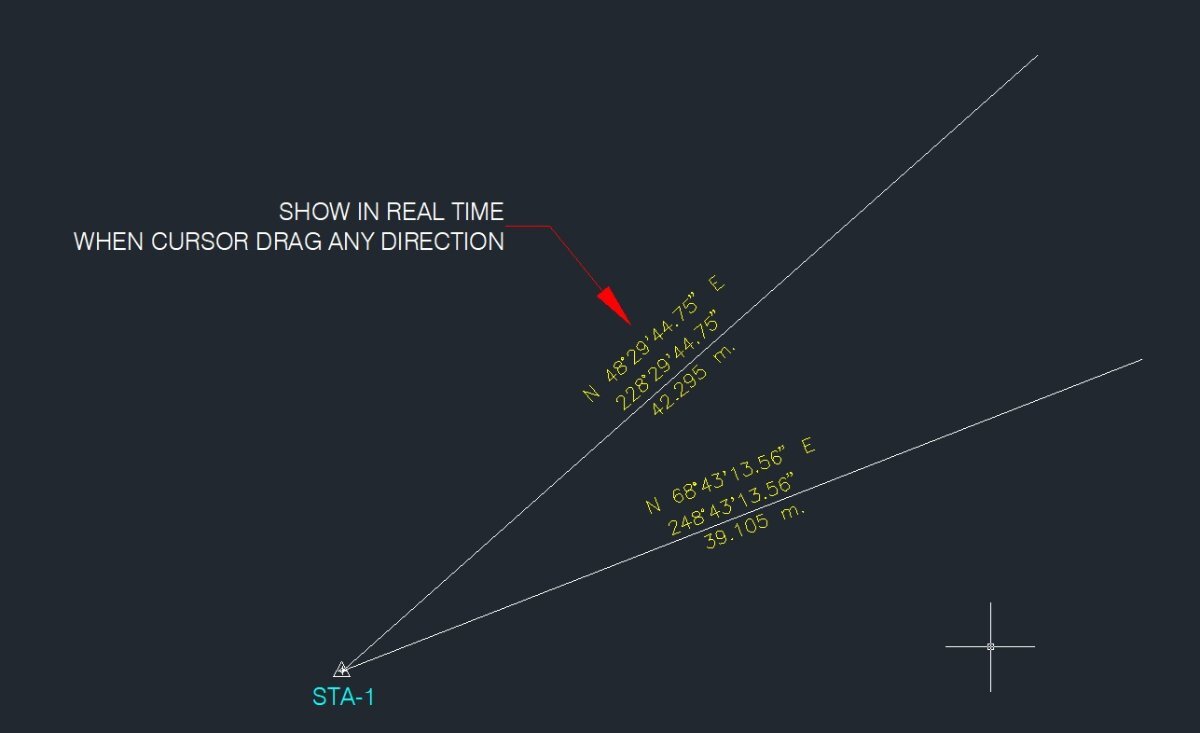
Need a routine lisp for bearing & azimuth in realtime.
oliver posted a topic in AutoLISP, Visual LISP & DCL
Good day once again..and Happy new year.. tired of doing manual and change the units everytime check the direction.. here is the photo. Thanks in advanced. 12.01.2026_11.15.39_REC.mp4
-
Thanks for comments, looks like it is difficult to achieve, will just use code from Lee Mac as is then
-
 lycan joined the community
 - Yesterday
-
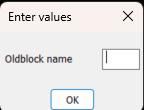
There may be a way around it for suffix, can do a dcl with the label as the old block name and the edit box is empty. Can not close gap in dcl. For prefix would need two column dcl, 1st with edit box , 2nd with label only, blockname. Can provide code if you think this is useful.
-
Another, could do a pop enter value in a dcl box etc, rather than command line. It works to specified length. (defun C:test2 ( / p1 p2 dist d) (initget 1) (setq p1 (getpoint "\npick point 1")) (initget 1) (setq p2 (getpoint p1 "\npick point 2")) (setq dist (distance p1 p2)) (setq d (getreal (strcat "\nLine length is " (rtos dist 2 2) " Enter new length "))) (if (= d nil) (princ) (setq dist d) ) (setq p2 (polar p1 (angle p1 p2) dist)) (command "_.line""_non" p1 "_non" p2 "") (princ) ) (c:test2)
-
 Chicane_Apex joined the community
 -
Hi All, I have multiple individual dwg files, would like to plot in individual pdf's. Is there any lisp file which can make this task automated?
-
Maybe with this subterfuge? (defun c:foo ( / src dxf app doc scr old new) (while (progn (setvar 'errno 0) (setq src (car (entsel (strcat "\nSelect block reference: ")))) (cond ((= 7 (getvar 'errno)) (princ "\nMissed, try again.") ) ((= 'ename (type src)) (setq dxf (entget src)) (cond ((/= "INSERT" (cdr (assoc 0 dxf))) (princ "\nPlease select a block reference.") ) ((= 4 (logand 4 (cdr (assoc 70 (tblsearch "layer" (cdr (assoc 8 dxf))))))) (princ "\nSelected block is on a locked layer.") ) ) ) ) ) ) (if (= 'ename (type src)) (progn (setq app (vlax-get-acad-object) doc (vla-get-activedocument app) src (vlax-ename->vla-object src) old (vlax-get-property src (if (vlax-property-available-p src 'effectivename) 'effectivename 'name)) new (strcat old (getstring t (strcat "\nSpecify new block name <" old ">: " (princ (strcat "\n" old))))) ) (cond ((and (= "" new) (or (not (snvalid new)) (tblsearch "block" new)) ) (princ "\nBlock name invalid or already exists.") ) (T (command "_.rename" "_block" old new)) ) ) ) (prin1) )
-
Use (list (entlast) p2) at place of p2: (list (entlast) p2) <=> at return of (entsel) (defun C:test1 ( / p1 p2 line1) (initget 1) (setq p1 (getpoint "\npick point1")) (initget 1) (setq p2 (getpoint p1 "\npick point2")) (command "_.line""_non" p1 "_non" p2 "") (setq line1 (entlast)) (command "_.lengthen" "_DYnamic" (list line1 p2) pause "") (command "_.change" line1 "" "_Properties" "_Color" "1" "") (prin1) )
-
Maybe it is possible to change the order of commands, at first "_.change", then "_.lengthen" ? (defun C:LineChLenDY ( / p1 p2 line1) (setq p1 (getpoint "Specify the first point: ")) (setq p2 (getpoint "Specify the second point: ")) (command "line" "non" p1 "non" p2 "") (setq line1 (entlast)) (command "change" line1 "" "P" "C" "1" "") (command "lengthen" "DYnamic") (princ) )
-
Not so sure you can do 'end' with the keyboard with the standard (getstring) functions - either live with it or perhaps a DCL pop up might let you do this. Should be able to amend Lees Code to insert a dialogue if it really is necessary. Change this line to call another function with the code needed, return value will be the string that (setq new is looking for: (setq new (strcat (getstring t (strcat "\nPrefix For Block <" def ">: ")) " " old)))
-

Stop Lengthen command repeating.
Steven P replied to Dayananda's topic in AutoLISP, Visual LISP & DCL
I don't think I have used lengthen in a LISP, not used the command for a while, but a quick look at your code "non"p2) - add a couple of spaces for readbility, but in that line you haven't specified the line to lengthen and you might need to end with "": (command "_lengthen" "DYnamic" "non" p2 (entlast) "") -
Thanks mhupp, but I didn't want to add prefix or suffix, actually preferred to leave name unchanged, just wanted to press End on keyboard to get to the end of the string.
-
I have following code to draw a line first and adjust the length of line using LENGTHEN command. Only after getting entity name I need to change its property etc. But the I cant stop the lengthen command and it repeating. Please explain me what is mistake in my command. (defun C:test1() (setq p1 (getpoint"\npick point1")) (setq p2 (getpoint"\npick point2")) (command "line""non"p1 "non"p2 ""); bottom bar (command "_lengthen" "DYnamic" "non"p2) (setq line1 (entlast)) (command "change" line1"""P""C""1"""); )
-

Select all the lines that are vertical
mhupp replied to Isaac26a's topic in AutoLISP, Visual LISP & DCL
That's why I like programming its dealers choice. sometimes its easier to do the opposite to get the results you want. like this simple lisp that invert the selection. if you wanted to select everything but 3 circles and their are 150 items. select the three circles and run this code. ;; Invert Selection on Screen (defun C:SEE (/ SS SS1) (vl-load-com) (if (setq SS (ssget "_I")) (progn) (setq ss (ssadd)) ) (if (setq SS1 (ssget "_WP" (GetScreenCoords))) (foreach ent (vl-remove-if 'listp (mapcar 'cadr (ssnamex SS))) (ssdel ent SS1) ) ) (sssetfirst nil SS1) ) ;;----------------------------------------------------------------------------;; ;Calculates Size of View Window (defun GetScreenCoords (/ ViwCen ViwDim ViwSiz VptMin VptMax) (setq ViwSiz (/ (getvar 'VIEWSIZE) 2) ViwCen (getvar 'VIEWCTR) ViwDim (list (* ViwSiz (apply '/ (getvar 'SCREENSIZE))) ViwSiz) VptMin (mapcar '- ViwCen ViwDim) VptMax (mapcar '+ ViwCen ViwDim) ) (list VptMin VptMax) ) -Edit Again if your only comparing x or y values of the line end points isn't a good option as lsaac26a said "some are slightly to one side left or right." and is using vertical as a relative term. whether you using (if (not vertical or (if horizontal to make the final selection set. both will fail to select anything in the sample drawing. that's why i jokingly put in "Vertical-ish lines Selected" as the final prompt. -edit edit forgot the post getscreencords lisp - Last week
-
Maybe (setq ss (ssget "I")) just select objects 1st then run in a lisp. A google revealed..
-

Select all the lines that are vertical
marko_ribar replied to Isaac26a's topic in AutoLISP, Visual LISP & DCL
You are right @mhupp... But that is why I don't like programming... I tend to write understandable codes... If I was to be asked I'd rather write it (not (equal (car (cdr (assoc 10 x))) (car (cdr (assoc 11 x))) 1e-8))... And this Lee's code selects only vertical lines like topic was stated... Either way, if OP wanted to select lines before deletion and remain only horizontals, then this testing expression should be different like I thought [(equal (cadr (cdr (assoc 10 x))) (cadr (cdr (assoc 11 x))) 1e-8)] -
Hehe reminds me of when I made a shortcut command for one of our customs lisp "Assembly populate".
-
Select all the lines that are vertical
mhupp replied to Isaac26a's topic in AutoLISP, Visual LISP & DCL
I think you might be getting caught up on the cadr? the list its looking at has the 10 and 11 as the first element so the 2nd element is going to be the x value. (10 370477.766247702 2284988.06147298 0.0) & (11 370477.775905386 2284983.23263075 0.0) the 1e-8 is to aggressive for @Isaac26a sample drawing that is why I added a dynamic fuzz the user can pick if they want true vertical lines just input 0. I started with the x value comparison, but isn't a good option for angled lines as it changes for lines of the same same angle but different lengths. and if you increase to pick up longer lines it will picked shorter lines that have a greater angle. -
only tested this on regular blocks. if you use prefix on anonymous blocks they might not be anonymous anymore. I don't know what would happen so test it first before using it on project files. @Lee Mac let me know if you want this taken down. probably do it Monday anyway. Rename.lsp
-
 KTOBY joined the community
 -
Select all the lines that are vertical
marko_ribar replied to Isaac26a's topic in AutoLISP, Visual LISP & DCL
No Lee... I am quite right in my observation... If only you removed that (not) from test expression (not (equal (cadr (assoc 10 x)) (cadr (assoc 11 x)) 1e-8)), your snippet would work as OP desired (gripped selecting all verticals and angled lines for forthcoming deletion)... -
I wasn't talking about the code
-
Ahh, was that yours RX? Mega apologies - I thought I had taken Lees from earlier in that thread (For this thread, RLX also had some ace code in the thread I linked to above)