All Activity
- Past hour
-
 nzhills1 joined the community
 -
 ryanatkins49056 joined the community
 -

Need a routine lisp for bearing & azimuth in realtime.
Tsuky replied to oliver's topic in AutoLISP, Visual LISP & DCL
@devitg Ok, try this. Now labels are fields. If you prefer simply Mtext, Ithink that you can change it (with previous code) mult-label_bearing.lsp - Today
-

Repair Lisp to create superimpose acad
rlx replied to karfung's topic in AutoLISP, Visual LISP & DCL
somehow a document type object lives along your copied_objects so try this : (defun c:new_desktop_file_copy ( / acad_dbx object_list zero_point db) (defun make_color_21 (/ layers) (setq layers (vla-get-layers acad_dbx)) (vlax-map-collection (vla-get-blocks acad_dbx) '(lambda (block) (vlax-map-collection block '(lambda (object) (vla-put-color object 256) (if (/= 21 (vla-get-color (setq layer (vla-item layers (vla-get-layer object))))) (vla-put-color layer 21)))) ) ) ) (setq acad_dbx (vla-getinterfaceobject (vlax-get-acad-object) (strcat "ObjectDBX.AxDbDocument." (substr (getvar 'acadver) 1 2)))) (prompt "\nPick objects to copy to a new file on the desktop...") (setq object_list (mapcar 'vlax-ename->vla-object (vl-remove-if 'listp (mapcar 'cadr (ssnamex (ssget)))))) (setq zero_point (getpoint "\nPick zero point for the copied entities: ")) (setq db (vla-get-database (vla-get-activedocument (vlax-get-acad-object)))) (foreach copied_object (setq odbx_objects_list (vlax-invoke db 'copyobjects object_list (vla-get-modelspace acad_dbx))) (if (vlax-method-applicable-p copied_object 'move) (vla-move copied_object (vlax-3d-point zero_point) (vlax-3d-point 0 0 0)) (princ (strcat "\nUnable to move object name : " (vla-get-name copied_object))) ) ) (make_color_21) (vla-saveas acad_dbx (princ (strcat (getenv "userprofile") "\\Desktop\\" (getstring "\nEnter file name: ") ".dwg"))) (vlax-release-object acad_dbx) (princ) ) - Yesterday
-

Repair Lisp to create superimpose acad
devitg replied to karfung's topic in AutoLISP, Visual LISP & DCL
@SLW210 how to select all the code at code tags , like a short key ctrl+a or whatever -

Perform hatch without superfluous requests
BIGAL replied to Nikon's topic in AutoLISP, Visual LISP & DCL
Maybe use (setvar 'hpname "User") in code, sets the pattern name. -
Repair Lisp to create superimpose acad
devitg replied to karfung's topic in AutoLISP, Visual LISP & DCL
@karfung see the new dwg new block.dwg -
Repair Lisp to create superimpose acad
devitg replied to karfung's topic in AutoLISP, Visual LISP & DCL
@karfung it seem to be you need to make a new.dwg , if so, you can use WRITEBLOCK acad command . -
Repair Lisp to create superimpose acad
rlx replied to karfung's topic in AutoLISP, Visual LISP & DCL
maybe first do an audit on this drawing -

Repair Lisp to create superimpose acad
pkenewell replied to karfung's topic in AutoLISP, Visual LISP & DCL
Does the LISP file load the Visual LISP ActiveX functions with (vl-load-com)? I don't see it in the code. -

Repair Lisp to create superimpose acad
SLW210 replied to karfung's topic in AutoLISP, Visual LISP & DCL
Your video did not work for me. Your LISP ran just fine on my computer. -
Repair Lisp to create superimpose acad
SLW210 replied to karfung's topic in AutoLISP, Visual LISP & DCL
In the future, please place your code in code tags. (<> in the editor toolbar) -
Hi, everybody. It is necessary to perform hatch, regardless of the previous type of hatching. The first code issues superfluous requests. The second code performs the hatch using the previous type, not the one specified in the code. (defun c:HatchUser ( / ss) (setq ss (ssget)) (if ss (progn (command "_-BHATCH" "_Properties" "_User" "0" "_Double" "_Yes" "200" "_S" ss "") ) ) (princ) ) ; *********** (defun c:HatchUser1 ( / ss) (setq ss (ssget)) (if ss (progn (command "_.-BHATCH" "_User" "_Double" "_Yes" "0" "200" "_S" ss "" "") ) ) (princ) ) HatchUserdwg.dwg

-
Need a routine lisp for bearing & azimuth in realtime.
Tsuky replied to oliver's topic in AutoLISP, Visual LISP & DCL
@oliver Try to reload the code at this answer -
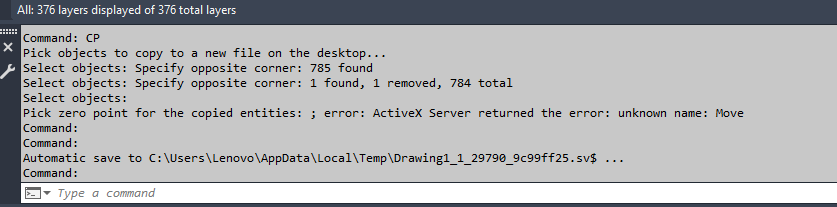
(defun c:new_desktop_file_copy (/ acad_dbx object_list zero_point) (defun make_color_21 (/ layers) (setq layers (vla-get-layers acad_dbx)) (vlax-map-collection (vla-get-blocks acad_dbx) '(lambda (block) (vlax-map-collection block '(lambda (object) (vla-put-color object 256) (if (/= 21 (vla-get-color (setq layer (vla-item layers (vla-get-layer object))))) (vla-put-color layer 21) ) ) ) ) ) ) (setq acad_dbx (vla-getinterfaceobject (vlax-get-acad-object) (strcat "ObjectDBX.AxDbDocument." (substr (getvar 'acadver) 1 2)))) (prompt "\nPick objects to copy to a new file on the desktop...") (setq object_list (mapcar 'vlax-ename->vla-object (vl-remove-if 'listp (mapcar 'cadr (ssnamex (ssget)))))) (setq zero_point (getpoint "\nPick zero point for the copied entities: ")) (foreach copied_object (setq odbx_objects_list (vlax-invoke (vla-get-database (vla-get-activedocument (vlax-get-acad-object))) 'copyobjects object_list (vla-get-modelspace acad_dbx) ) ) (vla-move copied_object (vlax-3d-point zero_point) (vlax-3d-point 0 0 0)) ) (make_color_21) (vla-saveas acad_dbx (princ (strcat (getenv "userprofile") "\\Desktop\\" (getstring "\nEnter file name: ") ".dwg"))) (vlax-release-object acad_dbx) (princ) ) Hi Bro, The LISP code above is awesome, and it is working. But, I encountered an error below and as per the attached drawing 1 with mp4 video (in link) and added it as follows, 1). Please set the unit to be "mm" in the created file. 2). Please zoom extend for the created file. fyi, I did changed the LISP code to "CP" Kindly advise and revert with the completed Lisp code. Thanks. https://drive.google.com/file/d/15VNesdJ3uHtPbUlrNbCsaP0yMzY3e2Po/view?usp=sharing Drawing1.dwg
-
Need a routine lisp for bearing & azimuth in realtime.
devitg replied to oliver's topic in AutoLISP, Visual LISP & DCL
@Tsuky Thanks for label_bearing-vertex, I need to label from points , not from polilines . Just to loop around the label_bearing.lsp from point to point Best regards label_bearing.lsp -
 karfung joined the community
 -
Need a routine lisp for bearing & azimuth in realtime.
Tsuky replied to oliver's topic in AutoLISP, Visual LISP & DCL
@devitg For labelling the segments of polylines (cords for the polyline arcs), I can offer you this. label_Bearing-vertex.lsp -

Lisp area and/or length of polyline, as a leader
dexus replied to filan1a's topic in AutoLISP, Visual LISP & DCL
The height of the text you can change with the "style" command. There you can change the default value of the text-style that is applied. -
 dragonet01 joined the community
 -

Lisp area and/or length of polyline, as a leader
Mr. O replied to filan1a's topic in AutoLISP, Visual LISP & DCL
Hello, Can you help me because im using millimeter drawing when i use this lisp the value and text is small, how can i change the value height in millimeter. thank you. Polylin Length FA-L.LSP -
Mr. O joined the community
-
Lisp area and/or length of polyline, as a leader
Mr. O replied to filan1a's topic in AutoLISP, Visual LISP & DCL
Hello how can i change the height value if i use millimeter drawing - Last week
-
Change a length of line by feeding a new end point to the association list.
BIGAL replied to Dayananda's topic in AutoLISP, Visual LISP & DCL
I looked at this and started to do move end point of a pline, then realised you state "Extend line" rather than move end point to a new point. So you can move the "end" point of a line or Pline to a point with one code That is different to say make a new length. If you think about it don't need code just pick line/pline then grips are exposed pick an end or vertice and move it to the new point. So can you explain more what it is your trying to do ? A dwg before after etc. -
 mzerlaut joined the community
 -
Need a routine lisp for bearing & azimuth in realtime.
devitg replied to oliver's topic in AutoLISP, Visual LISP & DCL
@Tsuky Please route me how to make it work on a lot of vertices or points as need to bearing or angle from points.dwg -
Need a routine lisp for bearing & azimuth in realtime.
devitg replied to oliver's topic in AutoLISP, Visual LISP & DCL
@oliver, please upload your sample.dwg so we can work at it -
 Bojanko joined the community
 -

Text temporarily disappearing
Rooster replied to Rooster's topic in AutoCAD 2D Drafting, Object Properties & Interface
Thanks, I've found that alternative an am using it for now. Functionally, I do prefer how the first addon works, but the resulting text issue is too painful to put up with because of that! I will submit a bug report to the developers. -
Yes, do it!!
-
 Clxrkyyy joined the community
 -

Need a routine lisp for bearing & azimuth in realtime.
oliver replied to oliver's topic in AutoLISP, Visual LISP & DCL
i tried this code, the bearing is fine recon from north..but azimuth have a problem. 14.01.2026_20.26.59_REC.mp4 -
 keksas joined the community
 -
I have a dump LISP called TakeADump, maybe I need this to go along with it!