All Activity
- Past hour
-

Does anybody else have this DIMBREAK issue?
DavidP replied to SLW210's topic in AutoCAD Bugs, Error Messages & Quirks
I never used dimbreak before so but can you use a lisp select all the dim and test which ones which have DimBreaks applied to the then just re-set them.? Test on a few drawings first (make sure run it on back version)... I did this with the help of ai... but it appears to work for me... (perhaps some can verify and improve on it) I'm on on Version 2027 Map but his worked for me. I have notice two things if the dimension are not on screen and the object it crosses are a layer that is off the break reset doesn't work. (So I added zoom extents and do both layer on and thaw for any layer that is printable. Then at the end I reset everything back. But it may be better to do that before you start... as I seen AutCAD behaving strange... Where some lisp functions run before the previous task is complete... (defun c:RefreshDimBreaks ( / layers oldecho i data name flags plot off frozen answer item viewctr viewsize) (setq oldecho (getvar "CMDECHO")) (setvar "CMDECHO" 0) (setq viewctr (getvar "VIEWCTR")) (setq viewsize (getvar "VIEWSIZE")) (setq layers '()) (if (tblnext "LAYER" T) (progn (while (setq data (tblnext "LAYER")) (setq name (cdr (assoc 2 data))) (setq flags (cdr (assoc 70 data))) (setq plot (cdr (assoc 290 data))) (setq off (< (cdr (assoc 62 data)) 0)) (setq frozen (= (logand flags 1) 1)) (if (and (= (if plot plot 1) 1) (or off frozen)) (setq layers (cons (list name off frozen) layers)) ) ) ) ) (if (> (length layers) 0) (progn (princ (strcat "\nFound " (itoa (length layers)) " printable layers that are off or frozen.")) (initget "Y N") (setq answer (getstring T "\nTurn these layers on and thaw them temporarily? [Y/N] <N>: ")) (if (or (= answer "") (= (strcase answer) "N")) (princ "\nNo changes made.") (if (= (strcase answer) "Y") (progn (foreach item layers (command "_.-LAYER" "_ON" (car item) "") (command "_.-LAYER" "_THAW" (car item) "") ) ) ) ) ) (princ "\nNo printable layers are off or frozen.") ) (RefreshDims) (foreach item layers (if (cadr item) (command "_.-LAYER" "_OFF" (car item) "") ) (if (caddr item) (command "_.-LAYER" "_FREEZE" (car item) "") ) ) (princ "\nOriginal layer states restored.") (command "_.ZOOM" "_C" viewctr viewsize) (command "_.REGEN") (setvar "CMDECHO" oldecho) (princ) ) (defun RefreshDims ( / ss ssBreak oldecho i ent dict 360type) (setq oldecho (getvar "CMDECHO")) (setvar "CMDECHO" 0) (command "_.ZOOM" "_E") (if (setq ss (ssget "_X" '((0 . "DIMENSION")))) (progn (setq ssBreak (ssadd)) (setq i 0) (while (< i (sslength ss)) (setq ent (ssname ss i)) (if (setq dict (cdr (assoc 360 (entget ent)))) (progn (setq 360type (cdr (assoc 0 (entget dict)))) (if (= 360type "DICTIONARY") (ssadd ent ssBreak) ) ) ) (setq i (+ i 1)) ) (if (> (sslength ssBreak) 0) (progn (princ (strcat "\nRefreshing " (itoa (sslength ssBreak)) " dimension breaks.")) (command "_.DIMBREAK" "_M" ssBreak "" "_R") (command "_.DIMBREAK" "_M" ssBreak "" "_A") ) (princ "\nNo dimensions with extension dictionaries found.") ) ) (princ "\nDrawing does not have any dimensions") ) (setvar "CMDECHO" oldecho) (princ) ) - Today
-

Issues with MText in different colours
GGuzzler posted a topic in AutoCAD 2D Drafting, Object Properties & Interface
Hi all, Having an issue that started recently where text pasted in from MS word looks fine in Paper space but then once printed to PDF, formats strangely. Please see screenshots attached. Any ideas much appreciated! vCT P2v0.1 YOC.dwg TEST.pdf
-
No worries. I simply fed your description into Claude. With a few more prompts or a couple of revisions it would have done all that you asked. Its crazy powerful especially in the hands off someone like yourself with advanced lisp coding knowledge and experience. Claude and similar are such a high level above the likes of Co-Pilot.
-
.thumb.jpg.615654602253be56b2fbd5d064834780.jpg)
Why does a 3D solid become difficult to edit after using UNION?
indiancad posted a topic in AutoCAD 3D Modelling & Rendering
Have you ever combined several 3D solids with UNION, only to find that editing one particular part later becomes difficult? Once separate solids are united, AutoCAD treats them as a single 3D solid. If you still need to modify individual components, I prefer keeping the original solids or using SLICE when I need to separate a specific portion. For complex models, combining everything too early can make later changes harder. How do you usually manage 3D solids when you know the model will need revisions later? -

[Part 1/6] The CAD Manager's Playbook: How to Elegantly Manage 100+ Custom Plugins
VicoWang replied to VicoWang's topic in CAD Management
Fair enough, Steven! If your current company drive setup is humming along without friction for your team, there is genuinely zero reason to disrupt what already works for you. Just to clear up one quick technical misconception for anyone following along: VedaCAD isn't an online file store (it's purely an environment deployment manager), and there is no password fatigue here—the platform is completely passwordless (supporting modern Enterprise SSO, OAuth, and Magic Links). Different tools for different office architectures. Wishing you and your CAD team smooth drafting! -

[Part 1/6] The CAD Manager's Playbook: How to Elegantly Manage 100+ Custom Plugins
Steven P replied to VicoWang's topic in CAD Management
Option 1 above - I think my CAD setup sends a request to the central server to get the licence information and won't run unless it gets that - I have to be online to start CAD - so can always get our resources. Open on demand shows no noticeable delays - milliseconds if there is (or the time it takes to move the hand from keyboard back to mouse again) Option 2 above - LISPs are loaded when called for and yes, there is a remote chance of 2 users requesting the same file at the same time, it is a very remote chance. Any updates to a routine will be an improvement, the user notice - they still have the working routine to use if a update occurs (and even if so, there is a LISP to reset the load on demand that they can invoke). So far you might have guessed I am not being sold on the idea of another online file store. Another set of user names, unique passwords, and so on -
 Strain2026 joined the community
 -
 ALEX993 joined the community
 -
 all_lll joined the community
 -
I used parts of the AI code and parts of my code that I had, like correct counts and correct table output to match task. Big thanks @Least I will look at Claude a lot more. https://forums.autodesk.com/t5/visual-lisp-autolisp-and-general/need-help-counting-support-quantities-can-you-please-help/td-p/14238558/page/3
-
 kim1022 joined the community
 -

Free Browser-Based STEP/STP Viewer for Quick CAD Inspection
cadprops replied to cadprops's topic in AutoCAD 3D Modelling & Rendering
Thanks for the detailed feedback! I’ve just improved the .3mf handling and fixed several compatibility issues. Could you give those files another try when you have a chance? If any of them still fail to open, I’d really appreciate it if you could let me know. Thanks again for helping me improve CADProps! -
Free Browser-Based STEP/STP Viewer for Quick CAD Inspection
cadprops replied to cadprops's topic in AutoCAD 3D Modelling & Rendering
Thanks for the detailed feedback! I’ve just improved the .3mf handling and fixed several compatibility issues. Could you give those files another try when you have a chance? If any of them still fail to open, I’d really appreciate it if you could let me know. Thanks again for helping me improve CADProps! - Yesterday
-
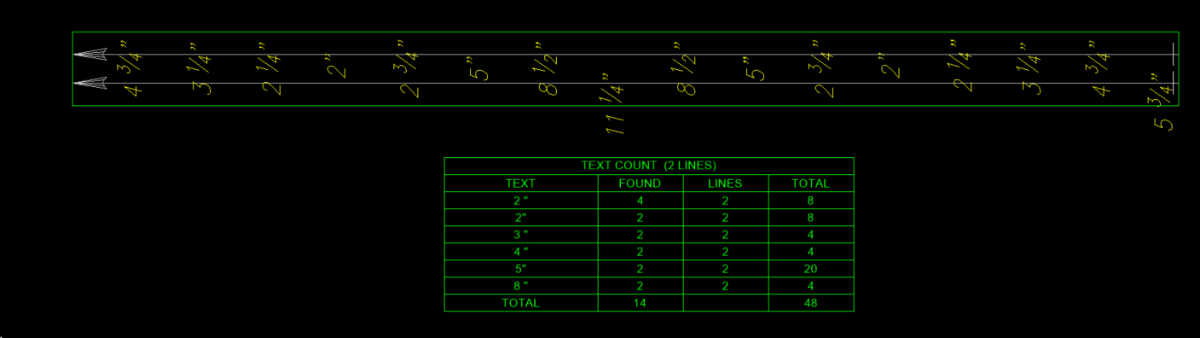
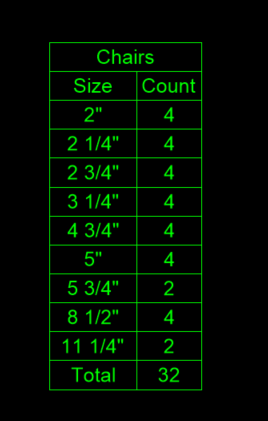
I am impressed with the result its very close, has a couple of things to fix. The Mtext needs to keep the Fraction text. It also needs to sort on that fraction text. If you look at image correct answer is Total = 32. One issue of the dwg is may need to get end user to make sure text is within a reasonable offset from the plines etc, In true dwg some ends are at angles and end text is close. But will test more. One thing I did not mention is there is 13 separate multi line segments to get the total for say a total maybe 1000+ but don't worry about that for now. I consider wether to keep going with what I have oe use what has been provided. Attached a sample dwg. Test lines text.dwg
-
VS Code + AutoCAD Lisp Extension Issues (Need constant re-starts)
DavidP replied to DavidP's topic in AutoLISP, Visual LISP & DCL
I may have been using vs Code incorrectly.... Before I was just loading the lisp or lisp(s) files I thought I need to test a specific function... but now I'm loading all the lisp in project before I start debugging... this change in approach appears to work much better. So for each Project I create a lisp called main.lsp the main function of this is to read the vscode project prj file and load each Lisp in the project while reporting the load status. (I hardcore file path and file name : I attach vs code while in the main function and run the main while checking to ensure none failed to load... then just debug as normal... So far I haven't had to do a restart yet. So now every time I make a code change I run main first then call what ever function I need to debug. (defun c:main ( / path projectfile ProjectLispList fileName filePath result) (setq path "C:/Tools/Projects/Project1/") (setq projectfile "MyProject.prj") (setq ProjectLispList (ReadProjectFile (strcat path projectfile))) (foreach fileName ProjectLispList (if (or (vl-string-search "\\" fileName) (vl-string-search "/" fileName) (vl-string-search ":" fileName)) (setq filePath fileName) (setq filePath (strcat path fileName ".lsp")) ) (if (findfile filePath) (progn (setq result (vl-catch-all-apply 'load (list filePath))) (if (vl-catch-all-error-p result) (princ (strcat "\nFAILED: " filePath)) (princ (strcat "\nSUCCESS: " filePath)) ) ) (princ (strcat "\nNOT FOUND: " filePath)) ) ) (princ) ) (defun ReadProjectFile (filePath / file line trimLine inList names start end name) (setq file (open filePath "r")) (setq inList nil) (setq names nil) (if file (progn (while (setq line (read-line file)) (setq trimLine (vl-string-trim " " line)) (if (= (strcase trimLine) ":OWN-LIST") (setq inList T) (if inList (if (= trimLine ")") (setq inList nil) (progn (if (= (substr trimLine 1 1) "(") (setq trimLine (substr trimLine 2)) ) (if (= (substr trimLine 1 1) "\"") (progn (setq start (vl-string-search "\"" trimLine)) (setq end (vl-string-search "\"" trimLine (1+ start))) (setq name (substr trimLine (+ start 2) (- end start 1))) (setq names (append names (list name))) ) ) ) ) ) ) ) (close file) ) ) (reverse names) ) -
I put in to Claude Opus 5. Attached is the result. It took a couple of minutes or so, with one revision. LTCOUNT_1.lsp
-

How can I make the following program support Chinese input?
SLW210 replied to xcn's topic in AutoCAD 2D Drafting, Object Properties & Interface
That's what I was also attempting, though I only have AutoCAD 2000i on my home computer for now. I'll try anther shot at it on the home computer when I get time. -
Free Browser-Based STEP/STP Viewer for Quick CAD Inspection
SLW210 replied to cadprops's topic in AutoCAD 3D Modelling & Rendering
I played with it for a few minutes, it needs better handling for .3mf files for me to have much use for it. It only opened a few and failed to open several, all can open with my Bambu Labs Slicer. The 10 MB limit is fairly low for 3D files, but for FREE, not too bad. -
VedaCAD - Technical Support, Updates & Community VCIDs
VicoWang replied to VicoWang's topic in AutoLISP, Visual LISP & DCL
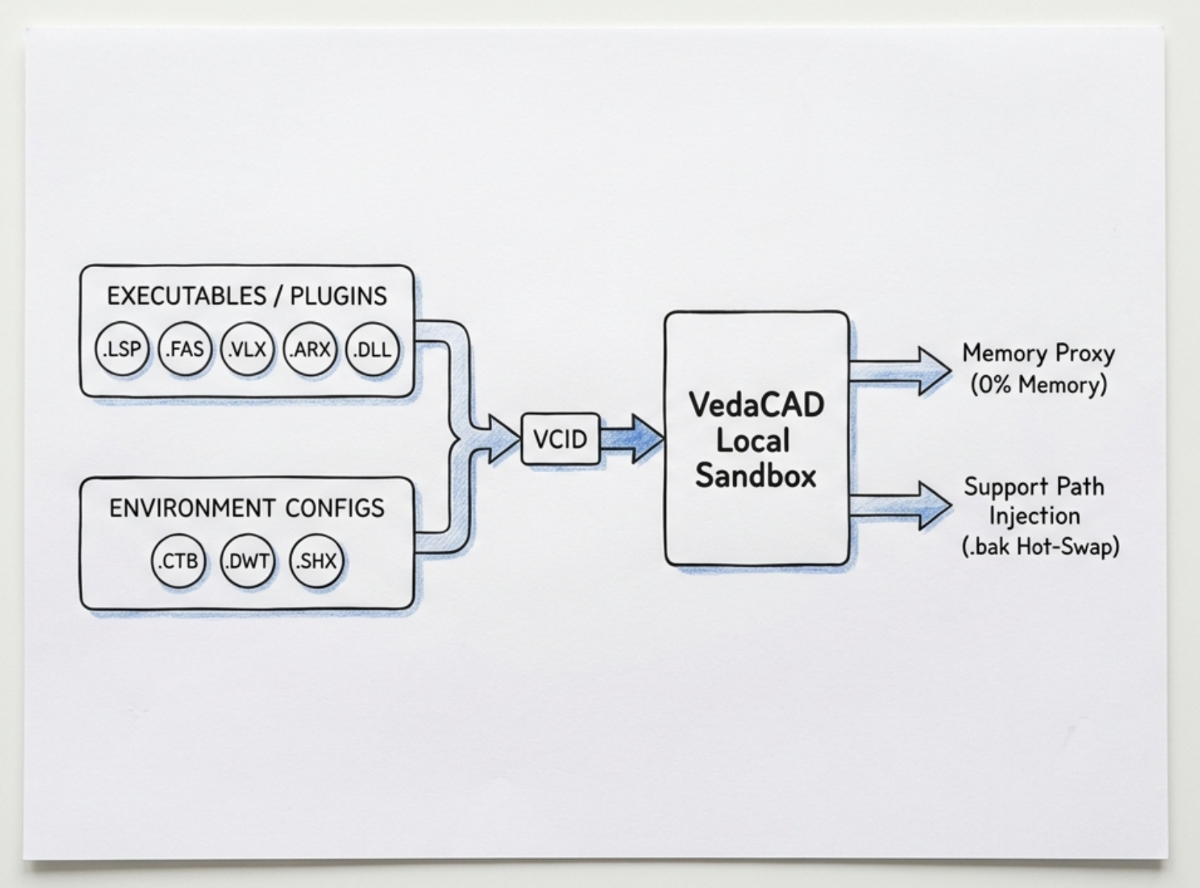
Hi everyone, Taking a step back and reflecting on the feedback I've received from veteran developers here over the past few weeks, I realized something: in my excitement to share VedaCAD, I’ve used a lot of heavy SaaS buzzwords like "Zero-Trust architecture," "MDM," and "Cloud Orchestration." Sometimes, tech jargon can make a tool sound overly mysterious or complex. I want to take the mask off for a moment. At the end of the day, what exactly is VedaCAD under the hood? It is simply a deployment manager for your routines (.lsp, .fas, .vlx, .arx, .dll) and environment standards (.dwt, .ctb, .shx, etc.). There is no hidden black magic here. We don't change how AutoCAD draws lines, and we don't encrypt or modify your source code. Instead of forcing CAD Managers to manually email ZIP files, edit acad.pgp aliases across 50 computers, or fight with the fragile APPLOAD Startup Suite, I just used pure AutoLISP/ActiveX to streamline the delivery physics: You wrap your asset into a 6-character VCID (local file publish VCID). The client fetches the exact physical file and drops it into an isolated local sandbox folder on the user's C: drive. For scripts, it creates a demand-loading proxy in memory so CAD boots up instantly at 0% memory overhead. For standards (like fonts and plot styles), it natively injects the Support Paths directly into the CAD preferences. Need to push an update but the .DLL is locked by Windows? The background engine simply renames the running file to .bak and slides the new version in silently. VedaCAD doesn't aim to revolutionize what you draw. It just brings modern software package management to how your CAD tools are delivered. Simple, clean, and transparent. Just wanted to put that out there for anyone wondering what the engine actually does!
-
multiple file selection dialog box using lisp & powershell
SLW210 replied to Paul Li's topic in AutoLISP, Visual LISP & DCL
I'll try to have a look at home tonight, I was busy and tired this weekend. -
Why does a 3D solid sometimes disappear when I rotate the view?
indiancad posted a topic in AutoCAD 3D Modelling & Rendering
Have you ever rotated a 3D model and suddenly part of the solid seems to disappear? In many cases, the geometry is fine and the issue is related to the visual style, clipping, or view direction. When this happens, I first switch to Shaded with Edges and use 3DORBIT to inspect the model from different angles. I also check whether a clipping plane or unusual camera/view setting is affecting the display. It’s easy to think the solid is damaged when it’s actually just a viewing issue. Have you run into this before? What was causing it in your case? -
[Part 1/6] The CAD Manager's Playbook: How to Elegantly Manage 100+ Custom Plugins
VicoWang replied to VicoWang's topic in CAD Management
Hi Steven, That is definitely a very disciplined on-premise setup! Putting the explicit network path directly into the load call (e.g., (load "Z:/CAD_Standards/...")) is certainly much cleaner than relying on AutoCAD's native search paths to guess where a file lives. For a single office where everyone is hardwired to a local Gigabit LAN running plain-text LISP routines, it has been a lightweight way to maintain a central file. Where that setup typically runs into real-world friction usually comes down to two specific scenarios: 1. Laptops, Job Sites & VPN Latency: If an engineer opens their laptop at home or on a job site without connecting to the company VPN first, Z:\ doesn't exist. AutoCAD will noticeably hang trying to resolve that dead network path before throwing an error. Even over VPN, querying scripts across Windows SMB introduces noticeable command hesitation. 2. Windows SMB File Locks & Concurrent Read Collisions: Overwriting a shared .lsp on the fly sounds seamless, but over Windows SMB networks it frequently collides with OS-level OpLocks (Opportunistic Locking) and lingering file leases, resulting in "Sharing Violation: File is in use" errors. Even worse is the race condition: if an administrator saves a script while a drafter's on-demand macro triggers a read, AutoCAD can ingest a partially written file, throwing a fatal "; error: malformed list on input" and breaking their active command. And the moment a firm introduces compiled binaries (.fas, .vlx, .arx, .dll), Windows places a hard shared read-lock on the file the second anyone opens CAD—making live server updates during work hours completely impossible without forcing everyone to exit. In Part 2 of this series, I dive a bit deeper into how we use a local sandbox cache model to tackle these exact remote work and file-locking bottlenecks: For a strictly in-house, LAN-only team with plain LISPs, keeping it simple the way you do works if everyone is in the building. We're primarily addressing the distributed teams and compiled environments where those network drops, SMB conflicts, and file locks become daily headaches. At the end of the day, VedaCAD doesn't aim to revolutionize drawing functions or replace your team's beloved scripts—it's simply a deployment manager for your routines (.lsp, .fas, .vlx, .arx, .dll) and environment standards (.dwt, .ctb, .shx) to modernize delivery across changing fleets. Appreciate you chiming in with your team's workflow, Steven! And you're always welcome to test VedaCAD whenever you have time—I'd love to get your thoughts. -
[Part 1/6] The CAD Manager's Playbook: How to Elegantly Manage 100+ Custom Plugins
Steven P replied to VicoWang's topic in CAD Management
We just add the file path to the 'load' string - the files being saved on the company drive and not on a support path. We all access to the same file, not a local copy, any updates are applied to all when the file is saved. 1 line in the startup menu to load the on-demand LISP / index. Time honoured maybe but it works well and is well understood by the CAD teams. -

Do you check the drawing units before starting work on a DWG?
Dadgad replied to indiancad's topic in AutoCAD Drawing Management & Output
Agreed, the -DWGUNITS command is quite comprehensive, and particularly when receiving drawings from a non-team member. When I want to use it, I expand my commandline history to display 5 or 6 lines, in one go, all the better to display the numerous options. -

Do you check the drawing units before starting work on a DWG?
BIGAL replied to indiancad's topic in AutoCAD Drawing Management & Output
We basically used our DWT so would insert an external dwg then way more than units were correct. The only disclaimer is that most of our dwg's started off with "Model" only no layouts. Our design process created those. -
[Part 1/6] The CAD Manager's Playbook: How to Elegantly Manage 100+ Custom Plugins
VicoWang replied to VicoWang's topic in CAD Management
Haha, oh no, BIGAL—I see where the confusion came from! Let me completely clear that up: A VCID is NOT a command alias, and it is definitely NOT a shortcut you type to draw! Nobody is typing arbitrary 6-character codes like "123, 456" to draw walls or doors. I would hate that software too! Here is how the architecture actually works: VCID is just an Asset Identifier: It is purely a package tracking code used once to fetch and sandbox the file (or pushed silently by the CAD Manager from the cloud). Instant, Lossless Alias Customization: Once on the machine, the draftsperson draws using their normal human aliases (e.g., W for wall, D for door). But here is the real game-changer: VedaCAD allows users and CAD managers to reassign any custom alias on the fly via our GUI, without ever editing acad.pgp, without writing wrapper LISP routines (defun c:...), and without modifying a single line of third-party source code. And regarding that conditional loading pattern you shared: (if (not ahbutts) (load "Multi radio buttons")) Using (if (not <func>) (load ...)) as a local load-guard has been a time-honored AutoLISP idiom since the 1990s. But as we touched upon in our previous discussion regarding Install.lspand AUTOLOAD, that pattern hits severe architectural limits in an enterprise environment: Search Path Fragility: (load "filename") strictly assumes the file is already sitting somewhere in AutoCAD’s native Support File Search Path. Furthermore, without a fallback argument, if the path breaks or an engineer takes a laptop to a disconnected job site, that one-liner crashes with a fatal ; error: LOAD failed. Zero Path Dependency in VedaCAD: VedaCAD completely bypasses AutoCAD's Support Paths. We engineered an independent, version-controlled Mapping Database. It binds custom aliases directly to the physical binaries vaulted inside an isolated local sandbox. The command executes natively without touching, polluting, or relying on AutoCAD's fragile support search paths at all. This series is specifically focused on solving deployment and governance nightmares for CAD Managers running enterprise fleets across dozens of workstations—where relying on manual path configurations and individual workstation edits simply doesn't scale. Hopefully that clears up the distinction between our backend mapping database and the actual drafting aliases! --- Just thinking about this a bit more, it really highlights how diverse everyone's CAD setup is. For folks who have spent decades fine-tuning their personal POP menus and local routines until it's second nature—honestly, don't fix what isn't broken! Everyone’s workflow is unique. On that note, I also wanted to give a quick shoutout to developers like @Paul Li , who recently took the time to actually test VedaCAD against his own real-world, complex application setups and sent over some amazingly detailed, hands-on feedback. It’s that kind of practical testing in the trenches that helps bridge the gap between traditional CAD habits and modern deployment. Really appreciate folks taking the time to kick the tires out in the wild! -
I am using V25 had properties window open, ran code by @mhupp and it worked properties window displays and objects are highlited.
-
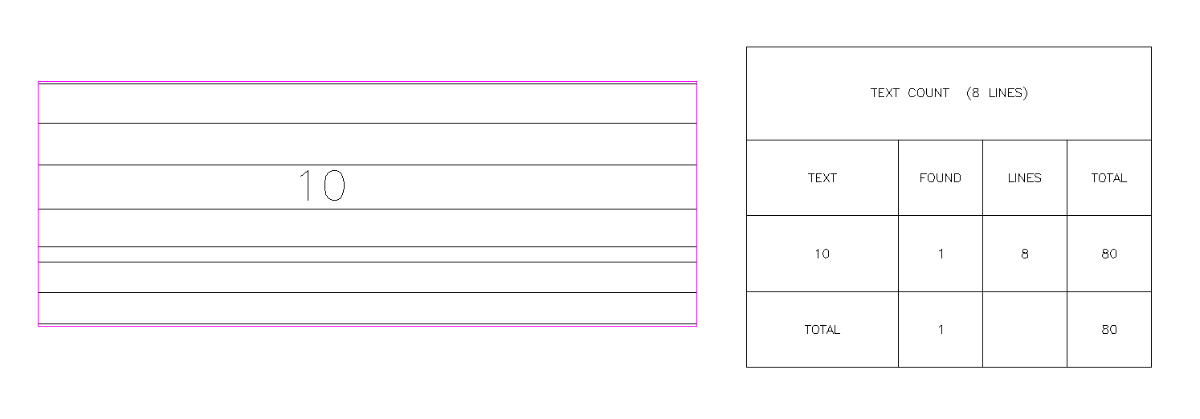
J2lstaples, I have been using AI a bit lately, When I code a bigger project even small ones I write numerous defuns the reason being they solve one task but a program may need 5 task defuns. Also I can test that defun and make sure its working correctly rather having one great big program and trying to find where it is not working. But sometimes the AI just does not work for a defun task so have to go back to searching old fashioned way. You can use AI but you have to know how to describe a task, knowing who some lisp functions like SSget work with filters. Not sure what AI would think of this, I will do old fashioned way. "Drag line over multiple parallel p/Lines get two out side linework, offset both outward further make a box, now ssget text on a layer within that box. Also get how many lines, Then sort and count the text multiplied by the number of lines and put results in a table." Yes it is a current post request, not here at Cadtutor. I am interested in what AI can do and how long it takes to make something that works.
-
[Part 1/6] The CAD Manager's Playbook: How to Elegantly Manage 100+ Custom Plugins
BIGAL replied to VicoWang's topic in CAD Management
It only takes one line to check is a program already loaded if not then demand losd. if (not ahbutts)(load "Multi radio buttons")) In the majority of programs to draw objects walls doors windows etc plus much much more are all demandloaded from a POP menu. It really comse down to how your going to present your programs to an end user, POP, Ribbon and toolbars can be used, yes your token method can be used also. I know of some software that pushed hard remember the option number to run a program, so a discussion would be use 123 pick objects then 456 and finish with 789. I had no idea what they were talking about.