All Activity
- Past hour
-
 Arthur 09 joined the community
 - Today
-
.thumb.jpg.615654602253be56b2fbd5d064834780.jpg)
Best Way to Protect Commercial AutoLISP Applications – High-Level Security and Licensing
indiancad replied to Sathar's topic in AutoLISP, Visual LISP & DCL
For commercial AutoLISP applications I would not trust FAS VLX compilation alone. It makes looking at the source code but it should not be seen as full protection from people trying to figure out how it works. A better way is to put parts about licenses and checks into a compiled.NET component. Use a server to check licenses and connect activations to a mix of computer details. I also suggest using signed license answers storing information in a way on the computer checking online now and then and allowing a short time without internet. Do not depend on hardware IDs because changes in hardware can cause real problems with activation. One key thing to remember: no protection on the computer side is completely safe. The aim is to make it hard for people to copy and change the software while making sure real users can activate and renew easily. It would be interesting to find out if people here have done this with their licensing server or, with a company that offers licensing services. -
When working with drawings received from other companies, you may encounter blocks containing attributes such as part numbers, descriptions, or reference labels. If you need to convert those blocks into ordinary drawing entities while preserving the displayed attribute values, the BURST command can be useful. Unlike EXPLODE, it converts attribute values into text rather than simply losing them. However, converting blocks can affect the original structure and editability of the drawing. When preparing external drawings for modification or data extraction, do you prefer BURST, EXPLODE, or keeping the original attributed blocks intact? What determines your choice?
-
Finding overlapping geometry without manually checking every line
indiancad posted a topic in AutoCAD 2D Drafting, Object Properties & Interface
In a complex 2D drawing, two or more lines may occupy exactly the same position. The drawing can look perfectly correct, but duplicate geometry can cause problems during area calculations, hatching, CNC preparation, and file conversion. One useful command is OVERKILL. It detects and removes duplicate or overlapping geometry, with options to control how objects are compared. However, running it with default settings may not always produce the desired result, especially in drawings with different layers, linetypes, or partially overlapping segments. Do you routinely run OVERKILL before issuing a drawing, or do you prefer to identify and correct overlapping geometry manually? Have you ever found a problem caused by duplicate entities? -
 HausDraft joined the community
 -

Aluminum composite panels parametric templates
BIGAL replied to emosms's topic in AutoCAD 2D Drafting, Object Properties & Interface
In the draw window it's for multi story buildings so size can be different for every window. There is not a problem matching properties with a dcl. You can make better descriptions, in the code is default values you set or it can remember previous values. Just have the tools to make the dcl. If you look at the window DCL in movie on right side is edge controls these do just that a corner or a multi panel join and so on. So in your comments you talk a bit about this. Yes it's drawn via objects Plines etc. You can have shapes like the V notch. The dimensioning is just part of a program. I believe it will be easier than trying to make a dynamic block work. Given how much post time has occurred in this forum, a program would be done by now. But it is for your company only so a cost may be relevant. But you can add more shapes quickly. Will see if can find time to do some form of example. Step 1
- Yesterday
-
These are ones I use: To record the current zoom: (setq currentzoom (list (getvar 'viewctr) (getvar 'viewsize))) .. zoom as you want And this returns you to where you were. (vla-ZoomCenter (vlax-get-acad-object) (vlax-3d-point (car currentzoom)) (cadr currentzoom)) Never tried with viewports but some ssget types need the entities to be selected to be in view, maybe viewports are the same
-
 EngiEasy joined the community
 -
Here's another without command calls: (defun c:zal (/ a d c tabs) ;; RJP » 2020-07-08 (setq c (getvar 'ctab)) (vlax-for x (vla-get-layouts (setq d (vla-get-activedocument (setq a (vlax-get-acad-object))))) (setq tabs (cons (list (vla-get-name x) (vla-get-taborder x)) tabs)) ) ;; The sort makes sure that the tabs step left to right (foreach x (cdr (vl-sort tabs '(lambda (r j) (< (cadr r) (cadr j))))) (setvar 'ctab (car x)) (vlax-put d 'mspace 0) (vla-zoomextents a) ) (setvar 'ctab c) (princ) )
-
I am still working on this, works pretty good on everything but blocks now. I can place my crosshairs on blocks no problem, they work off the dimension, Centermark command needs an object, I think I have that sorted, just need time to get it working in my LISP. For my use, I have it placing the CENTERMARK in modelspace when a paperspace dimension references an object in modelspace. To maintain a correct dimension measurement on a scaled viewport the marks need to be associated with the modelspace object. My question would be, does anyone want the Centermarks in paperspace? I also have my crosshairs and plan on the Centermark to be outside of the blocks since I am just working on objects that are dimensioned and wouldn't want to update all of the blocks if more than one. Is there a case where anyone would want them inside the blocks?
-
Yeah fig so just left 410 in there to be safe.
-
I have a Zoom Extents in Modelspace and Zooms Extents, then .9x in all layouts, it helps with the offset AutoCAD puts on some drawings when opening them, plus works for finding odd paperspace items, zooms just a little more to show the edges. Still trying to determine what is wrong with Lee Mac VPOUTLINE LISP? Are you looking for a count of true viewports? I have a LISP that gives this report of true viewports in all layouts, as well as places a border in modelspace and creates/checks for my viewport layer. ====================================== AutoVPBrdr REPORT ====================================== True layout viewports: 5 Viewport layer assignments: 5 Layer assignment failures: 0 Modelspace borders created: 5 Viewports skipped: 0 -------------------------------------- Layer: Viewport Color: 45 Plot: OFF ====================================== It only places a border for a viewport referencing Top/Plan view.
-
BricsCAD reports the correct number of view-ports without requiring looping through the layouts first.
-

Best Way to Protect Commercial AutoLISP Applications – High-Level Security and Licensing
SLW210 replied to Sathar's topic in AutoLISP, Visual LISP & DCL
As well as spend time making full instructions and even some videos of them in action. -

[Free LISP] Auto-mark revision clouds for design changes — compare two regions in same DWG
mohdomar replied to Beastt1992's topic in AutoLISP, Visual LISP & DCL
Thank you -
Aluminum composite panels parametric templates
indiancad replied to emosms's topic in AutoCAD 2D Drafting, Object Properties & Interface
I would avoid setting each flange. Begin with the panel dimensions then add horizontal, vertical, parallel and 45‑degree constraints only where the shape needs them. Measure each flange length on its own if the lengths can change. Look at the remaining degrees of freedom before adding another restriction because a missing restriction may control rotation or skew of length. Which CAD software are you using? -

Aluminum composite panels parametric templates
emosms replied to emosms's topic in AutoCAD 2D Drafting, Object Properties & Interface
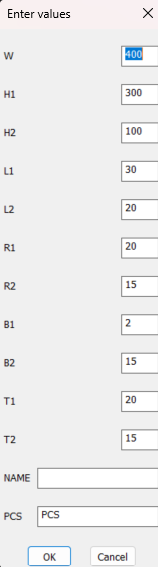
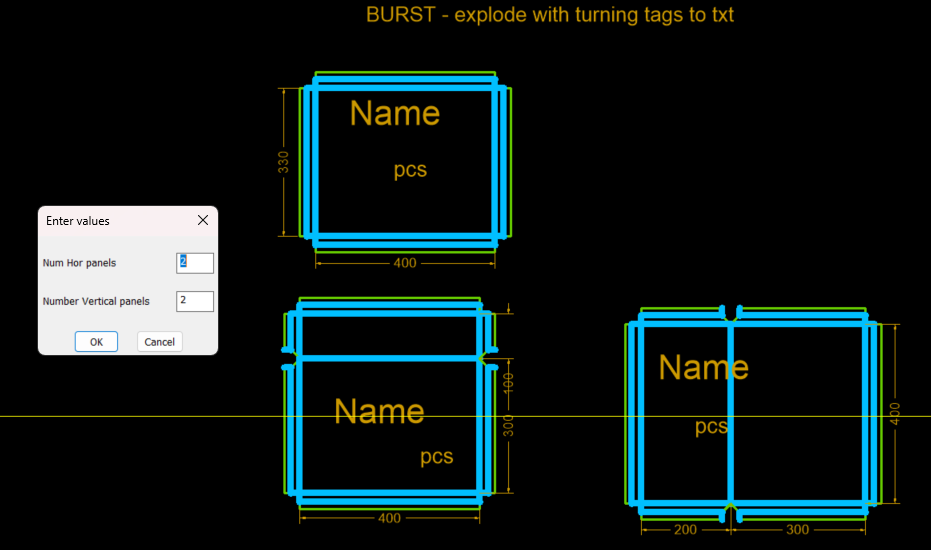
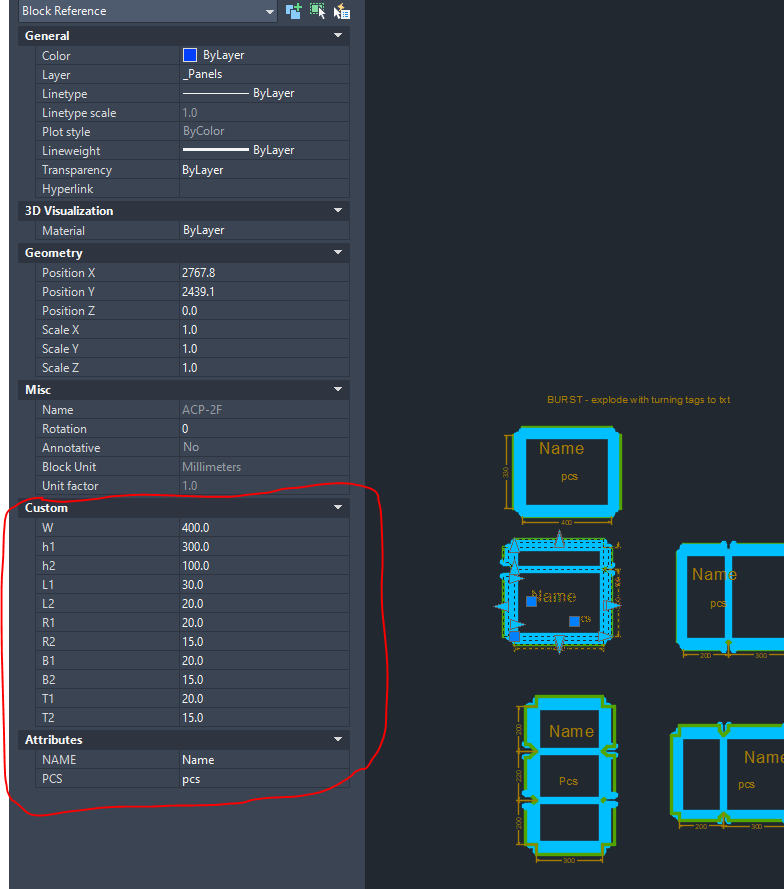
It is a small production work, no BOQ needed. The "work order" comes as hand sketches, all sizes for the aluminum panels facade are taken on site. The panel's dwg go straight to cam software for nesting and CNC router output (the green line is perimeter cutting, beter to be closed polyline). Made something like "parametric blocks", the adjustable dimensions appear as properties and could be set directly there (image and dwg attached). One extra step could be - when there is just one side flange, the V groove (the blue line) overlaps with the perimeter cutting - this is extra milling time and not needed. Set it as flange2 = 0 (Left, Right, Bottom, Top). But as far as I get it I cannot make expression: (if flange2 = 0 -> the blue line to be hidden), so some manual cleanup is needed. Then if flange2 is 0 the sketch might get buggy and not accept another dimension properly, so have to start over with fresh block or try to pull the dimension handles. Parametric sketches work outside of a block - wrapping them into block is handy to set the dimensions as custom properties. The constraint order is rougly: - make all coincident points to rig the green (cutting) to the blue (V groove) - delete ALL other constraints. Autoconstraint DOES NOT take into account what you set in 'constraintsettings' and the other constraints might overconstrain what u want to achieve. - set fixed constraint (lower left corner) - set lower left lines: along X - horizontal, along Y - vertical - set colinear all vertical/ horizontal lines that are to be colinear. - set the first colinear line parallel to the allready set horizontal/ vertical, these could be chain set (left to right, bottom to top) - set the mitre angles locked at 45 (all of them) - apply parametric dimensions (base dimensions, flanges in order inside out) Setting parallel makes irregular (slightly trapezoid and slanted) panels imposible. But a template for this IS near impossible. The proper 90 angles could be anywhere, so better manually explode and adjust with strech command> Slanted/ irregular panels come usually as end rows/ columns of the mounting work, following the construction - it is all cast in situ concrete and (kind of sloppy) masonry in between. The block work: - select all and make block, set basepoint matching with the fixed constraint. - convert parametric dimensions to dynamic ones (inside block editor/ block edit tab/ tool for this) - rename the dimensions to something usefull (in the object properties panel) - set order/ priority in the 'parameters' dialog, so that the custom properties appear in an uniform order. PARAMETRIC.dwg
-
FYI: my (67 . 1) filters out model space vports so only paper space vports will be selected.
-
I assuming "<>" and "/n" filter produce the same result as they both mean "not equal" (assuming lisp supports both syntax) Filter 410 . "~Model" may depend whether you have model space view ports or not. If you omit it and have no view ports in model space then the result should be the same. Regarding the codes I don't believe they are consistent, I did notice if its off screen we get -1 but not always but I haven't done enough testing to come to a conclusion. Looping through the layouts is the only thing I found that makes the codes predictable. I may test in BricsCad the morning to see how it behaves (if it supports the code as is).
- Last week
-
Just a comment using Bricscad only finds. D05 (sslength (ssget "_X" '((0 . "VIEWPORT") (67 . 1) (-4 . "/=") (69 . 1)))) returns 4 D03 = 4 D05 (sslength (setq ss (ssget "_X" (list (cons 0 "VIEWPORT") (cons 410 (getvar 'ctab)))))) returns 1 ie no normal viewports D03 = 2 a pspace and 1 viewport The order of SS is Viewport...Viewport Pspace may be different in Acad. I copied viewports for testing. Then erased one by one using (ssname ss X) can not erase pspace of course.
-
Best Way to Protect Commercial AutoLISP Applications – High-Level Security and Licensing
BIGAL replied to Sathar's topic in AutoLISP, Visual LISP & DCL
Post a description about what they do something like this. Then people may get interested. Lisp files DEC 2025.docx -
@ronjonp When I first open the sample TrueViewports.dwg I shared in a previous post which defaults to Layout2 and I run (length (rjp-getvports)) I get 7. Even after initializing by clicking on Layout1. I still get 7. But after clicking on Layout2 when I run @DavidP code I get 6: (sslength(setq ss (ssget "_X" '((0 . "VIEWPORT") (-4 . "<>") (69 . 1) (410 . "~Model"))))) Likewise when I run my code I posted earlier I also get 6: (sslength (ssget "_X" '((0 . "VIEWPORT") (67 . 1) (-4 . "/=") (69 . 1)))) I think mine & @DavidP code is similar. But what I don't see is whether @DavidP code is filtering out something more than compared to mine.
-
Another tip if your setting multiple variables. You can handle them with 4 lines of code. (defun C:lnze (/ lyt) ;(setq oldEcho (getvar "CMDECHO") ; oldNOMUTT (getvar "NOMUTT") ; lyt (getvar "CTAB") ;) (setq vars '(cmdecho nomutt ctab) ;list of variables as many as you want. vals (mapcar 'getvar vars) ;store old values to a list ) ;(setvar 'CMDECHO 0) ;(setvar 'NOMUTT 1) (mapcar 'setvar vars '(0 1)) ;this sets cmdecho 0 and nomutt 1, stops at short list so ctab isn't changed. (vl-catch-all-apply '(lambda () (foreach lay (layoutlist) (setvar 'CTAB lay) (setvar 'CVPORT 1) (vl-cmdf "_.ZOOM" "_E") ) ) ) ;(setvar "CTAB" lyt) ;(setvar "CMDECHO" oldEcho) ;(setvar "NOMUTT" oldNOMUTT) (mapcar 'setvar vars vals) ;restore old values (princ) )
-
Side topic but I've found that this: (setq ss (ssget "_X" '((0 . "VIEWPORT") (-4 . "!=") (69 . 1)))) Does not work with layouts that are not initialized. CAB at TheSwamp put this together many moons ago and it's been solid ( don't remember what the function was originally named ) (defun rjp-getvports (/ a b c lst ss) (if (setq ss (ssget "_X" '((0 . "VIEWPORT")))) (progn (foreach e (mapcar 'cadr (ssnamex ss)) ;;Paper space block (if (and (setq a (cdr (assoc 330 (entget e)))) ;;Layout (setq b (cdr (assoc 340 (entget a)))) ;;Viewport not wanted (setq c (cdr (assoc 331 (entget b)))) ) (or (equal c e) (setq lst (cons (list e (cdr (assoc 71 (entget b)))) lst))) ) ) ) ) ;;Sort the list by taborder L 2 R (mapcar 'car (vl-sort lst (function (lambda (x y) (< (cadr x) (cadr y)))))) )
-
Thanks ZA appears to work fine. LOL I hear you... We often hear complains from clients that drawing is broken and we usually we can narrow it down to a few things...useer define ucs is set, UCSfollow set to 1 or garbage has been left both in PS or MS an zoom extent result to just dots on the scree. So I too run the zoom E in PS as well just to see if there any garbage outside the TB. FYI does work either: (vla-Regen (vla-get-ActiveDocument (vlax-get-acad-object)) acAllViewports) doesn't update them. I added some prompt suppression... (defun DP:llnze (/ lyt) (setq oldEcho (getvar "CMDECHO") oldNOMUTT (getvar "NOMUTT") lyt (getvar "CTAB") ) (setvar "CMDECHO" 0) (setvar "NOMUTT" 1) (vl-catch-all-apply '(lambda () (foreach lay (layoutlist) (setvar "CTAB" lay) (setvar "CVPORT" 1) (vl-cmdf "_.ZOOM" "_E") ) ) ) (setvar "CTAB" lyt) (setvar "CMDECHO" oldEcho) (setvar "NOMUTT" oldNOMUTT) (princ) ) now Using this works fine.: (setq ss (ssget "_X" '((0 . "VIEWPORT") (-4 . "<>") (69 . 1) (410 . "~Model")))) So for this is working great
-
 Alex Brikulsky joined the community
 -
I made ZA because a coworker would leave things zoomed in. Might just need to hit it with (vl-load-com) (vla-Regen (vla-get-ActiveDocument (vlax-get-acad-object)) acAllViewports) to fix the 0,0 problem.
-
My other option would be to ensure the view port sits in specific layer. The danger with that is I depend on the user to create the VP correctly. @mhupp thanks for the zoom ext all tabs. Good looks like (vl-cmdf "_.Zoom" "E") behaves similar to "command-s" as we need to ensure AutoCAD updates every system variable before moving to the selection set. FYI: lee-mac's vpoutline routine has the same problem as it draws the PS extra view ports near 0,0. Adding calling C:ZA in Lees routine fix the issue it that. The idea is to use them to generate selection polygons in MS. Basically Lee's routine is accomplishing that minus the filtered for the actual view ports.
-
 Yancy2 joined the community
 -
Best Way to Protect Commercial AutoLISP Applications – High-Level Security and Licensing
SLW210 replied to Sathar's topic in AutoLISP, Visual LISP & DCL
Like @Danielm103, I was also going to suggest Autodesk Store and/or what @BIGAL stated would be my choices. It really depends on what you are comfortable/familiar with. Personally, unless your LISPs are really making difficult and/or complicated work easy and a lot faster, I wouldn't believe they would be big sellers since they seem targeted at AutoCAD MEP, I haven't looked at any numbers lately, but a lot of those users are slowly rolling over to Revit, I was using AutoCAD MEP occasionally, but haven't had any of that type work to do in a good while, perhaps an occasional user such as myself would be a potential customer, I am not sure what percentage of AutoCAD users "do a little of everything" like I do. That is not meant to deter you, just to give an insight on what $$$ and effort you need to spend getting them secure and keeping them up. What future plans do you have on providing support? I see a lot of for purchase apps that end up having the publisher lose interest or other issues and the support goes away.