All Activity
- Past hour
-

Automating schedules, dates, etc. on the plot.
BIGAL replied to Discus84's topic in AutoCAD Drawing Management & Output
I agree with you @SLW210 this was our plot stamp added to our std title block. It was set to a small size but showed when it was plotted not as per the revision date.
- Today
-

AutoLISP to print Custom Paper Size dynamically from Polyline/Layout geometry (ex: a3 extended,...)
SLW210 replied to cando's topic in AutoLISP, Visual LISP & DCL
Maybe this one? Solved: Automatic Papersize - Autodesk Community -

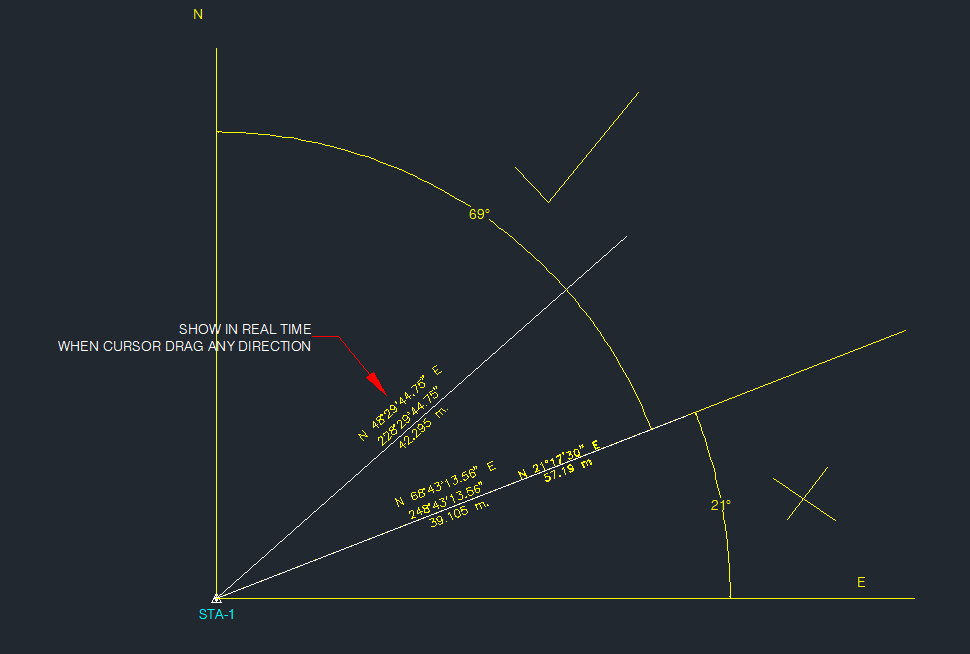
Need a routine lisp for bearing & azimuth in realtime.
marko_ribar replied to oliver's topic in AutoLISP, Visual LISP & DCL
FYI... You can call osnap menu while using (grread) in (while) loop... Read this message : https://www.theswamp.org/index.php?topic=12813.msg580708#msg580708 And further more, I'd read complete topic - there are many examples, but you need to be logged to download routines posted with messages... -
Need a routine lisp for bearing & azimuth in realtime.
SLW210 replied to oliver's topic in AutoLISP, Visual LISP & DCL
See the links in this post for information on using snaps with grread. (The entire thread is a good read) -
 lalir joined the community
 -

Need a routine lisp for bearing & azimuth in realtime.
Tsuky replied to oliver's topic in AutoLISP, Visual LISP & DCL
I don't really see the point of the dynamic mode in your function, especially if you want to snap to objects. This would seem to me to be sufficient and would resolve the osnap. (vl-load-com) (defun c:label_bearing ( / l_var AcDoc Space nw_style nw_obj pt1 pt alpha len_l m_pt val_txt) (setq l_var (mapcar 'getvar '("DIMZIN" "ANGDIR" "ANGBASE" "AUNITS" "AUPREC" "LUPREC" "LUNITS" "TEXTSIZE"))) (initget "Bearing Degrees") (if (eq (getkword "\nResult in [Bearing/Degrees]?<Bearing>: ") "Degrees") (mapcar 'setvar '("DIMZIN" "ANGDIR" "ANGBASE" "AUNITS" "AUPREC" "LUPREC" "LUNITS") (list 0 1 (* pi 1.5) 1 3 2 2)) (mapcar 'setvar '("DIMZIN" "ANGDIR" "ANGBASE" "AUNITS" "AUPREC" "LUPREC" "LUNITS") (list 0 1 (* pi 0.5) 4 3 2 2)) ) (setvar "TEXTSIZE" (* (getvar "VIEWSIZE") 0.015)) (setq AcDoc (vla-get-ActiveDocument (vlax-get-acad-object)) Space (if (= 1 (getvar "CVPORT")) (vla-get-PaperSpace AcDoc) (vla-get-ModelSpace AcDoc) ) ) (vla-startundomark AcDoc) (cond ((null (tblsearch "STYLE" "BEARING")) (setq nw_style (vla-add (vla-get-textstyles AcDoc) "BEARING")) (mapcar '(lambda (pr val) (vlax-put nw_style pr val) ) (list 'FontFile 'Height 'ObliqueAngle 'Width 'TextGenerationFlag) (list "romand.shx" 0.0 0.0 1.0 0.0) ) ) ) (setq nw_obj (vla-addMtext Space (vlax-3d-point '(0.0 0.0 0.0)) 0.0 "" ) ) (initget 1) (setq pt1 (getpoint "\nPick base point: ")) (initget 1) (setq pt (getpoint pt1 "\nPick other point: ")) (entmake (list (cons 0 "LINE") (cons 10 pt1) (cons 11 pt))) (setq alpha (angle pt1 pt) len_l (distance pt1 pt) m_pt (mapcar '* (mapcar '+ pt1 pt) '(0.5 0.5 0.5)) val_txt (vl-string-subst "%%d" "d" (strcat (angtos alpha) "\\P " (rtos len_l) " m")) ) (if (and (> alpha (* pi 0.5)) (<= alpha (* pi 1.5))) (setq alpha (+ alpha pi)) ) (mapcar '(lambda (pr val) (vlax-put nw_obj pr val) ) (list 'AttachmentPoint 'Height 'DrawingDirection 'InsertionPoint 'StyleName 'Layer 'Rotation 'TextString 'Color) (list 5 (getvar "TEXTSIZE") 5 m_pt "BEARING" (getvar "CLAYER") alpha val_txt 2) ) (vla-endundomark AcDoc) (mapcar 'setvar '("DIMZIN" "ANGDIR" "ANGBASE" "AUNITS" "AUPREC" "LUPREC" "LUNITS" "TEXTSIZE") l_var) (prin1) ) However, if you absolutely want the dynamic mode with the possibility of osnap, here is the redesigned function attached. ("osmode" must be defined beforehand, no possibility to force it when using the function) My management is succinct: only: "_end" "_mid" "_cen" "_nod" "_qua" "_int" "_ins" "_per" "_tan" "_nea" For a more elaborate management see perhaps the LeeMac function label_bearing.lsp -

Extents of a part, creating a bounding box
Discus84 posted a topic in AutoCAD 2D Drafting, Object Properties & Interface
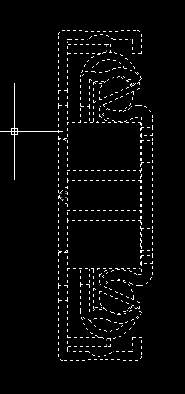
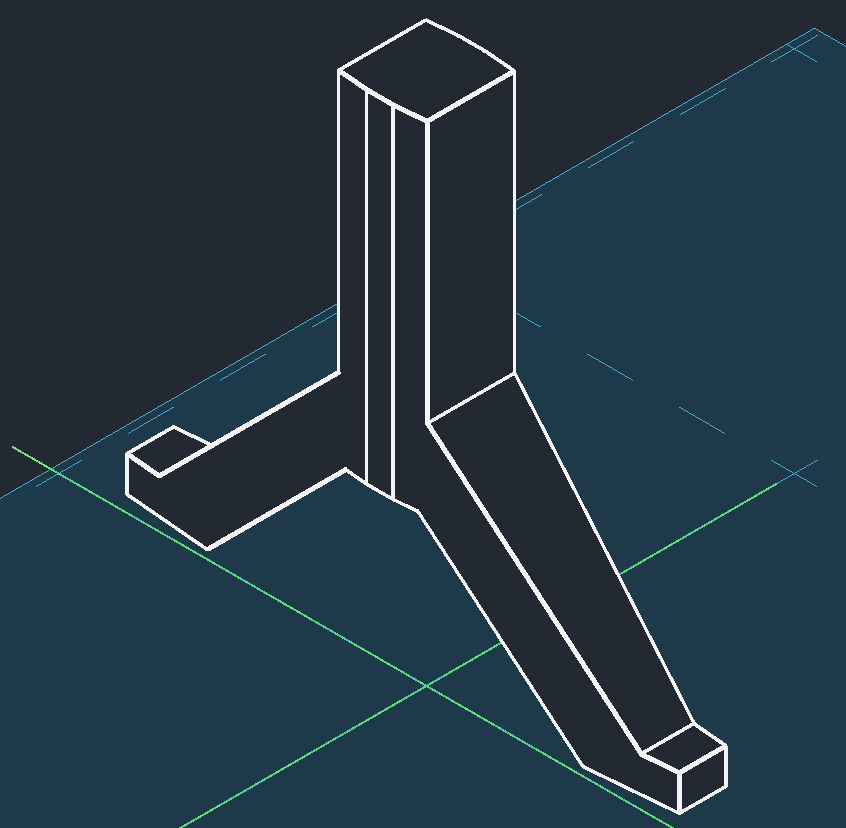
Suppose I have a part like this: This has to be placed in an assembly, therefore it would be nice to have a bounding box around it in order to find extents and centerlines. Regards, Lu
-

Need a routine lisp for bearing & azimuth in realtime.
mhupp replied to oliver's topic in AutoLISP, Visual LISP & DCL
Must have deleted from my other post, But how grread works I don't know if you can use snaps. every time you move the mouse it updates the point and calculation. maybe Tsuky knows of a way. -

AutoLISP to print Custom Paper Size dynamically from Polyline/Layout geometry (ex: a3 extended,...)
Dahzee replied to cando's topic in AutoLISP, Visual LISP & DCL
@cando I think you will find this is the big drawback of the way AutoCAD (and all of its clones) creates page setups and sizes. This wasn't really a problem when everything was actually printed onto standard paper sizes, but now we have PDFs, which can have much more varied page sizes. This highlights the limitations of the way printing is achieved in AutoCAD. I'm not saying there is anything wrong with the way AutoCAD prints; it just has limitations with custom pages. I think it is exacerbated with there being very limited access programmatically to the whole print/page setup. As you can appreciate, there is a lot of flexibility in the setup of multiple pages and scales the way it works at the moment, so someone would have to think long and hard about another way of achieving everything you have already and then incorporating another way of having custom pages into it. Sorry if that isn't what you wanted to hear. -
Text temporarily disappearing
SLW210 replied to Rooster's topic in AutoCAD 2D Drafting, Object Properties & Interface
Which Add-On if you don't mind sharing? I only have one right now loaded, but have a few waiting on IT to install. Could still be related to Windows updates. -
I would keep leaning on the powers that be to get proper .dwgs or at least vector PDFs. Other than that, I most recently converted some raster PDF's to PNG enhanced and cleaned up in GIMP and used Raster Tools in AutoCAD to create AutoCAD objects, worked okay.
-
Automating schedules, dates, etc. on the plot.
SLW210 replied to Discus84's topic in AutoCAD Drawing Management & Output
You should use the Plot Stamp to add the plotted/printed date, the date on the drawing should always remain the same, each revision gets a date as well and also should remain the same throughout the history of the drawing. -
The question was AutoCAD and was 12 years ago. To add, not much help just stating a program has a feature without any other context. Though there is the ability to adjust linetypes in MicroStation, the usual remedy is to break the line in most cases, same as AutoCAD.
-
AutoLISP to print Custom Paper Size dynamically from Polyline/Layout geometry (ex: a3 extended,...)
SLW210 replied to cando's topic in AutoLISP, Visual LISP & DCL
I have moved your thread to the AutoLISP, Visual LISP & DCL Forum. In the future please post in the appropriate forum. -
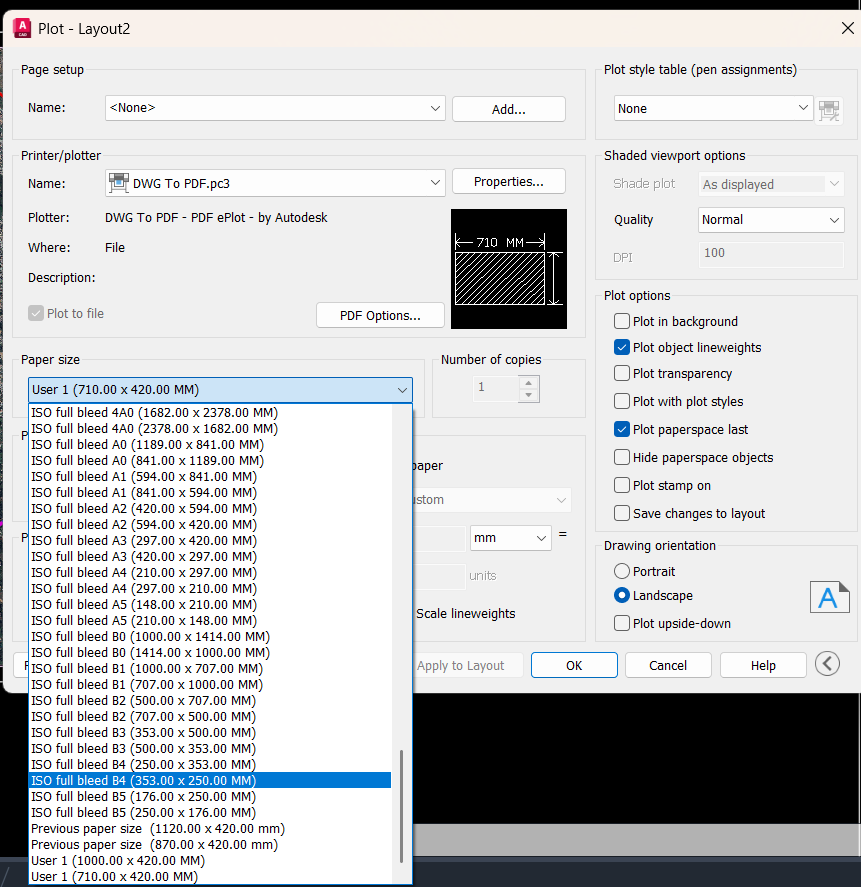
 Body: Hi everyone, I am looking for a LISP routine or a workflow to automate the printing process for non-standard sheet sizes. The problem: I frequently work with layouts of varying dimensions. Currently, I have to manually create a new "Custom Paper Size" in the Plotter Configuration (.pc3) every time I encounter a new size, which is very time-consuming. My goal: I need a Lisp that allows me to select a rectangular area (or a closed Polyline) representing the plot boundary. The routine should then: Detect the width and height of the selection. Automatically generate (or set) a matching custom paper size for the PDF plotter. Set the plot scale to 1:1 (1 mm = 1 drawing unit). Has anyone achieved this automation or can suggest a workaround? Thanks in advance!
-
cando joined the community
-

Need a routine lisp for bearing & azimuth in realtime.
oliver replied to oliver's topic in AutoLISP, Visual LISP & DCL
this code..work perfectly... val_txt (vl-string-subst "%%d" "d" (strcat (angtos (- (/ pi 2) alpha) 4 3) "\\P " (rtos len_l) " m")) but some little adjustment the osnap was not working.. much better if we have an option to select..BEARING OR DEGREES from my previous post. Have a good day.. thanks. 13.01.2026_16.24.06_REC.mp4 -
Need a routine lisp for bearing & azimuth in realtime.
mhupp replied to oliver's topic in AutoLISP, Visual LISP & DCL
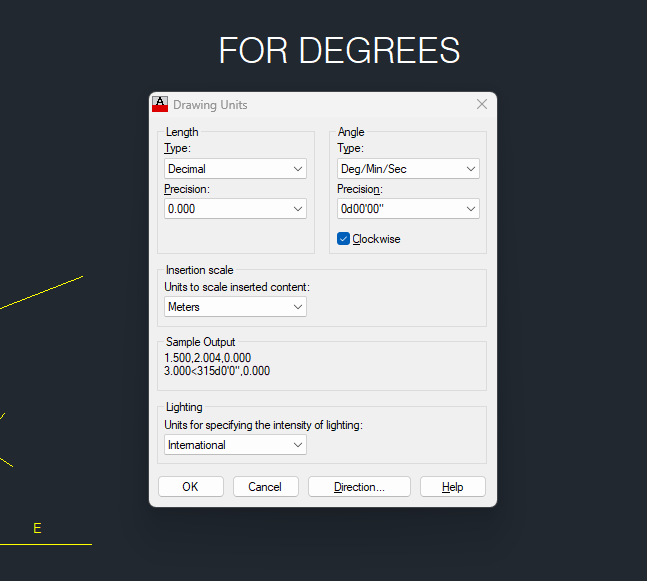
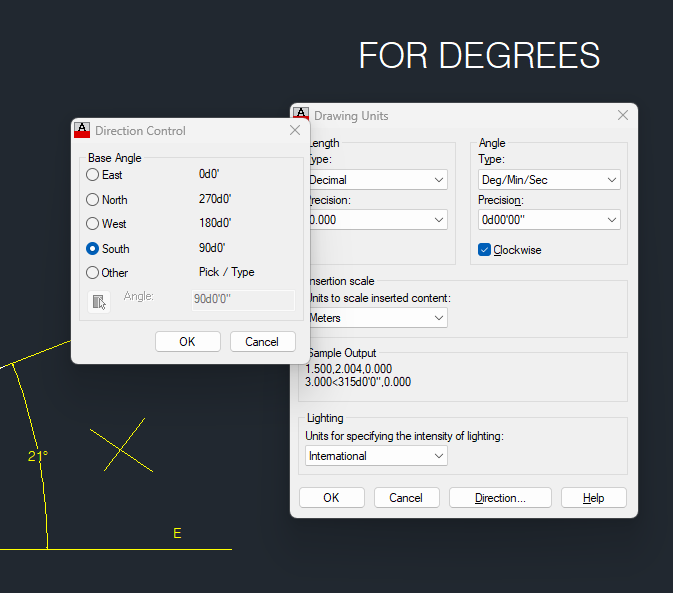
Nice Tsuky tho i use this when setting multiple variables. less likely to get the order mixed up if their is only one list. (setq vars '(DIMZIN ANGDIR ANGBASE AUNITS AUPREC LUPREC LUNITS TEXTSIZE) ;list of variables vals (mapcar 'getvar vars) ;store old values ) (mapcar 'setvar vars (list 0 1 (* pi 0.5) 4 3 2 2)) ;set new values ... (mapcar 'setvar vars vals) ;restore old values @oliver i think you want North to be 0 instead of East? so you have to subtract that from the angle in angtos. updating this line should give you what your looking for. val_txt (vl-string-subst "%%d" "d" (strcat (angtos (- (/ pi 2) alpha) 4 3) "\\P " (rtos len_l) " m"))
-
 Pattharin joined the community
 -
 arkiNat joined the community
 -
Nope. Revit works on Parameters. Try to read about Types and Instance Parameters as well as Project Information. These are the things that are to be used in your title blocks. As well as Visibility Parameters for your Key Plan.
-
Need a routine lisp for bearing & azimuth in realtime.
oliver replied to oliver's topic in AutoLISP, Visual LISP & DCL
Thank you the code is perfectly fine and work..but some a little adjustment here some photos and hope the osnap works this time.. 13.01.2026_09.37.04_REC.mp4
-
I should have used acdbAngToS which honors AUNITS
- Yesterday
-
Automating schedules, dates, etc. on the plot.
BIGAL replied to Discus84's topic in AutoCAD Drawing Management & Output
"Page 1 of 5" pretty sure Lee-mac has that covered. Yes uses fields. Do a Google. Where I worked had add on software so it would make layouts with blank title block so could edit one title block and copy all attribute values to the other title blocks a quick fill in. Others use the custom dwg properties again with fields. There is many update title block lisps out there to suit a particular task. -
Batch DWG to PDF plot LISP File
BIGAL replied to Chicane_Apex's topic in AutoLISP, Visual LISP & DCL
Just a comment over at Autodesk forum I posted some code to plot all dwg's in a certain directory to one pdf using publish. It has a bug though if the dwg's do not have the correct page setup saved, they don't plot. It uses OBDX to make the page setup but that is the point where I have a problem, setting the pagesetup to a known saved name. Still working on it. Using a script may be easier for the moment as can plot the pdf for each dwg then use via lisp Ghostscript to join them back into one. The only downfall is the script will open every dwg to process. I have the code for layouts into one pdf so will look at using a script in that code. The post at Autodesk wants only Model space plotted. The pdf's are located in a \PDF directory under the current dwg directory. -
Nice idea, here in Aus the brg is 0-360 dddmmss, much easier than the S & E etc. Maybe be second version.
-

Revit 2026 - Cutting an irregular shape? (Void Form Extrusion)
ILoveMadoka replied to ILoveMadoka's topic in Autodesk Revit
Maybe the secret is trying it 10 times... I don't even know what I did differently..
-

Automating schedules, dates, etc. on the plot.
CyberAngel replied to Discus84's topic in AutoCAD Drawing Management & Output
Have you looked into fields? When you edit a text object, you can type Ctrl-F to bring up the fields dialog. Pick a category, such as Date & Time, and pick the data you want to insert. To match your example, choose Date and a format. That field will be inserted into the text, like any other characters, but highlighted and with the corresponding data. There are many more pieces of data you can use. Once you put fields into your template, you may never have to change a title block again. -
Revit 2026 - Cutting an irregular shape? (Void Form Extrusion)
ILoveMadoka posted a topic in Autodesk Revit
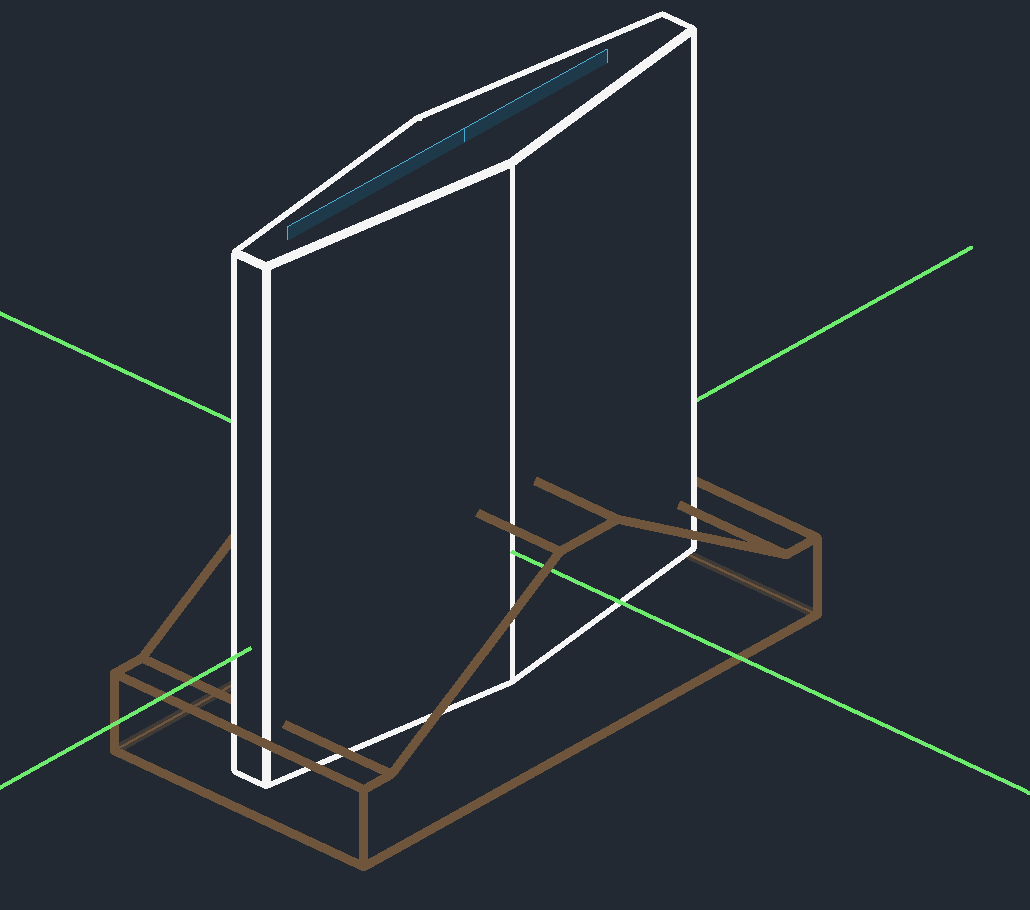
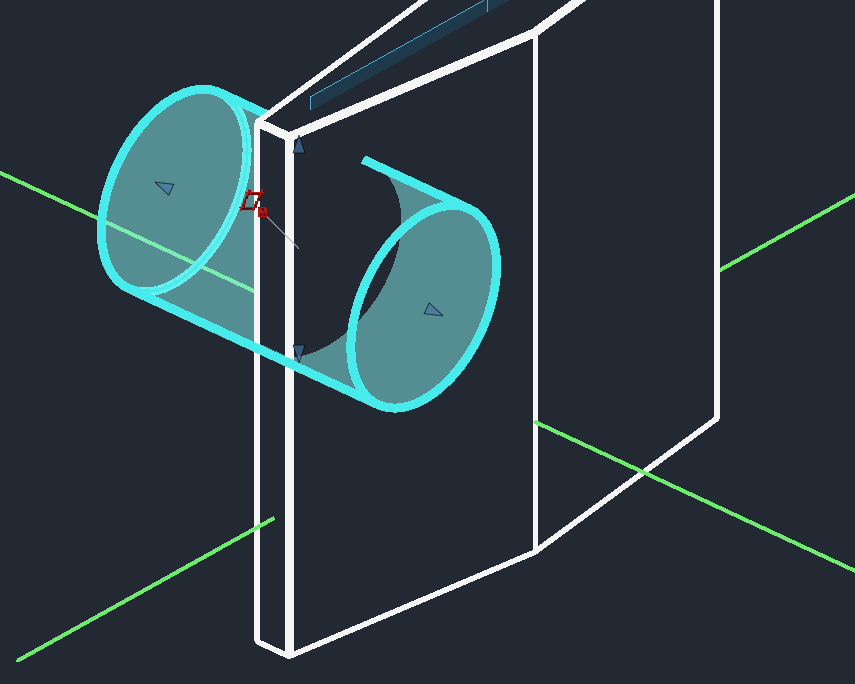
I am trying to make a cut to this diamond shape (shown) I have tried this from scratch two different times and cannot get the "cut" to work. You can see the face I used as a plane. Is there a magic trick I need to learn? fyi: Noob here... tried a different shape/sketch Simple cut on a simple shape works.. Sorry, I'm using "cut" because I'm a SW guy...