All Activity
- Today
-
 luzcid joined the community
 -

Hello everyone! Please take a look at this.
mhupp replied to sd2006's topic in AutoLISP, Visual LISP & DCL
chr instead of string. (cons 1 (strcat (rtos (/ area 1000000.0) 2 2) "m" (chr 0178))) also might be the font your using. https://www.cadtutor.net/forum/topic/75383-text-ascii/#findComment-596226 -

[SHARE] SyncBlock - Synchronize specific layers across multiple blocks with precise alignment
Beastt1992 posted a topic in AutoLISP, Visual LISP & DCL
Hi everyone, I want to share a LISP tool I recently developed called SyncBlock. If you work with architectural or MEP backgrounds, you probably deal with this nightmare constantly: You have a Master Block (A), and several child blocks (B, C, D) that were copied from A but have some layers deleted to show different details. When the Master Block updates, synchronizing those child blocks without ruining their specific layer visibility—and without them flying off to random coordinates because their base points are all set to (0,0,0)—is a huge pain. To solve this, I wrote a script that does the following: 1. You select the Master Block. 2. You window-select the target blocks. 3. The script reads which layers are currently active in the target block, clears it, and pulls only those matching layers from the Master Block. The Magic (Consensus Voting Algorithm): The biggest challenge was alignment. Standard Bounding Box methods fail if you delete half a room or add a dimension in the child block. To fix this, the script uses a "Consensus Voting" approach. It gathers all valid geometry centers in both blocks, pairs them up, calculates the displacement vectors (dX, dY), and lets them "vote." The offset with the overwhelming majority wins. This ensures pixel-perfect alignment even if the child block is heavily trimmed! GitHub Repository: https://github.com/beastt1992/SyncBlock-AutoCAD The code avoids copying Hatches to prevent associativity crashes, and it safely handles older AutoCAD versions (like 2014) by using pure English prompts to avoid ANSI/UTF-8 encoding issues. I’d love for you guys to test it out on your messy real-world drawings! Any feedback, bug reports, or suggestions for improvement are highly appreciated. Cheers! -

MLEADER WITH FIELDS FOR COORDINATES
SCHNIPPLES posted a topic in AutoCAD 2D Drafting, Object Properties & Interface
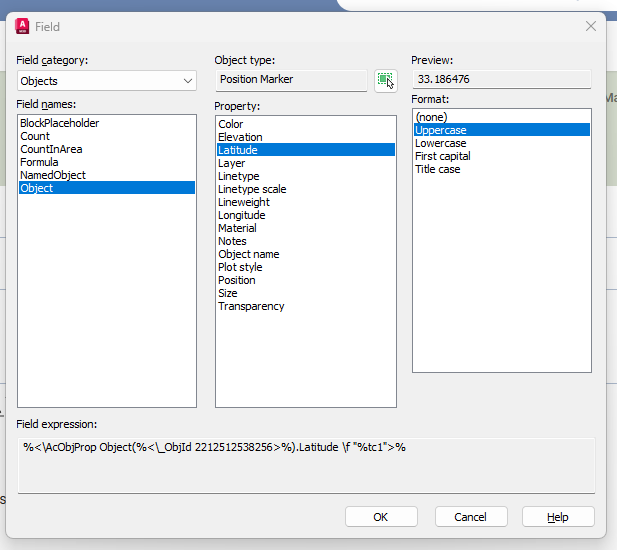
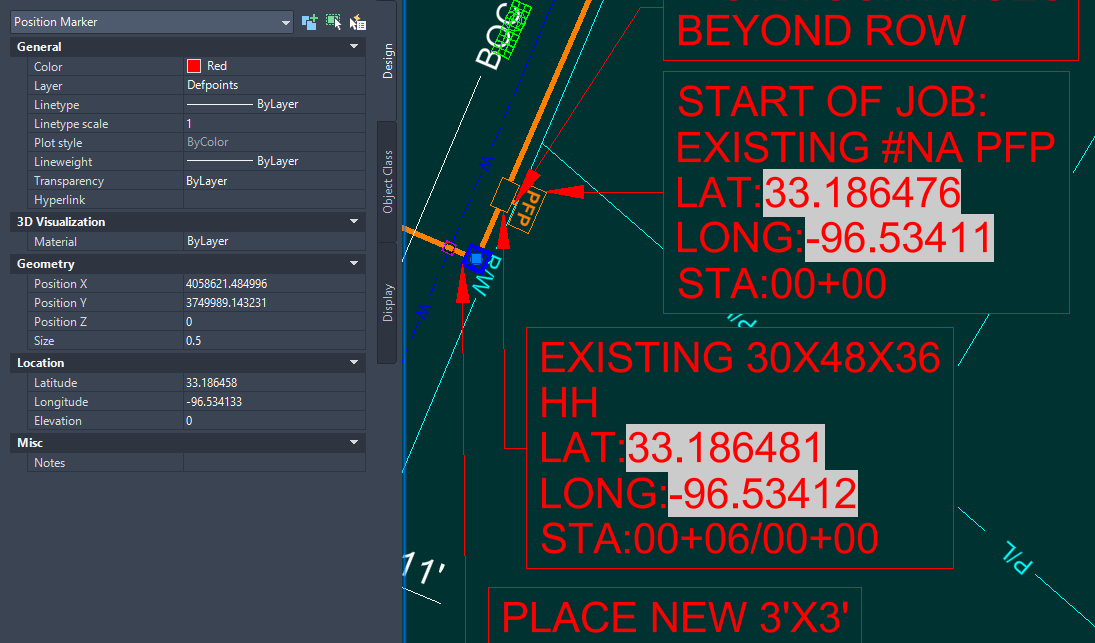
Hello, We have an engineering vendor that submits drawings to us that have mleaders that contain fields correspond to lat and long, making labeling very quick when placing mleaders. Does anyone know this works? Are the mleaders a block? There is a position marker linked to the field with the Lat/Long but I can't imagine they are placing the fields manually each time this wouldn't be a time saver if so. I found a program called smart leader on autocad store, which seems to do this but I was just wondering if this can be achieved through blocks alternatively. Thanks EXAMPLE.dwg
-

Hello everyone! Please take a look at this.
SLW210 replied to sd2006's topic in AutoLISP, Visual LISP & DCL
Please use Code Tags for your code in the future. (press the <> in the editor toolbar) -
Could you please take a look and explain why this Lisp program is producing this result? 27807.35m² Please help me adjust the result. 27807.35m² I know nothing about Lisp. thank you . (defun rh:dxf (code lst) (cdr (assoc code lst))) (defun c:aa ( / cmde ent e_typ e_lst area vtx x_lst y_lst z_lst x_pt y_pt z_pt c_lst v_lst ss sum) (cond ( (/= 0 (getvar 'cmdecho)) (setq cmde (getvar 'cmdecho)) (setvar 'cmdecho 0) ) ) (while (setq ss (ssget "_+.:E:S" '((0 . "POLYLINE,LWPOLYLINE") (-4 . "<OR") (70 . 1) (70 . 3) (70 . 5) (-4 . "OR>") ) )) (setq ent (ssname ss 0) e_typ (rh:dxf 0 (setq e_lst (entget ent))) area (getpropertyvalue ent "area") v_lst nil ) (cond ( (= e_typ "POLYLINE") (setq ent (entnext ent) vtx (rh:dxf 10 (entget ent)) ) (if (< (length vtx) 3) (setq vtx (reverse (cons 0.0 (reverse vtx))))) (while (/= "SEQEND" (cdr (assoc 0 (entget ent)))) (setq v_lst (cons vtx v_lst) ent (entnext ent) vtx (rh:dxf 10 (entget ent)) ) (if (< (length vtx) 3) (setq vtx (reverse (cons 0.0 (reverse vtx))))) ) (setq x_pt (/ (apply '+ (mapcar '(lambda (x) (car x)) v_lst)) (length v_lst)) y_pt (/ (apply '+ (mapcar '(lambda (x) (cadr x)) v_lst)) (length v_lst)) ) (if (= (setq sum (apply '+ (mapcar '(lambda (x) (caddr x)) v_lst))) 0.0) (setq z_pt 0.0) (setq z_pt (/ sum (length v_lst))) ) ) ( (= e_typ "LWPOLYLINE") (setq z_pt (rh:dxf 38 e_lst)) (foreach pr e_lst (if (= (car pr) 10) (setq v_lst (cons (cdr pr) v_lst))) ) (setq x_pt (/ (apply '+ (mapcar '(lambda (x) (car x)) v_lst)) (length v_lst)) y_pt (/ (apply '+ (mapcar '(lambda (x) (cadr x)) v_lst)) (length v_lst)) ) ) ) (setq c_lst (list x_pt y_pt z_pt)) (entmakex (list (cons 0 "MTEXT") (cons 100 "AcDbEntity") (cons 100 "AcDbMText") (cons 10 c_lst) (cons 40 (getvar 'textsize)) (cons 71 5) (cons 72 5) (cons 1 (strcat (rtos (/ area 1000000.0) 2 2) "m²")) ; (cons 1 (rtos (/ area 1000000.0) 2 3)) ; If you don't need the suffix "m²" ) ) ) (if cmde (setvar 'cmdecho cmde)) )
-
 sd2006 joined the community
 -

How to copy an object to a specified distance
sinergy2020 replied to sinergy2020's topic in AutoCAD Beginners' Area
Thank you @BIGAL -
How to copy an object to a specified distance
sinergy2020 replied to sinergy2020's topic in AutoCAD Beginners' Area
Hi @CyberAngel many thanks for your detailed explanation. Much appreciated. Playing with with all these options, I find that (in Nanocad) if I insert a displacement, this is measured from the leftmost corner, so if I have say a rectangle, and I introduce a displacement of (5, 0) the actual distance between the new rectangle and the original is 5 - the rectangle width. If I select the first point to be the rightmost corner instead, then I can't insert a displacement or at least nanocad doesn't care and nothing is drawn if I do. Another issue that I have with this (which isn't related to the Copy command) is that I can't easily have the cursor to snap exactly on the corner, it shows very close snaps but actually snapping on the exact meeting point of vertical and horizontal lines can be very laborious. I wonder if there are ways to configure the snap to fall exactly on the intersection points of lines. -
Thank you for your response. I'll post questions here if I have any. Have a great day
-
At one time P-F required students to submit a separate .dwg file for each plate. I don't see any reason why you can't use layouts. Your advisor could probably answer the question.
-
 abc1175457790 joined the community
 -
 brick8 joined the community
 -
[LISP] BPDF - Batch export Model Space title block frames to individual PDFs
Beastt1992 replied to Beastt1992's topic in AutoLISP, Visual LISP & DCL
Thank you for the welcome and for sharing your code! You're right that similar tools have existed for a long time - my goal was to create a modern open source version with a dialog box interface that's more accessible to new users. The Ghostscript PDF merging idea is brilliant - I hadn't thought of that and will look into adding it as an optional feature. Your version works with Layouts which is the correct workflow. Mine is specifically for the Model Space workflow common in Taiwan/Asia, so they serve different use cases. Thanks again for the tips! - Yesterday
-

[LISP] BPDF - Batch export Model Space title block frames to individual PDFs
BIGAL replied to Beastt1992's topic in AutoLISP, Visual LISP & DCL
Welcome to Cadtutor. What you are offering is not a new solutions this have been around for me say 17 years, for where I worked. But I have something extra for you, once you make the PDF's as single pdf's you can join them back into one, done this for 88 layouts but code looks for PDF's. It uses Ghostscript to rejoin the pdf's. Ghostscript is a free product and has lots of features. The code is ran via lisp. The code attached also allows for a selection of layouts it has the Ghostscript code in it. You will need to edit the version of Ghostscript and its location. A more advanced version checks for different company title blocks, eg landscape V's portrait. Like others I would push for using layouts a much better way as you can take advantage of the viewport scale, I have multi code for making multiple layouts at scale matching your model space. Multi GETVALS.lsp plotA3Pdfrange2.lsp -
[LISP] BPDF - Batch export Model Space title block frames to individual PDFs
Beastt1992 replied to Beastt1992's topic in AutoLISP, Visual LISP & DCL
That's a great tip, thank you! Much cleaner than spamming the command line. I'll add this to the next version and clear the status bar when done. -
 Nugget joined the community
 -
Hello. Just wondering if the other plates have to be drawn in separate files or on continuous layouts on one singular file: For example, layout one is plate 1, layout two is plate 2, layout 3 is plate 3 etc... Thank you
-
[LISP] BPDF - Batch export Model Space title block frames to individual PDFs
mhupp replied to Beastt1992's topic in AutoLISP, Visual LISP & DCL
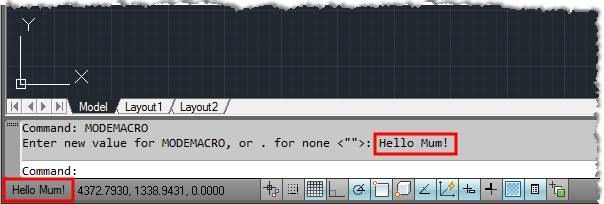
My 0.02¢ Instead of outputting the status to command line (princ (strcat " [" (itoa (1+ i)) "/" (itoa counter) "] Done\n")) Output to the Status Bar (setvar "MODEMACRO" (strcat "Processing: [" (itoa (1+ i)) "/" (itoa counter) "] Layouts")) Then you don't have clutter/spam in the command prompt but still have the current stats. Just have to clear it after complete.
-

[LISP] BPDF - Batch export Model Space title block frames to individual PDFs
pkenewell replied to Beastt1992's topic in AutoLISP, Visual LISP & DCL
@Steven P Not easy to notice, but he did give a link to the routine: https://github.com/beastt1992/autocad-batch-plot I agree that layouts should be used. -
Understanding 'Getenv Variable call denied'?
pkenewell replied to ScottMC's topic in AutoLISP, Visual LISP & DCL
@ScottMC Ok - I think I understand. You want to the Circle to be the last entity created, even though you added the points. That is relatively simple, just delete the circle and recreate it. See the update to my code below. (defun c:C2 (/ cr el *error* fp oe os p p2) (defun *error* (msg) (if oe (setvar "cmdecho" oe)) (if os (setvar "osmode" os)) (vla-endundomark (vla-get-activedocument (vlax-get-acad-object))) (princ (strcat "\n" msg)) ) (vla-startundomark (vla-get-activedocument (vlax-get-acad-object))) (setq oe (getvar "cmdecho") os (getvar "osmode") ) (setvar "cmdecho" 0) (while (and (setvar 'osmode (boole 7 os 512)) (setq fp (getpoint "\nSpecify 1st Point of 2P.Circle: ")) ) (command "._Circle" "_2P" "_non" fp) (setvar "osmode" os) (princ "\nSecond Point: ") (while (= (logand (getvar "cmdactive") 1) 1) (command pause) ) (setq el (entget (entlast)) p (trans (cdr (assoc 10 el)) (cdr (assoc 210 el)) 1) p2 (getvar "lastpoint") cr (getvar "circlerad") ) (entdel (entlast)); Delete the Circle (princ (strcat "\n Coordinates: " (setq C2:pp ;; Global Variable "C2:pp" (strcat (rtos (car p) 2 4) "," (rtos (cadr p) 2 4) "," (rtos (caddr p) 2 4) ) ) "\n Diameter: " (rtos (* cr 2) 2 4) " | Radius: " (rtos cr 2 4) "\n" ) ) (entmakex (list (cons 0 "POINT") (cons 10 p))) (entmakex (list (cons 0 "POINT") (cons 10 p2))) (entmakex (list (cons 0 "CIRCLE") (assoc 10 el) (assoc 8 el) (assoc 40 el))) ; Recreate the Circle ) (setvar "cmdecho" oe) (vla-endundomark (vla-get-activedocument (vlax-get-acad-object))) (princ) ) -

How to copy an object to a specified distance
CyberAngel replied to sinergy2020's topic in AutoCAD Beginners' Area
The COPY command has several different schemes, but they all do the same thing. The difference is in how you input your information. One option is to type the command (COPY) before you select the objects. The prompt will say: Select objects: You pick the objects you want to copy and then continue with the command. If you've already selected them, you get this prompt: Specify base point or [Displacement mOde] <Displacement>: What happens next depends on your input. It's asking for a base point, that is, a place that marks the beginning of the operation. You can type a coordinate, like (2,5), or you can pick a point with your mouse. If you select a corner of your rectangle, for instance, that will help you place the copy in line with it, rather than doing some math. Another option is Displacement, which is probably better for your purposes. AutoCAD forgets about a base point. Instead hit Enter to go into Displacement mode. You type the distance, such as (5,0). The copy appears five units to the right, and you're done. If you do use a base point, you get this prompt: Specify second point or [Array] <use first point as displacement>: You can still use Displacement. AutoCAD assumes again that the base point is the beginning mark. When you put in the second coordinate, you've defined the distance between the original rectangle and the copy. If you work through all these versions of COPY, you see that they all give you similar results. The only difference is where the copy begins and ends, and that depends on how you enter those points. With a base point, you can start anywhere in your drawing. You can snap to a corner of your rectangle, for instance, or to any other object in the drawing. You can type in an X,Y coordinate based on anything, or type in numbers at random, or pick a random point with your mouse. Once you have that base point, you can pick a second point in the same way: a point on another object, a pair of numbers, or a point in space. Without a base point, AutoCAD assumes the base point is (0,0). Any X/Y distance you enter will be calculated from (0,0). The result is the same. The best way to learn any CAD system is to experiment. You can't break it by giving it bad input. Try the different options to see what they do. -
[LISP] BPDF - Batch export Model Space title block frames to individual PDFs
Beastt1992 replied to Beastt1992's topic in AutoLISP, Visual LISP & DCL
Thanks Steven! Code is posted above. Regarding Paper Space - completely agree it's the better long-term approach, but changing an entire office workflow is harder than writing a tool to work around it! -
[LISP] BPDF - Batch export Model Space title block frames to individual PDFs
Beastt1992 replied to Beastt1992's topic in AutoLISP, Visual LISP & DCL
;;; BATCH-PDF ;;; Function: Batch export all title block frames to PDF ;;; Command: BPDF ;;; Compatible: AutoCAD 2014+ ;;; v2.0 - Single-frame mode + cross-version compatibility ;;; AC_WINDOW auto-detected (3 or 4) ;;; RefreshPlotDeviceInfo order fixed for fresh sessions (setq AC_0DEG 0) (setq AC_FIT 0) (defun BPDF-cfgpath () (strcat (getenv "APPDATA") "\\bpdf_settings.cfg") ) (defun BPDF-load-cfg ( / f line kv cfg) (setq cfg (list (cons "blockname" "") (cons "prefix" "frame") (cons "outpath" (strcat (getenv "USERPROFILE") "\\Desktop")) (cons "styleNum" "1") (cons "paperNum" "1") (cons "scaleStr" "") )) (setq f (open (BPDF-cfgpath) "r")) (if f (progn (while (setq line (read-line f)) (setq kv (vl-string-search "=" line)) (if kv (setq cfg (subst (cons (substr line 1 kv) (substr line (+ kv 2))) (assoc (substr line 1 kv) cfg) cfg )) ) ) (close f) ) ) cfg ) (defun BPDF-save-cfg (blockname prefix outpath styleNum paperNum scaleStr / f) (setq f (open (BPDF-cfgpath) "w")) (if f (progn (write-line (strcat "blockname=" blockname) f) (write-line (strcat "prefix=" prefix) f) (write-line (strcat "outpath=" outpath) f) (write-line (strcat "styleNum=" (itoa styleNum)) f) (write-line (strcat "paperNum=" (itoa paperNum)) f) (write-line (strcat "scaleStr=" scaleStr) f) (close f) ) ) ) (defun c:BPDF ( / blockname outpath ss i ent obj sel entdata plotMode minpoint maxpoint pt1 pt2 counter fname adoc alayout aplot scaleStr scaleVal useFit styleSheet prefix frameList frame fx fy fx2 fy2 rowHeight plotterName styleList styleNum allMedia mediaShort mediaIdx m j item paperNum paperSize cfg lastVal inp confirm AC_WINDOW err) (vl-load-com) (setq cfg (BPDF-load-cfg)) ;; 1. Click to select title block, or type name (princ "\nClick on a title block frame (or press Enter to type block name): ") (setq sel (entsel "")) (if sel (progn (setq ent (car sel)) (setq entdata (entget ent)) (if (= (cdr (assoc 0 entdata)) "INSERT") (progn (setq blockname (cdr (assoc 2 entdata))) (princ (strcat "\nBlock detected: " blockname "\n")) (initget "1 A") (setq plotMode (getkword "\nPlot [1=This frame only / A=All frames with this name] <A>: ") ) (if (null plotMode) (setq plotMode "A")) ) (progn (alert "Please click on a Block (INSERT) entity.") (exit) ) ) ) (progn (setq lastVal (cdr (assoc "blockname" cfg))) (if (/= lastVal "") (setq inp (getstring (strcat "\nBlock Name <" lastVal ">: "))) (setq inp (getstring "\nBlock Name: ")) ) (setq blockname (if (= inp "") lastVal inp)) (if (= blockname "") (progn (princ "\nCancelled.") (exit))) (setq plotMode "A") ) ) ;; 2. PDF Prefix (setq lastVal (cdr (assoc "prefix" cfg))) (setq inp (getstring (strcat "\nPDF Prefix <" lastVal ">: "))) (setq prefix (if (= inp "") lastVal inp)) ;; 3. Output Folder (setq lastVal (cdr (assoc "outpath" cfg))) (setq inp (getstring (strcat "\nOutput Folder <" lastVal ">: "))) (setq outpath (if (= inp "") lastVal inp)) (if (/= (substr outpath (strlen outpath)) "\\") (setq outpath (strcat outpath "\\")) ) (vl-mkdir outpath) (princ (strcat "Output: " outpath "\n")) ;; 4. Build frame list (if (= plotMode "1") (progn ;; Single mode: get bbox of the clicked entity directly (setq obj (vlax-ename->vla-object ent)) (vla-getboundingbox obj 'minpoint 'maxpoint) (setq frameList (list (list (vlax-safearray-get-element minpoint 0) (vlax-safearray-get-element minpoint 1) (vlax-safearray-get-element maxpoint 0) (vlax-safearray-get-element maxpoint 1) ))) (setq counter 1) (princ "Mode: Single frame\n") ) (progn ;; All mode: find all matching blocks (setq ss (ssget "X" (list (cons 0 "INSERT") (cons 2 blockname) (cons 410 "Model")) )) (if (null ss) (progn (alert (strcat "Block not found: " blockname)) (exit)) ) (setq counter (sslength ss)) (setq frameList nil i 0) (repeat counter (setq ent (ssname ss i)) (setq obj (vlax-ename->vla-object ent)) (vla-getboundingbox obj 'minpoint 'maxpoint) (setq fx (vlax-safearray-get-element minpoint 0)) (setq fy (vlax-safearray-get-element minpoint 1)) (setq fx2 (vlax-safearray-get-element maxpoint 0)) (setq fy2 (vlax-safearray-get-element maxpoint 1)) (setq frameList (append frameList (list (list fx fy fx2 fy2)))) (setq i (1+ i)) ) ;; Sort: top-to-bottom rows, left-to-right within row (setq rowHeight (* (- (cadddr (car frameList)) (cadr (car frameList))) 0.5)) (setq frameList (vl-sort frameList (function (lambda (a b) (if (> (abs (- (cadr a) (cadr b))) rowHeight) (> (cadr a) (cadr b)) (< (car a) (car b)) ) )) ) ) (princ (strcat "Mode: All frames (" (itoa counter) " found)\n")) ) ) ;; 5. VLA setup ;; Fix from forum: RefreshPlotDeviceInfo BEFORE ConfigName, ;; then ConfigName, then RefreshPlotDeviceInfo again. ;; This prevents "Invalid input" on fresh CAD sessions. (setq adoc (vla-get-activedocument (vlax-get-acad-object))) (setq alayout (vla-get-activelayout adoc)) (setq aplot (vla-get-plot adoc)) (setq plotterName "DWG To PDF.pc3") (vla-RefreshPlotDeviceInfo alayout) (vla-put-configname alayout plotterName) (vla-RefreshPlotDeviceInfo alayout) ;; Detect AC_WINDOW value: try 4 first (works on more setups), ;; fall back to 3 only if 4 is rejected. ;; Note: plottype=3 can silently "accept" but not actually work. (setq AC_WINDOW 4) (setq err (vl-catch-all-apply (function (lambda () (vla-put-plottype alayout 4))) )) (if (vl-catch-all-error-p err) (progn (vla-put-plottype alayout 3) (setq AC_WINDOW 3) ) ) ;; 6. Plot Style (setq styleList (vlax-safearray->list (vlax-variant-value (vla-GetPlotStyleTableNames alayout)) ) ) (setq styleList (append (list "None (Color)") styleList)) (setq lastVal (atoi (cdr (assoc "styleNum" cfg)))) (if (or (< lastVal 1) (> lastVal (length styleList))) (setq lastVal 1)) (princ "\nPlot Style:\n") (setq i 1) (foreach s styleList (princ (strcat " " (itoa i) ". " s (if (= i lastVal) " <- last" "") "\n")) (setq i (1+ i)) ) (setq inp (getint (strcat "Select <" (itoa lastVal) ">: "))) (setq styleNum (if (or (null inp) (< inp 1) (> inp (length styleList))) lastVal inp)) (setq styleSheet (if (= styleNum 1) "" (nth (1- styleNum) styleList))) (princ (strcat "Style: " (if (= styleSheet "") "None" styleSheet) "\n")) ;; 7. Paper Size (setq allMedia (vlax-safearray->list (vlax-variant-value (vla-GetCanonicalMediaNames alayout)) ) ) (setq mediaShort nil mediaIdx 0) (foreach m allMedia (if (or (vl-string-search "A0" m) (vl-string-search "A1" m) (vl-string-search "A2" m) (vl-string-search "A3" m) (vl-string-search "A4" m)) (setq mediaShort (append mediaShort (list (list mediaIdx m)))) ) (setq mediaIdx (1+ mediaIdx)) ) (setq lastVal (atoi (cdr (assoc "paperNum" cfg)))) (if (or (< lastVal 1) (> lastVal (length mediaShort))) (setq lastVal 1)) (princ "\nPaper Size:\n") (setq j 1) (foreach item mediaShort (princ (strcat " " (itoa j) ". " (cadr item) (if (= j lastVal) " <- last" "") "\n")) (setq j (1+ j)) ) (setq inp (getint (strcat "Select <" (itoa lastVal) ">: "))) (setq paperNum (if (or (null inp) (< inp 1) (> inp (length mediaShort))) lastVal inp)) (setq paperSize (cadr (nth (1- paperNum) mediaShort))) (princ (strcat "Paper: " paperSize "\n")) ;; 8. Scale (setq lastVal (cdr (assoc "scaleStr" cfg))) (setq inp (getstring (strcat "\nScale denominator (100=1:100, 0 or F=Fit, Enter=last setting)" (if (/= lastVal "") (strcat " <" lastVal ">") " <Fit>") ": ") )) (setq scaleStr (if (= inp "") lastVal inp)) ;; 0 or F or empty = Fit to paper (if (or (= scaleStr "") (= scaleStr "0") (= (strcase scaleStr) "F") (= (strcase scaleStr) "FIT")) (progn (setq useFit T scaleVal 0) (setq scaleStr "")) (setq useFit nil scaleVal (atof scaleStr)) ) (BPDF-save-cfg blockname prefix outpath styleNum paperNum scaleStr) ;; 9. Apply plot settings ONCE before loop (not inside loop!) (setvar "BACKGROUNDPLOT" 0) (vla-put-canonicalmedianame alayout paperSize) (vla-put-plotrotation alayout AC_0DEG) (vla-put-centerplot alayout :vlax-true) (vla-put-plotwithlineweights alayout :vlax-true) (if (/= styleSheet "") (progn (vla-put-plotwithplotstyles alayout :vlax-true) (vla-put-stylesheet alayout styleSheet) ) (vla-put-plotwithplotstyles alayout :vlax-false) ) (if useFit (progn (vla-put-useStandardScale alayout :vlax-true) (vla-put-standardscale alayout AC_FIT) ) (progn (vla-put-useStandardScale alayout :vlax-false) (vla-SetCustomScale alayout 1.0 scaleVal) ) ) ;; 10. Confirm (alert (strcat "===== Confirm Plot =====\n\n" "Frames: " (itoa counter) "\n" "Prefix: " prefix "\n" "Output: " outpath "\n" "Paper: " paperSize "\n" "Style: " (if (= styleSheet "") "None" styleSheet) "\n" "Scale: " (if useFit "Fit" (strcat "1:" (rtos scaleVal 2 0))) "\n\n" "Click OK to continue" )) (initget "Y N") (setq confirm (getkword "\nConfirm [Y=Yes / N=Cancel] <Y>: ")) (if (= confirm "N") (progn (princ "\nCancelled.") (exit)) ) ;; 11. Plot loop ;; SetWindowToPlot THEN put-plottype (per Autodesk docs) ;; No RefreshPlotDeviceInfo inside the loop (that was breaking it) (princ "Plotting...\n") (setq i 0) (foreach frame frameList (setq pt1 (vlax-make-safearray vlax-vbdouble '(0 . 1))) (vlax-safearray-put-element pt1 0 (car frame)) (vlax-safearray-put-element pt1 1 (cadr frame)) (setq pt2 (vlax-make-safearray vlax-vbdouble '(0 . 1))) (vlax-safearray-put-element pt2 0 (caddr frame)) (vlax-safearray-put-element pt2 1 (cadddr frame)) (vla-SetWindowToPlot alayout pt1 pt2) (vla-put-plottype alayout AC_WINDOW) (setq fname (strcat outpath prefix "_" (itoa (1+ i)) ".pdf")) (vla-PlotToFile aplot fname) (princ (strcat " [" (itoa (1+ i)) "/" (itoa counter) "] Done\n")) (setq i (1+ i)) ) (setvar "BACKGROUNDPLOT" 2) (alert (strcat "Done! " (itoa counter) " PDFs exported\nLocation: " outpath)) (princ) ) GitHub link with README and installation instructions: https://github.com/beastt1992/autocad-batch-plot Happy to answer any questions! -

[LISP] BPDF - Batch export Model Space title block frames to individual PDFs
Steven P replied to Beastt1992's topic in AutoLISP, Visual LISP & DCL
So post the LISP so we can give feedback - it is easier to reference if the LISP is in the same thread as the comments and questions Though I might be tempted to say change the system and get the draughters to use paperspace for what it is meant for. (haven't had the paperspace / modespace discussion on here for a while now....) -
 Tule changed their profile photo
 -
 huuhoai2012 joined the community
 -
 dusara joined the community
 -
 afaref joined the community
 -
Beastt1992 joined the community
-
[LISP] BPDF - Batch export Model Space title block frames to individual PDFs
Beastt1992 posted a topic in AutoLISP, Visual LISP & DCL
Hi CADTutor, I'm an architect in Taiwan and wrote a free AutoLISP tool to solve a problem we face daily - batch exporting all title block frames in Model Space to individual PDFs. For those of us who work with all drawings arranged in one Model Space (common workflow in Taiwan/Asia), AutoCAD's built-in Batch Plot doesn't help much since it works at the Layout level. Features: - Click on a title block frame to detect the Block name automatically - Option to plot just that 1 frame, or all frames with the same name - Sorts output top-to-bottom, left-to-right - Dynamically loads plot styles and paper sizes from your machine - Remembers last settings - Compatible with AutoCAD 2014 and above GitHub: https://github.com/beastt1992/autocad-batch-plot Already tested by users on Reddit r/AutoCAD with good feedback. A couple of bugs were found and fixed based on community input (AC_WINDOW constant varies by version, RefreshPlotDeviceInfo order). Would love feedback from the AutoLISP community here - especially if anyone tests it on different AutoCAD versions or workflows! - Last week
-
 Delfin joined the community
 -

Civil Drafting with AutoCAD Project-Civil Drafting with AutoCAD Project
nelsonm replied to nelsonm's topic in Student Project Questions
Thank you for the answers! Now I understand it better -

Understanding 'Getenv Variable call denied'?
ScottMC replied to ScottMC's topic in AutoLISP, Visual LISP & DCL
As mentioned, my intention is to correct the 'post.create' entity selection to be the circle as last.object. The other reason is for me to have visibility of the 2p.circle as I draw it. Attchd is the latest working.. Circle-2P.lsp -
Understanding 'Getenv Variable call denied'?
BIGAL replied to ScottMC's topic in AutoLISP, Visual LISP & DCL
You could save (entlast) properties like centre and radius so (setq cprop (list pt rad)) a line (setq Lprop (list start end)) you can redefine commands like circle as a lisp Defun so it would ask for pt and rad if it does not exist or use pt again for something else. Is that what your thinking ? -
Civil Drafting with AutoCAD Project-Civil Drafting with AutoCAD Project
BIGAL replied to nelsonm's topic in Student Project Questions
Where I am in Australia the co-ordinates of a real world point would be like X=473272.2831 Y=5977274.5924 Z=0 these values can be uploaded or read from survey data instruments. We just get used to working in big numbers.