All Activity
- Past hour
-

Need a routine lisp for bearing & azimuth in realtime.
devitg replied to oliver's topic in AutoLISP, Visual LISP & DCL
@Tsuky Thanks for label_bearing-vertex, I need to label from points , not from polilines . Just to loop around the label_bearing.lsp from point to point Best regards label_bearing.lsp -
 karfung joined the community
 - Today
-

Need a routine lisp for bearing & azimuth in realtime.
Tsuky replied to oliver's topic in AutoLISP, Visual LISP & DCL
@devitg For labelling the segments of polylines (cords for the polyline arcs), I can offer you this. label_Bearing-vertex.lsp -

Lisp area and/or length of polyline, as a leader
dexus replied to filan1a's topic in AutoLISP, Visual LISP & DCL
The height of the text you can change with the "style" command. There you can change the default value of the text-style that is applied. -
 dragonet01 joined the community
 -

Lisp area and/or length of polyline, as a leader
Mr. O replied to filan1a's topic in AutoLISP, Visual LISP & DCL
Hello, Can you help me because im using millimeter drawing when i use this lisp the value and text is small, how can i change the value height in millimeter. thank you. Polylin Length FA-L.LSP -
Mr. O joined the community
-
Lisp area and/or length of polyline, as a leader
Mr. O replied to filan1a's topic in AutoLISP, Visual LISP & DCL
Hello how can i change the height value if i use millimeter drawing - Yesterday
-

Change a length of line by feeding a new end point to the association list.
BIGAL replied to Dayananda's topic in AutoLISP, Visual LISP & DCL
I looked at this and started to do move end point of a pline, then realised you state "Extend line" rather than move end point to a new point. So you can move the "end" point of a line or Pline to a point with one code That is different to say make a new length. If you think about it don't need code just pick line/pline then grips are exposed pick an end or vertice and move it to the new point. So can you explain more what it is your trying to do ? A dwg before after etc. -
 mzerlaut joined the community
 -
Need a routine lisp for bearing & azimuth in realtime.
devitg replied to oliver's topic in AutoLISP, Visual LISP & DCL
@Tsuky Please route me how to make it work on a lot of vertices or points as need to bearing or angle from points.dwg -
Need a routine lisp for bearing & azimuth in realtime.
devitg replied to oliver's topic in AutoLISP, Visual LISP & DCL
@oliver, please upload your sample.dwg so we can work at it -
 Bojanko joined the community
 -

Text temporarily disappearing
Rooster replied to Rooster's topic in AutoCAD 2D Drafting, Object Properties & Interface
Thanks, I've found that alternative an am using it for now. Functionally, I do prefer how the first addon works, but the resulting text issue is too painful to put up with because of that! I will submit a bug report to the developers. -
Yes, do it!!
-
 Clxrkyyy joined the community
 -

Need a routine lisp for bearing & azimuth in realtime.
oliver replied to oliver's topic in AutoLISP, Visual LISP & DCL
i tried this code, the bearing is fine recon from north..but azimuth have a problem. 14.01.2026_20.26.59_REC.mp4 -
 keksas joined the community
 -
I have a dump LISP called TakeADump, maybe I need this to go along with it!
-

Text temporarily disappearing
SLW210 replied to Rooster's topic in AutoCAD 2D Drafting, Object Properties & Interface
You might try QRcode dynamic | AutoCAD | Autodesk App Store. Did you report the issue? -
 Mohamed.Radwan joined the community
 -
Text temporarily disappearing
Rooster replied to Rooster's topic in AutoCAD 2D Drafting, Object Properties & Interface
It was a QR Code generator, here: https://apps.autodesk.com/ACD/en/Detail/Index?id=7854648785059363913&appLang=en&os=Win32_64 Published by Autodesk. Pretty certain this was the culprit. My text problems began at the same time that I installed this. As soon as I unloaded it, the problem disappeared. -
 noobian joined the community
 -

Change a length of line by feeding a new end point to the association list.
mhupp replied to Dayananda's topic in AutoLISP, Visual LISP & DCL
to update entmod you need to get familiar with dxf codes. This simple lisps will dump to the command line. All entities follow a pattern. ;;----------------------------------------------------------------------------;; ;; Dump all DXF Group Data (defun C:DumpIt (/ ent) (while (setq ent (car (entsel "\nSelect Entity to Dump"))) (mapcar 'print (entget ent '( "*"))) ) (princ) ) ;;----------------------------------------------------------------------------;; ;; Dump All Visual Lisp Methods and Properties for Selected Entity (defun C:VDumpIt (/ ent) (while (setq ent (car (entsel "\nSelect Entity to Dump"))) (vlax-Dump-Object (vlax-Ename->Vla-Object ent) t) ) (princ) ) entsel will return an entity name and point of seleciton. use that to see which endpoint your closest to. and use that to update with entmod and entupd. ;;----------------------------------------------------------------------------;; ;; Extend line to new point. ;; https://www.cadtutor.net/forum/topic/98936-change-a-length-of-line-by-feeding-a-new-end-point-to-the-association-list/ (defun c:EXTLINE ( / sel ent pick line sp ep newpt) (if (setq sel (entsel "\nSelect line near the end to extend: ")) (progn (setq ent (car sel) pt (cadr sel) line (entget ent) ) (if (= (cdr (assoc 0 line)) "LINE") (progn (setq sp (cdr (assoc 10 line))) (setq ep (cdr (assoc 11 line))) (if (< (distance pt sp) (distance pt ep)) (setq newpt (getpoint ep "\nSpecify new endpoint: ") line (subst (cons 10 newpt) (assoc 10 line) line) ) (setq newpt (getpoint sp "\nSpecify new endpoint: ") line (subst (cons 11 newpt) (assoc 11 line) line) ) ) (entmod line) (entupd ent) ) (prompt "\nSelected entity is not a LINE.") ) ) ) (princ) ) -

Change a length of line by feeding a new end point to the association list.
Dayananda posted a topic in AutoLISP, Visual LISP & DCL
I can get the Association list of a line with entget . Please help me feed to new values to this list. -
Need a routine lisp for bearing & azimuth in realtime.
Tsuky replied to oliver's topic in AutoLISP, Visual LISP & DCL
I relied on your pictures... ??? In your picture: I see for degrees: Deg/Min/Sec - Clockwise (on) - South 90d0' If not correct change ANGDIR, ANGBASE and AUNITS in: (mapcar 'setvar '("DIMZIN" "ANGDIR" "ANGBASE" "AUNITS" "AUPREC" "LUPREC" "LUNITS") (list 0 1 (* pi 1.5) 1 3 2 2)) - Last week
-
Need a routine lisp for bearing & azimuth in realtime.
mhupp replied to oliver's topic in AutoLISP, Visual LISP & DCL
-
Need a routine lisp for bearing & azimuth in realtime.
oliver replied to oliver's topic in AutoLISP, Visual LISP & DCL
I really appreciate your help..there's a little minor adjustment ( "the bearing it should be from North base" ) i'd try to figure it out. Thanks and have a good day everyone. God blessed us all. -
AutoLISP to print Custom Paper Size dynamically from Polyline/Layout geometry (ex: a3 extended,...)
BIGAL replied to cando's topic in AutoLISP, Visual LISP & DCL
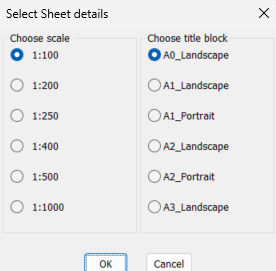
My first comment is when you hard print the pdf you have to pick a paper size so why would you not just pick a paper size to start with ? I do not understand the Custom scale size needed. In the world you are normally metric or imperial paper sizes. You can easily with a lisp etc plot a standard sheet size in a layout that has a Viewport at the correct scale. I think that is the step your not understanding, many example code does exist. For me a couple of choices make multiple layouts at scale walking along a pline, make multiple rectangs in Model at a scale matching viewports and title blocks in layouts. In this image select a title block and scale pick on Model and correct layout is made. A rectang is drawn in the model showing the result so you can accept or erase and run again. You can move and rotate the rectang before making the matching layout.
-
Extents of a part, creating a bounding box
BIGAL replied to Discus84's topic in AutoCAD 2D Drafting, Object Properties & Interface
Maybe this give it a try, https://www.lee-mac.com/ssboundingbox.html -
Automating schedules, dates, etc. on the plot.
BIGAL replied to Discus84's topic in AutoCAD Drawing Management & Output
I agree with you @SLW210 this was our plot stamp added to our std title block. It was set to a small size but showed when it was plotted not as per the revision date.
-
AutoLISP to print Custom Paper Size dynamically from Polyline/Layout geometry (ex: a3 extended,...)
SLW210 replied to cando's topic in AutoLISP, Visual LISP & DCL
Maybe this one? Solved: Automatic Papersize - Autodesk Community -

Need a routine lisp for bearing & azimuth in realtime.
marko_ribar replied to oliver's topic in AutoLISP, Visual LISP & DCL
FYI... You can call osnap menu while using (grread) in (while) loop... Read this message : https://www.theswamp.org/index.php?topic=12813.msg580708#msg580708 And further more, I'd read complete topic - there are many examples, but you need to be logged to download routines posted with messages... -
Need a routine lisp for bearing & azimuth in realtime.
SLW210 replied to oliver's topic in AutoLISP, Visual LISP & DCL
See the links in this post for information on using snaps with grread. (The entire thread is a good read)