All Activity
- Today
-
Have some time again so will try to have another go, hopefully your metric makes life easier. I would start with a layout with a title block and say some viewports at different sizes out side the title block. So have insets, and larger ones. Drag a viewport to location on title block. Go to modelspace in viewport and zoom to approx view required, can then display current scale as a 1:x so enter correct scale, viewport is corrected for scale and a Rectang drawn in Model with a label etc. Does that sound helpful ? let me know.
-
If your being provided the pdf's as part of a project, then why are they not provided under some form of copy right agreement. Am I reading between the lines and you have found some pdf's that you want to use without contacting the original authors ? Where I worked we often had out side consultants provide a dwg to us and we had an agreement about how we would use what was provided to us.
-
 MEP-easy-maker9209 joined the community
 -
A cursory inspection of the attached program is appreciated. I have a deadline today. The modified program shown above: DOES create the DWG files DOES NOT show the entities as shown in the source DXF files There is the possibility that I may have introduced in the code when editing it. I will thoroughly review and use the BricsCAD BLADE editor to debug it tomorrow BRICSCAD I use BricsCAD V25 that includes the DXFIN command just as AutoCAD. I took the liberty of changing the header but maintaining this link and the editor in the comments. ;;; DXF2DWG.lsp - Batch converts *.dxf drawings into *.dwg drawings ;;; Author: Written by M. Moolhuysen. Edited by C. Matthews. Edited by CEH ;;; Created on: 2024-01-10 ;;; Last edited: 2026-01-02 ;;; Description: ;;; Converts a list of BricsCAD *.dxf drawings into BricsCAD *.dwg drawings ;;; ;;;* DXFIN.LSP - Converts a list of BricsCAD *.dxf drawings into BricsCAD *.dwg drawings ;;; Start command by typing DXF2DWG ;;; ;;; Make the necessary adjustments to the following variables: ;;; --------------------------------------------------------- ;;; tx1 = path and name of a file that holds a list with names for all the *.dxf's to be imported, ;;; names of *.dxf drawings may be written without extension, as well as with extension, ;;; in plain text format, no return after the last line. ;;; tx2 = the path for the input folder, containing the actual *.dxf files to import. ;;; tx3 = the path for the output folder, where the drawings converted into *.dwg will be saved, ;;; (routine assumes that the *.dwg files do not exist yet) ;;; tx4 = name of the drawing model to import ;;; ;;; ;;; The routine reads drawing names from the file given in tx1 line-for-line. ;;; In each loop it performs a DXFIN from the folder given as tx2 into the existing AutoCAD drawing, ;;; does a Zoom Extends, saves the converted drawing result as *.dwg in the folder given as tx3, ;;; and finally restores the drawing to its original state, ready to receive the next DXFIN loop. ;;; ;;; The DELAY command for 1000 milliseconds (1 second) is needed to provide sufficient separation ;;; between the DXFIN and SAVEAS processes (otherwise it starts to mix up drawings). ;;; ;;; The DXFIN command trips when the name of the *.dxf to be imported contains a comma, ;;; I advise to rename drawings having this issue. ;;; ;;; This software may not be sold as commercial product or included as part of a commercial product. ;;; ;;; Modified by SLW210 A.K.A. Steve Wilson from DGN import to DXF import 01/10/2024 * ;;; In response to this thread at CADTutor * ;;; https://www.cadtutor.net/forum/topic/78909-batch-convert-dxf-to-dwg/#comment-626951 * ;;; ;;; ------------------------- Program Start ------------------------- ;;; (defun C:DXF2DWG (/ fil tx1 tx2 tx3 tx4 tx5) (princ "Please select input folder. \n") (setq tx1 (vl-directory-files (setq tx2 (acet-ui-pickdir)) "*.dxf")) ; Select the folder containing *.dxf files to be imported. (princ "Please select output folder. \n") (setq tx3 (acet-ui-pickdir) ; Select folder for the *.dwg files to be exported into. tx4 "Default" ) (setvar "FILEDIA" 0) (foreach tx5 tx1 (if (wcmatch tx5 "*`.???") (setq tx5 (substr tx5 1 (- (strlen tx5) 4))) ) (command "_UNDO" "_MARK" "DXFIN" (strcat tx2 "\\" tx5) tx4 "" "" "_ZOOM" "_E" "._DELAY" 500 "_SAVEAS" "2018(LT2018)" (strcat tx3 "\\" tx5 ".dwg") "_N" ) (command "_ERASE" "ALL" "") ;erases everything on the page after the save (command "_.purge" "_all" "" "_no") ;purges everything so you don't carry it over to the next drawing (command "_.purge" "_regapp" "" "_no") (command "_QNEW") ;opens a new drawing (setvar "FILEDIA" 0) ) (princ) ) DXF2DWG.lsp
-
There is a very, very minor difference between a W12x45 and a W12x40 and it has to do with the flange thickness. It will not affect the creation of any drawing required.
-
Lee's code allows the user to automatically generate polylines in modelspace representing the outline of a selected paperspace viewport, all viewports in the active paperspace layout, or all viewports found in all paperspace layouts. As long as the current layer is displayed in the Key Plan Viewport model space all those rectangles should display already. troggarf's code puts a copy of selected objects in paperspace.
-
 tstaudigel joined the community
 -
Okay gotcha. Thank you! I'm sure I'll be back soon with more questions I thought the type of steel girder PF called for changed. From what others have said it was W12x45's, now it's W1240's
-
Didn't read this post earlier, but a word of caution, if the vendor won't send out vector files (PDFs, DWGs), there might be a reason for it - propriety information. But if you can't get them as vectors then as SLW210 says, got to do the work yourself converting raster graphics to proper lines - also be aware in any converted vectors, text drawn as lines and not text and exploded dashed lines, layer names will often be prefixed with PDF_ which I would also convert (I think Lee Mac has a LISP for that). Dimensions might also be off (intentionally?) to be fixed... Yeah, I love PDFs
-
 neaga joined the community
 - Yesterday
-
 Papet joined the community
 -
 Linli joined the community
 -

Dynamic Block w/Rotation and Stretch
Calteq replied to Bill Tillman's topic in AutoCAD Drawing Management & Output
Here's another enjoy CallOut_Imp.dwg - Last week
-
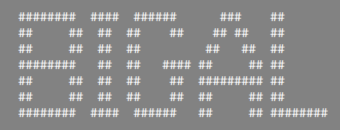
@Danielm103 ""with mtext, you have to use a fixed width font" I agree, Monotxt.sHx I think was what I used. monotxt_.ttf EXTRA FONTS A-Z.txt Banner heading3.lsp
-
Even i have a real job. I just ask you to respect me and if it bothers you, don't respond. I don't want any controversy. Anyway, Happy New Year to everyone.
-
Most of the members here have real jobs as well and provide help as their own busy schedules allow. I do not believe anyone was being rude, just nudging you along to do a little work for yourself.
-
I have done something like this a couple of years ago :
-
I would like to help someone who, like me, will need it and post the list. (defun c:SetByBlockDeep (/ sel i ent obj name nameList) (vl-load-com) ;; --- Funzione Ricorsiva per processare le definizioni --- (defun process-block-def (blockName / bDef) (setq bDef (vla-item (vla-get-blocks (vla-get-activedocument (vlax-get-acad-object))) blockName)) (vlax-for subEnt bDef ;; 1. Cambia Colore e Trasparenza dell'entità corrente (vla-put-color subEnt 0) ; 0 = ByBlock (vla-put-entitytransparency subEnt "ByBlock") ;; 2. Se l'entità è a sua volta un blocco (nidificato), processa la sua definizione (if (= (vla-get-ObjectName subEnt) "AcDbBlockReference") (progn (if (vlax-property-available-p subEnt 'EffectiveName) (process-block-def (vla-get-EffectiveName subEnt)) (process-block-def (vla-get-Name subEnt)) ) ) ) ) ) ;; ------------------------------------------------------- (princ "\nSeleziona blocchi (verranno processati tutti i livelli nidificati)...") (if (setq sel (ssget '((0 . "INSERT")))) (progn (setq nameList '()) (repeat (setq i (sslength sel)) (setq ent (ssname sel (setq i (1- i)))) (setq obj (vlax-ename->vla-object ent)) ;; Ottieni il nome (gestendo i dinamici) (if (vlax-property-available-p obj 'EffectiveName) (setq name (vla-get-EffectiveName obj)) (setq name (vla-get-Name obj)) ) ;; Se non abbiamo ancora processato questo blocco, avvia la ricorsione (if (not (member name nameList)) (progn (process-block-def name) (setq nameList (cons name nameList)) ) ) ) (vla-regen (vla-get-activedocument (vlax-get-acad-object)) acAllViewports) (princ (strcat "\nCompletato. " (itoa (length nameList)) " definizioni di blocco e relativi sotto-blocchi aggiornati.")) ) (princ "\nNessun blocco selezionato.") ) (princ) )
-
Thank you @Steven P, Cheers .
-
thanks for your gide
-
 architectsarath joined the community
 -
so this makes the color byblock and the transparency byblock in the blocks?
-
I'm working and I don't have time. Not everyone is as good at programming as you. Why did you respond so rudely? I think that without creating unnecessary controversy you could have not responded if the matter bothered you. Did you have a bad Christmas? However thanks
-
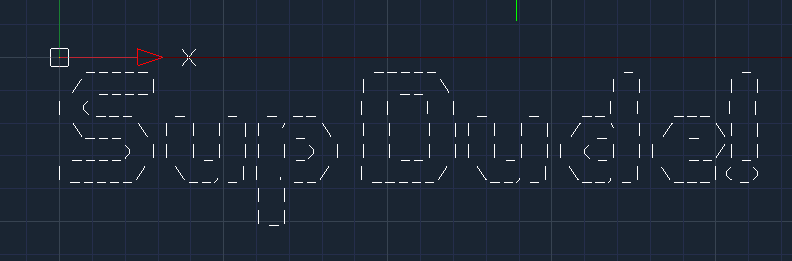
with mtext, you have to use a fixed width font import traceback from pyrx import Ap, Db, Ed import art @Ap.Command() def doit(): try: db = Db.curDb() mt = Db.MText() mt.setDatabaseDefaults() val = art.text2art("Sup Dude!", font="big", sep ="\\P") mt.setContents("{\\Fmonotxt8|c0;" + val + "}") db.addToModelspace(mt) except Exception as err: traceback.print_exception(err)

-
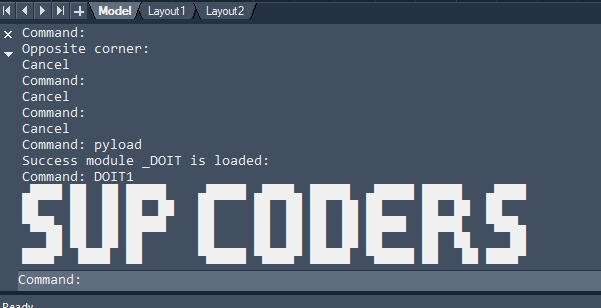
here's your big text import traceback from pyrx import Ap, Db, Ed ascii = {'A': ['▄████▄ ', '██ ██ ', '██████ ', '██ ██ ', '██ ██ '], 'B': ['█████ ', '██ ██ ', '█████ ', '██ ██ ', '█████ '], 'C': ['▄█████ ', '██ ', '██ ', '██ ', '▀█████ '], 'D': ['█████ ', '██ ██ ', '██ ██ ', '██ ██ ', '█████ '], 'E': ['▄█████ ', '██ ', '█████ ', '██ ', '▀█████ '], 'F': ['██████ ', '██ ', '████ ', '██ ', '██ '], 'G': ['▄█████ ', '██ ', '██ ███ ', '██ ██ ', '▀████▀ '], 'H': ['██ ██ ', '██ ██ ', '██████ ', '██ ██ ', '██ ██ '], 'I': ['██ ', '██ ', '██ ', '██ ', '██ '], 'J': [' ██ ', ' ██ ', ' ██ ', '██ ██ ', '██████ '], 'K': ['██ ██ ', '██ ██ ', '█████ ', '██ ██ ', '██ ██ '], 'L': ['██ ', '██ ', '██ ', '██ ', '█████ '], 'M': ['▄██████▄ ', '██ ██ ██ ', '██ ██ ██ ', '██ ██ ', '██ ██ '], 'N': ['██ ██ ', '███ ██ ', '██████ ', '██ ███ ', '██ ██ '], 'O': ['▄████▄ ', '██ ██ ', '██ ██ ', '██ ██ ', '▀████▀ '], 'P': ['█████ ', '██ ██ ', '█████ ', '██ ', '██ '], 'Q': [' ████ ', '██ ██ ', '██▀▄██ ', '██ ██ ', ' ███ █ '], 'R': ['█████ ', '██ ██ ', '█████ ', '██ ██ ', '██ ██ '], 'S': ['▄████ ', '██ ', '▀███▄ ', ' ██ ', '████▀ '], 'T': ['██████ ', ' ██ ', ' ██ ', ' ██ ', ' ██ '], 'U': ['██ ██ ', '██ ██ ', '██ ██ ', '██ ██ ', ' ████ '], 'V': ['██ ██ ', '██ ██ ', '██ ██ ', ' ██ ██ ', ' ███ '], 'W': ['██ █ ██ ', '██ █ ██ ', '██ █ ██ ', '▀█████▀ ', ' █ █ '], 'X': ['██ ██ ', '██ ██ ', ' ██ ', '██ ██ ', '██ ██ '], 'Y': ['██ ██ ', '██ ██ ', ' ████ ', ' ██ ', ' ██ '], 'Z': ['██████ ', ' ██ ', ' ██ ', '██ ', '██████ '], '0': [' ████ ', '██ ██ ', '██▀▄██ ', '██ ██ ', ' ████ '], '1': [' ██ ', '▄███ ', ' ██ ', ' ██ ', ' ██ '], '2': [' ████ ', '█ ██ ', ' ██ ', '██ ', '██████ '], '3': ['█████ ', ' ██ ', '█████ ', ' ██ ', '█████ '], '4': ['██ ██ ', '██ ██ ', '██████ ', ' ██ ', ' ██ '], '5': ['█████ ', '██ ', '████ ', ' ██ ', '████ '], '6': [' █████ ', '██ ', '█████ ', '██ ██ ', ' ████ '], '7': ['██████ ', ' ██ ', ' ██ ', ' ██ ', '██ '], '8': [' ████ ', '██ ██ ', ' ████ ', '██ ██ ', ' ████ '], '9': [' ████ ', '██ ██ ', ' █████ ', ' ██ ', ' ███ '], ':': [' ', '██ ', ' ', '██ ', ' '], '&': [' ███ ', '██ ██ ', ' █████ ██ ', '██ ███ ', ' █████ ██ '], ' ': [' ',' ',' ',' ',' '] } def _Big_text(text: str): lines = [""] * 5 text = text.upper() for char in text: pattern = ascii.get(char, [" ??? " ] * 5) for i in range(5): lines[i] += pattern[i] for line in lines: print(line) @Ap.Command() def doit1(): try: _Big_text("Sup coders") except Exception as err: traceback.print_exception(err)
-
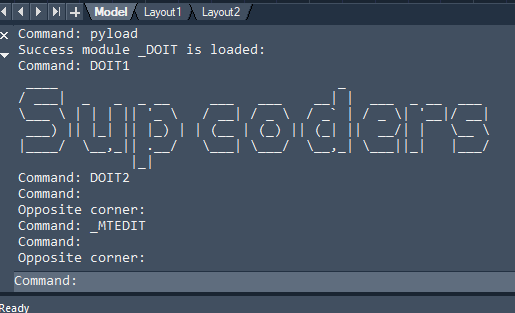
There's also art https://pypi.org/project/art/ might take some work to get it in am mtext import traceback from pyrx import Ap, Db, Ed import art @Ap.Command() def doit1(): try: art.tprint("Sup coders") except Exception as err: traceback.print_exception(err)
-
Made a custom interface for logging measurements of parts so no cad. need to output errors or other prompts to the screen that can be seen from about 5 feet. wouldn't mind taking a look at the lisp also guessing its mtext?
-
I have to agree with Bigal about to (new)bee or not to (new)bee but to give you an idea ; (setq val (getentitytransparency (car (entsel)))) (defun getentitytransparency ( ent ) (cond ((= 'vla-object (type ent))(vla-get-entitytransparency ent)) ((= 'ename (type ent))(getentitytransparency (vlax-ename->vla-object ent))))) ; (< lower-limit test-number upper-limit) ; (putentitytransparency (car (entsel)) "ByBlock") (putentitytransparency (car (entsel)) 100) (defun putentitytransparency (e v / i o) (cond ((null v)(setq v "ByLayer"))((and (numberp v)(< 0 v 90))(setq v (itoa (fix v)))) ((and (= (type v) 'STR) (distof v) (>= 0 (setq i (fix (distof v))) 90))(setq v (itoa i))) ((and (= (type v) 'STR) (member (strcase v t)'("bylayer" "byblock"))) v)(t (setq v "0"))) (if (setq o (e->o e))(vla-put-entitytransparency o v)))
-
"Not familiar with lisp" but you have 662 posts time to start learning and experimenting.
-
@mhupp do you want a lisp version of that ? It works same way uses "*". I think it was 1990.s used it as header in lisp programs.
-
Can you modify the code please ? I am not familiar with lisp. Only want tò setbyblock block .color: setbyblock Transparency: byblock