All Activity
- Past hour
-

How can I write the code for a batch fillet plugin for images like this?
GLAVCVS replied to amook147's topic in AutoLISP, Visual LISP & DCL
(defun C:FMP (/ plss n) (if (setq plss (ssget '((0 . "LWPOLYLINE")))) (repeat (setq n (sslength plss)) (command "_.fillet" "_polyline" (ssname plss (setq n (1- n)))) ); repeat ); if (princ) I guess this is it -

How can I write the code for a batch fillet plugin for images like this?
Nikon replied to amook147's topic in AutoLISP, Visual LISP & DCL
Can anyone attach a lisp from this link? -

forcing AutoCAD to look for “AcFields.fdc” in a network location?
halfcracked replied to halfcracked's topic in The CUI, Hatches, Linetypes, Scripts & Macros
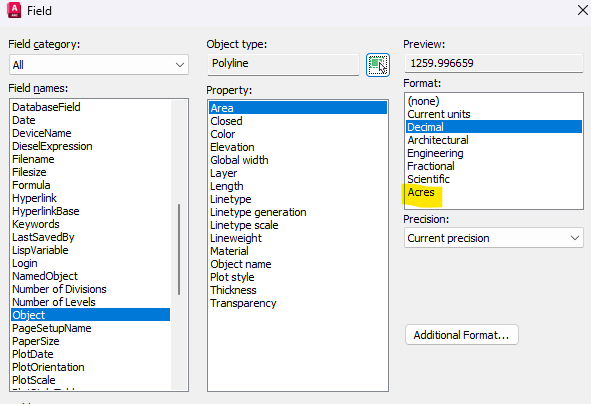
I use the fields to calculate acreage not a strait forward option in standard fields that come with out of the box. I was able to add "Acres" to the pulldown list through the AcFields file and quickly force the conversion from SI to acres.
- Today
-

Dynamic block - align to viewport
CyberAngel replied to D_P's topic in AutoCAD Drawing Management & Output
Let me get this straight. To show some type of pole, you have three types of markers in four sizes. You have a label that applies to all poles, but it needs to appear horizontal in every viewport. One of the markers should also appear with the same alignment (I assume that doesn't matter for the other two since they're circles). You'd rather use a dynamic block because you can easily change the marker size--but then the marker and text don't align. You could use a point style, but you still can't align the marker and text, and you'd have to change the style to change the pole size. My first thought is to add a polar parameter to the block and apply it to the marker and text. Then you can rotate them as desired. Not sure how that interacts with the visibility parameter, that is, you may have to add a new polar parameter for each visibility state. You could use a separate point style and label style for each pole, and you'd have the option to rotate them, but that sounds more clunky. On the other hand, you'd have the option to select the sizes independently (based on point style), which might help with takeoffs. -
How can I write the code for a batch fillet plugin for images like this?
Nikon replied to amook147's topic in AutoLISP, Visual LISP & DCL
Unfortunately, I couldn't check, the link doesn't open for me... -
I'd also like to know what other, more specialized programs can do about this. I'll be following any news on this closely.
-
Hopefully I will have free time after this week to play with this topic again.
-

Dynamic block - align to viewport
SLW210 replied to D_P's topic in AutoCAD Drawing Management & Output
I moved your thread to the AutoCAD Drawing Management & Output Forum. Can you post a drawing? -
How can I write the code for a batch fillet plugin for images like this?
SLW210 replied to amook147's topic in AutoLISP, Visual LISP & DCL
Did you bother to check the link I posted? The first one in my link from Kent Cooper will do fillet>R>0 if that is the value of FILLETRAD. https://forums.autodesk.com/t5/visual-lisp-autolisp-and-general/fillet-multiple-polyline-all-at-once-by-lisp/m-p/6473166#M130031 The FilletMultiplePolylines will work with 0 radius. https://forums.autodesk.com/t5/visual-lisp-autolisp-and-general/fillet-multiple-polyline-all-at-once-by-lisp/m-p/10151411#M130041 -
 willliam joined the community
 -
all sorted. my 2022 version was set up with regen when changing layouts but my 2026 wasn't set the same meaning i couldn't see the changes when i switched to modelspace without a manual regen
-
strange.. im running same routines on 2022 as i do on 2026. i shall do a bit more investigating. cheers for the info
-
 QQQ joined the community
 -
Hi there, I've created a dynamic block (multiple visibility states) but require it to 'align to viewport'. I have this option when turning MTEXT annotative, and when I first created the block before adding the visibility states, however once the visibility states are added the option to 'align to viewport will not work. The block is to display a power pole. Regardless of the orientation of the window, I require the 'X' on the last option to always be an 'X', not a '+' when the UCS is changed to a 45 degree angle. I have read this is not possible due to the block being dynamic, I have also looked at creating cogo point label styles however, I require all 3 of the above scaled for 0.3, 0.35, 0.4, 0.45m power poles which I'd rather have one block/multiple visibility states. Apologies if what I have said does not make sense I am still very early into my civil3d career. Appreciate any assistance. Cheers,
-

showing zones as a default in the properties of spaces
nod684 replied to ahmedabdallah's topic in Revit MEP
Architects use Rooms while MEP guys use Spaces. You can define your own space. You can also use Space Separator to define the space you need. -
 D_P joined the community
 -
This isn't feature rich as Lee's and uses command quite a bit. never got around to updating it. VP2M.lsp
- Yesterday
-
How can I write the code for a batch fillet plugin for images like this?
Nikon replied to amook147's topic in AutoLISP, Visual LISP & DCL
Lee Mac has a similar code. The FMP_R and fpoly codes perform conjugations with a given radius. Only in these codes it is impossible to set the value radius = 0. Is there a code for interfacing with a radius of 0? There's also the marko_ribar code, but I couldn't verify it. When loading, the message appears: Unknown command. -
 amndfley365 joined the community
 -
Is there a way to Crop images inserted into a dwg?
SLW210 replied to Rosco's topic in AutoCAD General
Not sure about newer AutoCAD LT, but as per the OP, they had no access to IMAGECLIP. Lot's of methods to do this, but, I would use a Viewport or an image editing software if IMAGECLIP wasn't available, sometimes I use more than one method, depending on the look I need. You could always make the image a vector file if not too complicated and you have the correct tools, I sometimes get sent images that need to be vector files. -
How can I write the code for a batch fillet plugin for images like this?
SLW210 replied to amook147's topic in AutoLISP, Visual LISP & DCL
Much like Elvis, the OP seems to have left the building. In case there is a dramatic return, here is a LISP that should work, though unclear what "code" they want or or if this is for an actual plug-in. Solved: Fillet multiple polyline all at once by lisp - Autodesk Community I didn't look at Kent Cooper's version to prompt for a radius, but used the original and added something simple to it. I am sure Kent Cooper's is better. (defun C:FMP_R (/ plss n rad) (setq rad (getdist "\nEnter fillet radius: ")) (if (and rad (> rad 0.0)) (progn (command "_.fillet" "_radius" rad) (if (setq plss (ssget "_:L" '((0 . "LWPOLYLINE")))) (repeat (setq n (sslength plss)) (command "_.fillet" "_polyline" (ssname plss (setq n (1- n)))) ) ) ) ) (princ) ) -

Is there a way to Crop images inserted into a dwg?
EleenD03 replied to Rosco's topic in AutoCAD General
It's funny how this thread has been going since 2009, but the advice is still so relevant! Using IMAGECLIP is definitely the cleanest way to do it, but I’ve also used the 'Wipeout' or 'Mtext mask' trick when I’m in a rush and don't want to mess with boundaries. -
I tried a couple of drawings with multiple tabs and it seems to be working on my AutoCAD 2026. Might be another LISP interfering.
-
 Larchy joined the community
 -
 imranhanif19 joined the community
 -
Dear All When viewing the zone from the space properties I was surprised to find that the zones were added as default. When I asked about this issue, I found that the reason might be that the architect did not create the spaces correctly. My question now is: Are there other possible causes? And how can I make sure that this is actually the reason? According to the BIM workflow, is it the responsibility of the HVAC design engineer to modify them, or should they be corrected by the architect by properly enclosing the spaces? best regards
-
Hi All, i've been using viewport outline for years (props to lee mac, of course) and have noticed after switching to autocad 2026 the vpoa command (thats where it automatically generates outputs for all viewports) doesn't seem to generate the outlines into modelspace anymore. vpo works (thats where you select the viewport first). i tested on autocad 2022 and works fine there. any suggestions how this can be fixed to work with 2026? VPOutlineV1-3.lsp
- Last week
-
Years ago think 40+ there was place a house on a lot inside a Civil package and it did what your asking for, as object moved the distances changed, and then you could accept. if you only want 2 offset dims something can be done if you imply say the left offset and bottom offset, then move object to match those offsets. I dont have code but it may be out there, try using google but with serach words like lot house offset, hopefully something will turn up. Not sure if in CIV3D.
-

How can I write the code for a batch fillet plugin for images like this?
Tsuky replied to amook147's topic in AutoLISP, Visual LISP & DCL
@amook147 Try this With your exemple seem to work's... mdf_gear.lsp -
 GHGHGH joined the community
 -
Am not sure if those are temporary dimensions. They automatically appear when selecting an object, and since they are temporary, they cannot be lock AFAIK. If you want to lock the object, better align it to a reference plane, add a dimension and lock the dimension. another option is create a simple family. Hope it helps.
-
Abdelhady Elkhshen joined the community
-
 ahmedabdallah joined the community
 -
 Marciano joined the community
 -
Hi, many thanks for keep responding. Due to electrical difficulties in UA, i cant check daily, i will try that and ur previous respond and comeback. God bless