All Activity
- Past hour
-
 Alex Brikulsky joined the community
 - Today
-
I made ZA because a coworker would leave things zoomed in or off in now where. Might just need to hit it with (vl-load-com) (vla-Regen (vla-get-ActiveDocument (vlax-get-acad-object)) acAllViewports) to fix the 0,0 problem.
-
My other option would be to ensure the view port sits in specific layer. The danger with that is I depend on the user to create the VP correctly. @mhupp thanks for the zoom ext all tabs. Good looks like (vl-cmdf "_.Zoom" "E") behaves similar to "command-s" as we need to ensure AutoCAD updates every system variable before moving to the selection set. FYI: lee-mac's vpoutline routine has the same problem as it draws the PS extra view ports near 0,0. Adding calling C:ZA in Lees routine fix the issue it that. The idea is to use them to generate selection polygons in MS. Basically Lee's routine is accomplishing that minus the filtered for the actual view ports.
-
 Yancy2 joined the community
 -

Best Way to Protect Commercial AutoLISP Applications – High-Level Security and Licensing
SLW210 replied to Sathar's topic in AutoLISP, Visual LISP & DCL
Like @Danielm103, I was also going to suggest Autodesk Store and/or what @BIGAL stated would be my choices. It really depends on what you are comfortable/familiar with. Personally, unless your LISPs are really making difficult and/or complicated work easy and a lot faster, I wouldn't believe they would be big sellers since they seem targeted at AutoCAD MEP, I haven't looked at any numbers lately, but a lot of those users are slowly rolling over to Revit, I was using AutoCAD MEP occasionally, but haven't had any of that type work to do in a good while, perhaps an occasional user such as myself would be a potential customer, I am not sure what percentage of AutoCAD users "do a little of everything" like I do. That is not meant to deter you, just to give an insight on what $$$ and effort you need to spend getting them secure and keeping them up. What future plans do you have on providing support? I see a lot of for purchase apps that end up having the publisher lose interest or other issues and the support goes away. -
Maybe read through this thread. Get All Viewports in All Layouts - Autodesk Community What exactly are you trying to accomplish after getting them selected?
-

Best Way to Protect Commercial AutoLISP Applications – High-Level Security and Licensing
Danielm103 replied to Sathar's topic in AutoLISP, Visual LISP & DCL
I have a couple apps on the autodesk store. here's one XLSX field evaluator. https://apps.autodesk.com/ACD/en/Detail/HelpDoc?appId=4867035866745163447&appLang=en&os=Win64 Anyway, I use Autodesk's entitlement API. All you need to do is register your application , they give you an Application id. you can see the ID in the link all you need to do is query the server with the ONLINEUSERID. You need to be able to let the user use your application offline, my app checks at the beginning of each month here's a quick lisp sample (defun c:IsEntitled (/ http response) (setq appId (getstring "Enter AppId ")) (setq userId (getvar "ONLINEUSERID")) (setq url (strcat "https://apps.autodesk.com/webservices/checkentitlement?userid=" userId "&appid=" appId ) ) ;https://docs.microsoft.com/en-us/previous-versions/windows/desktop/ms759148(v=vs.85) (if (setq http (vlax-create-object "MSXML2.XMLHTTP")) (progn (vlax-invoke-method http 'open "get" url :vlax-false) (if (not (vl-catch-all-error-p (vl-catch-all-apply 'vlax-invoke (list http 'send))) ) (setq response (vlax-get http 'responseText)) ) (vlax-release-object http) ) ) (cond ((> (vl-string-search "true" response) 0) (princ "\nTrue")) (t (princ "\nFalse")) ) (princ) );def -
 Mourou joined the community
 -
Think the 0 thing is for rendering but not 100% on that. for (68 . -1) means the viewport is off screen also for rending. This zoom ext all tabs and returns to the one you were on. ;;----------------------------------------------------------------------------;; ;; Zoom Extents All Tabs (defun C:ZA (/ lyt) (setq lyt (getvar 'ctab)) (foreach lay (layoutlist) (setvar 'ctab lay) (setvar 'cvport 1) (vl-cmdf "_.Zoom" "E") ) (setvar 'ctab lyt) ) @Paul Li I'm just posting the ssget not full code. Might also want to check this out. https://www.lee-mac.com/vpoutline.html
-
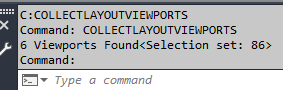
@mhupp I think @DavidP wants to filter out those viewports that are not "true view ports" which means when objects are used as view ports. As a test I run his c:COLLECTLAYOUTVIEWPORTS lisp code on the attach drawing the return value is 3: But when I run your lisp code on the same drawing the return value is 6: TrueViewports.dwg

-
Yeah @Paul Li had to look at my notes when I got home. My updated code above should give David what they are looking for in one ssget. kept the 410 just to be safe but used ~ to ignore instead of (-4
- Yesterday
-

Best Way to Protect Commercial AutoLISP Applications – High-Level Security and Licensing
BIGAL replied to Sathar's topic in AutoLISP, Visual LISP & DCL
Like the idea of using a cloud address that is yours. There is mentions in some forums of un-encrypting but how many really no how to do that. Yes people do give your code to friends, for me had security so eventually worked out the code was given to some one else. So no install. Some methods all lisp based. USB IP address on pc network card etc Hard disk ID Username CAD serial number Read registry Read a file from a web server. Some internet providers allow you space on their site at no cost. Re updating there is an old DOS command "Copy File1+file2 file3". so file1 is a lisp file with the correct security code checks, file2 is your normal lisp program code without security. You would compile file3. Pretty easy to make a BAT file for the task, did use this method very extensively. Do around 50 lisps in one go. One grey area is I do custom lisps for clients so who owns the code ? Unless you have some form of right to use contract. They are provided with source code. Last comment I have a Install.lsp that does all the hard work, unzips a file to correct directory with all the code dwg mnu cuix etc, adds support paths and new menu's, toolbars etc, Can do as a Bundle if needed. just ask if want more detail, saves making a MSI or EXE etc. -
Just a comment Bricscad sometimes does not support the "(( make a list method. so this does work and I added get for current layout, in case have multi viewports in a layout. You could loop through the layouts rather than getting all. If make a list of properties then have the layout name. Having problems post in <> get error message finally got it. A test (sslength (setq ss (ssget "_X" (list (cons 0 "VIEWPORT") (cons 67 1) (cons -4 "/=") (cons 69 1)(cons 410 (getvar 'ctab))))))
-
@DavidP Yes, you do need to activate each layout in order for the vports to come alive. So looping through them is a good way to deal with this.
-
Code 68 and 69 is not consistent and when you first open a drawing most of these codes show 0 for a value... When you switch to the each of the layouts the value updates. So for now looping through the layouts and zooming extents appears to solve the issue. Then I'm just filtering for 69 > 1.. still a bit confused. Also these values in some case are -1 but still valid viewports and I run a second time and changes to positive value.. Still not 100% sure of what's going on.
-
I also believe some of the flags change as you move to different layouts/ change the zoom scale or move view port off screen..(I am getting inconstant result between drawings an auto-cad sessions.) I have a lisp to report the result to a text file but I been having issues posting posting.
-

AutoCAD Foundations Is Now Available in All Supported AutoCAD Languages
The AutoCAD Blog posted a topic in AutoCAD Blogs
Learning AutoCAD has just become more accessible to users around the world. AutoCAD Foundations is now available in all 14 languages offered through the AutoCAD Online Help: English, Simplified Chinese, Traditional Chinese, Czech, French, German, Hungarian, Italian, Japanese, Korean, Polish, Brazilian Portuguese, Russian, and Spanish. Whether you’re new to AutoCAD or looking to refresh your skills, you can now explore foundational learning content in your preferred language, making it easier than ever to build confidence and develop essential design skills. What is AutoCAD Foundations? AutoCAD Foundations is a free, beginner-friendly learning series available directly within AutoCAD Online Help. Designed to help users get started quickly, it combines short instructional videos, guided lessons, and hands-on exercises to introduce essential AutoCAD tools, features, and workflows. From navigating the AutoCAD interface and creating your first drawing to working with precision, organizing objects with layers, adding dimensions, and preparing designs for sharing, AutoCAD Foundations provides just the right amount of information to help you learn at your own pace. Whether you’re working on architectural, mechanical, civil engineering, or other types of designs, these lessons help you develop the foundational skills needed to start working independently and confidently in AutoCAD. Getting started is easy! Visit AutoCAD Foundations in the AutoCAD 2027 Online Help. Locate the language drop-down menu at the top of the Help page. Select your preferred language. Drop-down menu with languages. Page in French after language selection. Explore the AutoCAD Foundations Learning Series AutoCAD Foundations includes 12 courses designed to guide you from understanding the interface to creating and sharing completed drawings. Each course focuses on practical skills you can put to use right away in AutoCAD. Tour the AutoCAD UI Get familiar with the AutoCAD workspace, including the ribbon, Command line, and essential interface tools. Open course 1 Take Your First Steps into AutoCAD Build confidence with two guided design exercises for architectural and mechanical design that introduce practical drawing techniques and foundational workflows. Open course 2 Create, Open, Save, and View Drawings Learn how to start new drawings, open existing files, save your work, and navigate different views. Open course 3 Start Working with Commands Discover how to access and use AutoCAD commands with the mouse, Command line, and Dynamic Input. Open course 4 Create Basic 2D Objects Learn to draw lines, circles, rectangles, and other fundamental geometric shapes used in 2D drafting. Open course 5 Create Objects with Precision and Accuracy Improve drawing accuracy using coordinates, object snaps, and more to position geometry precisely. Open course 6 Select, Modify, and Duplicate Objects Explore techniques for selecting, editing, moving, copying, and modifying geometry to work more efficiently. Open course 7 Change Object Properties and Organize Objects with Layers Control object appearance using colors, linetypes, and other properties while organizing drawings with layers. Open course 8 Place Annotation and Hatch Closed Areas Add text, labels, and hatch patterns to communicate design details and identify materials and areas. Open course 9 Add Dimensions to a Design Learn how to add accurate measurements to objects and communicate sizes, distances, and locations. Open course 10 Create and Insert Blocks Discover how to create reusable blocks for symbols, components, and repeated design elements to improve consistency and efficiency. Open course 11 Organize and Output a Design with Layouts Prepare finished drawings for sharing by setting up layouts and learning how to plot or print designs. Open course 12 Start your AutoCAD learning journey today! Whether you’re opening AutoCAD for the first time or revisiting the fundamentals, AutoCAD Foundations makes it easier to learn essential skills, practice with real examples, and grow your confidence. Explore AutoCAD Foundations and choose your preferred language today! The post AutoCAD Foundations Is Now Available in All Supported AutoCAD Languages appeared first on AutoCAD Blog. View the full article -
@mhupp unfortunately this ssget filter in autocad returns nothing: (ssget "_X" '((0 . "VIEWPORT") (-4 . "!=") (410 . "Model") (-4 . "!=")(-4 . ">") ))
-
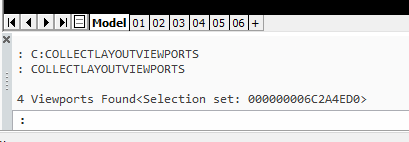
if your trying to select all Paperspace viewports at once. this filters all viewports that are not in model or the first (paperspace) (defun C:CLV () (C:CollectLayoutViewports)) (defun C:CollectLayoutViewports (/ ss) (if (not (setq ss (ssget "_X" '((0 . "VIEWPORT") (410 . "~Model") (-4 . ">") (69 . 1) (-4 . ">") (68 . 0))))) (princ "\nNo Active Paperspace Viewports Found") (princ (strcat "\n" (itoa (sslength ss)) " Viewports Found")) ) ss )
-
so you now know how to filter out the selection of a "true view port"?
-

Best Way to Protect Commercial AutoLISP Applications – High-Level Security and Licensing
Steven P replied to Sathar's topic in AutoLISP, Visual LISP & DCL
For pure LISP, FAS and VLX are generally OK - commercially these are used. Unless you are selling thousands of copies for thousands each time to make it worth while to break the coding, perhaps selling a few copies to each company doesn't make it worth breaking them. It is possible but the forums (including this one) are very quick to stop any such requests. I'd be happy to sell these in formats. Then of course you have sent your file out into the wild, it can be copied and sent around an office as fast as an email. You could hard code each file with details specific to the computer / user (www.cadtutor.net/forum/topic/34596-computer-name/) - perhaps check (getenv "ComputerName") and (getenv "UserName") and test these against a (unique) hard coded variable in each file that you sell. Down side is you have to trust them when they want an updated file if they update their computer (Limit this to '1 updated computer every 4 years is allowed') - though you could also do a check that the AutoCAD version has also increased when requesting a new LISP file. That does mean extra work for you or your team though, and not a fully automated process. These 2 should be enough to protect yourself from legitimate business stealing your code. After that your protection has to come out of AutoCAD and LISP and into professional file hosting solutions - not my thing there - but one solution was to again hard code their LISP file to link to a cloud based LISP file that will return a code to the first LISP - this, computer name, user name can validate that they are in their license period and LISP can run. Benefit here is you have complete control if they can get access and of course, the date / expiry is hard coded into the remote / your LISP. I'd have one remote LISP file for each licensed File you send out. Downside here is a financial cost to maintain a web presence, with firewall and authentication systems. Since it is just a file most commercial thing should do what you want, and you need internet access for that initial validation in each CAD instance. Taking that a step further, the file you sell could be a simple "appload" command linking to your remote files, once validated apploaded into that CAD instance - offline use will be OK s long as there was internet to connect and download initially for that CAD instance. Noting that any remote file is not copied to their system and to access it / read it needs the user to break the encoding to get the file path, to copy it to break the coding again to copy the programming. Good question - I might be out tomorrow with a systems architect and this is his thing - if I remember I'll see his thoughts, but that is who you want to talk to. It might be possible to host it all yourself. Of the developers on here Tharwat sells his work commercially and is up to speed with protecting his stuff, he might be around to give a few pointers. Final part - reverse engineering - if it is being used, not a lot you can do about that, just got to hope that whoever buys it realises the time and cost to remake it and that yours is a lot better value. -
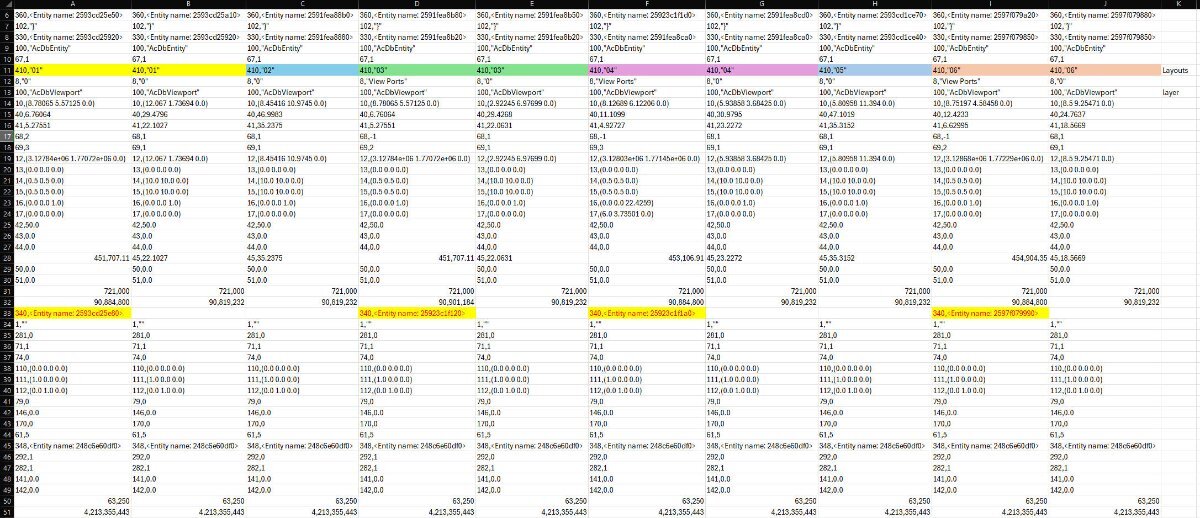
Here is how the codes line up between all the view ports:
-
if you're only looking for true rectangular vports then testing for the dxf 340 is the best way to filter that out.
-
 Coolo joined the community
 -
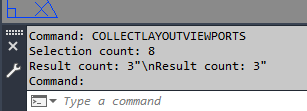
That didn't work but I notice some have code 340, other don't (Clipping boundary) so filtering post ssget worked... Just not exactly sure this true in every case. (defun c:CollectLayoutViewports (/ ss i ent ed layout number status pt items counts item) (setq items nil ss (ssget "_X" '((0 . "VIEWPORT") (67 . 1))) ) (princ (strcat "\nSelection count: " (if ss (itoa (sslength ss)) "0"))) (if ss (progn (setq i 0) (while (< i (sslength ss)) (setq ent (ssname ss i) ed (entget ent) layout (cdr (assoc 410 ed)) ) (if (and layout (/= (strcase layout) "MODEL") (assoc 340 ed)) (setq items (cons ent items)) ) (setq i (+ i 1)) ) ) ) (princ (strcat "\nResult count: " (if items (itoa (length items)) "0"))) )
-
 Bill Porter joined the community
 -
Try this selection filter which should remove the paperspace object itself which is also considered as a vport (ssget "_X" '((0 . "VIEWPORT") (67 . 1) (-4 . "/=") (69 . 1)))
-
I'm trying to select all the true view port in each layout but I'm running into issues. There are more view ports in the drawing than what's visible to the user(not sure why this is as I only create one single view port in each layout). So I need to filter for the actual view ports. (defun c:CollectLayoutViewports (/ ss i ent ed layout number status pt items counts item) (setq items nil counts nil ss (ssget "_X" '((0 . "VIEWPORT") (67 . 1))) ) (princ (strcat "\nSelection count: " (if ss (itoa (sslength ss)) "0"))) (if ss (progn (setq i 0) (while (< i (sslength ss)) (setq ent (ssname ss i) ed (entget ent) layout (cdr (assoc 410 ed)) number (cdr (assoc 69 ed)) status (cdr (assoc 68 ed)) pt (cdr (assoc 10 ed)) ) (if (and layout (/= (strcase layout) "MODEL") (> number 1) (> status 0)) (progn (setq items (cons ent items)) ) ) (setq i (+ i 1)) ) ) ) items ) is there a DXF code I can filter by or any other suggestion... ViewPortTest.dwg
-

Best Way to Protect Commercial AutoLISP Applications – High-Level Security and Licensing
VicoWang replied to Sathar's topic in AutoLISP, Visual LISP & DCL
Thanks for @mhupp recommendation. @Sathar These issues you raised, I should have solved them all on VedaCAD, but all the technologies are developed specifically, without using any mature commercial solutions or public libraries, so there is no way for me to provide you with my technical implementation. But I have an idea that might be easier to achieve, perhaps it could provide you with some ideas: Notion can actually be accessed through API, all operations in Notion are graphical, such as creating a table accessible through API, when your users verify through the client, check if there is corresponding authorization information in the table. At this point, the Notion table functions like a database, avoiding the trouble of creating a database (designing a database from scratch is really Trouble, the database in the development of vedacad has been adjusted for at least over 100 rounds). You need a server (even a dedicated domain is not necessary, but it needs to connect the client and the Notion API, and storing the Notion token on the server instead of hardcoding it on the client is a safe isolation strategy), let your client access your server, let the server access your Notion table, and return true/false and time to the client, and set a reasonable reconnection time interval, which should be able to implement a certain degree of online authorization verification system. As long as you master how to make the client connect to a specific server endpoint, the above pattern should be achievable, unlike VedaCAD, which also needs to transmit the file itself, which is the easiest part to crash. Although protecting our intellectual property is our business strategy, this forum is more open to discussions on the open-source of some simple/free plugins, hoping the above ideas can help you. --- I have a WhatsApp group related to CAD: https://chat.whatsapp.com/BsM62YEol9SHdKoWxaeW1D There's even a hidden expert in the group who write an AutoLisp IDE, where you might get more ideas. -

Best Way to Protect Commercial AutoLISP Applications – High-Level Security and Licensing
mhupp replied to Sathar's topic in AutoLISP, Visual LISP & DCL
@VicoWang might have a solution.