All Activity
- Past hour
-

multiple file selection dialog box using lisp & powershell
Paul Li replied to Paul Li's topic in AutoLISP, Visual LISP & DCL
so does the pl:getfiledps function still run properly on those older AutoCAD versions? - Today
-
multiple file selection dialog box using lisp & powershell
Paul Li replied to Paul Li's topic in AutoLISP, Visual LISP & DCL
Could you test if this PowerShell-p function would return nil on your powershell blocked computers? ; PowerShell-p function to check if powershell is available to run...Returns T if available (defun PowerShell-p (/ shell result) (setq shell (vlax-create-object "WScript.Shell") result (vl-catch-all-apply 'vlax-invoke-method (list shell 'Run "powershell.exe -NoProfile -Command \"exit 0\"" 0 T)) ) (vlax-release-object shell) (and (not (vl-catch-all-error-p result)) (= result 0) ) ) -

How can I make the following program support Chinese input?
SLW210 replied to xcn's topic in AutoCAD 2D Drafting, Object Properties & Interface
How are you executing the Chinese input? Like I stated, Autodesk claims you should use MText for multi-language. I just got into pinyin inputs so far and mostly I have been going over the pronunciations, though the characters are displayed. I have so far just been repeating that until I have a solid grasp. More or less it's a course where I am also brushing up on programming, they have a Chinese (simplified) and a Spanish (also English) pretty much for programming. My home computer has the Chinese switch, I'll have to see if I can do that at work. -

How can I make the following program support Chinese input?
xcn replied to xcn's topic in AutoCAD 2D Drafting, Object Properties & Interface
@SLW210 Glad to hear that you are learning Chinese. I used the English full version of AutoCAD 2027, set LISPSYS to 2, and restarted the computer to test the code. The result is that Chinese input still doesn’t work. I tried to catch keyboard input: once a key is pressed, the program exits the grread loop and calls getstring. This makes Chinese input possible. -
I have been looking at the discussion boards for the past month while working on my structural project for Penn Foster. It has been a great help but I was wondering if anyone could point me to a visual example of plate 3 (Section A)? I'm sure there is one somewhere in the boards but I have not been able to find it. I also don't need details, I am just a visual learner and I know for a fact the drawing I have made for this is completely wrong since the instructions are not clear to me. All of the plates after this seem to be based off of this one so I am struggling to go any further without a visual to see what I need to fix or how wrong exactly my drawing is. Any visual for this plate would be of great help! Thank you!
-

Do you check the drawing units before starting work on a DWG?
CyberAngel replied to indiancad's topic in AutoCAD Drawing Management & Output
Here's a simple workaround. When you get a drawing from someone else, open a New drawing (from one of your templates). Xref their drawing into that one and Bind it as an insertion. That gives you a block, which you can edit to clean it up and then explode. If there's a scale problem, it will show up there. Voila! You have their drawing with all your settings applied. -
there's also a board dedicated to XDrx-API https://www.theswamp.org/index.php?board=78.0
-
.thumb.jpg.615654602253be56b2fbd5d064834780.jpg)
Do you check the drawing units before starting work on a DWG?
indiancad posted a topic in AutoCAD Drawing Management & Output
Have you ever started working on a DWG file and discovered at some point that it was created using incorrect units? You can easily verify them with UNITS and see the DWG's insertion scale and other units-related settings before you begin making any changes. When working with someone else's DWG or from another company, I always like to check the units first, rather than just trusting that it's set up properly. It can save you headaches down the road when dealing with insertion scales of blocks, inserting or attaching references, etc. Do you check UNITS as part of your standard procedure when you receive an unfamiliar DWG? -
Why would I contact them? They have a website are usually on at a few AutoCAD fora. @XDCAD_net and @XDSoft should be the originators of that program. In looking at your first post, I would believe a newer program to be in C:\Program Files\, not in C:\ Program Files(x86)\. Here are installation instruction from the GitHub... xdcad · GitHub
-
Did you try contacting XDSOFT? HOW? I LOAD "XDRx.x64.25.arx" AND i get this error
-
How can I make the following program support Chinese input?
SLW210 replied to xcn's topic in AutoCAD 2D Drafting, Object Properties & Interface
@BIGAL, they are using Text, not MText, which could be part of the problem, from what I've seen on Autodesk site, Text doesn't lend itself to multiple languages. -
Did you try contacting XDSOFT? Maybe provide more information. What are you attempting to do that gives the error?
-

VedaCAD - Technical Support, Updates & Community VCIDs
Steven P replied to VicoWang's topic in AutoLISP, Visual LISP & DCL
Professionally all updates are via email. Recorded in the company systems and auditable. -
 3yl3mci joined the community
 -
@Paul Li it may not be the answer but what I have done in the past is to quickly get the strlen of say file name, Then get the maximum value of all the file names and add say 2, that becomes your new width for the dcl.
-
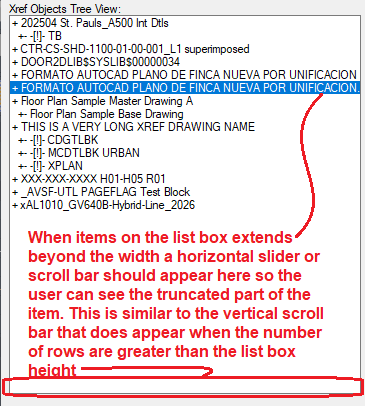
3) Regarding Horizontal Slide Bar (or better term may be Scroll bar)

-
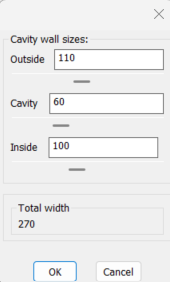
"3) Horizontal slide bar to list box" not sure if you mean like this a horizontal slider. as you move it the item in in the list box is selected. A slider uses a min max number and step size. So could do "1 to length of list", step of 1. This has 3 sliders and updates total. Sliders arrows are not clear in image. "6) A select file dialog box " thumbnails choice. Your "pl_getfiledps.lsp" when the explorer is opened click on the "More" option and can see icons etc.
- Yesterday
-

multiple file selection dialog box using lisp & powershell
BIGAL replied to Paul Li's topic in AutoLISP, Visual LISP & DCL
Works great often do old fashioned DOS to get file names list or use the VL files functions. A suggestion remove "result" from the local variables list. As the answer disappears. Or ; Example: ; (setq files (pl:getfiledps "Select Files" (getvar"dwgprefix") "dwg" 1)) A side comment I have used Powershell with Bricscad and sometimes does not work. Your code may help as you do a deeper dive into running Powershell. I generally only do a "Power shell and script" I have used it to change programs, I jump to Excel from CAD. -

multiple file selection dialog box using lisp & powershell
GLAVCVS replied to Paul Li's topic in AutoLISP, Visual LISP & DCL
One observation: in older versions of AutoCAD (2000 and 2002, at least), 'vla-get-HWND' applies to the Document object rather than the Acad object. -
How can I make the following program support Chinese input?
BIGAL replied to xcn's topic in AutoCAD 2D Drafting, Object Properties & Interface
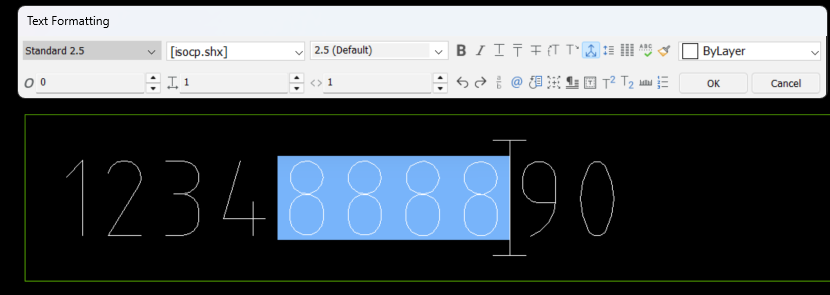
Still for me your just replacing the inbuilt mtext ability. The Mtext should support Chinese characters. 1 Select mtext, using dbl click 2 Highlite characters 3 Edit characters 4 Press OK
-
multiple file selection dialog box using lisp & powershell
Paul Li replied to Paul Li's topic in AutoLISP, Visual LISP & DCL
Thanks for troubleshooting. That could definitely be caused by having a write-line statement that's way too long. I've made the changes to reduce the write-line on the dcl. Kindly troubleshoot some more for offices that do allow for running powershell with the attached revised version...thanks in advance. pl_getfiledps.lsp -
 caado joined the community
 -
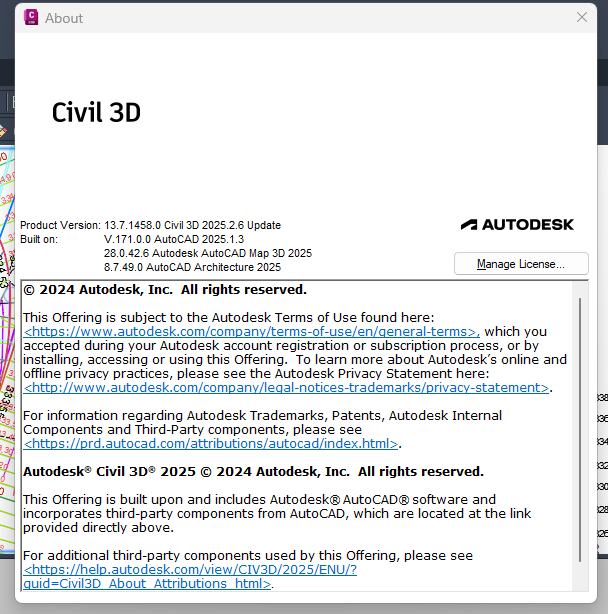
then xdrx.x64.25.arx seems correct, it should match (substr (getvar "ACADVER") 1 2)
-
-
multiple file selection dialog box using lisp & powershell
SLW210 replied to Paul Li's topic in AutoLISP, Visual LISP & DCL
I'm not going to troubleshoot it since Powershell is blocked at work, but if the load has that error, then it's something in the Code, probable in the DCL write-line part. -

VedaCAD - Technical Support, Updates & Community VCIDs
VicoWang replied to VicoWang's topic in AutoLISP, Visual LISP & DCL
Thank you for the reminder, this is long-term content for search engines. At least I know there are several WhatsApp groups in the AEC field, and I guess there should still be some users. What methods do you mainly use? -
VedaCAD - Technical Support, Updates & Community VCIDs
Steven P replied to VicoWang's topic in AutoLISP, Visual LISP & DCL
Not so sure on that one, CAD engineers don't get work phones so often, so whatsapp not so useful to keep up to date with a file repository.