All Activity
- Past hour
-
Hi, everybody. It is necessary to perform hatch, regardless of the previous type of hatching. The first code issues superfluous requests. The second code performs the hatch using the previous type, not the one specified in the code. (defun c:HatchUser ( / ss) (setq ss (ssget)) (if ss (progn (command "_-BHATCH" "_Properties" "_User" "0" "_Double" "_Yes" "200" "_S" ss "") ) ) (princ) ) (defun c:HatchUser1 ( / ss) (setq ss (ssget)) (if ss (progn (command "_.-BHATCH" "_User" "_Double" "_Yes" "0" "200" "_S" ss "" "") ) ) ) (princ) ) HatchUserdwg.dwg

- Today
-

Need a routine lisp for bearing & azimuth in realtime.
Tsuky replied to oliver's topic in AutoLISP, Visual LISP & DCL
@oliver Try to reload the code at this answer -

Need a routine lisp for bearing & azimuth in realtime.
devitg replied to oliver's topic in AutoLISP, Visual LISP & DCL
@Tsuky Thanks for label_bearing-vertex, I need to label from points , not from polilines . Just to loop around the label_bearing.lsp from point to point Best regards label_bearing.lsp -
 karfung joined the community
 -
Need a routine lisp for bearing & azimuth in realtime.
Tsuky replied to oliver's topic in AutoLISP, Visual LISP & DCL
@devitg For labelling the segments of polylines (cords for the polyline arcs), I can offer you this. label_Bearing-vertex.lsp -

Lisp area and/or length of polyline, as a leader
dexus replied to filan1a's topic in AutoLISP, Visual LISP & DCL
The height of the text you can change with the "style" command. There you can change the default value of the text-style that is applied. -
 dragonet01 joined the community
 -

Lisp area and/or length of polyline, as a leader
Mr. O replied to filan1a's topic in AutoLISP, Visual LISP & DCL
Hello, Can you help me because im using millimeter drawing when i use this lisp the value and text is small, how can i change the value height in millimeter. thank you. Polylin Length FA-L.LSP -
Mr. O joined the community
-
Lisp area and/or length of polyline, as a leader
Mr. O replied to filan1a's topic in AutoLISP, Visual LISP & DCL
Hello how can i change the height value if i use millimeter drawing - Yesterday
-

Change a length of line by feeding a new end point to the association list.
BIGAL replied to Dayananda's topic in AutoLISP, Visual LISP & DCL
I looked at this and started to do move end point of a pline, then realised you state "Extend line" rather than move end point to a new point. So you can move the "end" point of a line or Pline to a point with one code That is different to say make a new length. If you think about it don't need code just pick line/pline then grips are exposed pick an end or vertice and move it to the new point. So can you explain more what it is your trying to do ? A dwg before after etc. -
 mzerlaut joined the community
 -
Need a routine lisp for bearing & azimuth in realtime.
devitg replied to oliver's topic in AutoLISP, Visual LISP & DCL
@Tsuky Please route me how to make it work on a lot of vertices or points as need to bearing or angle from points.dwg -
Need a routine lisp for bearing & azimuth in realtime.
devitg replied to oliver's topic in AutoLISP, Visual LISP & DCL
@oliver, please upload your sample.dwg so we can work at it -
 Bojanko joined the community
 -

Text temporarily disappearing
Rooster replied to Rooster's topic in AutoCAD 2D Drafting, Object Properties & Interface
Thanks, I've found that alternative an am using it for now. Functionally, I do prefer how the first addon works, but the resulting text issue is too painful to put up with because of that! I will submit a bug report to the developers. -
Yes, do it!!
-
 Clxrkyyy joined the community
 -

Need a routine lisp for bearing & azimuth in realtime.
oliver replied to oliver's topic in AutoLISP, Visual LISP & DCL
i tried this code, the bearing is fine recon from north..but azimuth have a problem. 14.01.2026_20.26.59_REC.mp4 -
 keksas joined the community
 -
I have a dump LISP called TakeADump, maybe I need this to go along with it!
-

Text temporarily disappearing
SLW210 replied to Rooster's topic in AutoCAD 2D Drafting, Object Properties & Interface
You might try QRcode dynamic | AutoCAD | Autodesk App Store. Did you report the issue? -
 Mohamed.Radwan joined the community
 -
Text temporarily disappearing
Rooster replied to Rooster's topic in AutoCAD 2D Drafting, Object Properties & Interface
It was a QR Code generator, here: https://apps.autodesk.com/ACD/en/Detail/Index?id=7854648785059363913&appLang=en&os=Win32_64 Published by Autodesk. Pretty certain this was the culprit. My text problems began at the same time that I installed this. As soon as I unloaded it, the problem disappeared. -
 noobian joined the community
 -

Change a length of line by feeding a new end point to the association list.
mhupp replied to Dayananda's topic in AutoLISP, Visual LISP & DCL
to update entmod you need to get familiar with dxf codes. This simple lisps will dump to the command line. All entities follow a pattern. ;;----------------------------------------------------------------------------;; ;; Dump all DXF Group Data (defun C:DumpIt (/ ent) (while (setq ent (car (entsel "\nSelect Entity to Dump"))) (mapcar 'print (entget ent '( "*"))) ) (princ) ) ;;----------------------------------------------------------------------------;; ;; Dump All Visual Lisp Methods and Properties for Selected Entity (defun C:VDumpIt (/ ent) (while (setq ent (car (entsel "\nSelect Entity to Dump"))) (vlax-Dump-Object (vlax-Ename->Vla-Object ent) t) ) (princ) ) entsel will return an entity name and point of seleciton. use that to see which endpoint your closest to. and use that to update with entmod and entupd. ;;----------------------------------------------------------------------------;; ;; Extend line to new point. ;; https://www.cadtutor.net/forum/topic/98936-change-a-length-of-line-by-feeding-a-new-end-point-to-the-association-list/ (defun c:EXTLINE ( / sel ent pick line sp ep newpt) (if (setq sel (entsel "\nSelect line near the end to extend: ")) (progn (setq ent (car sel) pt (cadr sel) line (entget ent) ) (if (= (cdr (assoc 0 line)) "LINE") (progn (setq sp (cdr (assoc 10 line))) (setq ep (cdr (assoc 11 line))) (if (< (distance pt sp) (distance pt ep)) (setq newpt (getpoint ep "\nSpecify new endpoint: ") line (subst (cons 10 newpt) (assoc 10 line) line) ) (setq newpt (getpoint sp "\nSpecify new endpoint: ") line (subst (cons 11 newpt) (assoc 11 line) line) ) ) (entmod line) (entupd ent) ) (prompt "\nSelected entity is not a LINE.") ) ) ) (princ) ) -

Change a length of line by feeding a new end point to the association list.
Dayananda posted a topic in AutoLISP, Visual LISP & DCL
I can get the Association list of a line with entget . Please help me feed to new values to this list. -
Need a routine lisp for bearing & azimuth in realtime.
Tsuky replied to oliver's topic in AutoLISP, Visual LISP & DCL
I relied on your pictures... ??? In your picture: I see for degrees: Deg/Min/Sec - Clockwise (on) - South 90d0' If not correct change ANGDIR, ANGBASE and AUNITS in: (mapcar 'setvar '("DIMZIN" "ANGDIR" "ANGBASE" "AUNITS" "AUPREC" "LUPREC" "LUNITS") (list 0 1 (* pi 1.5) 1 3 2 2)) - Last week
-
Need a routine lisp for bearing & azimuth in realtime.
mhupp replied to oliver's topic in AutoLISP, Visual LISP & DCL
-
Need a routine lisp for bearing & azimuth in realtime.
oliver replied to oliver's topic in AutoLISP, Visual LISP & DCL
I really appreciate your help..there's a little minor adjustment ( "the bearing it should be from North base" ) i'd try to figure it out. Thanks and have a good day everyone. God blessed us all. -
AutoLISP to print Custom Paper Size dynamically from Polyline/Layout geometry (ex: a3 extended,...)
BIGAL replied to cando's topic in AutoLISP, Visual LISP & DCL
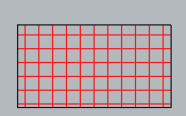
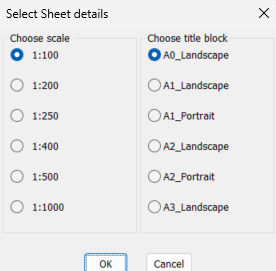
My first comment is when you hard print the pdf you have to pick a paper size so why would you not just pick a paper size to start with ? I do not understand the Custom scale size needed. In the world you are normally metric or imperial paper sizes. You can easily with a lisp etc plot a standard sheet size in a layout that has a Viewport at the correct scale. I think that is the step your not understanding, many example code does exist. For me a couple of choices make multiple layouts at scale walking along a pline, make multiple rectangs in Model at a scale matching viewports and title blocks in layouts. In this image select a title block and scale pick on Model and correct layout is made. A rectang is drawn in the model showing the result so you can accept or erase and run again. You can move and rotate the rectang before making the matching layout.
-
Extents of a part, creating a bounding box
BIGAL replied to Discus84's topic in AutoCAD 2D Drafting, Object Properties & Interface
Maybe this give it a try, https://www.lee-mac.com/ssboundingbox.html -
Automating schedules, dates, etc. on the plot.
BIGAL replied to Discus84's topic in AutoCAD Drawing Management & Output
I agree with you @SLW210 this was our plot stamp added to our std title block. It was set to a small size but showed when it was plotted not as per the revision date.
-
AutoLISP to print Custom Paper Size dynamically from Polyline/Layout geometry (ex: a3 extended,...)
SLW210 replied to cando's topic in AutoLISP, Visual LISP & DCL
Maybe this one? Solved: Automatic Papersize - Autodesk Community