All Activity
- Today
-

VS Code + AutoCAD Lisp Extension Issues (Need constant re-starts)
DavidP replied to DavidP's topic in AutoLISP, Visual LISP & DCL
I never use it but perhaps I should give a try instead thanks. -
VS Code + AutoCAD Lisp Extension Issues (Need constant re-starts)
DavidP replied to DavidP's topic in AutoLISP, Visual LISP & DCL
Thanks for the link, just notice the documentation it says I run vscode as admin ('ll try that and see and improvement). (my user has admin privileges but I never actually force VS Code to start with admin privileges ). I'll try that and see it improves. I believe the setup is fine as I can do both debug attach or debug launch... Also the executable for AutoCAD map is acad.exe just as AutoCAD. The behavior I see is as if VSCode loses contact with ACAD or as if it never releases the processes. At times it prompts me if I want to start a 2nd Debug Attach. I may go a day where I only need to restart once or twice other times I'm forced to restart 20 to 30 times. I wonder if could be interference with some other plug ins like ArcgIS. -

VS Code + AutoCAD Lisp Extension Issues (Need constant re-starts)
mhupp replied to DavidP's topic in AutoLISP, Visual LISP & DCL
I think you can still use VLIDE. if If VLIDE Doesn't Open set LISPSYS to 0 Tho doesn't have autocomplete and color coding like vs code. -

VS Code + AutoCAD Lisp Extension Issues (Need constant re-starts)
SLW210 replied to DavidP's topic in AutoLISP, Visual LISP & DCL
Did you read the instructions for the AutoCAD AutoLISP extension? I run code with AutoCAD, which is the path you show using, that probably doesn't work with AutoCAD Map3D, so you might need to repath if that's the program you use or just use AutoCAD and see if that resolves the issue. From AutoCAD AutoLISP Extension - Visual Studio Marketplace -
 AndruxaZ_Z_Z joined the community
 -
VS Code + AutoCAD Lisp Extension Issues (Need constant re-starts)
DavidP posted a topic in AutoLISP, Visual LISP & DCL
I have this Issue with in VSCode where I'm forced to constantly restart both applications in order to continue debugging. My Setup: AutoCAD Map3d 2021 VS Code 1.27.0 + Autocad AutoLISP Extension 1.6.3 VSCode Extitions Setup: Process name = acad AutoCAD com…start switchs: C:\Program Files\Autodesk\AutoCAD 2021\acad.exe Absolute path: C:\Program Files\Autodesk\AutoCAD 2021\acad.exe I start Autocad First, then run vlide from the command prompt to load the the VScode application. Then typical open a lisp project containing multiple lisp files. Then to start debugging by Pressing “F5”. Some times this works fine but more often than not I need to restart both app multiple times.. This happens mostly after I run into a code error… like typo or syntax error or trying to load a file autocad cant find. The only way to be able to continue debugging my project is to completely restart both vscode and autocad(once or a few times). I seen this with my previous setup as well (different hardware, os and applications versions). Any idea or suggestion why this could be happening? -
 Scott Bradshaw joined the community
 -

How to create field that shows text from a dimension
BIGAL replied to ColinPearson's topic in AutoCAD 2D Drafting, Object Properties & Interface
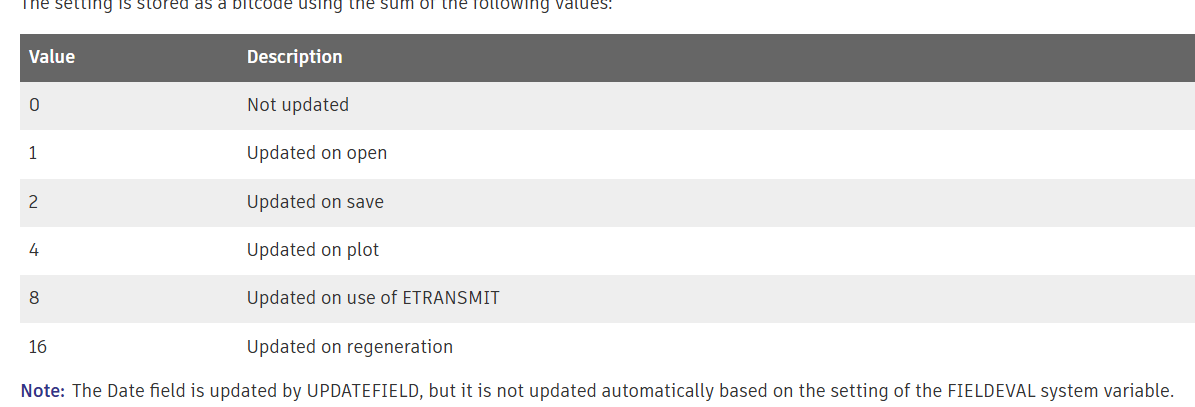
Went away and had a look at why 31. Sum the values.
- Yesterday
-
 giu.pecol joined the community
 -

How to create field that shows text from a dimension
ColinPearson replied to ColinPearson's topic in AutoCAD 2D Drafting, Object Properties & Interface
@zaphod That's a good one, thank you! -
 Nuno Ribeiro joined the community
 -

How to create field that shows text from a dimension
zaphod replied to ColinPearson's topic in AutoCAD 2D Drafting, Object Properties & Interface
the system/drawing variable "fieldeval" is set to 4, it needs to be set to 31 in order to visibly see it update. Drawing2.dwg -
Reload LineTypes in AutoCAD 2027 not working?
SLW210 replied to Aftertouch's topic in The CUI, Hatches, Linetypes, Scripts & Macros
I can't remember what I ended up doing. My issue was very similar and involved linetypes with shape files. Please post back here if Autodesk resolves the issue. -
 jogro joined the community
 -
 divyanshu sharma joined the community
 -

Reload LineTypes in AutoCAD 2027 not working?
Aftertouch replied to Aftertouch's topic in The CUI, Hatches, Linetypes, Scripts & Macros
I got myself a workaround that seems to work for me. Made a LISP (long live AI) that stores all layer and linetype combinations. Sets everything to 'Continious', purges all linetypes, that reloads the linetypes and that restores the default settings. This seems to do the trick to get rid off all 'corrupted' linetype definitions, and 'reloading' is replaced with a load function. -
Change text color in AutoCAD Lt Tables Lisp request
BIGAL replied to MSHR's topic in AutoLISP, Visual LISP & DCL
You need to post a true copy of what ever your starting with as you hinted a csv or a pdf. There is nom problem reading a csv and inserting all the borehole blocks at correct location, yes can look at other details so can insert different blocks when required, That is the sort of information you are not providing. eg a csv file like this. I can see need to compare your look up table that you previously provided. Once this sort of information is posted then a complete solution can be provided. Not just questions. Bore 1 X,Y 0.5,Green dirt 1.2,Black dirt 2.4,Blue dirt Bore 2 X,Y 1.3,Green Dirt 2.2,Black dirt Bore 3 and so on - Last week
-
 hkjtuofbojxxtzcuu joined the community
 -
 cecinamullah joined the community
 -
Reload LineTypes in AutoCAD 2027 not working?
SLW210 replied to Aftertouch's topic in The CUI, Hatches, Linetypes, Scripts & Macros
@Aftertouch I thought this may be a bug. I think there may be other bugs since 2025 version, I had some issues last year with linetypes. I'll play around with it next week when I am at work and have AutoCAD 2026 to test. @tombu I have the other one in that thread from Cad Studio, I'll have to try yours out when I get to work next week. -
Reload LineTypes in AutoCAD 2027 not working?
BIGAL replied to Aftertouch's topic in The CUI, Hatches, Linetypes, Scripts & Macros
Did the reload shx work ? It may take some time for a bug fix. -
Yep found the formula, also found some Excel convert formula. Did find even a lisp link. Try this in google. formula for convert latitude and longitude to northing and easting using lisp
-
Reload LineTypes in AutoCAD 2027 not working?
Aftertouch replied to Aftertouch's topic in The CUI, Hatches, Linetypes, Scripts & Macros
@tombu Ive had contact with AutoDesk: Hello Michel, I am writing to confirm that I have reviewed the issue you reported and replicated the results you described (see this video:https://go.screenpal.com/watch/cOieX2nU2gH ). I want to assure you that we've reported it to our development team, and they're currently investigating it. The resulting internal development ticket is linked to this technical support case and has the following Issue ID/subject: "CPR-2262 Reloading complex linetype without SHX shape does not update line display". AutoCAD confirmed that this issue is present since AutoCAD 2025 version. -

Reload LineTypes in AutoCAD 2027 not working?
tombu replied to Aftertouch's topic in The CUI, Hatches, Linetypes, Scripts & Macros
Have you tried saving, closing and reopening the drawing? I retired a few years ago and never saw the latest version. Here's a link to a lisp that will output the linetype definition of a selected line to the command line. I wrote it to extract linetypes I liked from drawings by others to add to my acad.lin file: https://forums.autodesk.com/t5/autocad-forum/export-linetype-to-acad-lin/m-p/11945136#M36909 which is why I called it LT_thief.lsp It will output the actual current linetype definition of a selected line to the command line including the shape references. -
Thanks for your interest. @BIGAL: To transform coordinates from LL to UTM, you only need to know the UTM zone, the hemisphere (N/S), and the datum (WGS84, ETRS89, Hayford, Clarke, etc.). The central meridian scale factor in the UTM system is always 0.9996. I usually work within UTM zones 31N, 32N, and 33N. However, the code should be able to return UTM coordinates for any location simply by specifying the UTM zone, hemisphere, and datum as parameters
-
Reload LineTypes in AutoCAD 2027 not working?
Aftertouch replied to Aftertouch's topic in The CUI, Hatches, Linetypes, Scripts & Macros
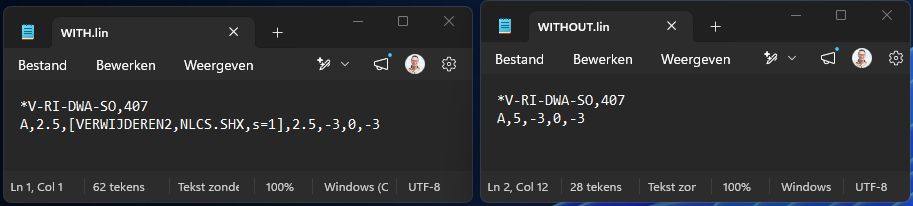
Hi All, thanks for the replies. @tombu That is exactly the issue. I removed the SHAPE reference from the linetype, reload the linetype. I see that the linetype is changed a bit, but the SHAPE keeps being shown. Even when i check the linetype definition in the DWG, the SHPAE reference is gone there, but still visualy there. Look, there are my definitions: Video attatched with my relaoding action. when i load the WITHOUT.LIN in a NEW drawing. the linetype is just fine... In the last sec off the video i do a REA command, and you see the linetype presentation change a bit. Most anoying... in AutoCAD 2023 this works just fine... looks like an AutoCAD 2027 error. Sample.mp4
-
You can have multiple references to the same drawing with different Layer Properties. I've done it many times. You could insert the same XREF drawing into one of your project drawing with a different name, modify it's layer properties then copy each of them into your project drawings. You could also define Layer States in the XREF drawing for both Layer States in the XREF drawing then insert and name each of them into one of your project drawings then just copy each of those inserts to the rest of your project drawing.
-
Reload LineTypes in AutoCAD 2027 not working?
tombu replied to Aftertouch's topic in The CUI, Hatches, Linetypes, Scripts & Macros
Did you regen the drawing? Shapes are referenced by linetypes not defined by them. Whatever Shapes defined in the drawing would still be there. Did you remove the Shape references in the linetype definition before reloading it? -
Reload LineTypes in AutoCAD 2027 not working?
BIGAL replied to Aftertouch's topic in The CUI, Hatches, Linetypes, Scripts & Macros
Just a maybe reload the shx while you sort out what is going on. Are your shx files and custom .lin files in a support path ? That may be why they are not reloading. (command "._LOAD" "C:\\Path\\To\\YourFile\\custom.shx") or (command "._LOAD" "Custom.shx") ; tested this Bricscad V25 -
The lat long convert is out there I have used one for here in AUS, the formula behind it is the same I think for any where in the world, but inside it is numerous values that depend on your location in the world, something like 8. values can be like 0.9987999 scale factor. So we need @PGia to tell us where she/he is in the world and what zones are relevant. Will do a quick look for the formula.
-

Change text color in AutoCAD Lt Tables Lisp request
MSHR replied to MSHR's topic in AutoLISP, Visual LISP & DCL
Hi, 1-I create dwg files myself 2-Somtimes I receive lab result just pdf sometimes I received excle and pdf anyway I can change pdf to CSV online(easy) 3-I can ask AI for change to CSV Or exel -
Windows XP came out in late 2001, so that would be Windows 3.1 which came out in 1992. Best bet may be set back up with the Virtual XP, if you are determined. You might try Longbow Reviver I am with BIGAL on this though, try something else less costly than AutoCAD if the price of AutoCAD is too much, some also have a monthly option for infrequent use. LibreCAD is free 2D CAD, but basic, and FreeCAD is like it's name, Free, but 3D CAD.
-
Reload LineTypes in AutoCAD 2027 not working?
SLW210 replied to Aftertouch's topic in The CUI, Hatches, Linetypes, Scripts & Macros
I don't have AutoCAD 2027, but it may show up in AutoCAD 2026. I will do some checking when I get back to work next week. You should post your script and your shape linetypes that are an issue. You could see if a LISP works for you Lee Mac has one... https://lee-mac.com/loadlinetype.html. Here is an example of using loadlinetype.lsp in a Macro... You may want to contact Autodesk, they may know about the issue or at least would need to know.