All Activity
- Past hour
-
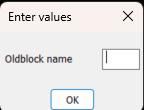
There may be a way around it for suffix, can do a dcl with the label as the old block name and the edit box is empty. Can not close gap in dcl. For prefix would need two column dcl, 1st with edit box , 2nd with label only, blockname. Can provide code if you think this is useful.

- Today
-
Another, could do a pop enter value in a dcl box etc, rather than command line. It works to specified length. (defun C:test2 ( / p1 p2 dist d) (initget 1) (setq p1 (getpoint "\npick point 1")) (initget 1) (setq p2 (getpoint p1 "\npick point 2")) (setq dist (distance p1 p2)) (setq d (getreal (strcat "\nLine length is " (rtos dist 2 2) " Enter new length "))) (if (= d nil) (princ) (setq dist d) ) (setq p2 (polar p1 (angle p1 p2) dist)) (command "_.line""_non" p1 "_non" p2 "") (princ) ) (c:test2)
-
 Chicane_Apex joined the community
 -
Maybe with this subterfuge? (defun c:foo ( / src dxf app doc scr old new) (while (progn (setvar 'errno 0) (setq src (car (entsel (strcat "\nSelect block reference: ")))) (cond ((= 7 (getvar 'errno)) (princ "\nMissed, try again.") ) ((= 'ename (type src)) (setq dxf (entget src)) (cond ((/= "INSERT" (cdr (assoc 0 dxf))) (princ "\nPlease select a block reference.") ) ((= 4 (logand 4 (cdr (assoc 70 (tblsearch "layer" (cdr (assoc 8 dxf))))))) (princ "\nSelected block is on a locked layer.") ) ) ) ) ) ) (if (= 'ename (type src)) (progn (setq app (vlax-get-acad-object) doc (vla-get-activedocument app) src (vlax-ename->vla-object src) old (vlax-get-property src (if (vlax-property-available-p src 'effectivename) 'effectivename 'name)) new (strcat old (getstring t (strcat "\nSpecify new block name <" old ">: " (princ (strcat "\n" old))))) ) (cond ((and (= "" new) (or (not (snvalid new)) (tblsearch "block" new)) ) (princ "\nBlock name invalid or already exists.") ) (T (command "_.rename" "_block" old new)) ) ) ) (prin1) )
-
Use (list (entlast) p2) at place of p2: (list (entlast) p2) <=> at return of (entsel) (defun C:test1 ( / p1 p2 line1) (initget 1) (setq p1 (getpoint "\npick point1")) (initget 1) (setq p2 (getpoint p1 "\npick point2")) (command "_.line""_non" p1 "_non" p2 "") (setq line1 (entlast)) (command "_.lengthen" "_DYnamic" (list line1 p2) pause "") (command "_.change" line1 "" "_Properties" "_Color" "1" "") (prin1) )
-
Maybe it is possible to change the order of commands, at first "_.change", then "_.lengthen" ? (defun C:LineChLenDY ( / p1 p2 line1) (setq p1 (getpoint "Specify the first point: ")) (setq p2 (getpoint "Specify the second point: ")) (command "line" "non" p1 "non" p2 "") (setq line1 (entlast)) (command "change" line1 "" "P" "C" "1" "") (command "lengthen" "DYnamic") (princ) )
-
Not so sure you can do 'end' with the keyboard with the standard (getstring) functions - either live with it or perhaps a DCL pop up might let you do this. Should be able to amend Lees Code to insert a dialogue if it really is necessary. Change this line to call another function with the code needed, return value will be the string that (setq new is looking for: (setq new (strcat (getstring t (strcat "\nPrefix For Block <" def ">: ")) " " old)))
-

Stop Lengthen command repeating.
Steven P replied to Dayananda's topic in AutoLISP, Visual LISP & DCL
I don't think I have used lengthen in a LISP, not used the command for a while, but a quick look at your code "non"p2) - add a couple of spaces for readbility, but in that line you haven't specified the line to lengthen and you might need to end with "": (command "_lengthen" "DYnamic" "non" p2 (entlast) "") -
Thanks mhupp, but I didn't want to add prefix or suffix, actually preferred to leave name unchanged, just wanted to press End on keyboard to get to the end of the string.
-
I have following code to draw a line first and adjust the length of line using LENGTHEN command. Only after getting entity name I need to change its property etc. But the I cant stop the lengthen command and it repeating. Please explain me what is mistake in my command. (defun C:test1() (setq p1 (getpoint"\npick point1")) (setq p2 (getpoint"\npick point2")) (command "line""non"p1 "non"p2 ""); bottom bar (command "_lengthen" "DYnamic" "non"p2) (setq line1 (entlast)) (command "change" line1"""P""C""1"""); )
-

Select all the lines that are vertical
mhupp replied to Isaac26a's topic in AutoLISP, Visual LISP & DCL
That's why I like programming its dealers choice. sometimes its easier to do the opposite to get the results you want. like this simple lisp that invert the selection. if you wanted to select everything but 3 circles and their are 150 items. select the three circles and run this code. ;; Invert Selection on Screen (defun C:SEE (/ SS SS1) (vl-load-com) (if (setq SS (ssget "_I")) (progn) (setq ss (ssadd)) ) (if (setq SS1 (ssget "_WP" (GetScreenCoords))) (foreach ent (vl-remove-if 'listp (mapcar 'cadr (ssnamex SS))) (ssdel ent SS1) ) ) (sssetfirst nil SS1) ) ;;----------------------------------------------------------------------------;; ;Calculates Size of View Window (defun GetScreenCoords (/ ViwCen ViwDim ViwSiz VptMin VptMax) (setq ViwSiz (/ (getvar 'VIEWSIZE) 2) ViwCen (getvar 'VIEWCTR) ViwDim (list (* ViwSiz (apply '/ (getvar 'SCREENSIZE))) ViwSiz) VptMin (mapcar '- ViwCen ViwDim) VptMax (mapcar '+ ViwCen ViwDim) ) (list VptMin VptMax) ) -Edit Again if your only comparing x or y values of the line end points isn't a good option as lsaac26a said "some are slightly to one side left or right." and is using vertical as a relative term. whether you using (if (not vertical or (if horizontal to make the final selection set. both will fail to select anything in the sample drawing. that's why i jokingly put in "Vertical-ish lines Selected" as the final prompt. -edit edit forgot the post getscreencords lisp - Yesterday
-
Maybe (setq ss (ssget "I")) just select objects 1st then run in a lisp. A google revealed..
-

Select all the lines that are vertical
marko_ribar replied to Isaac26a's topic in AutoLISP, Visual LISP & DCL
You are right @mhupp... But that is why I don't like programming... I tend to write understandable codes... If I was to be asked I'd rather write it (not (equal (car (cdr (assoc 10 x))) (car (cdr (assoc 11 x))) 1e-8))... And this Lee's code selects only vertical lines like topic was stated... Either way, if OP wanted to select lines before deletion and remain only horizontals, then this testing expression should be different like I thought [(equal (cadr (cdr (assoc 10 x))) (cadr (cdr (assoc 11 x))) 1e-8)] -
Hehe reminds me of when I made a shortcut command for one of our customs lisp "Assembly populate".
-
Select all the lines that are vertical
mhupp replied to Isaac26a's topic in AutoLISP, Visual LISP & DCL
I think you might be getting caught up on the cadr? the list its looking at has the 10 and 11 as the first element so the 2nd element is going to be the x value. (10 370477.766247702 2284988.06147298 0.0) & (11 370477.775905386 2284983.23263075 0.0) the 1e-8 is to aggressive for @Isaac26a sample drawing that is why I added a dynamic fuzz the user can pick if they want true vertical lines just input 0. I started with the x value comparison, but isn't a good option for angled lines as it changes for lines of the same same angle but different lengths. and if you increase to pick up longer lines it will picked shorter lines that have a greater angle. -
only tested this on regular blocks. if you use prefix on anonymous blocks they might not be anonymous anymore. I don't know what would happen so test it first before using it on project files. @Lee Mac let me know if you want this taken down. probably do it Monday anyway. Rename.lsp
-
 KTOBY joined the community
 -
Select all the lines that are vertical
marko_ribar replied to Isaac26a's topic in AutoLISP, Visual LISP & DCL
No Lee... I am quite right in my observation... If only you removed that (not) from test expression (not (equal (cadr (assoc 10 x)) (cadr (assoc 11 x)) 1e-8)), your snippet would work as OP desired (gripped selecting all verticals and angled lines for forthcoming deletion)... -
I wasn't talking about the code
-
Ahh, was that yours RX? Mega apologies - I thought I had taken Lees from earlier in that thread (For this thread, RLX also had some ace code in the thread I linked to above)
-
Thanx Steven , for wiping mine...
-
This is one I was looking at yesterday, sharing here because I am really 12.... 'WipeBottom' will move the defined entity types to the Bottom or Top draw order in a selected block definition. Define the entity types and move direction in the code. Made up because I wanted to split out the selection part of the examples online and use the 2nd part via LISP without user interface. Via LISP I only wanted it to process a single block at a time - selection set processing can be from the calling LISP. Examples out there mostly from Lee Mac - see his website or the link in the code. But apart from that I really wanted to use the LISP command name. (defun c:WIPEBOTTOM ( / MyName MoveType MoveDirection) ;;AcDbTypes: AcDb + .... replace 'movetype' below with these as required ;;AcDbEntity, AcDbLine, AcDbCircle, AcDbArc, AcDbPolyline, AcDbText, AcDbMText ;;AcDbBlockReference, AcDbPoint, AcDbEllipse, AcDbSpline, AcDbHatch, AcDbTable ;;AcDbRasterImage, AcDbLeader, AcDbRay, AcDbXline, AcDbTrace, AcDbWipeout ;;AcDbDimension, AcDbAlignedDimension, AcDbRadialDimension, AcDbDiametricDimension ;;AcDb3PointAngularDimension, AcDbArcDimension, AcDbOrdinateDimension ;;MoveDirections: vla-movetobottom, vla-movetotop (Setq MyName (cdr (assoc 2 (entget (car(entsel "Select Block")))))) ;; block name (setq MoveType "AcDbHatch") (setq MoveDirection "vla-MoveToBottom") (WIPEBOTTOM MyName MoveType MoveDirection) (setq MoveType "AcDbWipeout") (setq MoveDirection "vla-MoveToBottom") (WIPEBOTTOM MyName MoveType MoveDirection) (setq MoveType "AcDbText") (setq MoveDirection "vla-MoveToTop") (WIPEBOTTOM MyName MoveType MoveDirection) ;; MyName: Real Block Name (example "MyBlock"), MoveType "ACDb....", MoveDirection "VLA-MoveTo..." (princ) ) (defun WIPEBOTTOM ( name MoveType MoveDirection / acblk acdoc obj name MoveType) ;;https://www.cadtutor.net/forum/topic/31462-wipeout-inside-blocks-issue/ ;;updated to single block selections only refer to link for selection sets ;Lee Mac 17.06.11 (defun LM:SortentsTable ( space / dict result ) (cond ((not (vl-catch-all-error-p (setq result (vl-catch-all-apply 'vla-item (list (setq dict (vla-GetExtensionDictionary space)) "ACAD_SORTENTS") ) ) ) ) result ) ; end not ( (vla-AddObject dict "ACAD_SORTENTS" "AcDbSortentsTable") ) ) ) ; end defun (setq acdoc (vla-get-activedocument (vlax-get-acad-object))) ;;ACDoc reference (setq acblk (vla-get-blocks acdoc)) ;ACBlocks references (if name (progn ((lambda ( / lst ) (vlax-for obj (vla-item acblk name) ;;name: Block name. For each object in block (if (eq MoveType (vla-get-objectname obj)) ;;if object is required type (setq lst (cons obj lst)) ;; add to list ) ; end if ) ; end vlax-for (if lst (progn ( (eval (read MoveDirection)) ;; turn text move direction into command (LM:SortentsTable (vla-item acblk name)) ;; Sort objects - make into variable and only process once? (vlax-make-variant (vlax-safearray-fill (vlax-make-safearray vlax-vbobject (cons 0 (1- (length lst)))) lst )) ; end vlax-make-variant ) ; end vla-move (vla-regen acdoc acallviewports) ;; move to after lambda?? )) ; end if ; end progn )) ; end lambda ) ;; end progn ) ;; end if name )
-
Ok thanks mhupp. Do you know of a web page which has instructions on how to write LISP code after an object is selected.
-
Give this a try you just make the viewports and zoom inside the viewport the model, you will be asked for a scale and the viewport is rescaled to suit, then the outline is drawn in model. Will fix later the yes no question into the DCL. ; https://www.cadtutor.net/forum/topic/98882-viewport-inset-generator/ ; make rectangs from viewport ; By AlanH Jan 2026 ; resets viewport scale then make outline (defun c:vp2model ( / ent vp p1 p2 sc obj scvp ) (defun AH:domove ( / ) (command "chspace" (entlast) "") (vla-put-activepviewport (vla-get-activedocument (vlax-get-acad-object)) obj) (command "") ) (setq oldsnap (getvar 'osmode)) (setvar 'osmode 0) (alert "Have you zoomed in to viewport ? \n\nIf not then type N or no") (initget "Yes No" 6) (setq ans (getkword "\nContinue Yes or No. ")) (if (= ans "No") (exit)) (command "pspace") (setq ent (car (entsel "\nPick the viewport "))) (setq vp (cdr (assoc (cdr (assoc 69 (entget ent))) (vports)))) (setq p1 (car vp)) (setq p2 (cadr vp)) (setq obj (vlax-ename->vla-object ent)) (setq scvp (vlax-get obj 'customscale)) (setq sc (fix (/ 1000 scvp))) (vlax-put obj 'displaylocked 0) (setq fo (open (setq fname (vl-filename-mktemp "" "" ".dcl")) "w")) (write-line "ddgetvalAH : dialog {" fo) (write-line (strcat " label = \"Set Scale\" ;") fo) (write-line " : column {" fo) (write-line " width =25 ;" fo) (write-line ": edit_box {" fo) (write-line " key = \"Key1\" ;" fo) (write-line (strcat " label = \"Enter scale\" ;") fo) (write-line (strcat " edit_width = 10 ;") fo) (write-line (strcat " edit_limit = 9 ;") fo) (write-line " is_enabled = true ;" fo) (write-line " allow_accept=true ;" fo) (write-line " }" fo) (write-line " }" fo) (write-line "spacer_1 ;" fo) (write-line "ok_cancel;}" fo) (close fo) (setq dcl_id (load_dialog fname)) (if (not (new_dialog "ddgetvalAH" dcl_id)) (exit) ) (set_tile "Key1" (rtos sc 2 0)) (action_tile "accept" "(setq sc (get_tile \"Key1\"))(done_dialog)") (action_tile "cancel" "(done_dialog)") (start_dialog) (unload_dialog dcl_id) (vl-file-delete fname) (vlax-put obj 'customscale (/ 1000 (atof sc))) (vlax-put obj 'displaylocked -1) (command "Rectang" p1 p2) (AH:domove) (command "pspace") (setvar 'osmode oldsnap) (princ) ) (C:vp2model)
-
Hey everyone, I just had the idea for this last night and figured I’d give it a shot, since the logic seemed pretty straightforward using AI. I'm really glad with how it turned out and that I was able to get it working exactly how I wanted. Since it's been so helpful for my own workflow already, I've decided to release it here for everyone to use. If you’ve ever felt the pain of the "Edit-Save-Reload-Restart" cycle just to move a button 2 pixels, this might be for you! DCL Live Bridge essentially gives you a "Hot Reload" for your dialogs. You keep your favorite editor open (Notepad++, VS Code, etc.), hit save, and preview it instantly in AutoCAD. What it does: Live Preview: Open your editor from within CAD, tweak the DCL, and hit Preview. Done. Inline Converter: For those who prefer Inline DCL (keeping everything in one .lsp file), it has a one-click exporter. It handles all the messy quote-escaping and backslashes for you automatically. Smart Error Catching: It actually tells you which line number has a missing semicolon or mismatched brace before the CAD DCL engine crashes. Safety First: It scans your code to make sure you have an exit button (ok_only or is_cancel), so you don't accidentally lock up your CAD session. The Command: DCLB Quick Start: Just load the LSP, run DCLB, and go to Settings to point it to your editor's .exe. It’ll save your preferences to the registry so you only have to do it once. Grab the code on GitHub and also below. It's been working great for my workflow, hopefully, some of you find it useful too! Let me know if you run into any bugs or have ideas. Cheers, Azri DCLBridge.lsp
- Last week
-
 annmore398 joined the community
 -

Select all the lines that are vertical
Lee Mac replied to Isaac26a's topic in AutoLISP, Visual LISP & DCL
You're welcome! I'm glad it helps. -
Select all the lines that are vertical
Lee Mac replied to Isaac26a's topic in AutoLISP, Visual LISP & DCL
That's incorrect; my code is only retaining vertical lines (to within a tolerance of 1e-8) - any line for which the x-coordinate of the start point does not match the x-coordinate of the end point (up to the tolerance stated) will be removed from the set.