Leaderboard


Popular Content
Showing content with the highest reputation on 11/11/2025 in Posts
-
Can also put these into a routine: (command "-layer" "ON" "ListofLayers, EachLayerSeperated, Withcomma" "") ; Turns layer ON.. try 'OFF' (command "-layer" "FREEZE" "ListofLayers, EachLayerSeperated, Withcomma" "") ; Freezes layer, ty 'Thaw' as well For completion: (command "-layer" "SET" "LayerName" "") ; Sets current layer MHUPPs probably runs faster (like milliseconds) and a nice option to choose the layer, my ideas maybe better if the layer names are set and can be hard coded into the routine... but useless if each drawing / project uses a different name1 point
-
Depends on what you want to do. this will freeze a layer of the entity you select is on. (defun c:FreezeEntity (/ ent layN layO) (while (setq ent (entsel "\nSelect an entity to freeze layer: ")) (setq layN (cdr (assoc 8 (entget (car ent))))) (setq layO (vla-item (vla-get-Layers (vla-get-ActiveDocument (vlax-get-Acad-Object))) layN)) (vla-put-Freeze layO :vlax-true) (prompt (strcat "\nLayer \"" layN "\" has been frozen.")) ) (princ) ) -Edit Why not just have the calculations on defpoints or some other layer that is set not to print. (vla-put-Plottable layo :vlax-false)1 point
-
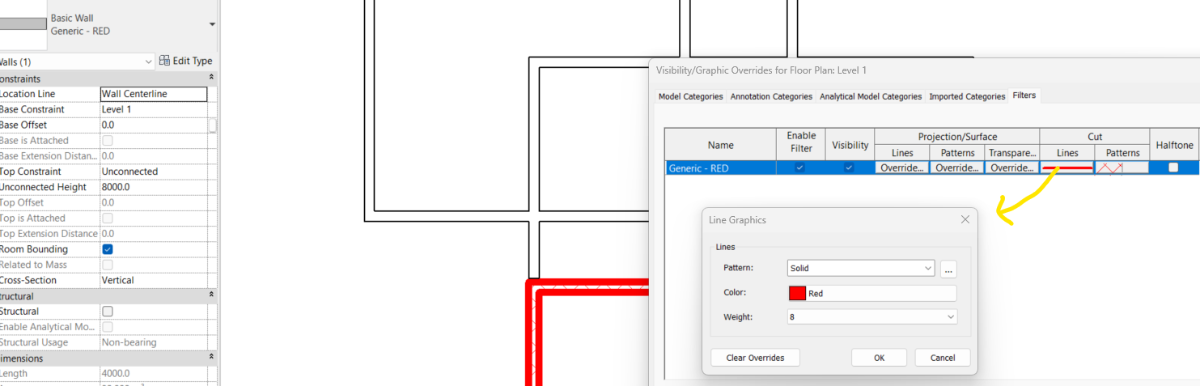
yes you can. Add a filter for wall using Type Name and apply that filter in View. hit VG and edit the filter CUT Properties according to your liking. Turn off Thin Lines to check the line thickness.
 1 point
 -
Autocad EXTRIM command, select polygon and click outside1 point