Leaderboard




Popular Content
Showing content with the highest reputation on 12/10/2025 in Posts
-
This should achieve the desired result without overriding nested width formatting - (defun c:mtw ( / enx idx sel str wid ) (initget 6) (cond ( (not (setq wid (getreal "\nSpecify new width factor: ")))) ( (setq sel (ssget "_:L" '((0 . "MTEXT")))) (repeat (setq idx (sslength sel)) (setq idx (1- idx) enx (entget (ssname sel idx)) str (assoc 1 enx) ) (entmod (subst (cons 1 (addupdatewidth (cdr str) wid)) str enx)) ) ) ) (princ) ) (defun addupdatewidth ( str wid / ps1 ps2 ps3 ) (cond ( (= "" str) str) ( (and (setq ps1 (vl-string-search "{\\W" str)) (setq ps2 (vl-string-search ";" str ps1)) (setq ps3 (vl-string-search "}" str ps2)) ) (strcat (addupdatewidth (substr str 1 ps1) wid) (substr str (1+ ps1) 3) (rtos wid 2) (substr str (1+ ps2) (- ps3 ps2 -1)) (addupdatewidth (substr str (+ ps3 2)) wid) ) ) ( (strcat "{\\W" (rtos wid 2) ";" str "}")) ) ) (princ)3 points
-
Untested I remember Lee Mac saying it was important to release the html obj as it could cause a memory leak or something. ;;----------------------------------------------------------------------------;; ;; Copy Selected Xref Path to Clipboard with prompt. ;; https://www.cadtutor.net/forum/topic/98871-xref-path-copy-to-clipboard (defun c:XrefToClipBoard (/ SS Blk Path html) (vl-load-com) (if (setq SS (ssget "_+.:E:S" '((0 . "INSERT")))) (progn (setq blk (vla-get-effectivename (vlax-ename->vla-object (ssname SS 0)))) (setq blk (vla-item (vla-get-blocks (vla-get-activedocument (vlax-get-acad-object))) blk)) (if (= (vla-get-isxref blk) :vlax-true) (progn (setq Path (vla-get-Path blk)) (vlax-invoke (vlax-get (vlax-get (setq html (vlax-create-object "htmlfile")) 'ParentWindow) 'ClipBoardData) 'setData "Text" Path) (vlax-release-object html) (alert (strcat "\nPath Sent to Clipboard\n Xref Path: " Path)) ) (princ "\nSelected Block isn't an Xref.") ) ) (princ "\nNothing Selected") ) (princ) ) -edit updated code.2 points
-
Thank you all for the replies. Lee & Tsuky, Your code works perfectly for me. Steven P, thanks for explaining what was happening under the hood, made perfect sense. As always, I appreciate it greatly!!2 points
-
Your code modified (defun C:MTW ; = MText Width (/ ss wf n mt val_text start end) (if (and (setq ss (ssget "_:L" '((0 . "MTEXT")))) (setq wf (getreal "\nWidth Factor to apply: ")) ); and (repeat (setq n (sslength ss)); then (setq mt (ssname ss (setq n (1- n)))) (setq val_text (getpropertyvalue mt "Contents")) (cond ((vl-string-search "{" val_text) (cond ((vl-string-search "\\W" val_text) (setq start (vl-string-search "\\W" val_text) end (vl-string-search ";" val_text 1) ) (repeat (1+ (- end start)) (setq val_text (vl-string-subst "" (chr (vl-string-elt val_text start)) val_text start)) ) (setpropertyvalue mt "Contents" val_text) ) (T (setpropertyvalue mt "Contents" (strcat "{\\W" (rtos wf 2) ";" (vl-string-left-trim "{" val_text) ) ) ) ) ) (T (setpropertyvalue mt "Contents" (strcat "{\\W" (rtos wf 2) ";" (getpropertyvalue mt "Contents") "}") ); setpropertyvalue ) ) ); repeat ); if (princ) )1 point
-
The code is adding a width string to the text. These characters are hidden but will show up if you click on the text and look at it in the properties menu, or via the LISP line: (assoc 1 (entget(car(entsel)))) In the code it adds {\\W'wf'; to the string where wf is the width factor Something like {\\W0.8;Here is a text string} If you run the code again, it will add another width factor to the text string... but won't remove the first, so you get something like this: {\\W0.5;{\\W0.8;Here is a text string}} - noting that the new text width is applied and then the first one is applied.. result is you only see what was applied first. Need to remove this formatting to the text string before applying a new one. You might also have issues if other text formatting is used, such as underlined, italics, bold... For width you might be able to amend Lee Macs Unformat LISP to just unformat the width portion: https://lee-mac.com/unformatstring.html In these text strings replace with just 'W' ACcFfHLlOopQTW and here ACcFfHLlOoPpQSTW change to SW ... and then apply the new width formatting from your LISP .. though CAD is off so not tested - all part of the fun for you! ...if Lee Mac is passing through, feel free to correct me, though many years later I am just about understanding some of your codes.1 point
-
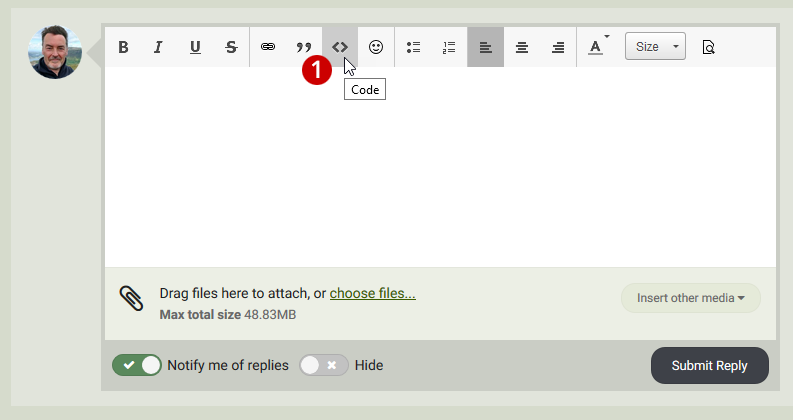
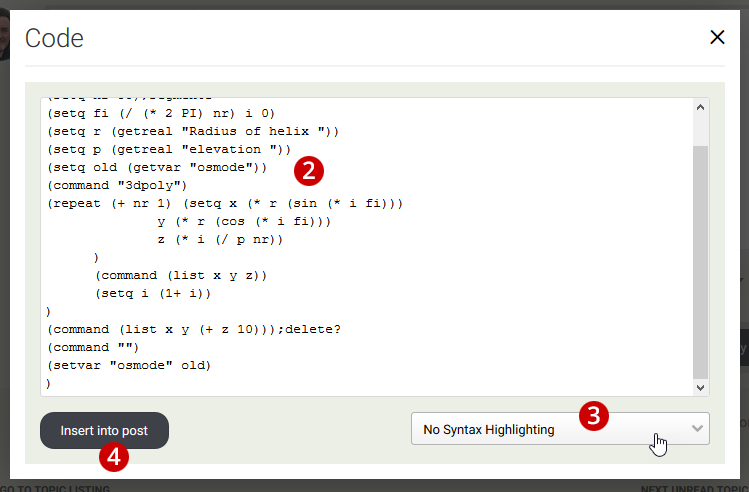
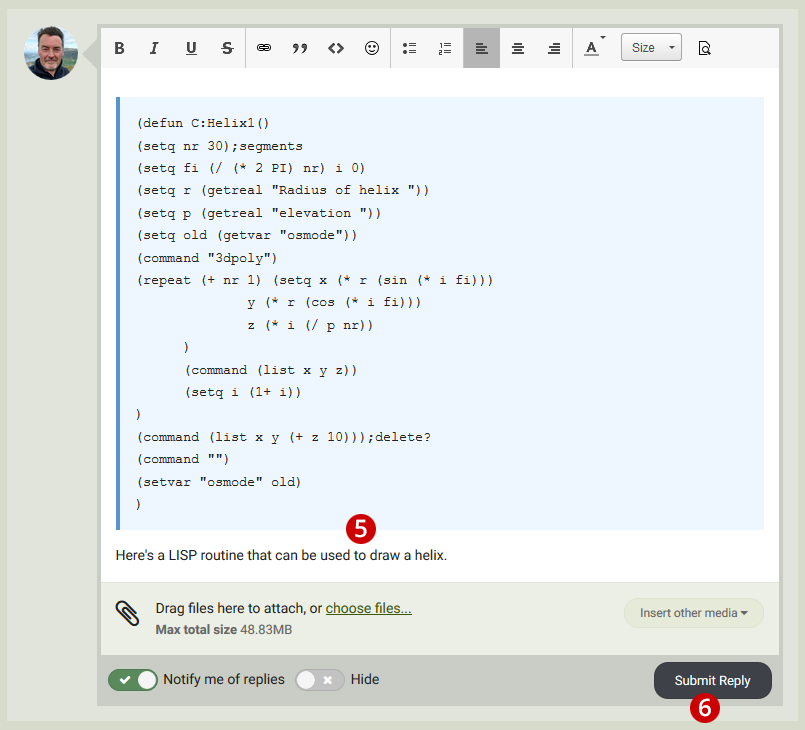
Code posting guidelines When you are posting AutoLISP or VBA code in these forums, there are some simple guidelines you should observe in order to make life easier for you and for others. Always add routines or code snippets using the Code option. This makes them easier to read within posts by making them distinct from other text. It helps those who may want to copy and paste the code. It also helps to save space because code blocks get a scroll bar beyond a certain number of lines. 1. Click the Code button on the editor toolbar. That's the one with the "<>" on it. You will then see the Code modal, shown below. 2. Type or paste your code into the text box. 3. Select "No Syntax Highlighting" from the drop-down. 4. Click Insert into post. 5. Add any instructions or additional commentary to your post. 6. Click Submit Reply (or Submit Topic if you are starting a new topic). See the next post in this topic for the final result. Please ensure that you have the right to publish code on a public forum. In most cases, the code you are publishing will be your own and it will be assumed that if no attribution is given, you are the author. However, if you are not the author, you must make this clear and where possible, give credit to the author. Any routines published here must have their header intact, including any title, instructions, author contact details, date and copyright information. If at all possible, please make sure that you have the author's permission to publish their work. You may, at your discretion, claim specific copyright over your code. All authors have the right to explicitly claim copyright of their code. We recommend that if you wish to do so, you use a standard form such as Creative Commons.
 1 point