Leaderboard



Popular Content
Showing content with the highest reputation on 12/29/2025 in Posts
-
Greetings to all members of Cad Tutor, Based on the upcoming holidays and New Year, I'v made something interesting which I want it to share with you. Everything was made using a Lisp. I hope it will interesting to all of you and maybe give some inspiration to the next year to made something different and share it with rest of us . Notice (it is on cyrillic, in Serbian language): - ЗИМСКА СЛУЖБА = Winter service on roads; - СРЕЋНА НОВА ГОДИНА = HAPPY NEW YEAR; - XO-XO-XOO = HO-HO-HOO (). Happy New Year 2026 to all members, and wish you all the best and new codes . NovaGodina2026_CadTutor.mp4 Best regards, Saxlle.5 points
-
Some really cool stuff here2 points
-
test with wxPython
 2 points
 -
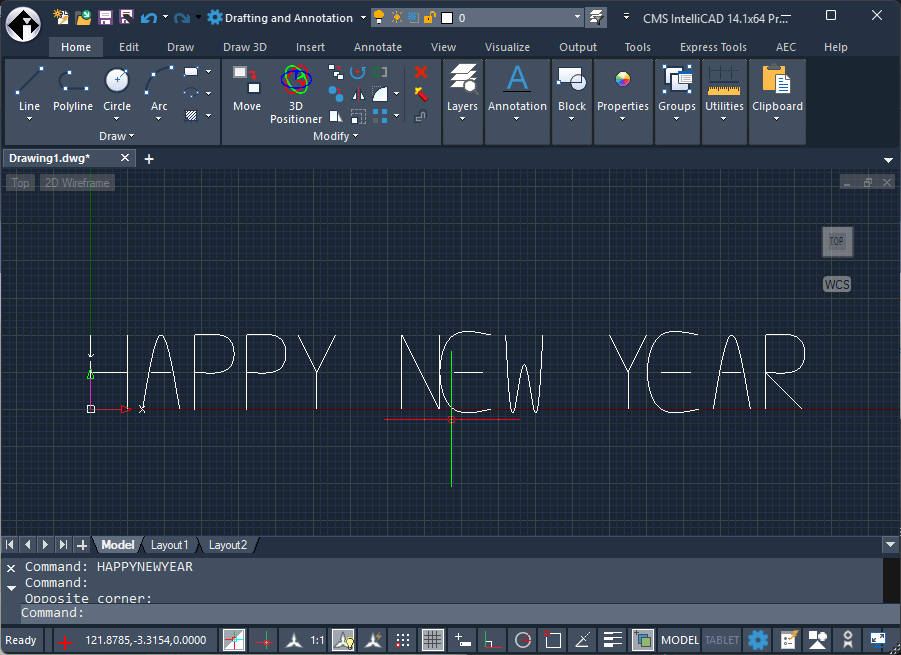
Super cool to see the progress IntelliCAD has made with their C++ API. I’ve been working to port pyrx, still not released, there’s a couple small issues I need to work out import traceback from pyrx import Ap, Db, Ge # ----------------------------- # Simple spline-based vector font # ----------------------------- FONT = { "H": [[(0, 0), (0, 10)], [(5, 0), (5, 10)], [(0, 5), (5, 5)]], "A": [[(0, 0), (2.5, 10), (5, 0)], [(1.2, 5), (3.8, 5)]], "P": [[(0, 0), (0, 10)], [(0, 10), (5, 9), (5, 6), (0, 5)]], "Y": [[(0, 10), (2.5, 5)], [(5, 10), (2.5, 5)], [(2.5, 5), (2.5, 0)]], "N": [[(0, 0), (0, 10)], [(0, 10), (5, 0)], [(5, 0), (5, 10)]], "E": [[(5, 0), (0, 0), (0, 10), (5, 10)], [(0, 5), (4, 5)]], "W": [[(0, 10), (1.2, 0), (2.5, 6), (3.8, 0), (5, 10)]], "R": [[(0, 0), (0, 10)], [(0, 10), (5, 9), (5, 6), (0, 5)], [(0, 5), (5, 0)]], " ": [], } # ----------------------------- # Create a spline from points # ----------------------------- def add_spline(ms, pts, base, scale): arr = [] for p in pts: arr.append(Ge.Point3d(base.x + p[0] * scale, base.y + p[1] * scale, 0.0)) spline = Db.Spline(arr, 3, 0.0) ms.appendAcDbEntity(spline) # ----------------------------- # Write text as splines # ----------------------------- def write_happy_new_year(start=Ge.Point3d(0, 0, 0), scale=5.0, spacing=8.0): db = Db.curDb() ms = Db.BlockTableRecord(db.modelSpaceId(), Db.OpenMode.kForWrite) cursor = Ge.Point3d(start.x, start.y, 0) text = "HAPPY NEW YEAR" for ch in text: strokes = FONT.get(ch.upper(), []) for stroke in strokes: add_spline(ms, stroke, cursor, scale) cursor.x += spacing * scale # ----------------------------- # Entry point # ----------------------------- def PyRxCmd_HAPPYNEWYEAR(): try: write_happy_new_year(start=Ge.Point3d(0, 0, 0), scale=2.5, spacing=7.0) except Exception as err: traceback.print_exception(err)
1 point
-
Not sure for ZWCad, but if you put checks into the code this can narrow down to where there error is. For example (princ "\nOK to here 1")... and 2, 3, 4 etc will show where the code runs to before an error (often errors are grammatically correct and just not doing what you want). Might help you out till you get another answer1 point
-
Here’s a test extracting data from multiple drawings import traceback import pandas as pd import os from pyrx import Ap, Db, Ed, Ge def proccessDrawing(db: Db.Database, data: dict): blk_dict = db.getBlocks() fname = os.path.basename(db.getFilename()) data[fname] = [] for name, id in blk_dict.items(): if name != "RMNUM": continue btr = Db.BlockTableRecord(id) for refid in btr.getBlockReferenceIds(): blkref = Db.BlockReference(refid) for attid in blkref.attributeIds(): attref = Db.AttributeReference(attid) data[fname].append(attref.textString()) def openSideDatabase(dwg_path: str, data: dict): sdb = Db.Database(False, True) sdb.readDwgFile(dwg_path) sdb.closeInput(True) proccessDrawing(sdb, data) @Ap.Command() def doit(): try: data = {} dwgs = Ap.Application.listFilesInPath("E:\\FloorPlans", ".dwg") for dwg in dwgs: openSideDatabase(dwg, data) df = pd.DataFrame(data) print(df) except Exception as err: traceback.print_exception(err) output : Success module _DOIT is loaded: Command: doit 1st floor.dwg 2nd floor.dwg 3rd floor.dwg 0 1049 2049 3049 1 1045 2045 3045 2 1032 2032 3032 3 1048 2048 3048 4 1046 2046 3046 .. ... ... ... 94 1122 2122 3122 95 1106 2106 3106 96 1104 2104 3104 97 1093 2093 3093 98 1042 2042 3042 [99 rows x 3 columns]1 point